2020 AUDI TT COUPE infotainment
[x] Cancel search: infotainmentPage 25 of 280
8S1012721BB
Opening and closing
ZA WARNING
— The central locking switch also works when
the ignition is switched off and automatical-
ly locks the entire vehicle when the & button
is pressed.
— The central locking switch is inoperative
when the vehicle is locked from the outside.
— Locked doors make it more difficult for
emergency workers to get into the vehicle,
which puts lives at risk. Do not leave anyone
behind in the vehicle, especially children.
@ Tips
Your vehicle locks automatically when it
reaches a speed of 9 mph (15 km/h) (Auto
Lock) > page 18. You can unlock the vehicle
again using the @ button in the central lock-
ing switch.
Setting the central locking system
You can adjust the central locking system to your
preferences. The settings depend on the vehicle
equipment.
> Select in the Infotainment system: [MENU] but-
ton > Vehicle > left control button > Vehicle
settings.
Door unlocking - You can decide if All doors or
only the Driver door should unlock. The luggage
compartment lid also unlocks when All is select-
ed. If you select Driver in a vehicle with a conven-
ience key*, only the door whose handle you pull
will unlock.
Long press to open windows - You can select if
all windows should open using the vehicle key
= page 27, Convenience opening and closing. If
you press and hold the ff button on the vehicle
key, all of the windows will close.
If you select Driver, all the doors and luggage
compartment lid will unlock if you press the @
button on the remote control key twice.
)_ This function is not available in all countries.
Lock when driving!) - If you select On, all doors
and the luggage compartment lid will be locked
automatically when driving (Auto Lock).
Fold mirrors - If you select On, the exterior rear-
view mirrors fold will in automatically when you
press the f button on the remote control key or
touch the sensor* in the handle.
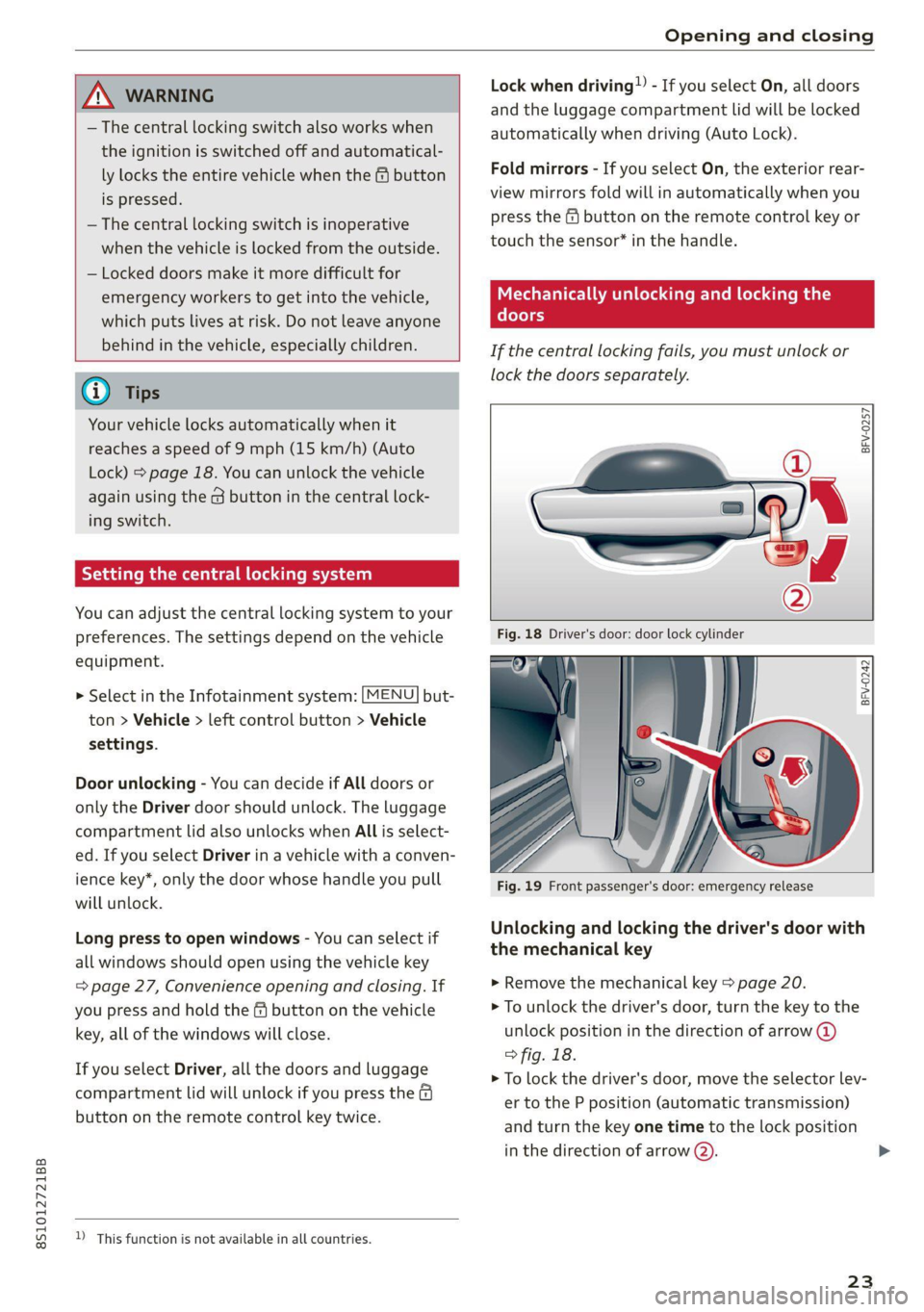
Mechanically unlocking and locking the
(foe)
If the central locking fails, you must unlock or
lock the doors separately.
BFV-0257
BFV-0242
Fig. 19 Front passenger's door: emergency release
Unlocking and locking the driver's door with
the mechanical key
> Remove the mechanical key > page 20.
> To unlock the driver's door, turn the key to the
unlock position in the direction of arrow @)
> fig. 18.
> To lock the driver's door, move the selector lev-
er to the P position (automatic transmission)
and turn the key one time to the lock position
in the direction of arrow Q).
23
>
Page 29 of 280
8S1012721BB
Opening and closing
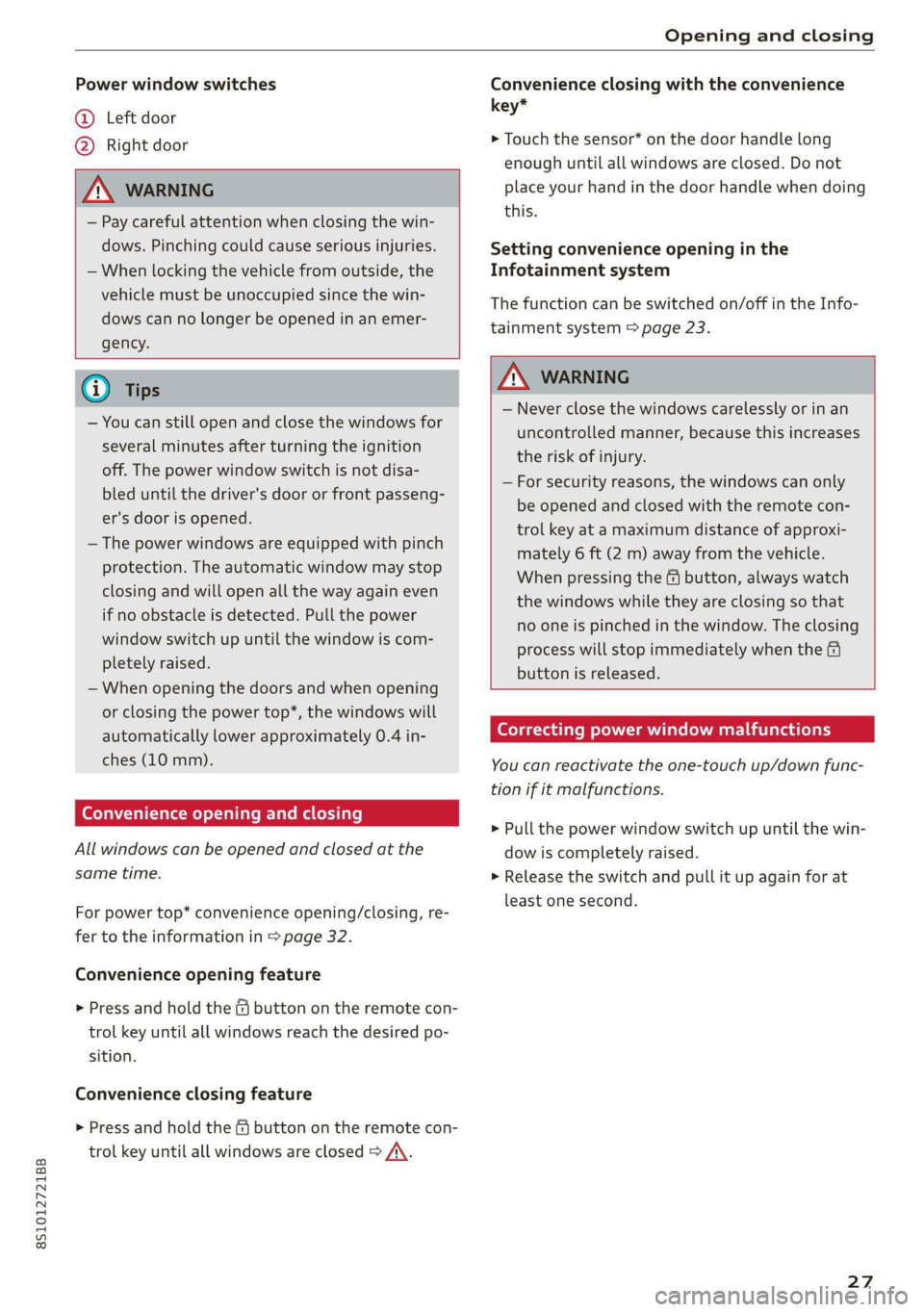
Power window switches
@ Left door
@ Right door
ZA WARNING
— Pay careful attention when closing the win-
dows. Pinching could cause serious injuries.
— When locking the vehicle from outside, the
vehicle must be unoccupied since the win-
dows can no longer be opened in an emer-
gency.
Convenience closing with the convenience
key*
> Touch the sensor* on the door handle long
enough until all windows are closed. Do not
place your hand in the door handle when doing
this.
Setting convenience opening in the
Infotainment system
The function can be switched on/off in the Info-
tainment system > page 23.
@) Tips
— You can still open and close the windows for
several minutes after turning the ignition
off. The power window switch is not disa-
bled until the driver's door or front passeng-
er's door is opened.
— The power windows are equipped with pinch
protection. The automatic window may stop
closing and will open all the way again even
if no obstacle is detected. Pull the power
window switch up until the window is com-
pletely raised.
— When opening the doors and when opening
or closing the power top*, the windows will
automatically lower approximately 0.4 in-
ches (10 mm).
Convenience opening and closing
All windows can be opened and closed at the
same time.
For power top* convenience opening/closing, re-
fer to the information in > page 32.
Convenience opening feature
> Press and hold the & button on the remote con-
trol key until all windows reach the desired po-
sition.
Convenience closing feature
> Press and hold the & button on the remote con-
trol key until all windows are closed > A\.
ZA WARNING
— Never close the windows carelessly or in an
uncontrolled manner, because this increases
the risk of injury.
— For security reasons, the windows can only
be opened and closed with the remote con-
trol key at a maximum distance of approxi-
mately 6 ft (2 m) away from the vehicle.
When pressing the ff button, always watch
the windows while they are closing so that
no one is pinched in the window. The closing
process will stop immediately when the f&
button is released.
Correcting power window malfunctions
You can reactivate the one-touch up/down func-
tion if it malfunctions.
> Pull the power window switch up until the win-
dow is completely raised.
> Release the switch and pull it up again for at
least one second.
27
Page 39 of 280

8S1012721BB
Lights and Vision
regulations in the country where you are op-
erating the vehicle.
— If the battery has been discharging for a
while, the parking light may switch off auto-
matically. Always make sure your vehicle is
parked and adequately illuminated accord-
ing to the legal regulations in the country
where you are operating the vehicle. Avoid
using the parking lights for several hours.
— Observe the legal regulations in the country
where you are operating the vehicle when
using the lighting system that is described.
@ Tips
— The light sensor for the automatic head-
lights* is in the rearview mirror mount. Do
not place any stickers in this area on the
windshield.
— Some exterior lighting functions can be ad-
justed > page 37.
— If you turn off the ignition while the exterior
lights are on and open the door, a warning
tone sounds.
— In some markets, the tail lights will switch
on when the daytime running lights switch
on.
—In cool or damp weather, the inside of the
headlights, turn signals, and tail lights can
fog
over due to the temperature difference
between the inside and outside. They will
clear shortly after switching them on. This
does not affect the service life of the light-
ing.
(ef ela) Mey
BFV-0012
Fig. 41 Operating lever: switching on the turn signal and
high beams
The lever operates the turn signals, the high
beams and the headlight flasher.
Turn signals 15>
The turn signal activates when you move the lev-
er into a turn signal position when the ignition is
switched on. The respective a or B indicator
light flashes.
@- Right turn signal
@- Left turn signal
The turn signal blinks three times if you tap the
lever (convenience turn signal).
High beams ZO and headlight flasher
> Move the lever to the corresponding position:
@®- High beams on
@- High beams off or headlight flasher
The
EJ indicator light in the instrument cluster
will turn on.
Z\ WARNING
High beams can cause glare for other drivers,
which increases the risk of an accident. For
this reason, only use the high beams or the
headlight flasher when they will not create
glare for other drivers.
Adjusting the exterior lighting
You can adjust the exterior lighting separately.
The settings depend on the vehicle equipment.
MENU > Select in the Infotainment system: but-
ton > Vehicle > left control button > Vehicle
settings > Exterior lighting.
Automatic headlights
You can adjust the following settings in the Auto-
matic
headlights menu:
Activation time - You can adjust if the headlights
switch on Early, Medium, or Late according to
the sensitivity of the light sensor.
Audi adaptive light - You can switch adaptive
light On and Off.
37
Page 41 of 280

8S1012721BB
Lights and Vision
By Headlight range control: malfunction! See
owner's manual
There is a malfunction in the headlight range
control system, which may cause glare for other
drivers.
Drive to an authorized Audi dealer or authorized
Audi Service Facility immediately to have the
malfunction corrected.
High beam assistant: malfunction! See owner's
manual
Drive immediately to an authorized Audi dealer
or authorized Audi Service Facility to have the
malfunction repaired. You can still switch the
high beams on or off manually.
High beam assistant: currently unavailable.
Camera view limited due to surroundings. See
owner's manual
The camera view is blocked, for example by a
sticker or debris.
The sensor is located between the interior rear-
view mirror and the windshield. Do not place any
stickers in this area on the windshield.
— Light bulbs are pressurized and can explode
when they are replaced, which increases the
risk of injury.
— With HID headlights (xenon headlights), the
high-voltage component must be handled
correctly. Otherwise, there is a risk of fatal
injury.
Interior lighting
alee Colm Ue Last]
BFV-0181
Fig. 43 Headliner: interior lighting
J - Door contact switch. The interior lighting is
controlled automatically.
A switch is no longer needed to switch the read-
ing lights on. A swiping movement or a brief tap
on the light is all that is needed to switch the
light on or off. If you hold your finger on the
reading light when switching it on, this can dim
the light down to a certain level.
Interior lighting
There are other optional interior lighting func-
tions that are available. Several functions can be
set in the Infotainment system. Select in the In-
fotainment system: |MENU] button > Vehicle >
left control button > Vehicle settings > Interior
lighting.
Instrument illumination
2 S
| > c o
Fig. 44 Light switch: instrument illumination
The brightness of the instrument cluster and the
center console can be adjusted.
> Press the knob to release it.
39
Page 43 of 280

8S1012721BB
Lights and Vision
— If electrolyte fluid comes into contact with
the eyes, flush them thoroughly with plenty
of clean water for at least 15 minutes and
then seek medical attention.
— If electrolyte fluid comes into contact with
the skin, flush the affected area with clean
water for at least 15 minutes, and then
clean with soap and water and seek medical
attention. Clean affected clothing and shoes
thoroughly before wearing again.
— If the fluid was swallowed and the person is
conscious, flush the mouth with water for at
least 15 minutes. Do not induce vomiting
unless this is recommended by medical pro-
fessionals. Seek medical attention immedi-
ately.
Q Note
If the glass on an automatic dimming mirror
breaks, electrolyte can leak out. This liquid
damages plastic surfaces. Clean this liquid as
quickly as possible, for example with a wet
sponge.
@ Tips
— If the light reaching the rearview mirror is
obstructed, the automatic dimming mirror
will not function correctly,
— The automatic dimming mirrors do not dim
when the interior lighting is turned on or
the reverse gear is selected.
Sun visors
eo
S
Z| > a
G3
Fig. 46 Front headliner: sun visor
Applies to: vehicles with pivoting sun visors: The
sun visors can be pulled out of their brackets and
turned toward the doors (@).
The vanity mirrors on the sun visors have covers.
Slide the cover in the direction of the arrow @).
Applies to: vehicles with mirror lighting: The mir-
ror lighting switches on when the cover opens.
Windshield wipers
Switching the windshield wipers on
BFV-0019
Fig. 47 Lever: windshield wipers.
Move the windshield wiper lever S7 to the corre-
sponding position:
@- Windshield wipers off
@- Interval mode. To increase/decrease the wip-
er intervals, move the switch @) to the left/right.
In vehicles with a rain sensor*, the wipers turn on
in the rain once the vehicle speed exceeds ap-
proximately 2 mph (4 km/h). The higher the sen-
sitivity of the rain sensor* is set (switch @) to the
right), the earlier the windshield wipers react to
moisture on the windshield. You can deactivate
the rain sensor mode* in the Infotainment sys-
tem, which switches the intermittent mode on.
Select in the Infotainment system: [MENU] but-
ton > Vehicle > left control button > Driver assis-
tance > Rain sensor > Off.
@- Slow wiping
@®- Fast wiping
@®- Single wipe. If you hold the lever in this posi-
tion longer, the wipers switch from slow wiping
to fast wiping.
©- Clean the windshield @. To eliminate water
droplets, the windshield wipers perform one af-
terwipe after several seconds while driving in
temperatures above 39 °F (4 °C). You can switch
this function off by moving the lever to position >
41
Page 73 of 280
![AUDI TT COUPE 2020 Owners Manual 8S1012721BB
Warm and cold
— Automatic* recirculation mode: auto recircula-
tion needs to be activated in the Infotainment
system. Select in the Infotainment system:
MENU] button > Vehicle >](/manual-img/6/57658/w960_57658-72.png "AUDI TT COUPE 2020 Owners Manual 8S1012721BB
Warm and cold
— Automatic* recirculation mode: auto recircula-
tion needs to be activated in the Infotainment
system. Select in the Infotainment system:
MENU] button > Vehicle >")
8S1012721BB
Warm and cold
— Automatic* recirculation mode: auto recircula-
tion needs to be activated in the Infotainment
system. Select in the Infotainment system:
MENU] button > Vehicle > left control button >
Vehicle settings > Air conditioning > Auto re-
circulation. The air quality sensor that is de-
signed for diesel and gasoline exhaust auto-
matically switches the recirculation mode on or
off depending on the level of pollutants in the
outside air.
In recirculation mode, the air inside the vehicle is
circulated and filtered. This prevents the unfil-
tered air outside the vehicle from entering the
vehicle interior. Switching recirculation mode on
when driving through a tunnel or when sitting in
traffic is recommended > A\.
Pressing the <> button, AUTO or the &Y button
switches recirculation mode off.
® Defrosting
The windshield and side windows are defrosted
or cleared of condensation as quickly as possible.
The maximum amount of air flows mainly from
the vents below the windshield. Recirculation
mode switches off. The temperature is controlled
automatically.
The AUTO button switches the defroster off.
& Rear window defogger
If the rear window defogger is activated when
the ignition is switched on, the battery manage-
ment determines based on the battery charge if
it is possible to turn on. Otherwise, the rear win-
dow defogger functions with the engine running
and switches off automatically after approxi-
mately 10 - 20 minutes, depending on the out-
side temperature.
To prevent the rear window defogger from
switching off automatically, press and hold the
& button for more than two seconds. This re-
mains stored up to approximately 15 minutes af-
ter turning off the ignition.
ZX WARNING
You should not use the recirculation mode for
an extended period since no fresh air is drawn
in. With the air-conditioning switched off, the
windows can fog up, which increases the risk
of an accident.
Adjusting the vents
BFV-0222
Fig. 78 Cockpit: adjusting the air vents
To adjust the direction of air flow, turn the
ridged outer adjustment wheel @) © fig. 78.
To adjust the amount of air flow, move the lever
@ on the air vent. To stop the air flow, move the
lever all the way to the left.
Sea Clair)
Fig. 79 Air vents: seat heating
Pressing the #/ button switches the seat heating
on at the highest setting (level 3). The LEDs indi-
cate the temperature level. To reduce the tem-
perature, press the button again. To switch the
seat heating off, press the button repeatedly un-
til the LED turns off.
ZA\ WARNING
Individuals with reduced sensitivity to pain or
temperature could develop burns when using
the seat heating function. To reduce the risk >
71
Page 81 of 280

8S1012721BB
Driving
pressed. To reduce the risk of an accident,
do not inadvertently press the accelerator
pedal and always shift into “P” when the ve-
hicle is stopped.
— If the power supply fails, you cannot set the
parking brake once it is released, or release
it if it is set. In this case, park the vehicle on
level ground and secure it by engaging the
"P” gear. Contact an authorized Audi dealer
or authorized Audi Service Facility for assis-
tance.
ZA WARNING
— If you do not begin driving immediately af-
ter releasing the brake pedal, your vehicle
may begin to roll backward. Press the brake
pedal
or set the parking brake immediately.
— The hill hold assist cannot hold the vehicle
on inclines in every scenario (for example,
on slippery or icy ground).
Sporty driving
Applies to: RS model
When driving in a sporty style, for example ona
driving track, the wear on all vehicle components
is greatly increased, especially on the engine,
transmission, tires, brakes, and suspension. This
can result in increased wear. Also note the fol-
lowing points:
— Make sure the vehicle is in good condition.
Make sure to check the brake pads, tire tread,
and tire pressure (when tires are warm).
— Beforehand, warm up the engine by driving no
higher than two-thirds of the maximum permit-
ted engine RPM. The engine oil temperature
must be brought to a minimum of 140 °F
(60 °C).
— Before stopping the vehicle, allow the engine
and brakes to cool back down to a regular oper-
ating temperature by driving normally.
If necessary, use the following functions:
— Dynamic Audi drive select mode* > page 96
— Launch Control > page 84
— Limit ESC > page 106
@) Tips
Wear caused by load does not constitute a ve-
hicle fault as defined by the terms of the war-
ranty.
Automatic transmission
Introduction
Your vehicle is equipped with an electronically-
controlled DSG transmission called S tronic. Two
independent clutches transfer the power be-
tween the engine and transmission. It allows the
vehicle to accelerate without a noticeable inter-
ruption in traction.
The transmission shifts up or down automatically
depending on which drive program is selected.
When a moderate driving style is used, the
transmission selects the most economical driving
mode. The transmission upshifts at a lower RPM
and downshifts at a higher RPM to improve fuel
efficiency.
The transmission switches to a sporty mode after
a kick-down or when the driver uses a sporty driv-
ing style characterized by quick accelerator pedal
movements, heavy acceleration, frequent
changes in speed, and traveling at the maximum
speed.
If desired, the driver can also select the gears
manually (tiptronic mode) > page 83.
a BS a $
z 5
Pog
a
Le oe
Fig. 85 Instrument cluster: selector lever positions
The Infotainment system display shows the cur-
rent selector lever position and the engaged
gear.
79
Page 82 of 280

Driving
P - Park
You can only shift into Park when the vehicle is
stationary > A.
To shift in and out of the P selector lever position,
press the interlock button in the selector lever
while pressing the brake pedal.
R - Reverse
Only shift into reverse gear when the vehicle is
stationary and the engine is running at idle
speed >A.
To select the R selector lever position, press the
interlock button while pressing the brake pedal.
The back-up lights switch on in the R position if
the ignition is switched on.
N - Neutral
The transmission is in idle in this position.
D/S - Normal position for driving forward
In the D/S selector lever position, the transmis-
sion can be operated either in the normal D mode
or in the S sport mode. To select the S sport
mode, pull the selector lever back briefly. Pulling
the lever back again will select the normal D
mode. The selected driving mode is shown in the
Infotainment display.
In the normal mode "D", the transmission auto-
matically selects the correct gear. It depends on
engine load, vehicle speed and driving style.
Select the sport mode "S" for sporty driving. The
vehicle makes full use of the engine's power.
Shifting may become noticeable when accelerat-
ing.
To move from selector lever position "N" to "D",
you must press the brake pedal and the vehicle
must be traveling less than 1 mph (2 km/h) or be
stationary > A.
— Never select "R" or "P" while driving, be-
cause this increases the risk of an accident.
— Power is still transmitted to the wheels
when the engine is running at idle. To pre-
vent the vehicle from “creeping”, you must
keep your foot on the brake in all selector
lever positions (except “P”) when the engine
is running. Otherwise, this increases the risk
of
an accident.
— Do not inadvertently press the accelerator
pedal when the vehicle is stopped if a gear is
engaged. Otherwise the vehicle will start to
move immediately, even if the parking brake
is set. This could result in a crash.
— Do not press the accelerator pedal when
changing the selector lever position while
the vehicle is stationary and the engine is
running.
— Never leave your vehicle with the engine
running while in gear. If you must leave your
vehicle when the engine is running, set the
parking brake and move the selector lever to
the "P" position.
— To decrease the risk of an accident, the se-
lector lever must be in the P position and
the parking brake must be set before open-
ing the hood and working ona running en-
gine. Always read and follow the applicable
warnings > page 200, General information.
Z\ WARNING
Read and follow all WARNINGS.
— Before starting to drive, check if the desired
selector lever position is displayed next to
the selector lever.
— The vehicle can roll even if the ignition is
switched off.
80
@) Note
Never let the vehicle roll downhill with engine
off and the selector lever in the "N" position,
because this could damage the automatic
transmission and catalytic converter.
G) Tips
— Drive select: sporty shifting characteristics
can be selected using the Dynamic driving
mode. The Infotainment display shows S as
the selector lever position instead of D.
—
If you accidentally select "N" while driving,
take your foot off the accelerator pedal im-
mediately and wait for the engine to slow
down to idle before selecting "D" or "S".
—If there is a power failure, the selector lever
will not move out of the "P" position. The >