2020 AUDI A3 change time
[x] Cancel search: change timePage 202 of 400

Navigation
vicinity, they will be shown stacked on the
map.
Better route @: If a better route is available
for the current route guidance, it will be dis-
played on the map including the time saved.
More information can be found under
= page 205.
Map functions
Applies to: vehicles with navigation system
NAV/MAP > Press the button repeatedly until
the map is displayed > page 199, fig. 174.
> Press the left control button.
The following map functions can be selected:
Switch to destination input
The free text search in the Enter destination
menu is displayed > page 189, fig. 166.
Traffic messages
Current traffic information is displayed in the In-
fotainment system display. You can also find ad-
ditional information under > page 204.
Route list
The route list can only be displayed when route
guidance is active and contains information re-
garding the route, the names of the streets and
the length of the route sections. When traveling
on highways, possible parking lots and rest areas
are shown, which you can select as a stopover.
POIs along the route
Requirement: route guidance must be active.
Searching for points of interest along your cur-
rent route For additional information, see
=>page 191.
Additional options on the map
Applies to: vehicles with navigation system
NAV/MAP > Press the button repeatedly until
the map is displayed > page 199, fig. 174.
> Press the right control button.
200
Depending on the function selected, the follow-
ing options can also be selected under the Map
menu:
Cancel route guidance: > page 194.
Adjust position: you can manually move the vehi-
cle position on the map to change the route.
Map settings: > page 200.
Route criteria: > page 198.
Voice guidance: > page 198.
Navigation settings: > page 197.
Show alternative routes: > page 197.
Parking along the route*: parking options along
the route will be displayed.
Save current position*: you can save your current
vehicle position as a favorite > page 196 or save
it as a contact in the directory > page 196.
Audi connect at this location”: allows you to
search for travel information at the entered loca-
tion (events, weather at the destination, etc.).
Online traffic data*: you can switch the online
traffic data on or off M.
Country information: > page 194.
Avoid route*: when route guidance is active, the
calculated route will avoid the area you have
specified (maximum: 12 mi (20 km)), if possible.
The navigation system calculates an alternative
route. The route to be avoided that you have en-
tered applies only to the current route and must
be set again, if needed. The areas you have se-
lected to avoid will appear with red and white
shading on the map.
Move route*: move your finger over the MMI
touch control pad* or use the control knob to ad-
just the route on the overview map.
Map settings
Applies to: vehicles with navigation system
NAV/MAP > Press the
the map is displayed.
> Select: right control button > Map settings.
button repeatedly until
>
Page 222 of 400
Media
© Bluetooth audio player* ........ 214
@ Wi-Fi audio player* ............ 214
Online media* and Internet radio” . 215
— Playing audio/video files: select a source in the
Media menu > category (such as artists > al-
bum > track).
— Moving one level up in the folder structure:
press the [BACK] button, or select and confirm
Folder up.
— Selecting the previous or next track/chap-
ter*)): press the On/Off knob on the MMI con-
trol panel briefly to the left Kd or right Pe.
— Fast-forwarding and rewinding audio/video*
files: press and hold the On/Off knob on the
MMI control panel to the left Kd or right Pol for
a longer time.
— Pausing or resuming playback: press the
On/Off knob on the MMI control panel briefly.
@ Tips
— You can scroll through long lists quickly by
turning the control knob quickly. The scroll-
ing speed depends on the number of list en-
tries.
— For safety reasons, the video image is only
displayed when the vehicle is stationary. On-
ly the sound from the video plays while driv-
ing.
Fig. 193 Infotainment system: USB flash drive categories
)) Depending on the DVD, this may not be possible during
playback.
220
Track
Folders Oa
Se aaeytses
Videos
Fig. 194 Infotainment system: USB flash drive categories
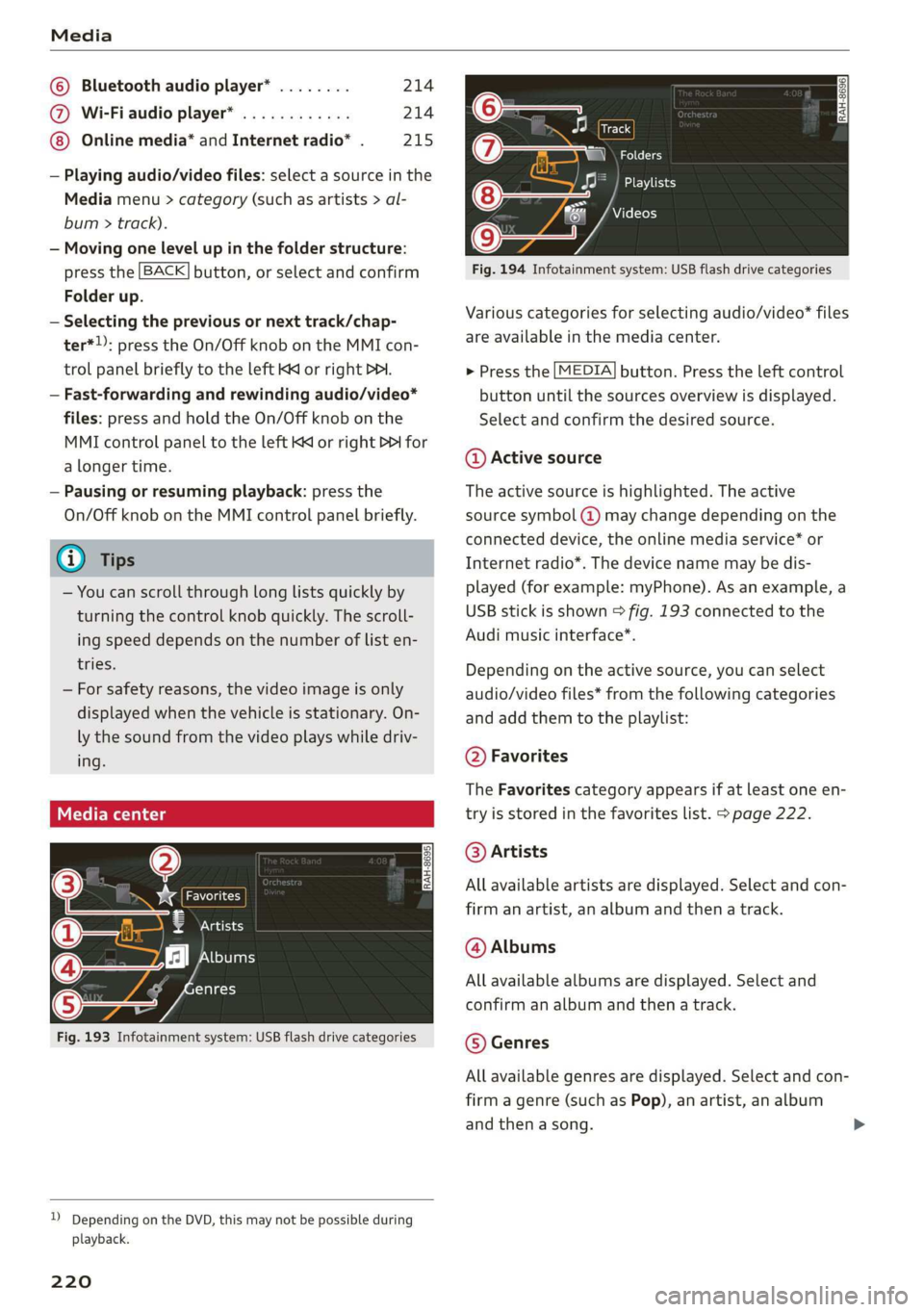
Various categories for selecting audio/video” files
are available in the media center.
> Press the [MEDIA] button. Press the left control
button until the sources overview is displayed.
Select and confirm the desired source.
@ Active source
The active source is highlighted. The active
source symbol @) may change depending on the
connected device, the online media service* or
Internet radio*. The device name may be dis-
played (for example: myPhone). As an example, a
USB stick is shown > fig. 193 connected to the
Audi music interface*.
Depending on the active source, you can select
audio/video files* from the following categories
and add them to the playlist:
@ Favorites
The Favorites category appears if at least one en-
try is stored in the favorites list. > page 222.
@ Artists
All available artists are displayed. Select and con-
firm
an artist, an album and then a track.
@ Albums
All available albums are displayed. Select and
confirm an album and then a track.
© Genres
All available genres are displayed. Select and con-
firm
a genre (such as Pop), an artist, an album
and then a song.
Page 229 of 400

8V2012721BK
Media
Problem Solution
Audi music interface: contents
that are changed on a mobile de-
vice connected to the Audi music
interface ®) are not displayed in
the media center.
Reset the Media settings to the factory default settings
=> page 231.
AUX input: there is static when
connecting and disconnecting the
AUX connection cable.
When connecting and disconnecting, the External audio player
source is already selected. Before connecting or disconnecting the
mobile device, either mute the device (see > page 234) or switch
to a different audio source (for example > page 206, Opening the
radio).
Bluetooth audio player*/Wi-Fi
audio player*: audio playback in-
terference.
Only one interface should be actively used at a time to ensure
problem-free playback.
Wi-Fi audio player*: audio play-
back interference.
Audio playback interference can occur on some cell phones if the
Internet connection in the vehicle was not established through
the SIM card reader on the MMI control panel and the mobile da-
ta option on the cell phone is switched on. Deactivate the mobile
data option on your cell phone.
Jukebox”: tracks on the imported
playlist are grayed out.
When importing playlists, all of the files themselves must be im-
ported.
Jukebox*: imported tracks cannot
be played or found.
If you cannot find imported tracks in the media center, they may
not be supported. Only copy supported files > page 224 to the
Jukebox.
Wi-Fi audio player*: multiple de-
vices are connected to the Wi-Fi
hotspot. A media player (such as a
smartphone) appears as the
source and cannot be changed.
Close the myAudi app on the connected devices (such as smart-
phones) that are not being used as the Wi-Fi audio player*. Like-
wise, close the UPnP server apps or the media permissions on the
integrated UPnP/DLNA server. Connect the desired device as a Wi-
Fi audio player* > page 214.
Online media*: connection failed
between the MMI and the myAudi
app.
To establish a connection to the MMI, the MMI connection switch
must be switched on in the myAudi app status screen.
Bluetooth audio player*: interfer-
ence with track display and audio
playback.
Playback interference can occur when using the Bluetooth audio
player if a music player app from a third party provider is open.
Audi recommends using the integrated media player on your Blue-
tooth device (such as a smartphone).
Wi-Fi hotspot*: your Wi-Fi device
is disconnected from the Wi-Fi
hotspot.
Make sure the network optimization functions are switched off in
the Wi-Fi settings or in the network settings for your Wi-Fi device.
For additional information refer to the user guide for your Wi-Fi
device.
Audi music interface: audio play-
back through the connected mo-
bile device is not possible.
Make sure the USB mode MTP is selected in the settings on your
mobile device.
a) Applies only to MTP devices. Does not apply to Apple devices and USB mass storage devices.
227
Page 230 of 400

Audi smartphone interface
Audi smartphone
interface
Setup
Applies to: vehicles with Audi smartphone interface
You can connect your smartphone to the MMI us-
ing the Audi smartphone interface. Certain con-
tent on your smartphone is adapted to the Info-
tainment system display while driving and can
be operated through the MMI control panel.
Requirement
The vehicle must be stationary and the ignition
must be switched on.
An iPhone generation 5 or newer with Lightning
connector and iOS 7.1.2 operating system or
higher is required. Or:
A smartphone with the Android Auto app and An-
droid 5.0 Lollipop operating system or higher is
required.
> Connect your smartphone to the Audi music in-
terface > page 217 using the applicable USB
adapter > page 217, fig. 190.
> Select and confirm Activate Apple CarPlay or
Activate Android Auto now.
> Follow the system instructions.
> Pay attention to any additional system prompts
on your smartphone, if applicable.
If you chose not to use Apple CarPlay or Android
Auto when connecting your smartphone for the
first time, you can start the Audi smartphone in-
terface later on using the Connection manager.
> Select: [MENU] button > Audi smartphone in-
terface > Change to connection manager.
> Connect your smartphone to the Audi music in-
terface using the appropriate USB adapter
=> page 217, fig. 190.
>» Select and confirm Audi smartphone interface
in the Connection manager > page 231. You
can select your smartphone in the list of devi-
ces that are already paired > page 233.
> Follow the system instructions.
sponsibility for safety in traffic. Never operate
mobile devices while driving, because this in-
creases the risk of an accident.
Z\ WARNING
Driving requires your complete and undivided
attention. As the driver, you have complete re-
228
C) Note
Always follow the information found in >@ in
General information on page 182.
@) Tips
— The functions that can be used depend on
the following factors, among others:
— The brand of your smartphone
—The version of the operating system in
your smartphone
— The software version of the app used
— The USB adapter cable and correct connec-
tion
— Your cell phone service provider
— The customized settings on your smart-
phone
— One of the factors above or a combination
of any of them could cause your smart-
phone to be incompatible with the Audi
smartphone interface. Compatibility cannot
be guaranteed for all types of smartphones.
For more information and assistance, refer
to the user guide and the manufacturer of
your smartphone.
— If the connected smartphone has voice con-
trol, you can operate your smartphone using
the external voice recognition system
=> page 168.
— The menu language shown in the MMI is
based on the settings in your smartphone.
— The time displayed in the MMI is based on
the settings in your smartphone.
— Some MMI functions are not available when
Apple CarPlay or Android Auto is active.
— You cannot connect any mobile devices via
Bluetooth when an Apple CarPlay connec-
tion is active.
— When the Apple CarPlay connection is ac-
tive, Tag this song for iTunes* is not availa-
ble > page 207.
Page 232 of 400
![AUDI A3 2020 Owner´s Manual System settings
System settings
Setting the date and
time
You can set the clock time manually or using the
GPS*.
> Select: [MENU] button > Settings > left control
button > MMI settings](/manual-img/6/40265/w960_40265-231.png "AUDI A3 2020 Owner´s Manual System settings
System settings
Setting the date and
time
You can set the clock time manually or using the
GPS*.
> Select: [MENU] button > Settings > left control
button > MMI settings")
System settings
System settings
Setting the date and
time
You can set the clock time manually or using the
GPS*.
> Select: [MENU] button > Settings > left control
button > MMI settings > Date & time, or:
> Select: [MENU] button > Vehicle > left control
button > Vehicle settings > Date & time.
Automatic setting
When this function is switched on ¥, the time
and date are automatically set.
Time
Requirement: the Automatic setting must be
switched off.
Press the control knob. You can set the Time
manually by turning and pressing the control
knob.
Date
Requirement: the Automatic setting must be
switched off.
Press the control knob. You can set the Date
manually by turning and pressing the control
knob.
Time zone
When selecting the appropriate time zone, a
sampling of countries in this zone will be listed.
Automatic time zone*
When this function is switched on ¥, the time
will automatically adjust to the corresponding
time zone.
Automatic daylight saving time*
When this function is switched on M, the time
will automatically switch to daylight saving time.
) The Qi standard makes it possible to charge your mobile
device wirelessly.
230
Time format
If you select 24h, the clock will display, for exam-
ple, 13:00. If you select AM/PM, the clock will
display, for example, 1:00 PM.
Date format
If you select DD.MM.YYYY, the date display will
show, for example, 31.03.2019. If you select
MM/DD/YYYY, the date display will show, for ex-
ample, 03/31/2019. If you select YYYY-MM-DD,
the date display will show, for example,
2019-03-31.
MMI settings
> Select: [MENU] button > Settings > left control
button > MMI settings.
Language
You can change the display language as well as
the language for the voice guidance* and voice
recognition system*.
The number of languages available depends on
the country.
Measurement units
The following measurement units can be set de-
pending on availability: Speed, Distance, Tem-
perature, Fuel consumption, Volume, Pressure.
Mobile device reminder signal
Applies to: vehicles with Audi phone box
Requirement: your cell phone must be Qi-capa-
ble ) or connected to the Audi music interface @
with a USB adapter cable > page 171, fig. 162.
When the device reminder signal is switched on,
you will be notified that your mobile device is still
in the Audi phone box when you leave the vehicle.
You can select between Spoken cue, Signal tone
and Off.
Mobile device reminder signal volume: you can
adjust the reminder signal volume by turning the
control knob.
Page 236 of 400
![AUDI A3 2020 Owner´s Manual System settings
To remove your mobile device from the list, select
and confirm Delete Apple CarPlay device or De-
lete Android Auto device.
System update
> Select: [MENU] button > Setti](/manual-img/6/40265/w960_40265-235.png "AUDI A3 2020 Owner´s Manual System settings
To remove your mobile device from the list, select
and confirm Delete Apple CarPlay device or De-
lete Android Auto device.
System update
> Select: [MENU] button > Setti")
System settings
To remove your mobile device from the list, select
and confirm Delete Apple CarPlay device or De-
lete Android Auto device.
System update
> Select: [MENU] button > Settings > left control
button > System maintenance.
— System update: insert the storage device with
the update data into the appropriate drive
=> page 212. Select and confirm: the drive >
Start update. The length of the process de-
pends on the size of the update.
— Reset driver installation: the selected media
driver package is reset to the settings at the
time of delivery.
— Version information: information on the MMI
software version and the navigation database*
software version is displayed. The Software in-
formation function also provides information
on the software contained in the MMI and the
licensing agreement.
Sound settings
The sound distribution and volume of the MMI
can be adjusted individually. The settings depend
on the vehicle equipment.
> Select: [MENU] button > Sound > left control
button > Entertainment.
Treble/Bass
You can adjust the Treble and Bass settings by
turning the control knob. The changed settings
only apply for the audio source that is active at
the time. This allows you to adjust the sound set-
tings for each audio source separately.
Balance/fader (Sound focus)
— Adjusting the sound distribution to the left or
right: press the control knob. Turn the control
knob to the left or right to the desired position.
— Adjusting the sound distribution to the front
or rear: press the control knob again. Turn the
control knob to the left or right to the desired
position.
234
— Adjusting the sound distribution using the
MMI touch: move your finger on the MMI touch
control panel in the desired direction.
Sound effects
Select and confirm a Focus setting:
— All: all speakers in the vehicle are active (sym-
metrical sound distribution).
— Front: only the speakers in the front of the ve-
hicle are active.
— Rear: only the speakers in the rear of the vehi-
cle are active.
Surround level
Turn the control knob to adjust the surround
sound level.
Subwoofer
Turn the control knob to adjust the subwoofer.
Speed dependent volume control
Turn the control knob to adjust the playback vol-
ume to the noise inside the vehicle.
Volume settings
Adjusting the volume
The volume of an audio source or a system mes-
sage (for example, from the voice recognition
system*) can be adjusted directly while the sound
is playing using the On/Off knob.
> Increasing or decreasing the volume: turn the
On/Off knob @) > page 146, fig. 144 to the
right or left.
> Muting or pausing: press the On/Off knob
briefly, or:
> Turn the On/Off knob to the left until the sym-
bol @ > page 155 appears. An active audio/
video source is stopped.
> Unmuting or resuming: press the On/Off knob
briefly, or:
> Turn the On/Off knob to the right.
ZA WARNING
To reduce the risk of an accident, adjust the
volume of the audio system so that audible
signals from outside the vehicle, such as >
Page 267 of 400

8V2012721BK
Airbag system
Monitoring the
Advanced Airbag System
‘oring indicator light
Two separate indicators monitor the function of
the Advanced Airbag System: the ka light and
the PASSENGER AIR BAG OFF light.
The Advanced Airbag System as well as the side
airbags and side curtain airbags with ejection
mitigation features (including the electronic con-
trol unit, sensors and system wiring) are all
monitored continuously to make sure that they
are functioning properly whenever the ignition is
on. Every time you turn on the ignition, the air-
bag system indicator light ka will come on fora
few seconds (function check).
The system must be inspected when the
indicator light Ba:
— does not come on when the ignition is switched
on,
— does not go out a few seconds after you have
switched on the ignition, or
— comes on while driving.
If an airbag system malfunction is detected, the
indicator light will come on to serve as a constant
reminder to have the system inspected immedi-
ately.
If a malfunction occurs that turns the front air-
bag on the passenger side off, the PASSENGER
AIR BAG OFF light will come on and stay on
whenever the ignition is on.
ZA\ WARNING
An airbag system that is not functioning prop-
erly cannot provide supplemental protection
in a frontal crash.
- If the airbag indicator light > page 238
comes when the vehicle is being used, have
the system inspected immediately by your
authorized Audi dealer. It is possible that
the airbag will inflate when it is not sup-
posed to, or will not inflate when it should.
PASSENGER AIR BAG OFF light
B8V-0215
Fig. 218 Center console: passenger airbag off warning
light
The PASSENGER AIR BAG OFF light is located in
the center of the instrument panel > fig. 218.
The PASSENGER AIR BAG OFF light will come on
and stay on to tell you when the front Advanced
Airbag on the passenger side has been turned off
by the electronic control unit. If the bulb for the
PASSENGER AIR BAG OFF light burns out, the
airbag indicator light 2 will come on to signal a
malfunction in the Advanced Airbag System. Al-
though the burned-out bulb will not change the
way the front passenger's frontal airbag works, it
will no longer be possible to use the PASSENGER
AIR BAG OFF light to make sure that the airbag
on/off status is correct for the occupant on the
front passenger seat. Have the airbag system in-
spected immediately by your authorized Audi
dealer.
The PASSENGER AIR BAG OFF light will blink
for about 5 seconds when:
— the ignition is switched on and
— the capacitive passenger detection system,
which switches the front seat passenger's fron-
tal Advanced Airbag on and off, detects a
change in the status of the front passenger
seat.
As soon as the PASSENGER AIR BAG OFF light
stops blinking, always make sure that the airbag
status
(on or off) as shown by the PASSENGER
AIR BAG OFF light is proper for the age, size and
electrical capacitance of the person occupying
the front passenger seat. Always make sure that
the safety belt for the front passenger seat is
properly fastened.
265
Page 270 of 400

Airbag system
fore and aft adjustment range, as far away
from the airbag as possible. The backrest
must be adjusted to an upright position.
Make sure that the PASSENGER AIR BAG
OFF light comes on and stays on all the time
whenever the ignition is switched on.
ZA WARNING
— If the PASSENGER AIR BAG OFF light does
not go out when an adult is sitting on the
front passenger seat after taking the steps
described above, make sure the adult is
properly seated and restrained at one of the
rear seating positions.
— Have the airbag system inspected by your
Audi dealer before transporting anyone on
the front passenger seat.
@) Tips
If the capacitive passenger detection system
determines that the front passenger seat is
empty, the frontal airbag on the passenger
side will be turned off, and the PASSENGER
AIR BAG OFF light will stay on.
Repair, care and disposal of the airbags
Parts of the airbag system are installed at many
different places on your Audi. Installing, remov-
ing, servicing or repairing a part in an area of the
vehicle can damage a part of an airbag system
and prevent that system from working properly
in a collision.
There are some important things you have to
know to make sure that the effectiveness of the
system will not be impaired and that discarded
components do not cause injury or pollute the
environment.
ZA WARNING
Improper care, servicing and repair proce-
dures can increase the risk of personal injury
and death by preventing an airbag from de-
ploying when needed or deploying an airbag
unexpectedly:
268
— Never cover, obstruct, or change the steer-
ing wheel horn pad or airbag cover or the in-
strument panel or modify them in any way.
— Never attach any objects such as cup holders
or telephone mountings to the surfaces cov-
ering the airbag units.
— For cleaning the horn pad or instrument
panel, use only a soft, dry cloth or one mois-
tened with plain water. Solvents or cleaners
could damage the airbag cover or change
the stiffness or strength of the material so
that the airbag cannot deploy and protect
properly.
— Never repair, adjust, or change any parts of
the airbag system.
— All work on the steering wheel, instrument
panel, front seats or electrical system (in-
cluding the installation of audio equipment,
cellular telephones and CB radios, etc.)
must be performed by a qualified technician
who has the training and special equipment
necessary.
— For any work on the airbag system, we
strongly recommend that you see your au-
thorized Audi dealer or qualified workshop.
— Never modify the front bumper or parts of
the vehicle body.
— Always make sure that the side airbag can
inflate
without interference:
— Never install seat covers or replacement
upholstery over the front seatbacks that
have not been specifically approved by
Audi.
— Never use additional seat cushions that
cover the areas where the side airbags in-
flate.
— Damage to the original seat covers or to
the seam in the area of the side airbag
module must always be repaired immedi-
ately by an authorized Audi dealer.
— The airbag system can deploy only once. Af-
ter an airbag has been deployed, it must be
replaced with new replacement parts de-
signed and approved especially for your Audi
model version. Replacement of complete
airbag systems or airbag components must
be performed by qualified workshops only.
Make sure that any airbag service action is