2019 VOLVO XC60 TWIN ENGINE ESP
[x] Cancel search: ESPPage 344 of 695

||
DRIVER SUPPORT
342
WARNING
The "City Safety in crossing traffic" func-tion is supplementary driver supportintended to improve driving safety – itcannot handle all situations in all traffic,weather and road conditions.
Warnings and brake interventions due toa collision risk with an oncoming vehicleoften come very late.
Never wait for a collision warning or forCity Safety to intervene.
City Safety is not a substitute for the driv-er's attention and judgment. The driver isalways responsible for ensuring the vehi-cle is driven in a safe manner, at theappropriate speed, with an appropriatedistance to other vehicles, and in accord-ance with current traffic rules and regula-tions.
Related information
City Safety™ (p. 335)
Limitations of City Safety incrossing traffic
In certain situations, it may be difficult for CitySafety to help the driver avoid a collision withcrossing traffic.
For example:
on slippery roads when Electronic StabilityControl (ESC) is actively operating
if an approaching vehicle is detected at a latestage
if the oncoming vehicle is partially obstructedby another vehicle or object
if the oncoming vehicle's headlights are off
if the oncoming vehicle is moving erraticallyand e.g. suddenly changes lanes at a latestage.
NOTE
The function uses the vehicle's combinedcamera and radar unit, which has certain gen-eral limitations; see sections "Camera limita-tions" and "Radar sensor limitations".
Related information
City Safety™ (p. 335)
City Safety limitations (p. 346)
City Safety in crossing traffic (p. 341)
Camera limitations (p. 332)
Radar sensor limitations (p. 327)
Page 345 of 695
DRIVER SUPPORT
343
City Safety steering assistance forevasive maneuver
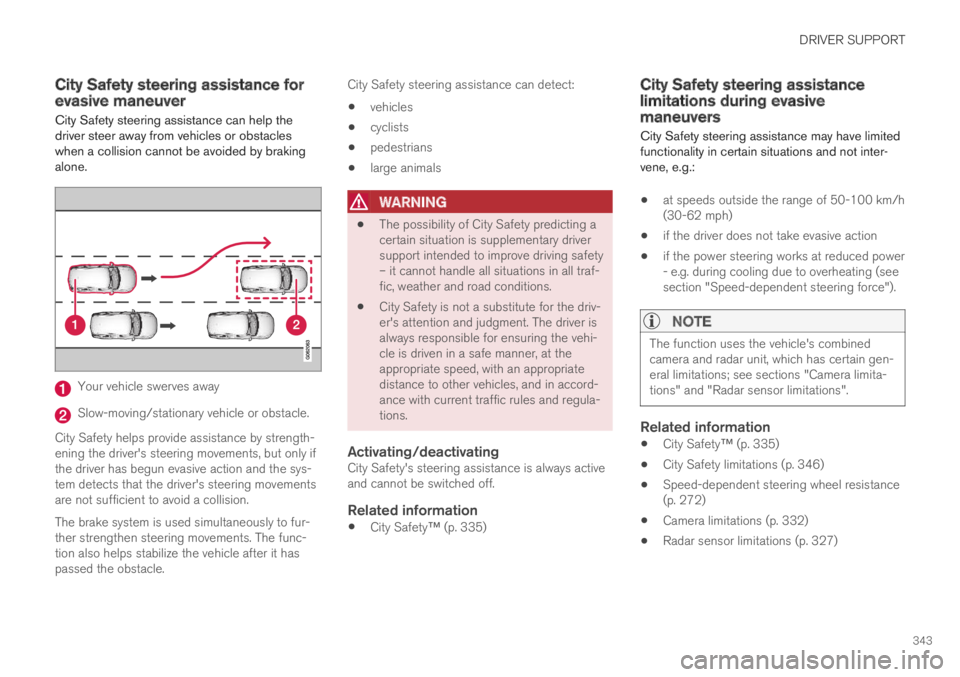
City Safety steering assistance can help thedriver steer away from vehicles or obstacleswhen a collision cannot be avoided by brakingalone.
Your vehicle swerves away
Slow-moving/stationary vehicle or obstacle.
City Safety helps provide assistance by strength-ening the driver's steering movements, but only ifthe driver has begun evasive action and the sys-tem detects that the driver's steering movementsare not sufficient to avoid a collision.
The brake system is used simultaneously to fur-ther strengthen steering movements. The func-tion also helps stabilize the vehicle after it haspassed the obstacle.
City Safety steering assistance can detect:
vehicles
cyclists
pedestrians
large animals
WARNING
The possibility of City Safety predicting acertain situation is supplementary driversupport intended to improve driving safety– it cannot handle all situations in all traf-fic, weather and road conditions.
City Safety is not a substitute for the driv-er's attention and judgment. The driver isalways responsible for ensuring the vehi-cle is driven in a safe manner, at theappropriate speed, with an appropriatedistance to other vehicles, and in accord-ance with current traffic rules and regula-tions.
Activating/deactivating
City Safety's steering assistance is always activeand cannot be switched off.
Related information
City Safety™ (p. 335)
City Safety steering assistancelimitations during evasivemaneuvers
City Safety steering assistance may have limitedfunctionality in certain situations and not inter-vene, e.g.:
at speeds outside the range of 50-100 km/h(30-62 mph)
if the driver does not take evasive action
if the power steering works at reduced power- e.g. during cooling due to overheating (seesection "Speed-dependent steering force").
NOTE
The function uses the vehicle's combinedcamera and radar unit, which has certain gen-eral limitations; see sections "Camera limita-tions" and "Radar sensor limitations".
Related information
City Safety™ (p. 335)
City Safety limitations (p. 346)
Speed-dependent steering wheel resistance(p. 272)
Camera limitations (p. 332)
Radar sensor limitations (p. 327)
Page 346 of 695

DRIVER SUPPORT
344
City Safety and delayed evasivemaneuvers
City Safety can assist the driver by automaticallybraking the vehicle when it is not possible toavoid a collision by steering alone.
City Safety assists the driver by periodicallyattempting to predict possible "escape routes" tothe sides of the vehicle in the event a slow-mov-ing or stationary vehicle were to be detected at alate stage.
Your vehicle (1) cannot detect any potential escaperoutes for veering away from the vehicle ahead (2) andmay therefore apply the brakes at an earlier stage.
Own vehicle
Slow-moving/stationary vehicles
City Safety will not intervene to automaticallyapply the brakes if it is possible for the driver toavoid a collision by steering the vehicle.
However, if City Safety determines that an eva-sive maneuver would not be possible due to traf-fic in the adjacent lane(s), the function can assistthe driver by automatically starting to apply thebrakes at an earlier stage.
WARNING
The possibility of City Safety predicting acertain situation is supplementary driversupport intended to improve driving safety– it cannot handle all situations in all traf-fic, weather and road conditions.
City Safety is not a substitute for the driv-er's attention and judgment. The driver isalways responsible for ensuring the vehi-cle is driven in a safe manner, at theappropriate speed, with an appropriatedistance to other vehicles, and in accord-ance with current traffic rules and regula-tions.
Limitations of City Safety during evasive
maneuvers
NOTE
The function uses the vehicle's combinedcamera and radar unit, which has certain gen-eral limitations; see sections "Camera limita-tions" and "Radar sensor limitations".
Related information
City Safety™ (p. 335)
Camera limitations (p. 332)
Radar sensor limitations (p. 327)
Page 347 of 695

DRIVER SUPPORT
* Option/accessory.345
City Safety braking for oncoming
vehicles*
City Safety can help you apply the brakes for anoncoming vehicle in your lane.
If an oncoming vehicle veers into your lane and acollision is unavoidable, City Safety can helpreduce your vehicle's speed to attempt to miti-gate the force of the collision.
Own vehicle
Oncoming vehicles
The following criteria must be met for the func-tion to work:
your vehicle's speed must be above 4 km/h(3 mph)
the road must be straight
your lane must have clear side lane markings
your vehicle must be positioned straight inyour lane
the oncoming vehicle must be positionedwithin your vehicle's lane markings
the oncoming vehicle's headlights must beon
the function can only handle “front-to-front”collisions
the function can only detect vehicles withfour wheels
the function requires functioning ElectricSeat Belt Tensioners* (see section “Seatbelt tensioners”).
NOTE
The function uses the vehicle's combinedcamera and radar unit, which has certain gen-eral limitations; see sections "Camera limita-tions" and "Radar sensor limitations".
WARNING
The "City Safety braking for oncomingvehicles" function is supplementary driversupport intended to help improve drivingsafety – it cannot handle all situations inall traffic, weather and road conditions.
Warnings and brake interventions due toan imminent collision with an oncomingvehicle always come very late.
Never wait for a collision warning or forCity Safety to intervene. If you notice anyhazard or other potentially dangerous sit-uation, always fully apply the brakes.
City Safety is not a substitute for the driv-er's attention and judgment. The driver isalways responsible for ensuring the vehi-cle is driven in a safe manner, at theappropriate speed, with an appropriatedistance to other vehicles, and in accord-ance with current traffic rules and regula-tions.
Related information
City Safety™ (p. 335)
City Safety limitations (p. 346)
Camera limitations (p. 332)
Radar sensor limitations (p. 327)
Seat belt tensioners (p. 50)
Page 349 of 695

DRIVER SUPPORT
347
Other limitations
WARNING
Warnings and brake interventions can betriggered late or not at all if the traffic sit-uation or external influences prevent thecamera and radar unit from properlydetecting pedestrians, cyclists, large ani-mals or vehicles ahead of the vehicle.
To be able to detect vehicles at night, itsfront and rear lights must work and illumi-nate clearly.
The camera and radar unit have a limitedrange for pedestrians and cyclists – thesystem can provide effective warningsand brake interventions if the relativespeed is lower than 50 km/h (30 mph).For stationary or slow-moving vehicles,warnings and brake interventions areeffective at vehicle speeds of up to70 km/h (43 mph). Speed reduction forlarge animals is less than 15 km/h(9 mph) and can be achieved at vehiclespeeds over 70 km/h (43 mph). At lowerspeeds, the warning and brake interven-tion for large animals is less effective.
Warnings for stationary or slow-movingvehicles and large animals can be disen-gaged due to darkness or poor visibility.
Warnings and brake interventions forpedestrians and cyclists are disengagedat vehicle speeds over 80 km/h(50 mph).
Do not place, affix or mount anything onthe inside or outside of the windshield, orin front of or around the camera andradar unit – this could disrupt camera-based functions.
Objects, snow, ice or dirt in the area ofthe camera sensor can reduce the func-tion, disengage it completely or give animproper function response.
NOTE
The function uses the vehicle's combinedcamera and radar unit, which has certain gen-eral limitations; see sections "Camera limita-tions" and "Radar sensor limitations".
Market limitations
City Safety is not available in all countries. If CitySafety is not shown in the center display'sSettings menu, your vehicle is not equipped withthis function.
In the center display's Top view, tap:
SettingsMy CarIntelliSafe
Related information
City Safety™ (p. 335)
Camera limitations (p. 332)
Radar sensor limitations (p. 327)
Page 353 of 695

DRIVER SUPPORT
}}
351
given, the indicator light will become brighter andbegin flashing.
NOTE
The light illuminates on the side of the vehiclewhere the system has detected the vehicle. Ifthe vehicle is passed on both sides simulta-neously, both lights come on.
WARNING
The BLIS function is supplementary driversupport intended to facilitate driving andhelp make it safer – it cannot handle allsituations in all traffic, weather and roadconditions.
The responsibility for changing lanessafely and using good judgment alwaysrests with the driver.
BLIS is not a substitute for the driver'sattention and judgment. The driver isalways responsible for ensuring the vehi-cle is driven in a safe manner, at theappropriate speed, with an appropriatedistance to other vehicles, and in accord-ance with current traffic rules and regula-tions.
Related information
Activating/deactivating BLIS (p. 351)
BLIS limitations (p. 352)
Recommended maintenance for BLIS(p. 353)
BLIS messages (p. 354)
Activating/deactivating BLIS
The BLIS75 function can be activated/deacti-vated.
Location of BLIS indicator light.76
Indicator light
The BLIS button in the center display's Func-tion view is used to activate/deactivate thefunction.
–Tap the BLIS button in Function view.
>The BLIS indicator light shows the statusof the function: GREEN (on) or GRAY(off).
If BLIS is activated when the engine is started,the indicator lights in the rearview mirrors willflash once.
If BLIS is deactivated when the engine is turnedoff, it will remain off the next time the engine isstarted and the indicator lights will not illuminate.
Page 357 of 695

DRIVER SUPPORT
* Option/accessory.355
Cross Traffic Alert*
CTA81 is a supplementary driver support system
to BLIS82 that is intended to help the driverdetect vehicles crossing behind the vehiclewhile backing up.
CTA overview.
CTA supplements BLIS by detecting traffic cross-ing from the side, e.g. when backing out of aparking space.
CTA is primarily designed to detect vehicles, butin certain cases can also detect pedestrians orsmaller objects such as bicycles.
CTA is only active when the vehicle is movingbackward or if reverse gear is engaged.
If CTA detects that something is approachingyour vehicle from the side:
an audible signal will sound from either theleft or right speaker, depending on whichside of your vehicle the object is approachingfrom.
an icon will illuminate in the PAS83 graphicon the screen.
an icon will appear in the Park Assist Cam-era's Top view.
Illuminated CTA icon in the PAS graphic84 on thescreen.
WARNING
The Cross Traffic Alert function is supple-mentary driver support intended to facili-tate driving and make it safer – it cannothandle all situations in all traffic, weatherand road conditions.
The responsibility for reversing the vehiclesafely and using good judgment alwaysrests with the driver.
Cross Traffic Alert is not a substitute forthe driver's attention and judgment. Thedriver is always responsible for ensuringthe vehicle is driven in a safe manner, atthe appropriate speed, with an appropri-ate distance to other vehicles, and inaccordance with current traffic rules andregulations.
Related information
Activating/deactivating Cross Traffic Alert(p. 356)
Cross Traffic Alert limitations (p. 356)
Recommended maintenance for CrossTraffic Alert (p. 357)
Cross Traffic Alert messages (p. 358)
81Cross Traffic Alert82Blind Spot Information83Park Assist System: Parking assistance with reversing sensors84Note: This illustration is general and details may vary depending on model.
Page 361 of 695

DRIVER SUPPORT
}}
* Option/accessory.359
Road Sign Information*
The Road Sign Information (RSI90) function canhelp the driver observe speed-related roadsigns.
Examples of signs that can be detected91.
Example91 of registered speed information.
If the vehicle passes a speed limit sign, it will bedisplayed in the instrument panel and the head-up display*.
NOTE
In certain markets, the Road Sign Informationfunction (RSI) is only available in combinationwith Sensus Navigation*.
WARNING
The Road Sign Information function issupplementary driver support intended tofacilitate driving and help make it safer –it cannot handle all situations in all traffic,weather and road conditions.
Road Sign Information is not a substitutefor the driver's attention and judgment.The driver is always responsible forensuring the vehicle is driven in a safemanner, at the appropriate speed, with anappropriate distance to other vehicles,and in accordance with current trafficrules and regulations.
Related information
Activating/deactivating Road Sign Informa-tion (p. 360)
Road Sign Information and sign displays(p. 361)
Road Sign Information and SensusNavigation (p. 361)
Road Sign Information with Speed Warningand Settings (p. 362)
Activating/deactivating Speed Warning inRoad Sign Information (p. 363)
90Road Sign Information91Road signs differ according to market ‒ the illustrations shown here are just some examples.