2019 VOLVO XC60 TWIN ENGINE ESP
[x] Cancel search: ESPPage 279 of 695

DRIVER SUPPORT
277
Speed limiter
A Speed Limiter (SL11) could be described as areverse cruise control. The driver regulates thevehicle's speed using the accelerator pedal, butis prevented by the Speed Limiter from inadver-tently exceeding a preset maximum speed.
Function buttons and symbols12.
: Activates the Speed Limiter fromstandby mode and resumes the set maxi-mum speed.
: Increases the set maximum speed
: From standby mode - activates theSpeed Limiter and sets the current speed
: From active mode - deactivates/putsthe Speed Limiter in standby mode
: Reduces the set maximum speed
Marker for set maximum speed
The vehicle's current speed
The set maximum speed
WARNING
The Speed Limiter function is supple-mentary driver support intended to facili-tate driving and help make it safer – itcannot handle all situations in all traffic,weather and road conditions.
The driver must always pay attention totraffic conditions and take action if theSpeed Limiter is not maintaining a suita-ble speed.
The Speed Limiter is not a substitute forthe driver's attention and judgment. Thedriver is always responsible for ensuringthe vehicle is driven in a safe manner, atthe appropriate speed, with an appropri-ate distance to other vehicles, and inaccordance with current traffic rules andregulations.
Related information
Cruise Control limitations (p. 281)
Activating and starting Speed Limiter(p. 278)
Managing Speed Limiter speed (p. 278)
Deactivating and putting Speed Limiter instandby mode (p. 279)
Reactivating Speed Limiter from standbymode (p. 280)
Turning off Cruise Control (p. 280)
Automatic Speed Limiter (p. 281)
Automatic Speed Limiter limitations (p. 285)
Activating/deactivating Automatic SpeedLimiter (p. 283)
Changing Automatic Speed Limiter tolerance(p. 284)
11Speed Limiter12Note: This illustration is general and details may vary depending on model.
Page 280 of 695

DRIVER SUPPORT
278
Activating and starting SpeedLimiter
The Speed Limiter (SL13) function must beselected and activated in order to regulatespeed.
Putting Speed Limiter in standby mode
Note: This illustration is general and details may varydepending on model.
–Press ◀ (1) or ▶ (3) and scroll to the Speed
Limiter function (4).
>The symbol (4) will appear, indicating thatthe Speed Limiter is in standby mode.
Starting the Speed Limiter
The Speed Limiter can only be activated whilethe engine is running. The lowest maximumspeed that can be set is 30 km/h (20 mph).
–With the Speed Limiter in standby mode and
the symbol displayed, press the
button (2) on the steering wheel key-pad.
>The Speed Limiter will be started and thevehicle's current speed will be set as themaximum speed.
Related information
Speed limiter (p. 277)
Managing Speed Limiter speed
The Speed Limiter (SL14) can be set to variousspeeds.
Setting/changing set speed
Note: This illustration is general and details may varydepending on model.
–Change a set speed by pressing the (1)
or (3) buttons briefly or by pressing andholding them:
Press briefly: Press briefly: each presschanges the speed in +/- 5 mph(+/- 5 km/h) increments.
Press and hold: Release the button whenthe set speed indicator (4) has moved tothe desired speed.
The most recently set speed will be stored.
13Speed Limiter
Page 281 of 695

DRIVER SUPPORT
279
Related information
Speed limiter (p. 277)Deactivating and putting SpeedLimiter in standby mode
The Speed Limiter (SL15) can be temporarilydeactivated and put in standby mode.
Note: This illustration is general and details may varydepending on model.
To deactivate the Speed Limiter and put it instandby mode:
–Press the button on the steering wheel(2).
>The speed limit markings and symbols inthe instrument panel will change fromWHITE to GRAY. This indicates that theSpeed Limiter is temporarily deactivatedand the driver can exceed the set maxi-mum speed.
Temporarily deactivating using the
accelerator pedal
The set maximum speed can be temporarilydeactivated and exceeded using the acceleratorpedal without first putting the Speed Limiter instandby mode, e.g. when quick acceleration isrequired.
To do so:
1. Depress the accelerator as far as possibleand then release it when the desired speedhas been reached.
> The Speed Limiter will remain activatedand the symbol in the instrument panelwill be WHITE.
2. Release the accelerator pedal fully when thetemporary acceleration is completed.
> The vehicle will use engine braking toautomatically slow down to a speed belowthe most recently set maximum speed.
Related information
Speed limiter (p. 277)
14Speed Limiter15Speed Limiter
Page 284 of 695

||
DRIVER SUPPORT
282
WARNING
The ASL function is supplementary driversupport intended to facilitate driving andhelp make it safer – it cannot handle allsituations in all traffic, weather and roadconditions.
Even if the driver can clearly see thespeed limit sign, the speed informationfrom the Road Sign Information (RSI)function to ASL may be incorrect. In suchcases, the driver must intervene andaccelerate or brake to an appropriatespeed.
ASL is not a substitute for the driver'sattention and judgment. The driver isalways responsible for ensuring the vehi-cle is driven in a safe manner, at theappropriate speed, with an appropriatedistance to other vehicles, and in accord-ance with current traffic rules and regula-tions.
See also the heading "Road Sign Infor-mation limitations".
Is SL or ASL active?
The symbols in the instrument panel indicatewhich Speed Limiter function is active:
SymbolSLASL
A✓ ✓
Road sign symbolB after "70" = ASL isactivated.
✓
AWHITE symbol: The function is active. GRAY symbol: Standbymode.BSee "ASL symbol" below for an explanation of the symbol's dif-ferent colors.
ASL symbol
The road sign symbol (next to thestored speed ("70" here) in the centerof the speedometer) can be displayedin three different colors, which areexplained in the following table:
Road signsymbol's colorExplanation
Greenish-yel-lowASL is active
GrayASL is in standby mode
Amber/orange ASL is temporarily instandby mode, e.g. becausea speed limit sign could notbe read.
Related information
Speed limiter (p. 277)
Activating/deactivating Automatic SpeedLimiter (p. 283)
Changing Automatic Speed Limiter tolerance(p. 284)
Automatic Speed Limiter limitations (p. 285)
Page 288 of 695

||
DRIVER SUPPORT
286
WARNING
The cruise control function is supplemen-tary driver support intended to facilitatedriving and help make it safer – it cannothandle all situations in all traffic, weatherand road conditions.
The driver is advised to read all sectionsin the Owner's Manual about this functionto learn of its limitations, which the drivermust be aware of before using the func-tion (see the link list at the end of thisarticle).
Cruise control is not a substitute for thedriver's attention and judgment. The driveris always responsible for ensuring thevehicle is driven in a safe manner, at theappropriate speed, with an appropriatedistance to other vehicles, and in accord-ance with current traffic rules and regula-tions.
Related information
Activating and starting Cruise Control(p. 286)
Managing Cruise Control speed (p. 287)
Deactivating and putting Cruise Control instandby mode (p. 288)
Reactivating Cruise Control from standbymode (p. 289)
Switching off Cruise Control (p. 290)
Switching between Cruise Control and Adap-tive Cruise Control (p. 307)Activating and starting CruiseControl
The Cruise Control (CC24) function must beselected and activated in order to regulatespeed.
Note: This illustration is general and details may varydepending on model.
Putting Cruise Control in standby mode
To put Cruise Control in standby mode:
–Tap ◀ (1) or ▶ (3) and scroll to the (4) function.
>A symbol will appear and Cruise Controlcan then be activated.
Activating/starting Cruise Control
In order to start Cruise Control from standbymode, the vehicle's current speed must be
Page 295 of 695

DRIVER SUPPORT
}}}}
* Option/accessory.293
NOTE
The greater the vehicles' speed, thegreater the distance between them for aset time interval.
Only use the time intervals permitted bylocal traffic regulations.
The set time interval is also used by theAdaptive Cruise Control and Pilot Assistfunctions.
WARNING
Only use a time interval suitable for thecurrent traffic conditions.
The driver should be aware that shorttime intervals give them limited time toreact and act to any unforeseen trafficsituation.
Related information
Distance Alert* (p. 290)
Distance Alert limitations36
Distance Alert functionality may be reduced incertain situations.
WARNING
The radar sensor has a limited field ofvision. In some situations, it may detect avehicle later than expected or not detectother vehicles at all.
The radar sensor cannot cover all drivingsituations and traffic, weather and roadconditions.
The driver is responsible for maintaining asafe distance and speed and must inter-vene if the various driver support systemsdo not maintain a suitable speed or suita-ble distance to the vehicle ahead.
Maintenance of radar sensor componentsmay only be performed by a trained andqualified Volvo technician.
Strong sunlight, reflections from the roadsurface, strong lighting contrasts or usingsunglasses may make the warning light inthe windshield difficult to see. Poorweather or winding roads can affect theradar sensor's capacity to detect vehiclesahead.
A vehicle's size (e.g., a motorcycle) canalso affect the radar sensor's capacity todetect another vehicle. This may result inthe warning light illuminating at a shorter
36The Distance Alert function is only available in vehicles that can display information on the windshield with a head-up display.
Page 296 of 695
||
DRIVER SUPPORT
* Option/accessory.294
distance than the one that has been setor not illuminating at all.
High speeds may also result in the warn-ing light illuminating at a shorter distancethan the one that has been set due tolimitations in the radar sensor's range.
NOTE
The function uses the vehicle's radar unit,which has some general limitations – see thesection "Radar unit limitations".
Related information
Distance Alert* (p. 290)
Radar sensor limitations (p. 327)
Adaptive Cruise Control*
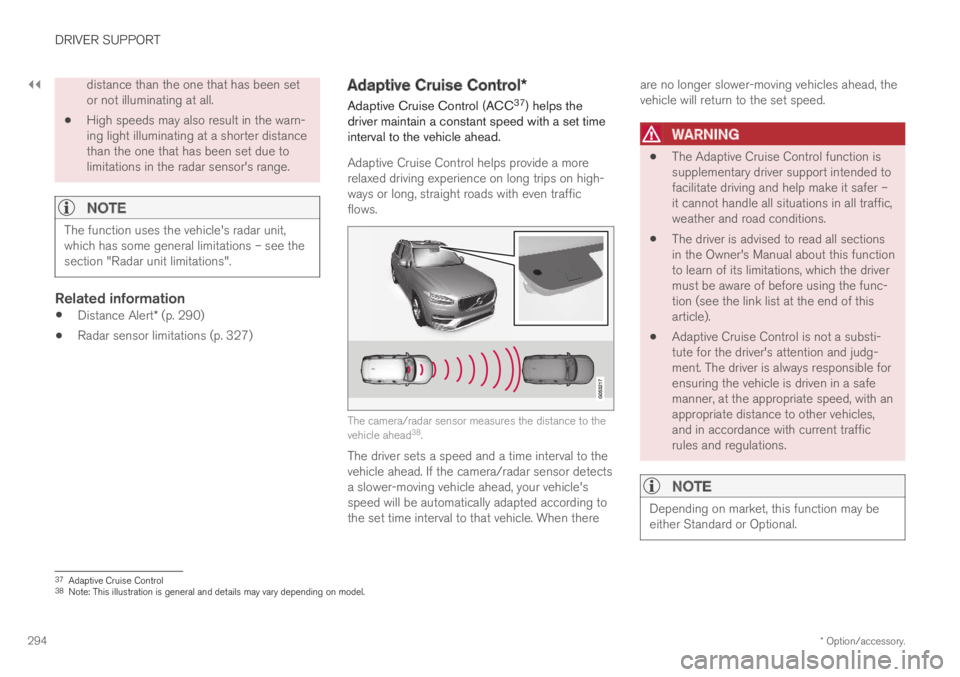
Adaptive Cruise Control (ACC37) helps thedriver maintain a constant speed with a set timeinterval to the vehicle ahead.
Adaptive Cruise Control helps provide a morerelaxed driving experience on long trips on high-ways or long, straight roads with even trafficflows.
The camera/radar sensor measures the distance to thevehicle ahead38.
The driver sets a speed and a time interval to thevehicle ahead. If the camera/radar sensor detectsa slower-moving vehicle ahead, your vehicle'sspeed will be automatically adapted according tothe set time interval to that vehicle. When there
are no longer slower-moving vehicles ahead, thevehicle will return to the set speed.
WARNING
The Adaptive Cruise Control function issupplementary driver support intended tofacilitate driving and help make it safer –it cannot handle all situations in all traffic,weather and road conditions.
The driver is advised to read all sectionsin the Owner's Manual about this functionto learn of its limitations, which the drivermust be aware of before using the func-tion (see the link list at the end of thisarticle).
Adaptive Cruise Control is not a substi-tute for the driver's attention and judg-ment. The driver is always responsible forensuring the vehicle is driven in a safemanner, at the appropriate speed, with anappropriate distance to other vehicles,and in accordance with current trafficrules and regulations.
NOTE
Depending on market, this function may beeither Standard or Optional.
37Adaptive Cruise Control38Note: This illustration is general and details may vary depending on model.
Page 297 of 695

DRIVER SUPPORT
}}
295
Adaptive Cruise Control regulates speed byaccelerating and braking. It is normal for thebrakes to emit a slight sound when they arebeing used to adjust speed.
Adaptive Cruise Control always attempts to regu-late speed smoothly. The driver must apply thebrakes in situations requiring immediate braking.For example, when there are great differences inspeed between vehicles or if the vehicle aheadbrakes suddenly. Due to limitations in the radarsensor, braking may occur unexpectedly or not atall.
Adaptive Cruise Control is designed to follow avehicle ahead in the same lane and maintain atime interval to that vehicle set by the driver. If theradar sensor does not detect a vehicle ahead, itwill instead maintain the speed set by the driver.This will also happen if the speed of the vehicleahead exceeds the set speed for your vehicle.
Adaptive Cruise Control can follow anothervehicle at speeds from a standstill up to200 km/h (125 mph).
WARNING
Adaptive Cruise Control is not a collisionavoidance system. The driver is alwaysresponsible and must intervene if the sys-tem fails to detect a vehicle ahead.
Adaptive Cruise Control does not brakefor people or animals and does not brakefor small vehicles, such as bikes andmotorcycles. Similarly, it does not brakefor low trailers, oncoming, slow-moving orstationary vehicles and objects.
Do not use Adaptive Cruise Control indemanding situations, such as in city traf-fic, at intersections, on slippery surfaces,with a lot of water or slush on the road, inheavy rain/snow, in poor visibility, onwinding roads, or on on/off ramps.
CAUTION
Maintenance of Adaptive Cruise Control com-ponents may only be performed by a work-shop – an authorized Volvo workshop is rec-ommended.
Overview
Controls
Function buttons and symbols38.
: Activates Adaptive Cruise Control fromstandby mode and resumes the set speed
: Increases the set speed
: From standby mode - activates theAdaptive Cruise Control and stores the cur-rent speed
: From active mode - deactivates/switches the Adaptive Cruise Control tostandby mode
: Reduces the set speed
Increases the time interval to the vehicleahead
38Note: This illustration is general and details may vary depending on model.