Page 563 of 645

MAINTENANCE AND SERVICE
}}
* Option/accessory.561
Messages - status messages
Status – checking engine oil level and
AdBlue level4
TPMS - tire inflation pressure check
Appointments - appointment information
and vehicle information3.
Related information
Handling messages saved from the instru-ment panel (p. 105)
Checking and filling engine oil (p. 570)
Tire pressure monitoring system* (p. 521)
Scheduling service and repairs (p. 561)
Sending vehicle information to the workshop(p. 562)
Navigating in the center display's views(p. 113)
Scheduling service and repairs5
This service offers a convenient way to scheduleservice and workshop appoints directly from thevehicle.
When it is time for service, and in certain cases ifthe vehicle requires repairs, a message will bedisplayed in the instrument panel and at the topof the center display. The time for service isdetermined by how much time has elapsed, thenumber of hours the engine has run, or the dis-tance driven since the last service.
To use the service
Create a Volvo ID and register it to the vehi-cle.
To select a Volvo retailer you would like tocontact, go to www.volvocars.com and log in.
To send and receive appointment informa-tion, the vehicle must be connected to the
Internet6.
Book service
Book a service request when desired or when amessage is displayed indicating that service orrepairs are needed.
1.Open the Car Status app from App view inthe center display.
2.Tap Appointments.
3.Tap Request appointment.
4.Check that your Volvo ID is correct.
5.Make sure your preferred Workshop is cor-rect.
6.In the Tap to write information to theworkshop field, you can provide details onwhat you would like performed during thevisit or other important information to yourworkshop.
4AdBlue Diesel models only.3Certain markets only.5Certain markets only.6There may be a charge for transmitting data over the Internet, depending on your service plan.
Page 615 of 645

SPECIFICATIONS
}}
613
Vehicle Emission Control Information. USmodels. Your Volvo is designed to meet all appli-cable emission standards, as evidenced by thecertification label on the underside of the hood.For further information regarding these regula-tions, please consult your Volvo retailer.
Vehicle Emission Control Information.Canadian models. Your Volvo is designed tomeet all applicable emission standards, as evi-denced by the certification label on the undersideof the hood. For further information regardingthese regulations, please consult your Volvoretailer.
Vehicle Identification Number (VIN). TheVIN plate is located on the top left surface of thedashboard. The Vehicle Identification Number(VIN) should always be quoted in all correspond-ence concerning your vehicle with the retailer andwhen ordering parts.
Tire inflation pressures. This label indicatesthe correct inflation pressures for the tires thatwere on the vehicle when it left the factory.
Federal Motor Vehicle Safety Standards(FMVSS) specifications (USA) and Ministry ofTransport (CMVSS) standards (Canada). YourVolvo is designed to meet all applicable safetystandards, as evidenced by the certification labelon the driver's side B-pillar (the structural mem-ber at the side of the vehicle, at the rear of thedriver's door opening). This label also includescodes for paint color, etc. For further informationregarding these regulations, please consult yourVolvo retailer. U.S. models have the upper decal;Canadian models have the lower one.
Page 633 of 645

INDEX
631
I
IAQS (Interior Air Quality System) 200
IC (Inflatable Curtain)60
ID, Volvo26
Identification number38
Ignition mode395, 396
Immobilizer243
Electronic immobilizer243
Indicator symbols92
Individual drive mode412
Infant seats67
Inflatable curtain60
Inflatable Curtain60
Inflating tires539
Inflation pressure
adjusting520
Checking519
decal with recommended pressure 521
Inflation pressure monitoring521
action525
save new inflation pressure523
Status524
Inflation pressure table623
Information display82, 84
Infotainment (Audio and media)448
Instrument cluster82
settings84
Instrument illumination162
Instrument lighting162
Instrument panel82
App menu101, 102
hybrid-related symbols and messages 387
messages103
settings84
Instruments and controls80
Instruments overview
left-hand drive vehicle80
IntelliSafe
driver support28
Interior Air Quality System200
Intermittent wiping175
Internet, see Internet-connected vehicle 494
Internet-connected vehicle494
book service and repair561
No connection or poor connection 498
send car data562
system updates559
iPod®, connecting476
ISOFIX/LATCH anchors74
J
Jack527
Jump-start432
K
Key230
Keyboard124, 127
change language127
Keyless
locking/unlocking245
settings246
touch-sensitive surfaces244
Key tag230
L
Labels
location612
Laminated glass 164
Lamps
changing 572
Trailer 437
Lane Keeping Aid 337
activating/deactivating 339
Page 639 of 645
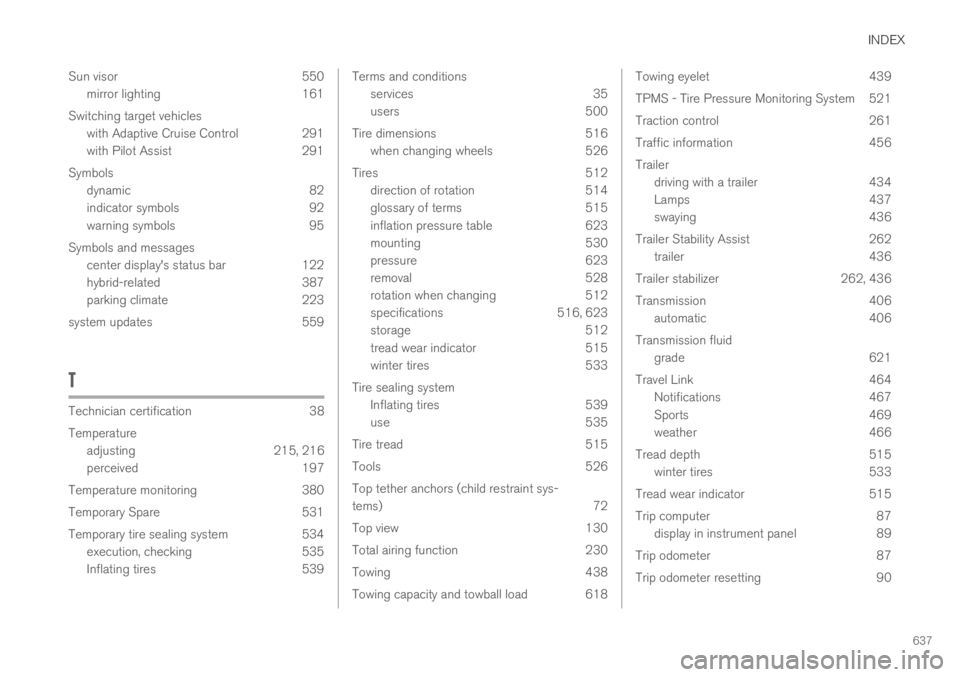
INDEX
637
Sun visor 550
mirror lighting 161
Switching target vehicles
with Adaptive Cruise Control 291
with Pilot Assist 291
Symbols
dynamic 82
indicator symbols 92
warning symbols 95
Symbols and messages
center display's status bar 122
hybrid-related 387
parking climate 223
system updates 559
T
Technician certification38
Temperature
adjusting215, 216
perceived197
Temperature monitoring 380
Temporary Spare 531
Temporary tire sealing system 534
execution, checking 535
Inflating tires 539
Terms and conditions
services35
users500
Tire dimensions 516
when changing wheels 526
Tires 512
direction of rotation 514
glossary of terms 515
inflation pressure table 623
mounting 530
pressure 623
removal 528
rotation when changing 512
specifications 516, 623
storage 512
tread wear indicator 515
winter tires 533
Tire sealing system
Inflating tires 539
use 535
Tire tread 515
Tools 526
Top tether anchors (child restraint sys-
tems)72
Top view 130
Total airing function 230
Towing 438
Towing capacity and towball load 618
Towing eyelet439
TPMS - Tire Pressure Monitoring System521
Traction control 261
Traffic information 456
Trailer
driving with a trailer 434
Lamps 437
swaying 436
Trailer Stability Assist 262
trailer 436
Trailer stabilizer 262, 436
Transmission 406
automatic 406
Transmission fluid
grade 621
Travel Link 464
Notifications 467
Sports 469
weather 466
Tread depth 515
winter tires 533
Tread wear indicator 515
Trip computer 87
display in instrument panel 89
Trip odometer 87
Trip odometer resetting 90
Page 640 of 645

INDEX
638
Trip statistics 90
settings 91
Troubleshooting
Adaptive Cruise Control 277
Camera unit 300
City Safety 316
Radar unit 300
Trunk
electrical outlet 546, 548
Lighting 161
Trunk lid
emergency opening 250
locking/unlocking 233, 247
unlocking from inside 250
TSA - Trailer Stability Assist 436
Tunnel detection 154
Turn off engine 394
Turn signals 156
Twin Engine
general 374
Type approval
HomeLink®443
radar system 297
U
Uniform Tire Quality Grading518
Units130
Unlocking
settings 233
with key blade 241
USB
socket for connecting media 477
V
Vehicle care 598, 599, 601, 602, 603, 604
leather upholstery596
Vehicle Event Data33
Vehicle functions
in the center display120
Vehicle key bat. low234
Vehicle modem
connecting vehicle to Internet 496
settings497
Vehicle recovery440
Vehicle status560
inflation pressure524
Vehicle upholstery 593, 595, 596, 597, 598
Vehicle weight617
Ventilation201, 202
Seats209
Video474, 476
settings475
Voice control143
climate197
phone145
radio and media146
settings147
VOL mark512
Volvo ID26
create and register27
W
Warning lights
Adaptive Cruise Control290
airbags SRS95
alternator does not charge95
brake system error95
low oil pressure95
parking brake applied95
Pilot Assist290
seat belt reminder95
stability and traction control system 261
Page:
< prev 1-8 9-16 17-24