2019 VOLVO S60 TWIN ENGINE battery
[x] Cancel search: batteryPage 226 of 645
CLIMATE CONTROL
224
Heater
The heater has two sub-functions that help warmthe passenger compartment or engine in varioussituations.
The heater has two sub-functions:
Parking heater - heats the passenger com-partment as needed when the parking cli-mate's preconditioning is activated.
Auxiliary heater - heats the passenger com-partment and engine while driving.
The heater is a high-voltage coolant heater and ismounted in the front right-side wheel housing.
Battery and charging
The heater is powered by the vehicle's hybrid bat-tery. If the charge level in the hybrid battery is toolow, the heater will switch off automatically and amessage will be displayed in the instrumentpanel.
NOTE
Make sure that the battery has sufficientcharge if the heater must be used.
Related information
Climate (p. 196)
Parking heater (p. 224)
Additional heater (p. 224)
Parking heater
The parking heater heats the passenger com-partment as needed before driving if precondi-tioning is activated.
The parking heater is one of two sub-functions ofthe vehicle's heater. The heater is mounted in thefront right-side wheel housing.
The parking heater starts automatically if theparking climate's preconditioning is activated andthe passenger compartment needs to be heated.
It switches off automatically when a set timertime has ended, or if the car is restarted.
Related information
Heater (p. 224)
Additional heater (p. 224)
Additional heater
The auxiliary heater helps heat the passengercompartment and engine while driving.
The auxiliary heater is one of two sub-functionsof the vehicle's heater. The heater is mounted inthe front right-side wheel housing.
The auxiliary heater is started and controlledautomatically when extra heat is required whilethe vehicle is being driven.
It switches off automatically when the ignition isswitched off.
Related information
Heater (p. 224)
Parking heater (p. 224)
Activating and deactivating the auxiliaryheater (p. 225)
Page 233 of 645

KEY, LOCKS AND ALARM
* Option/accessory.231
NOTE
Be aware of the risk of locking the remotekey in the vehicle.
If the remote key or key tag is left in thevehicle, it will be deactivated when thevehicle is locked and the alarm set usinganother valid key. The key will be reacti-vated when the vehicle is unlocked.
If the remote key or Red Key is left in thevehicle, it will be deactivated even if thevehicle is locked using Volvo On Call, andwill be reactivated when the vehicle isunlocked using Volvo On Call or anothervalid key.
Button-less key (Key Tag) *
The button-less key4 provided with the keylesslocking and unlocking function works in the sameway as the regular remote key for keyless start,locking and unlocking. The key is waterproof upto a depth of approx. 10 meters (30 feet) for upto 60 minutes. It does not have a detachable keyblade and its battery cannot be replaced.
Red Key - restricted remote key *
A Red Key is a key that makes it possible to setrestrictions for some of the vehicle's functions,e.g. maximum speed and maximum audio systemvolume. It helps vehicle owners ensure that the
vehicle is being operated responsibly by other dri-vers.
Interference
Electromagnetic fields or obstructing objects mayinterfere with the remote key's functions for key-less start and keyless locking and unlocking*.
NOTE
Avoid storing the remote control key nearmetal objects or electronic devices, e.g. cellphones, tablets, laptops or chargers – pref-erably no closer than 10-15 cm (4-6 in.).
If you experience interference, use the remotekey's detachable blade to unlock the vehicle andplace the remote key in the backup key reader inthe tunnel console cup holder to disarm thealarm.
NOTE
When the remote control key is placed in thecup holder, make sure that no other vehiclekeys, metal objects or electronic devices (e.g.cell phones, tablets, laptops or chargers) arefound in the cup holder. Multiple vehicle keysclose to each other in the cup holder can dis-rupt their functionality.
WARNING
California Proposition 65
Operating, servicing and maintaining a pas-senger vehicle can expose you to chemicalsincluding engine exhaust, carbon monoxide,phthalates, and lead, which are known to theState of California to cause cancer and birthdefects or other reproductive harm. To mini-mize exposure, avoid breathing exhaust, donot idle the engine except as necessary, serv-ice your vehicle in a well ventilated area andwear gloves or wash your hands frequentlywhen servicing your vehicle. For more infor-mation go to www.P65Warnings.ca.gov/passenger-vehicle.
Related information
Locking and unlocking using the remote key(p. 232)
Remote key range (p. 234)
Replacing the remote key's battery (p. 234)
Detachable key blade (p. 240)
Electronic immobilizer (p. 243)
Linking a remote key to a driver profile(p. 136)
4Also called sport key.
Page 234 of 645

KEY, LOCKS AND ALARM
* Option/accessory.232
Locking and unlocking using theremote key
All doors and the trunk lid can be locked andunlocked simultaneously using the buttons onthe remote key.
Locking with remote key
The illustration is generic - details may vary according tovehicle model.
–Press the button on the remote key tolock the vehicle.
To activate the locking sequence, the driver's
door must be closed5. If any of the other doors orthe trunk lid are open, they will be locked and thealarm will be armed once they are closed.
NOTE
Be aware of the risk of locking the remotekey in the vehicle.
If the remote key or key tag is left in thevehicle, it will be deactivated when thevehicle is locked and the alarm set usinganother valid key. The key will be reacti-vated when the vehicle is unlocked.
If the remote key or Red Key is left in thevehicle, it will be deactivated even if thevehicle is locked using Volvo On Call, andwill be reactivated when the vehicle isunlocked using Volvo On Call or anothervalid key.
Locking when the trunk lid is open
NOTE
If the vehicle is locked and the trunk lid is stillopen, make sure that the remote key is notleft in the trunk when the trunk lid is closed
and the entire vehicle is locked6.
Unlocking with remote key
–Press the button on the remote key tounlock the vehicle.
Automatic relocking
If none of the doors or trunk lid are opened withintwo minutes after being unlocked, they will auto-matically relock. This function reduces the risk ofinadvertently leaving the vehicle unlocked.
Remote key not working
NOTE
Move closer to the vehicle and try to unlock itagain.
If the remote key is not working to lock or unlockthe vehicle, its battery may be discharged. Usethe detachable key blade to lock/unlock the driv-er's door instead.
Related information
Settings for remote and inside door unlock(p. 233)
Unlocking the trunk lid using the remote key(p. 233)
Remote key (p. 230)
Replacing the remote key's battery (p. 234)
Locking and unlocking with detachable keyblade (p. 241)
5If the vehicle is equipped with keyless locking/unlocking*, all side doors must be closed.6If the vehicle is equipped with keyless locking/unlocking and the key is detected inside the vehicle, the trunk lid will not lock when it is closed.*
Page 236 of 645

KEY, LOCKS AND ALARM
* Option/accessory.234
Remote key range
In order to function correctly, the remote keymust be within a certain distance from the vehi-cle.
Manual use
The remote key's functions for e.g. locking and
unlocking, which are activated by pressing or
, have a range of approx. 20 meters (65 feet)from the vehicle.
If the vehicle's locks do not react, move closerand try again.
Keyless * use
The shaded areas around the vehicle illustrate the rangeof the system's antennas.
For keyless use, a remote key or the Key Tagmust be within the shaded areas shown in theillustration, i.e. a semicircle with a radius of
approx. 1.5 meter (5 feet) along the sides of thevehicle or approx. 1 meter (3 feet) from the trunklid.
NOTE
The functions of the remote control key canbe disrupted by ambient radio waves, build-ings, topographical conditions, etc. The vehi-cle can always be locked/unlocked using thekey blade.
If the remote key is removed from the
vehicle
If the remote key is removed from thevehicle while the engine is running, thewarning message Vehicle key notfound Removed from vehicle will bedisplayed in the instrument panel and an audiblesignal will sound when the last door is closed.
The message will disappear when the key isreturned to the vehicle and the O button on theright-side steering wheel keypad is pressed orwhen the last door is closed again.
Related information
Remote key (p. 230)
Antenna locations for the start and lock sys-tem (p. 248)
Keyless and touch-sensitive surfaces*(p. 244)
Replacing the remote key's battery
The battery in the remote key must be replacedwhen it is discharged.
NOTE
All batteries have a limited service life andmust eventually be replaced (does not applyfor Key Tag). The battery's service life variesdepending on how often the vehicle/key isused.
The remote key battery should be replaced if
the information symbol illuminates and themessage Vehicle key bat. low is displayedin the instrument panel.
the locks do not react after several attemptsto lock or unlock the vehicle using theremote key within approx. 20 meter (65 feet)from the vehicle.
NOTE
Move closer to the vehicle and try to unlock itagain.
Page 237 of 645

KEY, LOCKS AND ALARM
}}
* Option/accessory.235
The battery in the smaller key without buttons7
(the Key Tag) cannot be replaced. A new key canbe ordered from an authorized Volvo workshop.
CAUTION
An end-of-life Key Tag must be turned in toan authorized Volvo workshop. The key mustbe deleted from the vehicle because it canstill be used to start the vehicle via backupstart.
Opening the key and replacing the
battery
Hold the remote key with the front side(with the Volvo logo) facing up and move thebutton on the key ring section to the right.Slide the front cover slightly upward.
The cover will loosen and can beremoved from the key.
Turn the key over, move the button to theside and slide the rear cover slightly upward.
The cover will loosen and can beremoved from the key.
7Included in vehicles equipped with keyless locking/unlocking*.
Page 238 of 645
||
KEY, LOCKS AND ALARM
236
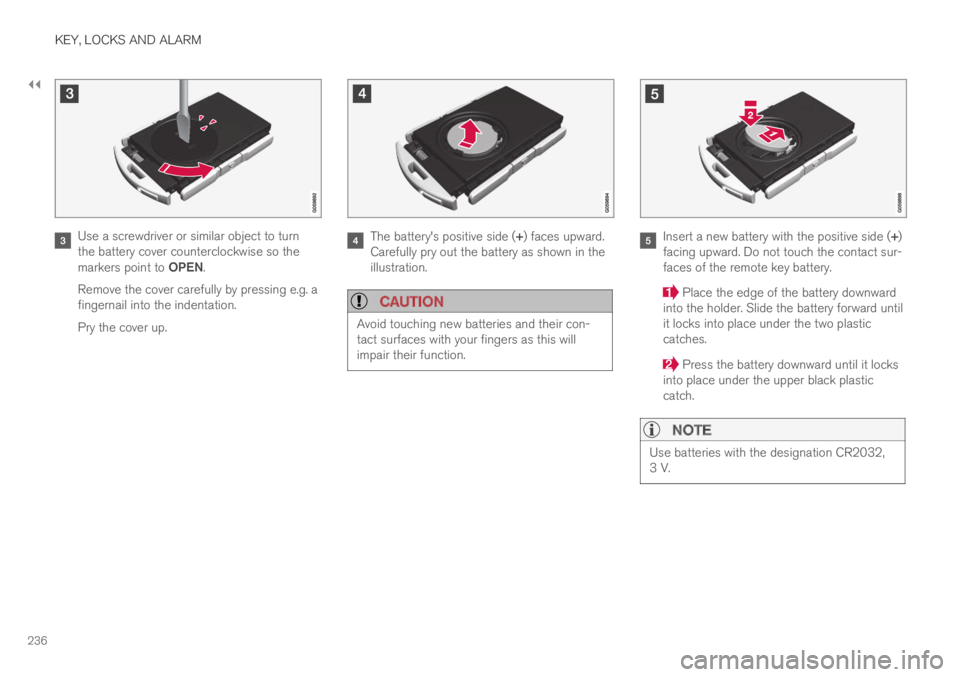
Use a screwdriver or similar object to turnthe battery cover counterclockwise so themarkers point to OPEN.
Remove the cover carefully by pressing e.g. afingernail into the indentation.
Pry the cover up.
The battery's positive side (+) faces upward.Carefully pry out the battery as shown in theillustration.
CAUTION
Avoid touching new batteries and their con-tact surfaces with your fingers as this willimpair their function.
Insert a new battery with the positive side (+)facing upward. Do not touch the contact sur-faces of the remote key battery.
Place the edge of the battery downwardinto the holder. Slide the battery forward untilit locks into place under the two plasticcatches.
Press the battery downward until it locksinto place under the upper black plasticcatch.
NOTE
Use batteries with the designation CR2032,3 V.
Page 239 of 645

KEY, LOCKS AND ALARM
237
NOTE
Volvo recommends that batteries used in theremote control key satisfy UN Manual of Testand Criteria, Part III, sub-section 38.3. Thefactory installed batteries and batteriesreplaced by an authorized Volvo workshopsatisfy the above criterion.
Replace the battery cover and turn it clock-wise until it points to CLOSE.
Put the rear cover back into position andpress it down until it clicks into place.
Slide the cover back.
>A second click indicates that the cover iscorrectly positioned and locked into place.
Turn the remote key over and press thefront cover down until it clicks into place.
Slide the cover back.
>An additional click indicates that the coveris correctly in place.
CAUTION
Be sure to dispose of end-of-life batteries ina way that protects the environment.
WARNING
California Proposition 65
Operating, servicing and maintaining a pas-senger vehicle can expose you to chemicalsincluding engine exhaust, carbon monoxide,phthalates, and lead, which are known to theState of California to cause cancer and birthdefects or other reproductive harm. To mini-mize exposure, avoid breathing exhaust, donot idle the engine except as necessary, serv-ice your vehicle in a well ventilated area andwear gloves or wash your hands frequentlywhen servicing your vehicle. For more infor-mation go to www.P65Warnings.ca.gov/passenger-vehicle.
Related information
Remote key (p. 230)
Page 243 of 645

KEY, LOCKS AND ALARM
}}
241
Put the key blade back into its designatedspot in the remote key after use.
Replace the cover by pressing it downuntil it clicks into place.
Slide the cover back.
>An additional click indicates that the coveris correctly in place.
Related information
Locking and unlocking with detachable keyblade (p. 241)
Remote key (p. 230)
Locking and unlocking withdetachable key blade
The detachable key blade can be used to unlockthe vehicle from the outside, e.g. if the battery inthe remote key is discharged.
Unlocking
Pull the front left-hand door handle to its endposition to access the lock cylinder.
Put the key in the lock cylinder.
Turn the key clockwise 45 degrees so thatthe key blade is pointing straight rearward.
Turn the key blade back 45 degrees to itsoriginal position. Remove the key from thelock cylinder and release the handle so that itreturns to its original position against thevehicle.
5.Pull the door handle.
> The door will open.
Lock the door in the same way, but turn the key45 degrees counterclockwise in step (3).
Turning off the alarm
NOTE
When the door is unlocked using the detach-able key blade and then opened, the alarmwill be triggered.
Location of the backup key reader in the cup holder.
Turn off the alarm by:
1.Place the remote control key on the key sym-bol in the backup reader in the bottom of thecup holder in the tunnel console.
2. Turn the start knob clockwise and release it.
> The alarm signal will stop and the alarmwill switch off.