Page 312 of 698

•With brake pedal released, verify that the gear selector
will not move out of PARK.
REVERSE (R)
This range is for moving the vehicle backward. Shift into
REVERSE only after the vehicle has come to a complete
stop.
NEUTRAL (N)
Use this range when the vehicle is standing for prolonged
periods with the engine running. Apply the parking brake
and shift the transmission into PARK if you must exit the
vehicle.
WARNING!
Do not coast in NEUTRAL and never turn off the
ignition to coast down a hill. These are unsafe practices
that limit your response to changing traffic or road
conditions. You might lose control of the vehicle and
have a collision.
CAUTION!
Towing the vehicle, coasting, or driving for any other
reason with the transmission in NEUTRAL can cause
severe transmission damage. Refer to “Recreational
Towing” in “Starting And Operating” and “Towing A
Disabled Vehicle” in “In Case Of Emergency” for
further information.
DRIVE (D)
This range should be used for most city and highway
driving. It provides the smoothest upshifts and downshifts,
and the best fuel economy. The transmission automatically
upshifts through all forward gears. The DRIVE position
provides optimum driving characteristics under all normal
operating conditions.
When frequent transmission shifting occurs (such as when
operating the vehicle under heavy loading conditions, in
hilly terrain, traveling into strong head winds, or while
towing a heavy trailer), select TOW/HAUL mode or use
the Electronic Range Select (ERS) shift control (refer to
�Electronic Range Select (ERS) Operation� in this section for
further information) to select a lower gear range. Under
310 STARTING AND OPERATING
Page 315 of 698

When to Use TOW/HAUL Mode
When driving in hilly areas, towing a trailer, carrying a
heavy load, etc., and frequent transmission shifting occurs,
push the TOW/HAUL switch to activate TOW/HAUL
mode. This will improve performance and reduce the
potential for transmission overheating or failure due to
excessive shifting.The “TOW/HAUL Indicator Light” will illuminate in the
instrument cluster to indicate that TOW/HAUL mode has
been activated. Pushing the switch a second time restores
normal operation. Normal operation is always the default
at engine start-up. If TOW/HAUL mode is desired, the
switch must be pushed each time the engine is started.
WARNING!
Do not use the “TOW/HAUL” feature when driving in
icy or slippery conditions. The increased engine brak-
ing can cause the rear wheels to slide, and the vehicle
to swing around with the possible loss of vehicle
control, which may cause an accident possibly result-
ing in personal injury or death.
FOUR-WHEEL DRIVE OPERATION — IF EQUIPPED
Four-wheel drive trucks are equipped with either a manu-
ally shifted transfer case or an electronically shifted trans-
fer case. Refer to the operating instructions for your
transfer case, located in this section for further information.
TOW/HAUL Switch
6
STARTING AND OPERATING 313
Page 328 of 698

Wheel Alignment Mode
Before performing a wheel alignment, this mode must be
enabled. Refer to “Instrument Cluster Display” in “Getting
To Know Your Instrument Panel” or “Uconnect Settings” in
“Multimedia” if equipped with a touch screen radio for
further information.
NOTE:This mode is intended to be enabled with engine
running.
Protection Strategy
In order to “protect” the air suspension system, the vehicle
will disable load leveling as required (suspension over-
loaded, battery charge low, etc.). Load leveling will automati-
cally resume as soon as system operation requirements are
met. See your authorized dealer if system does not resume.
NOTE:If towing with air suspension refer to “Trailer Towing”
in “Starting And Operating” for further information.
Instrument Cluster Display Messages
When the appropriate conditions exist, a message will
appear in the instrument cluster display. Refer to “Instru-
ment Cluster Display” in “Getting To Know Your Instru-
ment Panel” for further information.
An audible chime will be heard whenever a system error
has been detected. See your authorized dealer for system service if normal
operation does not resume.
Operation
Air Suspension Switch
1 — Off-Road 2 Indicator (Customer selectable)
2 — Off-Road 1 Indicator (Customer selectable)
3 — Normal Ride Height Indicator (Customer selectable)
4 — Aero Mode Indicator (Customer Selectable)
5 — Entry/Exit Mode Indicator (Customer selectable)
6 — Height Selector
326 STARTING AND OPERATING
Page 334 of 698

Protection Strategy
In order to “protect” the air suspension system, the vehicle
will disable load leveling as required (suspension over-
loaded, battery charge low, etc.). Load leveling will auto-
matically resume as soon as system operation requirements
are met. See your authorized dealer if system does not
resume.
NOTE:If towing with air suspension refer to “Trailer
Towing” in “Starting And Operating” for further informa-
tion.
Instrument Cluster Display Messages
When the appropriate conditions exist, a message will
appear in the instrument cluster display. Refer to “Instru-
ment Cluster Display” in “Getting To Know Your Instru-
ment Panel” for further information.
An audible chime will be heard whenever a system error
has been detected.
See your authorized dealer for system service if normal
operation does not resume.
Operation
Air Suspension Switch
1 — Off-Road Indicator (Customer selectable)
2 — Normal Ride Height Indicator (Customer selectable)
3 — Aero Mode Indicator (Customer Selectable)
4 — Entry/Exit Mode Indicator (Customer selectable)
5 — Height Selector
332 STARTING AND OPERATING
Page 347 of 698
WARNING!(Continued)
You should switch off the ACC system:
•When driving in fog, heavy rain, heavy snow, sleet,
heavy traffic, and complex driving situations (i.e., in
highway construction zones).
• When entering a turn lane or highway off ramp;
when driving on roads that are winding, icy, snow-
covered, slippery, or have steep uphill or downhill
slopes.
• When towing a trailer up or down steep slopes.
• When circumstances do not allow safe driving at a
constant speed.
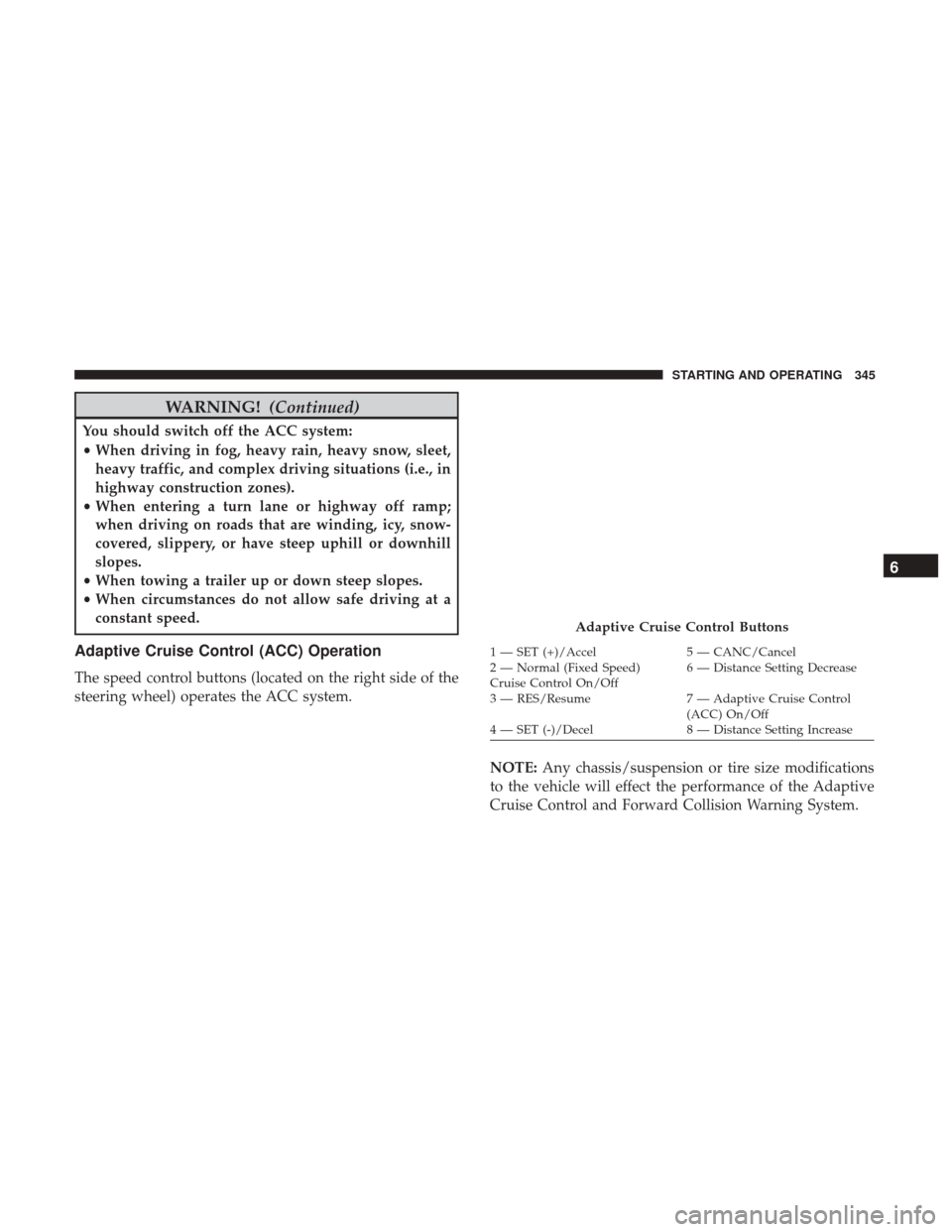
Adaptive Cruise Control (ACC) Operation
The speed control buttons (located on the right side of the
steering wheel) operates the ACC system.
NOTE:Any chassis/suspension or tire size modifications
to the vehicle will effect the performance of the Adaptive
Cruise Control and Forward Collision Warning System.
Adaptive Cruise Control Buttons
1 — SET (+)/Accel 5 — CANC/Cancel
2 — Normal (Fixed Speed)
Cruise Control On/Off 6 — Distance Setting Decrease
3 — RES/Resume 7 — Adaptive Cruise Control
(ACC) On/Off
4 — SET (-)/Decel 8 — Distance Setting Increase
6
STARTING AND OPERATING 345
Page 350 of 698

To Cancel
The following conditions cancel the system:
•The brake pedal is applied.
• The CANC (cancel) button is pushed.
• An Anti-Lock Brake System (ABS) event occurs.
• The gear selector is removed from the DRIVE position.
• The Electronic Stability Control/Traction Control Sys-
tem (ESC/TCS) activates.
• The vehicle parking brake is applied.
• Driver seatbelt is unbuckled at low speeds.
• Driver door is opened at low speeds.
• A Trailer Sway Control (TSC) event occurs.
• The driver switches ESC to full-off mode.
• The braking temperature exceeds normal range (over-
heated).
To Turn Off
The system will turn off and clear the set speed in memory
if:
• The Adaptive Cruise Control (ACC) on/off button is
pushed.
• The Normal (Fixed Speed) Cruise Control on/off button
is pushed.
• The ignition is turned OFF.
• You switch to Four-Wheel Drive Low.
To Resume
If there is a set speed in memory push the RES (resume)
button and then remove your foot from the accelerator
pedal. The instrument cluster display will display the last
set speed.
348 STARTING AND OPERATING
Page 360 of 698
Cleaning Instructions
Dust and dirt can accumulate on the cover and block the
camera lens. Clean the camera lens with a soft microfiber
cloth, being careful not to damage or scratch the module.
Towing A Trailer
ACC while towing a trailer is recommended only with an
Integrated Trailer Brake Controller. Aftermarket trailer
brake controllers will not activate the trailer brakes when
ACC is braking.
Offset Driving
ACC may not detect a vehicle in the same lane that is offset
from your direct line of travel, or a vehicle merging in from
a side lane. There may not be sufficient distance to the
vehicle ahead. The offset vehicle may move in and out of
the line of travel, which can cause your vehicle to brake or
accelerate unexpectedly.
Offset Driving Condition Example
358 STARTING AND OPERATING
Page 372 of 698

with�OFF� in the corresponding side. This vehicle
graphic will be displayed for as long as the vehicle is in
REVERSE.
• ParkSense, when on, will reduce the volume of the radio
when it is sounding a tone.
• Clean the ParkSense sensors regularly, taking care not to
scratch or damage them. The sensors must not be
covered with ice, snow, slush, mud, dirt or debris.
Failure to do so can result in the system not working
properly. The ParkSense system might not detect an
obstacle behind or in front of the fascia/bumper, or it
could provide a false indication that an obstacle is
behind or in front of the fascia/bumper.
• Use the ParkSense switch to turn the ParkSense system
off if obstacles such as bicycle carriers, trailer hitches,
etc. are placed within 12 inches (30 cm) from the rear
fascia/bumper. Failure to do so can result in the system
misinterpreting a close obstacle as a sensor problem,
causing the “PARKSENSE UNAVAILABLE SERVICE
REQUIRED” message to be appear in the instrument
cluster display.
• On vehicles equipped with a tailgate, ParkSense should
be disabled when the tailgate is in the lowered or open position. A lowered tailgate could provide a false indi-
cation that an obstacle is behind the vehicle.
WARNING!
•
Drivers must be careful when backing up even when
using ParkSense. Always check carefully behind
your vehicle, look behind you, and be sure to check
for pedestrians, animals, other vehicles, obstructions,
and blind spots before backing up. You are respon-
sible for safety and must continue to pay attention to
your surroundings. Failure to do so can result in
serious injury or death.
• Before using ParkSense, it is strongly recommended
that the ball mount and hitch ball assembly is
disconnected from the vehicle when the vehicle is
not used for towing. Failure to do so can result in
injury or damage to vehicles or obstacles because the
hitch ball will be much closer to the obstacle than the
rear fascia when the loudspeaker sounds the con-
tinuous tone. Also, the sensors could detect the ball
mount and hitch ball assembly, depending on its size
and shape, giving a false indication that an obstacle
is behind the vehicle.
370 STARTING AND OPERATING