2019 Peugeot Partner reset
[x] Cancel search: resetPage 83 of 312
81
OK
00 00
00 00
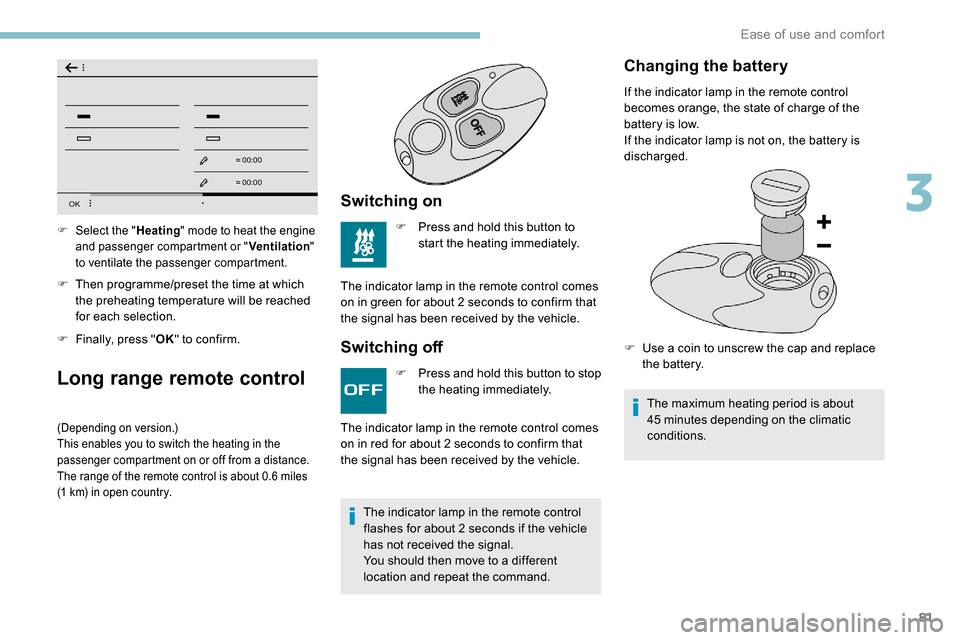
F Then programme/preset the time at which the preheating temperature will be reached
for each selection.
F
F
inally, press " OK" to confirm.
Long range remote control
(Depending on version.)
This enables you to switch the heating in the
passenger compartment on or off from a distance.
The range of the remote control is about 0.6
miles
(1
km) in open country.
Switching on
F Press and hold this button to start the heating immediately.
The indicator lamp in the remote control comes
on in green for about 2
seconds to confirm that
the signal has been received by the vehicle.
Switching off
F Select the " Heating" mode to heat the engine
and passenger compartment or " Ventilation"
to ventilate the passenger compartment.
F Press and hold this button to stop the heating immediately.
The indicator lamp in the remote control
flashes for about 2
seconds if the vehicle
has not received the signal.
You should then move to a different
location and repeat the command.
The indicator lamp in the remote control comes
on in red for about 2
seconds to confirm that
the signal has been received by the vehicle.
Changing the battery
If the indicator lamp in the remote control
becomes orange, the state of charge of the
battery is low.
If the indicator lamp is not on, the battery is
discharged.
F
U
se a coin to unscrew the cap and replace
the battery.
The maximum heating period is about
45
minutes depending on the climatic
conditions.
3
Ease of use and comfort
Page 103 of 312

101
The trailer stability assist system
offers increased safety in normal
driving conditions, provided that the
recommendations on towing a trailer are
obser ved. It must not encourage the driver
to take additional risks, such as towing
a trailer in adverse operating conditions
(overloading, failure to obser ve the trailer
nose weight, worn or under-inflated tyres,
faulty braking system, etc.) or drive at too
high a speed.
In certain cases, the swaying of the trailer
may not be detected by the ESC system,
particularly with a light trailer.
When driving on slippery or poor sur faces,
the system may not be able to prevent
sudden swaying of the trailer.
Advanced Grip Control
Special patented traction control system which
improves driveability on snow, mud and sand.
This system, the operation of which has been
optimised for each situation, allows you to
manoeuvre in most conditions of poor grip
(encountered during passenger vehicle use).Associated with all-season M+S (Mud and
Snow) tyres, this system offers a compromise
between safety, grip and driveability.
The accelerator pedal should be pressed
sufficiently to allow the system to use the power
of the engine. Operation at high engine speeds
is completely normal.
A five-position selector knob allows you to
choose the setting best suited to the driving
conditions encountered.
An indicator lamp associated with each mode
comes on, accompanied by the display of a
message to confirm your choice.
Operating modes
Every time the ignition is switched off, the
system automatically resets to this mode.
Snow
This mode adapts its strategy to
the conditions of grip encountered
for each of the two front wheels on
moving off.
(mode active up to 50
mph (80 km/h))
All terrain (mud, damp grass,
etc.)
This mode, when moving off, allows
considerable spin on the wheel with
the least grip to optimise clearing
of the mud and to regain grip. At
the same time, the wheel with the
most grip is controlled in such a
way as to transmit as much torque
as possible.
When moving, the system optimises wheel spin
to respond to the driver's requirements as fully
as possible.
(mode active up to 31
mph (50 km/h))
Standard (ESC)
This mode is calibrated for a low
level of wheel spin, based on the
different levels of grip normally
encountered on the road.
5
Safety
Page 133 of 312
131
Special cases: STOP mode
not available
STOP mode is not activated in certain
temporary conditions (examples: battery
charge, engine temperature, braking
assistance, ambient temperature) to assure
correct operation of the system and mainly
when:
-
t
he vehicle is on a steep slope (rising or
falling),
-
t
he driver's door is open,
-
a s
liding side door is open,
-
t
he driver's seat belt is not fastened,
-
t
he vehicle has not exceeded 6 mph
(10
km/h) since the last engine start by the
driver,
-
t
he automatic electronic parking brake is
applied or being applied,
-
t
he engine is needed to maintain a
comfortable temperature in the passenger
compartment, In this case, this indicator lamp
flashes for a few seconds, then goes
of f.
Going into engine START
mode
With a manual gearbox
, the Stop
& Start warning lamp goes off on
the instrument panel and the engine
restarts automatically when you press
the clutch pedal fully down to the floor.
With an automatic gearbox , the Stop & Start
warning lamp on the instrument panel goes off
and the engine restarts automatically when:
-
y
ou release the brake pedal with the gear
selector in position D or M ,
-
y
ou are in position N with the brake pedal
released and you move the gear selector to
position D or M,
-
y
ou engage reverse.
-
d
emisting is active,
-
t
he ambient temperature is lower than about
0°C or higher than about 35°C.
This operation is perfectly normal.
Stop & Start time counter
(minutes/seconds or hours/minutes)
If your vehicle is fitted with Stop & Start, a time
counter calculates the time spent in STOP
mode during a journey.
It resets to zero every time the ignition is
switched on.
Special cases: START
mode triggered
automatically
START mode is activated automatically in
certain temporary conditions (examples:
battery charge, engine temperature, braking
assistance, air conditioning setting) to assure
correct operation of the system and mainly
when:
-
y
ou open the driver's door,
-
y
ou open a sliding side door,
-
y
ou unfasten the driver's seat belt,
-
t
he speed of the vehicle exceeds 2 mph
(3
km/h) (depending on the engine)In this case, this indicator lamp
flashes for a few seconds, then goes
of f.
This operation is perfectly normal.
6
Driving
Page 136 of 312

134
- Certain road sign qualifier plates detected by the camera (e.g. the speed limit if towing).Qualifier plate detected Displaying the speed associated with
the qualifier plate
Speed limit in rain
Examples: If the wiper control stalk is in the
"intermittent wiping" or "automatic
wiping" position (so that the rain sensor is
activated):
68
mph (110 km/h) (for example)
Speed limit if towing If an approved towing device is fixed to
the vehicle:
56
mph (90 km/h) (for example)
Speed limit applicable over a cer tain distance
Example: 43
mph (70 km/h) (for example)
Speed limit for vehicles whose gross vehicle
weight or gross train weight is less than
3.5 tonnes 56
mph (90 km/h) (for example)
Speed limit in snow
Example: If the exterior temperature is below 3°C:
19
mph (30 km/h) (for example)
with a "snowflake" symbol
Speed limit at cer tain times
Example: 19
mph (30 km/h) (for example)
with a "clock" symbol The units for the speed limits (mph or
km/h) depend on the country you are
driving in.
It should be taken into account so that you
obser ve the speed limit.
For the system to operate correctly when
you change country, the units for speed in
the instrument panel must be those for the
country you are driving in.
The automatic reading of road signs is a
driving aid system and does not always
display speed limits correctly.
The speed limit signs present on the road
always take priority over the display by the
system.
The system cannot, in any circumstances,
replace the need for vigilance on the part
of the driver.
The driver must observe the driving
regulations and must adapt the speed of
the vehicle to suit the weather and traffic
conditions.
It is possible for the system to not display
the speed limit if it does not detect a
speed limit sign within a preset period.
The system is designed to detect signs
that conform to the Vienna Convention on
road signs.
Driving
Page 161 of 312

159
Fatigue detection system
Take a break as soon as you feel tired or at
least every two hours.
These systems cannot in any circumstances
replace the need for vigilance on the part of
the driver who must remain in control of their
decisions. It is never the intention of these
systems to keep the driver awake or to prevent
the driver from falling asleep at the wheel.
It is the driver’s responsibility to stop if feeling
tired.
Activation/Deactivation
The function is activated or
deactivated via the vehicle
configuration menu.
The state of the system stays in the memory
when the ignition is switched off.
Driver Attention Warning
The system triggers an alert as soon
as it detects that the driver has not
taken a break after two hours of driving
at a speed above 40
mph (65 km/h).
This alert is issued via the display of a
message encouraging you to take a break,
accompanied by an audible signal.
If the driver does not follow this advice, the
alert is repeated hourly until the vehicle is
stopped.
The system resets itself if one of the following
conditions is met:
-
e
ngine running, the vehicle has been
stationary for more than 15
minutes,
-
t
he ignition has been switched off for a few
minutes,
-
t
he driver's seat belt is unfastened and their
door is opened.
As soon as the speed of the vehicle drops
below 40
mph (65 km/h), the system goes
into standby.
The driving time is counted again once the
speed is above 40
mph (65 km/h).
Driver Attention Alert
Depending on version, the "Driver Attention
Warning" system is combined with the "Driver
Attention Alert" system.Using a camera placed at the top of
the windscreen, the system assesses
the driver's level of vigilance by
identifying variations in trajectory
compared to the lane markings.
This system is particularly suited to fast roads
(speed higher than 40
mph (65 km/h)).
When the system interprets the behaviour of
the vehicle as indicating a certain threshold of
driver fatigue or inattention, it triggers the first
level of alert.
The driver is then alerted by the message
" Ta k e c a r e ! ", accompanied by an audible
signal.
Depending on version, the function consists of
just the "Driver Attention Warning" system or of
this combined with the "Driver Attention Alert"
system.
6
Driving
Page 208 of 312

206
Quick-release terminal clamp
Disconnecting the (+) terminalReconnecting the (+) terminal
Do not force the lever as locking will be
impossible if the clamp is not positioned
correctly; start the procedure again.
Following reconnection of the battery
Following reconnection of the battery, turn on
the ignition and wait 1 minute before starting
the engine, in order to enable the electronic
systems to initialise.
However, if minor problems persist following
this operation, contact a PEUGEOT dealer or a
qualified workshop. The Stop & Start system may not be
operational during the trip following the
first engine start.
In this case, the system will only be
available again after a continuous
period of immobilisation of the vehicle,
a period which depends on the exterior
temperature and the state of charge of the
battery (up to about 8
hours).
F
s
witch off all electrical consumers (audio
system, wipers, lighting, etc.).
F
s
witch off the ignition and wait for four
minutes.
At the battery, detach the (+) terminal only.
F
Ra
ise the lever A fully to release the
clamp B .
F
R
emove the clamp B by lifting it off. F
Ra
ise the lever A fully.
F
R
eplace the open clamp B on the (+)
terminal.
F
P
ush the clamp B fully down.
F
L
ower the lever A to lock the clamp B
.Referring to the corresponding section, you
must reset certain systems yourself, such as:
-
t
he remote control or electronic key
(depending on version),
-
t
he electric windows,
-
t
he electric doors,
-
t
he date and time,
-
t
he radio preset stations.
To w i n g
Procedure for having your vehicle towed or
for towing another vehicle using a removable
mechanical device.
Access to the eye
For more information on the Tool kit
, refer
to the corresponding section.
In the event of a breakdown
Page 222 of 312

2
First steps
Press: On/Off.
Rotate: adjust volume.
Short press: change audio source
(radio; USB; AUX (if equipment
connected); CD; streaming).
Long press: display the Telephone
menu (if a telephone is connected).
Adjust audio settings:
Front/rear fader; left/right balance;
bass/treble; loudness; audio
ambience.
Activation/Deactivation of automatic
volume adjustment (linked to the
speed of the vehicle).
Radio:
Short press: display the list of radio
stations.
Long press: update the list.
Media:
Short press: display the list of
folders.
Long press: display the available
sorting options. Select the screen display mode,
between:
Date; Audio functions; Trip
computer; Telephone.
Confirm or display contextual menu.
Buttons 1 to 6.
Short press: select the preset radio
station.
Long press: preset a radio station.
Radio:
Automatic step by step search up/
down for radio stations.
Media:
Select previous/next CD, USB,
streaming track.
Scroll in a list.
Radio:
Manual step by step search up/down
for radio stations.
Select previous/next MP3 folder.
Media:
Select previous/next folder/genre/
artist/playlist on the USB device.
Scroll in a list.
Abandon the current operation.
Go up one level (menu or folder).
Access to the main menu.
Activate/Deactivate TA function
(traffic announcements).
Long press: select type of
announcement.
Selection of FM/DAB/AM
wavebands.
Steering mounted controls
Steering mounted controls –
Ty p e 1
Radio:
Select the previous/next preset radio
station.
Select the previous/next item in a
menu or a list.
Media:
Select the previous/next track.
Select the previous/next item in a
menu or a list.
Bluetooth® audio system
Page 224 of 312

4
Radio:
Select the previous/next preset radio
station.
Select the previous/next item in a
menu or a list.
Media:
Select the previous/next track.
Select the previous/next item in a
menu or a list.
Press the thumbwheel: confirm.
Menus
Depending on version."Multimedia ": Media settings, Radio
settings.
" Telephone ": Call, Directory
management, Telephone
management, Hang up.
" Trip computer ".
" Maintenance ": Diagnosis, Warning
log, etc. "
Connections ": Manage
connections, search for devices.
" Personalisation-configuration ":
Define the vehicle parameters,
Choice of language, Display
configuration, Choice of units, Date
and time adjustment.
Press the " MENU" button.
Move from one menu to another.
Enter a menu.
Radio
Selecting a station
Press the SOURCE button
repeatedly and select the radio.
Press this button to select a
waveband (FM/AM/DAB). Press one of the buttons for an
automatic search for radio stations.
Press one of the buttons to carry out
a manual search up/down for radio
frequencies.
Press this button to display the list of
stations received locally.
To update this list, press for more
than two seconds. The sound is cut
while updating.
RDS
The external environment (hills, buildings,
tunnels, basement car parks, etc.) may
block reception, including in RDS mode.
This is a normal effect of the way in
which radio waves are transmitted and
does not indicate any failure of the audio
equipment.
If RDS is not available, the RDS symbol
appears struck out in the screen.
Bluetooth® audio system