2019 Peugeot Partner reset
[x] Cancel search: resetPage 270 of 312
10
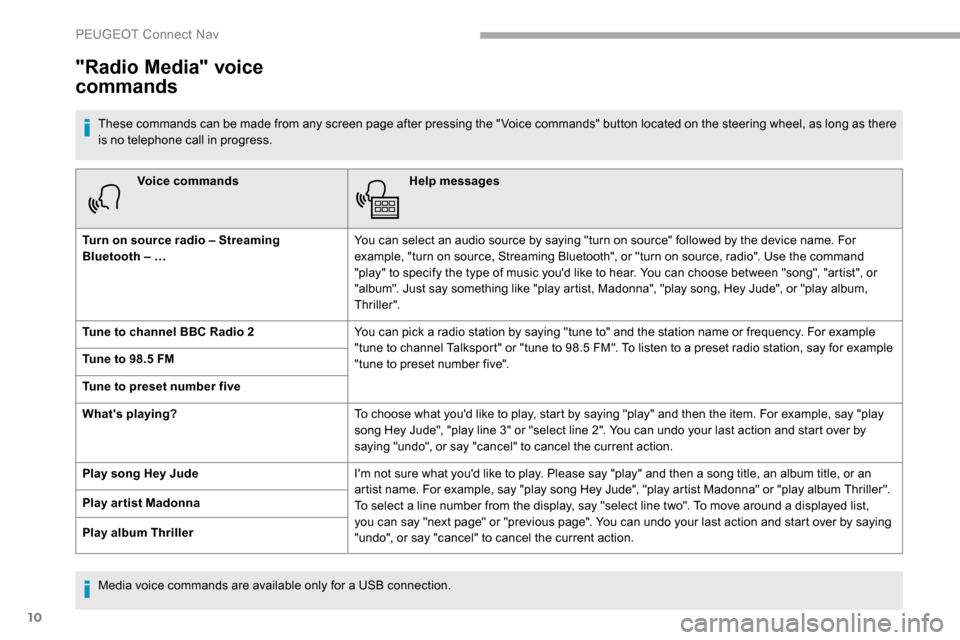
Voice commandsHelp messages
Turn on source radio – Streaming
Bluetooth – … You can select an audio source by saying "turn on source" followed by the device name. For
example, "turn on source, Streaming Bluetooth", or "turn on source, radio". Use the command
"play" to specify the type of music you'd like to hear. You can choose between "song", "artist", or
"album". Just say something like "play artist, Madonna", "play song, Hey Jude", or "play album,
Thriller".
Tune to channel BBC Radio 2 You can pick a radio station by saying "tune to" and the station name or frequency. For example
"tune to channel Talksport" or "tune to 98.5 FM". To listen to a preset radio station, say for example
"tune to preset number five".
Tune to 98.5 FM
Tune to preset number five
What's playing?
To choose what you'd like to play, start by saying "play" and then the item. For example, say "play
song Hey Jude", "play line 3" or "select line 2". You can undo your last action and start over by
saying "undo", or say "cancel" to cancel the current action.
Play song Hey Jude I'm not sure what you'd like to play. Please say "play" and then a song title, an album title, or an
artist name. For example, say "play song Hey Jude", "play artist Madonna" or "play album Thriller".
To select a line number from the display, say "select line two". To move around a displayed list,
you can say "next page" or "previous page". You can undo your last action and start over by saying
"undo", or say "cancel" to cancel the current action.
Play ar tist Madonna
Play album Thriller
"Radio Media" voice
commands
These commands can be made from any screen page after pressing the " Voice commands" button located on the steering wheel, as long as there
is no telephone call in progress.
Media voice commands are available only for a USB connection.
PEUGEOT Connect Nav
Page 273 of 312
13
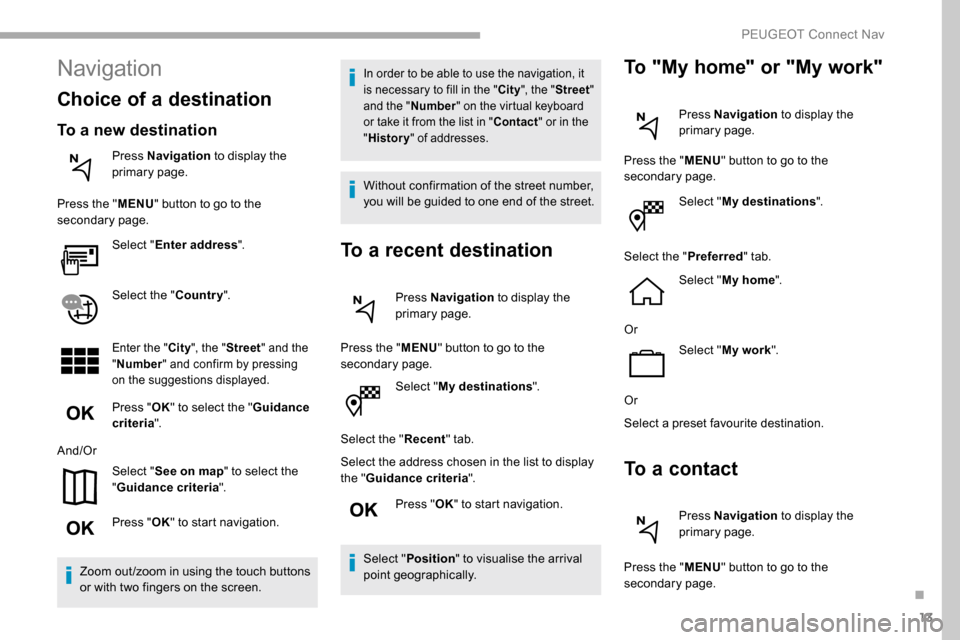
Select "My destinations ".
Select the " Recent" tab.
Select the address chosen in the list to display
the " Guidance criteria ".
Press " OK" to start navigation.
Select " Position " to visualise the arrival
point geographically.
To "My home" or "My work"
Press Navigation to display the
primary page.
Press the " MENU" button to go to the
secondary page.
Select "My destinations ".
Select the " Preferred" tab.
Select " My home ".
Or Select "My work ".
Or
Select a preset favourite destination.
To a contact
Press Navigation to display the
primary page.
Press the " MENU" button to go to the
secondary page.
Navigation
Choice of a destination
To a new destination
Press Navigation to display the
primary page.
Press the " MENU" button to go to the
secondary page.
Select "Enter address ".
Select the " Country".
Enter the " City", the " Street " and the
" Number " and confirm by pressing
on the suggestions displayed.
Press " OK" to select the " Guidance
criteria ".
And/Or Select "See on map " to select the
" Guidance criteria ".
Press " OK" to start navigation.
Zoom out /zoom in using the touch buttons
or with two fingers on the screen.
In order to be able to use the navigation, it
is necessary to fill in the " City", the " Street "
and the " Number" on the virtual keyboard
or take it from the list in " Contact" or in the
" History " of addresses.
Without confirmation of the street number,
you will be guided to one end of the street.
To a recent destination
Press Navigation to display the
primary page.
Press the " MENU" button to go to the
secondary page.
.
PEUGEOT Connect Nav
Page 276 of 312

16
Select a Wi-Fi network found by the
system and connect.
Wi-Fi connection
This function is only available if it has been
activated either via the "Notifications" or
via the "Applications" menu. Press " Notifications ".
Select Wi-Fi to activate it.
OR Press Applications to display the
primary page.
Press the " OPTIONS" button to go to the
secondary page.
Select "Wi- Fi network
connection ".
Select the " Secured" or "Not
secured " or "Stored " tab.
Select a network. Using the virtual keypad, enter the
"
Key " for the Wi-Fi network and the
" Password ".
Press " OK" to start the connection.
Restrictions of use:
-
W
ith CarPlay
®, connection sharing is
only with a Wi-Fi connection.
-
W
ith MirrorLink
TM, connection sharing
is only with a USB connection.
The quality of ser vices depends on the
quality of the network connection.
When "TOMTOM TR AFFIC"
appears, the services are available.
The ser vices offered with connected
navigation are as follows.
A Connected Services pack:
-
Weather,
-
F
illing stations,
-
C
ar park,
-
Tr a f f i c ,
-
P
OI local search.
A Danger zone pack (option).
The processes and standards are
constantly changing; for the communication
process between the smartphone and the
system to work correctly, we recommend
that you update the operating system of
the smar tphone as well as the date and
time of the smar tphone and the system.
Settings specific to
connected navigation
In the "Settings" menu you can create
a profile for just one person or a group
of people with common points, with the
possibility of entering a multitude of
settings (radio presets, audio settings,
navigation history, contact favourites,
etc.); these settings are taken into account
automatically.
Press Navigation to display the
primary page.
Press the " MENU" button to go to the
secondary page.
Select "Settings ".
PEUGEOT Connect Nav
Page 283 of 312

23
Radio
Selecting a station
Press Radio Media to display the
primary page.
Press " Frequency ".
Press one of the buttons for an
automatic search for radio stations.
Or Move the cursor for a manual search
for frequencies up or down.
Or Press Radio Media to display the
primary page.
Press the " OPTIONS" button to go to the
secondary page.
Select "Radio stations " in the
secondary page.
Press " Frequency ".
Enter the values using the virtual
keypad.
First enter the units then click on the
decimals zone to enter the figures
after the decimal point. Press "
OK" to confirm.
Radio reception may be affected by the
use of electrical equipment not approved
by the Brand, such as a USB charger
connected to the 12 V socket.
The external environment (hills, buildings,
tunnels, basement car parks, etc.) may
block reception, including in RDS mode.
This is a normal effect of the way in
which radio waves are transmitted and
does not indicate any failure of the audio
equipment.
Presetting a station
Select a radio station or frequency.
(refer to the corresponding section)
Press " Presets ".
Make a long press on one of the
buttons to preset the station.
Changing waveband
Press Radio Media to display the
primary page.
To change the waveband, press "Band…"
displayed at the top right of the screen.
Activating/Deactivating RDS
Press Radio Media to display the
primary page.
Press the " OPTIONS" button to go to the
secondary page.
Select "Radio settings ".
Select " General ".
Activate/Deactivate " Station
tracking ".
Press " OK" to confirm.
RDS, if activated, allows you to continue
listening to the same station by automatically
retuning to alternative frequencies. However,
in certain conditions, coverage of an RDS
station may not be assured throughout the
entire country as radio stations do not cover
100% of the territory. This explains the loss of
reception of the station during a journey.
.
PEUGEOT Connect Nav
Page 292 of 312
32
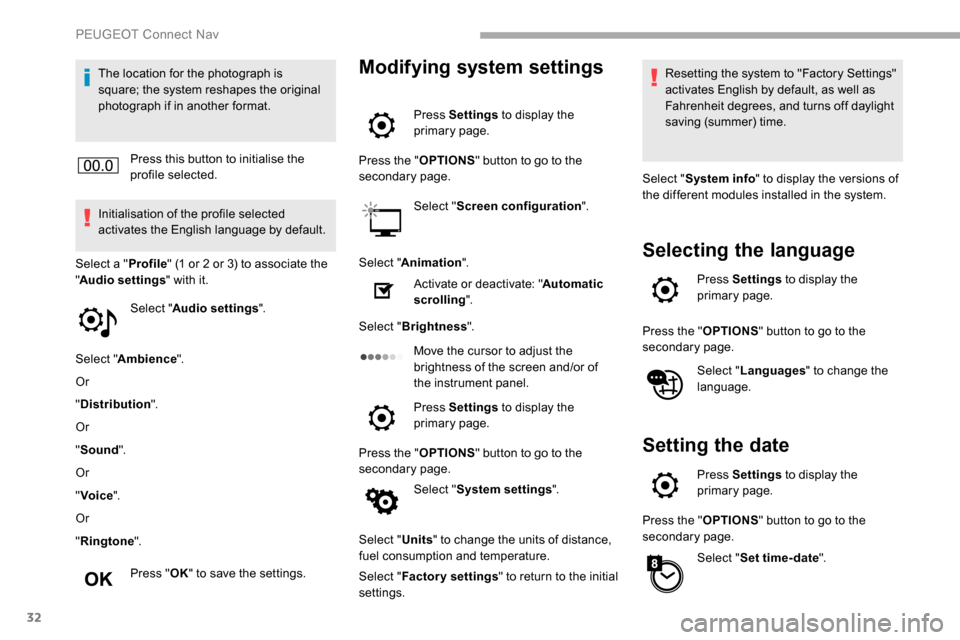
The location for the photograph is
square; the system reshapes the original
photograph if in another format.Press this button to initialise the
profile selected.
Initialisation of the profile selected
activates the English language by default.
Select a " Profile" (1 or 2 or 3) to associate the
" Audio settings " with it.
Select " Audio settings ".
Select " Ambience ".
Or
" Distribution ".
Or
" Sound ".
Or
" Voice ".
Or
" Ringtone ".
Press " OK" to save the settings.Modifying system settings
Press Settings to display the
primary page.
Press the " OPTIONS" button to go to the
secondary page.
Select "Screen configuration ".
Select " Animation ".
Activate or deactivate: " Automatic
scrolling ".
Select " Brightness ".
Move the cursor to adjust the
brightness of the screen and/or of
the instrument panel.
Press Settings to display the
primary page.
Press the " OPTIONS" button to go to the
secondary page.
Select "System settings ".
Select " Units" to change the units of distance,
fuel consumption and temperature.
Select " Factory settings " to return to the initial
settings. Resetting the system to "Factory Settings"
activates English by default, as well as
Fahrenheit degrees, and turns off daylight
saving (summer) time.
Select " System info " to display the versions of
the different modules installed in the system.
Selecting the language
Press Settings to display the
primary page.
Press the " OPTIONS" button to go to the
secondary page.
Select "Languages " to change the
language.
Setting the date
Press Settings to display the
primary page.
Press the " OPTIONS" button to go to the
secondary page.
Select "Set time-date ".
PEUGEOT Connect Nav
Page 299 of 312
39
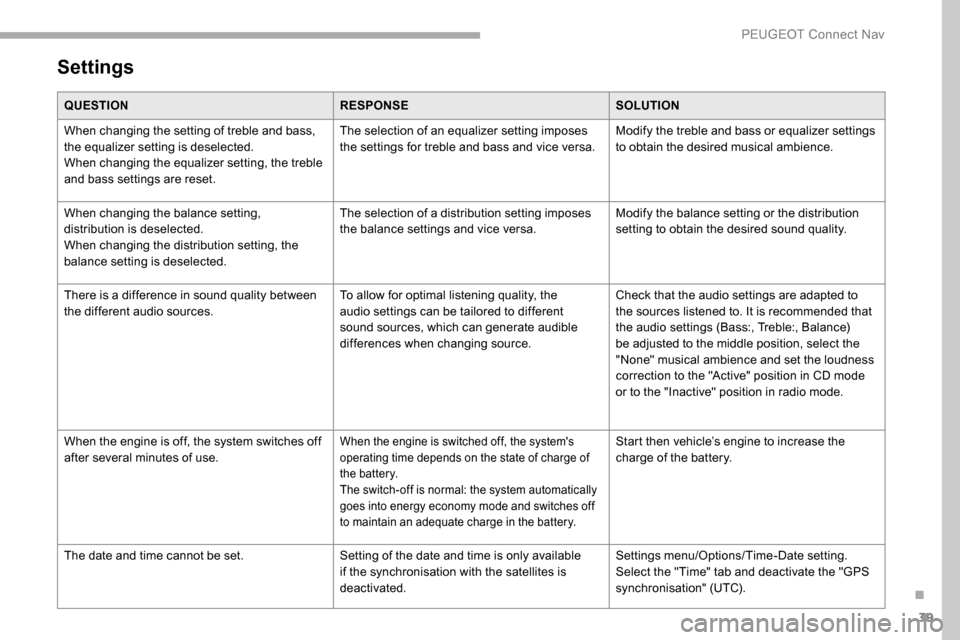
Settings
QUESTIONRESPONSESOLUTION
When changing the setting of treble and bass,
the equalizer setting is deselected.
When changing the equalizer setting, the treble
and bass settings are reset. The selection of an equalizer setting imposes
the settings for treble and bass and vice versa.
Modify the treble and bass or equalizer settings
to obtain the desired musical ambience.
When changing the balance setting,
distribution is deselected.
When changing the distribution setting, the
balance setting is deselected. The selection of a distribution setting imposes
the balance settings and vice versa.
Modify the balance setting or the distribution
setting to obtain the desired sound quality.
There is a difference in sound quality between
the different audio sources. To allow for optimal listening quality, the
audio settings can be tailored to different
sound sources, which can generate audible
differences when changing source.Check that the audio settings are adapted to
the sources listened to. It is recommended that
the audio settings (Bass:, Treble:, Balance)
be adjusted to the middle position, select the
"None" musical ambience and set the loudness
correction to the "Active" position in CD mode
or to the "Inactive" position in radio mode.
When the engine is off, the system switches off
after several minutes of use.
When the engine is switched off, the system's
operating time depends on the state of charge of
the battery.
The switch-off is normal: the system automatically
goes into energy economy mode and switches off
to maintain an adequate charge in the battery.Start then vehicle’s engine to increase the
charge of the battery.
The date and time cannot be set. Setting of the date and time is only available
if the synchronisation with the satellites is
deactivated.Settings menu/Options/Time-Date setting.
Select the "Time" tab and deactivate the "GPS
synchronisation" (UTC).
.
PEUGEOT Connect Nav
Page 304 of 312

222
PPads, brake ............................................ 182-183
Paint colour code .......................................... 217
Parking brake
................................. 121, 182-183
Parking brake, automatic electronic
..................... 16, 20 , 24-25 , 121-124
Parking sensors, audible and visual
.............160
Parking sensors, front
...................................161
Parking sensors, rear .................................... 160
Petrol
...................................................... 211-212
PEUGEOT Connect Nav
...................................1
PEUGEOT Connect Radio
...............................1
P
lates, identification ...................................... 217
Player, Apple
® ....................................... 10, 9, 26
Player, MP3 CD ............................... ............9, 25
Player, USB
............................................. 7, 9 , 25
Port, USB
.......................................... 65, 7, 9 , 25
Power steering
...............................
.................15
Pre-heater, Diesel
........................................... 18
Pressures, tyres
.................... 183, 191 , 195 , 217
Pre-tensioning seat belts
.............................. 105
Priming the fuel system
................................ 187
Profiles
...................................................... 16, 31
Programmable cruise control
.......................13 9
Protecting children
......................... 10 6, 1 0 9 -113
Puncture
................................................ 189, 191
RRadio ...................................... 4-5, 6 -7 , 9, 23 , 25
Radio, digital (Digital Audio Broadcasting - DAB)
.............................6,
8, 24
Range, AdBlue
........................................... 31- 32
RDS
................
........................................ 7, 23 -24
Rear screen, demisting
...................................79
Recharging the battery
.................................205
Recirculation, air
....................................... 75 -77
Reduction of electrical load
..........................17 7
Regeneration of the particle filter
.................182
Reinitialisation of the under-inflation
detection system ......................................... 168
Reinitialising the remote control
............... 45
-46
Reminder, key in ignition
...............................11
9
Reminder, lighting on
...................................... 86
R
emote control
...........37- 3 9, 42, 44 , 47- 4 8 , 120
Removing a wheel
................................. 193 -195
Removing the mat
..................................... 64-65
Replacing bulbs
..................................... 19
5 -197
Replacing fuses
.................................... 201-203
Replacing the air filter
................................... 18
1
Replacing the oil filter
................................... 18
2
Replacing the passenger compartment filter ....181Reservoir, screenwash ..........................18 0 -181
Resetting the service indicator .......................28
Resetting the trip recorder
..............................29
Reversing camera
...............................
..........163
Reversing lamps
..............................
.............19 9
Roof bars
....................................................... 17 7
Running out of fuel (Diesel)
..........................187
SSafety, children .............................. 10 6, 1 0 9 -113
Saturation of the particle filter (Diesel) .........182
Screen, instrument panel
................................29
Screen menu map
........................................... 12
Screen, multifunction (with audio system)
........4
Screenwash, front
........................................... 92
Screenwash, rear
............................................ 92
SCR (Selective Catalytic Reduction)
............183
Seat belts
................................. 15, 103 -105 , 111
Seat, bench front, 2-seat
.................. 61,
63, 104
Seat, rear bench
............................................. 63
Seats, front
...............................
.................59-63
Seats, front bench
..................................... 61- 63
Seats, heated
.................................................. 61
Seats, Multiflex ~ Extenso Cab
......................70Seats, rear
.....................................
58, 61 , 63-64
Serial number, vehicle
..................................
217
Service indicator
.............................................
28
Servicing
......................................................... 28
S
ettings, equipment
........................................
29
Settings, system
..................................
29, 16 , 32
Sidelamps
......................................... 85,
87
, 198
Side parking sensors
.................................... 16
1
Side repeater
................................................
197
Sliding side door, electric ....................
42, 5 0 - 51
Snow chains
..........................................
167, 173
Snow chains, link
..........................................
173
Socket, 12 V accessory ............................
64-65
Socket, 220 V ..................................................
66
Socket, auxiliary
...................................... 8,
9
, 25
Socket, Jack
................................................
8, 25
Speed limiter
.......................... 13
6 -13 9
, 14 9 -15 0
Speed limit recognition
......... 13
3
, 13 5 , 13 9, 141
Stability control (ESC) ..........25, 97- 9 8 , 10 0 -102
Starting a Diesel engine
............................... 17
0
Starting the engine
....................................... 11
6
Starting the vehicle
.............................
16 ,
20
, 24-25 , 115, 11 8 , 120 , 126 -129
Starting using another battery
......................
204
Station, radio ............................... ...
4, 6 -7 , 23 -24
Stay, bonnet ..................................................178
Steering mounted controls, audio ........ 2-
3, 3 , 3
Steering wheel, adjustment
............................ 57
S
topping the vehicle
...........................
16 , 20 , 24-25 , 115, 11 8 -12 0 , 126 -129
Stop & Start ...........................................
26 , 35 , 78, 83 , 13 0 -132 , 171, 17 7 , 181 , 203 , 206
STOP (warning lamp) ...................................... 17
St orage ............................................................ 65
Stowing rings
.................................................. 68
Surround Rear Vision
................................... 16
4
Switching off the engine
.......................11 6, 11 9
Synchronising the remote control
.............45-46
Alphabetical index