2019 Peugeot 508 Indicator
[x] Cancel search: IndicatorPage 163 of 320
161
If the front bumper is to be repainted or
retouched, contact a PEUGEOT dealer
or a qualified workshop. Certain types of
paint could inter fere with the operation of
the radar.
Malfunction
If the cruise control
malfunctions, dashes are
displayed instead of the
cruise control speed setting.
If this warning lamp comes
on, accompanied by an alert
message and an audible
signal, this confirms a
malfunction.
The adaptive cruise control deactivates
automatically if the use of a "space-saver"
type spare wheel is detected or if there is
a malfunction on the lateral brake lamps or
trailer brake lamps (for approved trailers).
Lane Positioning Assist
Have the system checked by a PEUGEOT
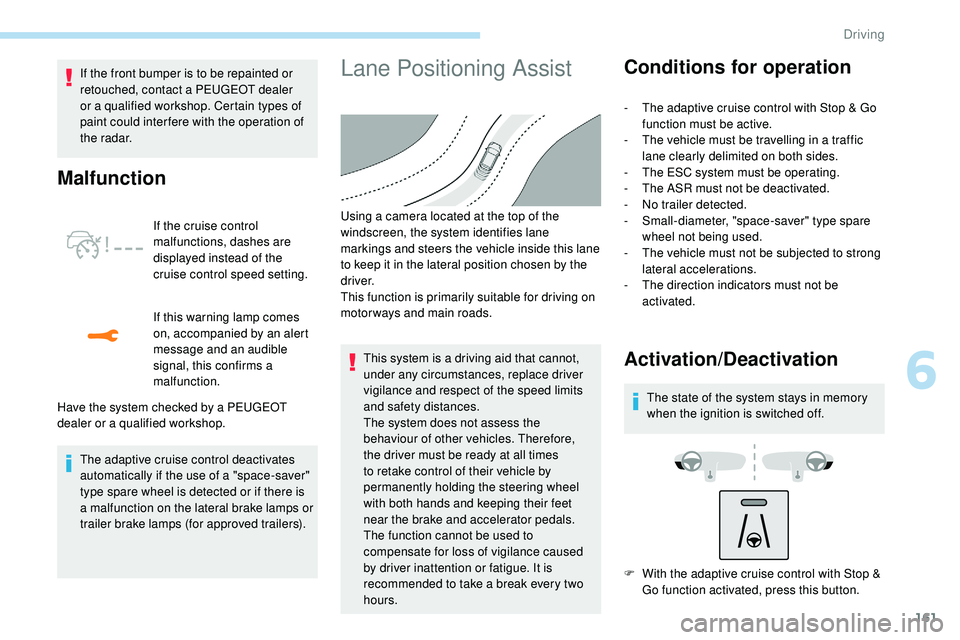
dealer or a qualified workshop. Using a camera located at the top of the
windscreen, the system identifies lane
markings and steers the vehicle inside this lane
to keep it in the lateral position chosen by the
driver.
This function is primarily suitable for driving on
motor ways and main roads.
This system is a driving aid that cannot,
under any circumstances, replace driver
vigilance and respect of the speed limits
and safety distances.
The system does not assess the
behaviour of other vehicles. Therefore,
the
driver must be ready at all times
to retake control of their vehicle by
permanently holding the steering wheel
with both hands and keeping their feet
near the brake and accelerator pedals.
The function cannot be used to
compensate for loss of vigilance caused
by driver inattention or fatigue. It is
recommended to take a break every two
hours.
Conditions for operation
- The adaptive cruise control with Stop & Go function must be active.
-
T
he vehicle must be travelling in a traffic
lane clearly delimited on both sides.
-
T
he ESC system must be operating.
-
T
he ASR must not be deactivated.
-
N
o trailer detected.
-
S
mall-diameter, "space-saver" type spare
wheel not being used.
-
T
he vehicle must not be subjected to strong
lateral accelerations.
-
T
he direction indicators must not be
activated.
Activation/Deactivation
The state of the system stays in memory
when the ignition is switched off.
F
W
ith the adaptive cruise control with Stop &
Go function activated, press this button.
6
Driving
Page 164 of 320
162
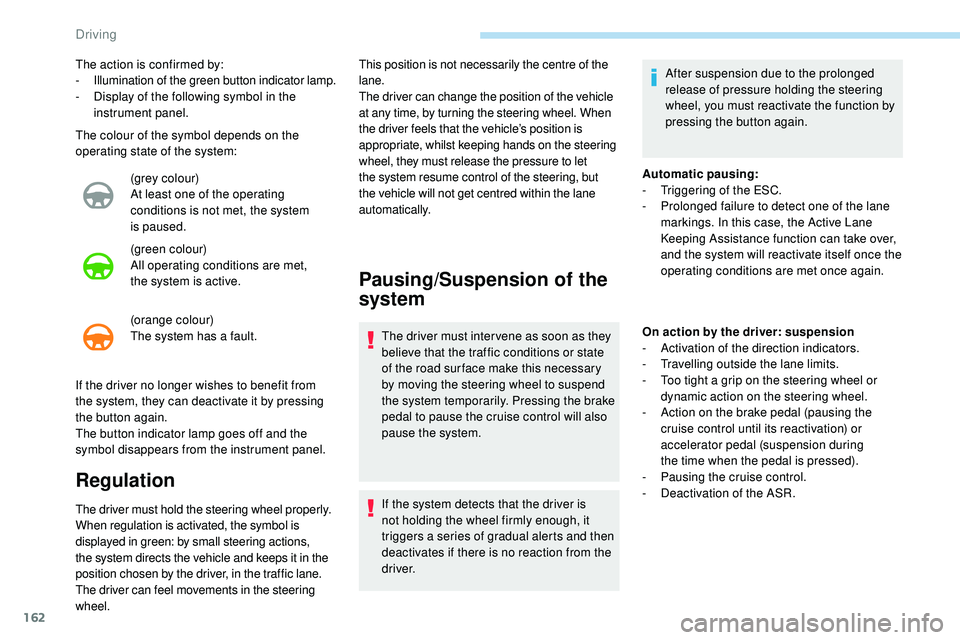
The colour of the symbol depends on the
operating state of the system:(grey colour)
At least one of the operating
conditions is not met, the system
is
paused.
(green colour)
All operating conditions are met,
the
system is active.
(orange colour)
The system has a fault.
The action is confirmed by:
-
I
llumination of the green button indicator lamp.
-
D
isplay of the following symbol in the
instrument panel.
If the driver no longer wishes to benefit from
the system, they can deactivate it by pressing
the
button again.
The button indicator lamp goes off and the
symbol disappears from the instrument panel.
Regulation
The driver must hold the steering wheel properly.
When regulation is activated, the symbol is
displayed in green: by small steering actions,
the system directs the vehicle and keeps it in the
position chosen by the driver, in the traffic lane.
The driver can feel movements in the steering
wheel. This position is not necessarily the centre of the
lane.
The driver can change the position of the vehicle
at any time, by turning the steering wheel. When
the driver feels that the vehicle’s position is
appropriate, whilst keeping hands on the steering
wheel, they must release the pressure to let
the system resume control of the steering, but
the vehicle will not get centred within the lane
automatically.
Pausing/Suspension of the
system
The driver must inter vene as soon as they
believe that the traffic conditions or state
of the road sur face make this necessary
by moving the steering wheel to suspend
the system temporarily. Pressing the brake
pedal to pause the cruise control will also
pause the system.
If the system detects that the driver is
not holding the wheel firmly enough, it
triggers a series of gradual alerts and then
deactivates if there is no reaction from the
driver.
Automatic pausing:
-
T
riggering of the ESC.
-
P
rolonged failure to detect one of the lane
markings. In this case, the Active Lane
Keeping Assistance function can take over,
and the system will reactivate itself once the
operating conditions are met once again.
On action by the driver: suspension
- A ctivation of the direction indicators.
-
T
ravelling outside the lane limits.
-
T
oo tight a grip on the steering wheel or
dynamic action on the steering wheel.
-
A
ction on the brake pedal (pausing the
cruise control until its reactivation) or
accelerator pedal (suspension during
the
time when the pedal is pressed).
-
P
ausing the cruise control.
-
D
eactivation of the ASR.
After suspension due to the prolonged
release of pressure holding the steering
wheel, you must reactivate the function by
pressing the button again.
Driving
Page 165 of 320
163
70
70
Driving situations and associated alerts
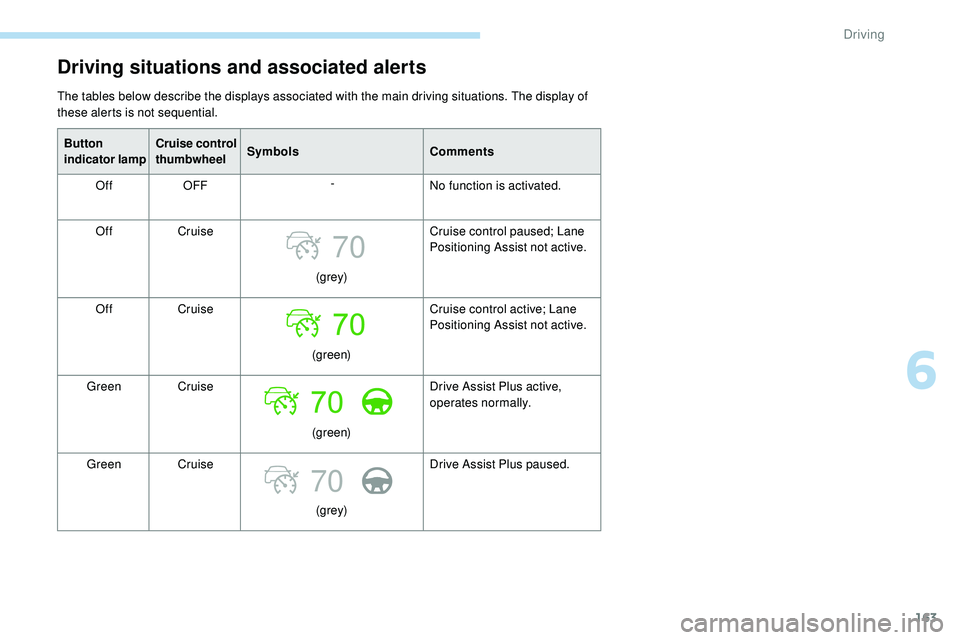
The tables below describe the displays associated with the main driving situations. The display of
these alerts is not sequential.Button
indicator lamp Cruise control
thumbwheel
Symbols
Comments
Off OFF -
No function is activated.
Off Cruise
(grey)Cruise control paused; Lane
Positioning Assist not active.
Off Cruise
(green)Cruise control active; Lane
Positioning Assist not active.
Green Cruise
(green)Drive Assist Plus active,
operates normally.
Green Cruise
(grey)Drive Assist Plus paused.
6
Driving
Page 166 of 320
164
70
--
Button indicator
lampCruise control
thumbwheel
Symbols
Comments
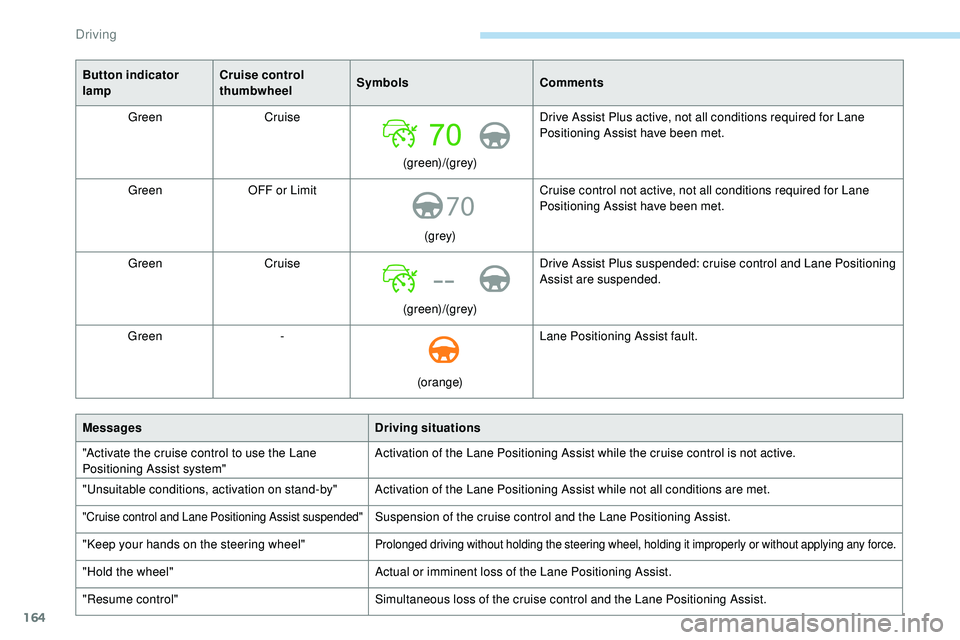
Green Cruise
(green)/(grey)Drive Assist Plus active, not all conditions required for Lane
Positioning Assist have been met.
Green OFF or Limit
(grey)Cruise control not active, not all conditions required for Lane
Positioning Assist have been met.
Green Cruise
(green)/(grey)Drive Assist Plus suspended: cruise control and Lane Positioning
Assist are suspended.
Green -
(orange)Lane Positioning Assist fault.
Messages Driving situations
"Activate the cruise control to use the Lane
Positioning Assist system" Activation of the Lane Positioning Assist while the cruise control is not active.
"Unsuitable conditions, activation on stand-by" Activation of the Lane Positioning Assist while not all conditions are met.
"Cruise control and Lane Positioning Assist suspended"Suspension of the cruise control and the Lane Positioning Assist.
"Keep your hands on the steering wheel"
Prolonged driving without holding the steering wheel, holding it improperly or without applying any force.
"Hold the wheel" Actual or imminent loss of the Lane Positioning Assist.
"Resume control" Simultaneous loss of the cruise control and the Lane Positioning Assist.
Driving
Page 168 of 320
166
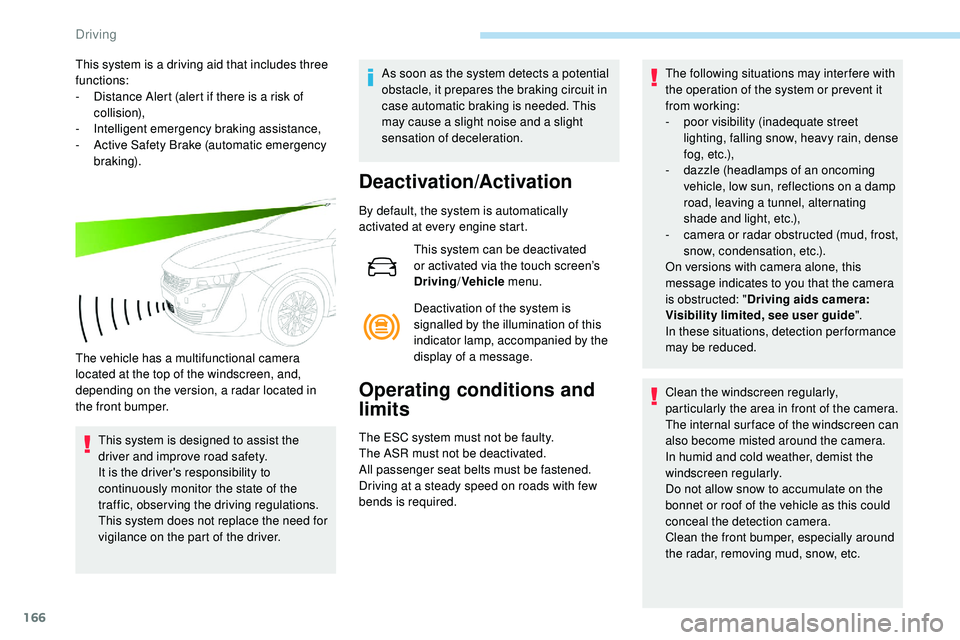
This system is a driving aid that includes three
functions:
-
D
istance Alert (alert if there is a risk of
collision),
-
I
ntelligent emergency braking assistance,
-
A
ctive Safety Brake (automatic emergency
b r ak ing).
The vehicle has a multifunctional camera
located at the top of the windscreen, and,
depending on the version, a radar located in
the front bumper. This system is designed to assist the
driver and improve road safety.
It is the driver's responsibility to
continuously monitor the state of the
traffic, observing the driving regulations.
This system does not replace the need for
vigilance on the part of the driver. As soon as the system detects a potential
obstacle, it prepares the braking circuit in
case automatic braking is needed. This
may cause a slight noise and a slight
sensation of deceleration.
Deactivation/Activation
By default, the system is automatically
activated at every engine start.
This system can be deactivated
or activated via the touch screen’s
Driving/Vehicle menu.
Deactivation of the system is
signalled by the illumination of this
indicator lamp, accompanied by the
display of a message.
Operating conditions and
limits
The ESC system must not be faulty.
The ASR must not be deactivated.
All passenger seat belts must be fastened.
Driving at a steady speed on roads with few
bends is required. The following situations may interfere with
the operation of the system or prevent it
from working:
-
p
oor visibility (inadequate street
lighting, falling snow, heavy rain, dense
f o g , e t c .),
-
d
azzle (headlamps of an oncoming
vehicle, low sun, reflections on a damp
road, leaving a tunnel, alternating
shade and light, etc.),
-
c
amera or radar obstructed (mud, frost,
snow, condensation, etc.).
On versions with camera alone, this
message indicates to you that the camera
is obstructed: " Driving aids camera:
Visibility limited, see user guide".
In these situations, detection performance
may be reduced.
Clean the windscreen regularly,
particularly the area in front of the camera.
The internal sur face of the windscreen can
also become misted around the camera.
In humid and cold weather, demist the
windscreen regularly.
Do not allow snow to accumulate on the
bonnet or roof of the vehicle as this could
conceal the detection camera.
Clean the front bumper, especially around
the radar, removing mud, snow, etc.
Driving
Page 172 of 320

170
After three first level alerts, the system triggers
a new alert with the message "Take a break!",
accompanied by a more pronounced audible
signal. When the system interprets the behaviour of
the vehicle as indicating a certain fatigue or
inattention threshold on the part of the driver,
it triggers the first level of alert.
The driver is then alerted by the message
" Ta k e c a r e ! ", accompanied by an audible
signal.
Active Blind Spot
Monitoring System
In addition to the fixed warning lamp in the door
mirror on the side in question, a correction of
trajectory will be felt if you attempt to cross a
lane marking with the direction indicators on,
to
help you avoid a collision.
This system is the combination of the Active
Lane Keeping Assistance and Blind Spot
Detection.
These two functions must be activated and in
operation.
The speed of the vehicle must be between
40
and 87 mph (65 and 140 km/h) inclusive.
These functions are especially suitable for
driving on motor ways and main roads.
For more information on the Active Lane
Keeping Assistance and Blind Spot
Detection , refer to the corresponding sections.
This system is a driving aid which cannot,
in any circumstances, replace the need for
vigilance on the part of the driver.
In certain driving conditions (poor road
sur face or strong winds), the system may
give alerts independent of the driver's
level of vigilance. The following situations may interfere with
the operation of the system or prevent it
from working:
-
p
oor visibility (inadequate lighting of
the roadway, falling snow, heavy rain,
dense fog, etc.),
-
d
azzle (headlamps of an oncoming
vehicle, low sun, reflections on a damp
road, leaving a tunnel, alternating
shade and light, etc.),
-
w
indscreen area located in front of the
camera: dirty, misted up, frost-covered,
snow-covered, damaged or covered by
a s t i c ke r,
-
l
ane markings absent, worn, hidden
(snow, mud) or multiple (roadworks,
e t c .),
-
c
lose to the vehicle ahead (lane
markings not detected),
-
r
oads that are narrow, winding, etc.
Clean the windscreen regularly,
particularly the area in front of the camera.
The internal sur face of the windscreen can
also become misted around the camera.
In humid and cold weather, demist the
windscreen regularly.
Do not allow snow to accumulate on the
bonnet or roof of the vehicle as this could
conceal the detection camera.
Driving
Page 173 of 320

171
Active Lane Keeping
Assistance
Using a camera located at the top of the
windscreen to identify lane markings on the
ground and the edges of the road (depending
on version), the system corrects the trajectory
of the vehicle while alerting the driver if it
detects a risk of involuntarily crossing a line or
hard shoulder (depending on version).
This system is particularly useful on motor ways
and main roads.
Conditions for operation
The speed of the vehicle must be between
40 mph and 112 mph (65 km/h and 180 km/h).
The driver must hold the steering wheel with
both hands.
The change of trajectory must not be
accompanied by operation of the direction
indicators.
The ESC system must be activated and fault-
free. This system is a driving aid that cannot,
in any circumstances, replace the
driver’s own vigilance. The driver must
remain in control of the vehicle under all
circumstances.
The system helps the driver only when
there is a risk of the vehicle involuntarily
wandering from the lane it is being driven
in. It does not manage the safe driving
distance, the speed of the vehicle or the
brakes.
The driver must hold the steering wheel
with both hands in a way that allows
control to be maintained in circumstances
where the system is not able to inter vene
(if lane markings disappear, for example).
It is necessary to obser ve the driving
regulations and take a break every two
hours.
Operation
Once the system identifies a risk of the vehicle
involuntarily crossing one of the lane markings
detected on the ground or a lane limit (e.g.
grass border), it makes the correction to the
trajectory necessary to return the vehicle to its
initial path.
The driver will notice a turning movement of the
steering wheel.
This warning lamp flashes during
trajectory correction. If the driver wishes to maintain the
trajectory of the vehicle, they can prevent
the correction by keeping a firm grip on
the wheel (during an avoiding manoeuvre,
for example).
The correction is interrupted if the
direction indicators are operated.
While the direction indicators are on and for
a few seconds after switching them off, the
system considers that any change of trajectory
is voluntary and no correction is triggered
during this period.
However, with the Blind Spot Detection
activated, if the driver starts changing lanes
and another vehicle is detected in the vehicle's
blind spot, the system will correct the trajectory
of the vehicle even though the direction
indicators are on.
For more information on the Blind Spot
Detection , refer to the corresponding section.
6
Driving
Page 174 of 320
172
If the system detects that the driver is not
holding the wheel firmly enough during
an automatic correction of trajectory,
it interrupts the correction. An alert is
triggered to encourage the driver to take
back control of the vehicle.
Driving situations and
associated alerts
To benefit from all necessary information in the
instrument panel, you must previously select
the "DRIVING" display mode.
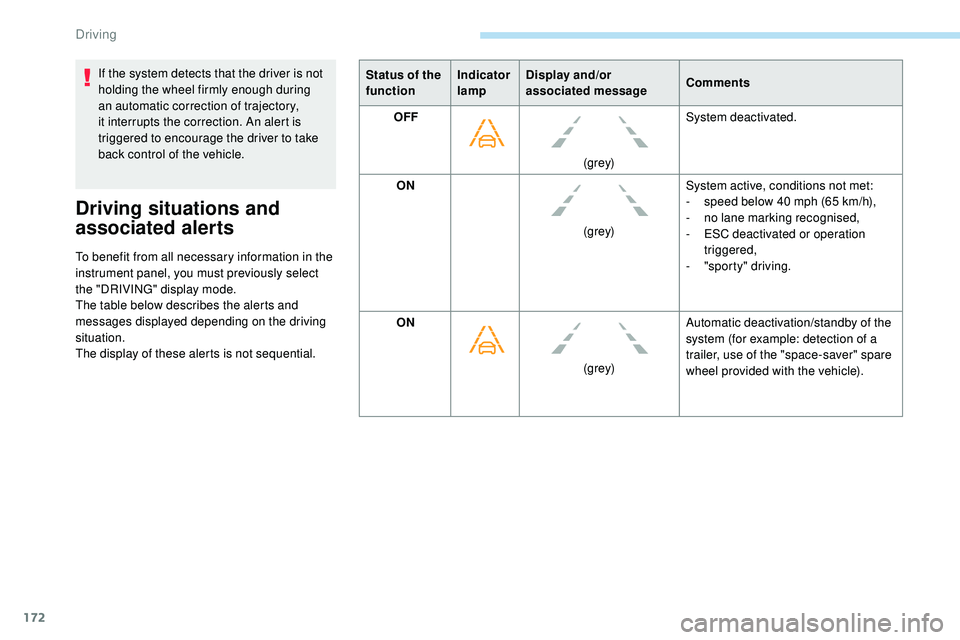
The table below describes the alerts and
messages displayed depending on the driving
situation.
The display of these alerts is not sequential.Status of the
function
Indicator
lampDisplay and/or
associated message
Comments
OFF
(grey)System deactivated.
ON (grey)System active, conditions not met:
-
s
peed below 40 mph (65 km/h),
-
n
o lane marking recognised,
-
ES
C deactivated or operation
triggered,
- " sporty" driving.
ON (grey)Automatic deactivation/standby of the
system (for example: detection of a
trailer, use of the "space-saver" spare
wheel provided with the vehicle).
Driving