2019 Peugeot 508 Indicator
[x] Cancel search: IndicatorPage 175 of 320
173
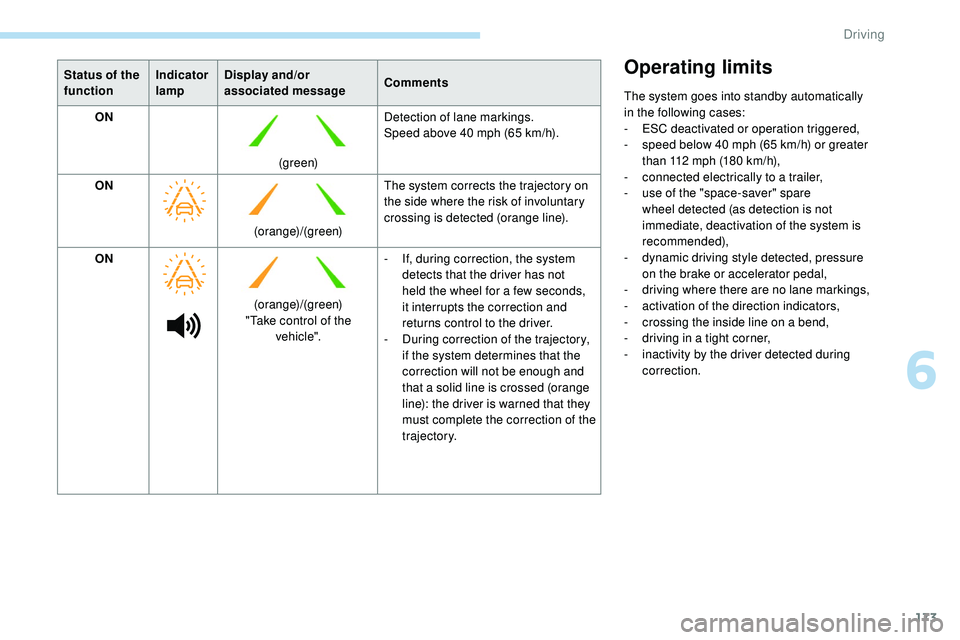
Status of the
functionIndicator
lampDisplay and/or
associated message
Comments
ON
(green)Detection of lane markings.
Speed above 40 mph (65 km/h).
ON (orange)/(green)The system corrects the trajectory on
the side where the risk of involuntary
crossing is detected (orange line).
ON
(orange)/(green)
"Take control of the vehicle". -
I
f, during correction, the system
detects that the driver has not
held the wheel for a few seconds,
it interrupts the correction and
returns control to the driver.
-
D
uring correction of the trajectory,
if the system determines that the
correction will not be enough and
that a solid line is crossed (orange
line): the driver is warned that they
must complete the correction of the
trajectory.Operating limits
The system goes into standby automatically
in the following cases:
-
E
SC deactivated or operation triggered,
-
s
peed below 40 mph (65 km/h) or greater
than 112 mph (180 km/h),
-
c
onnected electrically to a trailer,
-
u
se of the "space-saver" spare
wheel detected (as detection is not
immediate, deactivation of the system is
recommended),
-
d
ynamic driving style detected, pressure
on
the brake or accelerator pedal,
-
d
riving where there are no lane markings,
-
a
ctivation of the direction indicators,
-
c
rossing the inside line on a bend,
-
d
riving in a tight corner,
-
i
nactivity by the driver detected during
correction.
6
Driving
Page 176 of 320
174
The following situations may interfere with
the operation of the system or prevent it
working:
-
c
onditions of poor visibility (inadequate
street lighting, snowfall, rain, fog),
-
d
azzle (headlamps of an oncoming
vehicle, low sun, reflections on a damp
road, leaving a tunnel, alternating
shade and light),
-
w
indscreen area located in front of the
camera: dirty, misted, frost-covered,
snow-covered, damaged or covered by
a s t i c ke r,
-
l
ane markings worn, hidden (snow,
mud) or multiple (roadworks, etc.),
-
r
unning close to the vehicle in front
(the lane markings may not be
detected),
-
r
oads that are narrow, winding, etc.
Risk of undesirable operation
- driving with a trailer,
- d riving on a rolling stand,
-
d
riving on unstable sur faces.
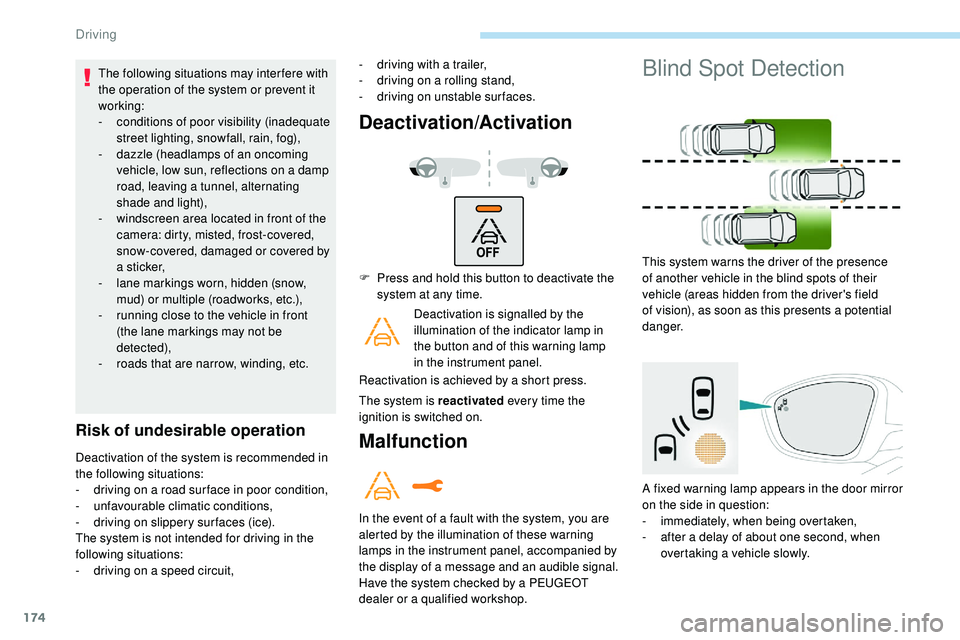
Deactivation/Activation
Deactivation of the system is recommended in
the following situations:
-
d
riving on a road sur face in poor condition,
-
u
nfavourable climatic conditions,
-
d
riving on slippery sur faces (ice).
The system is not intended for driving in the
following situations:
-
d
riving on a speed circuit, F
P
ress and hold this button to deactivate the
system at any time.
Deactivation is signalled by the
illumination of the indicator lamp in
the button and of this warning lamp
in the instrument panel.
Reactivation is achieved by a short press.
The system is reactivated every time the
ignition is switched on.Malfunction
In the event of a fault with the system, you are
alerted by the illumination of these warning
lamps in the instrument panel, accompanied by
the display of a message and an audible signal.
Have the system checked by a PEUGEOT
dealer or a qualified workshop.
Blind Spot Detection
This system warns the driver of the presence
of another vehicle in the blind spots of their
vehicle (areas hidden from the driver's field
of vision), as soon as this presents a potential
danger.
A fixed warning lamp appears in the door mirror
on the side in question:
-
i
mmediately, when being overtaken,
-
a
fter a delay of about one second, when
overtaking a vehicle slowly.
Driving
Page 187 of 320

185
The selection is accompanied by
this indicator lamp coming on.
Parking space search
F You should drive at a distance of between 0.50 m and 1.50 m from the row of parked
vehicles, without ever exceeding 19 mph
(30
km/h), until the system finds an available
space.
The parking space search stops over this limit.
The function automatically deactivates once
the vehicle speed exceeds 31 mph (50 km/h).
For "parallel" parking, the space must at
a minimum be equal to the length of your
vehicle plus 0.60 m.
For "bay" parking, the width of the space
must be equal to the width of your vehicle
plus 0.70 m.
If the parking sensors function has been
deactivated in the Driving/Vehicle menu
of the touch screen, it will be automatically
reactivated when the system is activated. When the system finds an available space,
"
OK " is displayed on the parking view,
accompanied by an audible signal.
Preparing for the
manoeuvre
F Move very slowly until the request to stop the vehicle is displayed: " Stop the vehicle"
and the " STOP" sign, accompanied by an
audible signal. Once the vehicle has stopped, an instructions
page is displayed on the screen.
F
T
o prepare for the manoeuvre, follow the
instruction.
This symbol is displayed to confirm
that you have followed the instructions.
The start of the manoeuvre is indicated by
the display of this page, with the message
" Manoeuvre under way ", accompanied by an
audible signal.
Reversing is indicated by this message:
" Release the steering wheel, reverse ".
6
Driving
Page 188 of 320

186
7
5
Visiopark 1 or Visiopark 2 and the parking
sensors are automatically activated to help
you monitor the close surrounding area of your
vehicle during the manoeuvre.
During the manoeuvre
The system takes over the vehicle's steering. It
gives instructions on the manoeuvring direction
when starting the entry and exit parallel parking
manoeuvres and for all entry manoeuvres for
bay parking.
There instructions are displayed as a symbol
accompanied by a message:
The manoeuvring status is indicated by these
symbols:The maximum speed limit indications during
the manoeuvres are signalled by these
symbols:
" Reverse "
" Advance "
Manoeuvre in progress (green).
Manoeuvre cancelled or finished
(red) (the arrows indicate that the
driver must take back control of the
vehicle). 5 mph or 7
km/h, for parking space
e nt r y.
3 mph or 5 km/h, for parking space
exit.
During a manoeuvre, the steering wheel
turns quickly: do not hold the steering
wheel, do not place your hand between
the spokes of the steering wheel. Watch
out for anything likely to block the
manoeuvre (loose and bulky clothing,
scar ves, ties, etc.) – Risks of injury!
It is the driver's responsibility to monitor
the state of the traffic continuously,
especially vehicles coming towards you.
The driver should check that no object
or person can hinder the advance of the
vehicle.
The images from the camera(s) displayed
on the touch screen may be distorted by
the relief.
In the presence of areas in shade, or in
conditions of bright sunlight or inadequate
lighting, the image may be darkened and
with lower contrast. The manoeuvre can be interrupted definitively
at any time, either by the driver or by the
system automatically.
By the driver's action:
-
t
aking over control of the steering,
-
a
ctivating the direction indicator lamps on
the opposite side to that of the manoeuvre,
- u nfastening the driver's seat belt,
-
s
witching off the ignition.
Interruption by the system:
-
e
xceeding the speed limit: 5 mph or 7 km/h
during the parking space entry manoeuvres
and 3 mph or 5 km/h during the parking
space exit manoeuvres,
-
t
riggering of the anti-slip regulation on a
slippery road,
-
o
pening of a door or the boot,
-
s
talling of the engine,
-
s
ystem malfunction,
-
a
fter 10 manoeuvres to enter or exit
a parallel parking space and after 7
manoeuvres to enter a parking bay.
Interrupting the manoeuvre automatically
deactivates the function.
Driving
Page 189 of 320

187
The manoeuvre symbol is displayed in red,
accompanied by the "Manoeuvre cancelled "
message on the touch screen.
A message encourages the driver to take back
control of the vehicle.
The function is deactivated after
a few seconds, this indicator lamp
goes off and the function returns to
the initial display.
End of the parking space
entry or exit manoeuvre
The vehicle stops as soon as the manoeuvre is
completed.
The manoeuvring symbol is displayed in red
accompanied by the " Manoeuvre completed "
message on the touch screen.
Deactivation of the function is
confirmed by this indicator lamp
going off, accompanied by an
audible signal. If entering a parking space, the driver may be
required to complete the manoeuvre.
Operating limits
- The system may suggest an inappropriate
parking space (parking prohibited, work
in progress with damaged road sur face,
location alongside a ditch, etc.).
-
T
he system may indicate that a space
was found but will not offer it because of
a fixed obstacle on the opposite side of
the manoeuvre which would not allow the
vehicle to follow a trajectory required for
parking.
-
T
he system is not designed for per forming
the parking manoeuvre on a sharp curve.
-
T
he system does not detect spaces that are
much larger than the vehicle itself or that
are delimited by obstacles that are too low
(pavements, studs, etc.) or too thin (trees,
posts, wire fences, etc.).
-
C
ertain obstacles located in the sensors’
blind spots may not be detected or no
longer be detected during the manoeuvre.
-
C
ertain materials (fabrics) absorb sound
waves: pedestrians may not be detected. -
A f
ront or rear impact to the vehicle can
upset the sensors’ settings, which is not
always detected by the system: distance
measurements may be falsified.
-
I
f the boot is heavily loaded, the tilt of the
vehicle towards the rear may inter fere with
the distance measurements.
The vehicle's sensors and camera(s) may be
impaired by:
-
a
ccumulated snow or fallen leaves on the
road,
-
a
dverse weather conditions (heavy rain,
thick fog, falling snow),
-
nois
e interference from noisy vehicles and
machinery (lorries, pneumatic drills, etc.).
Do not use the function under the
following exterior conditions:
-
A
longside a soft shoulder (ditch, etc.)
or quay or on a cliff edge.
-
W
hen the road sur face is slippery
( i c e ,
e t c .)
Do not use the function in presence of one
of the following malfunctions:
-
U
nder-inflation of a tyre.
-
I
f one of the bumpers is damaged,
-
I
f one of the cameras is faulty.
6
Driving
Page 190 of 320

188
Do not use the function in presence of one
of the following modifications:
-
W
hen carrying an object extending
beyond the vehicle size (ladder on
the roof bars, bicycle carrier on the
tailgate, etc.).
-
W
ith a non-approved towball in place.
-
W
ith snow chains fitted.
-
W
hen driving on a small-diameter or
"space-saver" type spare wheel.
-
W
hen the wheels fitted are a different
size from the original ones.
-
A
fter modifying one or both bumpers
(added protection, etc.).
-
I
f the sensors have been repainted
outside the PEUGEOT dealer network.
-
W
ith sensors not approved for your
vehicle.
Maintenance
recommendations Operating faults
When the function is not activated,
this indicator lamp temporarily
flashing and an audible signal
indicate a system fault.
If the fault occurs during the use of the system,
the indicator lamp goes off. If the fault in the parking sensors,
indicated by this warning lamp
coming on, occurs during use, it
causes the function to deactivate.
In the event of a fault, have the system checked
by a PEUGEOT dealer or a qualified workshop.
In the event of a fault with the
power steering, this warning lamp
flashes in the instrument panel,
accompanied by a message.
You must stop as soon as it is safe to do so.
Contact a PEUGEOT dealer or a qualified
workshop.
-
R
egularly check that the sensors and
cameras are clean.
If necessary, clean the camera lenses with
a soft, dry cloth.
-
I
f using a high-pressure washer, do not
direct the spray less than 30 cm from the
sensors and cameras.
-
I
n bad weather, or during the winter, ensure
that the sensors and cameras are not
covered with mud, ice or snow.
Full Park Assist
This system provides active assistance with
parking: it detects a parking space then
operates the vehicle to park it in this space,
without intervention from the driver.
Associated with the EAT8 automatic gearbox,
the system manages control of the steering,
direction, acceleration and braking.
To assist the driver in monitoring the
correct manoeuvring operation, the system
automatically triggers the display of Visiopark 1
or Visiopark 2 and the activation of the parking
sensors.
Driving
Page 192 of 320

190
Operation
F When approaching a parking area, reduce the speed of your vehicle to a maximum of
19 mph (30
km/h).
Function activation
Activating the function can be done in two
ways:F
P
ress this button, located on the
gearbox selector.
or F
Sel
ect "Park Assist " in the
Driving/Vehicle menu of the
touch screen.
Activating the function deactivates Blind
Spot Detection.
At any time, up to starting the entry
manoeuvre or leaving the parking space,
pressing the red arrow located in the
top left-hand corner of the display page
deactivates the function.
Selecting the type of
manoeuvre
A manoeuvre selection page is displayed on
the touch screen: by default, the " Entry" page if
the vehicle has been running since the ignition
was switched on, other wise, the " Exit" page.
F
S
elect the type and side of the manoeuvre
to activate the parking space search.
The selected manoeuvre can be changed
at any time, even when searching for an
available space.
This indicator lamp comes on to
confirm the selection.
Parking space search
F You should drive at a distance of between 0.50 m and 1.50 m from the row of parked
vehicles, without ever exceeding 19 mph
(30
km/h), until the system finds an available
space.
The parking space search stops over this limit.
The function automatically deactivates as soon
as the vehicle speed exceeds 31 mph (50
km/h)
For "parallel" parking, the space must at
a minimum be equal to the length of your
vehicle plus 1
m.
For "bay" parking, the width of the space
must be equal to the width of your vehicle
plus 0.70
m.
If you have deactivated the parking
sensors function, it will be automatically
reactivated when activating Full Park
Assist.
Driving
Page 195 of 320

193
- Resuming the manoeuvre, after resolving the suspension conditions:
•
r
elease all controls (brake pedal, function
control button, steering wheel, etc.)
•
p
ress the function control button again.
-
P
ermanent interruption after suspending
the manoeuvre:
•
p
ress the brake pedal and engage a gear. -
s udden appearance in the field of the
manoeuvre of an obstacle not detected
by the system before the manoeuvre was
started, with the obstacle remaining for
more than 30 seconds,
-
a
fter ten manoeuvres to enter or exit a
parallel parking space and after seven
manoeuvres to enter a bay parking space,
-
s
ystem malfunction during the manoeuvre.
Abandoning the manoeuvre immediately
triggers the vehicle’s brakes and automatically
deactivates the function. This symbol is displayed on the
touch screen, accompanied by the
message " Manoeuvre abandoned ".
A message encourages the driver to take back
control of their vehicle. The function is deactivated after
a few seconds, this indicator lamp
goes off and the initial display is
resumed.
The system automatically engages mode P of
the gearbox after 4 seconds.
The manoeuvre is abandoned in the following
situations:
-
n
o action from the driver during the 30
seconds following the manoeuvre being
suspended,
-
v
oluntary application of the parking brake,
-
enga
gement of gearbox mode P by the
driver,
-
u
nfastening of the driver's seat belt,
-
o
pening of a door or the boot,
-
a
ctivation of the direction indicator lamps on
the opposite side to that of the manoeuvre,
-
i
n certain cases, when a wheel of the
vehicle hits a pavement or a low obstacle,
-
t
riggering of the anti-slip regulation (traction
control) on a slippery road sur face,
-
s
talling of the engine,End of the manoeuvre
to enter or exit a parking
space
The vehicle stops as soon as the manoeuvre is
completed. This symbol is displayed on the
touch screen, accompanied by the
message " Manoeuvre completed ".
The function is deactivated after
a few seconds, this indicator lamp
goes off and the initial display is
resumed.
-
I
f entering a parking space, the driver may
be required to complete the manoeuvre.
The gearbox changes to P 4 seconds after
completion of the manoeuvre.
-
I
n the case of a parking space exit
manoeuvre, the gearbox changes to N .
With a message and symbols, the driver
is encouraged to resume control of their
vehicle: take hold of the steering wheel,
engage mode D or R of the gearbox and
accelerate when traffic conditions allow.
After a delay of 30 seconds with no action
from the driver, the gearbox automatically
changes to mode P .
6
Driving