Re
ar view camera Fu
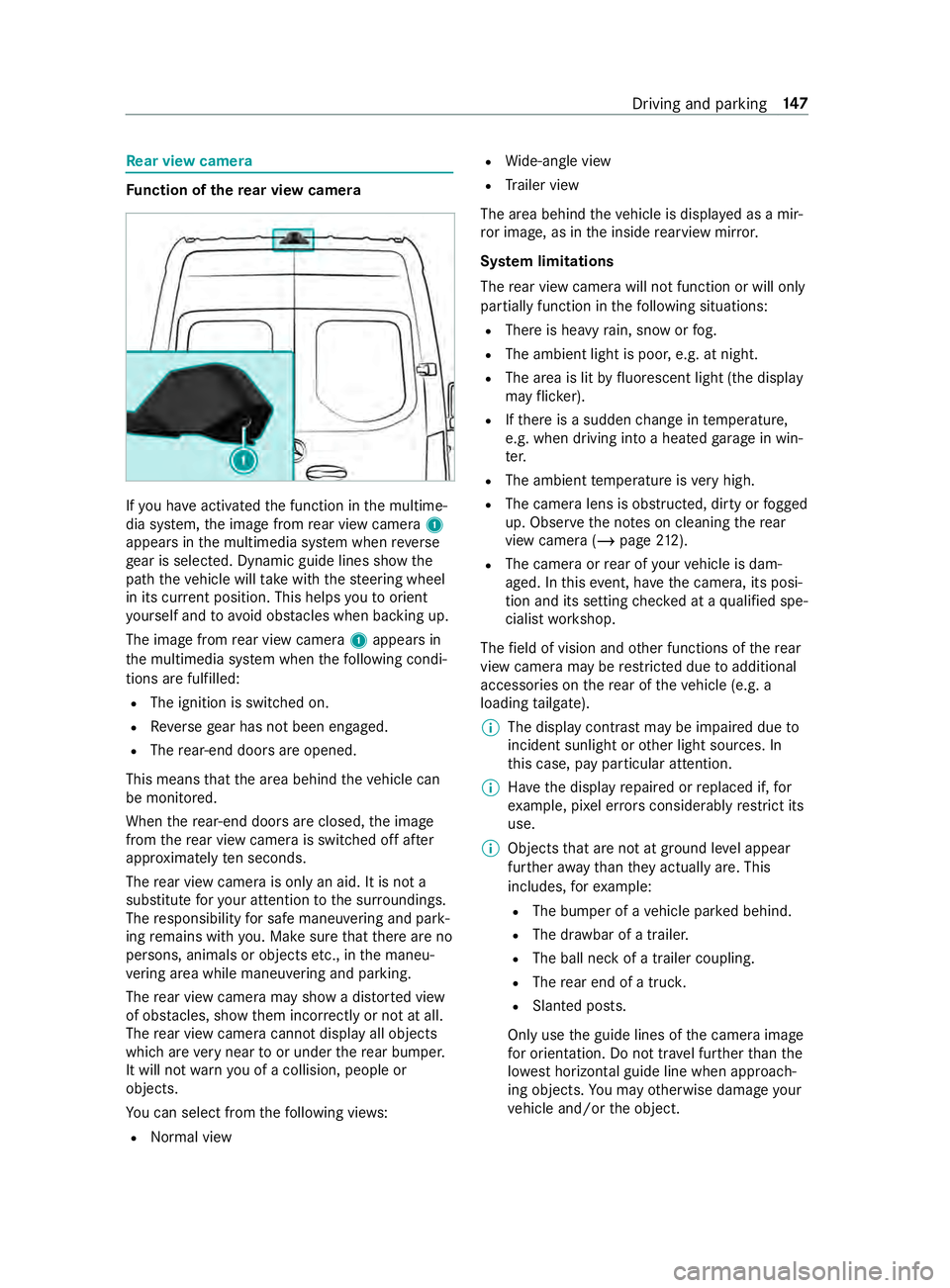
nction of there ar view camera If
yo u ha veactivated the function in the multime‐
dia sy stem, the image from rear view camera 1
appears in the multimedia sy stem when reve rse
ge ar is selec ted. Dynamic guide lines show the
path theve hicle will take with thesteering wheel
in its cur rent position. This helps youto orient
yo urself and toavo id obs tacles when ba cking up.
The image from rear view camera 1appears in
th e multimedia sy stem when thefo llowing condi‐
tions are fulfilled:
R The ignition is switched on.
R Reversege ar has not been engaged.
R The rear-end doors are opened.
This means that the area behind theve hicle can
be monitored.
When there ar-end doors are closed, the image
from there ar view camera is swit ched off af ter
appr oximately ten seconds.
The rear view camera is only an aid. It is not a
substitute foryo ur attention tothe sur roundings.
The responsibility for safe maneu vering and pa rk‐
ing remains with you. Make sure that there are no
persons, animals or objects etc., in the maneu‐
ve ring area while maneuvering and pa rking.
The rear view camera may show a dis torted view
of obs tacles, show them incor rectly or not at all.
The rear view camera cannot display all objects
which are very near toor under there ar bumper.
It will not warnyou of a collision, people or
objects.
Yo u can select from thefo llowing vie ws:
R Norma l view R
Wide-angle view
R Trailer view
The area behind theve hicle is displa yed as a mir‐
ro r image, as in the inside rearview mir ror.
Sy stem limitations
The rear view camera will not function or will only
partially function in thefo llowing situations:
R There is heavy rain, snow or fog.
R The ambient light is poor, e.g. at night.
R The area is lit byfluorescent light (the displ ay
may flic ke r).
R Ifth ere is a sudden change in temp erature,
e.g. when driving into a heated garage in win‐
te r.
R The ambient temp erature is very high.
R The camera lens is obstructed, dirty or fogged
up. Obser vethe no tes on cleaning there ar
view camera (/ page212).
R The camera or rear of your vehicle is dam‐
aged. In this event, ha vethe camera, its posi‐
tion and its setting checked at a qualified spe‐
cialist workshop.
The field of vision and other functions of there ar
view camera may be restricted due toadditional
accesso ries on there ar of theve hicle (e.g. a
loading tailgate).
% The display contrast may be impaired due
to
incident sunlight or other light sources. In
th is case, pay particular attention.
% Ha
ve the display repaired or replaced if, for
ex ample, pixel er rors considerably restrict its
use.
% Objects that are not at ground le vel appear
fur ther aw ay than they actually are. This
includes, forex ample:
R The bumper of a vehicle par ked behind.
R The dr awbar of a trailer.
R The ball neck of a trailer coupling.
R The rear end of a truc k.
R Slanted posts.
Only use the guide lines of the camera image
fo r orientation. Do not tr avel fur ther than the
lo west horizontal guide line when approach‐
ing objects. You may otherwise damage your
ve hicle and/or the object. Driving and parking
147
In trailer mode,
the guide lines are shown at
th e le vel of the trailer hitch.
Vi ew of trailer (if trailer hit chis installed) Vi
ew of trailer (if trailer hitch is ins talled)
1 Yellow guide line, locating aid
2 Red guide line at a dis tance of appr oximately
1. 0 in (0.3 m) from the ball head of the trailer
hitch
3 Ball head of the trailer hitch
Side view of the mir ror came ras
The sides of theve hicle can be seen in this vie w. 1
Lane indicating thero ute theve hicle will take
with thesteering wheel in its cur rent position
2 Yellow warning display of Parking Assist
PA RKTRONIC: obstacles at a dis tance of
appr oximately 3.3 ft(1.0 m) or less
3 Your vehicle from abo ve
4 Marker of the wheel contact points
5 Guide line of extern al vehicle dimensions
with outside mir rors folded out
If th e dis tance tothe object lessens, the color of
wa rning display 2changes.
Sy stem failure
If th ere is no operational readiness, thefo llowing
message appears in the multimedia sy stem: Sy
stem limitations
The 360° Camera will not function or will only
partially function in thefo llowing situations:
R The front doors are open.
R The side mir rors are folded in.
R There is heavy rain, snow or fog.
R The ambient light is poor, e.g. at night.
R The area is lit byfluorescent light (the displ ay
may flic ke r).
R Ifth ere is a sudden change in temp erature,
e.g. when driving into a heated garage in win‐
te r.
R The ambient temp erature is very high.
R The camera lens is obstructed, dirty or fogged
up.
R Cameras, or vehicle components in which the
came ras are ins talled, are damaged. In this
eve nt, ha vethe cameras, their positions and
th eir setting checked at a qualified specialist
wo rkshop.
Do not use the 360° Camera under such circum‐
st ances. You could otherwise injure others or col‐
lide with objects when parking theve hicle.
On vehicles with height-adjus table suspension or
if th eve hicle is car rying a heavy load, leaving the
st andard height can result in inaccuracies in the
guide lines and in the display of thege nerated
ima ges, depending on tech nical conditions.
The field of vision and other functions of the cam‐
era sy stem may be restricted due toadditional
attachments on theve hicle (e.g. loading tailgate).
% The contrast of
the display may be impaired
by abrupt direct sunlight or by other light
sources, e.g. when driving out of a garage . In
th is case, pay particular attention.
% Ha
ve the display repaired or replaced if, for
ex ample, pixel er rors considerably restrict its
use. 15 0
Driving and pa rking