2019 MERCEDES-BENZ SPRINTER warning
[x] Cancel search: warningPage 98 of 354
#
Tolock: turnthe emer gency key counter-
clo ckwise toposition 0048.
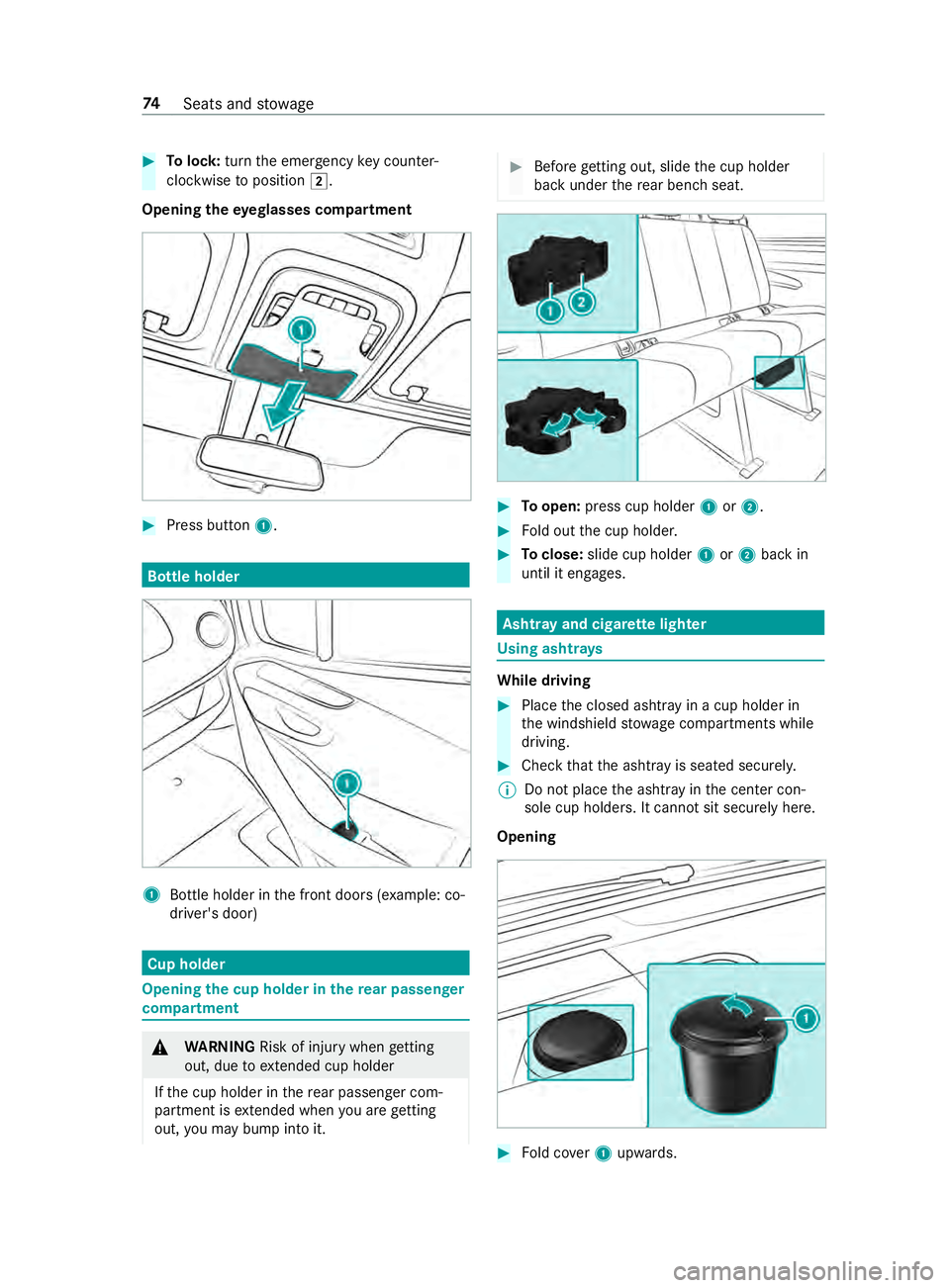
Opening theey eglasses compa rtment #
Press button 1. Bottle holder
1
Bottle holder in the front doors (e xample: co-
driver's door) Cup holder
Opening
the cup holder in there ar passen ger
compa rtment &
WARNING Risk of inju rywhen getting
out, due toextended cup holder
If th e cup holder in there ar passenger com‐
partment is extended when you are getting
out, you may bump into it. #
Before getting out, slide the cup holder
back under there ar ben chseat. #
Toopen: press cup holder 1or2. #
Fold out the cup holder. #
Toclose: slide cup holder 1or2 back in
until it engages. Asht
ray and cigar ette lighter Using asht
rays While driving
#
Place the closed ashtr ayin a cup holder in
th e windshield stowage compartments while
driving. #
Check that the ashtray is seated securely.
% Do not place
the ashtray in the center con‐
sole cup holders. It cann otsit securely here.
Opening #
Fold co ver1 upwards. 74
Seats and stowage
Page 99 of 354
Using
the cigar ette lighter in the center con‐
sole &
WARNING ‑ Risk of fire and injury from
hot cigar ette lighter
Yo u can burn yourself if youto uch the hot
heating element or the soc ket of the cigar ette
lighter.
In addition, flammable materials may ignite if:
R you drop the hot cigar ette lighter
R ach ild holds the hot cigar ette lighter to
objects, forex ample #
Always hold the cigar ette lighter bythe
knob. #
Always make sure that the cigar ette
lighter is out of reach of children. #
Never lea vechildren unat tended in the
ve hicle. Re
quirements:
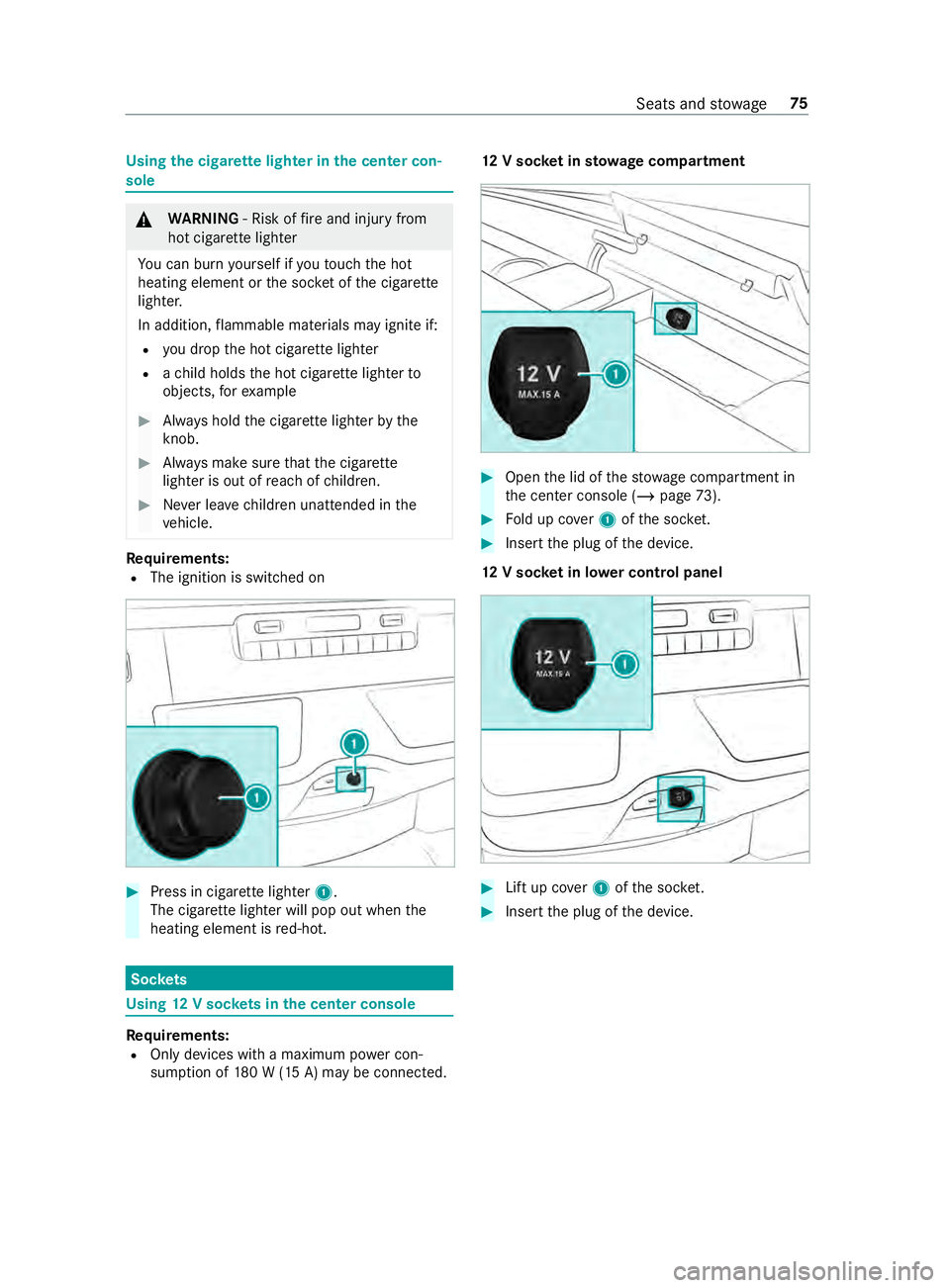
R The ignition is switched on #
Press in cigar ette lighter 1.
The cigar ette lighter will pop out when the
heating element is red-hot. Soc
kets Using
12V so ckets in the center console Re
quirements:
R Only devices with a maximum po wer con‐
sum ption of 180 W (15 A) may be connected. 12
V so cket insto wage compa rtment #
Open the lid of thestow age compartment in
th e center console (/ page73). #
Fold up co ver1 ofthe soc ket. #
Inse rtthe plug of the device.
12 V so cket in lo wer control panel #
Lift up co ver1 ofthe soc ket. #
Inse rtthe plug of the device. Seats and
stowage 75
Page 101 of 354
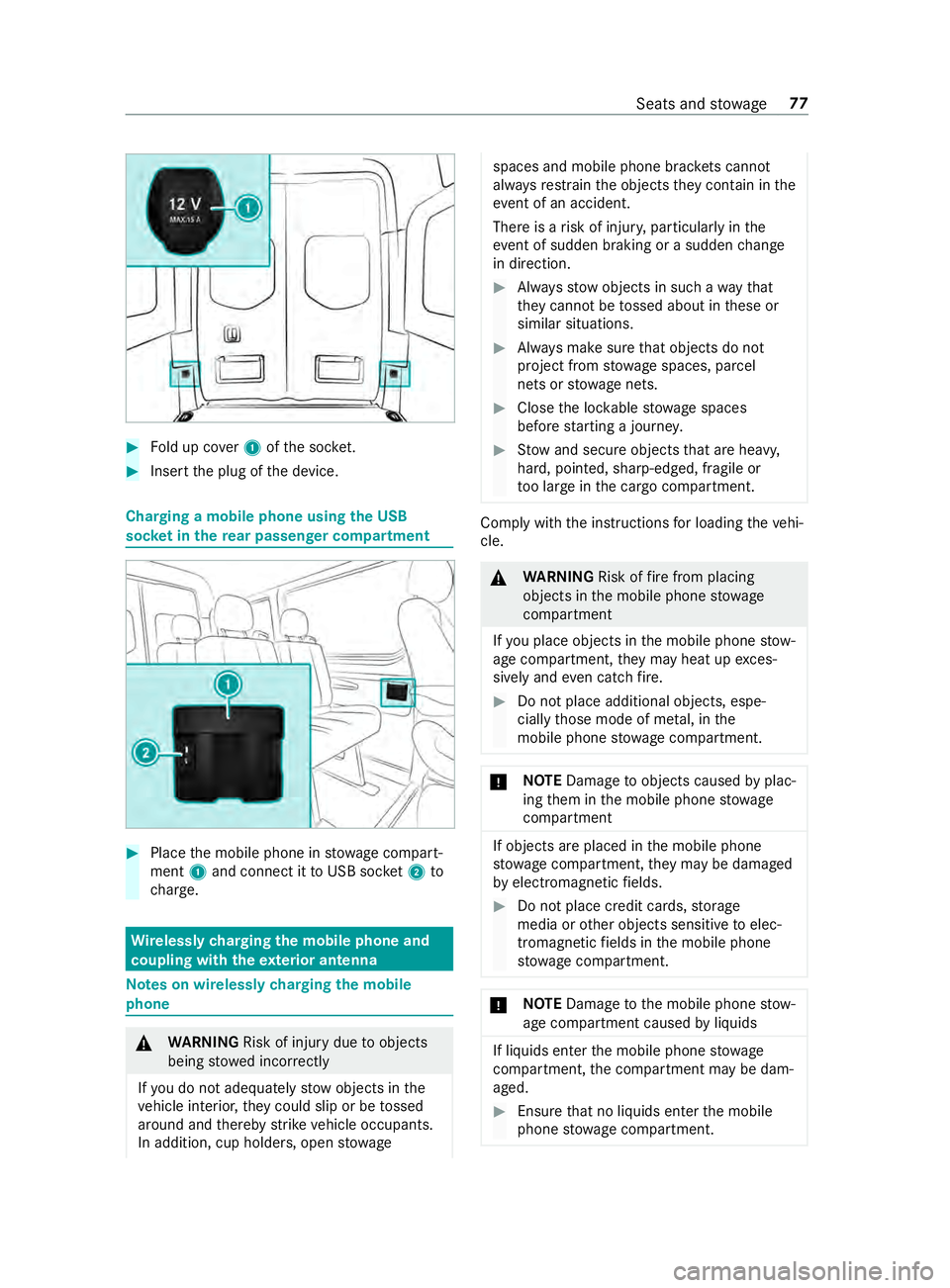
#
Fold up co ver1 ofthe soc ket. #
Inse rtthe plug of the device. Charging a mobile phone using
the USB
soc ket in the rear passen ger co mpartment #
Place the mobile phone in stowage compart‐
ment 1and connect it toUSB soc ket2 to
ch arge. Wire
lessly charging the mobile phone and
coupling with theex terior antenna Note
s on wirelessly charging the mobile
phone &
WARNING Risk of inju rydue toobjects
being stowed incor rectly
If yo u do not adequately stowobjects in the
ve hicle interior, they could slip or be tossed
around and thereby strike vehicle occupants.
In addition, cup holders, open stowage spaces and mobile phone brac
kets cannot
al wa ys restra in the objects they contain in the
eve nt of an accident.
The reis a risk of injur y,particular lyin the
eve nt of sudden braking or a sudden change
in direction. #
Alwaysstow objects in such a wayth at
th ey cannot be tossed about in these or
similar situations. #
Always make sure that objects do not
project from stowage spaces, parcel
nets or stowage nets. #
Close the loc kable stow age spaces
before starting a journe y. #
Stow and secure objects that are heavy,
hard, poin ted, sharp-edged, fragile or
to o lar geinthe cargo compartment. Comply with
the instructions for loading theve hi‐
cle. &
WARNING Risk offire from placing
objects in the mobile phone stowage
compartment
If yo u place objects in the mobile phone stow‐
age compartment, they may heat up exces‐
sively and even catch fire. #
Do not place additional objects, espe‐
cially those mode of me tal, in the
mobile phone stowage compartment. *
NO
TEDama getoobjects caused byplac‐
ing them in the mobile phone stowage
compartment If objects are placed in
the mobile phone
stow age compartment, they may be dama ged
by electromagnetic fields. #
Do not place credit cards, storage
media or other objects sensitive toelec‐
tromagnetic fields in the mobile phone
stow age compartment. *
NO
TEDama getothe mobile phone stow‐
age compartment caused byliquids If liquids enter
the mobile phone stowage
compartment, the compartment may be dam‐
aged. #
Ensure that no liquids enter the mobile
phone stowage compartment. Seats and
stowage 77
Page 102 of 354

Obser
vethefo llowing no tes on wireless charging:
R The charging function is only available when
th e ignition is switched on.
R In some cases, it may not be possible to
ch arge small mobile phones at every position
of the mobile phone recep tacle.
R It may not be possible tocharge large mobile
phones that do not rest inthe mobile phone
re cep tacle.
R The mobile phone can warm up during the
ch arging process. This depends on the appli‐
cations (apps) cur rently running.
R For more ef ficient charging, the pr otective
case should be remo ved from the mobile
phone. Pr otective cases designed for wireless
ch arging are an exception.
R When charging, the mat should be used if
possible. Charging
the mobile phone in the front wire‐
lessly Requ
irements:
R The mobile phone must be suitable for wire‐
less charging. A list of compatible mobile
phones can be found at:
http://www.mercedes-benz.com/connect #
Open theflap of stowage compartment 1
abo vethe media displa y. #
Place the mobile phone as cent rally as possi‐
ble with the display facing up wards on the
mar ked sur face of mat 2.
When thech arging symbol is shown in the
multimedia sy stem, the mobile phone is being
ch arge d.
Malfunctions during charging are shown in
th e multimedia sy stem displa y.
% The mat can be
remo vedfo r cleaning, e.g.
with clean, luk ewarmwater. Installing or
removing the floor mats &
WARNING Risk of accident due to
objects in the driver's foot we ll
Objects in the driver's foot we ll may impede
pedal tr avel or block a depressed pedal.
This jeopardizes the operating and road
saf ety of theve hicle. #
Stow all objects in theve hicle securely
so that they cannot getinto the driver's
fo ot we ll. #
Always ins tallth efloor mats securely
and as prescribed in order toensure
th at there is alw ays suf ficient room for
th e pedals. #
Do not use loose floor mats and do not
place floor mats on top of one ano ther. #
Toinstall: press pushbuttons 1onto hold‐
ers 2. #
Toremo ve: pull thefloor mats off holders
2. 78
Seats and stowage
Page 103 of 354

Exterior lighting
Note
s onchanging the lights when driving
abroad Ve
hicles with halogen or static LED head‐
lamps: Changing the headlamps is not neces‐
sar y.The legal requ irements will also be fulfilled
in countries with left and right-hand traf fic. In
fo rm ation about lighting sy stems and your
re sponsibility The
vehicle's various lighting sy stems are only
aids. The vehicle driver is responsible for adjust‐
ing theve hicle's lighting tothe pr evailing light,
visibilit y,statutory conditions and traf fic condi‐
tions. Light switch
Operating the light switch
#
00470060 Activates or deacti vates parking
light, license plate and instrument lighting. #
00480058 Activates or deacti vates automatic
headlamp s/daytime running lights (p referred
light switch position). #
00490058 Activates or deacti vates low beam/
high beam. #
4 Activates or deacti vatesfo g light. #
5 005E Activates or deacti vatesre ar fog
lights. #
6Applies and releases the electric parking
brake(/ page134)
% If
yo u hear a warning tone when exiting the
ve hicle, the light may still be on. %
The turn signal indicator,
the high beam and
th e high-beam flasher are operated with the
combination switch (/ page 80).
% Leaving
the parking lamps on for se veral
hours drains the batter y.
If th e battery charge isvery low, the parking
light will switch off automatically toenable
th e next vehicle start.
Au tomatic driving lights function &
WARNING Risk of accident when the low
beam is switched off in poor visibility
When the light switch is set to0058 ,th e low
beam may not be switched on automatically if
th ere is fog, snow or other causes of poor vis‐
ibility such as spr ay. #
In such cases, turn the light switch to
0058 . The automatic low beam is only an aid.
Responsi‐
bility forve hicle lighting rests with you.
Tu rn the light switch from 0058to0058 immedi‐
ately in theev ent of fog, snow or spr ay. Other‐
wise, the low beam is temp orarily inter rupte d.
Switching the automatic low beam on:
R Turn the light switch tothe0058 position.
Switch thevo ltage supply on: the parking
light automatically switches on or off depend‐
ing on the sur rounding brightness.
The daytime running la mps are switched on
when the engine is running. The pa rking light
and the low beam also switch on or off
depending on the sur rounding brightness.
When the low beam is switched on, the0058
indicator lamp on the instrument clus ter
switches on.
Switching fog light and rear fog light on or off
Requ irements:
R The light switch is in the 0058 or0058 posi‐
tion.
R The voltage supply or engine is on. #
Switching thefo g light on or off: press but‐
to n7. #
Switching the rear fog light on or off:
press button 6.
Comply with the count ry-specific regulations for
using there ar fog light. Light and vision
79
Page 104 of 354
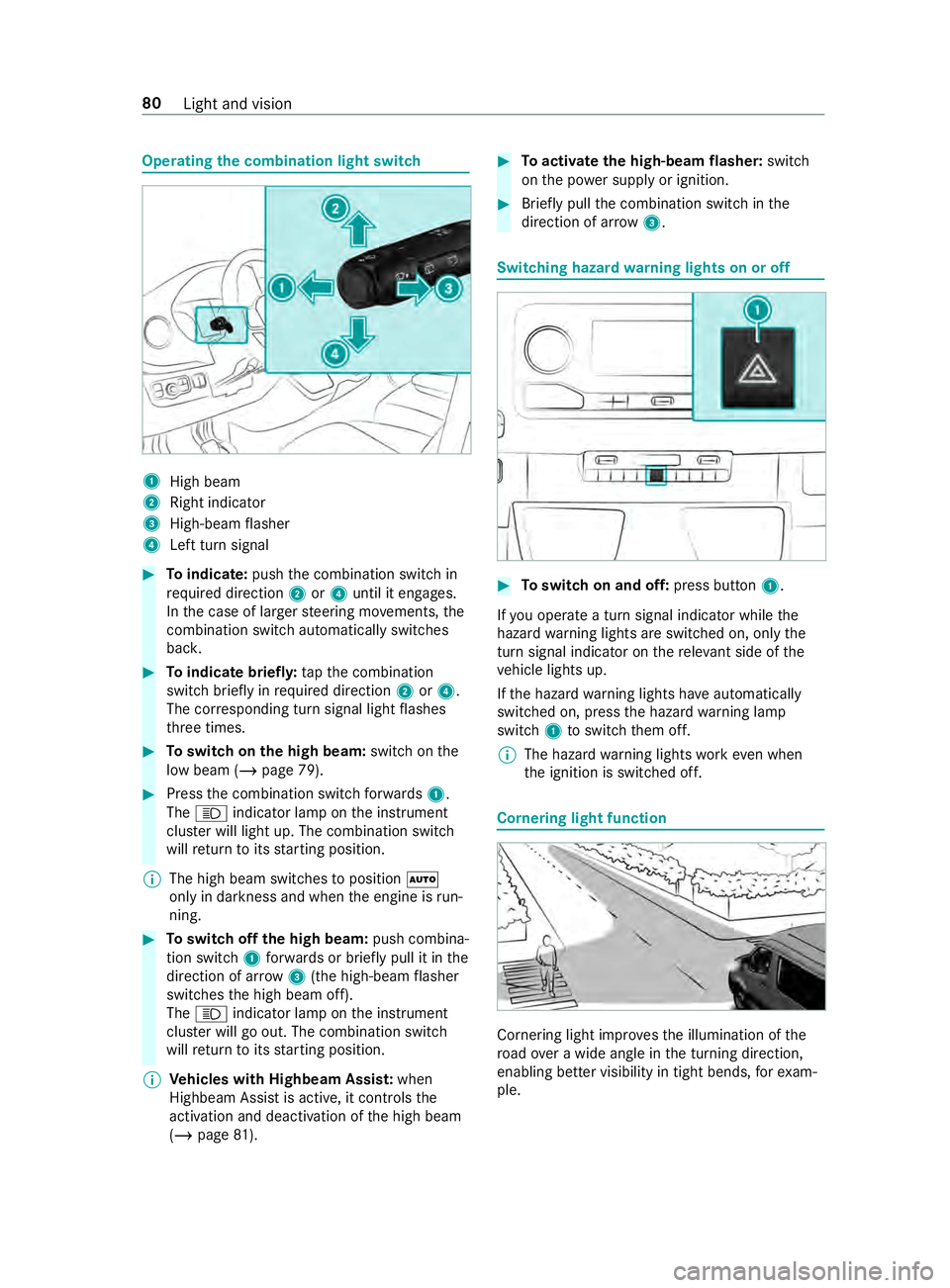
Operating
the combination light switch 1
High beam
2 Right indicator
3 High-beam flasher
4 Left turn signal #
Toindicate: pushthe combination switch in
re qu ired direction 2or4 until it engages.
In the case of larger steering mo vements, the
combination switch au tomatically switches
bac k. #
Toindicate briefl y:tapth e combination
switch briefly in required direction 2or4.
The cor responding turn signal light flashes
th re e times. #
Toswitch on the high beam: switchon the
low beam (/ page 79). #
Press the combination switch forw ards 1.
The 0057 indicator lamp on the instrument
clus ter will light up. The combination switch
will return toits starting position.
% The high beam swit ches toposition 0058
only in darkness and when the engine is run‐
ning. #
Toswitch off the high beam: push combina‐
tion swit ch1 forw ards or briefly pull it in the
direction of ar row3(the high-beam flasher
swit ches the high beam off).
The 0057 indicator lamp on the instrument
clus ter will go out. The combination switch
will return toits starting position.
% Ve
hicles with Highbeam Assis t:when
Highbeam Assist is active, it controls the
activation and deactivation of the high beam
(/ page 81). #
Toactivate the high-beam flasher: switch
on the po wer supp lyor ignition. #
Brief lypull the combination switch in the
direction of ar row3. Switching hazard
warning lights on or off #
Toswitch on and off: press button1.
If yo u operate a turn signal indicator while the
hazard warning lights are switched on, only the
turn signal indica tor on there leva nt side of the
ve hicle lights up.
If th e hazard warning lights ha veautomatically
swit ched on, press the hazard warning lamp
switch 1toswitch them off.
% The hazard
warning lights workeve n when
th e ignition is switched off. Cornering light function
Cornering light impr
ovesth e illumination of the
ro ad ove r a wide angle in the turning direction,
enabling better visibility in tight bends, forex am‐
ple. 80
Light and vision
Page 105 of 354

The function is active under
thefo llowing condi‐
tions:
R The speed is less than 37 mph (60 km/h) and
th e indicator has been switched on or the
st eering wheel is turned.
R The speed is between 37mph (60 km/h) and
50 mph (8 0 km/h) and thesteering wheel is
turned.
The cornering light may still light up for a short
time but is switched off automatically af ter a
maximum of thre e minutes.
% When
reve rsege ar is engaged, the lighting
switches tothe opposite side. Highbeam Assist
Ad
aptive Highbeam Assist function &
WARNING Risk of accident despite
Ad aptive Highbeam Assist
Ad aptive Highbeam Assist does not recognize
th efo llowing road users:
R Road users without lights, e.g. pedes‐
trians
R Road users with poor lighting, e.g. cyclists
R Road users whose lighting is obstructed,
e.g. bya bar rier
On very rare occasions, Adaptive Highbeam
Assist may failto recognize other road users
with their own lighting, or may recognize
th em too late.
In these or similar situations, the automatic
high beam is not deactivated or is activated
despite the presence of other road users. #
Always obser vethe tra ffic carefully and
switch off the high beam in good time. The
Adaptive Highbeam Assist automatically
swit ches between thefo llowing settings:
R Low beam
R High beam
The sy stem de tects that vehicle lights are
approaching in the opposite direction or driving
ahead of theve hicle.
At speeds greater than 19 mp h (30 km/h), a
ch ange is made tothefo llowing setting:
R If no other road users are de tected, the high
beam switches on automaticall y.At
speeds less than 16 mp h (25 km/h) or if there
is suf ficient road lighting, a change is made to
th efo llowing setting:
R The high beam automatically switches off.
Sy stem limitations
Ad aptive Highbeam Assist cannot take thero ad,
we ather or traf fic conditions into consideration.
The de tection of obs tacles can be restricted if:
R Visibility is impaired, e.g. in fog, heavy rain or
snow
R The sensors are dirty or co vered
Ad aptive Highbeam Assist is only an aid. You are
re sponsible for ensuring cor rect vehicle lighting
in accordance with the pr evailing light, visibility
and traf fic conditions.
The sy stem's optical sensor is located behind the
windshield near theove rhead cont rol panel.
Switching Highbeam Assist on or off #
Toswitch on: turnthe light switch tothe
0058 position. #
Switch the highbeam on using the combina‐
tion switch.
If th e highbeam is automatically switched on
in darkness, the 00CE indicator lamp on the
multifunction display lights up. #
Toswitch off: switch offthe highbeam using
th e combination switch. Setting
theex terior lighting switch-off delay
time Re
quirements:
R The light switch is in position 0058.
Multimedia sy stem:
4 © 5
Settings 5
Light
5 Ext. Light Switch-off #
Set a switch-off delay time.
When theve hicle engine is switched off, theex te‐
ri or lighting will be activated forth e set time. Ac
tivating and deactivating the sur round
lighting Multimedia sy
stem:
4 © 5
Settings 5
Light
5 Locator Lighting #
Activate or deacti vate the function. Light and vision
81
Page 107 of 354
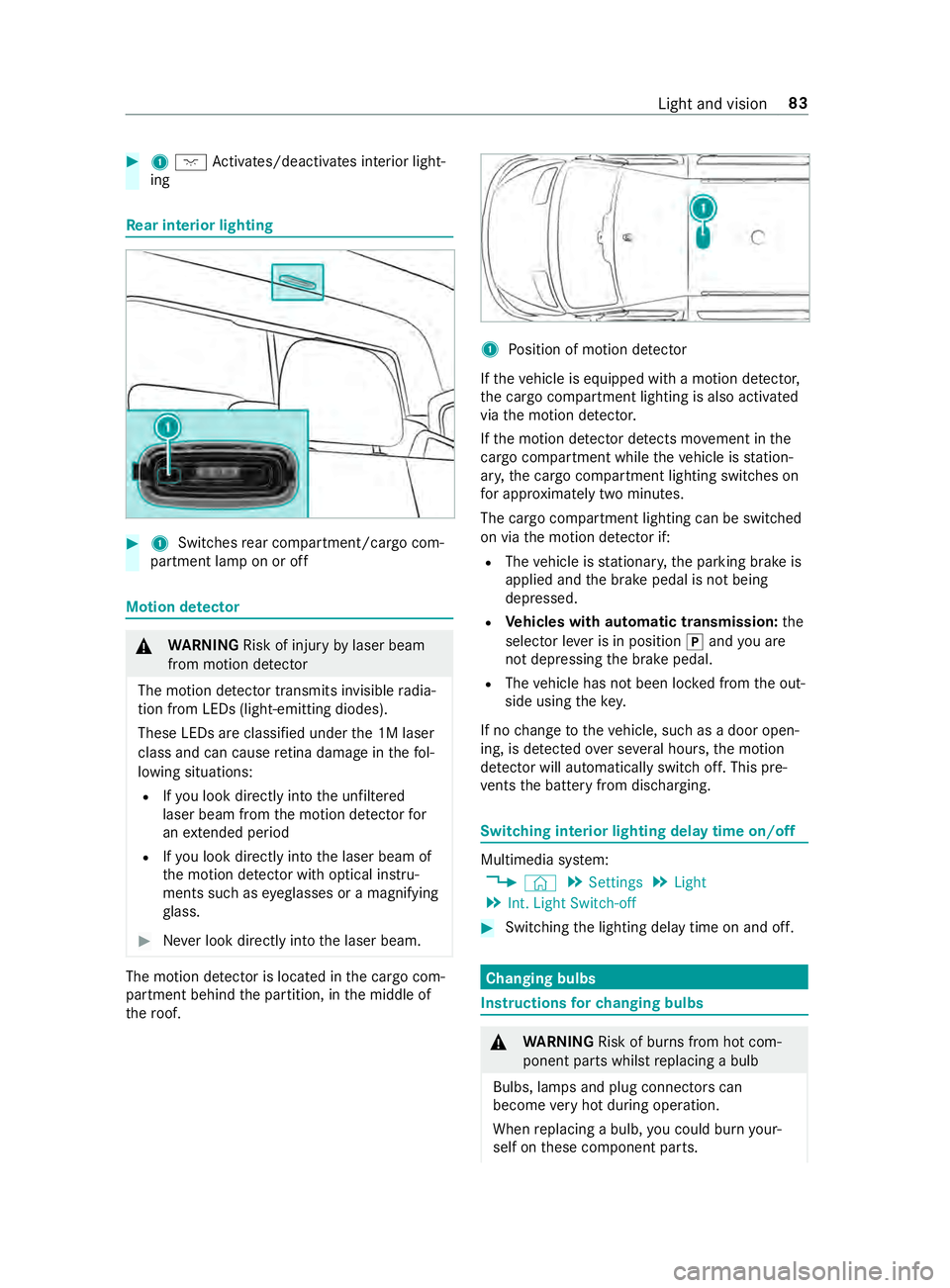
#
1004A Activates/deacti vates interior light‐
ing Re
ar interior lighting #
1 Switches rear compartment/cargo com‐
partment lamp on or off Motion de
tector &
WARNING Risk of inju ryby laser beam
from motion de tector
The motion de tector transmits invisible radia‐
tion from LEDs (light-emitting diodes).
These LEDs are classified under the 1M laser
class and can cause retina dama geinthefo l‐
lowing situations:
R Ifyo u look directly into the unfiltered
laser beam from the motion de tector for
an extended pe riod
R Ifyo u look direct lyinto the laser beam of
th e motion de tector wi thoptical instru‐
ments such as eyeglasses or a magnifying
gl ass. #
Never look directly into the laser beam. The motion de
tector is loca ted in the cargo com‐
partment behind the partition, in the middle of
th ero of. 1
Position of motion de tector
If th eve hicle is equipped with a motion de tector,
th e cargo compartment lighting is also activated
via the motion de tector.
If th e motion de tector de tects mo vement in the
cargo compa rtment while theve hicle is station‐
ar y, the cargo compartment lighting switches on
fo r appro ximately two minu tes.
The cargo compartment lighting can be switched
on via the motion de tector if:
R The vehicle is stationar y,the parking brake is
applied and the brake pedal is not being
depressed.
R Vehicles with automatic transmission: the
selector le ver is in position 005Dand you are
not depressing the brake pedal.
R The vehicle has not been loc ked from the out‐
side using thekey.
If no change totheve hicle, such as a door open‐
ing, is de tected over se veral hours, the motion
de tector will au tomatically switch off. This pre‐
ve nts the battery from discharging. Switching interior lighting delay time on/off
Multimedia sy
stem:
4 © 5
Settings 5
Light
5 Int. Light Switch-off #
Switching the lighting delay time on and off. Changing bulbs
Instructions
forch anging bulbs &
WARNING Risk of bu rns from hot com‐
ponent parts whilst replacing a bulb
Bulbs, lamps and plug connectors can
become very hot during operation.
When replacing a bulb, you could burn your‐
self on these component parts. Light and vision
83