2019 MERCEDES-BENZ SPRINTER lock
[x] Cancel search: lockPage 159 of 354

The electric parking brake is also automatically
applied if Active Dis tance Assi stDISTRONIC has
brought theve hicle toast andstill.
In addition, at least one of thefo llowing condi‐
tions must be fulfilled:
R the engine is switched off
R the driver is not sitting in the driver's seat
R the belt buckle is undone
R there is a sy stem malfunction
R the po wer supply is insuf ficient
R theve hicle is stationary for a long time
The red0049 and0024 (USA) or 0024(Canada)
indicator lamp in the instrument display lights up.
The electric parking brake is only actually applied
when there d0049 and0024 (USA) or 0024
(Canada) indicator lamps light up continuousl y.
Re leasing the electric pa rking brake automat‐
ically
Ve hicles with automatic transmission:
The electric parking brake of your vehicle is
re leased when all of thefo llowing conditions are
fulfilled:
R The driver is sitting in the driver's seat.
R The driver is belted.
R The engine is running.
R The transmission is in position 005Bor005E and
yo u depress the accelera tor
or
Yo u swit chfrom transmission position 005Dto
position 005Bor005E. You must also depress the
accelerator if tra veling on steep uphill gradi‐
ents.
R Ifth e transmission is in position 005E,there ar-
end doors must be closed.
App lying/releasing the electric pa rking brake
manually &
WARNING Risk of accident and inju ry
due tochildren and animals left unat ten‐
ded in theve hicle
If yo u lea vechildren and animals unat tended
in theve hicle, they may be able toset the
ve hicle in motion, forex ample by:
R Releasing the parking brake.
R Shifting the automatic transmission out of
park position 005D. R
Starting the engine.
In addition, they may operate vehicle equip‐
ment and become trapped. #
Never lea vechildren and animals unat‐
te nded in theve hicle. #
When leaving theve hicle, alw aysta ke
th e SmartK eywith you and lock the
ve hicle. #
Toappl y:press switch 1.
When the electric parking brake is applied,
th ere d0049 and0024 (USA) or 0024(Can‐
ada) indicator lamps light up in the instru‐
ment displa y.The electric parking brake is
only actually applied when there d0049
and 0024 (USA) or 0024(Canada) indicator
lamps light up continuousl y.
It is also possible toapply the electric parking
brake when the ignition is switched off. #
Torelease: pull switch 1.
The red0049 and0024 (USA) or 0024(Can‐
ada) indicator lamps in the instrument display
go out.
Yo u may on lyrelease the electric parking
brake if the ignition is switched on with the
st art/ stop button. Driving and parking
13 5
Page 161 of 354

Depending on
theve hicle's equipment, thera dar
sensors are integrated behind the bumpers
and/or behind thera diator grill. Keep these parts
free of dirt, ice and slush (/ page212). The se n‐
sors must not be co vered, forex ample bybicycle
ra ck s, overhanging loads or sticke rs. Af ter a colli‐
sion, ha vethe function of thera dar sensors
ch ecked at a qualified specialist workshop as
damage (bo thvisible or non-visible) may ha ve
occur redto the bumper or radiator trim. Fu
nction of driving sy stems and driving
saf ety sy stems In
this section, you will find information about the
fo llowing driving sy stems and driving saf ety sys‐
te ms:
R ABS ( Anti-lock braking system)
(/ page 137)
R ASC (Acceleration SkidControl)
(/ page 137)
R BAS (B rake Assist System) (/ page137)
R ESP ®
(Electronic Stability Program)
(/ page 138)
R EBD ( Electronic Brakeforce Distribution)
(/ page 139)
R Active Brake Assi st (/ page 139)
R Cruise co ntrol (/ page 141)
R Active Dis tance Assi stDISTRONIC
(/ page 143)
R Hill start assist
R HOLD function (/ page145)
R Parking Assist PARKTRONIC ( /page 145)
R Rear view camera (/ page147)
R 360° Camera (/ page149)
R ATTENTION ASSIST (/ page151)
R Blind Sp otAssi st (/ page 152)
R Active Lane Keeping Assist (/ page155) Fu
nctions of ABS (Anti-lock Braking Sy stem) Obser
vethe impor tant sa fety guidelines forthe
driving saf ety sy stem.
ABS cont rols the brake pressure in critical situa‐
tions:
R the wheels are pr evented from lo cking when
braking, e.g. during maximum full-s top brak‐
ing or when there is insuf ficient tire traction. R
thesteerability of theve hicle in term s of
ph ysical possibilities is ensured when brak‐
ing.
R ABS is active from speeds of appr ox. 3 mph
(5 km/h). On a slippery road sur face, ABS
inter venes even if you on lybrake gently.
Sy stem limitations
If th ere is a malfunction and theye llow 0025 ABS
wa rning lamp lights up continuously in the instru‐
ment display af terst arting the engine, ABS may
be impaired or inoperative.
If ABS inter venes, you will feel a pulsing in the
brake pedal. The pulsating brake pedal may be an
indication of hazardous road conditions and func‐
tions as a reminder totake extra care while driv‐
ing.
If ABS in terv enes: keep the brake pedal firm ly
depressed until the braking situation has passed.
To car ryout maximum full-s top braking:
dep ress the brake pedal with full forc e. Fu
nction of BAS (Brake Assist Sy stem) &
WARNING Risk of an accident caused by
a malfunction in BAS (Brake Assi stSys‐
te m)
If BA S is malfunctioning, the braking dis tance
in an emergency braking situation is
increased. #
Depress the brake pedal with full force
in emer gency braking situations. ABS
pr eve nts the wheels from locking. BA
S suppo rts yo u with additional braking forc e in
an emer gency braking situation.
If yo u depress the brake pedal quickl y,BA S is
acti vated:
R BAS au tomatically boosts the braking forc e of
th e brakes
R BAS can sho rten the braking dis tance
R ABS pr events the wheels from locking
When youre lease the brake pedal, the brakes
function as usual again. BAS is deactivated. Fu
nctions of ASR (Acceleration Skid Control) ASR can neither
reduce therisk of an accident
nor override the la wsof ph ysics if the driver does
not pay attention when pulling away or accelerat‐
ing. ASR is only an aid. Alw ays adapt your driving Driving and parking
137
Page 189 of 354

The on-board computer is operated via left-hand
To uch Control 2and the back button on the left
1. The on-board computer is operated using
thefo l‐
lowing buttons:
R the back button on the left 1
R the left-hand Touch Control 2
R the main menu button on the left 3
The following menus are available:
R Service
R Assistance
R Trip
R Radio
R Media
R Phone
R Settings #
Tocall up the main menu: pressthe back
button on the left 1repeatedly, or press and
hold it.
% Ve
hicles without Active Di stance Assist
DISTRO NIC:you can call up the main menu
of the on-board computer with the00E2 but‐
to n. #
Tobrows eth rough the menu bar: swipeto
th e left or right on left-hand Touch Control
2. #
Tocall up a menu or confirm a selection:
press left-hand Touch Control 2. #
Tobrows eth rough displa ysor lists in the
menu: swipe upwards or down wards on left-
hand Touch Control 2. #
Tocall up a submenu or confirm a selec‐
tion: press left-hand Touch Control 2. #
Toexit a submenu: pressthe back button on
th e left 1.
If yo u are in a submenu and press and hold the
back button on the left 1,the main menu
appears. Overview of
the displa yson the multifunc‐
tion display In
stru ment Display with color display
1 Outside temp erature
2 Transmission position
3 Clock
4 Display section In
stru ment Display with black and white dis‐
play
1 Outside temp erature
2 Display section
3 Clock
4 Transmission position
Fu rther displa yson the multifunction display:
0097 Gearshift
recommendation
é Parking Assist PARKTRONIC swit ched
off
00B2 Cruise cont
rol (/ page 141)
ç Active Dis tance Assi stDISTRONIC
(/ page 143) In
stru ment Display and on-board computer 16 5
Page 195 of 354
Information about Mercedes PRO
When you log in with a user account tothe
Mercedes PRO por tal,th en services and of fers
from Mercedes-Benz Vans will be available to
yo u.
Av ailability is countr y-dependent. You can check
th eav ailability of Mercedes PRO in your country
at thefo llowing page: http://www.me rcedes.pro
Fo r more information on Mercedes PRO contact
an authorized Mercedes-Benz Center or visit the
Mercedes PRO por tal. Information about Mercedes PRO connect
Mercedes PRO connect pr ovides thefo llowing
services:
R Accident and breakdown mana gement
(breakdown assi stance call button or auto‐
matic accident or breakd own de tection)
Use the breakdown assis tance call button in
th eov erhead cont rol panel tomake a call to
th e Mercedes-Benz Cus tomer Center
(/ page 171).
Yo u can also select a menu ent ryinthe multi‐
media sy stem (/ page171).
R Emergency Call Sy stem
Use the0053 button (SOS button) in the
ove rhead cont rol panel tomake a call tothe
Mercedes-Benz emer gency call center
(/ page 171).
Mercedes PRO connect accident and breakdown
management and the Mercedes-Benz emer gency
call center are available foryo u around the clock
fo rth e use of the services.
Please no tethat Mercedes PRO connect is a
Mercedes-Benz service. In emer gencies, al ways
call the national emer gency services firs t using
th est andard national emer gency service phone
numbers. In emergencies, you can also use the
Emergency Call Sy stem (/ page216).
The following conditions must be met touse
Mercedes PRO connect services in theve hicle:
R You ha veaccess toa GSM network
R The contract partner's GSM network co ver‐
age is available in there spective region
R The ignition is switched on, so that vehicle
data can be transfer red automatically Calling the Mercedes-Benz Cus
tomer Center
using the multimedia sy stem
Multimedia sy stem:
4 © 5
Phone 5
g #
Call Mercedes PRO connect.
Then, you can select a service and be connec ted
to a specialist at the Mercedes-Benz Cus tomer
Center. Making a call via the
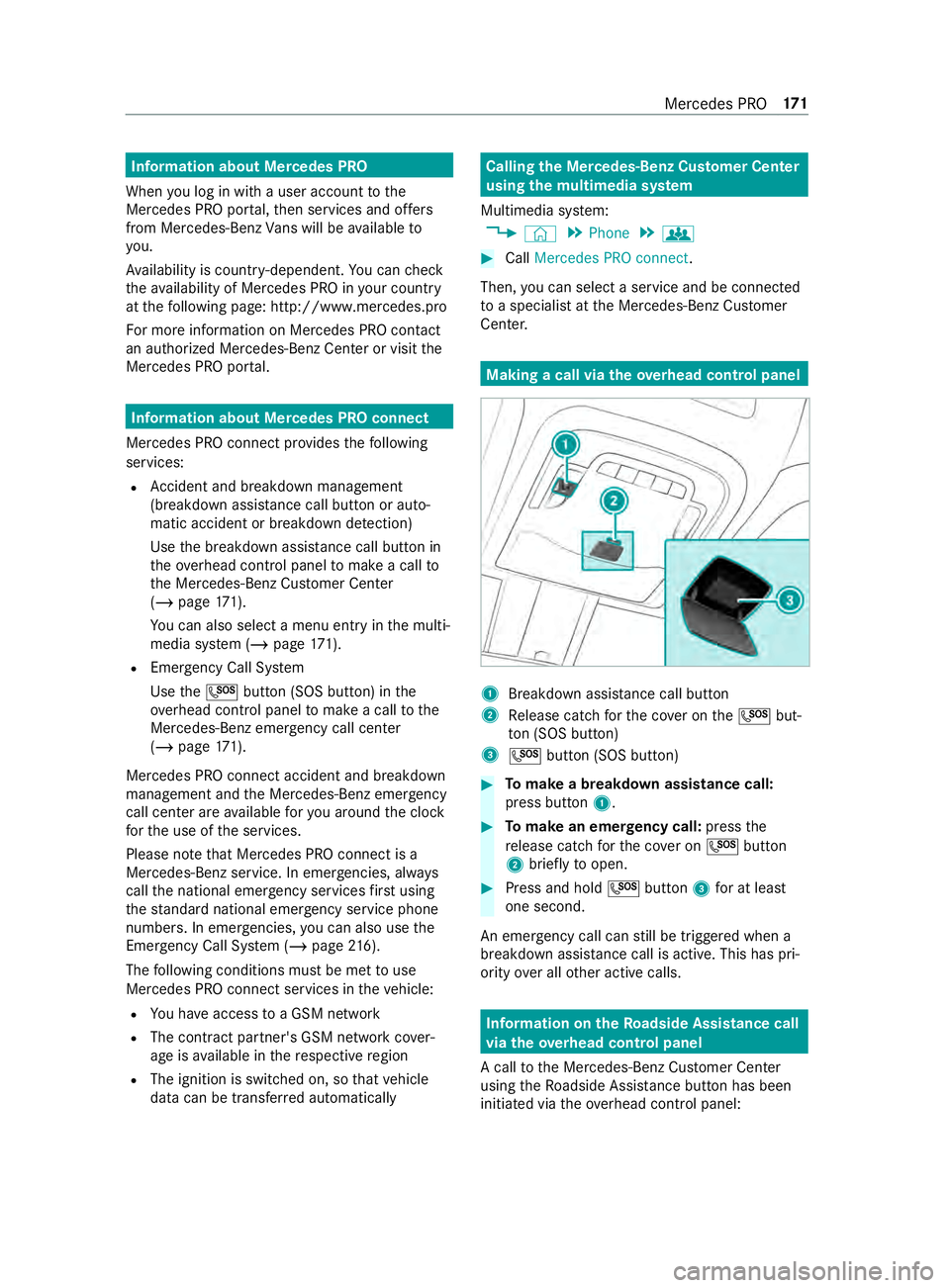
overhead control panel 1
Breakdown assis tance call button
2 Release cat chforth e co ver on the0053 but‐
to n (SOS button)
3 0053 button (SOS button) #
Tomake a breakdown assistance call:
press button 1. #
Tomake an eme rgency call: pressthe
re lease cat chforth e co ver on 0053 button
2 brief lyto open. #
Press and hold 0053button 3for at least
one second.
An emer gency call can still be triggered when a
breakdown assis tance call is acti ve. This has pri‐
ority over all other active calls. Information on
theRo adside Assistance call
via the overhead control panel
A call tothe Mercedes-Benz Cus tomer Center
using theRo adside Assis tance button has been
initia ted via theove rhead cont rol panel: Mercedes PRO
171
Page 221 of 354
lation and any ensuing consequences.
Obser
vecountr y-specific la ws.
Make sure that the load is secure before every
jou rney and at regular inter vals during a long
journe y.Ad just the load securing as necessar y.
Information on how tosecure loads cor rectly can
be obtained from the manufacturers of load
securing aids or tie downs for load-securing, for
ex ample.
When securing loads, obse rveth efo llowing:
R Fill spaces between the load and the cargo
compartment walls or wheel wells. Forth is
purpose, use rigid load securing aids, such as
we dges, wooden fixings or padding.
R Attach secured and stabilized loads in all
directions.
Use the cargo tie-down points or tie-down
ey es and the loading rails in the cargo com‐
partment or on the load sur face.
Only use tie downs, such as lashing rods, lock
ro ds or lashing nets and lashing stra ps, which
has been tested in accordance with cur rent
st andards (e.g. DIN EN). Alw ays use the cargo
tie-down point closest tothe load; pad sharp
edges.
Loads, and heavy loads in particular, should
preferably be secured using the tie-down
ey es.
% Yo
u will obtain tie downs tested in accord‐
ance with cur rent standards (e.g. DIN EN)
from any specialist company or from a quali‐
fi ed specialist workshop.
Note s onthe pa rtition
Wi thout a partition, vehicles that are appr oved as
commercial vehicles (N1, N2) do not fulfill ISO
27 956, whi chdescribes the equipment for prop‐
erly securing a load in deli very vehicles. If the
ve hicle is used totranspo rtgoods, retrofitting the
partition is stro ng lyrecommended, as prope rly
securing the load in vehicles without a partition
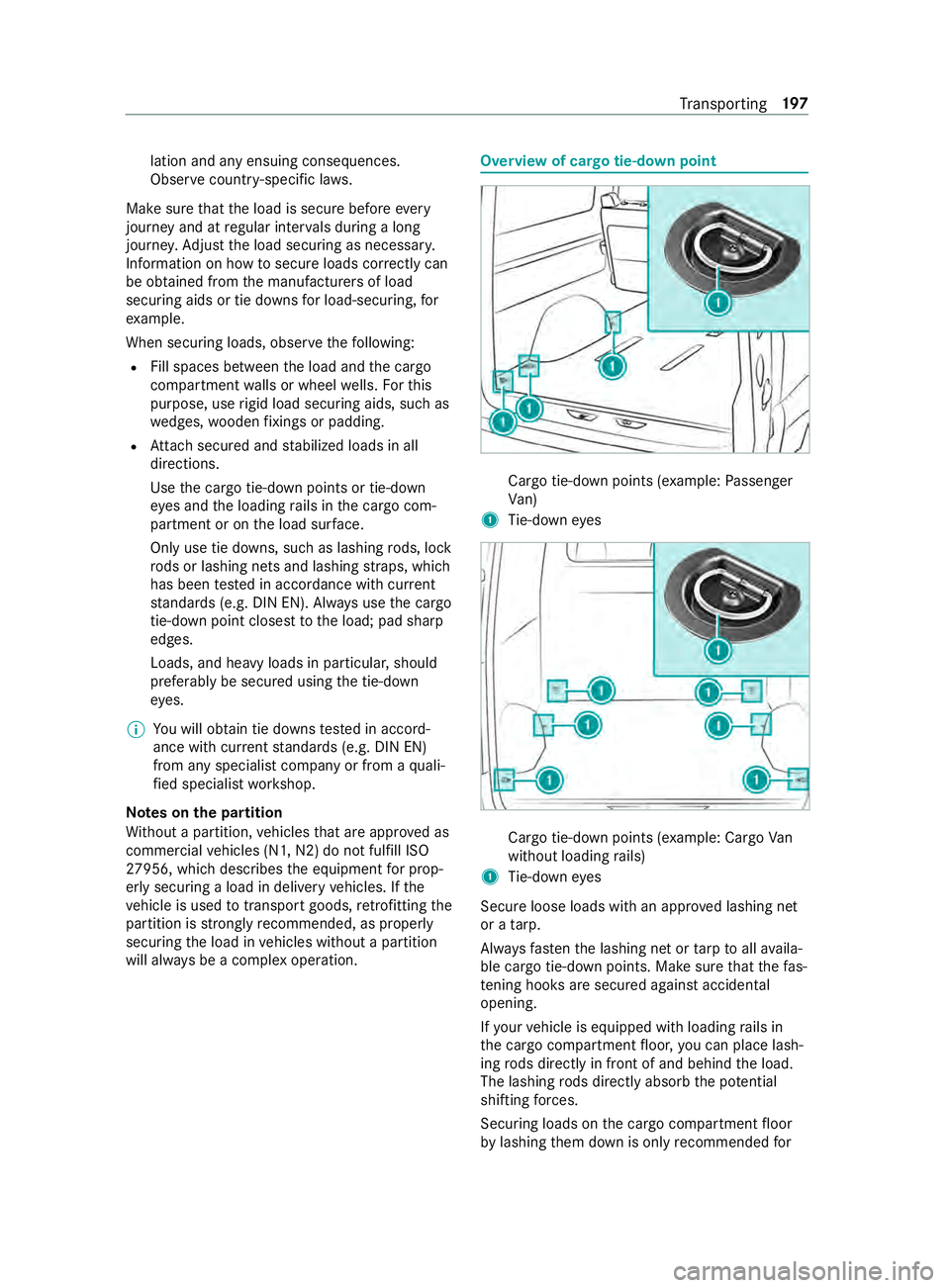
will alw ays be a complex operation. Overview of cargo tie-down point
Cargo tie-down points (e
xample:Passenger
Va n)
1 Tie-down eyes Cargo tie-down points (e
xample: Cargo Van
without loading rails)
1 Tie-down eyes
Secure loose loads with an appr oved lashing net
or a tarp.
Alw aysfast enthe lashing net or tarp toall availa‐
ble cargo tie-down points. Make sure that thefa s‐
te ning hoo ksare secured against acciden tal
opening.
If yo ur vehicle is equipped with loading rails in
th e cargo compartment floor, you can place lash‐
ing rods directly in front of and behind the load.
The lashing rods directly absorb the po tential
shi fting forc es.
Securing loads on the cargo compartment floor
by lashing them down is only recommended for Tr
ansporting 197
Page 222 of 354

light
weight loads. Lay anti-slip mats underneath
th e load tosecure the load additionally. Installing and
removing tie-down eyes #
Toinstall: slidethe tie-down eyeth ro ugh a
re cess in the loading rail close tothe load
until locking mechanism engages in the
re cess.
% When
you pull locking mechanism up and out
of there cess, the tie-down eye is able to
mo vewithin the loading rail. Make sure that
locking mechanism is alw ays engaged in a
re cess. #
Che ckthe tie-down eyefo rfirm seating. #
Toremo ve:pull lo cking mechanism up and
pull the tie-down eyeto wa rdsth e locking
mechanism and out of the loading rail
th ro ugh a recess. Car
rier sy stems Information about
thero of rack &
WARNING Risk of inju rydue tothe maxi‐
mum roof load being exceeded
When you place a load on thero of as well as
all outer and inner attachments, theve hicle's
center of gr avity will rise and thefa miliar driv‐
ing characteristics as well as thesteering and
braking characteristics will change. When
driving around bends, theve hicle will tilt
more heavily and may react more sluggishly
to steering mo vements.
If yo uexc eed the maximum roof load, the
driving characteristics, as well as thesteering
and braking, will be greatly impaired. #
Neverexc eed the maximum roof load
and adjust your driving style. 1
Mounting rails
Information about the maximum roof load can be
fo und in the "Technical data" section
(/ page 276).
Obse rveth efo llowing points for assembling roof
ra ck s:
R Tighten thero of rack 's scr ewsto ato rque of
6.0 lb -ft(8 Nm) – 7.4 lb-f t(10 Nm) in the des‐
ignated groo ved plates.
R The tightened scr ews should not touch the
ra ils.
R Ensure that the groo ved plates are not loca‐
te d in the areas around the plastic caps.
R The groo ved plates must ha vetheright cross-
section.
R The insides of the mounting rails must be free
of dirt.
R Re-tigh tenth e scr ews uniformly af ter around
300 miles (500 km).
Mercedes-Benz recommends that you use on ly
ro of rack sth at ha vebeen tested and appr oved
fo r Mercedes-Benz. These help topreve ntvehicle
damage.
If yo uwa nttoretrofit the mounting rails, ha ve
th em ins talled at a qualified specialist workshop.
Otherwise, you could damage theve hicle.
If yo ur vehicle is ins talled with mounting rails on
th ero of, you can install a roof rack on thero of.
Special fasteners (sliding bloc ks) are available as
accesso ries forth is purpose.
These fasteners are available from any authorized
Mercedes-Benz Center. 19 8
Transporting
Page 224 of 354
#
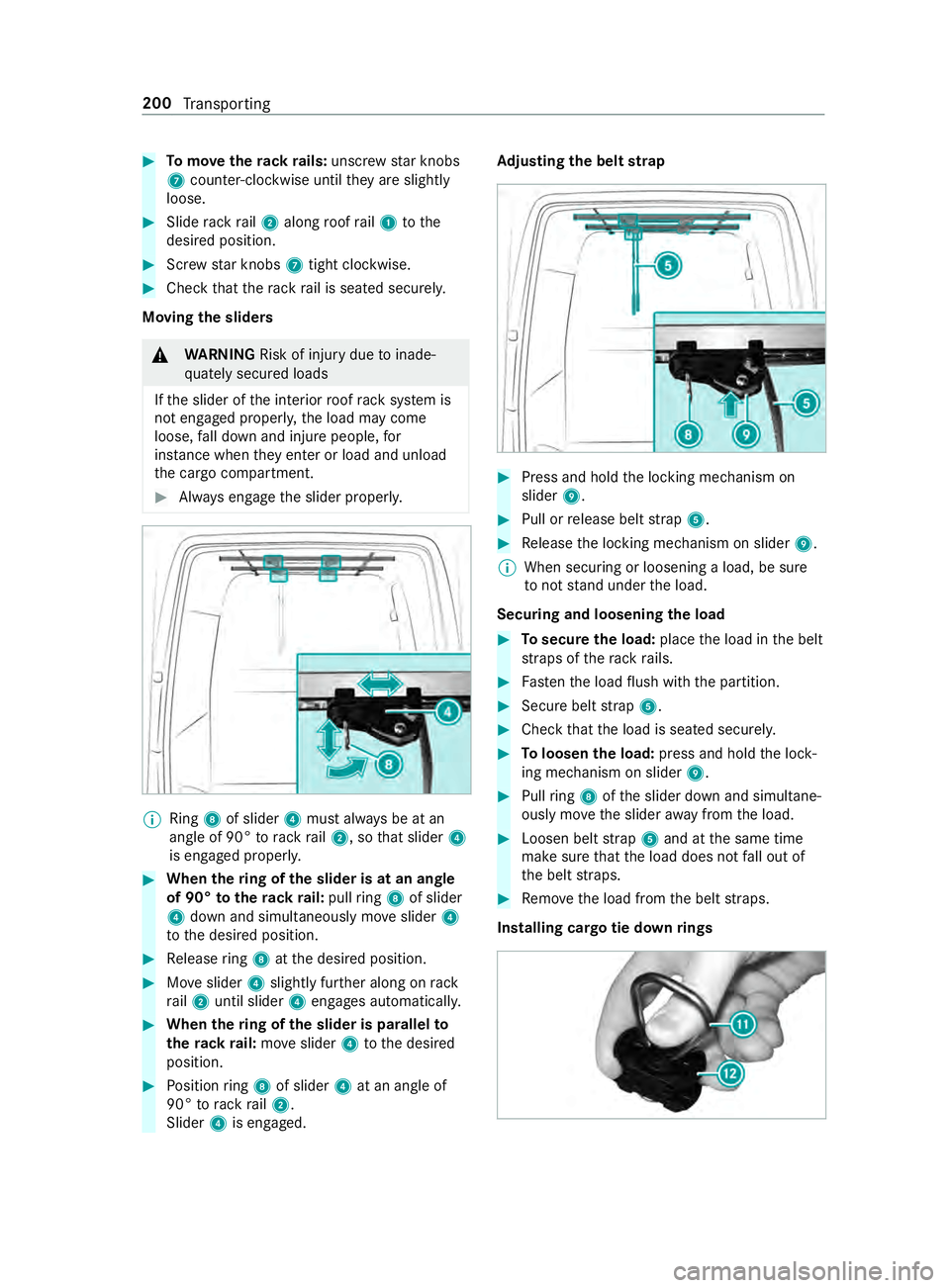
Tomo vetherack ra ils:unsc rew star knobs
7 coun ter-clockwise until they are slightly
loose. #
Slide rack rail2 along roof rail1 tothe
desired position. #
Screw star knobs 7tight clo ckwise. #
Check that thera ck rail is seated securely.
Moving the sliders &
WARNING Risk of inju rydue toinade‐
qu ately secured loads
If th e slider of the interior roof rack system is
not engaged proper ly,th e load may come
loose, fall down and injure people, for
ins tance when they enter or load and unload
th e cargo compartment. #
Always engage the slider properly. %
Ring
8of slider 4must alw ays be at an
angle of 90° torack rail2, so that slider 4
is engaged proper ly. #
When thering of the slider is at an angle
of 90° totherack ra il:pull ring 8 of slider
4 down and simul taneously mo veslider 4
to the desired position. #
Release ring 8 atthe desired position. #
Moveslider 4slightly fur ther along on rack
ra il2 until slider 4engages automaticall y. #
When thering of the slider is pa rallel to
th erack ra il:mo veslider 4tothe desired
position. #
Position ring 8 of slider 4at an angle of
90° torack rail2.
Slider 4is engaged. Ad
justing the belt strap #
Press and hold the locking mechanism on
slider 9. #
Pull or release belt stra p5. #
Release the locking mechanism on slider 9.
% When securing or loosening a load, be sure
to not stand under the load.
Securing and loosening the load #
Tosecure the load: placethe load in the belt
st ra ps of thera ck rails. #
Fasten the load flush with the partition. #
Secure belt stra p5. #
Check that the load is seated securel y. #
Toloosen the load: press and hold the lock‐
ing mechanism on slider 9. #
Pull ring 8 ofthe slider down and simultane‐
ously mo vethe slider away from the load. #
Loosen belt stra p5 and at the same time
make sure that the load does not fall out of
th e belt stra ps. #
Remo vethe load from the belt stra ps.
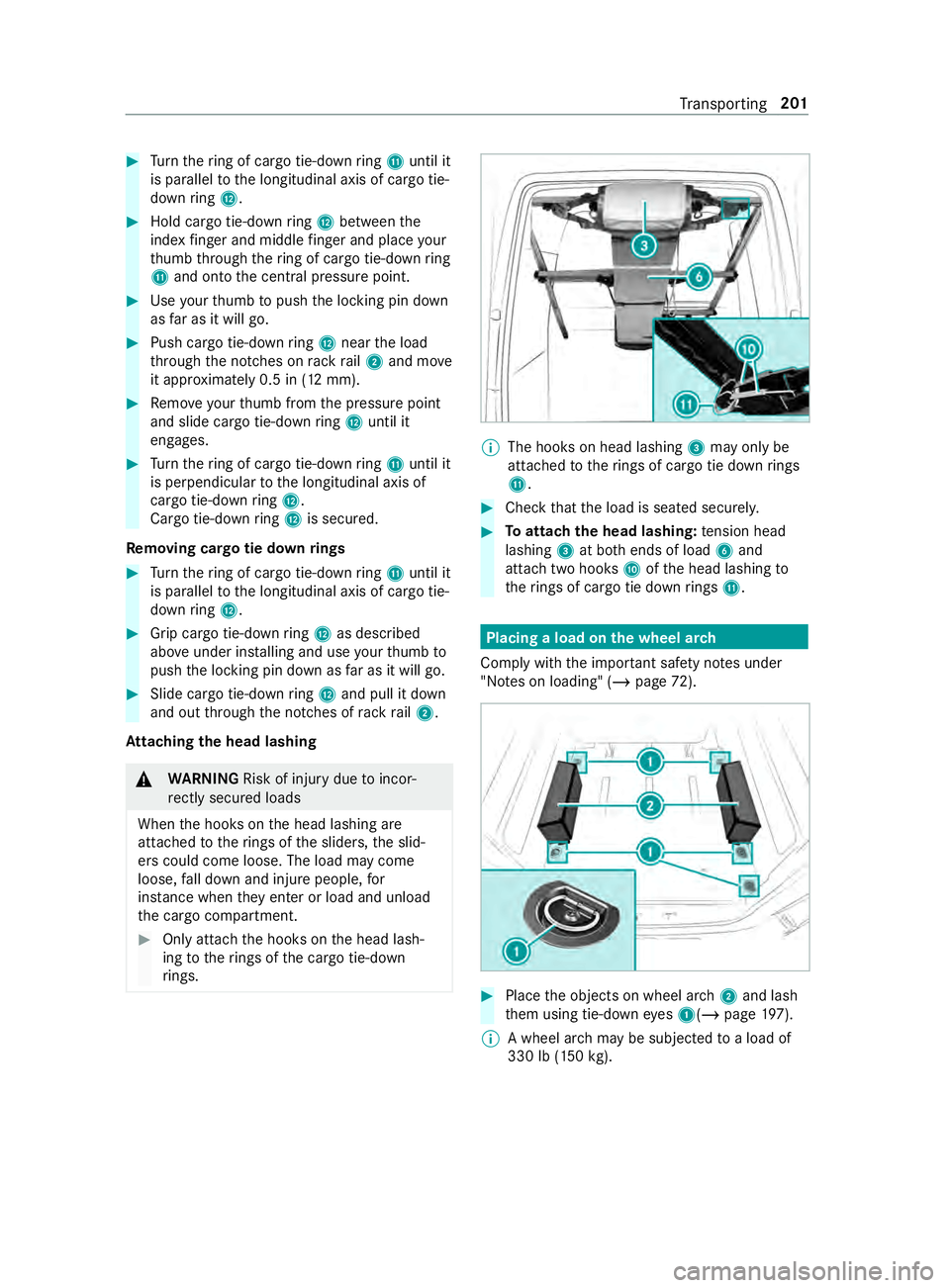
Installing cargo tie down rings 200
Transporting
Page 225 of 354
#
Turn thering of cargo tie-down ring B until it
is pa rallel tothe longitudinal axis of cargo tie-
down ring C. #
Hold cargo tie-down ring C between the
index finger and middle finger and place your
th umb thro ugh thering of cargo tie-down ring
B and onto the cent ral pressure point. #
Use your thumb topush the locking pin down
as far as it will go. #
Push cargo tie-down ring C near the load
th ro ugh the notches on rack rail2 and mo ve
it appr oximately 0.5 in (12 mm). #
Remo veyour thumb from the pressure point
and slide cargo tie-down ring C until it
engages. #
Turn thering of cargo tie-down ring B until it
is pe rpendicular tothe longitudinal axis of
cargo tie-down ring C.
Cargo tie-down ring C is secu red.
Re moving cargo tie down rings #
Turn thering of cargo tie-down ring B until it
is pa rallel tothe longitudinal axis of cargo tie-
down ring C. #
Grip cargo tie-down ring C as described
ab ove under ins talling and use your thumb to
push the locking pin down as far as it will go. #
Slide cargo tie-down ring C and pull it down
and out thro ugh the notches of rack rail2.
At taching the head lashing &
WARNING Risk of inju rydue toincor‐
re ctly secu red loads
When the hooks on the head lashing are
attached totherings of the sliders, the slid‐
ers could come loose. The load may come
loose, fall down and injure people, for
ins tance when they enter or load and unload
th e cargo compartment. #
Only atta chthe hooks on the head lash‐
ing totherings of the cargo tie-down
ri ngs. %
The hoo
kson head lashing 3may only be
attached totherings of cargo tie down rings
B. #
Check that the load is seated securel y. #
Toattach the head lashing: tension head
lashing 3at bo thends of load 6and
attach two hooks Aofthe head lashing to
th erings of cargo tie down rings B. Placing a load on the wheel ar
ch
Comply with the impor tant sa fety no tes under
"No tes on loading" (/ page72). #
Place the objects on wheel ar ch2 and lash
th em using tie-down eyes 1(/ page197).
% A wheel ar
chmay be subjected toa load of
330 lb (150 kg). Tr
ansporting 201