2019 MERCEDES-BENZ SPRINTER key
[x] Cancel search: keyPage 98 of 354
#
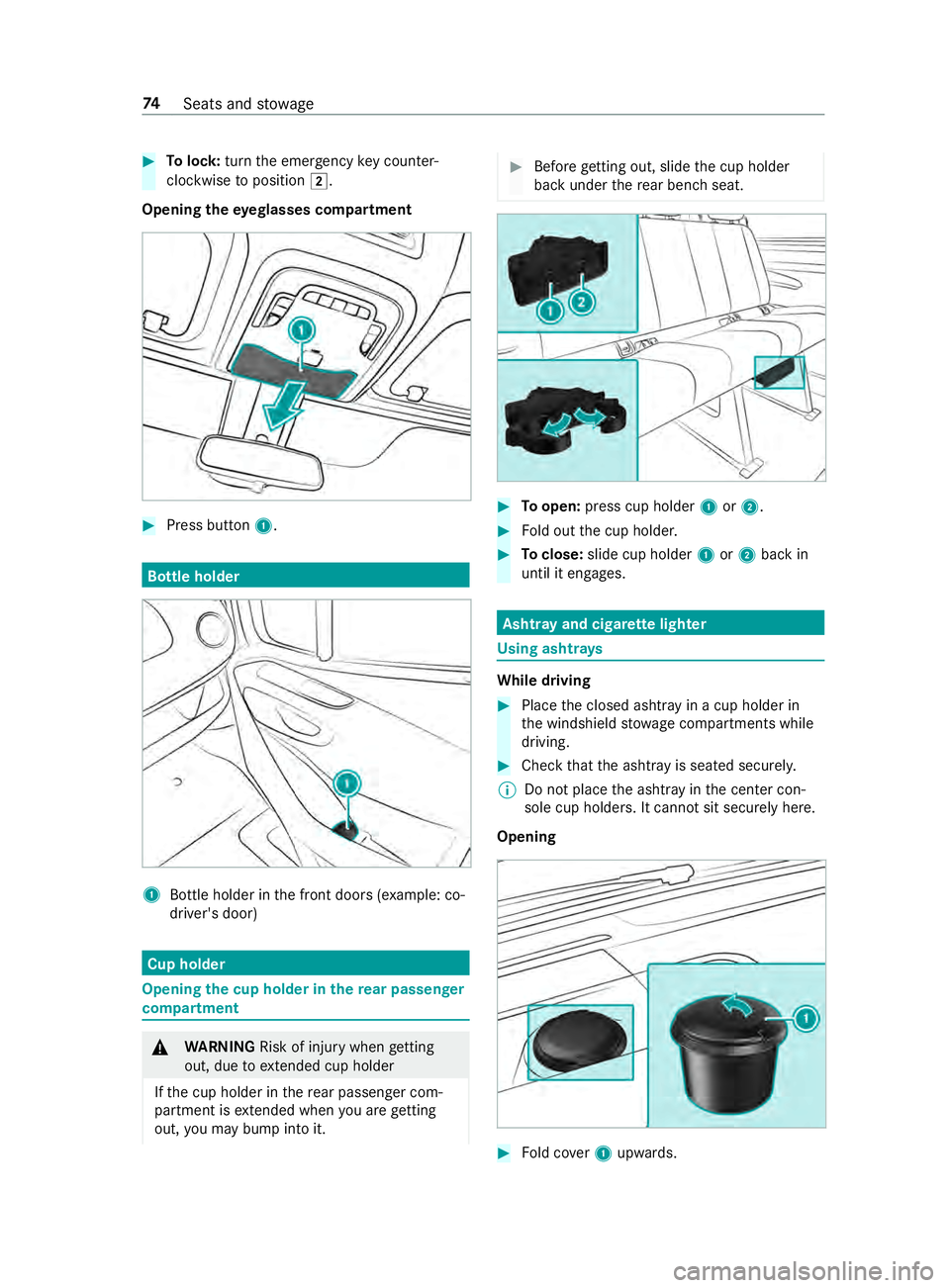
Tolock: turnthe emer gency key counter-
clo ckwise toposition 0048.
Opening theey eglasses compa rtment #
Press button 1. Bottle holder
1
Bottle holder in the front doors (e xample: co-
driver's door) Cup holder
Opening
the cup holder in there ar passen ger
compa rtment &
WARNING Risk of inju rywhen getting
out, due toextended cup holder
If th e cup holder in there ar passenger com‐
partment is extended when you are getting
out, you may bump into it. #
Before getting out, slide the cup holder
back under there ar ben chseat. #
Toopen: press cup holder 1or2. #
Fold out the cup holder. #
Toclose: slide cup holder 1or2 back in
until it engages. Asht
ray and cigar ette lighter Using asht
rays While driving
#
Place the closed ashtr ayin a cup holder in
th e windshield stowage compartments while
driving. #
Check that the ashtray is seated securely.
% Do not place
the ashtray in the center con‐
sole cup holders. It cann otsit securely here.
Opening #
Fold co ver1 upwards. 74
Seats and stowage
Page 107 of 354
#
1004A Activates/deacti vates interior light‐
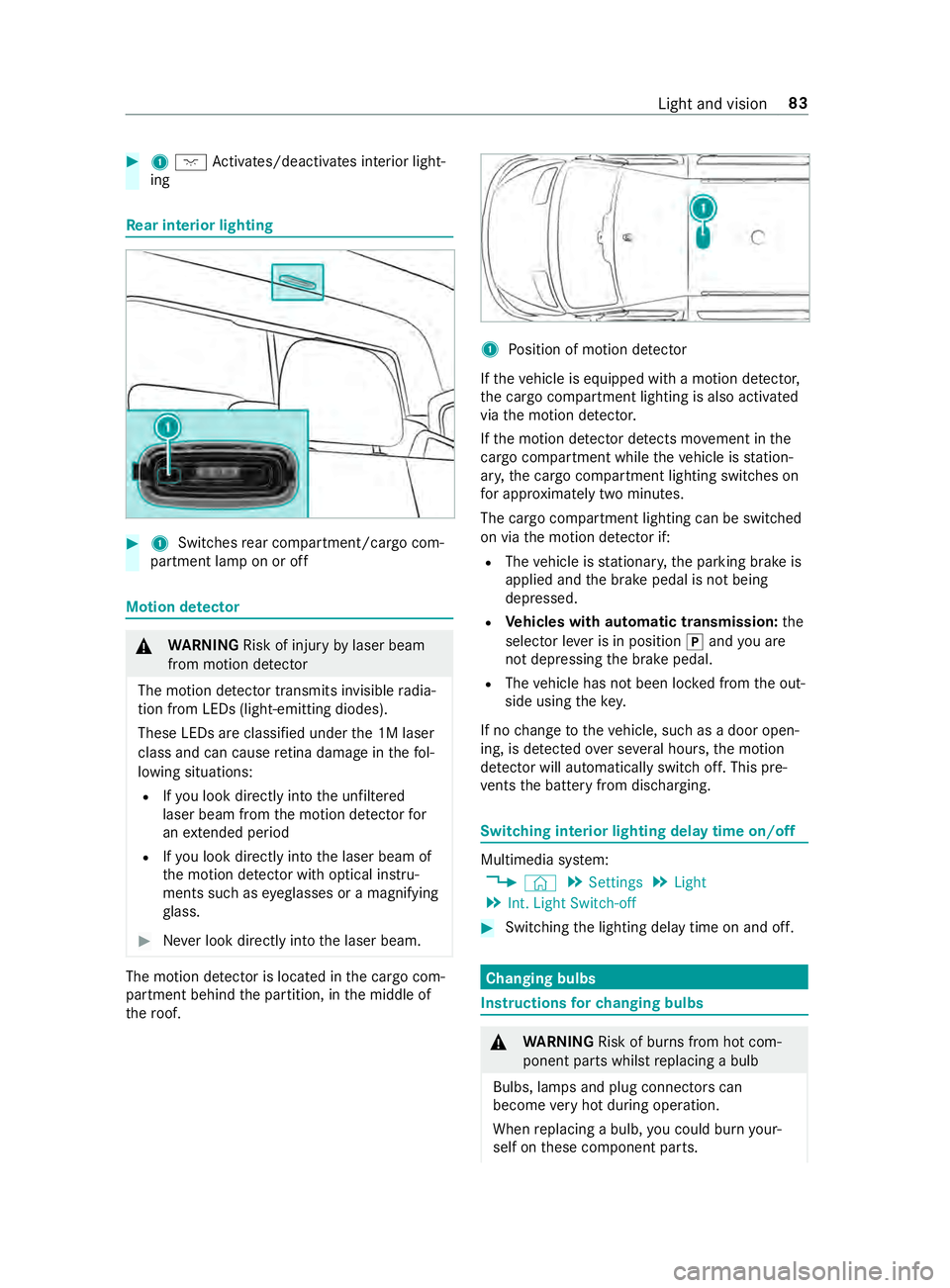
ing Re
ar interior lighting #
1 Switches rear compartment/cargo com‐
partment lamp on or off Motion de
tector &
WARNING Risk of inju ryby laser beam
from motion de tector
The motion de tector transmits invisible radia‐
tion from LEDs (light-emitting diodes).
These LEDs are classified under the 1M laser
class and can cause retina dama geinthefo l‐
lowing situations:
R Ifyo u look directly into the unfiltered
laser beam from the motion de tector for
an extended pe riod
R Ifyo u look direct lyinto the laser beam of
th e motion de tector wi thoptical instru‐
ments such as eyeglasses or a magnifying
gl ass. #
Never look directly into the laser beam. The motion de
tector is loca ted in the cargo com‐
partment behind the partition, in the middle of
th ero of. 1
Position of motion de tector
If th eve hicle is equipped with a motion de tector,
th e cargo compartment lighting is also activated
via the motion de tector.
If th e motion de tector de tects mo vement in the
cargo compa rtment while theve hicle is station‐
ar y, the cargo compartment lighting switches on
fo r appro ximately two minu tes.
The cargo compartment lighting can be switched
on via the motion de tector if:
R The vehicle is stationar y,the parking brake is
applied and the brake pedal is not being
depressed.
R Vehicles with automatic transmission: the
selector le ver is in position 005Dand you are
not depressing the brake pedal.
R The vehicle has not been loc ked from the out‐
side using thekey.
If no change totheve hicle, such as a door open‐
ing, is de tected over se veral hours, the motion
de tector will au tomatically switch off. This pre‐
ve nts the battery from discharging. Switching interior lighting delay time on/off
Multimedia sy
stem:
4 © 5
Settings 5
Light
5 Int. Light Switch-off #
Switching the lighting delay time on and off. Changing bulbs
Instructions
forch anging bulbs &
WARNING Risk of bu rns from hot com‐
ponent parts whilst replacing a bulb
Bulbs, lamps and plug connectors can
become very hot during operation.
When replacing a bulb, you could burn your‐
self on these component parts. Light and vision
83
Page 127 of 354

Driving
Swit
ching on po wer supply or ignition with
the start/s top button &
WARNING Risk of accident and inju ry
due tochildren left unat tended in the
ve hicle
If ch ildren are left unat tended in theve hicle,
th ey could:
R open doo rs,th ereby endangering other
persons or road users.
R get out of theve hicle and be hit by
oncoming traf fic.
R operate ve hicle equipment and become
trapped, forex ample.
In addition, children could also set theve hicle
in motion, forex ample, by:
R releasing the parking brake.
R shifting the automatic transmission out of
park position 005D.
R starting the engine #
Never lea vechildren and animals unat‐
te nded in theve hicle. #
When leaving theve hicle, alw aysta ke
th e SmartK eywith you and lock the
ve hicle. #
Keep the SmartK eyout of there ach of
ch ildren. &
DANG ER Risk of fata l injuries due to
ex haust gases
Combustion engines emit poisonous exhaust
ga ses such as carbon monoxide. Inhaling
th ese exhaust gases is hazardous tohealth
and can lead topoisoning. #
Never lea vethe engine running in an
enclosed space wi thout suf ficient venti‐
lation. &
WARNING Risk offire caused byflamma‐
ble material on theex haust sy stem
Flammable materials brought in byeither ani‐
mals or environmen tal influences may ignite if
th ey come into contact wi thhot parts of the
engine or exhaust sy stem. #
Therefore, check regularly that there are
no flammable materials in the engine
compartment or on theex haust sy stem. Re
quirements:
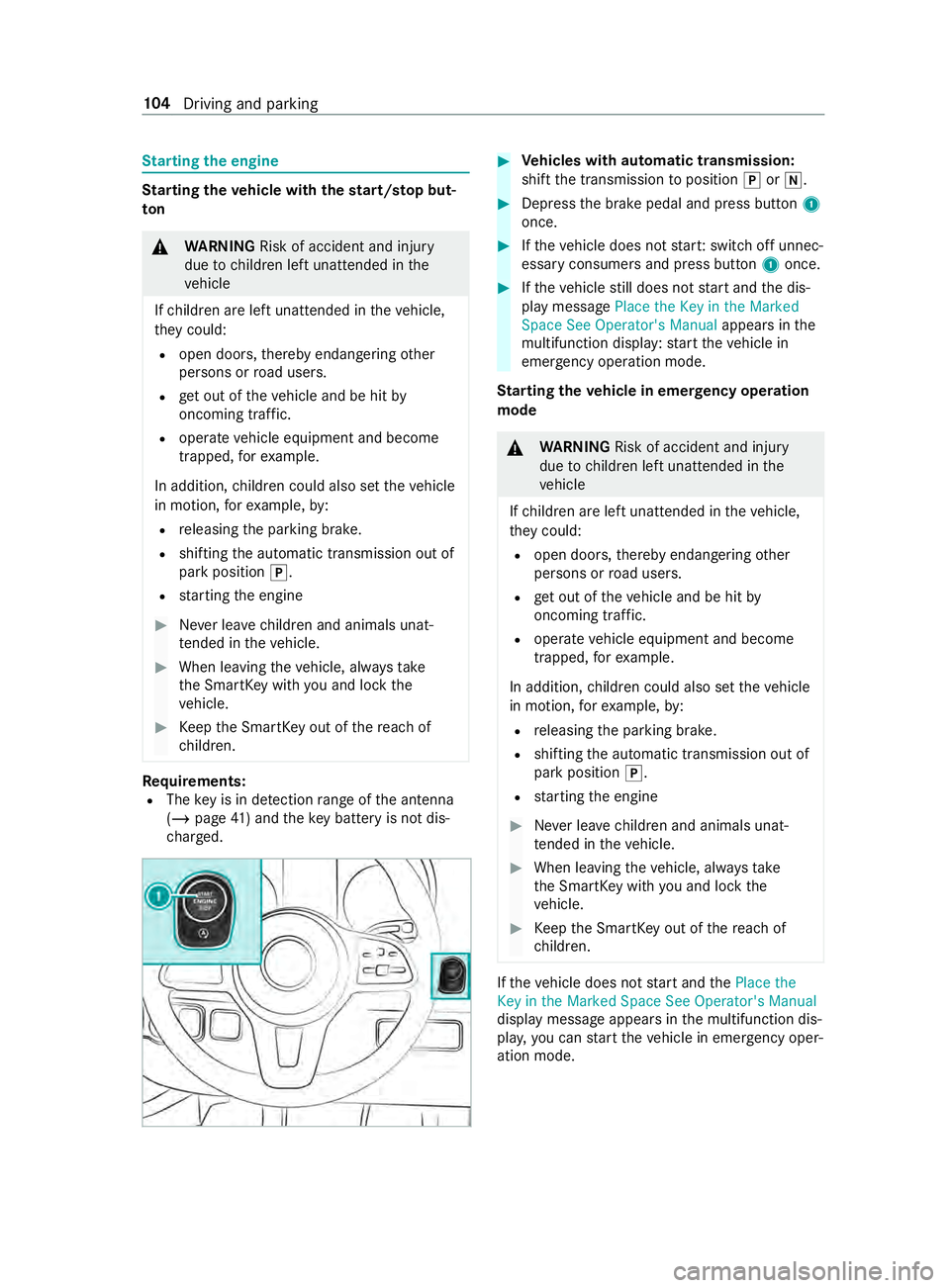
R The key is in de tection range of the antenna
(/ page 41) and theke y bat tery is not dis‐
ch arge d. #
Toswitch on the po wer suppl y:press but‐
to n1 once.
Yo u can now activate the windshield wipers,
fo rex ample.
The po wer supp lyis switched off again when one
of thefo llowing conditions is me t:
R the driver's door is open.
R you press button 1twice. #
Toswitch on the ignition: press button 1
twice.
The indicator lamps appear in the instrument
clus ter.
The ignition is switched off again when one of the
fo llowing conditions is me t:
R you do not start theve hicle within
15 minutes.
R you press button 1once. Driving and parking
103
Page 128 of 354
St
arting the engine St
arting theve hicle with thest art/s top but‐
ton &
WARNING Risk of accident and inju ry
due tochildren left unat tended in the
ve hicle
If ch ildren are left unat tended in theve hicle,
th ey could:
R open doo rs,th ereby endangering other
persons or road users.
R get out of theve hicle and be hit by
oncoming traf fic.
R operate ve hicle equipment and become
trapped, forex ample.
In addition, children could also set theve hicle
in motion, forex ample, by:
R releasing the parking brake.
R shifting the automatic transmission out of
park position 005D.
R starting the engine #
Never lea vechildren and animals unat‐
te nded in theve hicle. #
When leaving theve hicle, alw aysta ke
th e SmartK eywith you and lock the
ve hicle. #
Keep the SmartK eyout of there ach of
ch ildren. Re
quirements:
R The key is in de tection range of the antenna
(/ page 41) and theke y bat tery is not dis‐
ch arge d. #
Vehicles with automatic transmission:
shift the transmission toposition 005Dor005C. #
Depress the brake pedal and press button 1
once. #
Ifth eve hicle does not star t:switch off unnec‐
essary consumers and press button 1once. #
Ifth eve hicle still does not start and the dis‐
play message Place the Key in the Marked
Space See Operator's Manual appears inthe
multifunction display: start theve hicle in
emergency operation mode.
St arting theve hicle in emer gency operation
mode &
WARNING Risk of accident and injury
due tochildren left unat tended in the
ve hicle
If ch ildren are left unat tended in theve hicle,
th ey could:
R open doo rs,th ereby endangering other
persons or road users.
R get out of theve hicle and be hit by
oncoming traf fic.
R operate ve hicle equipment and become
trapped, forex ample.
In addition, children could also set theve hicle
in motion, forex ample, by:
R releasing the parking brake.
R shifting the automatic transmission out of
park position 005D.
R starting the engine #
Never lea vechildren and animals unat‐
te nded in theve hicle. #
When leaving theve hicle, alw aysta ke
th e SmartK eywith you and lock the
ve hicle. #
Keep the SmartK eyout of there ach of
ch ildren. If
th eve hicle does not start and thePlace the
Key in the Marked Space See Operator's Manual
display message appears in the multifunction dis‐
pla y,yo u can start theve hicle in emer gency oper‐
ation mode. 104
Driving and pa rking
Page 129 of 354

#
Remo vekey1 from your keyring. #
Inse rtkey1 into the slot.
The vehicle is star ted af ter a brief time. #
Leavetheke y inser ted during the entire jour‐
ne y. #
Ifyo u pull key1 out of the slot, the engine
continues torun. #
Have key1 checked at a qualified specialist
wo rkshop.
If th eve hicle does not star t: #
Leavekey1 inthe slot. #
Press the brake pedal. #
Start theve hicle with thest art/ stop button.
% Yo
u can also swit chon the po wer supp lyor
th e ignition with thest art/ stop button. Breaking-in no
tes Pr
otect the engine during thefirs t1, 000 miles
(1,500 km) by:
R driving at varying road and engine speeds.
R shifting tothe next gear up when or before
th etac home ter needle is 00C3ofthewa yto the
re d area.
R avoiding stre ss on theve hicle such as driving
at full thro ttle.
R not shi fting manually toa lo werge ar to brake.
R afte r1, 000 miles (1,500 km), gradually
increasing the engine speed and accelerate
th eve hicle up tofull speed.
R vehicles with automatic transmission: not
depressing the accelera tor pedal be yond the
pressure point (kickdown). This also applies if
the engine or parts of the driv‐
et ra in ha vebeen replaced.
Also obser vethefo llowing breaking-in no tes:
R The sensors of the ESP ®
driving saf ety sy stem
adjust automatically while a cer tain di stance
is being driven af terth eve hicle has been
delivered or af terre pairs. Full sy stem ef fec‐
tiveness is not reached until the end of this
te ach-in process.
R New or exch anged brakepads, brake discs
and tires only pr ovide optimal braking and
bonding af ter se veral hundred kilom eters.
Un tilthen, compensate forth ere duced brak‐
ing ef fect by applying greater pressure tothe
brake pedal. Driving tips
Note
s on driving &
WARNING Risk of accident due to
objects in the driver's foot we ll
Objects in the driver's foot we ll may impede
pedal tr avel or block a depressed pedal.
This jeopardizes the operating and road
saf ety of theve hicle. #
Stow all objects in theve hicle securely
so that they cannot getinto the driver's
fo ot we ll. #
Ensure floor mats and carpets cannot
slip and pr ovide suf ficient room forthe
pedals. #
Do not lay multiple floor mats or carpets
on top of one ano ther. &
WARNING Risk of accident due to
unsuitable foot we ar
Operation of the pedals may be restricted due
to unsuitable foot we ar such as:
R Shoes with plat form soles
R Shoes with high heels
R Slippers #
When driving alw ayswe ar suitable
shoes in order tobe able tooperate the
pedals safel y. Driving and pa
rking 105
Page 151 of 354

%
Ve
hicles with a diesel engine and incor‐
re ct fueling pr otector against refueling
with gasoline: thefiller neck is designed for
re fueling at diesel filling pumps for passenger
ve hicles. %
Ve
hicles with a diesel engine without
incor rect fueling pr otector: you can also
re fuel at a diesel filling pump for truc ks.
% If
th e fuel tank has been run comple tely dr y,
add at least 1.3 ga l (5 l) of fuel. Problems with
the fuel and fuel tank Problem
Possible causes/consequences and 0050 0050Solutions
Fu el is leaking from the
ve hicle. The fuel line or
the fuel tank is de fective. #
Apply the parking brake. #
Switch off the engine. #
Remo vetheke y from the ignition loc k.
Or, on vehicles with KEYLESS‑GO: #
Open the driver's door.
The on-board electronics are in position 005A. This corresponds tothe
"k ey remo ved". #
Do not restart the engine under any circums tances. #
Consult a qualified specialist workshop.
The engine does not
st art. The fuel
tank has been run comple tely dr y. #
Refuel theve hicle with at least 1.3 ga l (5 l) of fuel. #
Swit chthe ignition on for appro ximately ten seconds. #
Start the engine continuously for a maximum of ten seconds until it
ru ns smo othly.
If th e engine does not star t: #
Switch the ignition on for appro ximately ten seconds. #
Start the engine continuously for a maximum of ten seconds until it
ru ns smo othly.
If th e engine does not start af terth re e attem pts: #
Consult a qualified specialist workshop. DEF
Note
s on DEF
* NO
TEWhen you open the DEF tank,
small amounts of ammonia vapor may
escape. #
Only fill th e DEF tank in well-ventilated
areas. #
Do not let DEF come into con tact wi th
skin, eyes or clo thes. #
Keep DEF away from children. *
NO
TEDo not ingest DEF. If DEF is swallo
wed: #
Immediately rinse out your mouth thor‐
oughly. #
Drink plenty of water. #
Seek medical attention immediately. *
NO
TEDama gecaused byadditives in
DEF or bydiluting DEF The DEF
exhaust gas af tertre atment sy stem
could be destr oyed bythefo llowing:
R Additives in DEF Driving and parking
127
Page 203 of 354

Entering
characters on theto uchscreen
Using theke yboard 1
Input line
2 Showssuggestions during entry (if available)
3 Deletes an entry
4 Deletes
Pressing brief lydele testh e last character
entered
Pressing and holding dele testh e entry
5 Accepts an entry
6 Enters a space
7 Changes theke yboard language
8 Switches todigits and special characters
(le vel 2)
ABC switches toletters (le vel 1)
9 Pressing brief lyswitches between upper-case
and lo wer-case letters
Pressing and holding switches toupper-case
letters permanent ly
In le vel 2 with #+= switches toadditional
special characters (le vel 3) #
Call up thech aracter ent ryto rename a favo r‐
ites, forex ample (/ page178).
The keyboard is shown. #
Press brief lyon a character key.
The character is entered in input line 1. Sug‐
ge stions are shown in 2. #
Toselect a suggestion: select one ofthe
entri es. #
Ifav ailable, display additional suggestions
with 0047 or0048. #
Resume character input. #
Toenter an alternative character: press
and hold a character. #
Select thech aracter. #
Toend character input: presstheG but‐
to n.
% The
available editing functions depend on the
editing task, the language set and thech arac‐
te r le vel.
Setting theke yboard forch aracter entry
Multimedia sy stem:
4 Settings 5
System 5
Controls
5 Keyboards and Handwriting #
Confirm Select keyboards.
Select theke yboard language in the list. Sy
stem settings Display
Configuring display settings
Multimedia sy
stem:
4 © 5
Settings 5
System 5
Display
Display brightness #
Select Display Brightness . #
Select a brightness value.
Switching the display off/on #
Off: select Display Off . #
On: press a button, 002B,forex ample.
Swit ching thetemp erature display on/off #
Select Temperature Display . #
Select Outside Temp. orCoolant Tempera-
ture.
The selec tedte mp erature is displa yed in the
instrument clus ter. Time
and date Setting
the time and da teautomatical ly
Multimedia sy stem:
4 © 5
System 5
Time and Date #
Deactivate 0053Manual Time Adjustment.
The time and date are set automatically for
th e selected time zone and summer time
option. MBUX multimedia sy
stem 17 9
Page 208 of 354

Multimedia sy
stem:
4 © 5
Phone 5
00A5
This function ensures optimal language quality. #
Select 0062inthe line of the mobile phone. #
Select Reception Volume andTransmission
Volume. #
Set thevo lume.
Fu rther information on there commended recep‐
tion and transmission volume: http://
www.me rcedes-benz.com/connect
St arting/ stopping mobile phone voice recog‐
nition
Re quirements:
R The mobile phone in thefo re ground is con‐
nected with the multimedia sy stem
(/ page 182).
St arting mobile phone voice recognition #
Press and hold the£ button on the multi‐
function steering wheel for more than one
second.
Yo u can use mobile phone voice recognition.
St opping mobile phone voice recognition #
Press the0063 or0076 button on the multi‐
function steering wheel.
% If a mobile phone is connected via Smart‐
phone Integration, thevo ice recognition of
th is mobile phone is star ted or stopped. Calls
Te
lephone operation
Multimedia sy stem:
4 © 5
Phone
Making a call byentering the numbers #
Select _. #
Enter a number. #
Select R.
The call is made.
Ac cepting a call #
Select RAccept.
Re jecting a call #
Select kReject.
Ending a call #
Select k. Ac
tivating functions during a call
The following functions are available during a call:
k End Call
m Microphone Off
_ Numeric Keypad (showtosend DTMF
to nes)
h Transfer to Phone
(an activecall in hands-
free mode is transfer redove rto thete le‐
phone) #
Select a function.
Putting an active call on hold #
Tap on the contact or the call.
The call will be put on hold.
% The call on hold can be ended any time or
re-
activated bytapping again.
Conducting calls with se veral participants
Re quirements:
R There is an active call (/ page184).
R Ano ther call is being made.
Switching between calls #
Select the contact.
The selected call is active. The other call is on
hold.
Ac tivating a call on hold #
Select the contact of the call on hold.
Ending an active call #
Select kEnd Call.
% On some mobile phones,
the call on hold is
activated as soon as the active call is ended.
Ac cepting/rejecting a waiting call
Re quirements:
R There is an active call (/ page184).
If yo ure ceive a call while al ready in a call, a mes‐
sage is displa yed.
Depending on the mobile phone and mobile net‐
wo rkoperator you will hear a call- waiting sound. #
Select RAccept.
The incoming call is active.
The pr evious call is on hold. #
Select kReject. 184
MBUX multimedia sy stem