2019 MERCEDES-BENZ GLE COUPE oil reset
[x] Cancel search: oil resetPage 20 of 370

SD memory card
see also Digital Operator's Man-
ual .................................................. 264
Selecting ........................................2 14
Search & Send
see also Digital Operator's Man-
ual ................................................. .264
Seat
Correct driver's seat position ........... 94
Seat belts
Adjusting the driver's and front-
passenger seat bel t......................... 46
Adjusting the height ......................... 46
Cleaning ......................................... 308
Correct usage .................................. 45
Fastening ......................................... 46
Important safety guidelines ............. 44
Introduction ..................................... 43
Releasing ......................................... 46
Switching belt adjustment on/off
(on-board computer) ...................... 219
Warning lamp ................................. 251
Warning lamp (function) ................... 46
Seats
Adjusting (electrically) ..................... 95
Adjusting the 4-way lumbar sup-
port .................................................. 98
Adjusting the head restraint ............ 96
Calling up a stored setting (mem-
ory function) .................................. 105
Cleaning the cover ......................... 307
Folding the rear bench seat for-
wards/back ................................... 275
Important safety notes .................... 94
Overview .......................................... 94
Seat heating problem ...................... 99
Seat ventilation problem .................. 99
Storing settings (memory func-
tion) ............................................... 105
Switching seat heating on/of f......... 98
Switching seat ventilation on/of f.... 99
Section
Sliding sunroof ................................. 89
Selector lever
Cleaning ......................................... 307
Sensors (cleaning instructions) ....... 305
Service menu (on-board com-
puter) .................................................. 217 Service message
see ASSYST PLUS
Service products
Brake fluid ..................................... 362
Coolant (engine) ............................ 362
Engine oil ....................................... 361
Fuel ................................................ 360
Important safety notes .................. 359
Refrigerant (air-conditioning sys-
tem) ............................................... 363
Washer fluid ................................... 363
Setting the air distribution ............... 121
Setting the airflow ............................ 121
Setting the date/time format
see also Digital Operator's Man-
ual .................................................. 264
Setting the language
see also Digital Operator's Man-
ual .................................................. 264
Setting the time
see also Digital Operator's Man-
ual .................................................. 264
Settings
Factory (on-board computer) ......... 220
On-board computer ....................... 217
SETUP (on-board computer,
Mercedes-AMG vehicles) .................. 220
Side impact air bag ............................. 49
Side marker lamp (display mes-
sage) ................................................... 235
Side windows
Cleaning ......................................... 304
Convenience closing feature ............ 87
Convenience opening feature .......... 87
Important safety information ........... 86
Opening/closing .............................. 86
Overview .......................................... 86
Problem (malfunction) ..................... 88
Resetting ......................................... 88
Reversing feature ............................. 86
SIRIUS services
see also Digital Operator's Man-
ual .................................................. 264
Sliding sunroof
see Panorama roof with power
tilt/sliding panel 18
Index
Page 222 of 370
X
Press the 0059or0065 button on the steering
wheel to select the Sett.
Sett. menu.
X Press the 0064or0063 button to select the
Convenience
Convenience submenu.
X Press 0076to confirm.
X Press the 0064or0063 button to select the
Auto. Mirror Folding
Auto. Mirror Folding function.
If the Auto. Mirror Folding
Auto. Mirror Folding function is
switched on, the multifunction display shows the exterior mirror in orange.
X Press the 0076button to save the setting. If you have switched the
Auto. Mirror Fold‐
Auto. Mirror Fold‐
ing
ing on and you fold the exterior mirrors in using
button 0043, they will not fold out automatically
(Y page 103).
You can then only fold out the exterior mirrors
using button 0043.
Restoring the factory settings X
Press the 0059or0065 button on the steering
wheel to select the Sett.
Sett. menu.
X Press the 0064or0063 button to select the
Factory Setting
Factory Setting submenu.
X Press 0076to confirm.
The Reset All Settings?
Reset All Settings? message
appears.
X Press the 0064or0063 button to select No
Noor
Yes
Yes.
X Press 0076to confirm the selection.
If you select Yes
Yes, the multifunction display
shows a confirmation message.
If you want to reset the Daytime Running
Daytime Running
Lights
Lights function in the Light
Light submenu, you
must turn the SmartKey to position 0047in the
ignition lock. AMG menu (Mercedes-AMG vehicles)
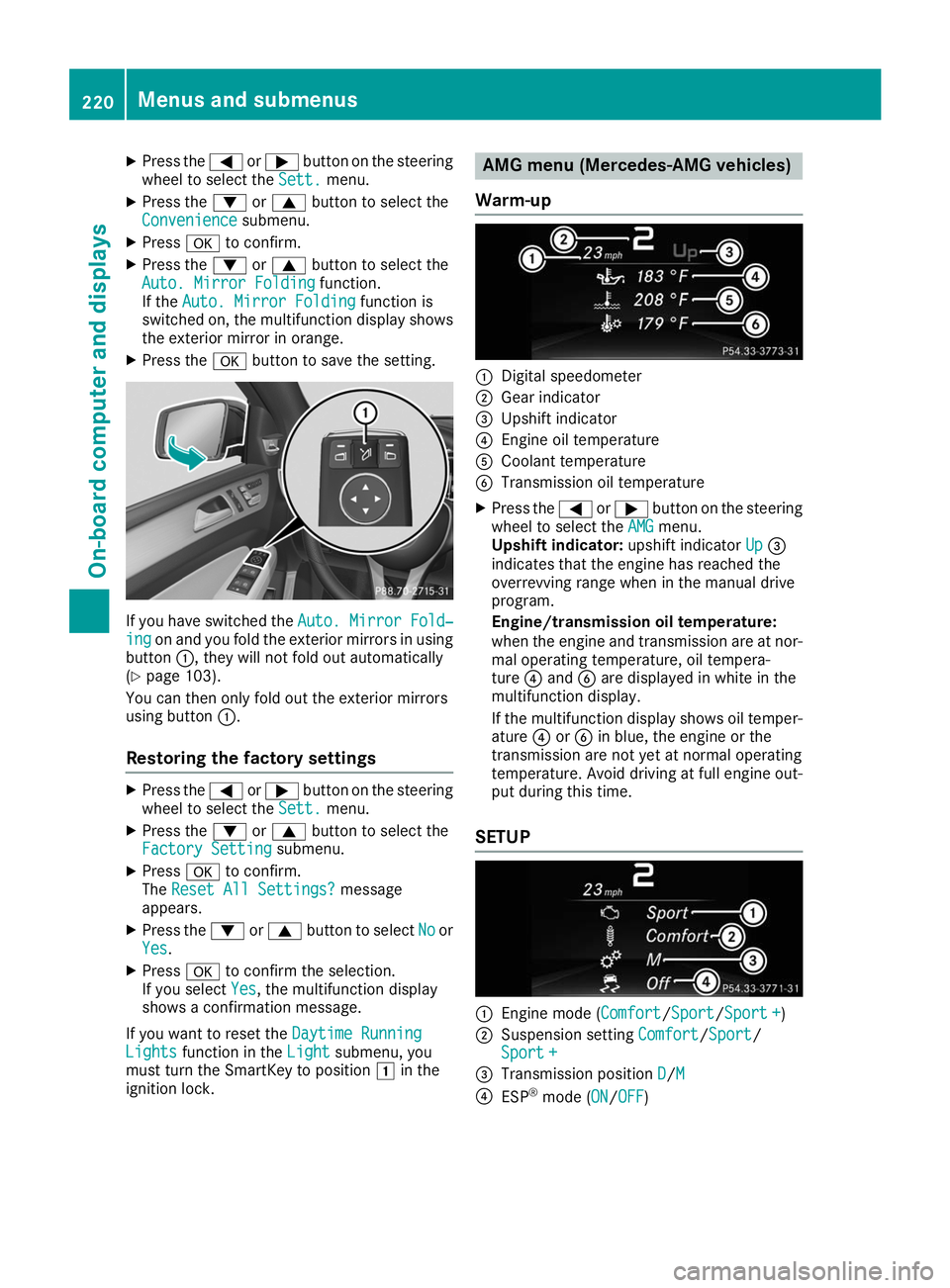
Warm-up 0043
Digital speedometer
0044 Gear indicator
0087 Upshift indicator
0085 Engine oil temperature
0083 Coolant temperature
0084 Transmission oil temperature
X Press the 0059or0065 button on the steering
wheel to select the AMG
AMGmenu.
Upshift indicator: upshift indicatorUp
Up0087
indicates that the engine has reached the
overrevving range when in the manual drive
program.
Engine/transmission oil temperature:
when the engine and transmission are at nor-
mal operating temperature, oil tempera-
ture 0085and 0084are displayed in white in the
multifunction display.
If the multifunction display shows oil temper- ature 0085or0084 in blue, the engine or the
transmission are not yet at normal operating
temperature. Avoid driving at full engine out-
put during this time.
SETUP 0043
Engine mode (Comfort Comfort/SportSport/Sport +Sport +)
0044 Suspension setting Comfort
Comfort/ Sport Sport/
Sport +
Sport +
0087 Transmission position D
D/MM
0085 ESP ®
mode (ON ON/OFFOFF) 220
Menus and submenusOn-board computer and displays
Page 302 of 370
Further information on windshield washer fluid
(Y page 363). ASSYST PLUS
Service message
i If the scheduled service intervals are excee-
ded, this may result in damage to the vehicle.
You can obtain up-to-date information concern-
ing the servicing of your vehicle from a qualified specialist workshop, e.g. an authorized
Mercedes-Benz Center or at
http://www.mbusa.com (USA only).
i The ASSYST PLUS service interval display
does not show any information on the engine
oil level. Observe the notes on the engine oil
level (Y page 297).
The multifunction display shows a service mes-
sage for several seconds, e.g.:
R Service A in .. Days Service A in .. Days
R Service A Due
Service A Due
R Service A Exceeded by .. Days
Service A Exceeded by .. Days
Depending on the operating conditions of the
vehicle, the remaining time or distance until the next service due date is displayed.
The letter A Aor B
B, possibly in connection with a
number or another letter, shows the type of ser-
vice. A
A stands for a minor service and B
Bfor a
major service.
Further information can be obtained at a quali-
fied specialist workshop.
The ASSYST PLUS service interval display does
not take into account any periods of time during
which the battery is disconnected.
Maintaining the time-dependent service sched-
ule:
X Note down the service due date displayed in
the multifunction display before disconnect-
ing the battery.
or
X After reconnecting the battery, subtract the
battery disconnection periods from the ser-
vice date shown on the display. Hiding a service message
X Press the 0038or0076 button on the steering
wheel. Displaying service messages
X Switch on the ignition.
X Press the 0059or0065 button on the steering
wheel to select the Serv. Serv.menu.
X Press the 0063or0064 button to select the
ASSYST
ASSYST PLUS
PLUSsubmenu and confirm by press-
ing the 0076button.
The service due date appears in the multi-
function display. Information about Service
Resetting the ASSYST PLUS service
interval display !
If the ASSYST PLUS service interval display
has been inadvertently reset, this setting can
be corrected at a qualified specialist work-
shop.
Have service work carried out as described in the Maintenance Booklet. This may otherwise
lead to increased wear and damage to the
major assemblies or the vehicle.
A qualified specialist workshop will reset the
ASSYST PLUS service interval display after the
service work has been carried out. You can also obtain further information on maintenance
work, for example.
Special service requirements The specified maintenance interval takes only
the normal operation of the vehicle into
account. Under increased load on the vehicle,
maintenance work must be carried out more
frequently, for example:
R Regular city driving with frequent intermedi-
ate stops
R If the vehicle is primarily used to travel short
distances
R Use in mountainous terrain or on poor road
surfaces
R If the engine is often left idling for long periods
Under these or similar conditions, have, for
example, the air filter, engine oil and oil filter
replaced or changed more frequently. Under
arduous operating conditions, the tires must be checked more often. Further information can be
obtained at a qualified specialist workshop. 300
ASSYST PLUSMaintenance and care