2019 MERCEDES-BENZ GLC tow
[x] Cancel search: towPage 165 of 370
possible deceleration. If this deceleration is
not sufficient, Active Distance Assist
DISTRONIC alerts you with a visual and acous-
tic warning. There is a risk of an accident.
Adjust your speed in these cases and main-
tain sufficient distance. Apply the brakes
yourself and try to take evasive action.
!When Active Distance Assist DISTRONIC orthe HOLD function is activated, the vehiclebrakes automatically in certain situations.
To avoid damage to the vehicle, deactivateActive Distance Assist DISTRONIC and theHOLD function in the following or similar sit-uations:
Rwhen towing the vehicle
Rin the car wash
Active Distance Assist DISTRONIC can neitherreduce the risk of an accident if you fail to adaptyour driving style, nor override the laws of phys-ics. Active Distance Assist DISTRONIC cannottake into account road, weather or traffic con-ditions. Active Distance Assist DISTRONIC isonly an aid. You are responsible for maintaininga safe distance to the vehicle in front, for vehiclespeed, for braking in good time and for staying inlane.
Do not use Active Distance Assist DISTRONIC:
RIn road and traffic conditions which do notallow you to maintain a constant speed, e.g. inheavy traffic or on winding roads
ROn slippery road surfaces. Braking or accel-erating could cause the drive wheels to losetraction and the vehicle could then skid
RIn poor visibility, e.g. due to fog, heavy rain orsnow
Active Distance Assist DISTRONIC may notdetect narrow vehicles driving in front, e.g.motorcycles, or vehicles driving in a staggeredformation.
In particular, the detection of obstacles can beimpaired if:
RThere is dirt on the sensors or anything elsecovering the sensors
RThere is snow or heavy rain
RThere is interference by other radar sources
RThere are strong radar reflections, for exam-ple in parking garages
If Active Distance Assist DISTRONIC no longerdetects a vehicle in front, Distance Pilot
DISTRONIC may unexpectedly accelerate to thespeed stored.
This speed may:
RBe too high if you are driving in a turning laneor an exit lane
Rbe so high in the right lane that you pass vehi-cles driving on the left (in countries wherethey drive on the right)
Rbe so high in the left lane that you pass vehi-cles driving on the right (in countries wherethey drive on the left)
If there is a change of drivers, advise the newdriver of the speed stored.
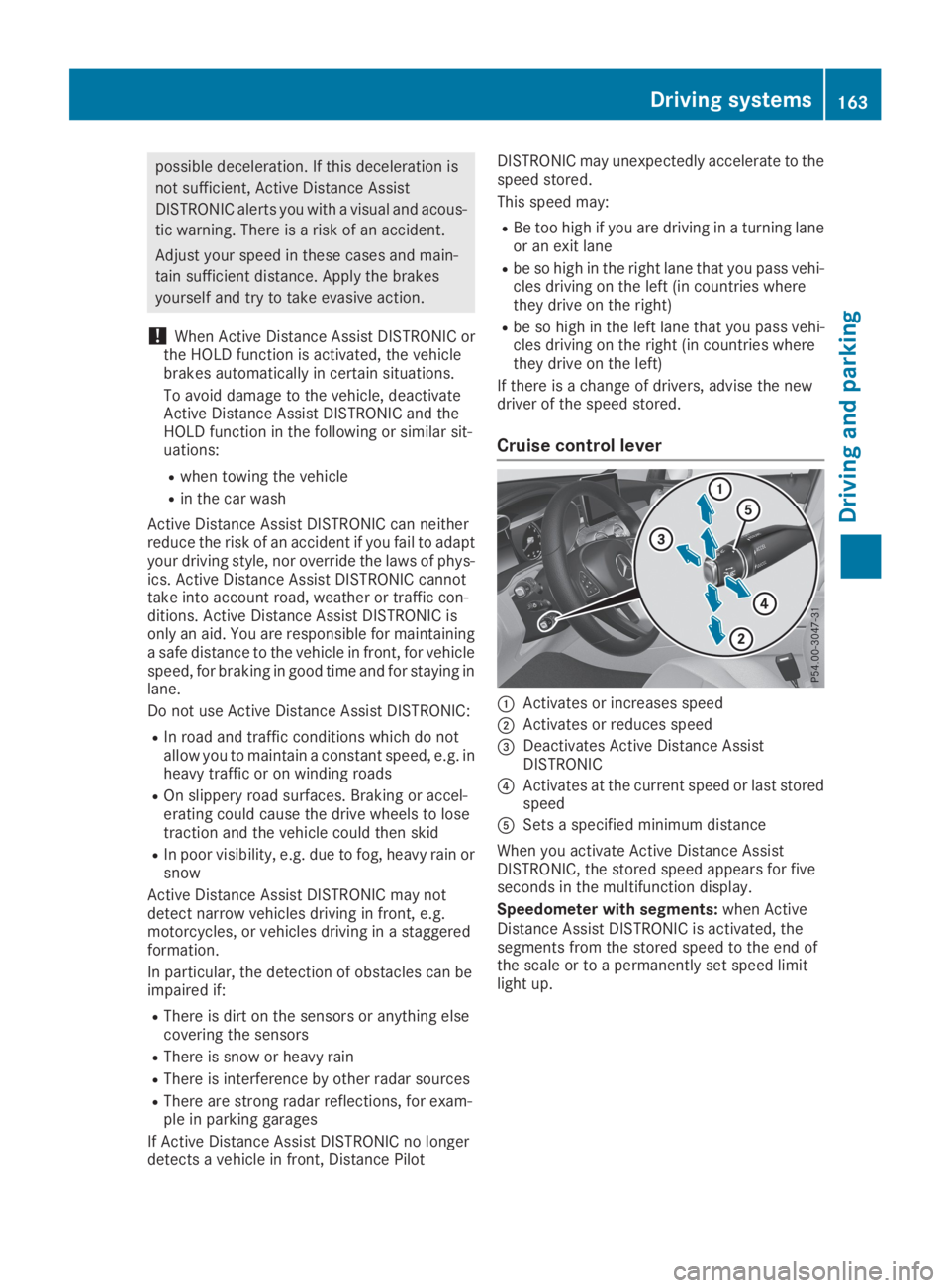
Cruise control lever
CActivates or increases speed
DActivates or reduces speed
Page 166 of 370
Activating Active Distance Assist
DISTRONIC
Activation conditions
To activate Active Distance Assist DISTRONIC,the following conditions must be fulfilled:
Rthe engine must be started. It may take up totwo minutes of driving before Active DistanceAssist DISTRONIC is ready for use.
Rthe electric parking brake must be released.
RESP®must be activated, but not interveningat present.
RParking Pilot must not be activated.
Rthe transmission must be in position[.
Rthe driver's door must be closed when youshift the transmission from position]to[or your seat belt must be fastened.
Rthe front-passenger door and rear doors mustbe closed.
Rthe vehicle must not slide.
Activating
XBriefly pull the cruise control lever towardsyou
Page 170 of 370
ple, the detected vehicle turns a corner andan obstacle or stationary vehicle is revealed,Active Distance Assist DISTRONIC will notbrake for them.
RCrossing vehicles: Active Distance AssistDISTRONIC may mistakenly detect vehiclesthat are crossing your lane. Activating ActiveDistance Assist DISTRONIC at, for example, atraffic light with crossing traffic could causeyour vehicle to pull away at the wrong time.
In such situations, brake if necessary. ActiveDistance Assist DISTRONIC will then be deacti-vated.
Active Distance Assist DISTRONIC with
Active Steering Assist
General notes
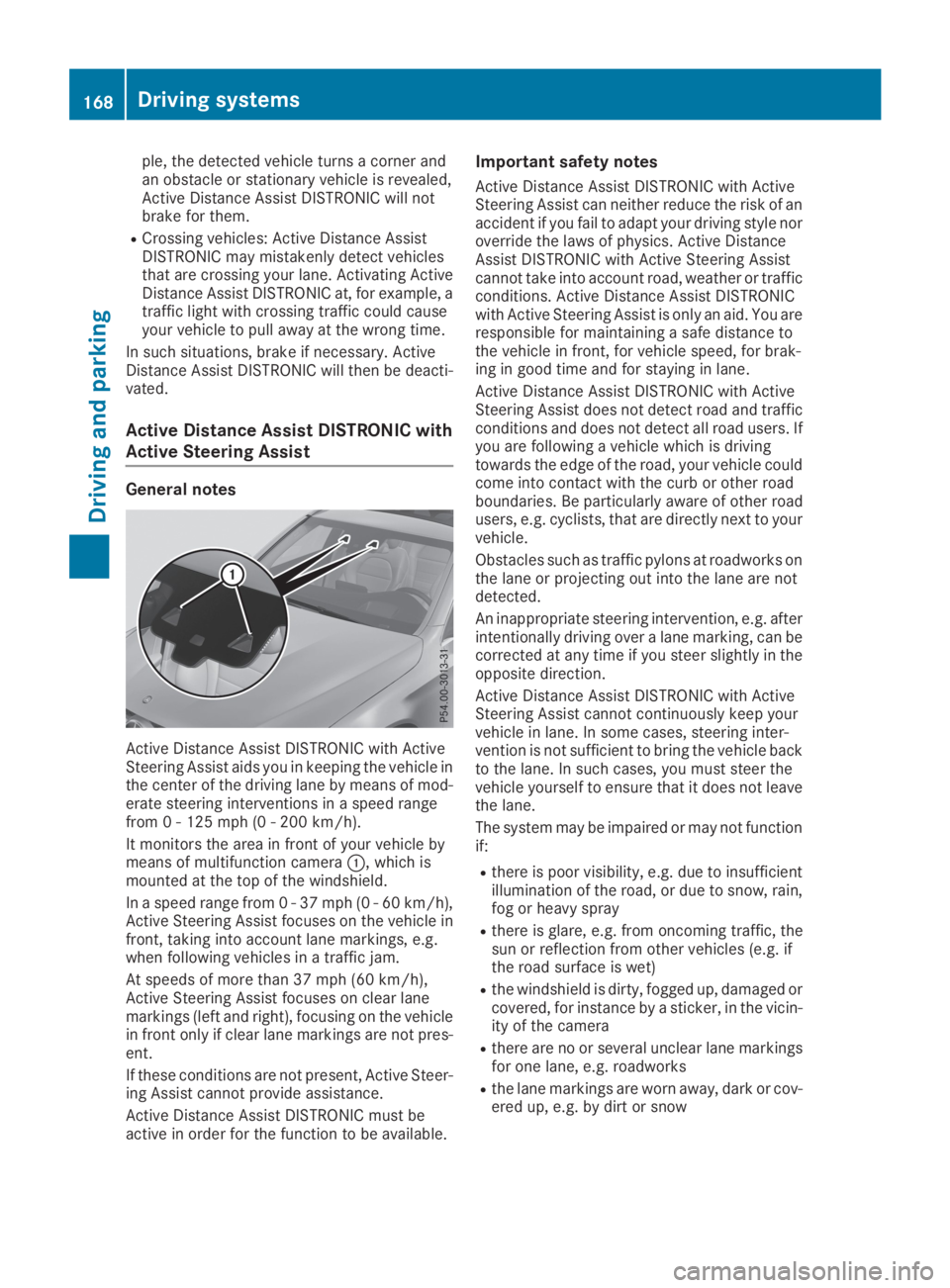
Active Distance Assist DISTRONIC with ActiveSteering Assist aids you in keeping the vehicle inthe center of the driving lane by means of mod-erate steering interventions in a speed rangefrom 0 - 125 mph (0 - 200 km/h).
It monitors the area in front of your vehicle bymeans of multifunction cameraC, which ismounted at the top of the windshield.
In a speed range from 0 - 37 mph (0 - 60 km/h),Active Steering Assist focuses on the vehicle infront, taking into account lane markings, e.g.when following vehicles in a traffic jam.
At speeds of more than 37 mph (60 km/h),Active Steering Assist focuses on clear lanemarkings (left and right), focusing on the vehiclein front only if clear lane markings are not pres-ent.
If these conditions are not present, Active Steer-ing Assist cannot provide assistance.
Active Distance Assist DISTRONIC must beactive in order for the function to be available.
Important safety notes
Active Distance Assist DISTRONIC with ActiveSteering Assist can neither reduce the risk of anaccident if you fail to adapt your driving style noroverride the laws of physics. Active DistanceAssist DISTRONIC with Active Steering Assistcannot take into account road, weather or trafficconditions. Active Distance Assist DISTRONICwith Active Steering Assist is only an aid. You areresponsible for maintaining a safe distance tothe vehicle in front, for vehicle speed, for brak-ing in good time and for staying in lane.
Active Distance Assist DISTRONIC with ActiveSteering Assist does not detect road and trafficconditions and does not detect all road users. Ifyou are following a vehicle which is drivingtowards the edge of the road, your vehicle couldcome into contact with the curb or other roadboundaries. Be particularly aware of other roadusers, e.g. cyclists, that are directly next to yourvehicle.
Obstacles such as traffic pylons at roadworks onthe lane or projecting out into the lane are notdetected.
An inappropriate steering intervention, e.g. afterintentionally driving over a lane marking, can becorrected at any time if you steer slightly in theopposite direction.
Active Distance Assist DISTRONIC with ActiveSteering Assist cannot continuously keep yourvehicle in lane. In some cases, steering inter-vention is not sufficient to bring the vehicle backto the lane. In such cases, you must steer thevehicle yourself to ensure that it does not leavethe lane.
The system may be impaired or may not functionif:
Rthere is poor visibility, e.g. due to insufficientillumination of the road, or due to snow, rain,fog or heavy spray
Rthere is glare, e.g. from oncoming traffic, thesun or reflection from other vehicles (e.g. ifthe road surface is wet)
Rthe windshield is dirty, fogged up, damaged orcovered, for instance by a sticker, in the vicin-ity of the camera
Rthere are no or several unclear lane markingsfor one lane, e.g. roadworks
Rthe lane markings are worn away, dark or cov-ered up, e.g. by dirt or snow
168Driving systems
Driving and parking
Page 171 of 370
Rthe distance to the vehicle in front is too shortand thus the lane markings cannot be detec-ted
Rthe lane markings change quickly, e.g. lanesbranch off, cross one another or merge
Rthe road is narrow and winding
Rthere are highly variable shade conditions onthe roadway
The system is switched to passive and no longerassists you by performing steering interventionsif:
Ryou actively change lane
Ryou switch on the turn signal
Ryou take your hands off the steering wheel ordo not steer for a prolonged period of time
Once you have finished changing lanes, ActiveSteering Assist automatically reactivates.
Active Steering Assist cannot provide assis-tance:
Ron very sharp corners
Rwhen towing a trailer
Rwhen a loss of tire pressure or a defective tirehas been detected and displayed
Observe the important safety notes on ActiveDistance Assist DISTRONIC (Ypage 162).
The steering interventions are carried out with alimited steering moment. The system requiresthe driver to keep his hands on the steeringwheel and to steer himself.
If you do not steer yourself or if you take yourhands off the steering wheel for a prolongedperiod of time, the system will first alert you witha visual warning. A steering wheel symbolappears in the multifunction display. If you havestill not started to steer and have not taken holdof the steering wheel after five seconds at thelatest, a warning tone also sounds to remind youto take control of the vehicle. Active SteeringAssist is then switched to passive. Active Dis-tance Assist DISTRONIC remains active.
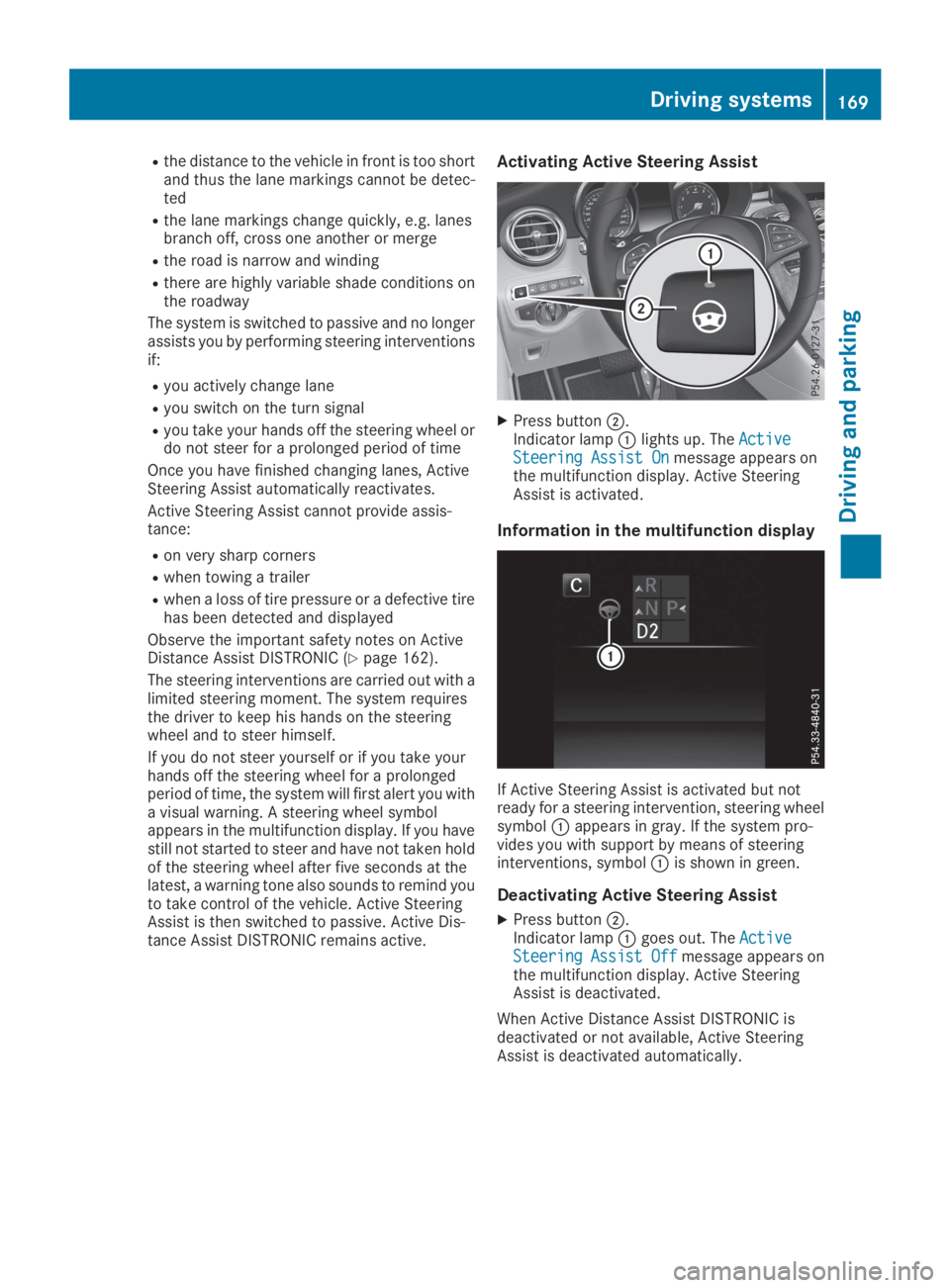
Activating Active Steering Assist
XPress buttonD.Indicator lampClights up. TheActiveActiveSteering Assist OnSteering Assist Onmessage appears onthe multifunction display. Active SteeringAssist is activated.
Information in the multifunction display
If Active Steering Assist is activated but notready for a steering intervention, steering wheelsymbolCappears in gray. If the system pro-vides you with support by means of steeringinterventions, symbolCis shown in green.
Deactivating Active Steering Assist
XPress buttonD.Indicator lampCgoes out. TheActiveActiveSteeringSteeringAssistAssistOffOffmessage appears onthe multifunction display. Active SteeringAssist is deactivated.
When Active Distance Assist DISTRONIC isdeactivated or not available, Active SteeringAssist is deactivated automatically.
Driving systems169
Driving an d parking
Z
Page 172 of 370
HOLD function
General notes
The HOLD function can assist the driver in thefollowing situations:
Rwhen pulling away, especially on steep slopes
Rwhen maneuvering on steep slopes
Rwhen waiting in traffic
The vehicle is kept stationary without the driverhaving to depress the brake pedal.
The braking effect is canceled and the HOLDfunction deactivated when you depress theaccelerator pedal to pull away.
Important safety notes
GWARNING
If the vehicle is only braked using the HOLD
function, the vehicle may roll away in the fol-
lowing situations when you leave the vehicle:
Rif there is a malfunction in the system or in
the voltage supply
Rif the HOLD function is deactivated by
depressing the accelerator pedal or brake
pedal, e.g. by a vehicle occupant
Rif the electrical system in the engine com-
partment, the battery or the fuses are tam-
pered with or the battery is disconnected
There is a risk of an accident.
Always deactivate the HOLD function and
secure the vehicle against rolling away before
you leave it.
!When DISTRONIC PLUS or the HOLD func-tion is activated, the vehicle brakes automat-ically in certain situations.
To avoid damage to the vehicle, deactivateDISTRONIC PLUS and the HOLD function inthe following or similar situations:
Rwhen towing the vehicle
Rin the car wash
Deactivating the HOLD function (Ypage 170).
Activation conditions
You can activate the HOLD function if all of thefollowing conditions are fulfilled:
Rthe vehicle is stationary.
Rthe engine is running or if it has been auto-matically switched off by the ECO start/stopfunction.
Rthe driver's door is closed or your seat belt isfastened.
Rthe electric parking brake is released.
Rthe transmission is in position[,^or\\.
RDISTRONIC PLUS is deactivated.
Activating the HOLD function
XMake sure that the activation conditions aremet.
XDepress the brake pedal.
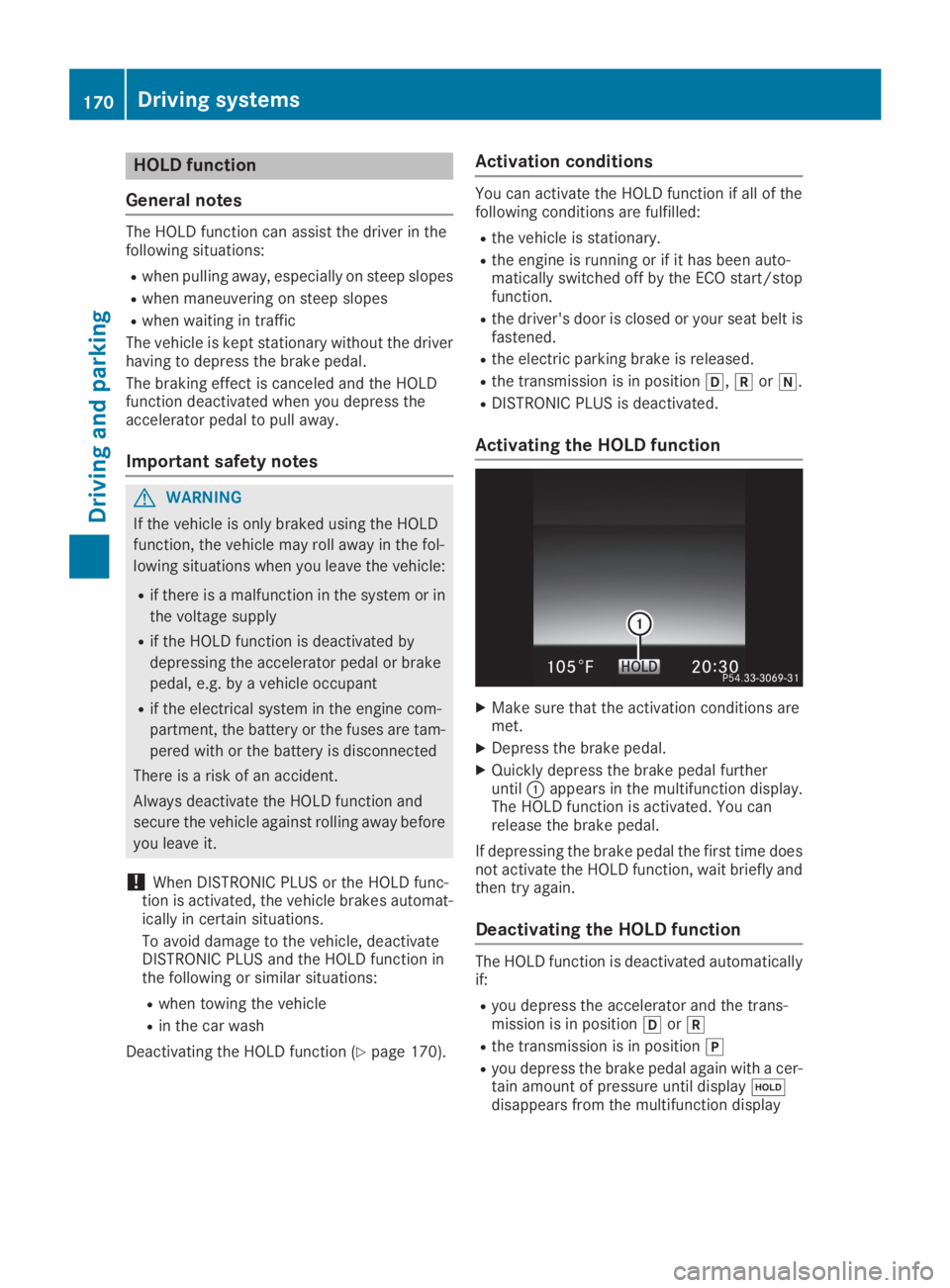
XQuickly depress the brake pedal furtheruntilCappears in the multifunction display.The HOLD function is activated. You canrelease the brake pedal.
If depressing the brake pedal the first time doesnot activate the HOLD function, wait briefly andthen try again.
Deactivating the HOLD function
The HOLD function is deactivated automaticallyif:
Ryou depress the accelerator and the trans-mission is in position[or^
Rthe transmission is in position]
Ryou depress the brake pedal again with a cer-tain amount of pressure until display
Page 178 of 370
for safe maneuvering, parking and exiting aparking space. Make sure that no persons, ani-mals or objects are in the path of your vehicle.
When Parking Assist PARKTRONIC is deactiva-ted, Active Parking Assist is also unavailable.
For vehicles with a trailer tow hitch installed, theminimum length for parking spaces is slightlylonger.
If you have attached a trailer to your vehicle, youshould not use Active Parking Assist. Once theelectrical connection is established betweenyour vehicle and the trailer, Active ParkingAssist is no longer available. Parking AssistPARKTRONIC is deactivated for the rear area.
GWARNING
While parking or pulling out of a parking
space, the vehicle swings out and can drive
onto areas of the oncoming lane. This could
result in a collision with another road user.
There is a risk of an accident.
Pay attention to other road users. Stop the
vehicle if necessary or cancel the Active Park-
ing Assist parking procedure.
!If they cannot be avoided, drive over obsta-cles such as curbs slowly and at an obtuseangle. Otherwise, you may damage thewheels or tires.
Active Parking Assist may possibly indicateparking spaces which are not suitable for park-ing, for example:
Rwhere parking or stopping is prohibited
Rin front of driveways or entrances and exits
Ron unsuitable surfaces
Parking tips:
ROn narrow roads, drive as close to the parkingspace as possible
RParking spaces that are littered or overgrownmight be identified or measured incorrectly
RParking spaces that are partially occupied bytrailer drawbars might not be identified assuch or be measured incorrectly
RSnowfall or heavy rain may lead to a parkingspace being measured inaccurately
RPay attention to the warning messages ofParking Assist PARKTRONIC during the park-ing procedure (Ypage 181).
RYou can intervene in the steering procedureto correct it at any time. Active Parking Assistis then deactivated
RWhen transporting a load which protrudesfrom your vehicle, you should not use ActiveParking Assist
Rnever use Active Parking Assist when snowchains are installed
RAlways pay attention to the specified tirepressure for your vehicle. This has a directinfluence on the parking characteristics of thevehicle.
Use Active Parking Assist for parking spaces:
Rparallel or at right angles to the direction oftravel
Ron straight roads, not bends
Ron the same level as the road, e.g. not on thepavement
Detecting parking spaces
Objects located above the detection range ofActive Parking Assist will not be detected whenthe parking space is measured. These are nottaken into account when the parking procedureis calculated, e.g. overhanging loads, tail sec-tions or loading ramps of trucks. Active ParkingAssist may therefore guide you into the parkingspace too early.
GWARNING
If there are objects above the detection range:
RActive Parking Assist may steer too early
Rthe vehicle may not stop in front of these
objects
This could cause a collision. There is a risk of
an accident.
If objects are located above the detection
range, stop and deactivate Active Parking
Assist.
Further information about the detection range(Ypage 180).
176Driving systems
Driving and parking
Page 182 of 370
Parking Assist PARKTRONIC is only an aid. It isnot a replacement for your attention to yourimmediate surroundings. You are alwaysresponsible for safe maneuvering, parking andexiting a parking space. Make sure that thereare no persons, animals or objects in the maneu-vering area while maneuvering and parking in/leaving parking spaces.
!When parking, pay particular attention toobjects above or below the sensors, such asflower pots or trailer drawbars. Parking AssistPARKTRONIC does not detect such objectswhen they are in the immediate vicinity of thevehicle. You could damage the vehicle or theobjects.
The sensors may not detect snow and otherobjects that absorb ultrasonic waves.
Ultrasonic sources such as an automatic carwash, the compressed-air brakes of a truck ora pneumatic drill could cause Parking AssistPARKTRONIC to malfunction.
Parking Assist PARKTRONIC may not functioncorrectly on uneven terrain.
!If you do not need the trailer tow hitch,remove the detachable ball coupling. ParkingAssist PARKTRONIC measures the minimumdetection range to an obstacle from thebumper, not the ball coupling.
Parking Assist PARKTRONIC is activated auto-matically when you:
Rswitch on the ignition
Rshift the transmission to position[,^or\\
Parking Assist PARKTRONIC is deactivated atspeeds above 11 mph (18 km/h). It is reactiva-ted at lower speeds.
Parking Assist PARKTRONIC is deactivated forthe rear area when you establish an electricalconnection between your vehicle and a trailer.
Range of the sensors
Parking Assist PARKTRONIC does not take intoaccount obstacles located:
Rbelow the detection range, such as persons,animals or objects
Rabove the detection range, e.g. overhangingloads, tail sections or loading ramps of trucks
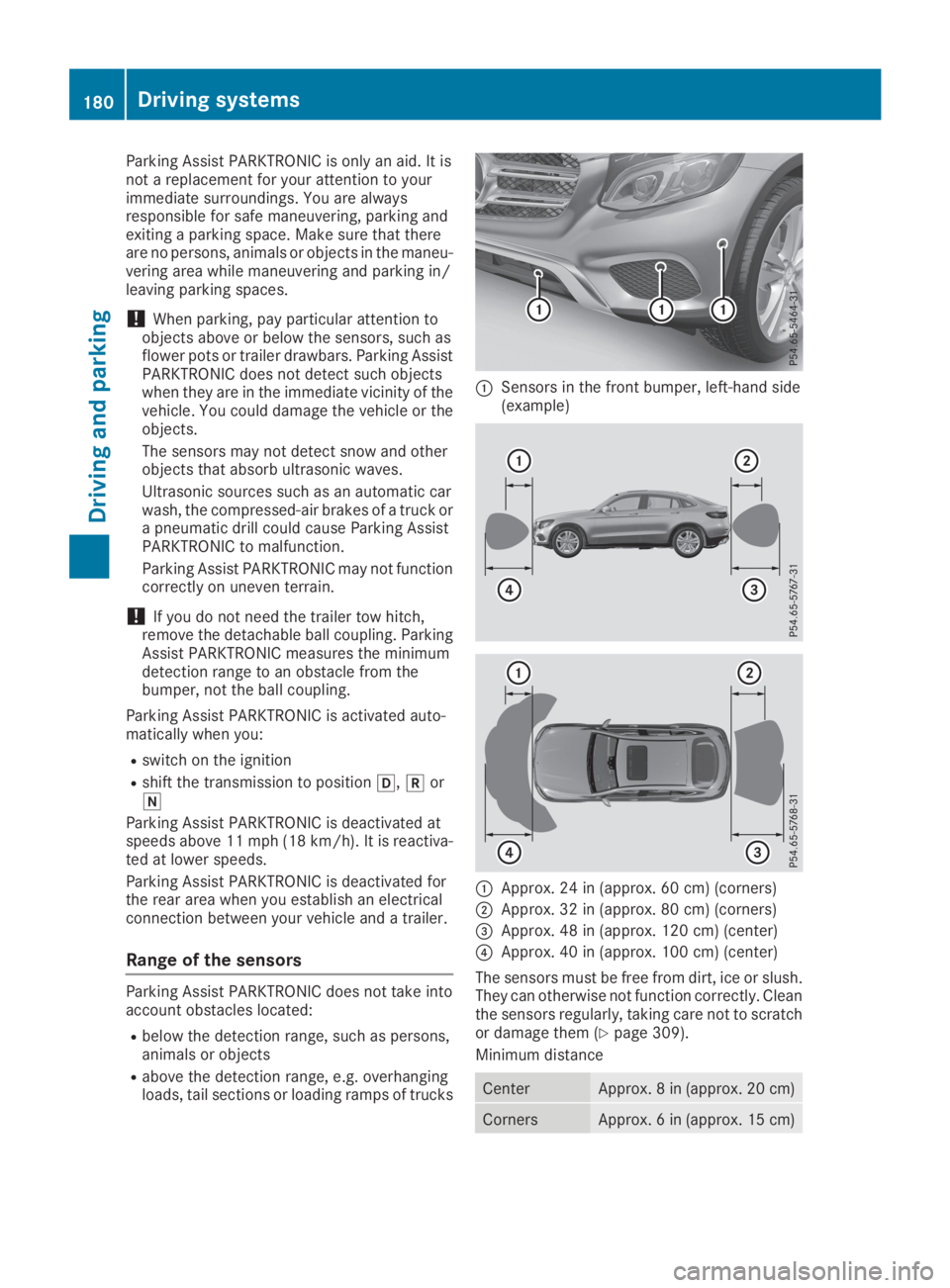
CSensors in the front bumper, left-hand side(example)
CApprox. 24 in (approx. 60 cm) (corners)
DApprox. 32 in (approx. 80 cm) (corners)
Page 185 of 370
Rif there is a sudden change in temperature,e.g. when driving into a heated garage in win-ter
Rif the camera lens is dirty or obstructed.Observe the notes on cleaning(Ypage 309)
Rif the rear of your vehicle is damaged. In thiscase, have the camera position and settingchecked at a qualified specialist workshop
The field of vision and other functions of the rearview camera may be restricted due to additionalaccessories on the rear of the vehicle (e.g.license plate holder, rear bicycle rack).
The rear view camera is protected from rain-drops and dust by means of a flap. When the rearview camera is activated, this flap opens.
The flap closes again when:
Ryou have finished the maneuvering process
Ryou switch off the engine
Ryou open the cargo compartment
Observe the notes on cleaning (Ypage 309).
For technical reasons, the flap may remain openbriefly after the rear view camera has beendeactivated.
Activating/deactivating the rear view
camera
XTo activate:make sure that theActiva‐Activa‐
tion by R geartion by R gearfunction is selected in themultimedia system (see the Digital Operator'sManual).
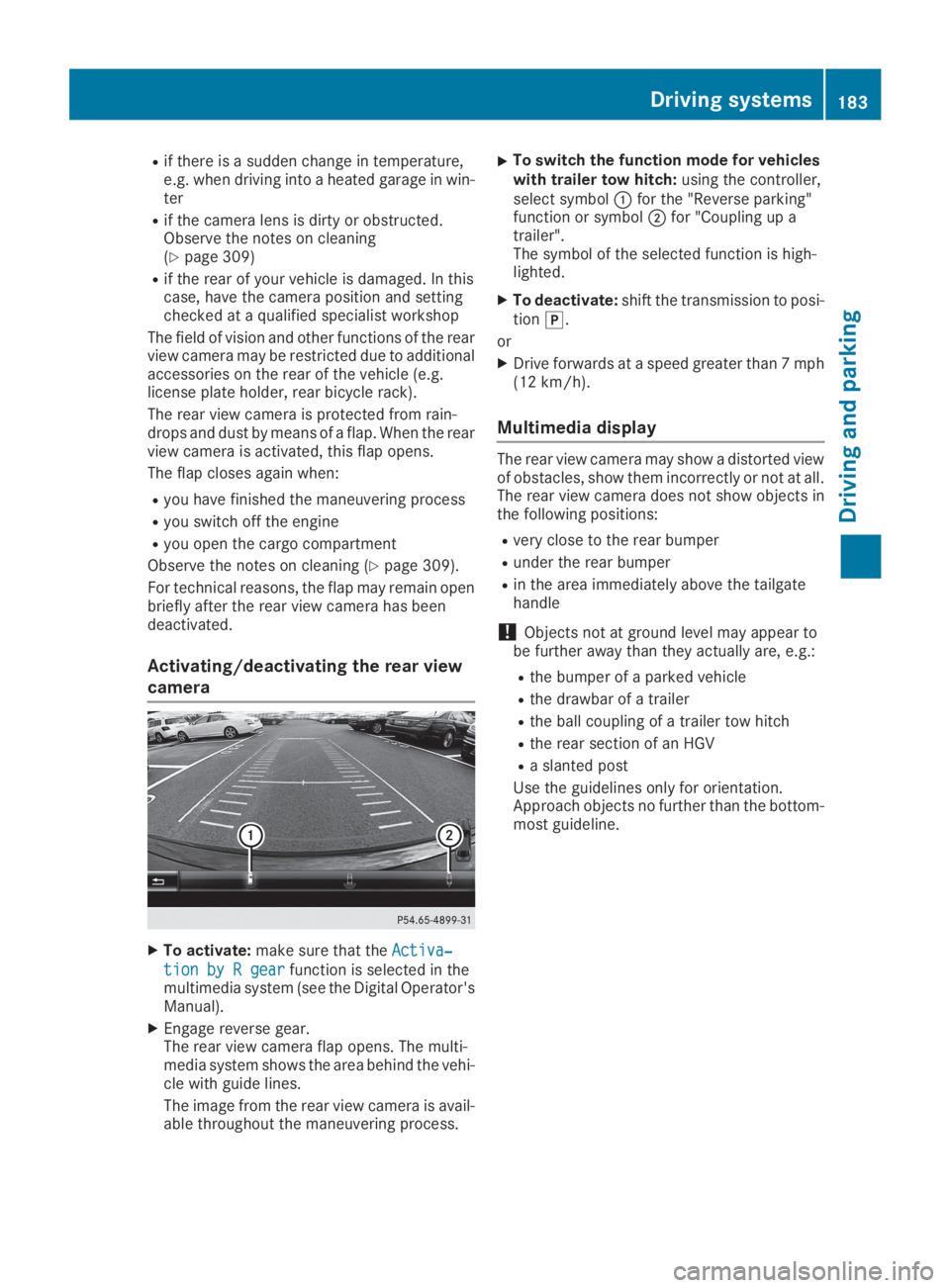
XEngage reverse gear.The rear view camera flap opens. The multi-media system shows the area behind the vehi-cle with guide lines.
The image from the rear view camera is avail-able throughout the maneuvering process.
XTo switch the function mode for vehicleswith trailer tow hitch:using the controller,select symbolCfor the "Reverse parking"function or symbolDfor "Coupling up atrailer".The symbol of the selected function is high-lighted.
XTo deactivate:shift the transmission to posi-tion].
or
XDrive forwards at a speed greater than 7 mph(12 km/h).
Multimedia display
The rear view camera may show a distorted viewof obstacles, show them incorrectly or not at all.The rear view camera does not show objects inthe following positions:
Rvery close to the rear bumper
Runder the rear bumper
Rin the area immediately above the tailgatehandle
!Objects not at ground level may appear tobe further away than they actually are, e.g.:
Rthe bumper of a parked vehicle
Rthe drawbar of a trailer
Rthe ball coupling of a trailer tow hitch
Rthe rear section of an HGV
Ra slanted post
Use the guidelines only for orientation.Approach objects no further than the bottom-most guideline.
Driving systems183
Driving and parking
Z