2019 MERCEDES-BENZ GLC manual radio set
[x] Cancel search: manual radio setPage 18 of 370
Occupant safety
Air bags ...........................................48
Automatic measures after an acci-
dent ................................................. 58
Belt warning .....................................48
Children in the vehicle .....................59
Important safety notes .................... 43
Introduction to the restraint sys-
tem .................................................. 43
Occupant Classification System
(OCS) ............................................... 51
PASSENGER AIR BAG indicator
lamps ............................................... 44
Pets in the vehicle ........................... 64
PRE-SAFE®(anticipatory occu-
pant protection) ............................... 57
PRE-SAFE®PLUS (anticipatory
occupant protection PLUS) .............. 58
Restraint system warning lamp ........ 44
Seat belt .......................................... 44
OCS
Conditions ....................................... 51
Faults ............................................... 54
Operation .........................................51
System self-test ............................... 53
Odometer........................................... 212
Oil
see Engine oil
On-board computer
Active Distance Assist
DISTRONIC .................................... 166
AMG menu ..................................... 223
Assistance graphic menu ............... 219
Assistance menu ........................... 220
Display messages .......................... 227
Displaying a service message ........ 304
Displays and operation .................. 208
Factory settings ............................. 223
G-Meter ......................................... 224
Head-up display ............................. 211
Important safety notes .................. 208
Instrument cluster menu ............... 222
Lights menu ................................... 222
Media menu ................................... 216
Menu overview .............................. 212
Message memory .......................... 227
Navigation menu ............................ 214
RACETIMER ................................... 225
Radio menu ................................... 216
Service menu ................................. 219
Settings menu ............................... 219
Standard display ............................ 212
Telephone menu ............................ 218
Trip menu ...................................... 212
Video DVD operation ..................... 217
Operating safety
Declaration of conformity ................ 30
Important safety notes .................... 30
Operating system
see On-board computer
Operation
Digital Operator's Manual ................ 26
Operator's Manual
Overview .......................................... 28
Vehicle equipment ........................... 28
Outside temperature display........... 209
Overhead control panel...................... 41
Override feature
Rear side windows........................... 64
P
Paddle shifters
see Steering wheel paddle shifters
Paint code number............................ 357
Paintwork (cleaning instructions)... 307
Panic alarm.......................................... 43
Parcel net........................................... 285
Parking
Important safety notes .................. 152
Parking brake ................................ 154
Parking position for the exterior
mirror on the front-passenger
side ................................................ 106
Rear view camera .......................... 182
Switching off the engine ................ 153
see Parking Assist PARKTRONIC
Parking aid
see 360° camera
see Active Parking Assist
see Exterior mirrors
see Parking Assist PARKTRONIC
see Rear view camera
Parking Assist PARKTRONIC
Deactivating/activating ................. 181
16Index
Page 19 of 370
Driving system ............................... 179
Function/notes............................. 179
Important safety notes .................. 179
Problems (malfunctions) ................ 182
Sensor range ................................. 180
Warning display ............................. 181
Parking assistance
see Parking Assist PARKTRONIC
Parking brake
Applying automatically................... 154
Applying or releasing manually ...... 154
Display message ............................ 230
Electric parking brake .................... 154
Emergency braking ........................ 155
General notes ................................ 154
Releasing automatically................. 155
Warning lamp ................................. 262
Parking lamps
Switching on/off........................... 110
PASSENGER AIR BAG
Display message ............................ 237
Indicator lamps ................................ 44
Problems (malfunction) .................. 237
Perfume atomizer
Operating ....................................... 127
Problem (malfunction) ................... 128
Setting the perfume intensity
(multimedia system) ...................... 273
Vial ................................................ 127
Permanent all-wheel drive
see 4MATIC (permanent four-
wheel drive)
Pets in the vehicle............................... 64
Phone book
see also Digital Operator's Man-
ual .................................................. 268
Plastic trim (cleaning instruc-
tions).................................................. 310
Power washers.................................. 306
Power windows
see Side windows
PRE-SAFE®(anticipatory occupant
protection)
Display message ............................ 234
Operation ......................................... 57
PRE-SAFE®PLUS (anticipatory
occupant protection PLUS)
Operation ......................................... 58
Program
see Drive programs
Protection against theft
ATA (Anti-Theft Alarm system)......... 75
Immobilizer ...................................... 75
Protection of the environment
General notes .................................. 27
Pulling away
Automatic transmission ................. 134
General notes ................................ 134
Hill start assist ............................... 135
Trailer ............................................ 135
Q
QR code
Mercedes-Benz Guide App ................. 1
Rescue card ..................................... 32
Qualified specialist workshop........... 31
Quick access for audio and tele-
phone
Changing the station/music
track .............................................. 271
R
RACE START (Mercedes-AMG vehi-
cles).................................................... 171
RACE TIMER (on-board computer,
Mercedes-AMG vehicles).................. 225
Radar sensor system
Display message ............................ 235
Radiator cover................................... 300
Radio
Selecting a station ......................... 216
Radio mode
see also Digital Operator's Man-
ual.................................................. 268
Radio-wave reception/transmis-
sion in the vehicle
Declaration of conformity ................ 30
Reading lamp..................................... 113
Rear compartment
Setting the air vents ...................... 129
Setting the airflow ......................... 124
Index17
Page 23 of 370
Summer tires
In winter ........................................332
Sun visor............................................ 290
Suspension settings
AIR BODY CONTROL ......................172
Suspension tuning
AMG sports suspension based on
AIR BODY CONTROL ......................174
SETUP (on-board computer,
Mercedes-AMG vehicles) ...............224
Switching air-recirculation mode
on/off................................................. 126
Switching on media mode
Via the device list.......................... 276
T
Tachometer........................................ 209
Tail lamps
Display message ............................ 239
Tailgate
Display message ............................ 254
Emergency unlocking ....................... 89
HANDS-FREE ACCESS ..................... 87
Important safety notes .................... 84
Limiting the opening angle ............... 89
object detection............................... 85
Opening dimensions ...................... 363
Opening/closing (automatically
from inside) ...................................... 88
Opening/closing (automatically
from outside) ................................... 85
Reversing feature ............................. 85
Tank content
Fuel gauge ....................................... 36
Technical data
Capacities ...................................... 358
Drawbar load (maximum) ............... 364
Information .................................... 356
Trailer loads................................... 364
Vehicle data ................................... 363
Telephone
Accepting a call (multifunction
steering wheel) .............................. 218
Authorizing a mobile phone (con-
necting) ......................................... 275
Connecting a mobile phone
(device manager) ........................... 275
Display message ............................ 255
Introduction ................................... 218
Menu (on-board computer) ............ 218
Number from the phone book ........ 218
Redialing ........................................ 219
Rejecting/ending a call ................. 218
see also Digital Operator's Man-
ual .................................................. 268
see Mobile phone
Temperature
Coolant (display in the instrument
cluster) .......................................... 209
Engine oil (on-board computer,
Mercedes-AMG vehicles) ............... 223
Outside temperature ...................... 209
Setting (climate control)................ 123
Transmission oil (on-board com-
puter, Mercedes-AMG vehicles) ..... 223
Timing (RACETIMER)......................... 225
Tire pressure
Calling up (on-board computer) ..... 337
Checking manually ........................ 336
Display message ............................ 250
Maximum ....................................... 336
Not reached (TIREFIT) .................... 318
Notes ............................................. 334
Reached (TIREFIT) .......................... 318
Recommended ............................... 333
Using the TIREFIT kit ...................... 317
Tire pressure loss warning system
General notes ................................ 336
Important safety notes .................. 336
Restarting ...................................... 337
Tire pressure monitor
Checking the tire pressure elec-
tronically ........................................ 339
Function/notes............................. 337
General notes ................................ 337
Important safety notes .................. 338
Radio type approval for the tire
pressure monitor ........................... 340
Restarting ...................................... 339
Warning lamp ................................. 266
Warning message .......................... 339
Tire pressure sensors
Display message ............................ 251
Tire-change tool kit........................... 314
Index21
Page 80 of 370
multimedia system; see the Digital Operator'sManual.
You will receive visual and acoustic locking con-firmation if all components were able to belocked.
When the locator lighting is activated via themultimedia system, it lights up when it is darkafter the vehicle is unlocked with the SmartKey;see the Digital Operator's Manual.
XTo open the tailgate automatically fromoutside the vehicle:press and hold theTbutton until the tailgate opens.
XTo close the tailgate automatically fromoutside the vehicle:if the SmartKey is loca-ted in the immediate vicinity of the vehicle,press theTbutton on the SmartKey.When the tailgate closes you can then releasethe button.
KEYLESS-GO
General notes
Bear in mind that the engine can be started byany of the vehicle occupants if there is a Smart-Key in the vehicle (Ypage 133).
Locking/unlocking centrally
You can start, lock or unlock the vehicle usingKEYLESS-GO. To do this, you only need carry theSmartKey with you. You can combine the func-tions of KEYLESS-GO with those of a conven-tional SmartKey. Unlock the vehicle by usingKEYLESS-GO, for instance, and lock it using the7button on the SmartKey.
The driver's door and the door at which the han-dle is used, must both be closed. The SmartKeymust be outside the vehicle. When locking orunlocking with KEYLESS-GO, the distancebetween the SmartKey and the correspondingdoor handle must not be greater than 3 ft (1 m).
A brief radio connection between the vehicleand the SmartKey determines whether a validSmartKey is in, or in the direct vicinity of, thevehicle. This occurs, for example:
Rwhen starting the engine
Rwhile driving
Rwhen using HANDS-FREE ACCESS
Rwhen the external door handles are touched
Rduring convenience closing
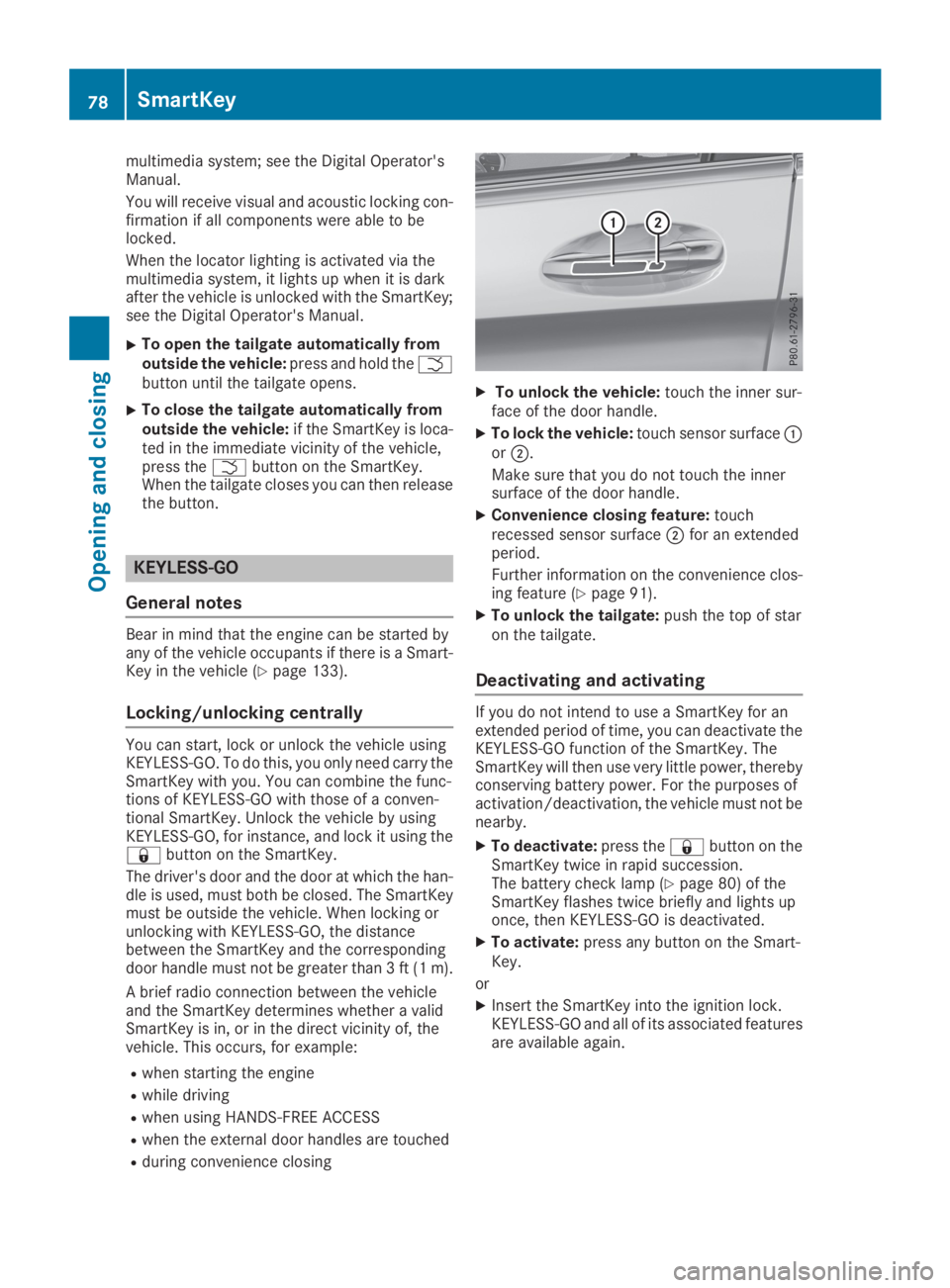
XTo unlock the vehicle:touch the inner sur-face of the door handle.
XTo lock the vehicle:touch sensor surfaceCorD.
Make sure that you do not touch the innersurface of the door handle.
XConvenience closing feature:touchrecessed sensor surfaceDfor an extendedperiod.
Further information on the convenience clos-ing feature (Ypage 91).
XTo unlock the tailgate:push the top of staron the tailgate.
Deactivating and activating
If you do not intend to use a SmartKey for anextended period of time, you can deactivate theKEYLESS-GO function of the SmartKey. TheSmartKey will then use very little power, therebyconserving battery power. For the purposes ofactivation/deactivation, the vehicle must not benearby.
XTo deactivate:press the7button on theSmartKey twice in rapid succession.The battery check lamp (Ypage 80) of theSmartKey flashes twice briefly and lights uponce, then KEYLESS-GO is deactivated.
XTo activate:press any button on the Smart-Key.
or
XInsert the SmartKey into the ignition lock.KEYLESS-GO and all of its associated featuresare available again.
78SmartKey
Opening and closing
Page 270 of 370
General notes
The multimedia system section in this Opera-tor's Manual describes the basic principles foroperation. More information can be found in theDigital Operator's Manual.
Important safety notes
GWARNING
If you operate information systems and com-
munication equipment integrated in the vehi-
cle when driving, you may be distracted from
the traffic situation. You could also lose con-
trol of the vehicle. There is a risk of an acci-
dent.
Only operate this equipment when the traffic
situation permits. If you are not sure that this
is possible, park the vehicle paying attention
to traffic conditions and operate the equip-
ment when the vehicle is stationary.
You must observe the legal requirements for thecountry in which you are currently driving whenoperating the multimedia system.
The multimedia system calculates the route tothe destination without taking the following intoaccount, for example:
Rtraffic lights
Rstop and yield signs
Rparking or stopping restrictions
Rroad narrowing
Rother road and traffic rules and regulations
The multimedia system may give incorrect nav-igation recommendations if the actual street/traffic situation does not correspond with thedigital map's data.
For example:
Ra diverted route
Rthe road layout or the direction of a one-waystreet has been changed
For this reason, you must always observe roadand traffic rules and regulations during yourjourney. Road and traffic rules and regulationsalways have priority over multimedia systemdriving recommendations.
Navigation announcements are intended todirect you while driving without diverting yourattention from the road and driving.
Please always use this feature instead of con-sulting the map display for directions. Lookingat the icons or map display can distract you fromtraffic conditions and driving, and increase therisk of an accident.
This equipment complies with FCC radiationexposure limits set forth for uncontrolled equip-ment and meets the FCC radio frequency (RF)Exposure Guidelines in Supplement C to OET65.
This equipment has very low levels of RF energythat is deemed to comply without maximumpermissive exposure evaluation (MPE). How-ever, it is recommended to install it at a distanceof at least 8 inches (approx. 20 cm) between theradiation source and a person's body (notincluding limbs such as hands, wrists, feet andlegs).
GWARNING
Modifications to electronic components, their
software as well as wiring can impair their
function and/or the function of other net-
worked components. In particular, systems
relevant to safety could also be affected. As a
result, these may no longer function as inten-
ded and/or jeopardize the operating safety of
the vehicle. There is an increased risk of an
accident and injury.
Never tamper with the wiring as well as elec-
tronic components or their software. You
should have all work to electrical and elec-
tronic equipment carried out at a qualified
specialist workshop.
Function restrictions
For safety reasons, some functions are restric-ted or unavailable while the vehicle is in motion.You will notice this, for example, because eitheryou will not be able to select certain menu itemsor a message will appear to this effect.
268Function restrictions
Multimedia system