2019 MERCEDES-BENZ GLA instrument cluster
[x] Cancel search: instrument clusterPage 153 of 346
take advantage of engine braking. For thisyou must first activate manual gearshifting.This helps you to avoid overheating thebrakes and wearing them out excessively.
When you take advantage of engine braking,it is possible that a drive wheel will notrotate for some time, e.g. on a slippery roadsurface. This could cause damage to thedrive train. This type of damage is not cov-ered by the Mercedes-Benz warranty.
Briefly depressing the accelerator pedal ondownhill gradients while the manual drive pro-gramMis temporarily activated: the automatictransmission may switch to the last activeautomatic drive programEorS. The automatictransmission may shift to a higher gear. Thiscan reduce the engine's braking effect.
Heavy and light loads
GWARNING
If you rest your foot on the brake pedal
while driving, the braking system can over-
heat. This increases the stopping distance
and can even cause the braking system to
fail. There is a risk of an accident.
Never use the brake pedal as a footrest.
Never depress the brake pedal and the
accelerator pedal at the same time.
!Depressing the brake pedal constantlyresults in excessive and premature wear tothe brake pads.
If the brakes have been subjected to a heavyload, do not stop the vehicle immediately.Drive on for a short while. This allows the air-flow to cool the brakes more quickly.
Wet roads
If you have driven for a long time in heavy rainwithout braking, there may be a delayed reac-tion from the brakes when braking for the firsttime. This may also occur after the vehicle hasbeen washed or driven through deep water.
You have to depress the brake pedal morefirmly. Maintain a greater distance from thevehicle in front.
After driving on a wet road or having the vehi-cle washed, brake firmly while paying attentionto the traffic conditions. This will warm up the
brake discs, thereby drying them more quicklyand protecting them against corrosion.
Limited braking performance on salt-
treated roads
If you drive on salted roads, a layer of salt resi-due may form on the brake discs and brakepads. This can result in a significantly longerbraking distance.
RIn order to prevent any salt build-up, applythe brakes occasionally while paying atten-tion to the traffic conditions.
RCarefully depress the brake pedal and thebeginning and end of a journey.
RMaintain a greater distance to the vehicleahead.
Servicing the brakes
!The brake fluid level may be too low, if:
Rif the red brake warning lamp lights up inthe instrument cluster and
Ryou hear a warning tone while the engineis running
Observe additional warning messages in themultifunction display.
The brake fluid level may be too low due tobrake pad wear or leaking brake lines.
Have the brake system checked immedi-ately. Consult a qualified specialist work-shop to arrange this.
!A function or performance test should onlybe carried out on a 2-axle dynamometer. Ifyou wish to operate the vehicle on such adynamometer, please consult a qualifiedspecialist workshop in advance. You couldotherwise damage the drive train or thebrake system.
!As the ESP®system operates automati-cally, the engine and the ignition must beswitched off (the SmartKey must be in posi-tion
Page 161 of 346
sound and the distance warning lamp will lightup in the instrument cluster. Brake immedi-ately in order to increase the distance to thevehicle in front or take evasive action providedit is safe to do so.
Active Distance Assist DISTRONIC operates inthe speed range between 0 mph (0 km/h) and120 mph (200 km/h).
Change into a lower gear in good time on longand steep downhill gradients. This is especiallyimportant if the vehicle is laden. By doing so,you will make use of the braking effect of theengine. This relieves the load on the brake sys-tem and prevents the brakes from overheatingand wearing too quickly.
Do not use Active Distance Assist DISTRONICon roads with steep gradients.
For Active Distance Assist DISTRONIC toassist you when driving, the radar sensor sys-tem must be operational.
As Active Distance Assist DISTRONIC trans-mits radar waves, it can resemble the radardetectors of the responsible authorities. Youcan refer to the relevant chapter in the Opera-tor's Manual if questions are asked about this.
iUSA only: This device has been approvedby the FCC as a "Vehicular Radar System".The radar sensor is intended for use in anautomotive radar system only. Removal,tampering, or altering of the device will voidany warranties, and is not permitted by theFCC. Do not tamper with, alter, or use in anynon-approved way.
Any unauthorized modification to this devicecould void the user's authority to operatethe equipment.
iCanada only: This device complies withRSS-210 of Industry Canada. Operation issubject to the following two conditions:
1. This device may not cause interference,and
2. This device must accept any interferencereceived, including interference that maycause undesired operation of the device.
Removal, tampering, or altering of thedevice will void any warranties, and is notpermitted. Do not tamper with, alter, or usein any non-approved way.
Any unauthorized modification to this devicecould void the user's authority to operatethe equipment.
Important safety notes
GWARNING
Active Distance Assist DISTRONIC does not
react to:
Rpeople or animals
Rstationary objects in the road, e.g. stop-
ped or parked vehicles
Roncoming vehicles and crossing traffic
As a result, Active Distance Assist
DISTRONIC may neither give warnings nor
intervene in such situations. There is a risk
of an accident.
Always pay careful attention to the traffic
situation and be ready to brake.
GWARNING
Active Distance Assist DISTRONIC cannot
always clearly identify other road users and
complex traffic situations.
In such cases, Active Distance Assist
DISTRONIC can:
Rgive an unnecessary warning and then
brake the vehicle
Rneither give a warning nor intervene
Raccelerate or brake unexpectedly
There is a risk of an accident.
Continue to drive carefully and be ready to
brake, especially if Active Distance Assist
DISTRONIC warns you.
GWARNING
Active Distance Assist DISTRONIC brakes
your vehicle with up to 50% of the maximum
possible deceleration. If this deceleration is
not sufficient, Active Distance Assist
DISTRONIC alerts you with a visual and
acoustic warning. There is a risk of an acci-
dent.
Adjust your speed in these cases and main-
tain sufficient distance.
Apply the brakes yourself and/or take eva-
sive action.
Driving systems159
Driving and parking
Z
Page 166 of 346
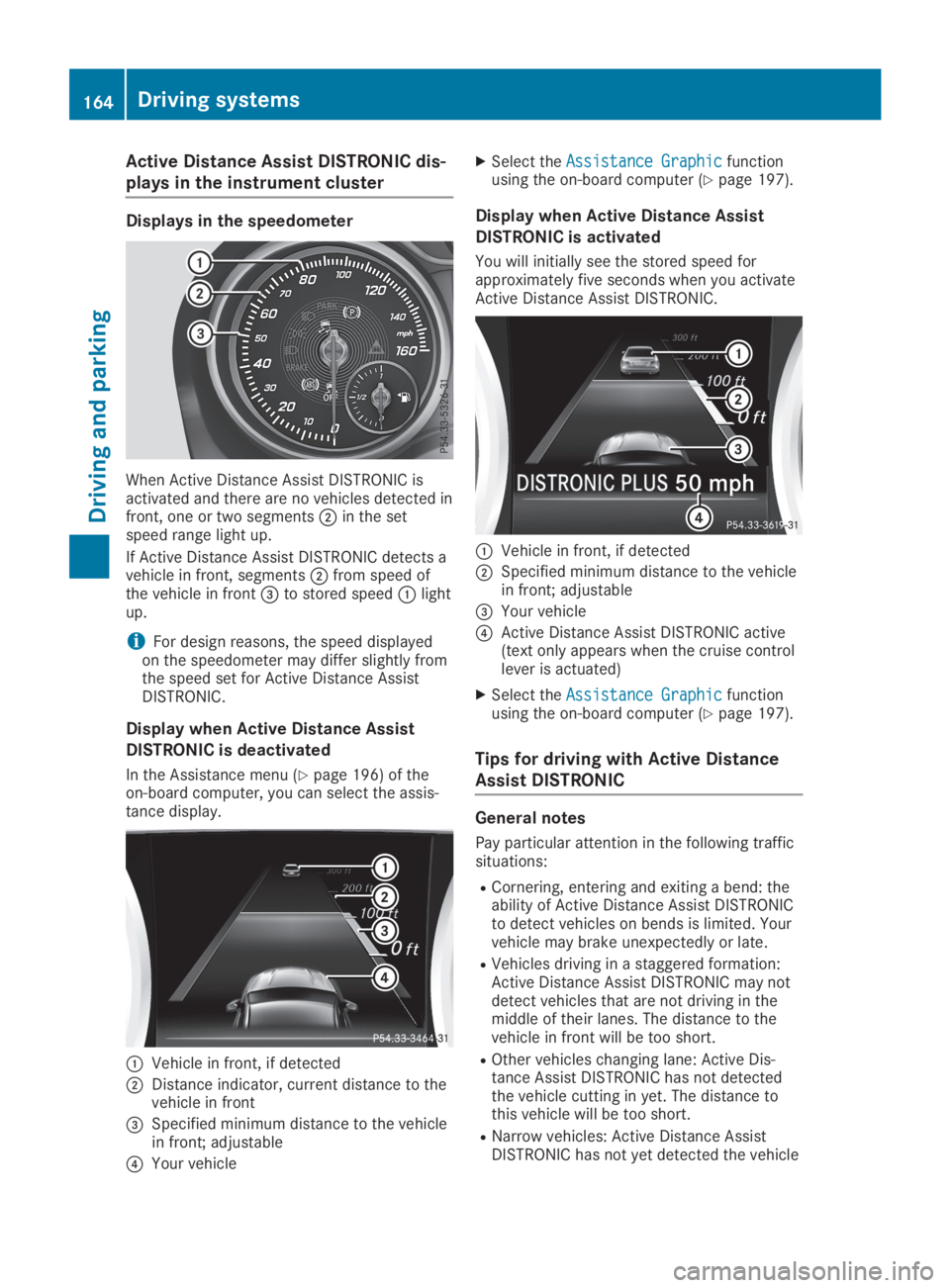
Active Distance Assist DISTRONIC dis-
plays in the instrument cluster
Displays in the speedometer
When Active Distance Assist DISTRONIC isactivated and there are no vehicles detected infront, one or two segmentsDin the setspeed range light up.
If Active Distance Assist DISTRONIC detects avehicle in front, segmentsDfrom speed ofthe vehicle in front
Page 178 of 346
Rthat are parallel to the direction of traveland at least 39.5 in (1.0m) longer than yourvehicle
Rat right angles to the direction of travel andat least 39.5 in (1.0m) widerthan your vehi-cle
When driving at speeds below 19 mph(30 km/h), you will see parking symbolDasa status indicator in the instrument cluster.When a parking space has been detected, anarrow towards the right or the left alsoappears. By default, Active Parking Assist onlydisplays parking spaces on the front-passenger side. Parking spaces on the driver'sside are displayed as soon as the turn signalon the driver's side is activated. When parkingon the driver's side, this must remain activateduntil you confirm the use of Active ParkingAssist by pressing thevbutton on the mul-tifunction steering wheel. The system automat-ically determines whether the parking space isparallel or at right-angles to the direction oftravel.
A parking space is displayed while you aredriving past it, and until you are approximately50 ft (15m) away from it.
Parking
GWARNING
If you leave the driver's seat when the vehi-
cle is only being braked by the Parking Pack-
age with rear view camera, it could roll
away:
Rif there is a malfunction in the system or
in the voltage supply
Rif the electrical system in the engine com-
partment, the battery or the fuses are
tampered with
Rif the battery is disconnected
Rif the vehicle is accelerated, e.g. by a vehi-
cle occupant
There is a risk of an accident.
Before leaving the vehicle, always secure it
against rolling away.
iIf Active Parking Assist detects obstacles,Active Parking Assist brakes automaticallywhile the vehicle is parking. You are respon-sible for braking in good time.
XStop the vehicle when the parking spacesymbol shows the desired parking space inthe instrument cluster.
XShift the transmission to position^.TheStart Parking Assist?Start Parking Assist?Yes: OKYes: OKNo:No:8message appears on the multifunctiondisplay.
XTo cancel the procedure:press the8button on the multifunction steering wheelor pull away.
or
XTo park using Active Parking Assist:press thevbutton on the multifunctionsteering wheel.TheParking Assist Active Acceler‐Parking Assist Active Acceler‐ate and Brakeate and BrakeObserve SurroundingsObserve Surroundingsmessage appears on the multifunction dis-play.
XLet go of the multifunction steering wheel.
XBack up the vehicle, being ready to brake atall times. When backing up, drive at a speedbelow approximately 6 mph (10 km/h). Oth-erwise, Active Parking Assist will be can-celed.Active Parking Assist brakes the vehicle to astandstill when the vehicle approaches therear border of the parking space.
Maneuvering may be required in tight park-ing spaces.
TheParking Assist Active SelectParking Assist Active SelectDObserve SurroundingsDObserve Surroundingsmessage appearson the multifunction display.
XShift the transmission to position[whilethe vehicle is stationary.Active Parking Assist immediately steers inthe other direction.
TheParking Assist Active Acceler‐Parking Assist Active Acceler‐ate and Brakeate and BrakeObserve SurroundingsObserve Surroundingsmessage appears on the multifunction dis-play.
iYou will achieve the best results by waitingfor the steering procedure to completebefore pulling away.
XDrive forwards and be ready to brake at alltimes.Active Parking Assist brakes the vehicle to astandstill when the vehicle approaches thefront border of the parking space.
Maneuvering may be required in tight park-ing spaces.
176Driving systems
Driving an d parking
Page 190 of 346
Important safety notes
GWARNING
If you operate information systems and com-
munication equipment integrated in the
vehicle when driving, you may be distracted
from the traffic situation. You could also
lose control of the vehicle. There is a risk of
an accident.
Only operate this equipment when the traffic
situation permits. If you are not sure that
this is possible, park the vehicle paying
attention to traffic conditions and operate
the equipment when the vehicle is station-
ary.
You must observe the legal requirements forthe country in which you are currently drivingwhen operating the on-board computer.
GWARNING
If the instrument cluster has failed or mal-
functioned, you may not recognize function
restrictions in systems relevant to safety.
The operating safety of your vehicle may be
impaired. There is a risk of an accident.
Drive on carefully. Have the vehicle checked
at a qualified specialist workshop immedi-
ately.
The on-board computer only shows messagesor warnings from certain systems in the multi-function display. You should therefore makesure your vehicle is operating safely at alltimes.
If the operating safety of your vehicle isimpaired, pull over as soon as it is safe to doso. Contact a qualified specialist workshop.
For an overview, see the instrument panelillustration (Ypage 32).
Displays and operation
Instrument cluster lighting
The light sensor in the instrument cluster auto-matically controls the brightness of the multi-function display. In daylight, the displays in theinstrument cluster are not illuminated.
The lighting in the instrument cluster, in thedisplays and the controls in the vehicle interiorcan be adjusted using the brightness controlknob.
The brightness control knob is located on thebottom left of the instrument cluster(Ypage 32).
XTurn the brightness control knob clockwiseor counter-clockwise.If the light switch is set to theX,`orXposition, the brightness is dependentupon the brightness of the ambient light.
Speedometer with segments
The speedometer is only divided into seg-ments in vehicles with Active Distance AssistDISTRONIC.
The segments in the speedometer indicatewhich speed range is available.
RActive Distance Assist DISTRONIC activated(Ypage 158):
One or two segments in the set speed rangelight up.
RActive Distance Assist DISTRONIC detects avehicle in front moving more slowly than thestored speed:
The segments between the speed of thevehicle in front and the stored speed lightup.
Tachometer
!Do not drive in the overrevving range, asthis could damage the engine.
The red band in the tachometer indicates theengine's overrevving range.
The engine is limited within a range to protectthe engine when the red band is reached.
Outside temperature display
You should pay special attention to road con-ditions when temperatures are around freezingpoint.
Bear in mind that the outside temperature dis-play indicates the temperature measured anddoes not record the road temperature.
188Displays and operation
On-board computer and displays
Page 201 of 346
The selected unit of measurement for distanceapplies to:
RDigital speedometer in theTripTripmenu
ROdometer and the trip odometer
RTrip computer
RCurrent fuel consumption and approximaterange
RNavigation instructions in theNaviNavimenu
RCruise control
RActive Distance Assist DISTRONIC
RASSYST PLUS service interval display
Switching the additional speedometer
on/off
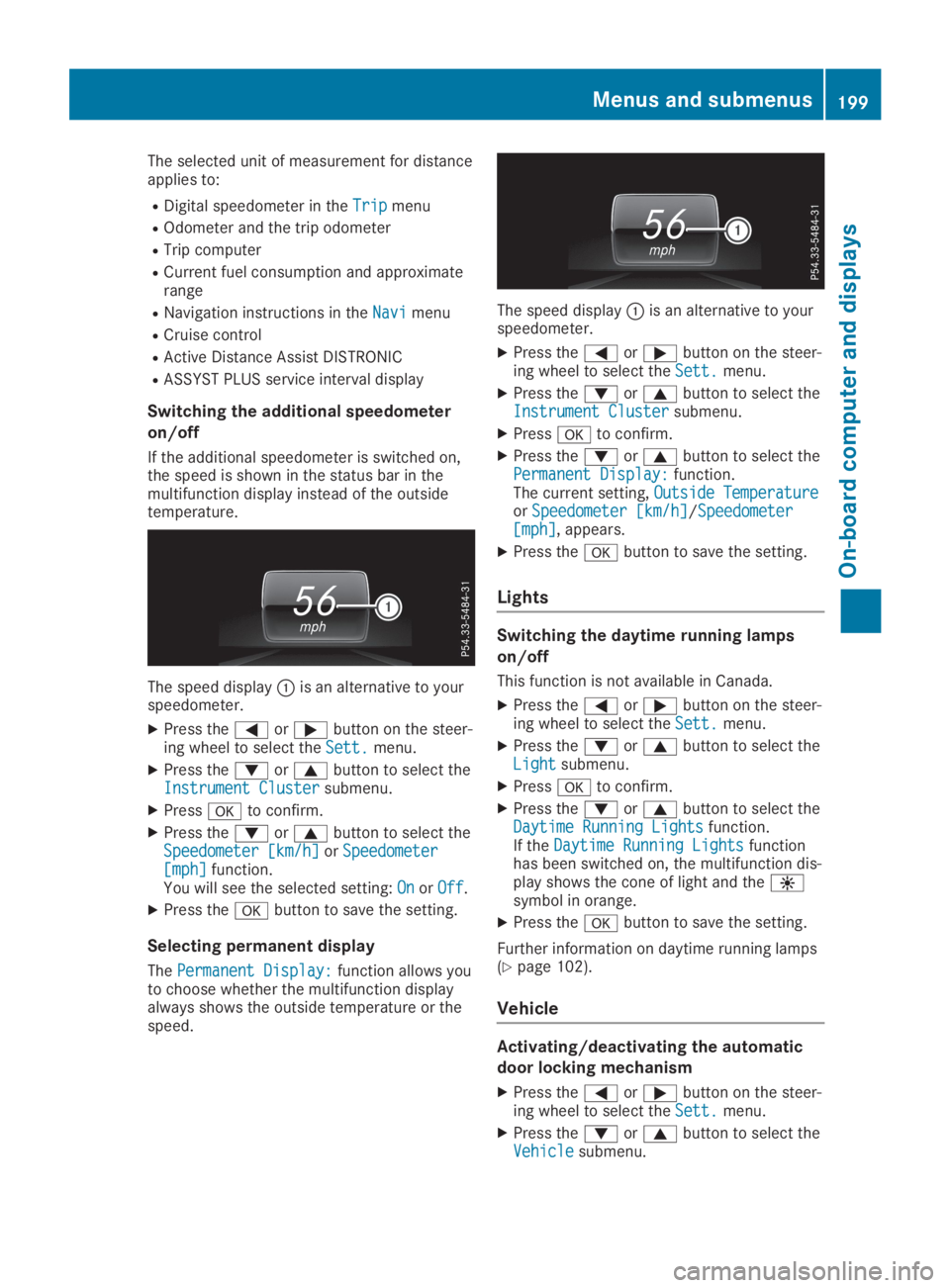
If the additional speedometer is switched on,the speed is shown in the status bar in themultifunction display instead of the outsidetemperature.
The speed displayCis an alternative to yourspeedometer.
XPress theYorebutton on the steer-ing wheel to select theSett.Sett.menu.
XPress thedorcbutton to select theInstrument ClusterInstrument Clustersubmenu.
XPressvto confirm.
XPress thedorcbutton to select theSpeedometer [km/h]Speedometer [km/h]orSpeedometerSpeedometer[mph][mph]function.You will see the selected setting:OnOnorOffOff.
XPress thevbutton to save the setting.
Selecting permanent display
ThePermanent Display:Permanent Display:function allows youto choose whether the multifunction displayalways shows the outside temperature or thespeed.
The speed displayCis an alternative to yourspeedometer.
XPress theYorebutton on the steer-ing wheel to select theSett.Sett.menu.
XPress thedorcbutton to select theInstrument ClusterInstrument Clustersubmenu.
XPressvto confirm.
XPress thedorcbutton to select thePermanent Display:Permanent Display:function.The current setting,Outside TemperatureOutside TemperatureorSpeedometer [km/h]Speedometer [km/h]/SpeedometerSpeedometer[mph][mph], appears.
XPress thevbutton to save the setting.
Lights
Switching the daytime running lamps
on/off
This function is not available in Canada.
XPress theYorebutton on the steer-ing wheel to select theSett.Sett.menu.
XPress thedorcbutton to select theLightLightsubmenu.
XPressvto confirm.
XPress thedorcbutton to select theDaytime Running LightsDaytime Running Lightsfunction.If theDaytime Running LightsDaytime Running Lightsfunctionhas been switched on, the multifunction dis-play shows the cone of light and the
Page 211 of 346
Display messagesPossible causes/consequences andPPSolutions
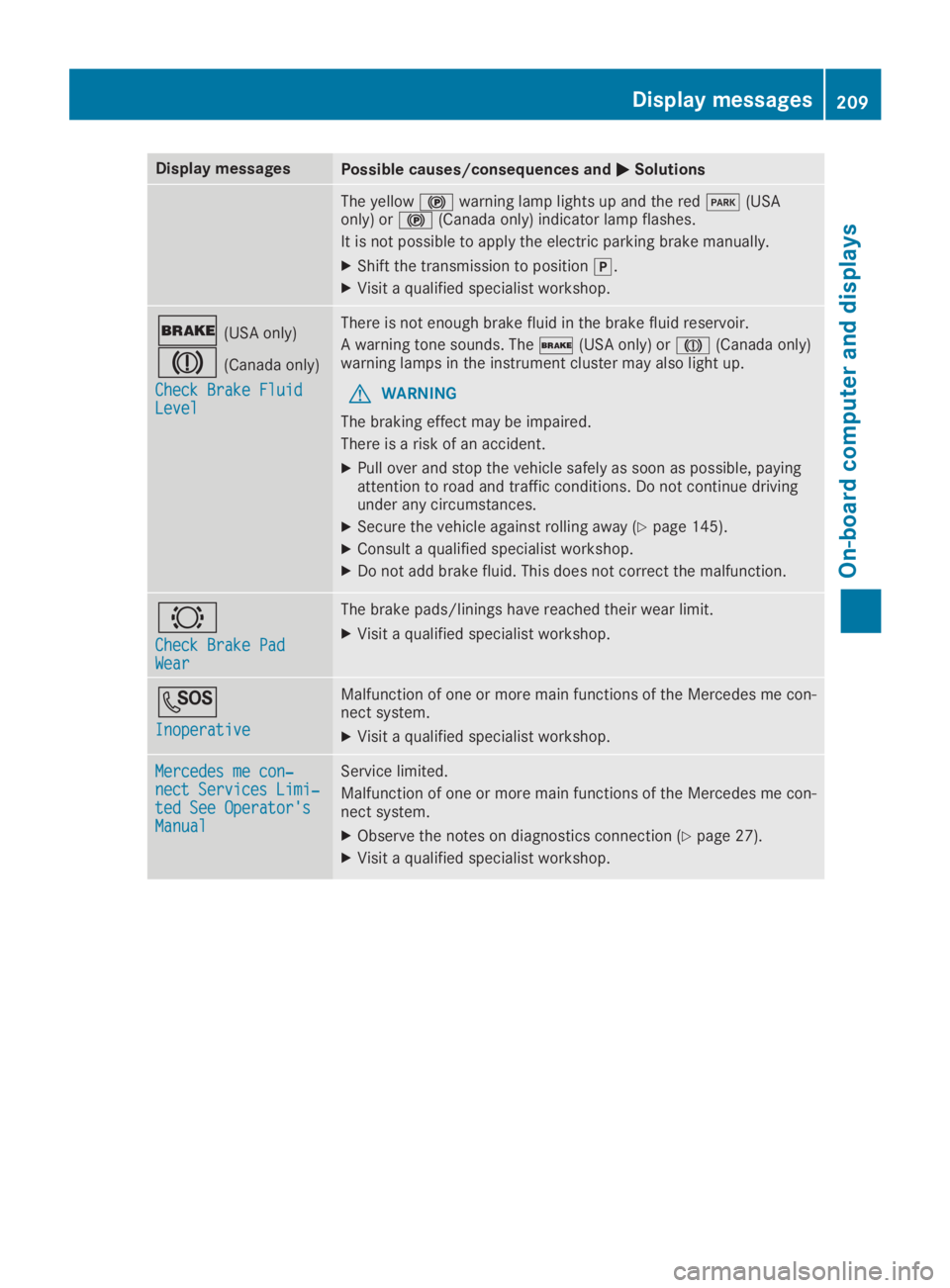
The yellow$warning lamp lights up and the redI(USAonly) or$(Canada only) indicator lamp flashes.
It is not possible to apply the electric parking brake manually.
XShift the transmission to position].
XVisit a qualified specialist workshop.
'(USA only)
M(Canada only)
Check Brake FluidCheck Brake FluidLevelLevel
There is not enough brake fluid in the brake fluid reservoir.
A warning tone sounds. The'(USA only) orM(Canada only)warning lamps in the instrument cluster may also light up.
GWARNING
The braking effect may be impaired.
There is a risk of an accident.
XPull over and stop the vehicle safely as soon as possible, payingattention to road and traffic conditions. Do not continue drivingunder any circumstances.
XSecure the vehicle against rolling away (Ypage 145).
XConsult a qualified specialist workshop.
XDo not add brake fluid. This does not correct the malfunction.
&
Check Brake PadCheck Brake PadWearWear
The brake pads/linings have reached their wear limit.
XVisit a qualified specialist workshop.
S
InoperativeInoperative
Malfunction of one or more main functions of the Mercedes me con-nect system.
XVisit a qualified specialist workshop.
Mercedes me con‐Mercedes me con‐nect Services Limi‐nect Services Limi‐ted See Operator'sted See Operator'sManualManual
Service limited.
Malfunction of one or more main functions of the Mercedes me con-nect system.
XObserve the notes on diagnostics connection (Ypage 27).
XVisit a qualified specialist workshop.
Displaymessages209
On-b oard computer and displays
Z
Page 213 of 346
Display messagesPossible causes/consequences andPPSolutions
u
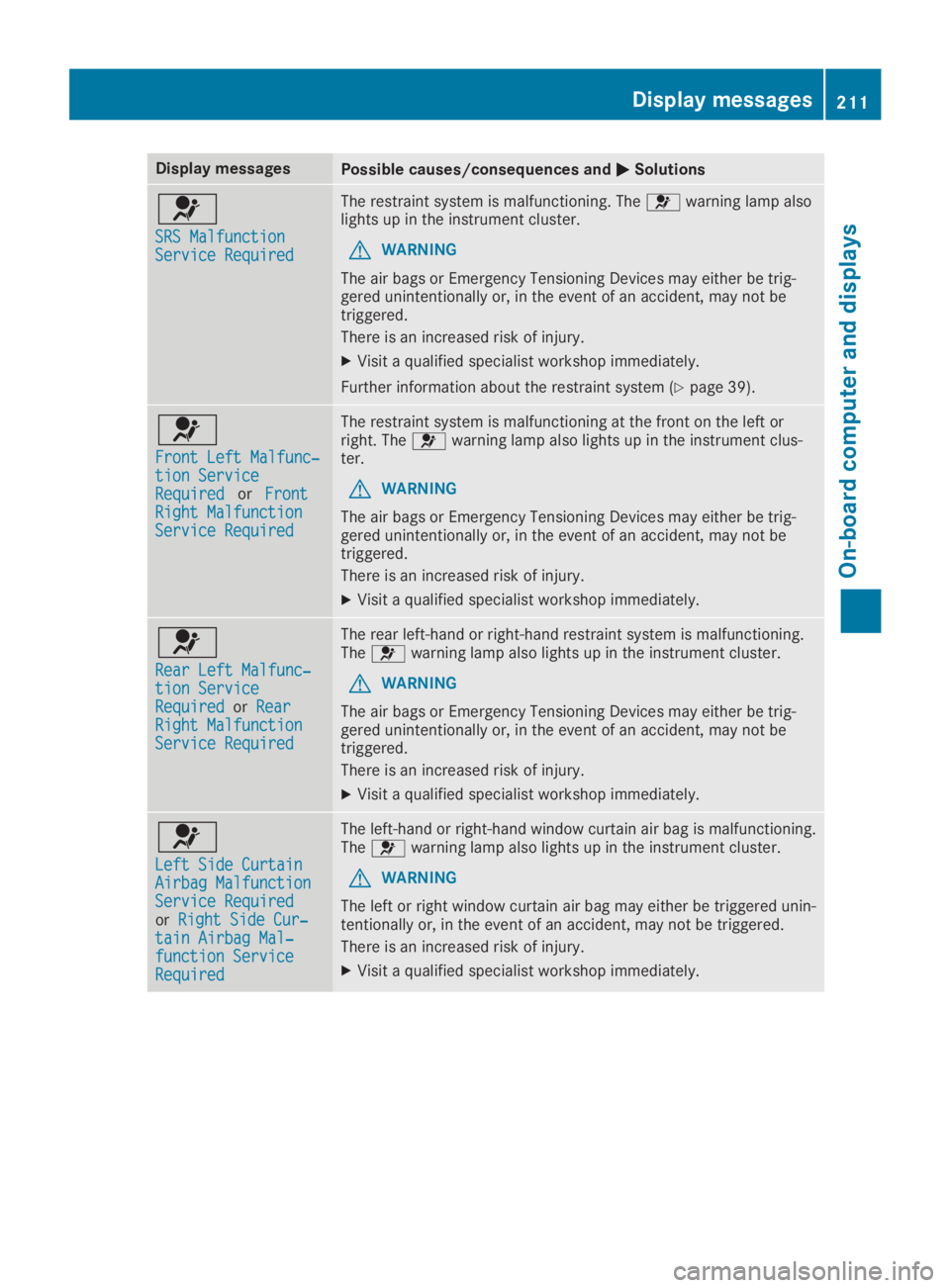
SRS MalfunctionSRS MalfunctionService RequiredService Required
The restraint system is malfunctioning. Theuwarning lamp alsolights up in the instrument cluster.
GWARNING
The air bags or Emergency Tensioning Devices may either be trig-gered unintentionally or, in the event of an accident, may not betriggered.
There is an increased risk of injury.
XVisit a qualified specialist workshop immediately.
Further information about the restraint system (Ypage 39).
u
Front Left Malfunc‐Front Left Malfunc‐tion Servicetion ServiceRequiredRequiredorFrontFrontRight MalfunctionRight MalfunctionService RequiredService Required
The restraint system is malfunctioning at the front on the left orright. Theuwarning lamp also lights up in the instrument clus-ter.
GWARNING
The air bags or Emergency Tensioning Devices may either be trig-gered unintentionally or, in the event of an accident, may not betriggered.
There is an increased risk of injury.
XVisit a qualified specialist workshop immediately.
u
Rear Left Malfunc‐Rear Left Malfunc‐tion Servicetion ServiceRequiredRequiredorRearRearRight MalfunctionRight MalfunctionService RequiredService Required
The rear left-hand or right-hand restraint system is malfunctioning.Theuwarning lamp also lights up in the instrument cluster.
GWARNING
The air bags or Emergency Tensioning Devices may either be trig-gered unintentionally or, in the event of an accident, may not betriggered.
There is an increased risk of injury.
XVisit a qualified specialist workshop immediately.
u
Left Side CurtainLeft Side CurtainAirbag MalfunctionAirbag MalfunctionService RequiredService RequiredorRight Side Cur‐Right Side Cur‐tain Airbag Mal‐tain Airbag Mal‐function Servicefunction ServiceRequiredRequired
The left-hand or right-hand window curtain air bag is malfunctioning.Theuwarning lamp also lights up in the instrument cluster.
GWARNING
The left or right window curtain air bag may either be triggered unin-tentionally or, in the event of an accident, may not be triggered.
There is an increased risk of injury.
XVisit a qualified specialist workshop immediately.
Displaymessages211
On-b oard computer and displays
Z