2019 MERCEDES-BENZ GLA ECO mode
[x] Cancel search: ECO modePage 170 of 346
iIf RACE START is used repeatedly within ashort period of time, it is only availableagain after the vehicle has been driven acertain distance.
AMG adaptive sport suspension sys-
tem
General notes
The electronically controlled damping systemworks continuously. This improves drivingsafety and ride comfort.
The damping is tuned individually to eachwheel and depends on:
Ryour driving style, e.g. sporty
Rthe road surface condition, e.g. bumps
Ryour individual selection ofSportorCom-fort
The suspension setting is adjusted using thecorresponding button in the center console.
iThe mode can also be set using the AMGDYNAMIC SELECT controller (Ypage 133).
Each time you start the engine with the Smart-Key or the Start/Stop button,Comfortmodeis activated. For further information aboutstarting the engine, see (Ypage 125).
Sport mode
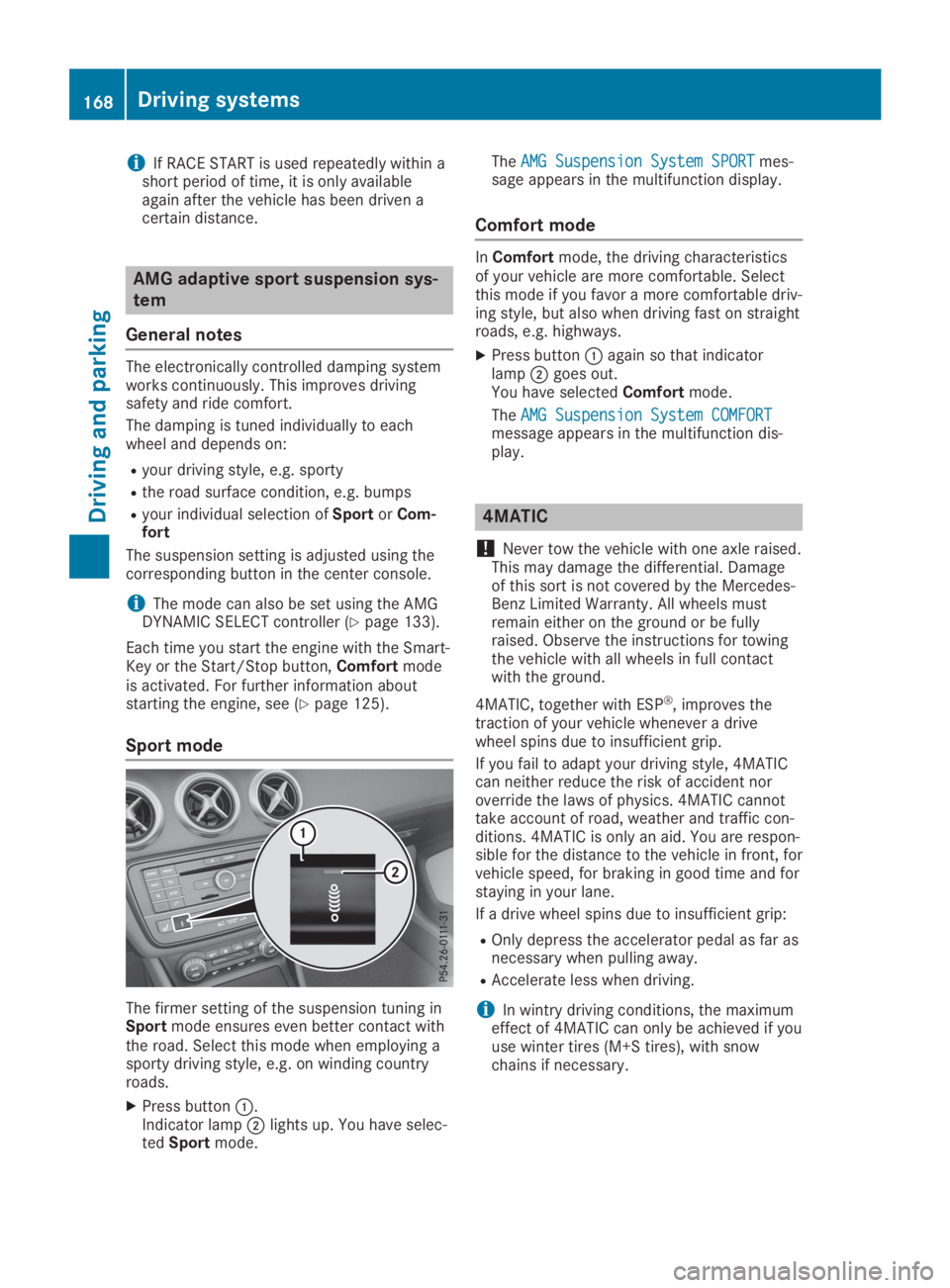
The firmer setting of the suspension tuning inSportmode ensures even better contact withthe road. Select this mode when employing asporty driving style, e.g. on winding countryroads.
XPress buttonC.Indicator lampDlights up. You have selec-tedSportmode.
TheAMG Suspension System SPORTAMG Suspension System SPORTmes-sage appears in the multifunction display.
Comfort mode
InComfortmode, the driving characteristicsof your vehicle are more comfortable. Selectthis mode if you favor a more comfortable driv-ing style, but also when driving fast on straightroads, e.g. highways.
XPress buttonCagain so that indicatorlampDgoes out.You have selectedComfortmode.
TheAMG Suspension System COMFORTAMG Suspension System COMFORTmessage appears in the multifunction dis-play.
4MATIC
!Never tow the vehicle with one axle raised.This may damage the differential. Damageof this sort is not covered by the Mercedes-Benz Limited Warranty. All wheels mustremain either on the ground or be fullyraised. Observe the instructions for towingthe vehicle with all wheels in full contactwith the ground.
4MATIC, together with ESP®, improves thetraction of your vehicle whenever a drivewheel spins due to insufficient grip.
If you fail to adapt your driving style, 4MATICcan neither reduce the risk of accident noroverride the laws of physics. 4MATIC cannottake account of road, weather and traffic con-ditions. 4MATIC is only an aid. You are respon-sible for the distance to the vehicle in front, forvehicle speed, for braking in good time and forstaying in your lane.
If a drive wheel spins due to insufficient grip:
ROnly depress the accelerator pedal as far asnecessary when pulling away.
RAccelerate less when driving.
iIn wintry driving conditions, the maximumeffect of 4MATIC can only be achieved if youuse winter tires (M+S tires), with snowchains if necessary.
168Driving systems
Driving and parking
Page 245 of 346
Operating system
Overview
General notes
!Do not use the space in front of the dis-play for storage. Objects placed here coulddamage the display or impair its function.Avoid any direct contact with the displaysurface. Pressure on the display surfacemay result in impairments to the display,which could be irreversible.
Wearing polarized sunglasses may impair yourability to read the display.
The display has an automatic temperature-controlled switch-off feature. The brightness isautomatically reduced if the temperature istoo high. The display may temporarily switchoff completely.
Cleaning instructions
!Do not touch the display. The display has avery sensitive high-gloss surface; there is arisk of scratching. If you have to clean thescreen, however, use a mild cleaning agentand a soft, lint-free cloth.
The display must be switched off and havecooled down before you start cleaning. Do notapply pressure to the display surface whencleaning it, as this could cause irreversibledamage to the display.
Switching the multimedia system
on/off
XPress theCcontrol knob.
Adjusting the volume
XTurn theCcontrol knob.
The volume is adjusted:
Rfor the currently selected media source
Rduring traffic or navigation announcements
Rin hands-free mode during an active call
Switching the sound on or off
XPress thecbutton on the control panel.If the audio output is switched off, the sta-tus line will show thecsymbol. If you
switch the media source or set the volume,the sound is automatically switched on.
iNavigation announcements will be heardeven if the sound is muted.
Functions
The multimedia system has the following func-tions:
RRadio mode
RMedia mode with media search
RSound systems
RNavigation system
COMAND: navigation via the hard drive
Audio 20: navigation via SD card
RCommunication functions
RSIRIUS Weather (COMAND)
RVehicle functions with system settings
RFavorites functions
Controller
The controller in the center console lets you:
Rselect menu items on the display
Renter characters
Rselect a destination on the map
Rsave entries
The controller can be:
Rturned3
Rslid left or right1
Rslid forwards or back4
Rslid diagonally2
Rpressed briefly or pressed and held7
Back button
You can use the8button to exit a menu orto call up the main menu of the current operat-ing mode.
XTo exit the menu:briefly press the8button.The multimedia system changes to the nexthigher menu level in the current operatingmode.
XTo call up the main menu:press the8button for longer than two seconds.The multimedia system changes to the mainmenu of the current operating mode.
Operating system243
Multimedia system
Z
Page 246 of 346
Favorites button
You can assign predefined functions using the}favorites button and call them up bypressing the button (Ypage 244).
Favorites
Calling up and exiting favorites
XTo call up:press the}button on thecontroller.
XSelect a favorite, e.g.VehicleVehicle.The favorites are displayed.
XTo exit:press the}button again.
Adding favorites
Adding predefined favorites
XPress the}button.
XCOMAND:slide6the controller.
XAudio 20:slide5or6the controller.The menu bar is displayed.
XSelectReassignReassign.The categories are displayed.
XSelect a category.The favorites are displayed.
XSelect a favorite.
XCOMAND:to add the favorite to the desiredposition, turn and press the controller.If a favorite has already been added at thisposition, it will be overwritten.
XAudio 20:to add the favorite to the desiredposition, turn, slide5or6and pressthe controller.If a favorite has already been added at thisposition, it will be overwritten.
Adding your own favorites
You can add climate control as a favorite, forexample.
XSelectVehicleVehicle{Vehicle SettingsVehicle Settings.
XPress and hold the}button until thefavorites are displayed.
XAdd a favorite to the desired position.If a favorite has already been added at thisposition, it will be overwritten.
Navigation mode
Important safety notes
GWARNING
If you operate information systems and com-
munication equipment integrated in the
vehicle when driving, you may be distracted
from the traffic situation. You could also
lose control of the vehicle. There is a risk of
an accident.
Only operate this equipment when the traffic
situation permits. If you are not sure that
this is possible, park the vehicle paying
attention to traffic conditions and operate
the equipment when the vehicle is station-
ary.
You must observe the legal requirements forthe country in which you are currently drivingwhen operating the navigation system.
General notes
Among other things, correct functioning of thenavigation system depends on GPS reception.In certain situations, GPS reception may beimpaired, there may be interference or theremay be no reception at all, e.g. in tunnels orparking garages.
Audio 20 is equipped with Garmin®MAP PILOT(see the manufacturer's operating instruc-
tions). The Garmin®MAP PILOT operatinginstructions are stored on the SD card as aPDF file. The SD card box contains a quickguide.
The following descriptions apply to navigationwith COMAND. Further information can befound in the Digital Operator's Manual.
Selecting a route type and route
options
Multimedia system:
XSelectNaviNavi{NavigationNavigation.The map shows the vehicle's current posi-tion.
XSlide6the controller.
XSelectOptionsOptions{Route SettingsRoute Settings.
244Operating system
Multimedia system
Page 250 of 346
Connecting a mobile phone
XOne-telephone mode:selectConnect asConnect as
New Main PhoneNew Main Phone.
XTwo-telephone mode:selectConnect asConnect as
Additional PhoneAdditional Phonewhen a mobile phone isalready connected.
XAuthorization using Secure Simple Pair-ing:
A code is displayed in the multimedia sys-tem and on the mobile phone.
XConfirm code on the mobile phone. Depend-ing on the mobile phone used, confirm theconnection to the multimedia system and
for the PBAP and MAP Bluetooth®profiles.The prompt to confirm may take up to twominutes to be displayed (see the manufac-turer's operating instructions).
XIf the codes are different: selectNoNoon themultimedia system.The process is canceled.
Repeat authorization.
or
XAuthorization by entering a passkey(passcode):enter any one- to sixteen-digitnumber sequence which you have chosenyourself into the passkey input menu.
XPressTto confirm.
XEnter and confirm the passkey on themobile phone. Depending on the mobilephone used, confirm the connection to themultimedia system and for the PBAP and
MAP Bluetooth®profiles. The prompt toconfirm may take up to two minutes to bedisplayed (see the manufacturer's operatinginstructions).
Symbols in the device manager
The symbols are shown in color depending ontheir use.
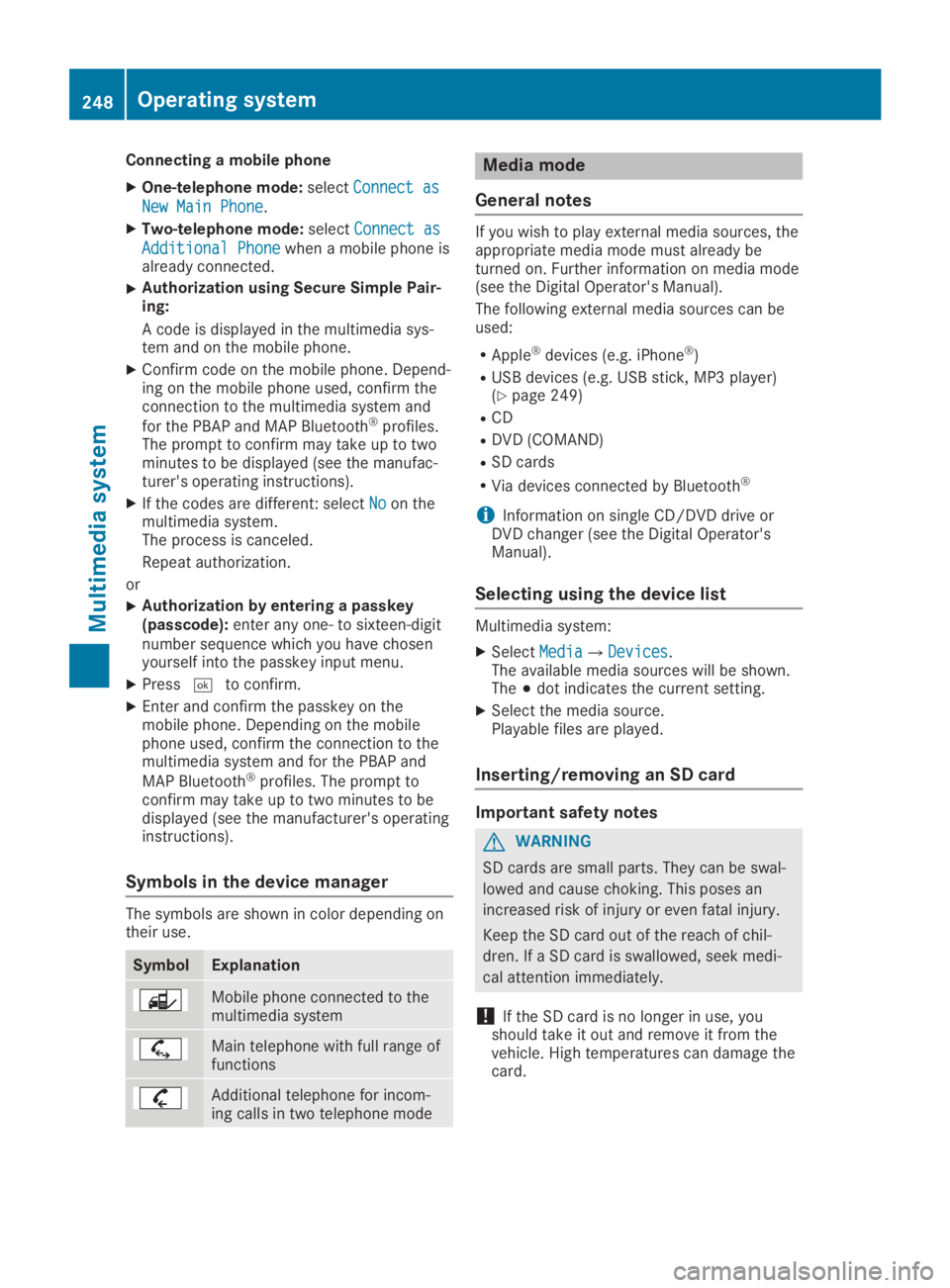
SymbolExplanation
Mobile phone connected to themultimedia system
Main telephone with full range offunctions
Additional telephone for incom-ing calls in two telephone mode
Media mode
General notes
If you wish to play external media sources, theappropriate media mode must already beturned on. Further information on media mode(see the Digital Operator's Manual).
The following external media sources can beused:
RApple®devices (e.g. iPhone®)
RUSB devices (e.g. USB stick, MP3 player)(Ypage 249)
RCD
RDVD (COMAND)
RSD cards
RVia devices connected by Bluetooth®
iInformation on single CD/DVD drive orDVD changer (see the Digital Operator'sManual).
Selecting using the device list
Multimedia system:
XSelectMediaMedia{DevicesDevices.The available media sources will be shown.The;dot indicates the current setting.
XSelect the media source.Playable files are played.
Inserting/removing an SD card
Important safety notes
GWARNING
SD cards are small parts. They can be swal-
lowed and cause choking. This poses an
increased risk of injury or even fatal injury.
Keep the SD card out of the reach of chil-
dren. If a SD card is swallowed, seek medi-
cal attention immediately.
!If the SD card is no longer in use, youshould take it out and remove it from thevehicle. High temperatures can damage thecard.
248Operating system
Multimedia system
Page 280 of 346
Displaying service messages
XSwitch on the ignition.
XPress theYorebutton to select theServ.Serv.menu.
XPress thecordbutton to select theASSYST PLUSASSYST PLUSsubmenu and confirm bypressing thevbutton.The service due date appears in the multi-function display.
Information about Service
Resetting the ASSYST PLUS service
interval display
!If the ASSYST PLUS service interval dis-play has been inadvertently reset, this set-ting can be corrected at a qualified special-ist workshop.
Have service work carried out as describedin the Maintenance Booklet. This may other-wise lead to increased wear and damage tothe major assemblies or the vehicle.
A qualified specialist workshop, e.g. an author-ized Mercedes-Benz Center, will reset theASSYST PLUS service interval display after theservice work has been carried out. You canalso obtain further information on mainte-nance work, for example.
Special service requirements
The specified maintenance interval takes onlythe normal operation of the vehicle intoaccount. Under arduous operating conditionsor increased load on the vehicle, maintenancework must be carried out more frequently, forexample:
Rregular city driving with frequent intermedi-ate stops
Rif the vehicle is primarily used to travel shortdistances
Ruse in mountainous terrain or on poor roadsurfaces
Rif the engine is often left idling for long peri-ods
Rin particularly dusty conditions, or if air-recirculation mode is frequently used
In these or similar operating conditions, havethe interior filter, engine air cleaner, engine oil
and oil filter, for example, changed more fre-quently. Under arduous operating conditions,the tires must be checked more often. Furtherinformation can be obtained at a qualified spe-cialist workshop, e.g. an authorized Mercedes-Benz Center.
Driving abroad
An extensive Mercedes-Benz Service networkis also available in other countries. You canobtain further information from any authorizedMercedes-Benz Center.
Care
General notes
HEnvironmental note
Dispose of empty packaging and cleaning
cloths in an environmentally responsible
manner.
!When cleaning your car, do not use:
Rdry, coarse or hard cloths
Rabrasive cleaning agents
Rsolvents
Rcleaning agents containing solvents
Do not scrub.
Do not touch the surfaces and films withhard objects, e.g. rings or ice scrapers. Oth-erwise, you may scratch or damage the sur-faces and films.
!Do not park your vehicle for a long periodof time directly after cleaning, particularlyafter cleaning the wheel rim with wheelcleaner. Wheel cleaner can lead to theincreased corrosion of the brake discs andpads. Therefore, drive for a few minutesafter cleaning. By heating up the brakes, thebrake discs and pads dry. The vehicle canthen be parked for a long period of time.
Regular care of your vehicle is a condition forretaining the quality in the long term.
Use care products and cleaning agents recom-mended and approved by Mercedes-Benz.
278Care
Maintenance and care
Page 290 of 346
XSwitch off the engine.
XVehicles without KEYLESS-GO:removethe SmartKey from the ignition lock.
XVehicles with KEYLESS-GO start-func-tion or KEYLESS-GO:open the driver'sdoor.The vehicle electronics are now in positionZ. This is the same as the SmartKey havingbeen removed.
XVehicles with KEYLESS-GO start-func-tion or KEYLESS-GO:remove the Start/Stop button from the ignition lock(Ypage 125).
XMake sure that the engine cannot be startedvia your smartphone (Ypage 126).
XMake sure that the passengers are notendangered as they do so. Make sure thatno one is near the danger area while awheel is being changed. Anyone who is notdirectly assisting in the wheel changeshould, for example, stand behind the bar-rier.
XGet out of the vehicle. Pay attention to traf-fic conditions when doing so.
XClose the driver's door.
MOExtended tires (tires with run-flat
properties)
General notes
With MOExtended tires (tires with run flatcharacteristics), you can continue to drive yourvehicle even if there is a total loss of pressurein one or more tires. The affected tire must notshow any clearly visible damage.
You can recognize an MOExtended tire by theMOExtended marking which appears on thesidewall of the tire. You will find this markingnext to the tire size designation, the load-bear-ing capacity and the speed index(Ypage 320).
MOExtended tires may be used only in con-junction with an activated tire pressure losswarning system (Canada only) or tire pressuremonitor (USA only).
If a pressure loss warning messageappears in the multifunction display:
Robserve the instructions in the display mes-sages (Ypage 223).
Rcheck the tire for damage
Rif driving on, observe the following notes
The driving distance possible in run-flat modeis approximately 50 miles (80 km) when thevehicle is partially laden. When the vehicle isfully laden it is approximately 19 miles(30 km).
In addition to the vehicle load, the driving dis-tance possible depends upon:
RVehicle speed
RRoad condition
ROutside temperature
The driving distance possible in run-flat modemay be reduced by extreme driving conditionsor maneuvers, or it can be increased through amoderate style of driving.
The driving distance possible in run-flat modeis counted from the moment the tire pressureloss warning appears in the multifunction dis-play.
You must not exceed the maximum permissi-ble speed for limp-home mode of 50 mph(80 km/h).
When replacing one or all tires, please observethe following specifications for your vehicle'stires:
RSize
RType and
RThe "MOExtended" marking
If a tire has gone flat and cannot be replacedwith an MOExtended tire, a standard tire maybe used as a temporary measure. Make surethat you use the proper size and type (summeror winter tire).
Vehicles equipped with MOExtended tires arenot equipped with a TIREFIT kit at the factory.It is therefore recommended that you addition-ally equip your vehicle with a TIREFIT kit if youmount tires that do not feature run-flat charac-teristics, e.g. winter tires. A TIREFIT kit may beobtained from a qualified specialist workshop.
288Flat tire
Roadside Assistance
Page 306 of 346
Important safety notes
GWARNING
If you install wheels and tires with incorrect
dimensions, the service brake or wheel sus-
pension components may be damaged.
There is a risk of an accident.
Always replace wheels and tires with ones
that comply with the specifications of the
original part.
When replacing wheels, pay attention to the:
RDesignation
RModel
When replacing tires, pay attention to the:
RDesignation
RManufacturer
RModel
GWARNING
A flat tire will severely affect the driving
characteristics as well as the steering and
braking of the vehicle. There is a risk of an
accident.
Tires without run-flat characteristics:
RDo not drive on with a flat tire.
RChange the flat tire immediately with an
emergency spare wheel or spare wheel.
Alternatively, consult a qualified specialist
workshop.
Tires with run-flat characteristics:
RObserve the information and warning
notes on MOExtended tires (run-flat tires).
Accessories that are not approved for yourvehicle by Mercedes-Benz or are not beingused correctly can impair the operating safety.
Before purchasing and using non-approvedaccessories, visit a qualified specialist work-shop and inquire about:
Rsuitability
Rlegal stipulations
Rfactory recommendations
Further information regarding wheels and tirescan be found under "Wheel/tire combinations"(Ypage 329).
You can ask for information regarding permit-ted wheel/tire combinations at an authorizedMercedes-Benz Center.
Information on tire pressure can be found:
Ron the Tire and Loading Information placardon the B-pillar on the driver's side(Ypage 316)
Rin the tire pressure table in the fuel filler flap(Ypage 144)
Runder "Tire pressure" (Ypage 307)
Operation
Information on driving
Check the tire pressure when the vehicle isheavily laden and adjust prior to a trip.
While driving, pay attention to vibrations,noises and unusual handling characteristics,e.g. pulling to one side. This may indicate thatthe wheels or tires are damaged. If you sus-pect that a tire is defective, reduce your speedimmediately. Stop the vehicle as soon as pos-sible to check the wheels and tires for dam-age. Hidden tire damage could also be causingthe unusual handling characteristics. If youfind no signs of damage, have the tires andwheels checked at a qualified specialist work-shop.
When parking your vehicle, make sure that thetires do not get deformed by the curb or otherobstacles. If they cannot be avoided, driveover obstacles such as curbs slowly and at anobtuse angle. Otherwise, you may damage thewheels or tires.
Regular checking of wheels and tires
GWARNING
Damaged tires can cause tire inflation pres-
sure loss. As a result, you could lose control
of your vehicle. There is a risk of accident.
Check the tires regularly for signs of dam-
age and replace any damaged tires immedi-
ately.
304Operation
Wheels and ti res
Page 308 of 346
(tires with run-flat characteristics)" section(Ypage 288).
ROnly mount tires of the correct size onto thewheels.
RBreak in new tires at moderate speeds forthe first 60 miles (100 km). The new tiresonly reach their full performance after thisdistance.
RDo not drive with tires which have too littletread depth. This significantly reduces thetraction on wet roads (hydroplaning).
RReplace the tires after six years at the lat-est, regardless of wear.
Observe the notes on the emergency sparewheel (Ypage 330).
MOExtended tires (tires with run-flat
properties)
With MOExtended tires (tires with run flatcharacteristics), you can continue to drive yourvehicle even if there is a total loss of pressurein one or more tires.
MOExtended tires may only be used in con-junction with an activated tire pressure losswarning system (Canada only) or tire pressuremonitor (USA only) and only on wheels specifi-cally tested by Mercedes-Benz.
Notes on driving with MOExtended tires with aflat tire (Ypage 288).
Vehicles equipped with MOExtended tires arenot equipped with a TIREFIT kit at the factory.It is therefore recommended that you addition-ally equip your vehicle with a TIREFIT kit if youmount tires that do not feature run-flat charac-teristics, e.g. winter tires. A TIREFIT kit may beobtained from a qualified specialist workshop.
Winter operation
General notes
Have your vehicle winter-proofed at a qualifiedspecialist workshop at the onset of winter.
Observe the notes in the "Changing a wheel"section (Ypage 325).
Driving with summer tires
At temperatures below 45 ‡ (+7 †), summertires lose elasticity and therefore traction andbraking power. Change the tires on your vehi-cle to M+S tires. Using summer tires at verycold temperatures could cause cracks to form,thereby damaging the tires permanently.Mercedes-Benz cannot accept responsibilityfor this type of damage.
GWARNING
Damaged tires can cause tire inflation pres-
sure loss. As a result, you could lose control
of your vehicle. There is a risk of accident.
Check the tires regularly for signs of dam-
age and replace any damaged tires immedi-
ately.
M+S tires
GWARNING
M+S tires with a tire tread depth of less than