Page 196 of 629
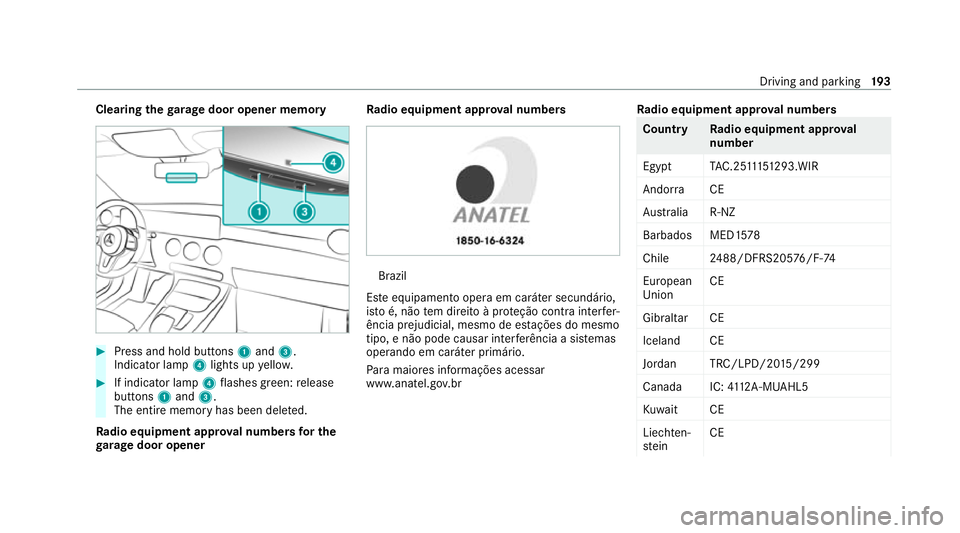
Clearing
thega rage door opener memo ry#
Press and hold buttons 1and 3.
Indicator lamp 4lights up yello w. #
If indicator lamp 4flashes green: release
buttons 1and 3.
The entire memo ryhas been dele ted.
Ra dio equipment appr oval numbers for the
ga rage door opener Ra
dio equipment appr oval numbers Brazil
Es te equipamento opera em caráter secundário,
is to é, não tem direito à pr oteção contra inter fer‐
ência prejudicial, mesmo de es tações do mesmo
tipo, e não pode causar inter ferê ncia a si stemas
operando em caráter primário.
Pa ra maio res informações acessar
www.anatel.go v.br Ra
dio equipment appr oval numbers Countr
yRadio equipment appr oval
number
Egyp tT AC.25 111 51293.WIR
Andor ra CE
Au stra lia R-NZ
Barbados MED1 578
Chile 2488/DFRS205 76/F-74
European
Union CE
Gibral tarCE
Iceland CE
Jordan TRC/LPD/20 15/299
Canad aI C:4112 A-MUAHL5
Ku wa it CE
Liechten‐
st ein CE Driving and parking
19 3
Page 490 of 629

Blown fuses must be
replaced with fuses of the
same rating, which you can recognise bythe col‐
our and fuse rating. The fuse ratings and fu rther
information tobe obser ved can be found in the
fuse assignment diagram.
Fu se assignment diag ram: onthe fuse box in
th e load compartment (/ page 489).
* NO
TEDama geor malfunctions caused
by moisture Moisture may cause dama
getothe electrical
sy stem or cause it tomalfunction. #
When the fuse box is open, make sure
th at no moisture can enter the fuse
box. #
When closing the fuse box, make sure
th at the seal of the lid is positioned cor‐
re ctly on the fuse box. If
th e newly inser ted fuse also blo ws, ha vethe
cause traced and rectified at a qualified special‐
ist workshop.
Ensure thefo llowing before replacing a fuse:
R The vehicle is secured against rolling away. R
All electrical consumers are switched off.
R The ignition is switched off.
The electrical fuses are located in various fuse
bo xes:
R Fuse box in the engine compartment on the
driver's side (/ page 487)
R Fuse box on the driver's side of the cockpit
(/ page 488)
R Fuse box in the front passenger foot we ll
(/ page 488)
R Fuse box in the load compartment on the
ri ght-hand side of theve hicle, when vie wed
in the direction of tra vel (/ page 489) Opening and closing
the fuse box in the
engine compa rtment Re
quirements:
R A dry clo thand a sc rewdriver are available.
Obse rveth e no tes on electrical fuses
(/ page 486). Opening &
WARNING Risk of inju ryfrom using the
windscreen wipers while the engine bon‐
net is open
When the engine bonn etis open, and the
windscreen wipers are set in motion, you can
be trapped bythe wiper linkage. #
Alw ays switch off the windscreen wip‐
ers and ignition before opening the
engine bonn et. Breakdown assis
tance 487
Page 491 of 629
#
Turn clips 2on co ver1 aqu arter-turn to
th e left. #
Fold co ver1 up in the direction of the
ar row. #
Remo veany existing moisture from the fuse
box using a dry clo th. #
Loosen scr ews3 and remo vefuse box lid
4 from theto p.
Closing #
Check whe ther the seal is positioned cor‐
re ctly in lid 4. #
Insert lid 4into the brac ket at there ar of
th e fuse box. #
Fold down lid 4ofthe fuse box and tighten
scr ews3. #
Fold down co ver1. #
Turn clips 2on co ver1 aqu arter-turn to
th eright. #
Close the bonn et. Opening and closing
the fuse box in the
cockpit The fuse box is on
the side of the dashboard
under a co ver. #
Con tact a Mercedes-Benz Service Centre for
fur ther information. Opening and closing
the fuse box in the front
passenger foot we ll Obser
vethe no tes on electrical fuses
(/ page 486). 488
Breakdown assis tance
Page 600 of 629

Fo
r an EQ-optimised route
Overview ............................................. 354
Fr ag rance
see Fragrance sy stem
Fr ag rance sy stem .................................... 15 3
Inserting/removing theflacon ............ .153
Setting ................................................. 15 2
Fr ee software ............................................ 29
Fr equencies
Mobile phone ...................................... .510
Tw o-w ayradio ...................................... 51 0
Fr equency band
Dialling (on-board computer) .............. .271
Fr ont airbag (driver, front passenger) .....37
Fr ont passenger seat
see Seat
Fu el consum ption indicator
Calling up ............................................ .173
Fu nction seat
see Door cont rol panel
Fu ses ........................................................ 486
Before replacing a fuse ........................ 486 Fu
se assignment diagram ...................4 86
Fu se box in the engine compartment .. 487
Fu se box in the front passenger foot‐
we ll ...................................................... 488
Fu se box in the load compartment ...... 489
Fu se box on the dashboard ................. 488
No tes .................................................. 486 G
Garage door opener Cleari ngthe memory ........................... 19 3
Opening or closing the door ................1 92
Programming buttons .......................... 19 0
Ra dio equipment appr oval numbers .... 19 3
Re solving problems ............................. 19 2
Synchronising thero lling code ............ .191
Genera l operating permit number
(EU) ............................................................ 511
Genuine parts ............................................ 17
Global sear ch
Fu nction .............................................. 320
Overview ............................................. 320
Glo vecompa rtment
Locking/unlo cking .............................. .114 H
Handbrake see Electric parking brake
Handling characteristics (unusual) ....... 490
HANDS-FREE ACCESS ................................ 85
Ha ptic accelerator pedal ........................16 9
Hazard warning lights ............................ .136
HD prog rammes
see CI+ module
Head restra int
Fr ont (adjusting mechanically) .............1 03
Re ar (adjusting) .................................. .104
Head-up display ....................................... 273
Ad justing display elements (on-board
compu ter) ............................................ 273
Ad justing the brightness (on-board
computer) ............................................ 273
Fu nction ............................................... 274
Menu (on-board computer) .................. 273
Setting the position (on-board com‐
puter) ................................................... 273
Switching on/off ................................. 274 Index
597