Page 95 of 629
*
NO
TEDama gecaused byprotru ding
objects Objects
that pr otru de from the sliding sun‐
ro of may damage the sealing strips. #
Do not allow anything toprotru de from
th e sliding sunroof. *
NO
TEImpo rtant points toremember
when a roof rack isfitted When a
roof rack isfitted, raising or opening
th e sliding sunroof may be limited. #
Check whe ther the sliding sunroof can
be raised or opened when a roof rack is
fi tted. #
If in doubt, do not raise or open the
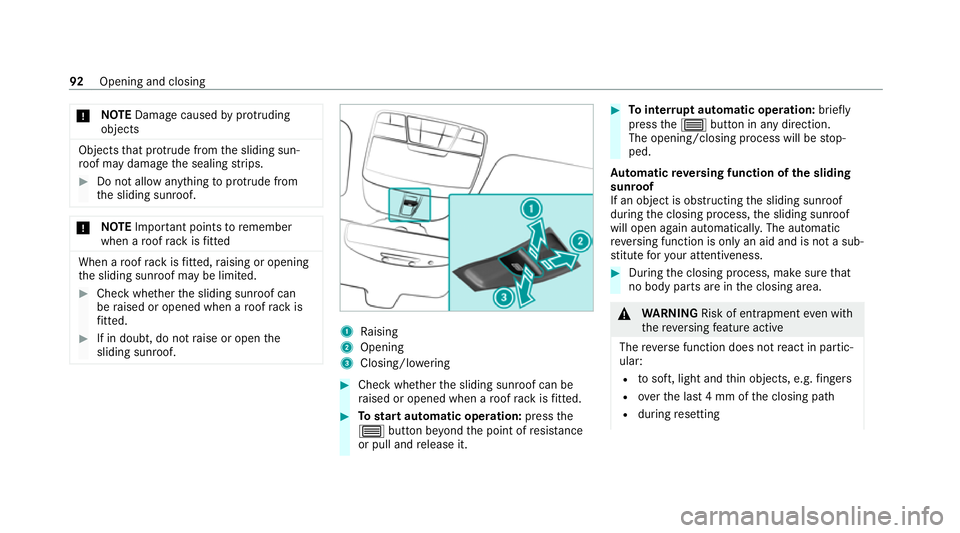
sliding sunroof. 1
Raising
2 Opening
3 Closing/lo wering #
Check wh ether the sliding sunroof can be
ra ised or opened when a roof rack isfitted. #
Tostart automatic operation: pressthe
3 button be yond the point of resis tance
or pull and release it. #
Tointer rupt automatic operation: briefly
press the3 button in any direction.
The opening/closing process will be stop‐
ped.
Au tomatic reve rsing function of the sliding
sunroof
If an object is obstructing the sliding sunroof
during the closing process, the sliding sunroof
will open again automaticall y.The automatic
re ve rsing function is only an aid and is not a sub‐
st itute foryo ur attentiveness. #
During the closing process, make sure that
no body parts are in the closing area. &
WARNING Risk of entrapment even wi th
th ere ve rsing feature active
The reve rse function does not react in partic‐
ular:
R tosoft, light and thin objects, e.g. fingers
R overth e last 4 mm of the closing path
R during resetting 92
Opening and closing
Page 97 of 629
Problems with
the sliding sunroof Problem
Possible causes/consequences and M
MSolutions
The sliding sunroof cann otbe closed
and you cannot see the cause. &
WARNING Risk of becoming trapped or fata l injury byclosing the sliding sunroof again
If yo u close the sliding sunroof again immediately af ter it has been bloc ked or reset, the sliding sunroof
closes with increased forc e.
Pa rts of the body could become trapped in the closing area in the process. #
Make sure that no parts of the body are in the closing area. #
Release the button immediately if somebody becomes trapped.
or #
Press the button in any direction during the automatic closing process.
The closing process is stopped. If
th e sliding sunroof is obstructed during closing and reopens again slightly: #
Immediately af ter auto matic reve rsing, pull and hold the3 button down again tothe point of resist‐
ance until the sliding sunroof is closed.
The sliding sunroof will be closed with increased forc e.
If th e sliding sunroof is obstructed again and reopens again slightly: 94
Opening and closing
Page 612 of 629

Overview .............................................
445
Sea rching forst ations ........................ .446
Setting a channel ................................ 445
Setting station tracking ...................... .447
Setting the frequency band ................. 445
Setting the traf fic information
service volume inc rease ...................... 447
St oring radio stations .......................... 446
Vo ice commands (LINGU ATRO NIC) .....2 86
Ra dio stations
Dialling (on-boa rdcompu ter) ............... 271
Ra in closing function
Sliding sunroof ...................................... 93
Ra in-closing feature
Side wind ows ........................................88
Ra nge
Displaying ............................................ 269
Ra pid charging
see Cha rging
REA CHregulation ...................................... 26
Re ading light
Switching on/off using poses ............. 307 Re
ading light
see Interior lighting
Re alwo od (Care) ...................................... 471
Re ar axle le vel control ............................ 226
Re ar door (child saf ety lock) .................... 69
Re ar fog light
Switching on/off .................................1 35
Re ar seat
see Seat
Re ar seat belt
St atus display ........................................ 36
Re ar seat belt status display .................... 36
Re ar window
Changing the wiper blade .................... 14 5
Re ar window wipers
Ac tivating/deactivating ...................... .143
Re ar-view mir ror
see Outside mir rors
Re cuperation
Fu nction ............................................... 161
Setting ................................................. 161Re
cycling
see Take -ba ckof end-of-life vehicles
Re gistration
Ve hicle .................................................. 26
Re scue card ............................................... 27
Re set function (multimedia sy stem) .....3 38
Re storing (factory settings)
see Reset function (multimedia sy stem)
Re stra int sy stem ...................................... .30
Basic instructions forch ildren .............. .45
Fu nction in an accident ........................ .31
Fu nctionality .......................................... 31
Malfunction ...........................................31
Pr otection ..............................................30
Re duced pr otection ...............................30
Self-test ................................................. 31
Wa rning lamp ........................................ .31
Re versege ar
Engaging .............................................. 174
Re versing camera .................................. .232
Care .................................................... 469
Fu nction .............................................. 232 Index
609