2019 MERCEDES-BENZ EQC SUV temperature
[x] Cancel search: temperaturePage 184 of 629
R
Extension cables
R Extension reels
R Multiple soc kets #
Never use soc ket adap ters to connect
th ech arging cable tothe mains soc ket.
The only exception being if the adap ter
has been tested and appr oved bythe
manufacturer forch arging the high-volt‐
age battery of an electric vehicle. #
Obser vethe saf ety no tes in the operat‐
ing instructions forth e soc ket adap ter. Only
thefo llowing charging cables may be used:
R The charging cable supplied with theve hicle.
R Ach arging cable that has been appr oved for
th eve hicle.
The charging process can vary depending on the
po we r supp lyequipment.
Shor terch arging times can be achie ved in the
fo llowing ways:
R Charging at a wallbox.
R Charging at a charging station. When doing so, alw
ays obser vethe local infor‐
mation.
Do not lea vethech arging cable controls hanging
loose from a mains soc ket.
Do not li ftthe controls bythefo llowing compo‐
nent parts:
R The charging cable connec tor.
R The mains plug.
The charging cable should be stowed and held in
place in the bag pr ovided in the boot of theve hi‐
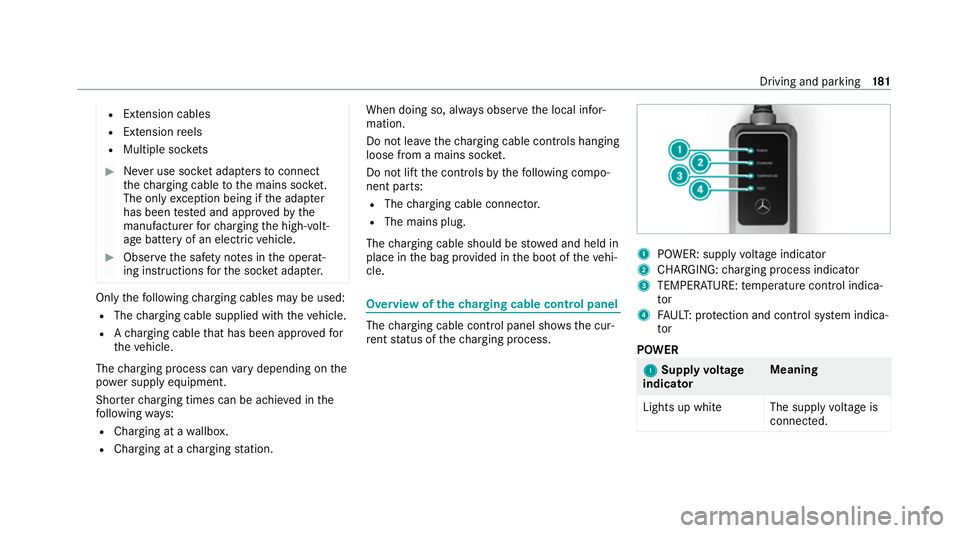
cle. Overview of
thech arging cable control panel The
charging cable control panel sho wsthe cur‐
re nt status of thech arging process. 1
POWER: supply voltage indicator
2 CHARGING: charging process indicator
3 TEMPERATURE: temp erature control indica‐
tor
4 FAUL T:protection and control sy stem indica‐
tor
POWER 1 1
Supply voltage
indicator Meaning
Lights up whit eThe supplyvoltage is
connec ted. Driving and parking
181
Page 185 of 629
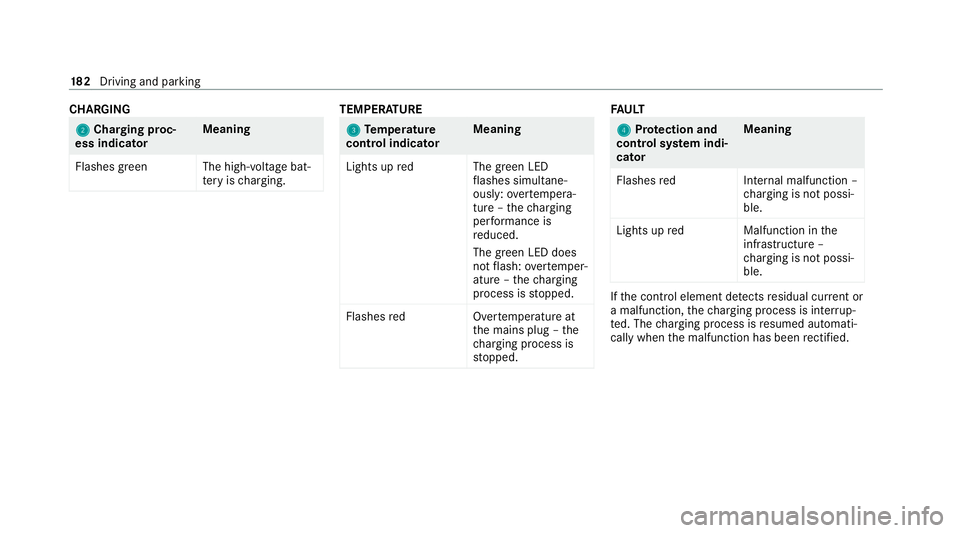
CHA
RGING 2 2
Cha rging proc‐
ess indicator Meaning
Flashes green The high- voltage bat‐
te ry isch arging. TEMPER
ATURE 3
3
Temp erature
control indica torMeaning
Lights up redT he green LED
fl ashes simul tane‐
ously: overtemp era‐
ture – thech arging
per form ance is
re duced.
The green LED does
not flash: overtemp er‐
ature – thech arging
process is stopped.
Flashes redO vertemperature at
th e mains plug – the
ch arging process is
st opped. FA
ULT 4 4
Protection and
control sy stem indi‐
cator Meaning
Flashes redI nternal malfunction –
ch arging is not possi‐
ble.
Lights up redM alfunction inthe
inf rastru cture –
ch arging is not possi‐
ble. If
th e control element de tects residual cur rent or
a malfunction, thech arging process is inter rup‐
te d. The charging process is resumed automati‐
cally when the malfunction has been rectified. 18 2
Driving and pa rking
Page 295 of 629
%
If no seat or side is mentioned for com‐
mands that relate toa seat or side of vehicle th
en all actions are car ried out automatically
fo rth e driver's seat.
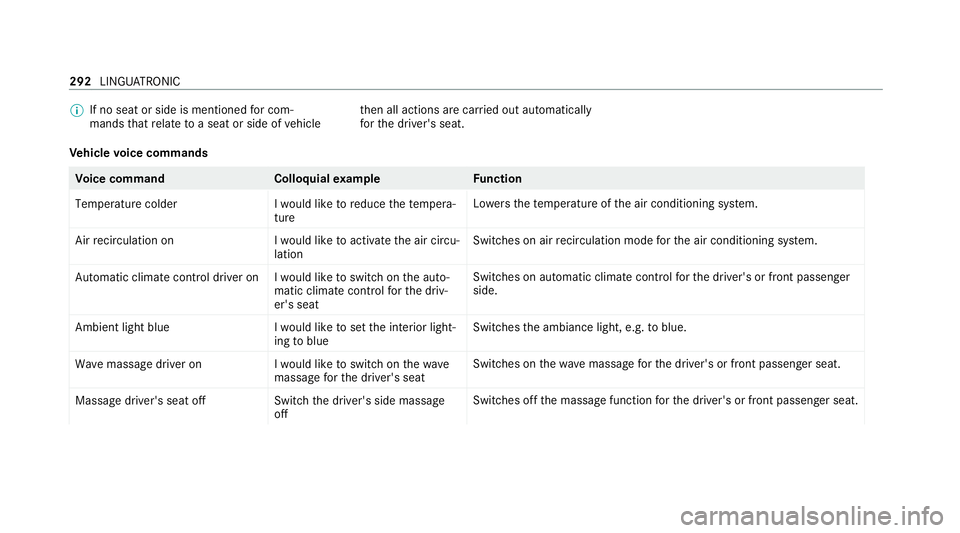
Ve hicle voice commands Vo
ice command Colloquialexample Function
Temperature colder I would like to reduce the tempera-
tureLo
we rsthete mp erature of the air conditioning sy stem.
Air recirculation on I would like to activate the air circu-
lationSwitches on air
recirculation mode forth e air conditioning sy stem.
Automatic climate control driver on I would like to switch on the auto- matic climate control for the driv-
er's seatSwitches on automatic climate control
forth e driver's or front passenger
side.
Ambient light blue I would like to set the interior light-
ing to blueSwitches
the ambiance light, e.g. toblue.
Wave massage driver on I would like to switch on the wave
massage for the driver's seatSwitches on
thewav e massage forth e driver's or front passenger seat.
Massage driver's seat off Switch the driver's side massage
offSwitches off
the massage function forth e driver's or front passenger seat. 292
LINGU ATRO NIC
Page 296 of 629
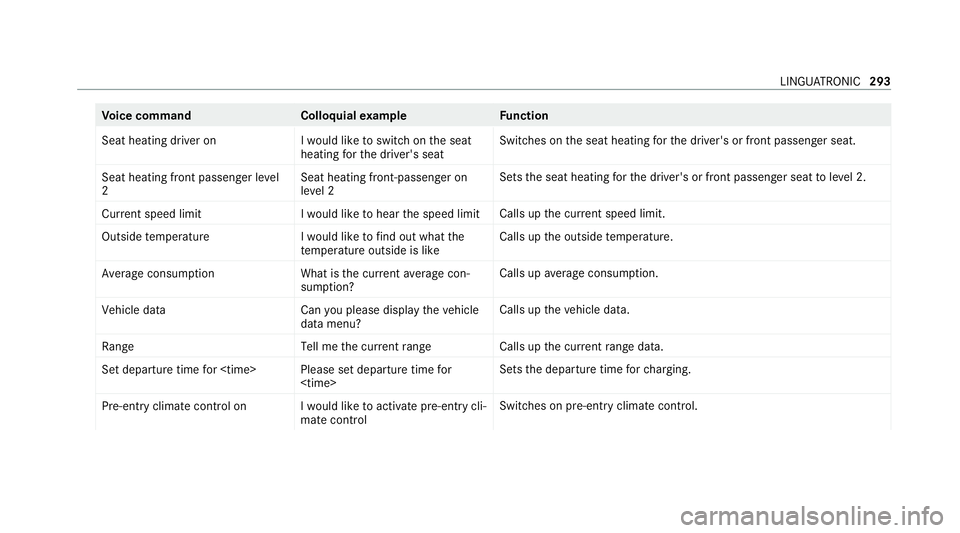
Vo
ice command Colloquialexample Function
Seat heating driver on I would like to switch on the seat
heating for the driver's seatSwitches on
the seat heating forth e driver's or front passenger seat.
Seat heating front passenger level
2 Seat heating front-passenger on
level 2Sets
the seat heating forth e driver's or front passenger seat toleve l 2.
Current speed limit I would like to hear the speed limitCalls up
the cur rent speed limit.
Outside temperature I would like to find out what the
temperature outside is likeCalls up
the outside temp erature.
Average consumption What is the current average con-
sumption?Calls up
average consu mption.
Vehicle data Can you please display the vehicle
data menu?Calls up
theve hicle data.
Range Tell me the current rangeCalls up
the cur rent range da ta.
Set departure time for
Page 299 of 629
%
Ifth eve hicle is fitted wi thgesture mode,
selected functions of the multimedia sy stem
can be operated conta ct-free aswell as turn‐
ing there ading light on or off (/ page 303).
Nu merous application, online services, services
and apps are available foryo u. These can be
called up via the home screen or using buttons
3.
Yo u can co nveniently call up and add favo urites
on thesteering wheel using theß rock er
switch or using theß button on control panel
3. Quic k-access in the home screen and in the
applications ser vetoselect functions more
qu ickl y.
If yo u use the learn function of the multimedia
sy stem, you will recei vesuggestions during oper‐
ation of the most probable navigation destina‐
tions, media sources, radio stations and con‐
ta cts. The configu ration of the suggestions takes
place in your profile. You can co mpileyour pro‐
fi le from various vehicle settings and settings of
th e multimedia sy stem. You can create themes
fo rva rious driving situations in the home screen
as well as using theß rocker switch or the
ß button. The
Notifications Centre collects incoming notifi‐
cations, e.g. about an available software update.
Depending on the type of notification it of fers
va rious actions. You can call up the Notifications
Centre on the home screen and in the applica‐
tion menus.
Wi th th eglobal sear chintheve hicle you can
sear chon-board across many categories as well
as online in the Internet. You can use theglobal
sear chinthe home screen and in the notifica‐
tions.
Anti-theft pr otection
This device is equipped with tech nical pr ovisions
to protect it against theft. More de tailed informa‐
tion about anti-theft pr otection can be obtained
at a qualified specialist workshop. Note
s onthe media display Obser
vethe no tes on caring forth e interior
(/ page 471).
Au tomatic temperature-cont rolled switch-
off feature: ifth ete mp erature is too high, the
brightness is initially reduced automatically. The media display may
then switch off comple tely for
a while.
% Ifyo u are wearing polarised sun glasses, it
may be dif ficult toread the multimedia sys‐
te m displa y. 296
MBUX multimedia sy stem
Page 333 of 629
Switching
thetemp erature display on/off #
Select Temperature display .#
Select Outside temp. orCoolant temp..
The selec tedte mp erature is displa yed in the
instrument clus ter. Time
and date Setting
the time and da teautomatically
Multimedia sy stem:
4 © 5
Settings 5
System
5 Time and date #
Deactivate Manual time adjustment.
The time and date are set automatically for
th e selected time zone and summer time
option.
% The cor rect time is requ ired forth efo llowing
functions: R Route guidance with time-dependent
traf fic guidance.
R Calculation of expected time of ar riva l.
Setting the time zone
Re quirements: R
For the manual time zone: Automatic time
zone is switched off.
Multimedia sy stem:
4 © 5
Settings 5
System
5 Time and date
Setting the time zone manually #
Select Time zone:.
The list of countries is displa yed.
% Ifth ere are se veral time zones available in a
countr y,these will be shown af terth e coun‐
try is selected. #
Select a count ryand, if requ ired, a time
zone.
The time zone set is displa yed af terTime
zone:.
Setting the time zone automatically #
Activate Automatic time zone .Setting the time and date
form at
Multimedia sy stem:
4 © 5
Settings 5
System
5 Time and date 5
Set format #
Set the date and time form at#.
Setting the time and da temanually
Re quirements:
R The Manual time adjustment function is
switched on.
R For setting the date manuall y:no GPS is
ins talled in theve hicle.
Multimedia sy stem:
4 © 5
Settings 5
System
5 Time and date
Setting the time (without time zone) #
Select Set time. #
Set a time.
Setting the time (with time zone) #
Select Set time. 330
MBUX multimedia sy stem