2019 MERCEDES-BENZ EQC SUV trailer
[x] Cancel search: trailerPage 243 of 629
Snowfall or heavy
rain may lead toa parking
space being measured inaccuratel y.Pa rking
spaces that are partial lyoccupied bytrailer
dr aw bars might not be identified as such or be
measured incor rectly. Only use Active Parking
Assist on le vel, high-grip ground.
Do not useActive Parking Assist in thefo llowing
situations:
R The weather conditions are extreme, e.g. ice,
pa cked snow or heavy rain.
R Ifyo u are transpo rting a load that pr otru des
be yond theve hicle.
R Ifth e parking space is on a steep downhill or
uphill gradient.
R Ifyo u ha veinstalled snow chains.
Ac tive Parking Assist may also display parking
spaces that are not suitable for parking, e.g.:
R Parking spaces where parking is prohibited.
R Parking spaces on unsuitable sur faces. Ac
tive Parking Assist will not assist you with
parking spaces at right angles tothe direction of
tr av el in thefo llowing situations:
R If two parking spaces are located immedi‐
ately next toeach other.
R Ifth e parking space is immediately next to a
low obs tacle su chas a kerb.
Ac tive Parking Assist will not assist you with
parking spaces parallel or at right angles tothe
direction of tr avel in thefo llowing situations:
R Ifth e parking space is on a kerb.
R Ifth e parking space is bordered byan obs ta‐
cle, e.g. a tree, a post or a traile r.Pa
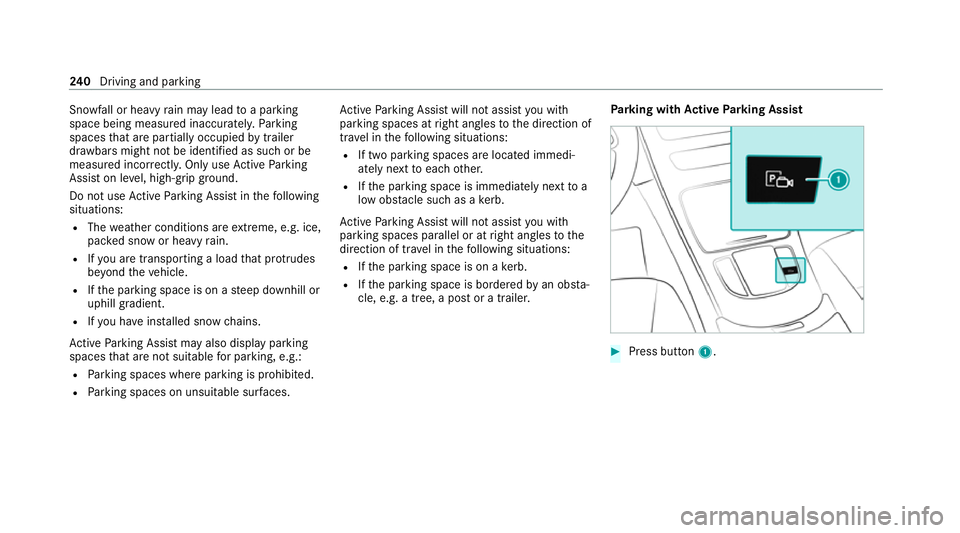
rking with Active Park ing Assist #
Press button 1. 240
Driving and pa rking
Page 247 of 629
R
Ifth e wrong gear is selec ted.
Drive AwayAssi stis active under thefo llowing
conditions:
R IfPa rking Assist PARKTRONIC is activated.
R Every time thege ar is changed tok orh
when theve hicle is at a standstill.
R Ifth e de tected obs tacle is less than appr ox.
1. 0 m away.
R Ifth e manoeuvring assis tant function is acti‐
va ted in the multimedia sy stem.
Sy stem limits
The per form ance of Drive AwayAssi stis limited
on inclines.
When driving with a trailer, Drive AwayAssi stis
not available.
% Also obse rveth e sy stem limits of Parking
Assist PARKTRONIC (/ page 227).
Fu nction of Cross Traf fic Alert
% Also read the instructions on Blind Spot
Assist (/ page 250). Ve
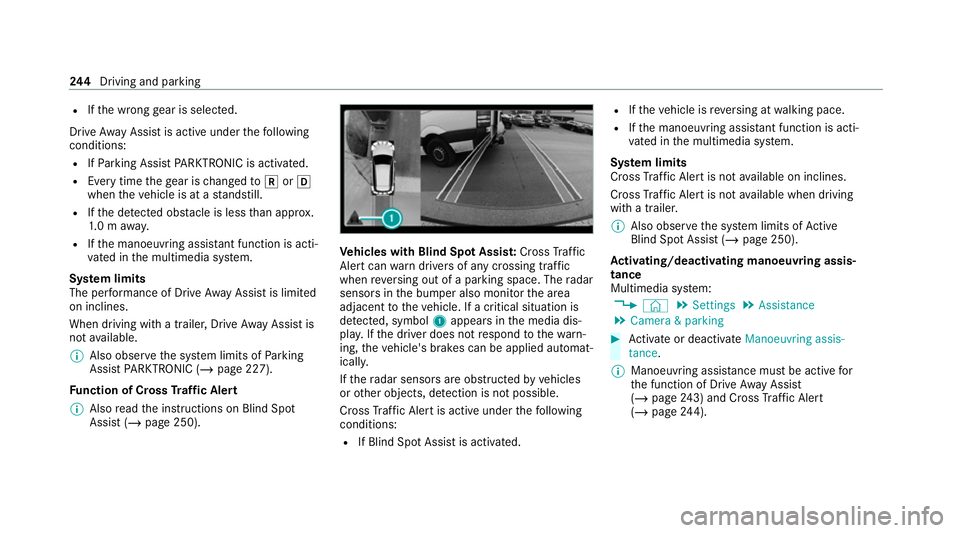
hicles with Blind Spot Assis t:Cross Traf fic
Ale rtcan warndrivers of any crossing tra ffic
when reve rsing out of a parking space. The radar
sensors in the bumper also monitor the area
adjacent totheve hicle. If a critical situation is
de tected, symbol 1appea rsinthe media dis‐
pla y.Ifth e driver does not respond tothewa rn‐
ing, theve hicle's brakes can be applied automat‐
ically.
If th era dar sensors are obstructed byvehicles
or other objects, de tection is not possible.
Cross Traf fic Alert is acti veunder thefo llowing
conditions:
R If Blind Spot Assist is activated. R
Ifth eve hicle is reve rsing at walking pace.
R Ifth e manoeuvring assis tant function is acti‐
va ted in the multimedia sy stem.
Sy stem limits
Cross Traf fic Alert is not available on inclines.
Cross Traf fic Alert is not available when driving
with a trailer.
% Also obse rveth e sy stem limits of Active
Blind Spot Assi st (/ page 250).
Ac tivating/deactivating manoeuv ring assis‐
tance
Multimedia sy stem:
4 © 5
Settings 5
Assistance
5 Camera & parking #
Activate or deacti vate Manoeuvring assis-
tance.
% Manoeuvring assis tance mu stbe active for
th e function of Drive AwayAssi st
( / page 243) and Cross Traf fic Alert
(/ page 244). 244
Driving and pa rking
Page 255 of 629
R
ifve hicles are not driving in the middle of
th eir lane
Wa rnings may be issued in er ror when driving
close tocrash ba rriers or similar solid lane bor‐
ders. Alw ays make sure that there is suf ficient
di st ance tothe side forot her traf fic or obs ta‐
cles.
Wa rnings may be inter rupte d when driving along‐
side long vehicles, forex ample lor ries, for a pro‐
longed time.
Blind Spot Assist is not operational when reve rse
ge ar is engaged.
Blind Spot Assist is not operational when a
trailer is coupled totheve hicle and the electrical
connection has been cor rectly es tablished.
The exitwa rning may be limited in thefo llowing
situations:
R when the sensors are co veredby adjacent
ve hicles in nar row parking spaces
R when people approach theve hicle
R intheeve nt of stationary or slowly moving
objects Fu
nction of brake application (Active Blind
Spot Assist)
% The brake application function is only availa‐
ble forve hicles with a Driving Assis tance
Pa ckage.
If Ac tive Blind Spot Assi stdetects a risk of a side
impact in the monitoring range, a cou rse-cor‐
re cting brake application is car ried out. This is
designed tohelp youavo id a collision.
The course-cor recting brake application is availa‐
ble in the speed range between appr oximately
30 km/h and 200 km/h. &
WARNING Risk of accident despi te
brake application of Active Blind Spot
Assi st
A cou rse-co rrecting brake application cann ot
alw ays pr event a collision. #
Alw aysst eer, brake or accelera teyour‐
self, especially if Active Blind Spot
Assi stwa rnsyo u or makes a course-
co rrecting brake application. #
Alw ays maintain a safe dis tance at the
sides. &
WARNING Risk of accident despi te
Ac tive Blind Spot Assi st
Ac tive Blind Spot Assi stdoes not react tothe
fo llowing:
R ifve hicles overtake too closely on the
side, placing them in the blind spot area
R vehicles approaching and overtaking you
at a greatly di fferent speed
As a result, Active Blind Spot Assi stmay nei‐
th er give warnings nor inter vene in su chsit‐
uations. #
Alw ays pay careful attention tothe traf‐
fi c situation and maintain a safe dis‐
ta nce at the side of theve hicle. 252
Driving and parking
Page 256 of 629
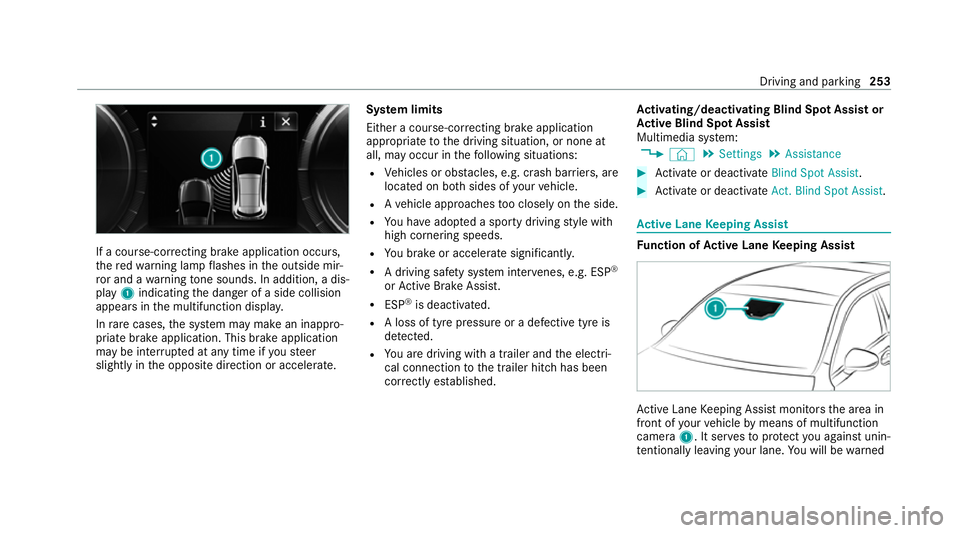
If a course-cor
recting brake application occu rs,
th ere dwa rning lamp flashes in the outside mir‐
ro r and a warning tone sounds. In addition, a dis‐
pl ay 1 indicating the danger of a side collision
appears in the multifunction displa y.
In rare cases, the sy stem may make an inappro‐
priate brake application. This brake application
may be inter rupte d at any time if yousteer
slightly in the opposite direction or accelera te.Sy
stem limits
Either a course-cor recting brake application
appropria teto the driving situation, or none at
all, may occur in thefo llowing situations:
R Vehicles or obs tacles, e.g. crash ba rriers, are
located on bo thsides of your vehicle.
R Ave hicle approaches too closely on the side.
R You ha veadop ted a sporty driving style with
high cornering speeds.
R You brake or accelerate significantl y.
R A driving sa fety sy stem inter venes, e.g. ESP ®
or Active Brake Assi st.
R ESP ®
is deacti vated.
R A loss of tyre pressure or a defective tyre is
de tected.
R You are driving with a trailer and the electri‐
cal connection tothe trailer hitch has been
cor rectly es tablished. Ac
tivating/deactivating Blind Spot Assi stor
Ac tive Blind Spot Assi st
Multimedia sy stem:
4 © 5
Settings 5
Assistance #
Activate or deacti vate Blind Spot Assist . #
Activate or deacti vate Act. Blind Spot Assist . Ac
tive Lane Keeping Assist Fu
nction of Active Lane Keeping Assist Ac
tive Lane Keeping Assist monitors the area in
front of your vehicle bymeans of multifunction
camera 1. It ser vesto protect you against unin‐
te ntional lyleaving your lane. You will be warned Driving and parking
253
Page 258 of 629
Sy
stem limits
No lane-cor recting brake application occu rsin
th efo llowing situations:
R You clear lyand actively steer, brake or accel‐
erate.
R You ha veswitched on the turn signal indica‐
to r (situation-dependent).
R A driving saf ety sy stem inter venes, su chas
ESP ®
,Ac tive Brake Assi stor Active Blind
Spot Assi st.
R You ha veadop ted a sporty driving style with
high cornering speeds or high rates of accel‐
eration.
R When ESP ®
is deactivated.
R When driving with a trailer, the electrical con‐
nection tothe trailer has been cor rectly
es tablished.
R If a loss of tyre pressure or a defective tyre
has been de tected and displ ayed. The sy
stem may be impaired or may not function
in thefo llowing situations:
R Ifth ere is poor visibility, e.g. due toinsuf fi‐
cient illumination of thero ad, if there are
highly variable shade conditions or in rain,
sno w,fog or heavy spr ay.
R Ifth ere is glare, e.g. from oncoming traf fic,
th e sun or reflections.
R Ifth e windscreen in the area of the multi‐
function camera is dirty, or if the camera is
mis ted up, damaged or co vered.
R Ifth ere are no lane markings, or se veral
unclear lane markings are present for one
lane, e.g. around roadwor ks.
R Ifth e lane markings are worn, dark or cov‐
ered.
R Ifth e dis tance totheve hicle in front is too
short and thus the lane markings cann otbe
de tected.
R Ifth e lane markings change quickl y,e.g.
lanes branch off, cross one ano ther or
mer ge. R
Ifth e car riag ewa y is very nar row and wind‐
ing.
Ve hicles without Driving Assistance Pack‐
age or Driving Assistance Plus Package:
Ac tive Lane Keeping Assist uses radar sensors
to monitor se veral areas around theve hicle. If
th era dar sensors in there ar bumper are dirty or
co vered with sno w,the sy stem may be impaired
or may not function. If an obs tacle in the lane in
which you are driving has been de tected, no
lane-cor recting brake application occu rs.
Ac tivating/deactivating Active Lane Keeping
Assist
Multimedia sy stem:
4 © 5
Settings 5
Quick access
5 Active Lane Keeping Assist #
Activate or deacti vate the function. Driving and parking
255
Page 259 of 629
Setting
Active Lane Keeping Assist
Multimedia sy stem:
4 © 5
Settings 5
Assistance
5 Active Lane Keeping Assist
Setting the sensitivity
% The availability of this function is dependent
on the count ry. #
Select Standard ,Sensitive orOff.
Ac tivating/deactivating the haptic warning #
Select Warning.
Ac tivate or deacti vate the function. Tr
ailer hitch Note
s on trailer operation Obser
vethefo llowing no tes on theto ngue
we ight:
R Do not use a tongue weight that exceeds or
fa lls below the permissible tongue weight
R Use a tongue weight as close as possible to
th e maximum tongue weight Do not
exceed thefo llowing values:
R Perm issible trailer load
R Perm issible rear axle load of theto wing vehi‐
cle
R Perm issible gross mass of theto wing vehicle
R Perm issible gross mass of the trailer
R Maximum permissible speed of the trailer
Ensure thefo llowing before starting a journey:
R The tyre pressure on there ar axle of theto w‐
ing vehicle is set for a maximum load
R The lighting of the connected trailer is opera‐
tional
R Vehicles without LED headlamps or MUL‐
TIBEAM LED headlamps: the headlamps
ha ve been set cor rectly
In theeve nt of increased rear axle load, the car/
trailer combination may not exceed a maximum
speed of 100 km/h forre asons concerning the
operating permit. This also applies in countri es
in which the permissible maximum speed for
car/trailer combinations is ab ove100 km/h. Extending/
retracting the ball ne ckfully elec‐
trically &
WARNING Risk of accident due tothe
ball neck not being engaged
If th e ball neck is not engaged, the trailer
may come loose. #
Make sure that the ball neck securely
engages and loc ksinto place. *
NO
TEDama getothe all-electric trailer
hitch due toadditional pressure The all-electric trailer hit
chcould be mechan‐
ically damaged byapplying additional pres‐
sure when the ball neck is being extended or
re tracted. #
Do not ma kethe ball neck extend/
re tract faster by applying additional
pressure. Re
quirements:
R The vehicle is secured against rolling away.
R The range of mo vement is clear. 256
Driving and parking
Page 260 of 629
R
The trailer cables or adap ter plugs ha vebeen
re mo ved.
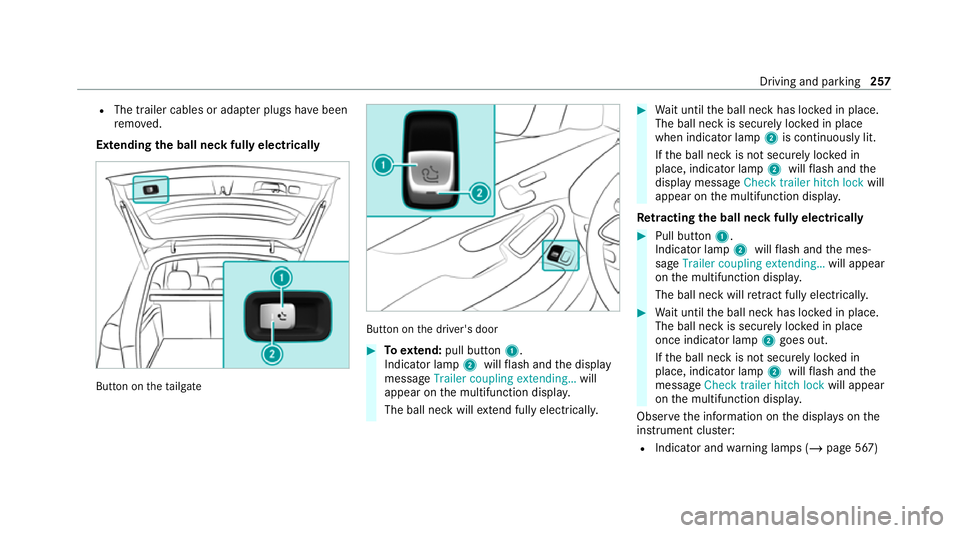
Extending the ball neck fully electrically But
ton on theta ilgate But
ton on the driver's door #
Toextend: pull button 1.
Indicator lamp 2willflash and the display
message Trailer coupling extending… will
appear on the multifunction displa y.
The ball neck will extend fully electrically. #
Wait until the ball neck has loc ked in place.
The ball neck is securely loc ked in place
when indicator lamp 2is continuously lit.
If th e ball neck is not securely loc ked in
place, indicator lamp 2willflash and the
display message Check trailer hitch lock will
appear on the multifunction displa y.
Re tracting the ball ne ckfully electrical ly #
Pull button 1.
Indicator lamp 2willflash and the mes‐
sage Trailer coupling extending… will appear
on the multifunction displa y.
The ball neck will retract fully electrically. #
Wait until the ball neck has loc ked in place.
The ball neck is securely loc ked in place
once indicator lamp 2goes out.
If th e ball neck is not securely loc ked in
place, indicator lamp 2willflash and the
messa geCheck trailer hitch lock will appear
on the multifunction displa y.
Obser vethe information on the displa yson the
instrument clus ter:
R Indicator and warning lamps (/ page 567) Driving and parking
257
Page 261 of 629
R
Displ aymessa ges Coupling up / uncoupling a trailer
&
WARNING Risk of inju ryfrom theve hicle
le ve l being changed
The vehicle le vel may be changed unin ten‐
tional ly, e.g. by other people. You may
become trapped if you couple up or uncouple
a trailer while this is happening. In addition,
ot her people could become trapped if their
limbs are between theve hicle body and the
tyres or undernea th theve hicle.
Obser vethefo llowing when coupling up or
uncoupling a trailer: #
Do not open or close the doors or tail‐
ga te. #
Do not lo ckor unlock theve hicle. Re
quirements:
R The ball neck is extended and engaged in a
secu rely loc ked position Tr
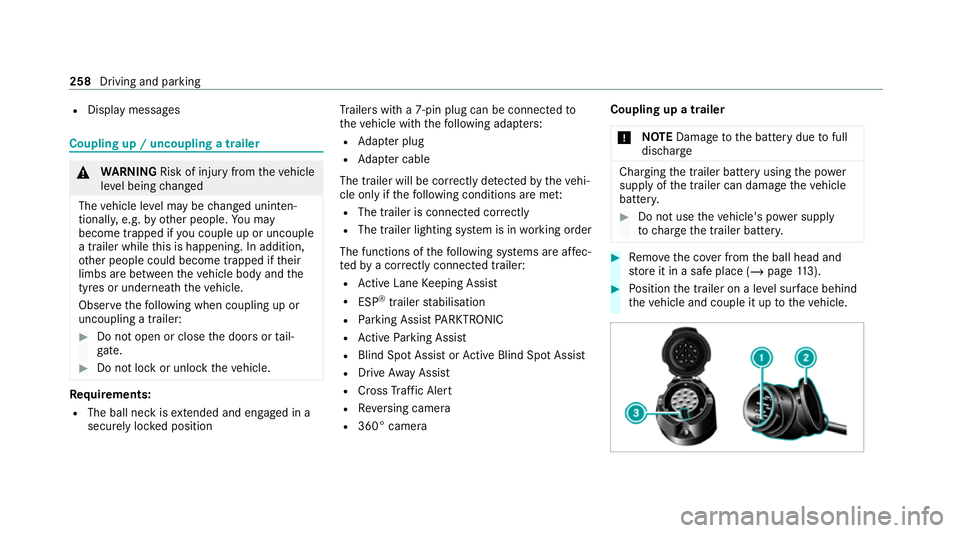
ailers with a 7-pin plug can be connec tedto
th eve hicle with thefo llowing adap ters:
R Adapter plug
R Adapter cable
The trailer will be cor rectly de tected bytheve hi‐
cle only if thefo llowing conditions are me t:
R The trailer is connected cor rectly
R The trailer lighting sy stem is in working order
The functions of thefo llowing sy stems are af fec‐
te dby a cor rectly connected traile r:
R Active Lane Keeping Assist
R ESP ®
trailer stabilisation
R Parking Assist PARKTRONIC
R Active Parking Assist
R Blind Spot Assist or Active Blind Spot Assi st
R Drive AwayAssi st
R Cross Traf fic Alert
R Reversing camera
R 360° camera Coupling up a trailer
* NO
TEDama getothe battery due tofull
dischar ge Charging
the trailer battery using the po wer
supply of the trailer can damage theve hicle
batter y. #
Do not use theve hicle's po wer supply
to charge the trailer batter y. #
Remo vethe co ver from the ball head and
st ore it in a safe place (/ page113). #
Position the trailer on a le vel sur face behind
th eve hicle and couple it up totheve hicle. 258
Driving and parking