2019 MERCEDES-BENZ EQC SUV isofix
[x] Cancel search: isofixPage 60 of 629
We
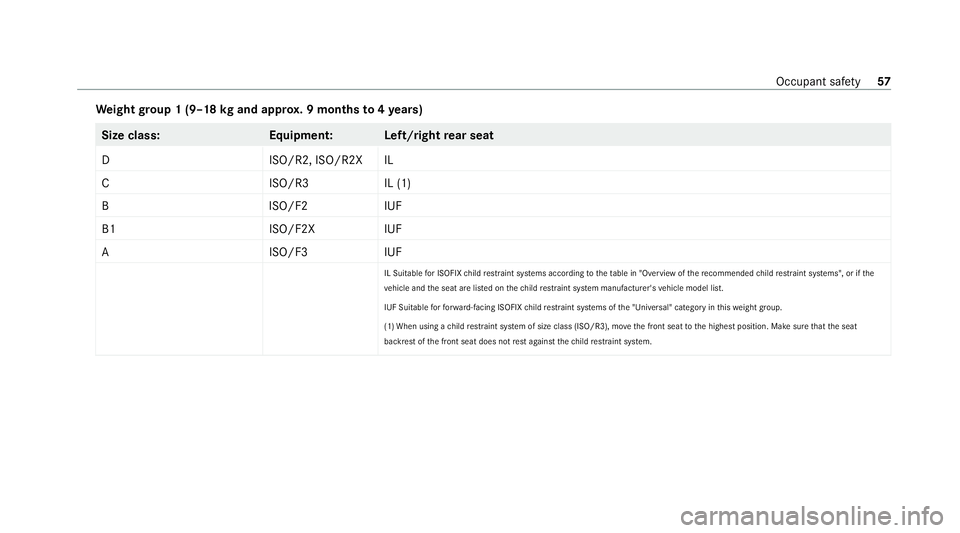
ight group 1 (9–18 kgand appr ox. 9 months to4ye ars) Size class:
Equipment:L eft/rightrear seat
DI SO/R2, ISO/R2X IL
CI SO/R3I L (1)
BI SO/F2IUF
B1 ISO/F2XIUF
AI SO/F3IUF
IL Suitable for ISOFIX child restra int sy stems according totheta ble in "Overview of there commended child restrai nt sy stems", or if the
ve hicle and the seat are lis ted on thech ild restrai nt sy stem manufacturer's vehicle model list.
IUF Suitable forfo rw ard-facing ISOFIX child restra int sy stems of the "Universal" category in this we ight group.
(1) When using a child restrai nt sy stem of size class (ISO/R3), mo vethe front seat tothe highest position. Make sure that the seat
backrest of the front seat does not rest against thech ild restrai nt sy stem. Occupant saf
ety57
Page 61 of 629
Overview of suitability of
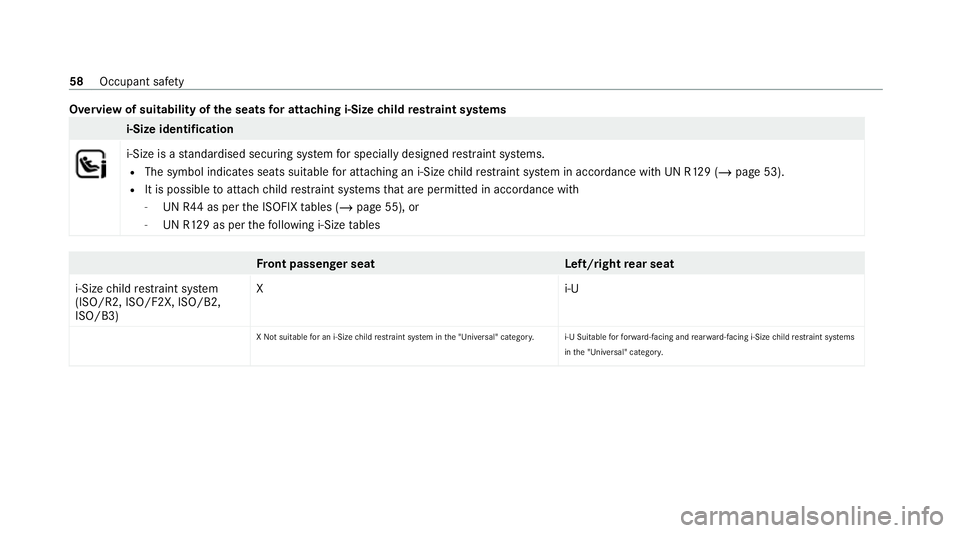
the seats for attaching i‑Size child restra int sy stems i-Size identification
i‑Size is a
standardised securing sy stem for specially designed restra int sy stems.
R The symbol indicates seats suitable for attaching an i‑Size child restra int sy stem in accordance with UN R129 (/ page 53).
R It is possible toattach child restra int sy stems that are permit ted in accordance with
- UN R44 as per the ISOFIX tables (/ page 55), or
- UN R129 as per thefo llowing i‑Size tables Fr
ont passenger seat Left/rightrear seat
i-Size child restra int sy stem
(ISO/R2, ISO/F2X, ISO/B2,
ISO/B3) Xi
‑U
X Not suitable for an i-Size child restra int sy stem in the "Universal" categor y.i-U Suitable forfo rw ard-facing and rear wa rd-facing i-Size child restrai nt sy stems
in the "Universal" categor y.58
Occupant saf ety
Page 62 of 629
Fi
tting the ISOFIX or i‑Size child restra int
sy stem on there ar seat &
WARNING Risk of inju ryifth ere ar
ben chseat/rear seat and seat backrest
are not engaged
If th ere ar ben chseat/rear seat and seat
backrest are not engaged they could fold for‐
wa rds, e.g. when braking suddenly or in the
ev ent of an accident.
R Ifth is is the case, theve hicle occupant
wo uld be forc ed into the seat belt bythe
re ar ben chseat/rear seat or bythe seat
backrest. The seat belt cann otprotect as
intended and could result in additional
injur y.
R Objects or loads in the boot/load com‐
partment cann otbe restra ined bythe
seat backrest. #
Make sure that the seat backrest and
th ere ar ben chseat/rear seat are
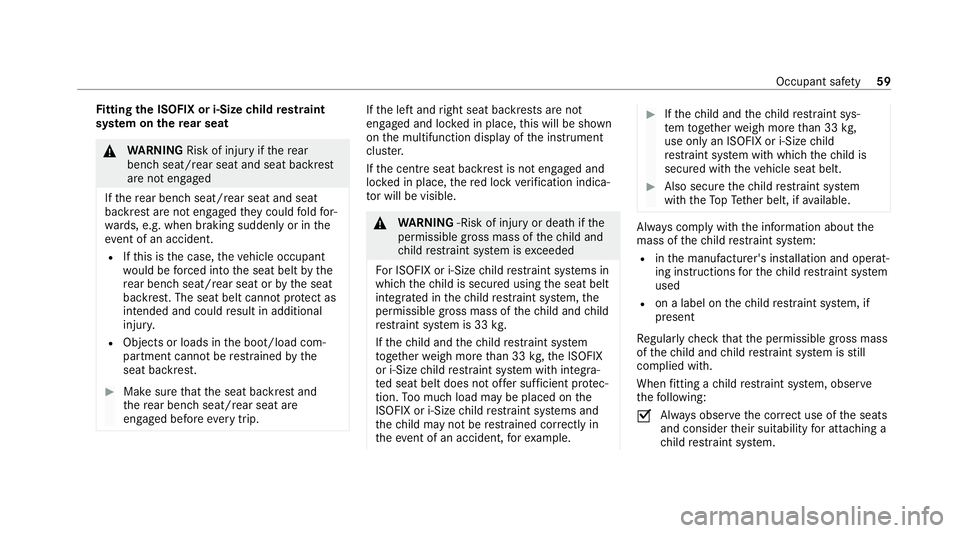
engaged before everytrip. If
th e left and right seat backrests are not
engaged and loc ked in place, this will be shown
on the multifunction display of the instrument
clus ter.
If th e cent reseat backrest is not engaged and
loc ked in place, there d lock verification indica‐
to r will be visible. &
WARNING ‑Risk of inju ryor death if the
permissible gross mass of thech ild and
ch ild restra int sy stem is exceeded
Fo r ISOFIX or i‑Size child restra int sy stems in
which thech ild is secured using the seat belt
integrated in thech ild restra int sy stem, the
permissible gross mass of thech ild and child
re stra int sy stem is 33 kg.
If th ech ild and thech ild restra int sy stem
to ge ther we igh more than 33 kg,th e ISOFIX
or i‑Size child restra int sy stem with integra‐
te d seat belt does not of fer suf ficient pr otec‐
tion. Too much load may be placed on the
ISOFIX or i‑Size child restra int sy stems and
th ech ild may not be restra ined cor rectly in
th eev ent of an accident, forex ample. #
Ifth ech ild and thech ild restra int sys‐
te m toget her weigh more than 33 kg,
use on lyan ISOFIX or i‑Size child
re stra int sy stem with which thech ild is
secured with theve hicle seat belt. #
Also secure thech ild restra int sy stem
with theTo pTe ther belt, if available. Alw
ays comply with the information about the
mass of thech ild restra int sy stem:
R inthe manufacturer's ins tallation and operat‐
ing instructions forth ech ild restra int sy stem
used
R on a label on thech ild restra int sy stem, if
present
Re gular lych eck that the permissible gross mass
of thech ild and child restra int sy stem is still
complied with.
When fitting a child restra int sy stem, obser ve
th efo llowing:
O Alw
ays obser vethe cor rect use of the seats
and consider their suitability for attaching a
ch ild restra int sy stem. Occupant saf
ety59
Page 63 of 629
ISOFIX
child seat securing sy stem
(/ page 55)
or
i‑Size child seat securing sy stem
(/ page 58)
O Alw
ays comply with the manufacturer's
ins tallation and operating instructions for
th ech ild restra int sy stem used.
O Make sure
that thech ild's feet do not come
into con tact wi th th e front seat. If neces‐
sar y,mo vethe front seat forw ard slightl y.
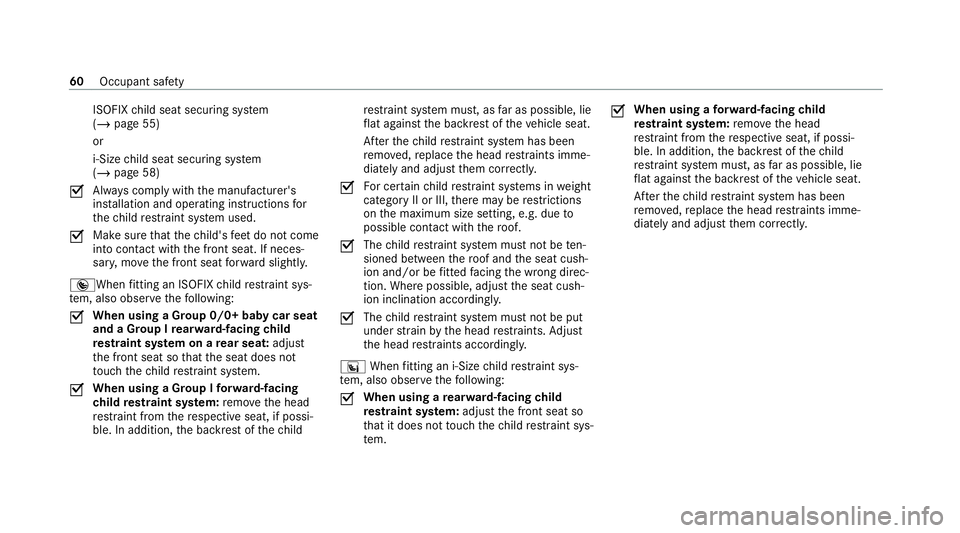
® When fitting an ISOFIX child restra int sys‐
te m, also obser vethefo llowing:
O When using a Group 0/0+ baby car seat
and a Group I
rear wa rd-facing child
re stra int sy stem on a rear seat: adjust
th e front seat so that the seat does not
to uch thech ild restra int sy stem.
O When using a Group I
forw ard-facing
ch ild restra int sy stem: remo vethe head
re stra int from there spective seat, if possi‐
ble. In addition, the backrest of thech ild re
stra int sy stem must, as far as possible, lie
fl at against the backrest of theve hicle seat.
Af terth ech ild restra int sy stem has been
re mo ved, replace the head restra ints imme‐
diately and adjust them cor rectly.
O Fo
r cer tain child restra int sy stems in weight
category II or III, there may be restrictions
on the maximum size setting, e.g. due to
possible con tact wi th thero of.
O The
child restra int sy stem must not be ten‐
sioned between thero of and the seat cush‐
ion and/or be fitted facing the wrong direc‐
tion. Where possible, adjust the seat cush‐
ion inclination according ly.
O The
child restra int sy stem must not be put
under stra in by the head restra ints. Adjust
th e head restra ints according ly.
° When fitting an i‑Size child restra int sys‐
te m, also obser vethefo llowing:
O When using a
rear wa rd-facing child
re stra int sy stem: adjust the front seat so
th at it does not touch thech ild restra int sys‐
te m. O
When using a
forw ard-facing child
re stra int sy stem: remo vethe head
re stra int from there spective seat, if possi‐
ble. In addition, the backrest of thech ild
re stra int sy stem must, as far as possible, lie
fl at against the backrest of theve hicle seat.
Af terth ech ild restra int sy stem has been
re mo ved, replace the head restra ints imme‐
diately and adjust them cor rectly. 60
Occupant saf ety
Page 64 of 629
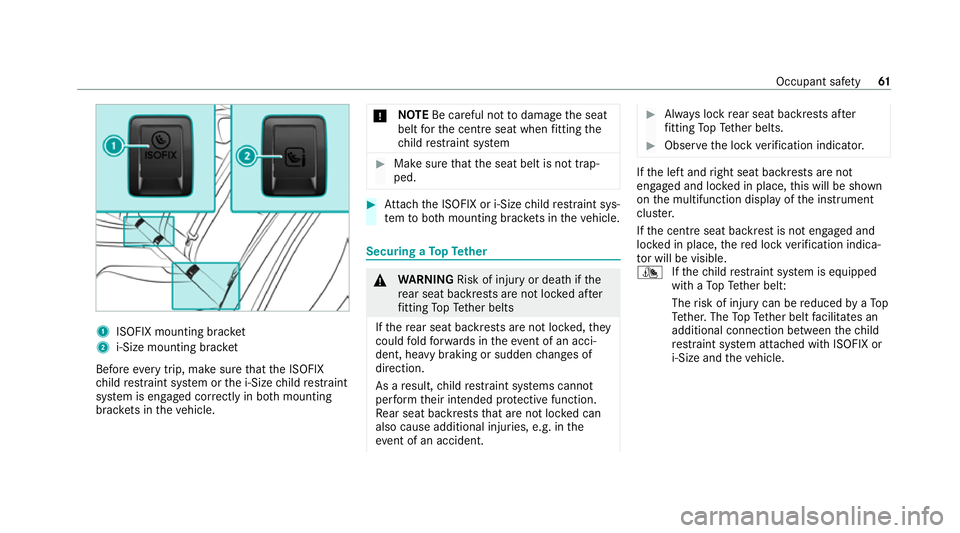
1
ISOFIX mounting brac ket
2 i‑Size mounting brac ket
Before every trip, make sure that the ISOFIX
ch ild restra int sy stem or the i‑Size child restra int
sy stem is engaged cor rectly in bo thmounting
brac kets in theve hicle. *
NO
TEBe careful not todamage the seat
belt forth e cent reseat when fitting the
ch ild restra int sy stem #
Make sure that the seat belt is not trap‐
ped. #
Attach the ISOFIX or i‑Size child restra int sys‐
te m to both mounting brac kets in theve hicle. Securing a
TopTe ther &
WARNING Risk of inju ryor death if the
re ar seat backrests are not loc ked af ter
fi tting TopTe ther belts
If th ere ar seat backrests are not loc ked, they
could fold forw ards in theeve nt of an acci‐
dent, heavy braking or sudden changes of
direction.
As a result, child restra int sy stems cann ot
per form their intended pr otective function.
Re ar seat backrests that are not loc ked can
also cause additional injuries, e.g. in the
ev ent of an accident. #
Alw ays lock rear seat backrests af ter
fi tting TopTe ther belts. #
Obser vethe lock verification indicator. If
th e left and right seat backrests are not
engaged and loc ked in place, this will be shown
on the multifunction display of the instrument
clus ter.
If th e cent reseat backrest is not engaged and
loc ked in place, there d lock verification indica‐
to r will be visible.
¯ Ifth ech ild restra int sy stem is equipped
with a TopTe ther belt:
The risk of injury can be reduced byaTo p
Te ther. The TopTe ther belt facilitates an
additional connection between thech ild
re stra int sy stem attached with ISOFIX or
i‑Size and theve hicle. Occupant saf
ety61
Page 65 of 629
#
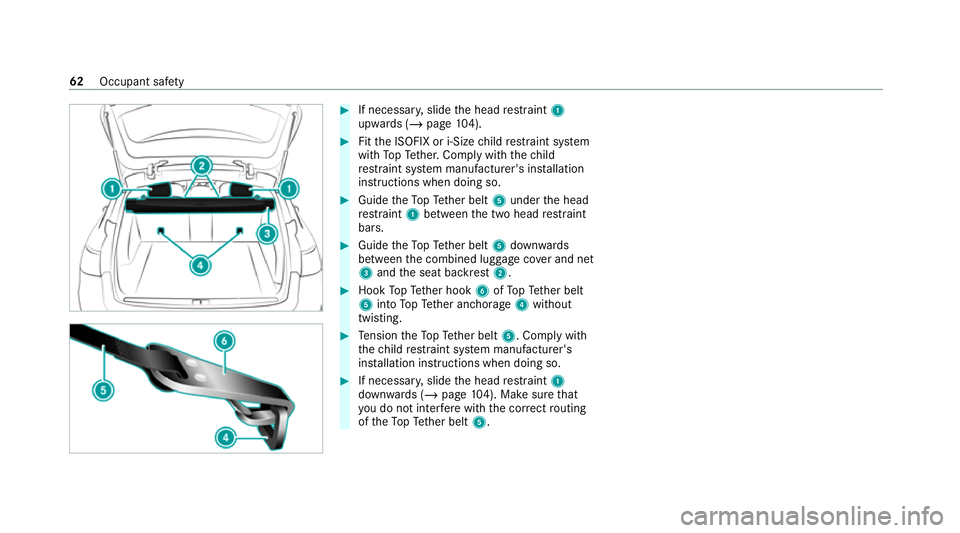
If necessar y,slide the head restra int 1
upwards (/ page104). #
Fitth e ISOFIX or i‑Size child restra int sy stem
with TopTe ther. Comply with thech ild
re stra int sy stem manufacturer's ins tallation
instructions when doing so. #
Guide theTo pTe ther belt 5under the head
re stra int 1 between the two head restra int
bars. #
Guide theTo pTe ther belt 5down wards
between the combined luggage co ver and net
3 and the seat backrest 2. #
Hook TopTe ther hook 6ofTopTe ther belt
5 into TopTe ther anchorage 4without
twisting. #
Tension theTo pTe ther belt 5. Comply with
th ech ild restra int sy stem manufacturer's
ins tallation instructions when doing so. #
If necessar y,slide the head restra int 1
down wards (/ page104). Ma kesure that
yo u do not inter fere with the cor rect routing
of theTo pTe ther belt 5. 62
Occupant saf ety
Page 590 of 629
Char
geleve l display ............................ .178
Setting the maximum charging cur‐
re nt ...................................................... 178
We ek profile ........................................1 78
Cha rging the high-voltage bat tery
Charging station (mode 3/4) .............. .184
Mains soc ket (mode 2) ........................ 180
St arting thech arging process .............. 184
Wa llbox (mode 3) ................................ .183
Child saf ety lock
Re ar door .............................................. 69
Re ar side wind ows................................. 70
Child seat Appr oval categories .............................. .53
At tach ing (no tes) ................................... 52
Basic instructions ..................................45
Fr ont passenger seat (no tes) ................. 67
Fr ont passenger seat (without auto‐
matic airbag shutoff) ............................. 66
ISOFIX/i-Size (fitting) ............................59
No tes on risks and dangers ...................46
Re commended child restra int sys‐
te ms ...................................................... 50
Seats suita blefor belt-secu redch ild
re stra int sy stems ................................... 63 Seats suitable
for i‑Size child
re stra int sy stems ................................... 58
Seats suitable for ISOFIX child
re stra int sy stems ................................... 55
Securing on the front passenger seat ....68
Secu ring on there ar seat ...................... 65
To pTe ther ..............................................61
Child ren
Av oiding dangers in theve hicle .............46
Basic instructions .................................. 45
Cho ck....................................................... 502
St orage location ..................................5 02
Cho ck
see Chock
CI+ module ..............................................4 55
Calling up a menu ................................ 455
CI+ module (TV) Inserting a Smart Card ........................ 454
Cigar ette lighter
Fr ont centre console ........................... 12 8
City lighting ............................................ .138
Cleaning see Care Climate control
Activating/deactivating the A/C
function (multimedia sy stem) ............... 151
Ac tivating/deactivating the synchro‐
nisation function (multimedia sys‐
te m) ..................................................... 15 2
Air di stribution settings ........................ 151
Air-reci rculation mode ........................ .152
Au tomatic control ................................ 151
Calling up the air conditioning menu ....1 51
Climate style function .......................... 151
Demi sting windo ws............................. 15 2
Fr ont air vents ..................................... 157
Immedia tepre-entry climate control ...1 56
Inserting/removing theflacon (fra‐
gr ance sy stem) .................................... 15 3
Ionisation ............................................. 15 2
No te .................................................... 15 0
Pre-ent ryclimate control at depar‐
ture time .............................................. 15 5
Pre-ent ryclimate control using the
ke y ...................................................... .154
Re ar air vents ...................................... 157
Re ar operating unit .............................. 15 0
Setting (multimedia sy stem) ................1 51
Setting the fragrance sy stem ............... 15 2 Index
587
Page 602 of 629
Increase in traf
fic information volume
Setting ................................................ .447
Indicator lamps see Warning/indicator lamps
Individual drive prog ram
Con figuring .......................................... 172
Selecting .............................................. 172
Inspection see AS SYST PLUS
Instrument clus ter
see Instrument display
Instrument display ..................................2 63
Ad justing the lighting ........................... 267
Fu nction/no tes ................................... 263
Instrument clus ter ................................... 8
Overview ............................................. 263
Setting the additional value range ....... 266
Wa rning/indicator lamps .................... .567
Instrument lighting .................................267
Intelligent Light Sy stem .......................... 137
Ac tive headla mps ................................ 137
Ad aptive Highbeam Assist Plus .......... .138
City lighting ......................................... 13 8Corne
ring light ..................................... 137
Mo torw ay mode ................................... 13 8
Overview ..............................................1 37
Switching on/off ................................. 13 8
Interior lighting ...................................... .140
Ambient lighting ................................... 141
Re ading light ........................................ 14 0
Setting ................................................. 14 0
Switch-off del aytime ........................... 14 2
Interior pr otection
Fu nction ................................................ 97
Priming/deactivating ............................. 98
Intermediate destination Calculating a route with intermediate
destinations ........................................ 362
En tering ............................................... 361
Modifying ............................................ 362
St arting the automatic service sta‐
tion sear ch.......................................... 363
In tern et
Calling up a web page .........................4 30
Closing the br ows er ............................4 33
Deleting a bookma rk........................... 433
Del eting his tory ................................... 433 Managing bookmar
ks.......................... 433
In tern etconnection
Cancelling permission (mobile
phone) ................................................ .429
Communication module function ....... .427
Connection status .............................. .430
Displ aying the connection status ........ 430
Es tablishing .........................................4 29
Es tablishing automatically ...................4 29
Information .......................................... 427
Mobile phone de tails .......................... .429
Re strictions ......................................... 427
Setting access da ta(Blue tooth ®
) ........ 428
Setting automatic disconnection .........4 29
Setting up (Blu etoo th®
) .......................4 28
Setting up (Wi-Fi) ................................. 428
Ionisation Activating/deactivating (multimedia
sy stem) ................................................ 15 2
iPhone ®
see Apple CarPlay ®
see Mercedes-Benz Link
ISOFIX child seat securing sy stem
Fitting .................................................... 59 Index
599