2019 MERCEDES-BENZ CLA trunk
[x] Cancel search: trunkPage 4 of 330

Index.......................................................4
Digital Operator's Manual..................23
Introduction ...........................................23
Operation ............................................... 23
Introduction.........................................24
Protecting the environment ...................24
Genuine Mercedes-Benz parts ...............24
Operator's Manual ................................. 25
Service and vehicle operation ................25
Operating safety .................................... 27
QR code for rescue card ........................ 29
Data storage .......................................... 29
Information on copyright ....................... 31
At a glance...........................................32
Cockpit .................................................. 32
Instrument cluster ................................. 33
Multifunction steering wheel ................. 34
Center console ...................................... 35
Door control panel ................................. 38
Overhead control panel .........................39
Safety...................................................40
Panic alarm ............................................ 40
Occupant safety .................................... 40
Children in the vehicle ........................... 54
Pets in the vehicle ................................. 60
Driving safety systems ........................... 61
Protection against theft .........................68
Opening and closing...........................70
SmartKey ............................................... 70
Doors ..................................................... 76
Trunk ..................................................... 78
Side windows ......................................... 82
Panorama roof with power tilt/sliding
panel ...................................................... 86
Seats, steering wheel and mirrors....91
Correct driver's seat position ................91
Seats ..................................................... 91
Steering wheel ....................................... 96
Mirrors ................................................... 97
Memory function ................................. 100
Lights and windshield wipers..........101
Exterior lighting ................................... 101
Interior lighting .................................... 104
Replacing bulbs ................................... 105
Windshield wipers ................................ 108
Climate control.................................111
Overview of climate control systems ... 111
Operating the climate control sys-
tems .................................................... 116
Air vents .............................................. 121
Driving and parking..........................122
Notes on breaking-in a new vehicle ..... 122
Driving ................................................. 122
DYNAMIC SELECT button (all vehicles
except Mercedes-AMG vehicles) ......... 129
DYNAMIC SELECT controller
(Mercedes-AMG vehicles) .................... 130
Automatic transmission ....................... 131
Refueling ............................................. 139
Parking ................................................ 142
Driving tips .......................................... 145
Driving systems ................................... 150
On-board computer and displays....178
Important safety notes ........................ 178
Displays and operation ........................ 178
Menus and submenus ......................... 181
Display messages ................................ 193
Warning and indicator lamps in the
instrument cluster ............................... 220
Multimedia system...........................231
General notes ...................................... 231
Important safety notes ........................ 231
Function restrictions ............................ 231
Operating system ................................ 232
Stowage and features......................239
Loading guidelines ............................... 239
Stowage areas ..................................... 239
2Contents
Page 19 of 330
Folding the backrest (rear com-
partment) forwards/back .............. 242
Important safety notes .................... 91
Seat heating problem ...................... 96
Storing settings (memory func-
tion) ............................................... 100
Switching seat heating on/off ......... 95
Section
Trunk ............................................... 78
Securing cargo.................................. 243
Selector lever
Cleaning ......................................... 271
Sensors (cleaning instructions)....... 269
Service center
see Qualified specialist workshop
Service Center
see Qualified specialist workshop
Service menu (on-board com-
puter).................................................. 188
Service message
see ASSYST PLUS
Service products
Brake fluid ..................................... 322
Coolant (engine) ............................ 323
Engine oil ....................................... 322
Fuel ................................................ 319
Important safety notes .................. 319
Refrigerant (air-conditioning sys-
tem) ............................................... 324
Washer fluid ................................... 323
Setting the air distribution............... 117
Setting the airflow............................ 118
Setting the date/time format
see also Digital Operator's Man-
ual .................................................. 231
Setting the language
see also Digital Operator's Man-
ual .................................................. 231
Setting the time
see also Digital Operator's Man-
ual .................................................. 231
Settings
Factory (on-board computer) ......... 190
On-board computer ....................... 188
SETUP (on-board computer,
Mercedes-AMG vehicles).................. 191
Side impact air bag............................. 47
Side marker lamp (display mes-
sage)................................................... 206
Side windows
Cleaning ......................................... 268
Convenience closing feature ............ 84
Convenience opening feature .......... 83
Important safety information ........... 82
Opening/closing .............................. 83
Problem (malfunction) ..................... 85
Resetting ......................................... 85
Reversing feature ............................. 83
SIRIUS services
see also Digital Operator's Man-
ual .................................................. 231
Sliding sunroof
see Panorama roof with power
tilt/sliding panel
SmartKey
Changing the battery ....................... 73
Changing the programming ............. 72
Checking the battery ....................... 73
Convenience closing feature ............ 84
Convenience opening feature .......... 83
Display message............................ 218
Door central locking/unlocking ....... 70
Important safety notes .................... 70
KEYLESS-GO start function .............. 71
Loss ................................................. 74
Mechanical key ................................ 72
Positions (ignition lock) ................. 123
Problem (malfunction) ..................... 74
Starting the engine ........................ 125
SmartKey positions (ignition lock).. 123
Smartphone
Starting the engine ........................ 125
SMS
see also Digital Operator's Man-
ual .................................................. 231
Snow chains...................................... 293
Sockets
Center console .............................. 247
General notes ................................ 247
Rear compartment ......................... 248
Trunk ............................................. 248
Sound
Switching on/off........................... 232
Special seat belt retractor.................. 55
Index17
Page 20 of 330
Specialist workshop............................28
Speed, controlling
see Cruise control
Speedometer
Activating/deactivating the addi-
tional speedometer ........................ 189
Digital ............................................ 183
In the Instrument cluster ................. 33
Segments ...................................... 178
Selecting the display unit ............... 188
SPORT handling mode
Deactivating/activating
(Mercedes-AMG vehicles) ................66
Warning lamp ................................. 224
Standing lamps
Display message ............................205
Switching on/off ........................... 102
Start-off assist
Activating ....................................... 160
Important safety notes .................. 159
Start/Stop button
Removing ....................................... 124
Starting the engine ........................ 125
Start/stop function
see ECO start/stop function
Starting (engine)................................ 124
STEER CONTROL.................................. 68
Steering
Display message ............................ 218
Steering assistant STEER CON-
TROL
see STEER CONTROL
Steering wheel
Adjusting (manually)........................ 96
Button overview ............................... 34
Buttons (on-board computer) ......... 179
Cleaning ......................................... 271
Important safety notes .................... 96
Paddle shifters ............................... 137
Steering wheel paddle shifters........ 137
Stopwatch (RACETIMER)................... 191
Stowage compartments
Armrest (front) ............................... 240
Armrest (under) ............................. 241
Center console .............................. 240
Center console (rear) ..................... 241
Cup holders ................................... 244
Eyeglasses compartment ............... 240
Glove box ....................................... 240
Important safety information ......... 239
Map pockets .................................. 241
Stowage net ................................... 241
Stowage net....................................... 241
Stowage well beneath the trunk
floor.................................................... 243
Summer tires..................................... 292
Sun visor............................................ 246
Suspension setting
AMG adaptive sport suspension
system ........................................... 161
Switching air-recirculation mode
on/off................................................. 120
Switching on media mode
Via the device list .......................... 237
T
Tachometer........................................ 178
Tail lamps
Display message ............................ 205
see Lights
Tailgate
Limiting the opening angle ............... 81
Obstruction detection...................... 78
Opening dimensions ...................... 325
Opening/closing automatically
from outside .................................... 79
Tank
see Fuel tank
Tank content
Fuel gauge ....................................... 33
Technical data
Capacities ...................................... 319
Information .................................... 317
Tires/wheels ................................. 315
Vehicle data ................................... 325
Telephone
Accepting a call (multifunction
steering wheel) .............................. 186
Authorizing a mobile phone (con-
necting) ......................................... 235
Authorizing a mobile phone via the
device manager (connecting) ......... 236
Connecting a mobile phone
(device manager) ........................... 236
18Index
Page 22 of 330
Optional equipment weight (defi-
nition) ............................................ 310
PSI (pounds per square inch) (def-
inition) ...........................................310
Replacing ....................................... 310
Service life ..................................... 291
Sidewall (definition) ....................... 310
Speed rating (definition) ................ 309
Storing ...........................................311
Structure and characteristics
(definition) ..................................... 308
Summer tires ................................. 292
Temperature .................................. 305
TIN (Tire Identification Number)
(definition) ..................................... 310
Tire bead (definition) ......................310
Tire pressure (definition) ................ 310
Tire pressures (recommended) ...... 309
Tire size (data) ............................... 315
Tire size designation, load-bearing
capacity, speed rating .................... 305
Tire tread ....................................... 291
Tire tread (definition) ..................... 310
Total load limit (definition) ............. 310
Traction ......................................... 304
Traction (definition) ....................... 310
Tread wear..................................... 304
Uniform Tire Quality Grading
Standards ...................................... 304
Uniform Tire Quality Grading
Standards (definition) .................... 309
Wear indicator (definition) ............. 310
Wheel rim (definition) .................... 309
see Flat tire
Top Tether............................................ 57
Tow-starting
Emergency engine starting ............ 287
Important safety notes .................. 284
Installing the towing eye ................ 285
Removing the towing eye ............... 286
Towing
Permitted towing methods ............ 287
Towing a trailer
ESP®(Electronic Stability Pro-
gram) ............................................... 67
Towing away
Important safety guidelines ........... 284
Installing the towing eye ................ 285
Notes for 4MATIC vehicles ............ 287
Removing the towing eye ............... 286
Transporting the vehicle ................ 287
With both axles on the ground ....... 286
With the front axle raised ............... 286
Towing eye......................................... 274
Traffic reports
see also Digital Operator's Man-
ual .................................................. 231
Transmission
see Automatic transmission
Transmission position display
(DIRECT SELECT lever)...................... 131
Transporting the vehicle.................. 287
Trim pieces (cleaning instruc-
tions).................................................. 271
Trip computer (on-board com-
puter).................................................. 182
Trip odometer
Calling up ....................................... 182
Resetting (on-board computer) ...... 183
Trunk
Emergency release .......................... 82
Emergency release button ............... 82
Important safety notes .................... 78
Opening (automatically from out-
side) ................................................. 79
Opening (from outside the vehi-
cle, HANDS-FREE ACCESS) .............. 80
Opening automatically from
inside ............................................... 81
Opening/closing (manually from
outside) ............................................ 79
Trunk lid
Display message ............................ 217
see Tailgate
Turn signals
Display message ............................ 204
Replacing bulbs (front) ................... 107
Switching on/off........................... 102
Two-way radio
Frequencies ................................... 317
Installation ..................................... 317
Transmission output (maximum) .... 317
Type identification plate
see Vehicle identification plate
20Index
Page 70 of 330
You should therefore adapt your driving style
to the different handling characteristics. Have
the brake system checked at a qualified spe-
cialist workshop.
Please observe the information on warning andindicator lamps (Ypage 222)
(Ypage 222) as well as on display messages(Ypage 196).
ADAPTIVE BRAKE
ADAPTIVE BRAKE enhances braking safety andoffers increased braking comfort. In addition tothe braking function, ADAPTIVE BRAKE also hasthe HOLD function (Ypage 158) and hill startassist (Ypage 126).
STEER CONTROL
General information
STEER CONTROL helps you by transmitting anoticeable steering force to the steering wheelin the direction required for vehicle stabilization.
This steering assistance is provided in particularif:
Rboth right wheels or both left wheels are on awet or slippery road surface when you brake
Rthe vehicle begins to skid
Important safety notes
iObserve the "Important safety notes" sec-tion (Ypage 61).
No steering assistance is provided from STEERCONTROL, if:
RESP®is malfunctioning
Rthe steering is malfunctioning
If ESP®is malfunctioning, you will be assistedfurther by the electrical power steering.
Protection against theft
Immobilizer
The immobilizer prevents your vehicle frombeing started without the correct SmartKey.
XTo activate with the SmartKey:remove theSmartKey from the ignition lock.
XTo activate with KEYLESS-GO start-func-tion or KEYLESS-GO:switch the ignition offand open the driver's door.
XTo deactivate:switch on the ignition.
When leaving the vehicle, always take theSmartKey with you and lock the vehicle. Anyonecan start the engine if a valid SmartKey has beenleft inside the vehicle.
iThe immobilizer is always deactivated whenyou start the engine.
In the event that the engine cannot be started(yet the vehicle's battery is charged), the sys-tem is not operational. Contact an authorizedMercedes-Benz Center or call1-800-FOR-MERCedes (in the USA) or1-800-387-0100(in Canada).
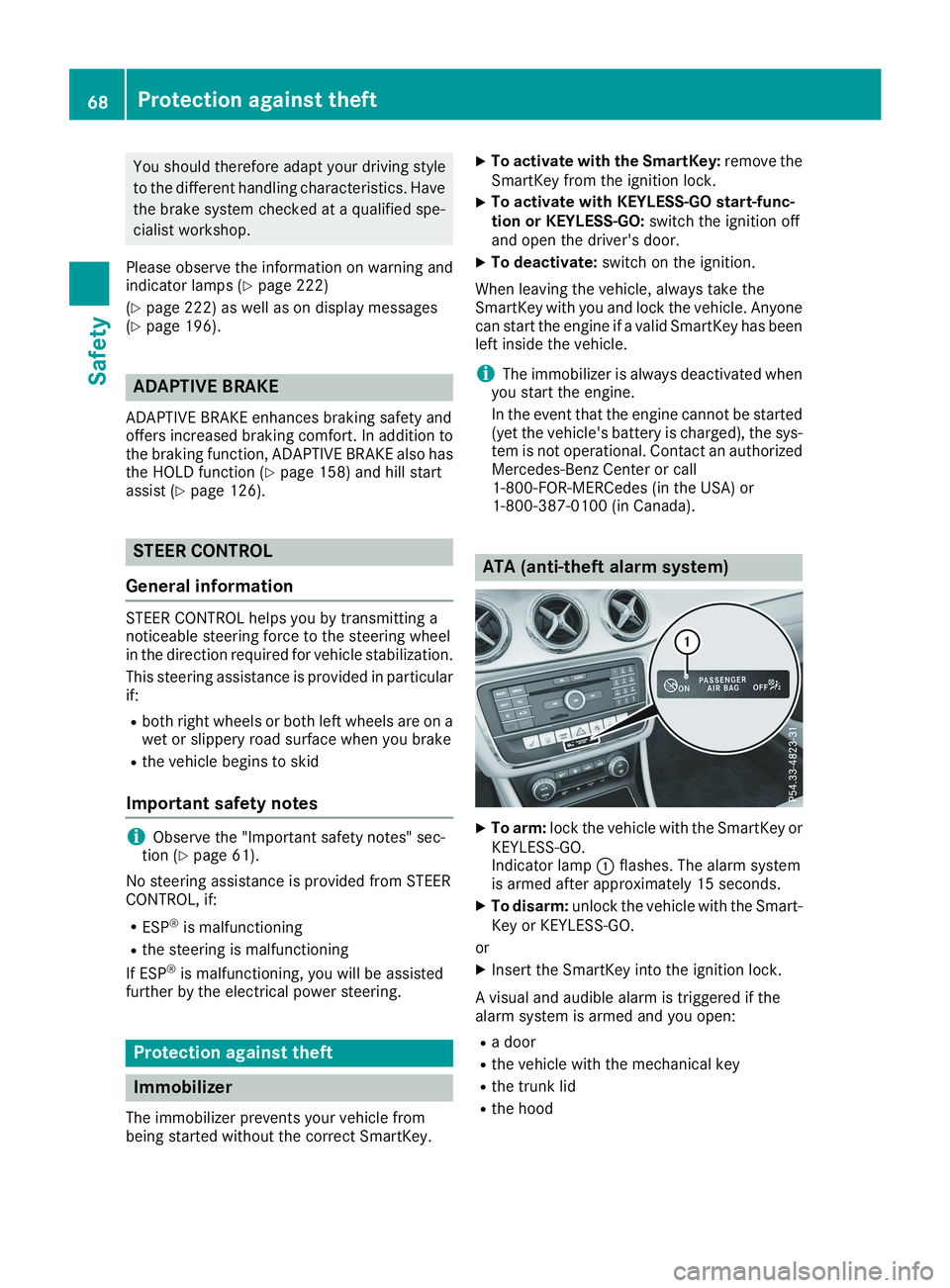
ATA (anti-theft alarm system)
XTo arm:lock the vehicle with the SmartKey orKEYLESS-GO.Indicator lampCflashes. The alarm systemis armed after approximately 15 seconds.
XTo disarm:unlock the vehicle with the Smart-Key or KEYLESS-GO.
or
XInsert the SmartKey into the ignition lock.
A visual and audible alarm is triggered if thealarm system is armed and you open:
Ra door
Rthe vehicle with the mechanical key
Rthe trunk lid
Rthe hood
68Protection against theft
Safety
Page 72 of 330
SmartKey
Important safety notes
GWARNING
If children are left unsupervised in the vehicle,
they could:
Roperate the vehicle's equipment
Additionally, children could set the vehicle in
motion if, for example, they:
Rrelease the parking brake
Rshift the automatic transmission out of park
position]
Rstart the engine
There is a risk of an accident and injury.
Never leave children or animals unattended in
the vehicle.
When leaving the vehicle, always take the
SmartKey with you and lock the vehicle. This
also applies for the Digital Vehicle Key if the
"Digital Vehicle Key" function is activated via
Mercedes me connect.
GWARNING
If you attach heavy or large objects to the
SmartKey, the SmartKey could be uninten-
tionally turned in the ignition lock. This could
cause the engine to be switched off. There is a
risk of an accident.
Do not attach any heavy or large objects to the
SmartKey. Remove any bulky key rings before
inserting the SmartKey into the ignition lock.
!Keep the SmartKey away from strong mag-netic fields. Otherwise, the remote controlfunction could be affected.
Strong magnetic fields can occur in the vicin-ity of powerful electrical installations.
Do not keep the SmartKey:
Rwith electronic devices, e.g. a mobile phoneor another SmartKey
Rwith metallic objects, e.g. coins or metal foil
Rinside metallic objects, e.g. a metal case
Vehicles with KEYLESS-GO start function:donot keep the SmartKey in the trunk. Otherwise,
the SmartKey may not be detected, e.g. whenstarting the engine using the Start/Stop button.
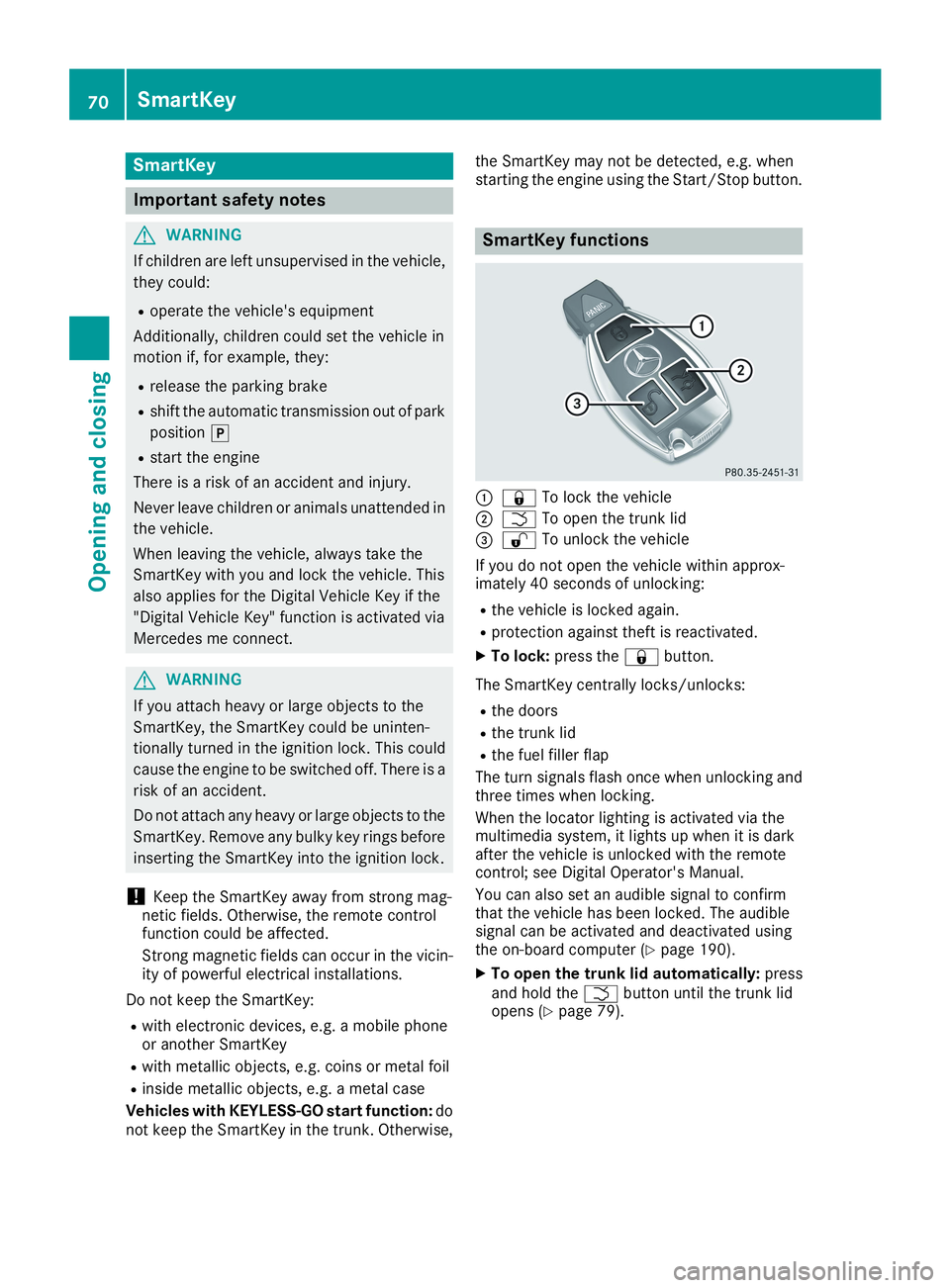
SmartKey functions
C7To lock the vehicle
DTTo open the trunk lid
Page 73 of 330

KEYLESS-GO
General notes
Bear in mind that the engine can be started byany of the vehicle occupants if there is a Smart-Key in the vehicle.
Locking and unlocking
You can start, lock or unlock the vehicle usingKEYLESS-GO. To do this, you only need carry theSmartKey with you. You can combine the func-tions of KEYLESS-GO with those of a conven-tional SmartKey. Unlock the vehicle by usingKEYLESS-GO, for instance, and lock it using the7button on the SmartKey.
The driver's door and the door at which the han-dle is used, must both be closed. The SmartKeymust be outside the vehicle. When locking orunlocking with KEYLESS-GO, the distancebetween the SmartKey and the correspondingdoor handle must not be greater than three feet(one meter).
A check which periodically establishes a radioconnection between the vehicle and the Smart-Key determines whether a valid SmartKey is inthe vehicle. This occurs, for example:
Rwhen starting the engine
Rwhile driving
Rwhen using HANDS-FREE ACCESS
Rwhen the external door handles are touched
Rduring convenience closing
XTo unlock the vehicle:touch the inner sur-face of the door handle.
XTo lock the vehicle:touch sensor surfaceCorD.
Make sure that you do not touch the innersurface of the door handle.
XConvenience closing feature:touchrecessed sensor surfaceDfor an extendedperiod.
Further information on the convenience clos-ing feature (Ypage 84).
XTo unlock the trunk lid:pull trunk lid han-dleC.
Deactivating and activating
If you do not intend to use the vehicle for a lon-ger period of time, you can deactivate KEYLESS-GO. The SmartKey will then use very little power,thereby conserving battery power. For the pur-poses of activation/deactivation, the vehiclemust not be nearby.
XTo deactivate:press the7button on theSmartKey twice in rapid succession.The indicator light on the SmartKey flashestwice briefly then one long flash, then KEY-LESS-GO is deactivated (Ypage 73).
XTo activate:press any button on the Smart-Key.
or
XInsert the SmartKey into the ignition lock.KEYLESS-GO and all of its associated featuresare available again.
KEYLESS-GO start function
General notes
Bear in mind that the engine can be started byany of the vehicle occupants if there is a Smart-Key in the vehicle.
SmartKey71
Opening and closing
Z
Page 74 of 330
Changing the settings of the locking
system
You can change the settings of the locking sys-tem. This means that only the driver's door andthe fuel filler flap are unlocked when the vehicleis unlocked. This is useful if you frequently travelon your own.
XTo change the setting:press and hold the6and7buttons simultaneously forapproximately six seconds until the batteryindicator lamp flashes twice (Ypage 73).
If the setting of the locking system is changedwithin the signal range of the vehicle, pressingthe7or6button:
Rlocks or
Runlocks the vehicle
The SmartKey now functions as follows:
XTo unlock:press the6button once.
XTo unlock centrally:press the6buttontwice.
XTo lock centrally:press the7button.
The KEYLESS-GO function is changed as fol-lows:
XTo unlock the driver's door:touch the innersurface of the door handle on the driver'sdoor.
XTo unlock centrally:touch the inner surfaceof the door handle on the front-passengerdoor or the rear door.
XTo lock centrally:touch the outer sensorsurface on one of the door handles.
XTo restore the factory settings:press andhold the6and7buttons simultane-ously for approximately six seconds until thebattery check lamp flashes twice(Ypage 73).
Mechanical key
General notes
If the vehicle can no longer be locked orunlocked with the SmartKey or KEYLESS-GO,use the mechanical key.
If you use the mechanical key to unlock andopen the driver's door or the trunk lid, the anti-theft alarm system will be triggered (Ypage 68).
There are several ways to turn off the alarm:
XTo deactivate the alarm with the key:pressthe6or7button on the key.
or
XInsert the SmartKey into the ignition lock.
or
XTo deactivate the alarm with KEYLESS-GO:press the Start/Stop button in the ignitionlock. The SmartKey must be in the vehicle.
or
XLock or unlock the vehicle using KEYLESS-GO. The SmartKey must be outside the vehi-cle.
If you unlock the vehicle using the mechanicalkey, the fuel filler flap will not be unlocked auto-matically.
XTo unlock the fuel filler flap:insert theSmartKey into the ignition lock.
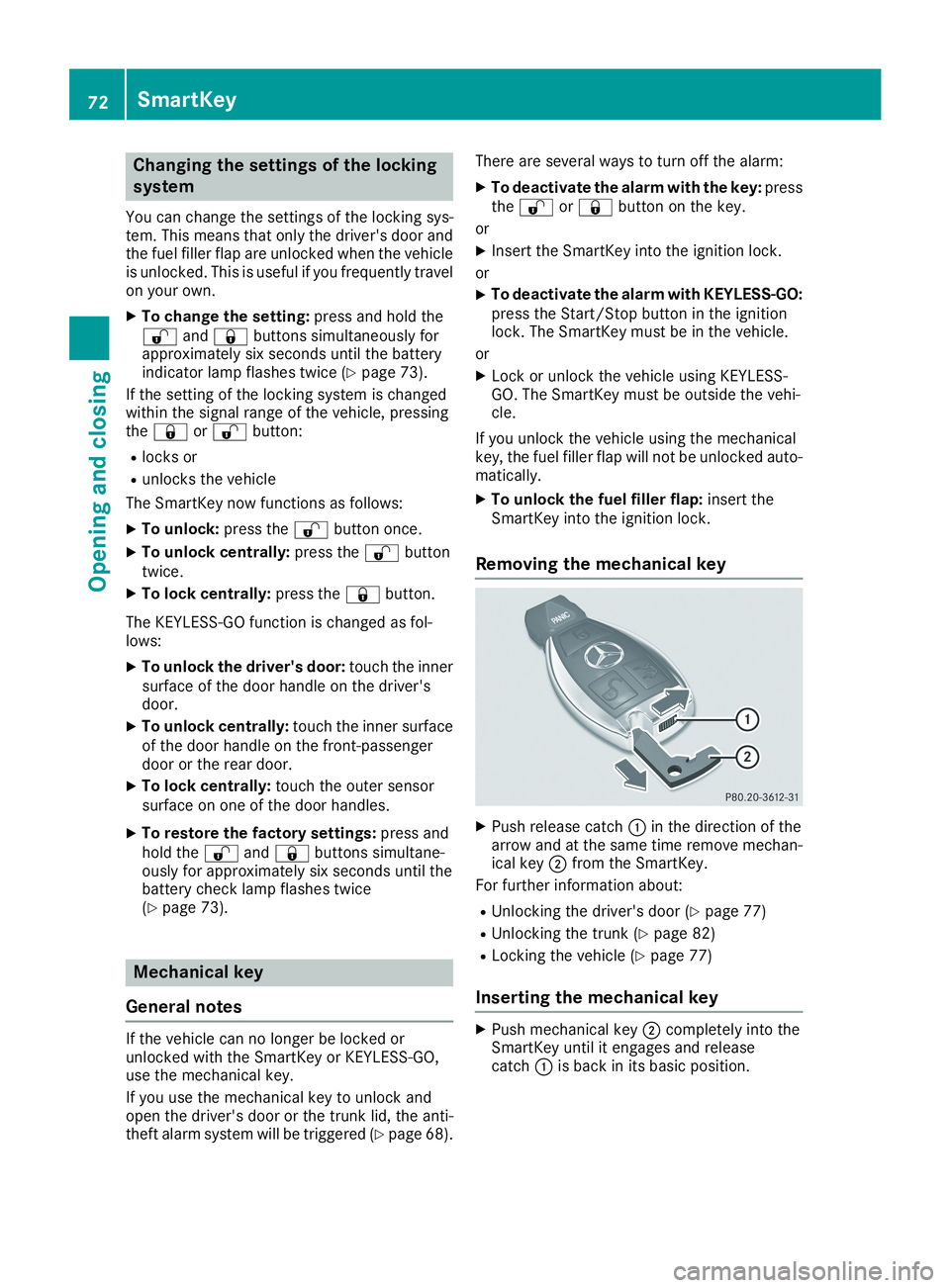
Removing the mechanical key
XPush release catchCin the direction of thearrow and at the same time remove mechan-ical keyDfrom the SmartKey.
For further information about:
RUnlocking the driver's door (Ypage 77)
RUnlocking the trunk (Ypage 82)
RLocking the vehicle (Ypage 77)
Inserting the mechanical key
XPush mechanical keyDcompletely into theSmartKey until it engages and releasecatchCis back in its basic position.
72SmartKey
Opening and closing