2019 MERCEDES-BENZ CLA brake
[x] Cancel search: brakePage 65 of 330
The distance warning function may not give
warnings in all critical situations. There is a
risk of an accident.
Always pay careful attention to the traffic sit-
uation and be ready to brake.
Always adapt your speed to suit the prevailing
road and traffic conditions.
GWARNING
The distance warning function cannot always
clearly identify objects and complex traffic
situations.
In such cases, the distance warning function
may:
Rgive an unnecessary warning
Rnot give a warning
There is a risk of an accident.
Always pay careful attention to the traffic sit-
uation and do not rely solely on the distance
warning function.
Function
Starting at a speed of approximately 4 mph(7 km/h), the distance warning function warnsyou if you rapidly approach a vehicle in front. Anintermittent warning tone will then sound, andthe
Page 66 of 330
Situation-dependent braking assistance is capa-ble of reacting to moving objects that havealready been detected as such at least onceover the period of observation, up to vehiclespeeds of around 155 mph (250 km/h).
Situation-dependent braking assistance canalso detect stationary objects, up to vehiclespeeds of around 44 mph (70 km/h).
XKeep the brake pedal depressed until theemergency braking situation is over.ABS prevents the wheels from locking.
The brakes will work normally again if:
Ryou release the brake pedal
Rthere is no longer any danger of a collision
Rno obstacle is detected in front of your vehicle
Situation-dependent braking assistance is thendeactivated.
Important safety notes
iObserve the "Important safety notes" sec-tion for driving safety systems (Ypage 61).
GWARNING
Active Brake Assist does not react:
Rto persons, bicycles, motorcycles or ani-
mals
Rto approaching vehicles
Rto cross traffic
Ron bends
As a result, Active Brake Assist cannot inter-
vene in all critical situations. There is a risk of
an accident.
Always pay careful attention to the traffic sit-
uation and be prepared to brake.
GWARNING
Adaptive Brake Assist cannot always clearly
identify objects and complex traffic situa-
tions.
In such cases, Adaptive Brake Assist might:
Rintervene unnecessarily
Rnot intervene
There is a risk of an accident.
Always pay careful attention to the traffic sit-
uation and be ready to brake. Terminate the
intervention in a non-critical driving situation.
Due to the nature of the system, complex butnon-critical driving conditions may also causeActive Brake Assist to intervene.
Even if Active Brake Assist is not available due toa malfunction in the radar sensor system, thebrake system is still available with full brakeboosting effect and BAS.
ESP®(Electronic Stability Program)
General notes
iObserve the "Important safety notes" sec-tion (Ypage 61).
ESP®monitors driving stability and traction, i.e.power transmission between the tires and theroad surface.
If ESP®detects that the vehicle is deviating fromthe direction desired by the driver, one or morewheels are braked to stabilize the vehicle. Theengine output is also modified to keep the vehi-cle on the desired course within physical limits.
ESP®assists the driver when pulling away on
wet or slippery roads. ESP®can also stabilizethe vehicle during braking.
ETS/4ETS (Electronic Traction System)
iObserve the "Important safety notes" sec-tion (Ypage 61).
ETS traction control is part of ESP®. On vehicles
with 4MATIC, 4ETS is part of ESP®.
Traction control brakes the drive wheels indi-vidually if they spin. This enables you to pullaway and accelerate on slippery surfaces, forexample if the road surface is slippery on oneside. In addition, more drive torque is transfer-red to the wheel or wheels with traction.
Traction control remains active, even if you
deactivate ESP®.
Important safety notes
iObserve the "Important safety notes" sec-tion (Ypage 61).
GWARNING
If ESP®is malfunctioning, ESP®is unable to
stabilize the vehicle. Additionally, further driv-
ing safety systems are deactivated. This
increases the risk of skidding and an accident.
64Driving safety systems
Safety
Page 70 of 330
You should therefore adapt your driving style
to the different handling characteristics. Have
the brake system checked at a qualified spe-
cialist workshop.
Please observe the information on warning andindicator lamps (Ypage 222)
(Ypage 222) as well as on display messages(Ypage 196).
ADAPTIVE BRAKE
ADAPTIVE BRAKE enhances braking safety andoffers increased braking comfort. In addition tothe braking function, ADAPTIVE BRAKE also hasthe HOLD function (Ypage 158) and hill startassist (Ypage 126).
STEER CONTROL
General information
STEER CONTROL helps you by transmitting anoticeable steering force to the steering wheelin the direction required for vehicle stabilization.
This steering assistance is provided in particularif:
Rboth right wheels or both left wheels are on awet or slippery road surface when you brake
Rthe vehicle begins to skid
Important safety notes
iObserve the "Important safety notes" sec-tion (Ypage 61).
No steering assistance is provided from STEERCONTROL, if:
RESP®is malfunctioning
Rthe steering is malfunctioning
If ESP®is malfunctioning, you will be assistedfurther by the electrical power steering.
Protection against theft
Immobilizer
The immobilizer prevents your vehicle frombeing started without the correct SmartKey.
XTo activate with the SmartKey:remove theSmartKey from the ignition lock.
XTo activate with KEYLESS-GO start-func-tion or KEYLESS-GO:switch the ignition offand open the driver's door.
XTo deactivate:switch on the ignition.
When leaving the vehicle, always take theSmartKey with you and lock the vehicle. Anyonecan start the engine if a valid SmartKey has beenleft inside the vehicle.
iThe immobilizer is always deactivated whenyou start the engine.
In the event that the engine cannot be started(yet the vehicle's battery is charged), the sys-tem is not operational. Contact an authorizedMercedes-Benz Center or call1-800-FOR-MERCedes (in the USA) or1-800-387-0100(in Canada).
ATA (anti-theft alarm system)
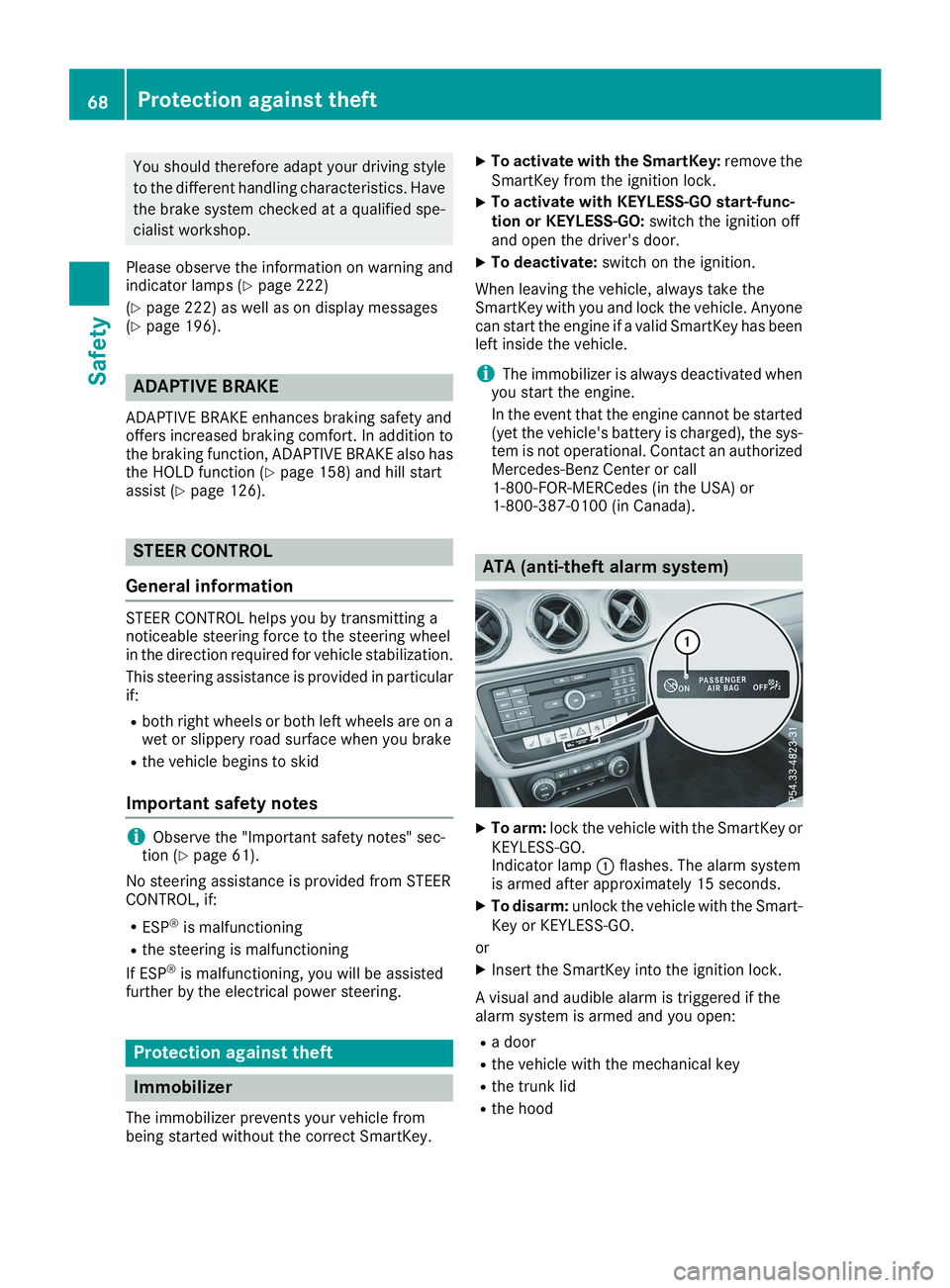
XTo arm:lock the vehicle with the SmartKey orKEYLESS-GO.Indicator lampCflashes. The alarm systemis armed after approximately 15 seconds.
XTo disarm:unlock the vehicle with the Smart-Key or KEYLESS-GO.
or
XInsert the SmartKey into the ignition lock.
A visual and audible alarm is triggered if thealarm system is armed and you open:
Ra door
Rthe vehicle with the mechanical key
Rthe trunk lid
Rthe hood
68Protection against theft
Safety
Page 72 of 330
SmartKey
Important safety notes
GWARNING
If children are left unsupervised in the vehicle,
they could:
Roperate the vehicle's equipment
Additionally, children could set the vehicle in
motion if, for example, they:
Rrelease the parking brake
Rshift the automatic transmission out of park
position]
Rstart the engine
There is a risk of an accident and injury.
Never leave children or animals unattended in
the vehicle.
When leaving the vehicle, always take the
SmartKey with you and lock the vehicle. This
also applies for the Digital Vehicle Key if the
"Digital Vehicle Key" function is activated via
Mercedes me connect.
GWARNING
If you attach heavy or large objects to the
SmartKey, the SmartKey could be uninten-
tionally turned in the ignition lock. This could
cause the engine to be switched off. There is a
risk of an accident.
Do not attach any heavy or large objects to the
SmartKey. Remove any bulky key rings before
inserting the SmartKey into the ignition lock.
!Keep the SmartKey away from strong mag-netic fields. Otherwise, the remote controlfunction could be affected.
Strong magnetic fields can occur in the vicin-ity of powerful electrical installations.
Do not keep the SmartKey:
Rwith electronic devices, e.g. a mobile phoneor another SmartKey
Rwith metallic objects, e.g. coins or metal foil
Rinside metallic objects, e.g. a metal case
Vehicles with KEYLESS-GO start function:donot keep the SmartKey in the trunk. Otherwise,
the SmartKey may not be detected, e.g. whenstarting the engine using the Start/Stop button.
SmartKey functions
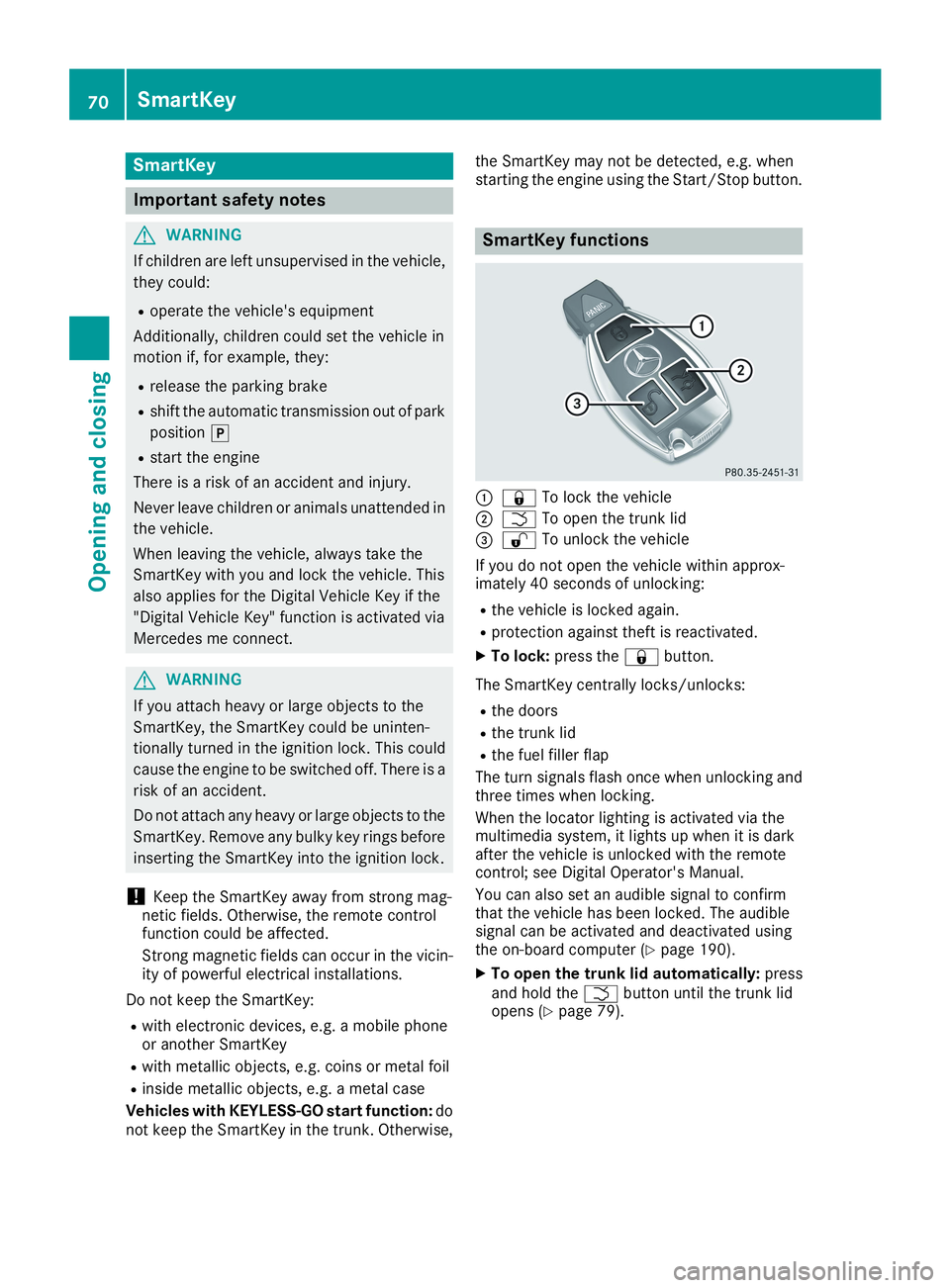
C7To lock the vehicle
DTTo open the trunk lid
Page 78 of 330
Doors
Important safety notes
GWARNING
If children are left unsupervised in the vehicle,
they could:
Roperate the vehicle's equipment
Additionally, children could set the vehicle in
motion if, for example, they:
Rrelease the parking brake
Rshift the automatic transmission out of park
position]
Rstart the engine
There is a risk of an accident and injury.
Never leave children or animals unattended in
the vehicle.
When leaving the vehicle, always take the
SmartKey with you and lock the vehicle. This
also applies for the Digital Vehicle Key if the
"Digital Vehicle Key" function is activated via
Mercedes me connect.
You should preferably place luggage or loads inthe cargo compartment. Observe the loadingguidelines (Ypage 239).
Unlocking and opening doors from
the inside
!The side windows will not open/close if thebattery is discharged or if the side windowshave iced up. It will then not be possible toclose the door. Do not attempt to force thedoor closed. You could otherwise damage thedoor or the side window.
When a door is opened, the side window on thatside opens slightly. When the door is closed, theside window closes again.
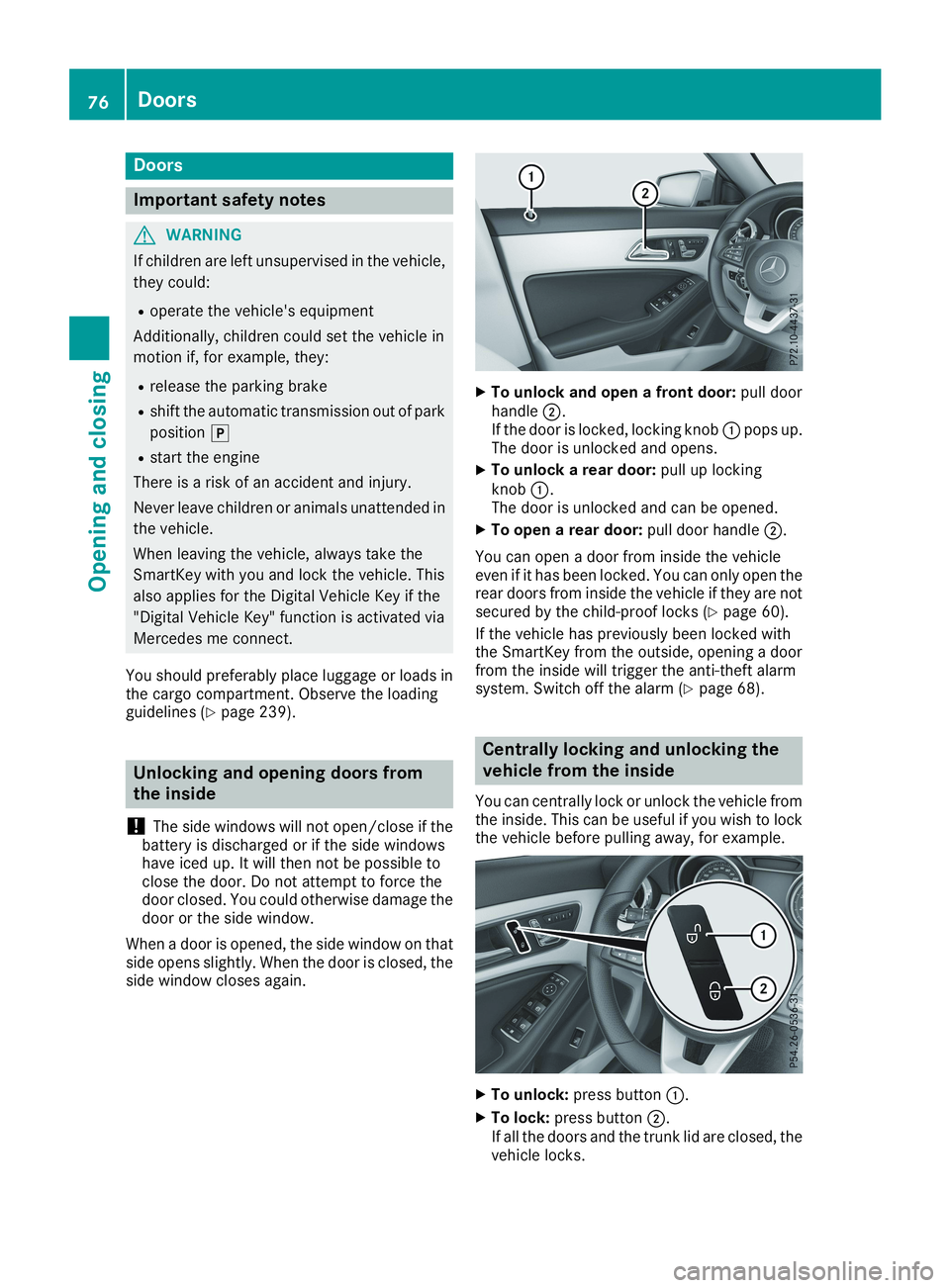
XTo unlock and open a front door:pull doorhandleD.If the door is locked, locking knobCpops up.The door is unlocked and opens.
XTo unlock a rear door:pull up lockingknobC.The door is unlocked and can be opened.
XTo open a rear door:pull door handleD.
You can open a door from inside the vehicleeven if it has been locked. You can only open therear doors from inside the vehicle if they are notsecured by the child-proof locks (Ypage 60).
If the vehicle has previously been locked withthe SmartKey from the outside, opening a doorfrom the inside will trigger the anti-theft alarmsystem. Switch off the alarm (Ypage 68).
Centrally locking and unlocking the
vehicle from the inside
You can centrally lock or unlock the vehicle fromthe inside. This can be useful if you wish to lockthe vehicle before pulling away, for example.
XTo unlock:press buttonC.
XTo lock:press buttonD.If all the doors and the trunk lid are closed, thevehicle locks.
76Doors
Opening and closing
Page 104 of 330
take precedence over the daytime runninglamps.
USA only:
The daytime running lamps improve the visibilityof your vehicle during the day. To do this, thedaytime running lamps function must beswitched on using the on-board computer(Ypage 189).
If the engine is running and you turn the lightswitch to the`orXposition, the manualsettings take precedence over the daytime run-ning lamps.
Low-beam headlamps
Even if the light sensor does not detect that it isdark, the parking lamps and low-beam head-lamps switch on when the ignition is switched onand the light switch is set to theXposition.This is a particularly useful function in the eventof rain and fog.
XTo switch on the low-beam headlamps:turn the SmartKey to positionHin the igni-tion lock or start the engine.
XTurn the light switch toX.The greenXindicator lamp in the instru-ment cluster lights up.
Rear fog lamp
The rear fog lamp improves visibility of yourvehicle for the traffic behind in the event of thickfog. Please take note of the country-specificregulations for the use of rear fog lamps.
XTo switch on the rear fog lamp:turn theSmartKey in the ignition lock to positionHorstart the engine.
XTurn the light switch toXorX.
XPress the^button.The yellow^indicator lamp in the instru-ment cluster lights up.
XTo switch off the rear fog lamp:press the^button.The yellow^indicator lamp in the instru-ment cluster goes out.
iWhen the rear fog lamp is switched on, thecenter brake lamp in the tail lamp switches offdue to a legal requirement.
Parking lamps
!If the battery charge is very low, the parkinglamps or standing lamps are automaticallyswitched off to enable the next engine start.Always park your vehicle safely and in a well lit
area, in accordance with the relevant legalstipulations. Avoid using the`parkinglamps over a period of several hours. If pos-sible, switch on the right-handdor left-handcstanding lamps.
XTo switch on:turn the light switch to`.The green`indicator lamp in the instru-ment cluster lights up.
Standing lamps
Switching on the standing lamps ensures thecorresponding side of the vehicle is illuminated.
XTo switch on the standing lamps:theSmartKey is not in the ignition lock or it is inpositionZin the ignition lock.
XTurn the light switch toc(left-hand side ofthe vehicle) ord(right-hand side of thevehicle).
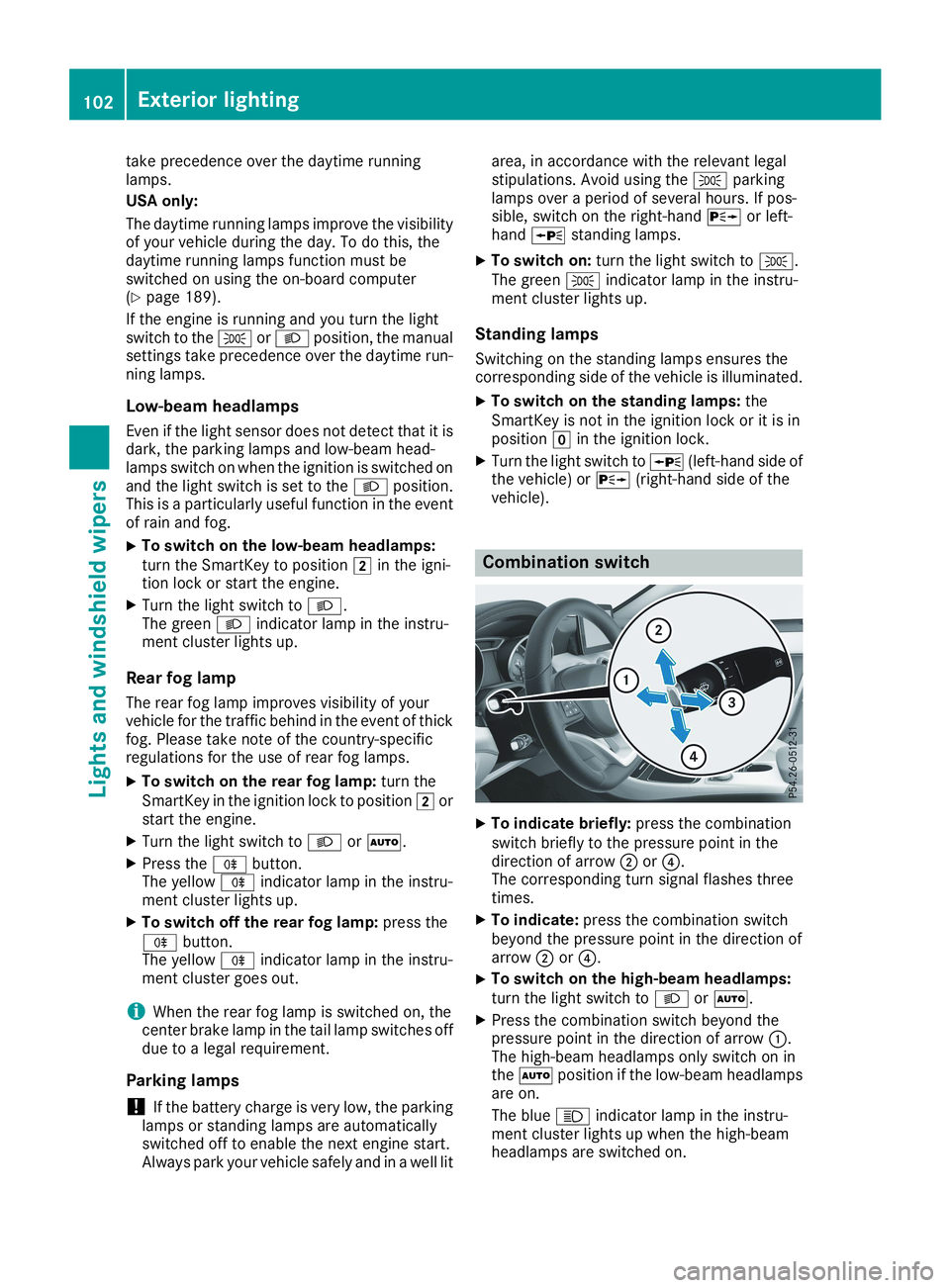
Combination switch
XTo indicate briefly:press the combinationswitch briefly to the pressure point in thedirection of arrowDor
Page 110 of 330
XPress retaining clipsCat the same time inthe direction of the arrows.
XCarefully remove the bulb holder togetherwith the connected plug and the bulbs.
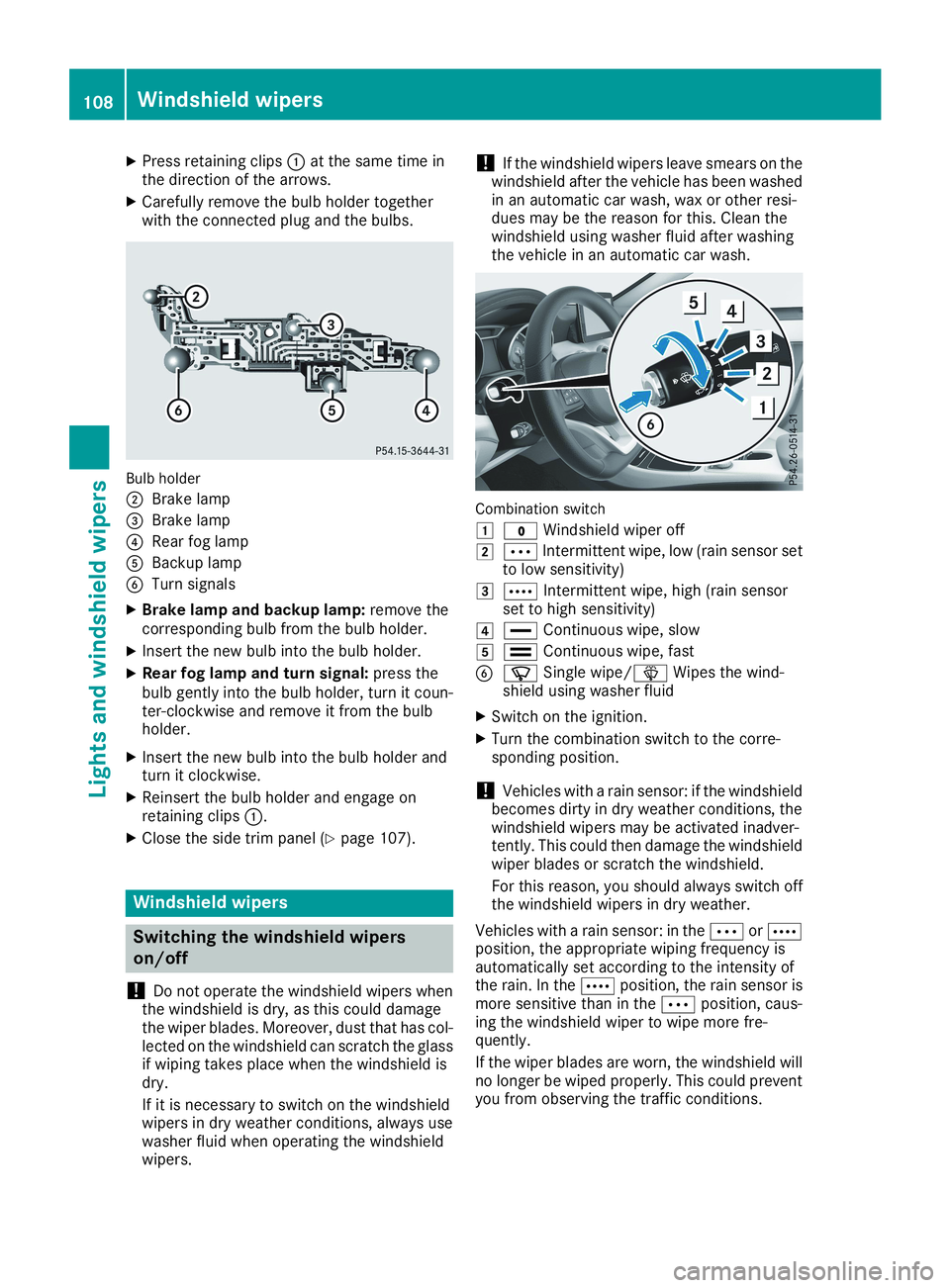
Bulb holder
DBrake lamp
Page 124 of 330
Notes on breaking-in a new vehicle
Important safety notes
The sensor system of some driving and drivingsafety systems adjusts automatically while acertain distance is being driven after the vehiclehas been delivered or after repairs. Full systemeffectiveness is not reached until the end of thisteach-in procedure.
New and replaced brake pads and discs onlyreach their optimum braking effect after severalhundred kilometers of driving. Compensate forthis by applying greater force to the brake pedal.
The first 1000 miles (1500 km)
The more you look after the engine when it isnew, the more satisfied you will be with its per-formance in the future.
RYou should therefore drive at varying vehicleand engine speeds for the first 1000 miles(1500 km).
RAvoid heavy loads, e.g. driving at full throttle,during this period.
RChange gear in good time, before the tach-ometer needle is