2019 MERCEDES-BENZ AMG GT ROADSTER service reset
[x] Cancel search: service resetPage 7 of 298
Alarm system
see ATA (Anti-Theft Alarm system)
AMG
Adaptive sport suspension sys-
tem ................................................ 147
E-SELECT lever .............................. 117
Menu (on-board computer) ............ 170
Performance Seat ............................ 87
SPEEDSHIFT DCT 7-gear sport
transmission .................................. 117
AMG ceramic brakes .........................133
AMG high-performance and
ceramic brakes .................................. 133
AMG sports exhaust system ............ 114
Animals
see Pets in the vehicle
Anti-entrapment function
see Reversing feature
Anti-lock braking system
see ABS (Anti-lock Braking System)
Anti-skid chains
see Snow chains
Anti-theft alarm system
see ATA (Anti-Theft Alarm system)
Ashtray ............................................... 221
Assistance display (on-board com-
puter) ................................................. .167
Assistance menu (on-board com-
puter) ................................................. .168
Assistance system
see Driving systems
ASSYST PLUS
Displaying a service message ....... .241
Hiding a service message .............. 241
Resetting the service interval dis-
play ................................................ 241
Service message ............................ 240
Special service requirements ......... 241
ATA (Anti-Theft Alarm system)
Activating/deactivating ................... 64
Function .......................................... .64
Switching off the alarm .................... 64
ATTENTION ASSIST
Activating/deactivating ................. 168
Display message ............................ 189
Function/note s............................. 154 Authorized Mercedes-Benz Center
see Qualified specialist workshop
Authorized workshop
see Qualified specialist workshop
AUTO lights
Display message ............................ 186
see Lights
Automatic car wash (care) ............... 242
Automatic engine start (ECO start/
stop function) .................................... 114
Automatic engine switch-off (ECO
start/stop function) .......................... 113
Automatic headlamp mode ................ 96
Automatic transmission
Accelerator pedal position ............. 120
Automatic drive program ............... 122
Changing gear ............................... 120
Display message ............................ 194
Double-clutch function .................. 120
Drive program display .................... 119
Driving tips .................................... 120
Emergency running mode .............. 125
Engaging neutral ............................ 118
Engaging park position automati-
cally ............................................... 118
Engaging reverse gear ................... 118
Engaging the park position ............ 118
Gearshift recommendation ............ 123
Gliding mod e................................. 120
Important safety notes .................. 117
Kickdown ....................................... 120
Manual drive progra m.................... 122
Manual mod e................................. 123
Oil temperature (on-board com-
puter) ............................................. 170
Overview ........................................ 117
Problem (malfunction) ................... 125
Pulling away ................................... 112
Rocking the vehicle free ................ 120
Shift override ................................. 124
Starting the engine ........................ 112
Steering wheel paddle shifters ...... 121
Transmission position display ........ 119
Transmission positions .................. 119
Automatic transmission emer-
gency mode ....................................... 125 Index
5
Page 19 of 298
Important safety guidelines .............42
Introduction .....................................41
Releasin g......................................... 44
Warning lamp ................................. 199
Warning lamp (function) ................... 44
Seat function
see Seat
Seats
Adjusting (electrically) ..................... 86
Adjusting (manually) ........................ 85
Adjusting (Performance Seat) .......... 87
Adjusting lumbar support ................ 86
Adjusting the head restraint ............ 86
Calling up a stored setting (mem-
ory function) .................................... 95
Cleaning the cover ......................... 248
Important safety notes .................... 84
Seat heating problem ...................... 89
Seat ventilation problem .................. 89
Storing settings (memory func-
tion) ................................................. 94
Switching AIRSCARF on/of f............ 89
Switching seat heating on/of f......... 87
Switching seat ventilation on/of f.... 88
Selecting a gear
see Automatic transmission
Selector lever
Cleaning ......................................... 247
Positions ........................................ 117
Sensors (cleaning instructions) ....... 246
Service menu (on-board com-
puter) .................................................. 168
Service message
see ASSYST PLUS
Service products
Brake fluid ..................................... 291
Coolant (engine) ............................ 292
Engine oil ....................................... 291
Fuel ................................................ 289
Important safety notes .................. 289
Refrigerant (air-conditioning sys-
tem) ............................................... 293
Washer fluid ................................... 292
Setting the date/time format
see also Digital Operator's Man-
ual .................................................. 209 Setting the language
see also Digital Operator's Man-
ual .................................................. 209
Setting the time
see also Digital Operator's Man-
ual .................................................. 209
Settings
Factory (on-board computer) ......... 170
On-board computer ....................... 168
SETUP (on-board computer,
Mercedes-AMG vehicles) .................. 171
Side impact air bag ............................. 47
Side marker lamp (display mes-
sage) ................................................... 186
Side windows
Cleaning ......................................... 245
Convenience closing feature ............ 78
Convenience opening feature .......... 78
Important safety information ........... 76
Opening/closing .............................. 77
Problem (malfunction) ..................... 79
Resetting ......................................... 78
Reversing feature ............................. 77
SIRIUS services
see also Digital Operator's Man-
ual .................................................. 209
SmartKey
Changing the battery ....................... 69
Changing the programming ............. 68
Checking the battery ....................... 69
Convenience closing feature ............ 78
Convenience opening feature .......... 78
Display message ............................ 197
Door central locking/unlocking ....... 66
Important safety notes .................... 66
KEYLESS-GO start function .............. 67
Loss ................................................. 70
Mechanical key ................................ 68
Opening/closing soft top ................. 81
Overview .......................................... 66
Positions (ignition lock) ................. 111
Problem (malfunction) ..................... 70
Starting the engine ........................ 112
SMS
see also Digital Operator's Man-
ual .................................................. 209
Snow chains ...................................... 265 Index
17
Page 22 of 298
PSI (pounds per square inch) (def-
inition) ...........................................2 80
Replacing ....................................... 281
Service life ..................................... 264
Sidewall (definition) ....................... 280
Speed rating (definition) ................ 280
Storing .......................................... .282
Structure and characteristics
(definition) ..................................... 279
Summer tires in winter .................. 265
Temperature .................................. 275
TIN (Tire Identification Number)
(definition) ..................................... 281
Tire bead (definition) ..................... .280
Tire pressure (definition) ................ 280
Tire pressures (recommended) ...... 279
Tire size (data) ............................... 285
Tire size designation, load-bearing capacity, speed rating .................... 276
Tire tread ....................................... 264
Tire tread (definition) ..................... 280
Total load limit (definition) ............. 281
Traction ......................................... 275
Traction (definition) ....................... 281
Tread wea r..................................... 275
Uniform Tire Quality Grading
Standards ...................................... 274
Uniform Tire Quality Grading
Standards (definition) .................... 279
Wear indicator (definition) ............. 281
Wheel and tire combination ........... 285
Wheel rim (definition) .................... 279
see Flat tire
Tool
see Vehicle tool kit
Touchpad
Changing the station/music
track .............................................. 212
Character suggestions ................... 211
Deleting characters ....................... 211
Entering a space ............................ 211
Entering characters ....................... 211
Gesture control .............................. 211
Handwriting recognition ................ 211
Operating the touchpad ................. 211
Overview ........................................ 211
Quick access for Audio .................. 212
Switching ....................................... 211 Switching input line ....................... 211
Tow-starting
Emergency engine starting ............ 261
Towing
Permitted towing methods ............ 259
Towing away
Important safety guidelines ........... 258
Installing the towing eye ................ 259
Removing the towing eye ............... 260
Transporting the vehicle ................ 260
With both axles on the ground ....... 260
Towing eye ......................................... 249
Traction system
see ETS (Electronic Traction System)
Traffic reports
see also Digital Operator's Man-
ual .................................................. 209
Transmission
Driving tips .................................... 120
Selector lever ................................ 117
see Automatic transmission
Transmission position display ......... 119
Transmission positions
General notes ................................ 117
Overview ........................................ 118
Transporting the vehicle .................. 260
Trim pieces (cleaning instruc-
tions) .................................................. 247
Trip computer (on-board com-
puter) .................................................. 162
Trip odometer
Calling up ....................................... 161
Resetting (on-board computer) ...... 162
Trunk lid
Display message ............................ 196
Important safety notes .................... 74
Locking separately ........................... 76
Opening (automatically from
inside) .............................................. 75
Opening dimensions ...................... 293
Opening/closing (from the out-
side) ................................................. 74
Unlocking with KEYLESS-GO ............ 74
Trunk load (maximum) ...................... 293
Turn signals
Display message ............................ 186
Switching on/of f.............................. 97 20
Index
Page 30 of 298
Only connect equipment to a diagnostics con-
nection in the vehicle, which is approved for
your vehicle by Mercedes-Benz. G
WARNING
Objects in the driver's footwell can restrict the pedal travel or obstruct a depressed pedal.
The operating and road safety of the vehicle is
jeopardized. There is a risk of an accident.
Make sure that all objects in the vehicle are
stowed correctly, and that they cannot enter
the driver's footwell. Install the floormats
securely and as specified in order to ensure
sufficient clearance for the pedals. Do not use loose floormats and do not place floormats on
top of one another.
! If the engine is switched off and equipment
on the diagnostics connection is used, the
starter battery may discharge.
Connecting equipment to the diagnostics con-
nection can lead to emissions monitoring infor-
mation being reset, for example. This may lead
to the vehicle failing to meet the requirements of the next emissions test during the main inspec-
tion. Qualified specialist workshop
An authorized Mercedes-Benz Center is a quali-
fied specialist workshop. It has the necessary
specialist knowledge, tools and qualifications to correctly carry out the work required on your
vehicle. This is especially the case for work rel-
evant to safety.
Always have the following work carried out at an authorized Mercedes-Benz Center:
R work relevant to safety
R service and maintenance work
R repair work
R alterations, installation work and modifica-
tions
R work on electronic components Correct use
If you remove any warning stickers, you or oth-
ers could fail to recognize certain dangers.
Leave warning stickers in position.
Observe the following information when driving your vehicle:
R the safety notes in this manual
R the vehicle technical data
R traffic rules and regulations
R laws and safety standards pertaining to motor
vehicles Problems with your vehicle
If you should experience a problem with your
vehicle, particularly one that you believe may
affect its safe operation, we urge you to contact
an authorized Mercedes-Benz Center immedi-
ately to have the problem diagnosed and recti-
fied. If the problem is not resolved to your sat-
isfaction, please discuss the problem again with
the authorized Mercedes-Benz Center or, if nec-
essary, contact us at one of the following
addresses.
In the USA
Customer Assistance Center
Mercedes-Benz USA, LLC
One Mercedes Drive
Montvale, NJ 07645-0350
In Canada
Customer Relations Department
Mercedes-Benz Canada, Inc.
98 Vanderhoof Avenue
Toronto, Ontario M4G 4C9 Reporting safety defects
USA only:
The following text is published as required of
manufacturers under Title 49, Code of U.S. Fed- eral Regulations, Part 575 pursuant to the
"National Traffic and Motor Vehicle Safety Act of
1966".
If you believe that your vehicle has a defect
which could cause a crash or could cause injury
or death, you should immediately inform the
National Highway Traffic Safety Administration
(NHTSA) in addition to notifying Mercedes-Benz USA, LLC. 28
Operating safetyIntroduction
Page 31 of 298
If NHTSA receives similar complaints, it may
open an investigation, and if it finds that a safety
defect exists in a group of vehicles, it may order a recall and remedy campaign. However, NHTSA cannot become involved in individual problems
between you, your dealer, or Mercedes-Benz
USA, LLC.
To contact NHTSA, you may call the Vehicle
Safety Hotline toll-free at 1-888-327-4236
(TTY: 1-800-424-9153); go to http://
www.safercar.gov; or write to: Administrator,
NHTSA, 400 Seventh Street, SW., Washington,
DC 20590.
You can also obtain other information about
motor vehicle safety at:
http://www.safercar.gov Limited Warranty
! Observe the notes in this Operator's Manual
regarding the correct operation of your vehi-
cle and possible damage to the vehicle. Dam-
age to the vehicle which is caused by violation
of these notes is not covered by the
Mercedes-Benz implied warranty or the new
or used-vehicle warranty. QR code for rescue card
The QR codes are secured in the fuel filler flap
and on the opposite side on the B-pillar. In the
event of an accident, rescue services can use
the QR code to quickly find the appropriate res-
cue card for your vehicle. The current rescue
card contains the most important information
about your vehicle in a compact form, e.g. the
routing of the electric cables.
You can find more information at
www.mercedes-benz.de/qr-code. Data stored in the vehicle
Electronic control units
There are electronic control units installed in
your vehicle. Some of these are necessary for
your vehicle to operate safely, while some offer
support during driving (driver assistance sys-
tems). In addition, your vehicle offers comfort
and entertainment functions that are also made possible by electronic control units. Electronic control units contain data storage
systems that can temporarily or permanently
save technical information concerning the vehi-
cle's condition, component stress and mainte-
nance requirements as well as technical events
and malfunctions.
This information generally documents the con-
dition of a component, a module, a system or the
surroundings, such as:
R Operating states of system components (e.g.
fill levels, battery status, tire pressure)
R Status messages concerning the vehicle or its
individual components (e.g. wheel rpm/
speed, deceleration, lateral acceleration, indi-
cation of whether seat belts are fastened)
R Malfunctions and defects in important system
components (e.g. lights, brakes)
R Information about events leading to vehicle
damage
R System responses in special driving situa-
tions (e.g. air bag deployment, intervention of
stability control systems)
R Ambient conditions (e.g. temperature, rain
sensor)
In addition to performing the actual control unit function, this data is used by manufacturers to
detect and rectify malfunctions and to optimize
vehicle functions. Most of this data is volatile
and processed only in the vehicle itself. Only a
small part of the data is stored in event or mal-
function memories.
When you use services, the technical data from
the vehicle can be read out by service network
employees (e.g. workshops, manufacturers) or
third parties (e.g. breakdown services). Services can include repair services, maintenance pro-
cesses, warranty cases and quality assurance
measures. The data are read out via the con-
nection for the diagnostics connection in the
vehicle, which is required by law. The relevant
offices in the service network or third parties
collect, process and use the data. This data
documents the vehicle's technical states, is
used to help in finding malfunctions and improv-
ing quality and is sent to the manufacturer
where necessary. In addition, the manufacturer is subject to product liability. The manufacturer
needs technical data from vehicles for this pur-
pose.
Malfunction memories in the vehicle can be
reset by a service center during repair or service work. Data stored in the vehicle
29Introduction Z
Page 172 of 298
The selected unit of measurement for distance
applies to:
R Digital speedometer in the Trip
Trip menu
R Odometer and the trip odometer
R Trip computer
R Range
R Navigation instructions in the Navi
Navi menu
R Cruise control
R Active Distance Assist DISTRONIC
R ASSYST PLUS service interval display
Switching the additional speedometer
on/off
If the additional speedometer is switched on,
the speed is shown in the status bar in the mul- tifunction display instead of the outside tem-
perature.
The additional speedometer displays the speed
in the respective unit that is not shown in the
multifunction display.
X Press 00E2on the steering wheel to open the
main menu.
X Press 0064or0063 on the steering wheel to
select the Settings Settings menu.
X Confirm by pressing 0076on the steering
wheel.
X Press 0064or0063 to select the Instru‐
Instru‐
ment Cluster
ment Cluster submenu.
X Press 0076to confirm.
X Press 0064or0063 to select the Addi‐
Addi‐
tional Speedometer [km/h]
tional Speedometer [km/h] function.
The current selection appears.
X To switch on/off: press0076again.
Restoring the factory settings X
Press 00E2on the steering wheel to open the
menu list.
X Press 0064or0063 on the steering wheel to
select the Settings
Settings menu.
X Confirm by pressing 0076on the steering
wheel.
X Press 0064or0063 to select the Factory
Factory
Settings
Settings submenu.
X Press 0076to confirm.
The Reset All Settings?
Reset All Settings? function
appears. X
Press 0064or0063 to select No
No orYes
Yes.
X Press 0076to confirm the selection.
If you have selected Yes
Yes, the multifunction
display shows a confirmation message.
For safety reasons, the Daytime Running
Daytime Running
Lights
Lights function in the Lights
Lightssubmenu is only
reset when the vehicle is stationary. AMG menu
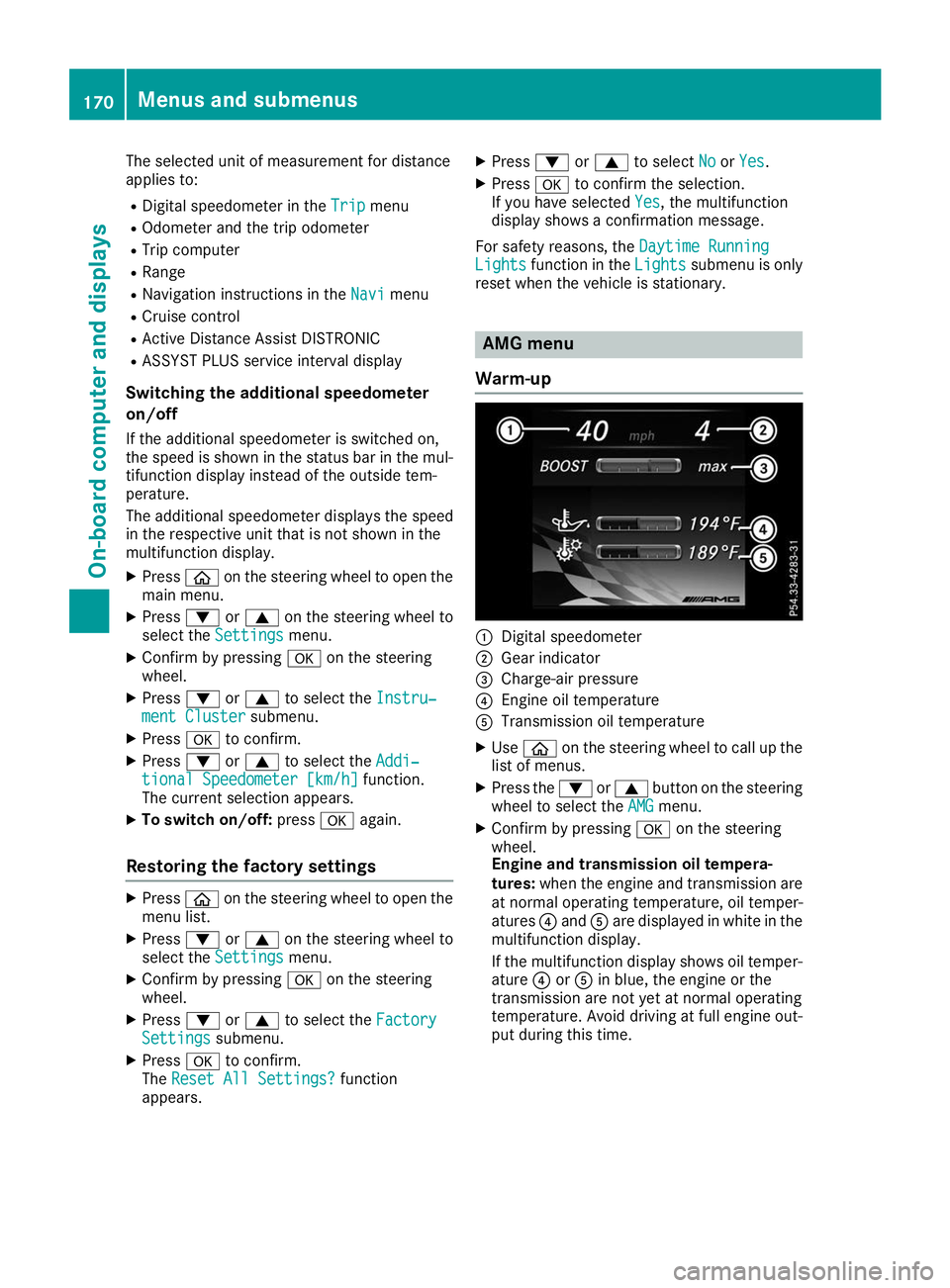
Warm-up 0043
Digital speedometer
0044 Gear indicator
0087 Charge-air pressure
0085 Engine oil temperature
0083 Transmission oil temperature
X Use 00E2 on the steering wheel to call up the
list of menus.
X Press the 0064or0063 button on the steering
wheel to select the AMG AMGmenu.
X Confirm by pressing 0076on the steering
wheel.
Engine and transmission oil tempera-
tures: when the engine and transmission are
at normal operating temperature, oil temper-
atures 0085and 0083are displayed in white in the
multifunction display.
If the multifunction display shows oil temper- ature 0085or0083 in blue, the engine or the
transmission are not yet at normal operating
temperature. Avoid driving at full engine out-
put during this time. 170
Menus and submenusOn-board computer and displays
Page 243 of 298
Hiding a service message
X Press the 0076or0038 button on the steering
wheel. Displaying service messages
X Switch on the ignition.
X Use 00E2 on the steering wheel to call up the
list of menus.
X Press 0063or0064 on the steering wheel to
select the Service Servicemenu and confirm with
0076.
X Press 0063or0064 on the steering wheel to
select the ASSYST PLUS
ASSYST PLUS submenu and con-
firm with 0076.
The service due date appears in the multi-
function display. Information about Service
Resetting the ASSYST PLUS service
interval display !
If the ASSYST PLUS service interval display
has been inadvertently reset, this setting can
be corrected at a qualified specialist work-
shop.
Have service work carried out as described in the Maintenance Booklet. This may otherwise
lead to increased wear and damage to the
major assemblies or the vehicle.
A qualified specialist workshop, e.g. an author-
ized Mercedes-Benz Service Center, will reset
the ASSYST PLUS service interval display after
the service work has been carried out. You can
also obtain further information on maintenance work, for example.
Special service requirements The specified maintenance interval takes only
the normal operation of the vehicle into
account. Under arduous operating conditions or
increased load on the vehicle, maintenance
work must be carried out more frequently, for
example:
R Regular city driving with frequent intermedi-
ate stops
R If the vehicle is primarily used to travel short
distances R
Use in mountainous terrain or on poor road
surfaces
R If the engine is often left idling for long periods
R In racetrack mode
Under these or similar conditions, have, for
example, the air filter, engine oil and oil filter
replaced or changed more frequently. Under
arduous operating conditions, the tires must be
checked more often. Further information can be
obtained at a qualified specialist workshop, e.g. an authorized Mercedes-Benz Service Center.
i In racetrack mode, the vehicle is subject to
higher loads, meaning that additional main-
tenance work is required. If you plan race-
track use, consult a qualified specialist work-
shop first. Mercedes-Benz recommends that
you use an authorized Mercedes-Benz Ser-
vice Center for this purpose.
Driving abroad An extensive Mercedes-Benz Service network is
also available in other countries. You can obtain further information from any authorized
Mercedes-Benz Service Center. Care
General notes
H
Environmental note
Dispose of empty packaging and cleaning
cloths in an environmentally responsible man-
ner.
! When cleaning your car, do not use:
R dry, coarse or hard cloths
R abrasive cleaning agents
R solvents
R cleaning agents containing solvents
Do not scrub.
Do not touch the surfaces and films with hard
objects, e.g. rings or ice scrapers. Otherwise,
you may scratch or damage the surfaces and films.
! Do not park your vehicle for a long period of
time directly after cleaning, particularly after
cleaning the wheel rim with wheel cleaner.
Wheel cleaner can lead to the increased cor-
rosion of the brake discs and pads. Therefore, Care
241Maintenance and care Z
Page 257 of 298
Should it, in exceptional circumstances, be
absolutely necessary to disconnect the 12-
volt battery yourself, please observe the fol-
lowing:
R Secure the vehicle to prevent it from rolling
away.
R Switch off the ignition.
R Disconnect the negative terminal first and
then the positive terminal.
The transmission is locked in position 005D
after disconnecting the battery.
After the work has been done, install the bat-
tery and replace the cover of the positive ter- minal clamp firmly.
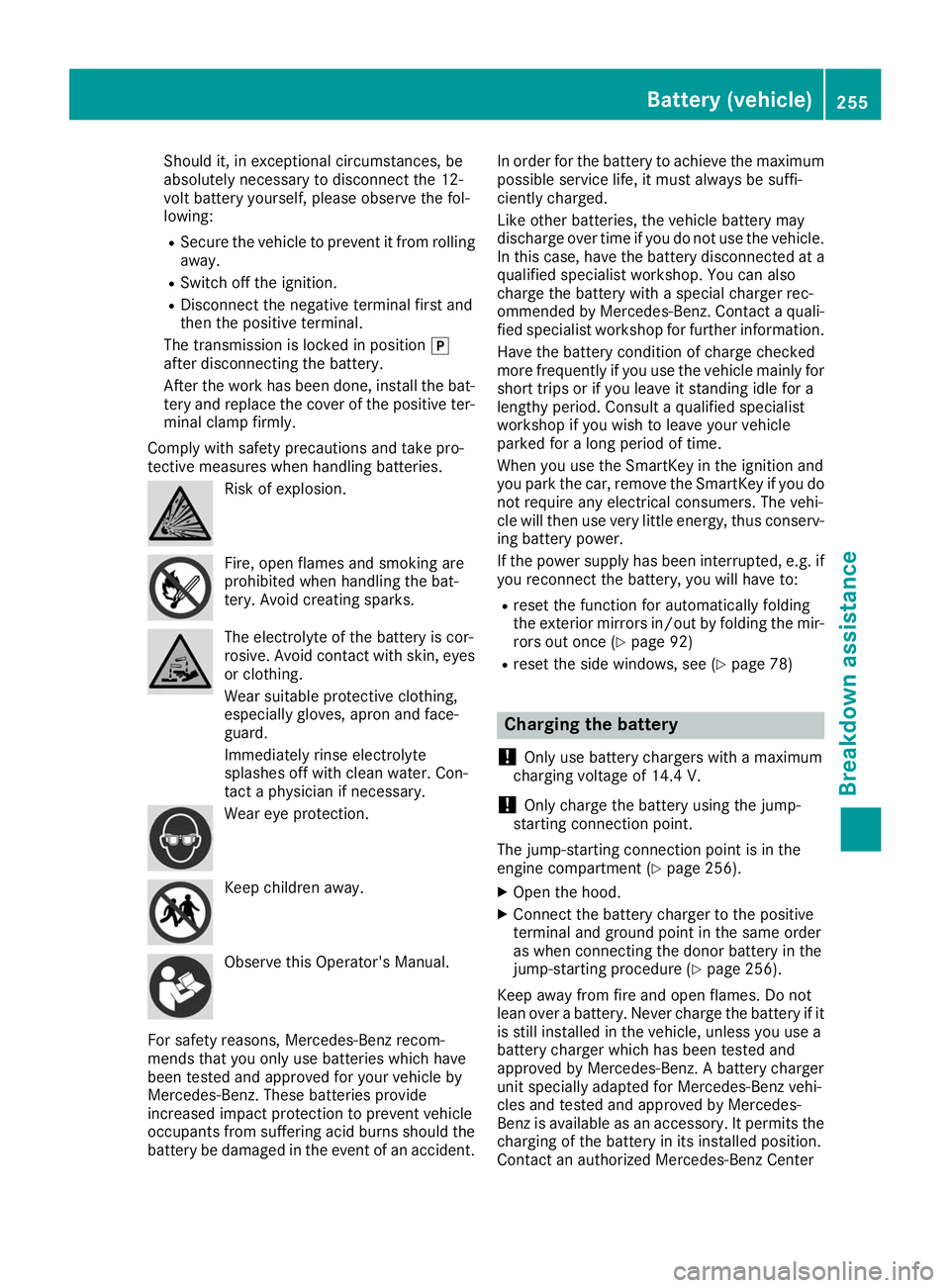
Comply with safety precautions and take pro-
tective measures when handling batteries. Risk of explosion.
Fire, open flames and smoking are
prohibited when handling the bat-
tery. Avoid creating sparks.
The electrolyte of the battery is cor-
rosive. Avoid contact with skin, eyes
or clothing.
Wear suitable protective clothing,
especially gloves, apron and face-
guard.
Immediately rinse electrolyte
splashes off with clean water. Con-
tact a physician if necessary. Wear eye protection.
Keep children away.
Observe this Operator's Manual.
For safety reasons, Mercedes-Benz recom-
mends that you only use batteries which have
been tested and approved for your vehicle by
Mercedes-Benz. These batteries provide
increased impact protection to prevent vehicle
occupants from suffering acid burns should the battery be damaged in the event of an accident. In order for the battery to achieve the maximum
possible service life, it must always be suffi-
ciently charged.
Like other batteries, the vehicle battery may
discharge over time if you do not use the vehicle.In this case, have the battery disconnected at a
qualified specialist workshop. You can also
charge the battery with a special charger rec-
ommended by Mercedes-Benz. Contact a quali- fied specialist workshop for further information.
Have the battery condition of charge checked
more frequently if you use the vehicle mainly for
short trips or if you leave it standing idle for a
lengthy period. Consult a qualified specialist
workshop if you wish to leave your vehicle
parked for a long period of time.
When you use the SmartKey in the ignition and
you park the car, remove the SmartKey if you do not require any electrical consumers. The vehi-
cle will then use very little energy, thus conserv-
ing battery power.
If the power supply has been interrupted, e.g. if
you reconnect the battery, you will have to:
R reset the function for automatically folding
the exterior mirrors in/out by folding the mir-
rors out once (Y page 92)
R reset the side windows, see (Y page 78) Charging the battery
! Only use battery chargers with a maximum
charging voltage of 14.4 V.
! Only
charge the battery using the jump-
starting connection point.
The jump-starting connection point is in the
engine compartment (Y page 256).
X Open the hood.
X Connect the battery charger to the positive
terminal and ground point in the same order
as when connecting the donor battery in the
jump-starting procedure (Y page 256).
Keep away from fire and open flames. Do not
lean over a battery. Never charge the battery if it is still installed in the vehicle, unless you use a
battery charger which has been tested and
approved by Mercedes-Benz. A battery charger
unit specially adapted for Mercedes-Benz vehi-
cles and tested and approved by Mercedes-
Benz is available as an accessory. It permits the
charging of the battery in its installed position.
Contact an authorized Mercedes-Benz Center Battery (vehicle)
255Breakdown assistance Z