2019 MERCEDES-BENZ AMG GT ROADSTER change time
[x] Cancel search: change timePage 3 of 298
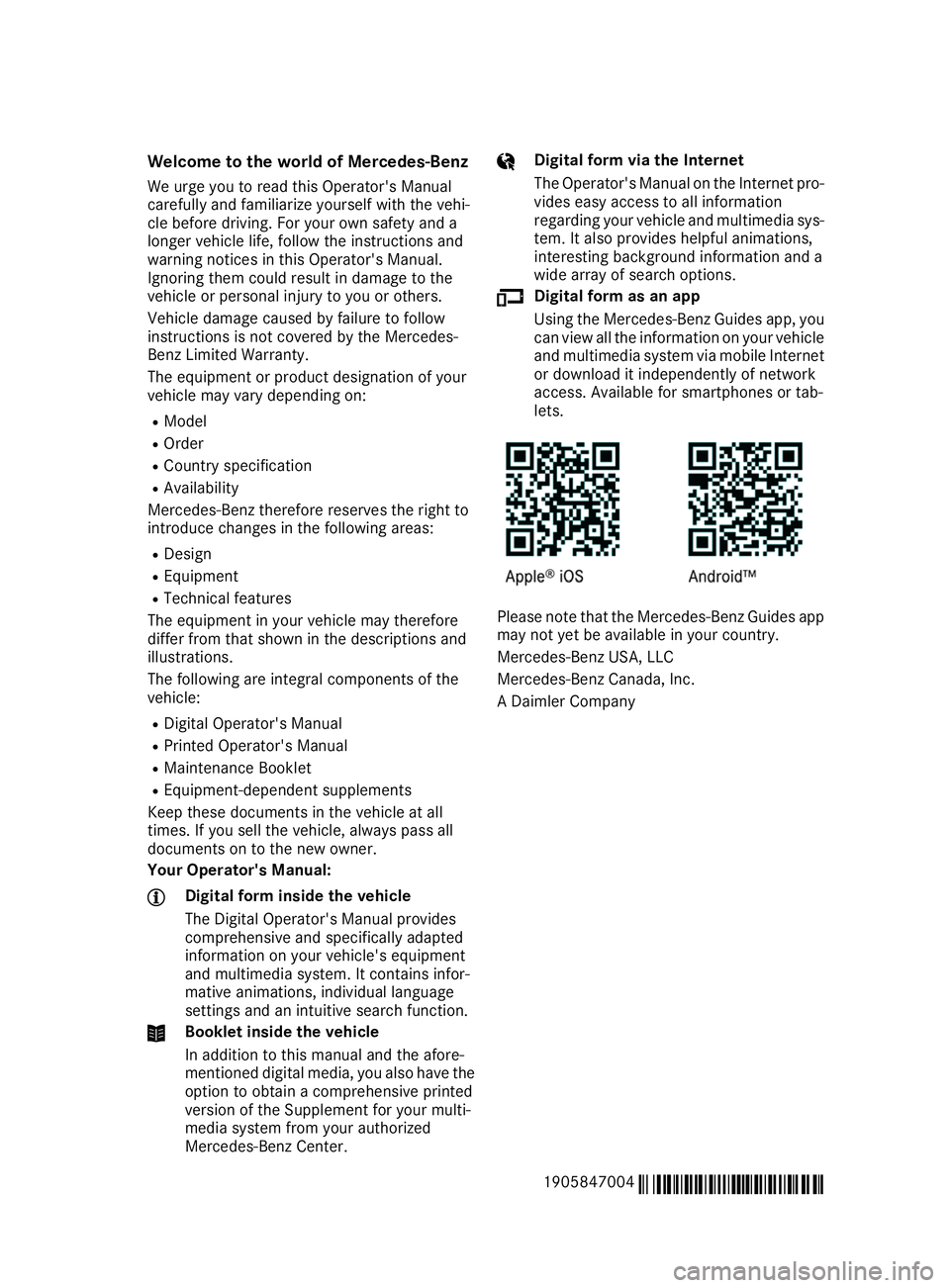
Welcome to the world of Mercedes-Benz
We urge you to read this Operator's Manual
carefully and familiarize yourself with the vehi-
cle before driving. For your own safety and a
longer vehicle life, follow the instructions and
warning notices in this Operator's Manual.
Ignoring them could result in damage to the
vehicle or personal injury to you or others.
Vehicle damage caused by failure to follow
instructions is not covered by the Mercedes-
Benz Limited Warranty.
The equipment or product designation of your
vehicle may vary depending on:
R Model
R Order
R Country specification
R Availability
Mercedes-Benz therefore reserves the right to
introduce changes in the following areas:
R Design
R Equipment
R Technical features
The equipment in your vehicle may therefore
differ from that shown in the descriptions and
illustrations.
The following are integral components of the
vehicle:
R Digital Operator's Manual
R Printed Operator's Manual
R Maintenance Booklet
R Equipment-dependent supplements
Keep these documents in the vehicle at all
times. If you sell the vehicle, always pass all
documents on to the new owner.
Your Operator's Manual: Digital form inside the vehicle
The Digital Operator's Manual provides
comprehensive and specifically adapted
information on your vehicle's equipment
and multimedia system. It contains infor-
mative animations, individual language
settings and an intuitive search function. Booklet inside the vehicle
In addition to this manual and the afore-
mentioned digital media, you also have the option to obtain a comprehensive printed
version of the Supplement for your multi-
media system from your authorized
Mercedes-Benz Center. Digital form via the Internet
The Operator's Manual on the Internet pro-
vides easy access to all information
regarding your vehicle and multimedia sys- tem. It also provides helpful animations,
interesting background information and a
wide array of search options. Digital form as an app
Using the Mercedes-Benz Guides app, you
can view all the information on your vehicle and multimedia system via mobile Internetor download it independently of network
access. Available for smartphones or tab-
lets. Please note that the Mercedes-Benz Guides app
may not yet be available in your country.
Mercedes-Benz USA, LLC
Mercedes-Benz Canada, Inc.
A Daimler Company
1905847004 É1905847004KËÍ
Page 21 of 298
Information .................................... 287
Tires/wheels .................................2
85
Vehicle data ................................... 293
Telephone
Accepting a call (multifunction
steering wheel) .............................. 167
Authorizing a mobile phone (con-
necting) ......................................... 216
Connecting a mobile phone
(device manager) ........................... 215
Display message ............................ 197
Introduction ................................... 166
Menu (on-board computer) ............ 166
Number from the phone book ....... .167
Redialing ........................................ 167
Rejecting/ending a call ................. 167
see also Digital Operator's Man-
ual ................................................. .209
Temperature
Coolant (display in the instrumentcluster) .......................................... 159
Engine oil (on-board computer) ...... 170
Outside temperature ..................... .159
Setting (climate control) ................ 105
Transmission oil (on-board com-
puter) ............................................. 170
Timing (RACETIMER) ......................... 172
Tire pressure
Calling up (on-board computer) ..... 269
Checking manually ........................ 268
Display message ............................ 192
Maximum ....................................... 268
Not reached (TIREFIT) .................... 253
Notes ............................................. 267
Reached (TIREFIT) .......................... 253
Recommended ............................... 266
Tire pressure monitor
Checking the tire pressure elec-
tronically ........................................ 270
Function/notes ............................ .269
General notes ................................ 269
Important safety notes .................. 269
Restarting ...................................... 271
Warning lamp ................................. 207
Warning message .......................... 270
Tire-change tool kit ........................... 250
TIREFIT kit
Important safety notes .................. 251 Storage location ............................ 250
Tire pressure not reached .............. 253
Tire pressure reached .................... 253
Using ............................................. 251
Tires
Aspect ratio (definition) ................. 280
Average weight of the vehicle
occupants (definition) .................... 279
Bar (definition) ............................... 279
Changing a wheel .......................... 281
Characteristics .............................. 279
Checking ........................................ 264
Curb weight (definition) ................. 280
Definition of terms ......................... 279
Direction of rotation ..................... .281
Display message ............................ 192
Distribution of the vehicle occu-
pants (definition) ............................ 281
DOT (Department of Transporta-
tion) (definition) ............................ .279
DOT, Tire Identification Number
(TIN) ............................................... 278
GAWR (Gross Axle Weight Rating)
(definition) ..................................... 279
GVW (Gross Vehicle Weight) (def-
inition) .......................................... .280
GVWR (Gross Vehicle Weight Rat-
ing) (definition) .............................. 280
Important safety notes .................. 263
Increased vehicle weight due to
optional equipment (definition) ...... 279
Information on driving .................... 263
Kilopascal (kPa) (definition) ........... 280
Labeling (overview )........................ 276
Load bearing index (definition) ...... 281
Load index ..................................... 278
Load index (definition) ................... 280
Maximum load on a tire (defini-
tion) ............................................... 280
Maximum loaded vehicle weight
(definition) ..................................... 280
Maximum permissible tire pres-
sure (definition) ............................. 280
Maximum tire load ......................... 278
Maximum tire load (definition) ....... 280
Notes on sport tire s....................... 263
Optional equipment weight (defi-
nition) ............................................ 281 Index
19
Page 28 of 298
Mercedes-Benz USA, LLC
Customer Assistance Center
One Mercedes Drive
Montvale, NJ 07645-0350
Maintenance
USA only:
Always have the Service and Warranty Booklet
with you when you bring the vehicle to an
authorized Mercedes-Benz Center. The service
advisor will record every service for you in the
Service and Warranty Booklet.
Canada only:
Have every service in a qualified specialist work-
shop confirmed in the service report. Roadside Assistance
The Mercedes-Benz Roadside Assistance Pro-
gram offers technical help in the event of a
breakdown. Calls to the toll-free Roadside Assis-
tance Hotline are answered by our agents 24
hours a day, 365 days a year.
1-800-FOR-MERCedes (1-800-367-6372)
(USA)
1-800-387-0100 (Canada)
For additional information, refer to the
Mercedes-Benz Roadside Assistance Program
brochure (USA) or the "Roadside Assistance"
section in the Service and Warranty Booklet
(Canada). You will find both in the vehicle docu-
ment wallet. Change of address or change of own-
ership
In the event of a change of address, please send us the "Notification of Address Change" in the
Service and Warranty Booklet or simply call the
Mercedes-Benz Customer Assistance Center
(USA) at the hotline number
1-800-FOR-MERCedes (1-800-367-6372) or
Customer Service Center (Canada) at
1-800-387-0100. This will assist us in contact-
ing you in a timely manner should the need arise.
If you sell your Mercedes, please leave all liter-
ature in the vehicle so that it is available to the
next owner. If you have purchased a used car, please send us
the "Notification of Used Car Purchase" in the
Service and Warranty Booklet or simply call the
Mercedes-Benz Customer Assistance Center
(USA) at the hotline number
1-800-FOR-MERCedes (1-800-367-6372) or
Customer Service (Canada) at 1-800-387-0100. Vehicle operation outside the USA
and Canada
When you are abroad with your vehicle, observe
the following points:
R Service facilities or replacement parts may
not be readily available.
R Lead-free fuel for vehicles with a catalytic
converter may not be available. Leaded fuel
can cause damage to the catalytic converter.
R The fuel may have a considerably lower
octane number. Unsuitable fuel can cause
engine damage.
Some Mercedes-Benz models are available for
delivery in Europe through our European Deliv-
ery Program. For details, consult an authorized
Mercedes-Benz Center or write to one of the
following addresses.
In the USA
Mercedes-Benz USA, LLC
European Delivery Department
One Mercedes Drive
Montvale, NJ 07645-0350
In Canada
Mercedes-Benz Canada, Inc.
European Delivery Department
98 Vanderhoof Avenue
Toronto, Ontario M4G 4C9 Operating safety
Important safety notes
G
WARNING
If you do not have the prescribed service/
maintenance work or any required repairs
carried out, this can result in malfunctions or system failures. There is a risk of an accident. 26
Operating safetyIntroduction
Page 32 of 298
You can incorporate data into the vehicle's com-
fort and infotainment functions yourself as part
of the selected equipment.
These include, for example:
R Multimedia data such as music, films or pho-
tos for playback in an integrated multimedia
system
R Address book data for use in conjunction with
an integrated hands-free system or an inte-
grated navigation system
R Navigation destinations that have been
entered
R Data about using Internet services
This data can be saved locally in the vehicle or
located on a device that you have connected to the vehicle (e.g. smartphone, USB memory stick
or MP3 player). If this data is saved in the vehi-
cle, you can delete it at any time. This data is
sent to third parties only at your request, par-
ticularly when you use online services in accord- ance with the settings that you have selected.
You can save and change comfort settings/
customizations in the vehicle at any time.
Depending on the equipment in question, these can include:
R Seat and steering wheel position settings
R Suspension and climate control settings
R Custom settings such as interior lighting
If your vehicle is equipped appropriately, you
can connect your smartphone or another mobile
end device to the vehicle. You can control this by
means of the control elements integrated in the vehicle. The smartphone's picture and sound
can be output via the multimedia system. Spe-
cific items of information are also sent to your
smartphone.
Depending on the type of integration, this can
include:
R General vehicle information
R Position data
This allows the use of selected smartphone
apps, such as navigation or music player apps.
There is no additional interaction between the
smartphone and the vehicle, particularly active
access to vehicle data. The type of additional
data processing is determined by the provider of
the app being used. Whether you can configure settings for it and, if so, which ones, depends on
the app and your smartphone's operating sys-
tem. Online services
Wireless network connection If your vehicle has a wireless network connec-
tion, data can be exchanged between your vehi-
cle and other systems. The wireless network
connection is made possible by the vehicle's
own transmitter and receiver or by mobile devi- ces that you have brought into the vehicle (e.g.
smartphones). Online functions can be used via
this wireless network connection. These include online services and applications/apps providedby the manufacturer or other providers.
Services provided by the manufacturer In the case of the manufacturer's online serv-
ices, the manufacturer describes the functions
in a suitable place (e.g. operating instructions,
manufacturer's website) and provides the asso-
ciated information subject to data protection
legislation. Personal data can be used in order to
provide online services. The exchange of data
for this purpose takes place via a secure con-
nection, e.g. with the manufacturer's IT systems intended for the purpose. Collecting, processing
and using personal data beyond the provision of
services is permitted only on the basis of a stat-
utory permit or declaration of consent.
You can usually activate and deactivate the serv-
ices and functions (sometimes subject to a fee).
In many cases, this also applies to the vehicle's entire data connection. However, this does not
apply in particular to legally prescribed func-
tions and services such as the "eCall" emer-
gency call system.
Services from third parties If it is possible to use online services from other
providers, these services are the responsibility
of the provider in question and subject to that
provider's data protection conditions and terms of use. The manufacturer has no influence over
the content exchanged here.
For this reason, please ask the service provider
for information about the type, extent and pur-
pose of the collection and use of personal data
when services are provided by third parties. 30
Data stored in the vehicleIntroduction
Page 34 of 298
Daimler AG can restrict or discontinue the ser-
vice.
The remote online services of Mercedes me
connect:
R are not intended for use in the vehicle. These
services must not be used while the vehicle is in motion.
R may contain data which is out of date or inva-
lid. The displays in the vehicle apply at all
times.
The remote online services and selected basic
services can be used via the website https://
www.mercedes.me or via the web application
for your smartphone. They can be called up
using many Internet-enabled end devices.
You must observe the legal requirements for the country in which you are currently driving when
calling up the website via the multimedia sys-
tem. Do not use the website while the vehicle is in motion. Notes on data protection
G
WARNING
The use of remote control functions can lead
to security risks.
Remote control functions include, for exam-
ple:
R Locking/unlocking the vehicle
R Activating auxiliary heating
A security risk could occur, for example by
the activation of the auxiliary heating at an
unsuitable location for the vehicle.
An unauthorized person with knowledge of
your access data could take control of vehicle
behavior and/or individual vehicle functions.
Take great care to protect your access data
from unauthorized access.
Change your access data immediately if you
suspect unauthorized access has taken place
or that your access data has been compro-
mised. In addition, consult an authorized
Mercedes-Benz Center immediately.
Any person who has access to your access data
can use the Mercedes me connect services. Change of vehicle
If you sell your vehicle, you are obliged to delete
the vehicle from your personal area on the
Mercedes me website.
If you have bought a used vehicle, it is possible
that the previous owner still has access to the
Mercedes me connect services. Daimler AG or
Mercedes me connect are not automatically
informed about the change of owner.
For as long as the previous owner has a con-
nection with the vehicle, they can use all of the
Mercedes me connect services.
For example:
R locating the vehicle
R remotely operated vehicle functions
e.g. locking and unlocking the vehicle
Active vehicle location is shown in the multime- dia system display.
If in doubt, deactivate the function:
R on the Mercedes me connect website by
switching off the function in the settings.
R via the Mercedes-Benz Customer Center. You
can call up the Mercedes-Benz Customer
Center by pressing the 00D9button in the
overhead control unit. Have access for the
previous owner deactivated. Information on copyright
Free and open-source software
Information on license for free and open-source
software used in your vehicle can be found on
the data carrier in your vehicle document wallet
and, including updates, on the following web-
site:
http://www.mercedes-benz.com/
opensource 32
Information on copyrightIntroduction
Page 70 of 298
Changing the settings of the locking
system
You can change the settings of the locking sys-
tem. This means that only the driver's door, the
glove box and the fuel filler flap are unlocked
when the vehicle is unlocked. This is useful if you
frequently travel on your own.
X To change the setting: press and hold down
the 0036 and0037 buttons simultaneously
for approximately six seconds until the indi-
cator lamp flashes twice (Y page 69).
If the setting of the locking system is changed
within the signal range of the vehicle, pressing
the 0037 or0036 button:
R locks or
R unlocks the vehicle
The SmartKey now functions as follows:
X To unlock: press the0036button once.
X To unlock centrally: press the0036button
twice.
X To lock: press the 0037button.
The KEYLESS-GO functions can be changed as
follows:
X To unlock the driver's door: touch the inner
surface of the door handle on the driver's
door.
X To unlock centrally: touch the inner surface
of the front-passenger door handle.
X To lock centrally: touch the outer sensor
surface on one of the door handles.
Restoring factory settings:
X Press the 0036and0037 buttons simultane-
ously for approximately six seconds until the
indicator lamp flashes twice (Y page 69).Mechanical key
General notes If the vehicle can no longer be locked or
unlocked with the SmartKey or KEYLESS-GO,
use the mechanical key.
If you use the mechanical key to unlock and
open the driver's door, the anti-theft alarm sys- tem will be triggered. Switch off the alarm
(Y page 64). If you unlock the vehicle using the mechanical
key, the fuel filler flap will not be unlocked auto-
matically.
X To unlock the fuel filler flap: insert the
SmartKey into the ignition lock.
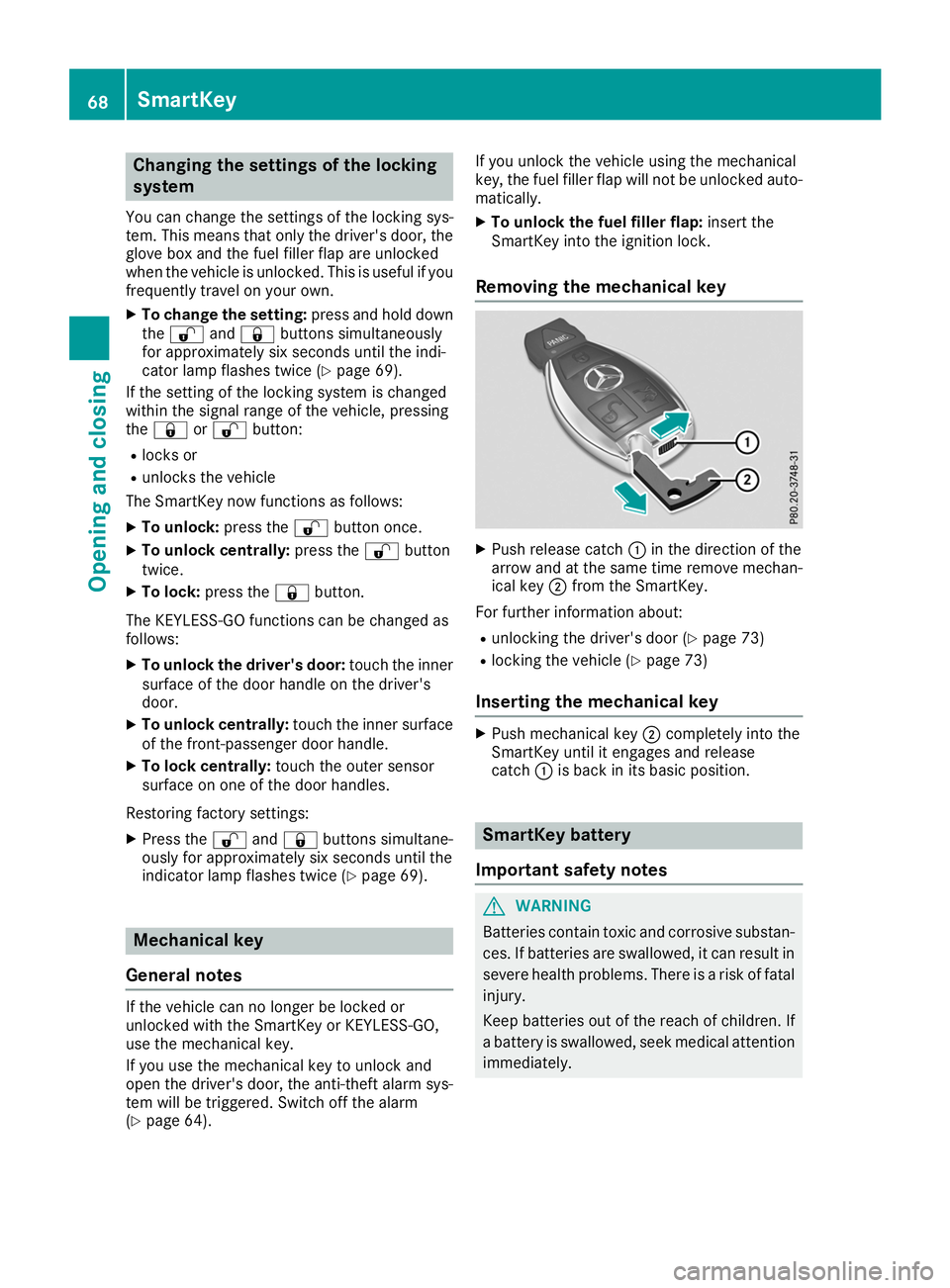
Removing the mechanical key X
Push release catch 0043in the direction of the
arrow and at the same time remove mechan- ical key 0044from the SmartKey.
For further information about:
R unlocking the driver's door (Y page 73)
R locking the vehicle (Y page 73)
Inserting the mechanical key X
Push mechanical key 0044completely into the
SmartKey until it engages and release
catch 0043is back in its basic position. SmartKey battery
Important safety notes G
WARNING
Batteries contain toxic and corrosive substan- ces. If batteries are swallowed, it can result in
severe health problems. There is a risk of fatal injury.
Keep batteries out of the reach of children. If
a battery is swallowed, seek medical attention immediately. 68
SmartKeyOpening and closing
Page 100 of 298
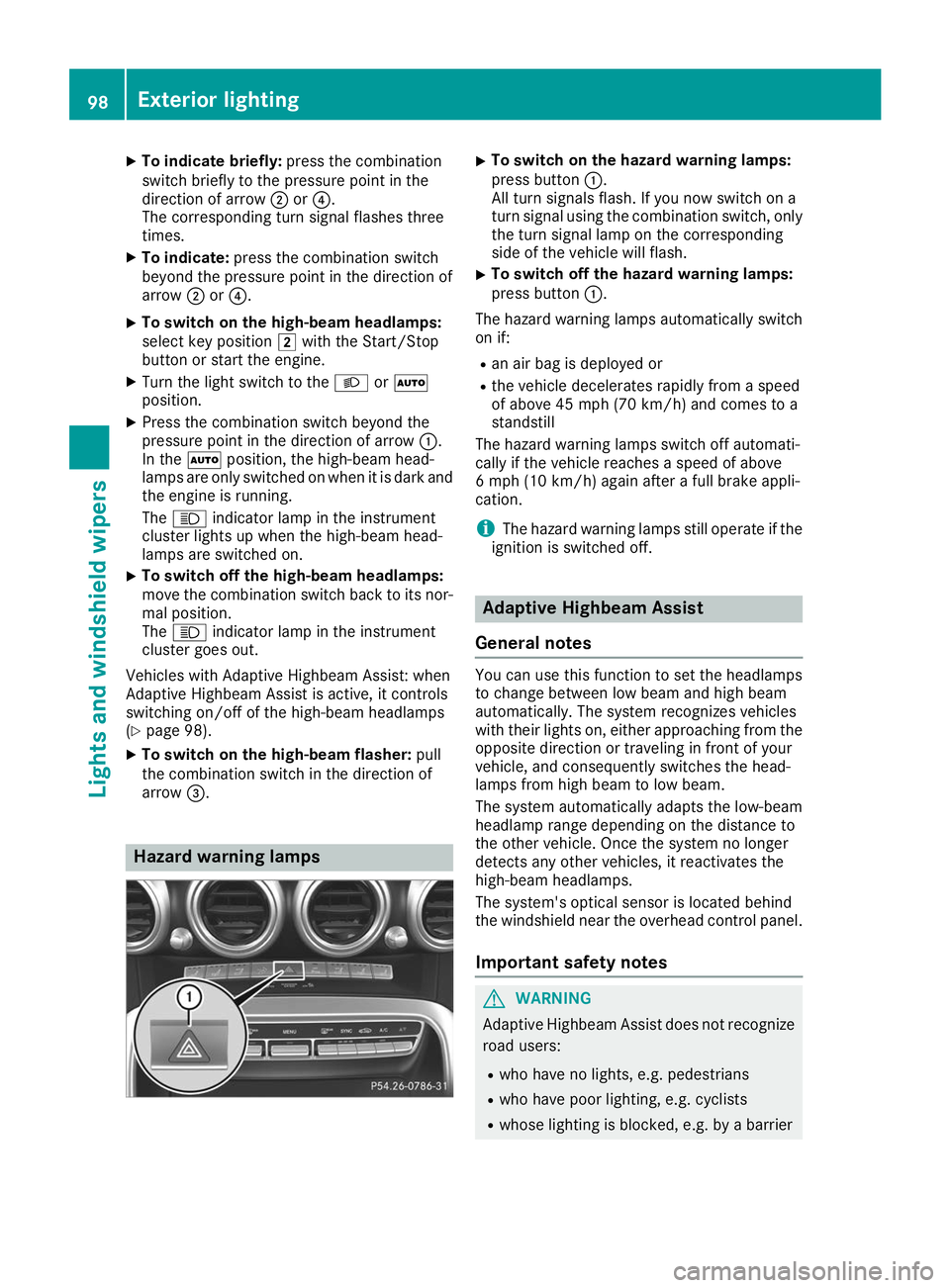
X
To indicate briefly: press the combination
switch briefly to the pressure point in the
direction of arrow 0044or0085.
The corresponding turn signal flashes three
times.
X To indicate: press the combination switch
beyond the pressure point in the direction of
arrow 0044or0085.
X To switch on the high-beam headlamps:
select key position 0048with the Start/Stop
button or start the engine.
X Turn the light switch to the 0058or0058
position.
X Press the combination switch beyond the
pressure point in the direction of arrow 0043.
In the 0058position, the high-beam head-
lamps are only switched on when it is dark and
the engine is running.
The 0057 indicator lamp in the instrument
cluster lights up when the high-beam head-
lamps are switched on.
X To switch off the high-beam headlamps:
move the combination switch back to its nor- mal position.
The 0057 indicator lamp in the instrument
cluster goes out.
Vehicles with Adaptive Highbeam Assist: when
Adaptive Highbeam Assist is active, it controls
switching on/off of the high-beam headlamps
(Y page 98).
X To switch on the high-beam flasher: pull
the combination switch in the direction of
arrow 0087. Hazard warning lamps X
To switch on the hazard warning lamps:
press button 0043.
All turn signals flash. If you now switch on a
turn signal using the combination switch, only the turn signal lamp on the corresponding
side of the vehicle will flash.
X To switch off the hazard warning lamps:
press button
0043.
The hazard warning lamps automatically switch
on if:
R an air bag is deployed or
R the vehicle decelerates rapidly from a speed
of above 45 mph (70 km/h) and comes to a
standstill
The hazard warning lamps switch off automati-
cally if the vehicle reaches a speed of above
6 mph (10 km/h) again after a full brake appli-
cation.
i The hazard warning lamps still operate if the
ignition is switched off. Adaptive Highbeam Assist
General notes You can use this function to set the headlamps
to change between low beam and high beam
automatically. The system recognizes vehicles
with their lights on, either approaching from the opposite direction or traveling in front of your
vehicle, and consequently switches the head-
lamps from high beam to low beam.
The system automatically adapts the low-beam
headlamp range depending on the distance to
the other vehicle. Once the system no longer
detects any other vehicles, it reactivates the
high-beam headlamps.
The system's optical sensor is located behind
the windshield near the overhead control panel.
Important safety notes G
WARNING
Adaptive Highbeam Assist does not recognize road users:
R who have no lights, e.g. pedestrians
R who have poor lighting, e.g. cyclists
R whose lighting is blocked, e.g. by a barrier 98
Exterior lightingLights and
windshield wipers
Page 107 of 298
Problems with the "Cooling with air dehumidification" function
Problem
Possible causes/consequences and
0050
0050Solutions The indicator lamp over
the
005A rocker switch
flashes three times or
remains off. The cooling
with air dehumidification
function cannot be acti-
vated via the multimedia system any longer
(Y page 213). Cooling with air dehumidification has been deactivated due to a mal-
function.
X Visit a qualified specialist workshop. Setting climate control to automatic
General notes In automatic mode, the set temperature is main-
tained automatically at a constant level. The
system automatically regulates the temperature of the dispensed air, the airflow and the air dis- tribution.
During automatic controlling, the "Cooling with
air dehumidification" function is activated.
Automatic control X
Select key position 0048with the Start/Stop
button (Y page 111).
X To activate: press rocker switch 0058up or
down.
The indicator lamp above the 0058rocker
switch lights up.
X Set the desired temperature using the 0082
rocker switch.
X To switch to manual operation: press the
H rocker switch up or down.
or
X Press the upper or lower section of the 008F
rocker switch.
The indicator lamp above the 0058rocker
switch goes out.
In automatic mode, if you adjust the airflow or
air distribution manually, the indicator lamp
above the 0058rocker switch goes out. The
function which has not been changed manually,
however, continues to be controlled automati-
cally. When the manually set function switches
back to automatic mode, the indicator lamp
above the 0058rocker switch lights up again. Setting the temperature
Different temperatures can be set for the driv-
er's and front-passenger sides.
X Select key position 0048with the Start/Stop
button (Y page 111).
X To increase or reduce: press the0082
rocker switch up or down.
Only change the temperature setting in small
increments. Start at 72 ‡ (22 †). Setting the air distribution
Air distribution settings 0061
Directs air through the defroster vents
009C Directs air through the center and side air
vents
009B Directs air through the footwell air vents
009F Directs air through the center, side and
footwell vents
008F Directs air through the defroster, center,
side and footwell vents
0087 Directs air through the defroster, center
and side air vents
0086 Directs air through the defroster and
footwell vents
Setting X
Select key position 0048with the Start/Stop
button (Y page 111).
X Press the 008Frocker switch up or down.
The various air distribution settings appear in the multimedia system. Operating the climate control systems
105Climate control