Page 464 of 595
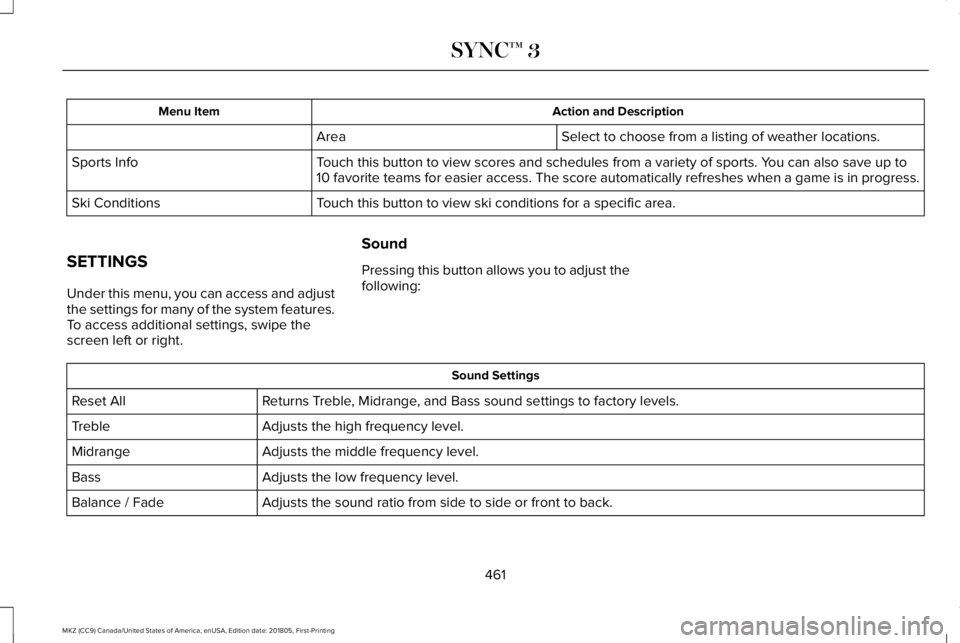
Action and DescriptionMenu Item
Select to choose from a listing of weather locations.Area
Touch this button to view scores and schedules from a variety of sports. You can also save up to10 favorite teams for easier access. The score automatically refreshes when a game is in progress.Sports Info
Touch this button to view ski conditions for a specific area.Ski Conditions
SETTINGS
Under this menu, you can access and adjustthe settings for many of the system features.To access additional settings, swipe thescreen left or right.
Sound
Pressing this button allows you to adjust thefollowing:
Sound Settings
Returns Treble, Midrange, and Bass sound settings to factory levels.Reset All
Adjusts the high frequency level.Treble
Adjusts the middle frequency level.Midrange
Adjusts the low frequency level.Bass
Adjusts the sound ratio from side to side or front to back.Balance / Fade
461
MKZ (CC9) Canada/United States of America, enUSA, Edition date: 201805, First-Printing
SYNC™ 3
Page 465 of 595
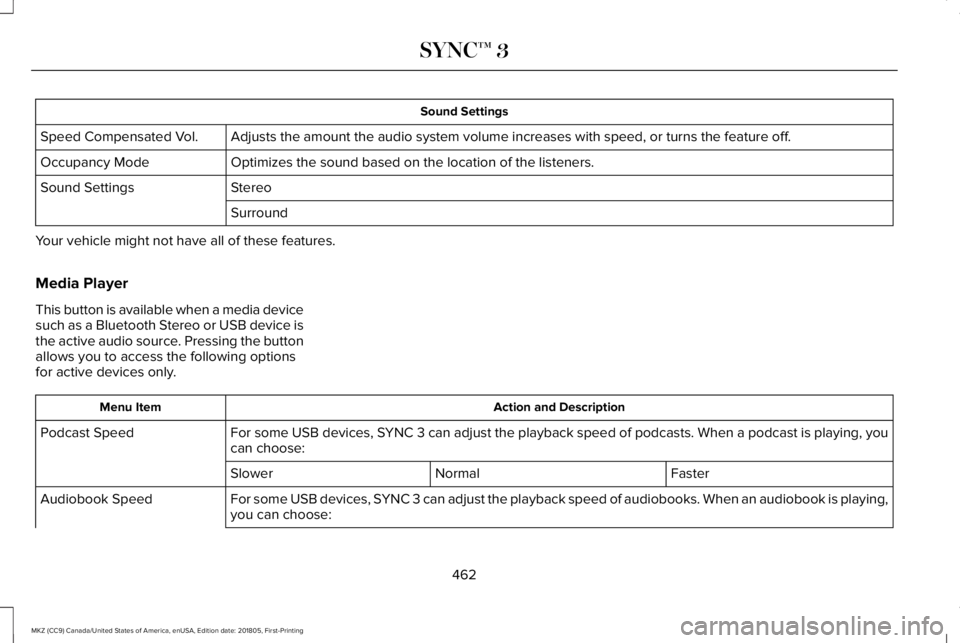
Sound Settings
Adjusts the amount the audio system volume increases with speed, or turns the feature off.Speed Compensated Vol.
Optimizes the sound based on the location of the listeners.Occupancy Mode
StereoSound Settings
Surround
Your vehicle might not have all of these features.
Media Player
This button is available when a media devicesuch as a Bluetooth Stereo or USB device isthe active audio source. Pressing the buttonallows you to access the following optionsfor active devices only.
Action and DescriptionMenu Item
For some USB devices, SYNC 3 can adjust the playback speed of podcasts. When a podcast is playing, youcan choose:Podcast Speed
FasterNormalSlower
For some USB devices, SYNC 3 can adjust the playback speed of audiobooks. When an audiobook is playing,you can choose:Audiobook Speed
462
MKZ (CC9) Canada/United States of America, enUSA, Edition date: 201805, First-Printing
SYNC™ 3
Page 467 of 595
Action and DescriptionMenu Item
Select how time displays.Clock Format
When active, the clock adjusts to time zone changes.Auto Time Zone UpdateThis feature is only available in vehicles with navigation.
When selected, the vehicle clock resets to GPS satellite time.Reset Clock to GPS Time
The system automatically saves any updatesyou make to the settings.
Bluetooth
Pressing this button allows you to access thefollowing:
ActionMenu Item
OnBluetooth
Off
You must activate Bluetooth to pair aBluetooth enabled device.
The processes of pairing a Bluetooth deviceis the same as pairing a phone. See Pairinga Device in Phone settings for how to pair adevice and the available options.
Phone
Pair your Bluetooth enabled phone with thesystem before using the functions inhands-free mode.
Switch on Bluetooth on your device to beginpairing. See your phone’s manual ifnecessary.
464
MKZ (CC9) Canada/United States of America, enUSA, Edition date: 201805, First-Printing
SYNC™ 3
Page 472 of 595
911 Assist
Enabling 911 Assist
Note:For this feature to work, your cellphone must have Bluetooth and connectwith SYNC3.
To activate 911 Assist from the settingsscreen select:
Action and DescriptionMenu Item
Press this button to enter the settings screen for this feature. You can switch this feature on and off by slidingthe scrollbar as follows.911 Assist
Slide the scrollbar to switch this feature on.
You can set your contacts in the phone bookfor emergency quick dialing.
Setting Emergency Contacts
Ensure the phone book of your cell phonedownloaded to SYNC 3.
From the settings screen select:
Action and DescriptionMenu Item
Press this button to enter the settings screen for this feature.911 Assist
Select this option as it displays on the screen.Set Emergency Contacts
Action and DescriptionMenu Item
Select this option under .Select a Contact
469
MKZ (CC9) Canada/United States of America, enUSA, Edition date: 201805, First-Printing
SYNC™ 3
Page 477 of 595

Navigation Source Selection
The screen lists available alternativenavigation sources using Applink.
Mobile Apps
You can enable the control of compatiblemobile apps running on your Bluetooth orUSB device on SYNC 3. In order to enablemobile apps, SYNC 3 requires user consentto send and receive app authorizationinformation and updates using the data planassociated with the connected device.
The connected devices send data to us inthe United States. The encrypted informationincludes your VIN, SYNC 3 module number,anonymous usage statistics and debugginginformation. Updates may take place.
Note:Not all Mobile Apps are compatiblewith the system.
Note:Standard data rates apply. We are notresponsible for any additional charges youmay receive from your service provider,when your vehicle sends or receives datathrough the connected device.
Action and DescriptionMenu Item
Enable or disable the use of mobile apps onSYNC 3.OnMobile Apps
OffDisabling mobile apps in the settings menudisables automatic updates and the use ofmobile apps on SYNC 3.
You can view the status of mobile app permissions in the settings menu.
Once Mobile Apps is enabled, you have the following options:
This provides information on the current state of available app updates.Update Mobile Apps
There are three possible statuses:
474
MKZ (CC9) Canada/United States of America, enUSA, Edition date: 201805, First-Printing
SYNC™ 3
Page 478 of 595

Action and DescriptionMenu Item
Updating Mobile Apps…Up-To-DateUpdate Needed
The system is trying to receive an update.No update is required.The system has detected a new apprequiring authorization or a generalpermissions update is required.
Select this button if an update is required andyou want to request this update manually. Forexample, when your mobile device is connectedto a Wi-Fi hotspot, select:
Request Update
Request Update
Grant or deny permissions to all apps at once.All Apps
Grant or deny an individual app particular permissions. App permissions are organized into groups. By pressingthe info book icon, you can see which signals are included in each group.There may also be SYNC 3enabled apps listed underthese options.
Note:We is not responsible or liable for anydamages or loss of privacy relating to usageof an app, or dissemination of any vehicledata that you approve us to provide to anapp.
General
Access and adjust the system settings, voicefeatures, as well as phone, navigation andwireless settings.
475
MKZ (CC9) Canada/United States of America, enUSA, Edition date: 201805, First-Printing
SYNC™ 3
Page 479 of 595
Menu Item
Select to have the touchscreen display in English, Spanish or French.Language
Select to display units in kilometers or miles.Distance
Select to display units in Celsius or Fahrenheit.Temperature
Select to have the system beep to confirm choices made through the touch-screen.Touch Screen Beep
When you activate this option, the system automatically updates when you havean available Internet connection through a Wi-Fi network or mobile connection.Automatic System Updates
Information pertaining to the system and its software.About SYNC
Documentation of the software license for the system.Software Licenses
Select to restore factory defaults. This erases all personal settings and personaldata.Master Reset
Wi-Fi & Hotspot (If Equipped)
Access SYNC Wi-Fi and Vehicle Hotspotsettings and information.
System Wi-Fi
You can access the following:
476
MKZ (CC9) Canada/United States of America, enUSA, Edition date: 201805, First-Printing
SYNC™ 3
Page 480 of 595

Action and DescriptionMenu Item
Enable this option to connect to Wi-Fi for SYNC 3 vehicle software updates.Wi-Fi
This provides you with a list of available Wi-Fi networks within range.Available Networks
Clicking on a network from the list allows you to connect or disconnect from that network. The system mayrequire a security code to connect.
When you click the information button next to a network, more information about the network displays suchas the signal strength, connection status and security type.
The system alerts you when your vehicle is parked and a Wi-Fi network is within range if SYNC is not alreadyconnected.Wi-Fi Available Notifications
Vehicle Hotspot
You can access the following:
Action and DescriptionMenu Item
Allows you to turn the hotspot on and off.Wi-Fi Hotspot On/Off
Allows you to view and edit hotspot settings such as the SSID and password.Settings
Allows you to view your vehicle's hotspot plan and data usage.Data Usage
Allows you to manage devices connected to your hotspot.Manage Devices
477
MKZ (CC9) Canada/United States of America, enUSA, Edition date: 201805, First-Printing
SYNC™ 3