2019 LEXUS UX250H battery
[x] Cancel search: batteryPage 99 of 476
992-1. Instrument cluster
2
Vehicle status information and indicators
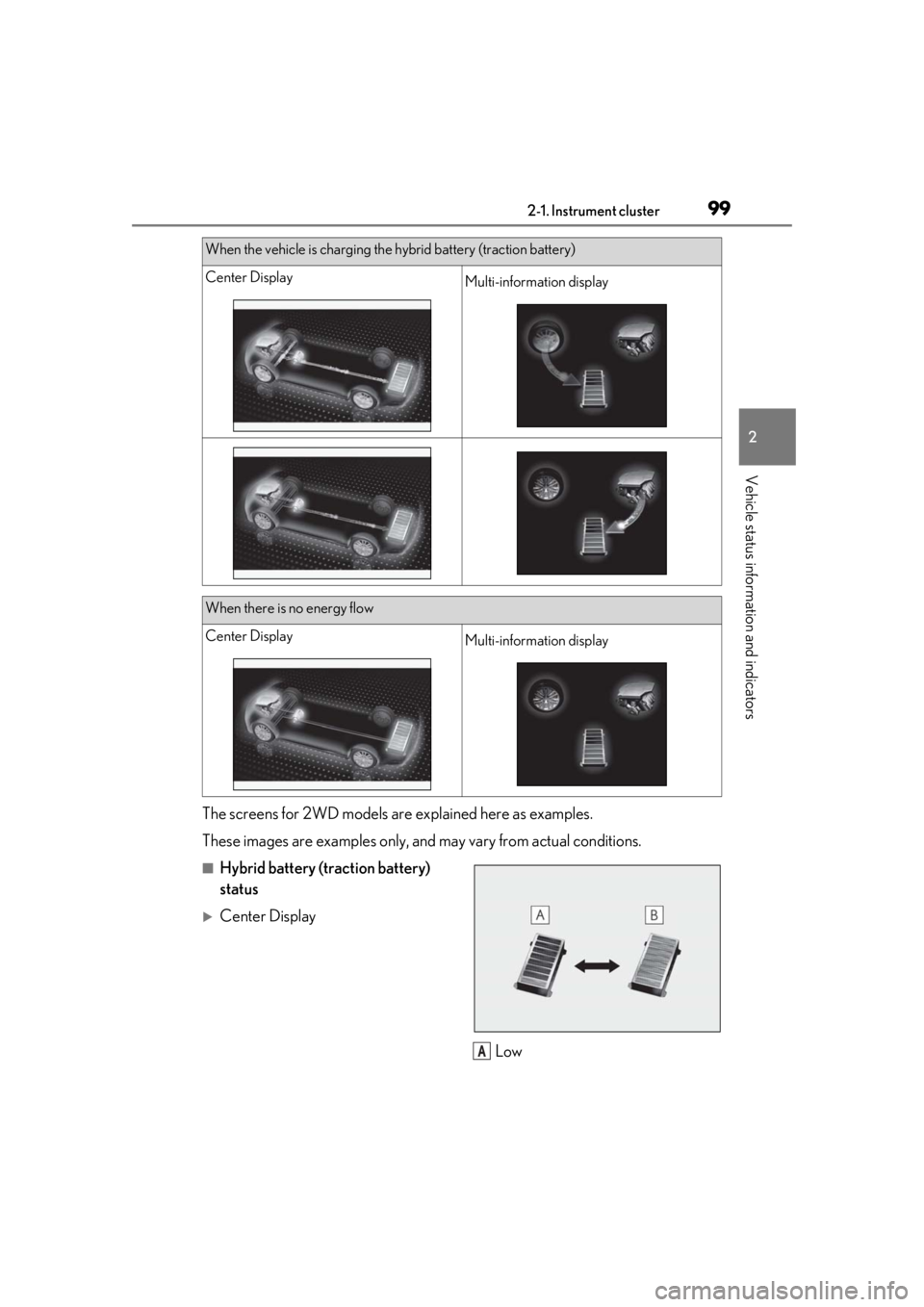
The screens for 2WD models are explained here as examples.
These images are examples only, an d may vary from actual conditions.
■Hybrid battery (traction battery)
status
Center Display
Low
When the vehicle is charging the hybrid battery (traction battery)
Center DisplayMulti-information display
When there is no energy flow
Center DisplayMulti-information display
A
Page 104 of 476
1043-1. Key information
3-1.Key information
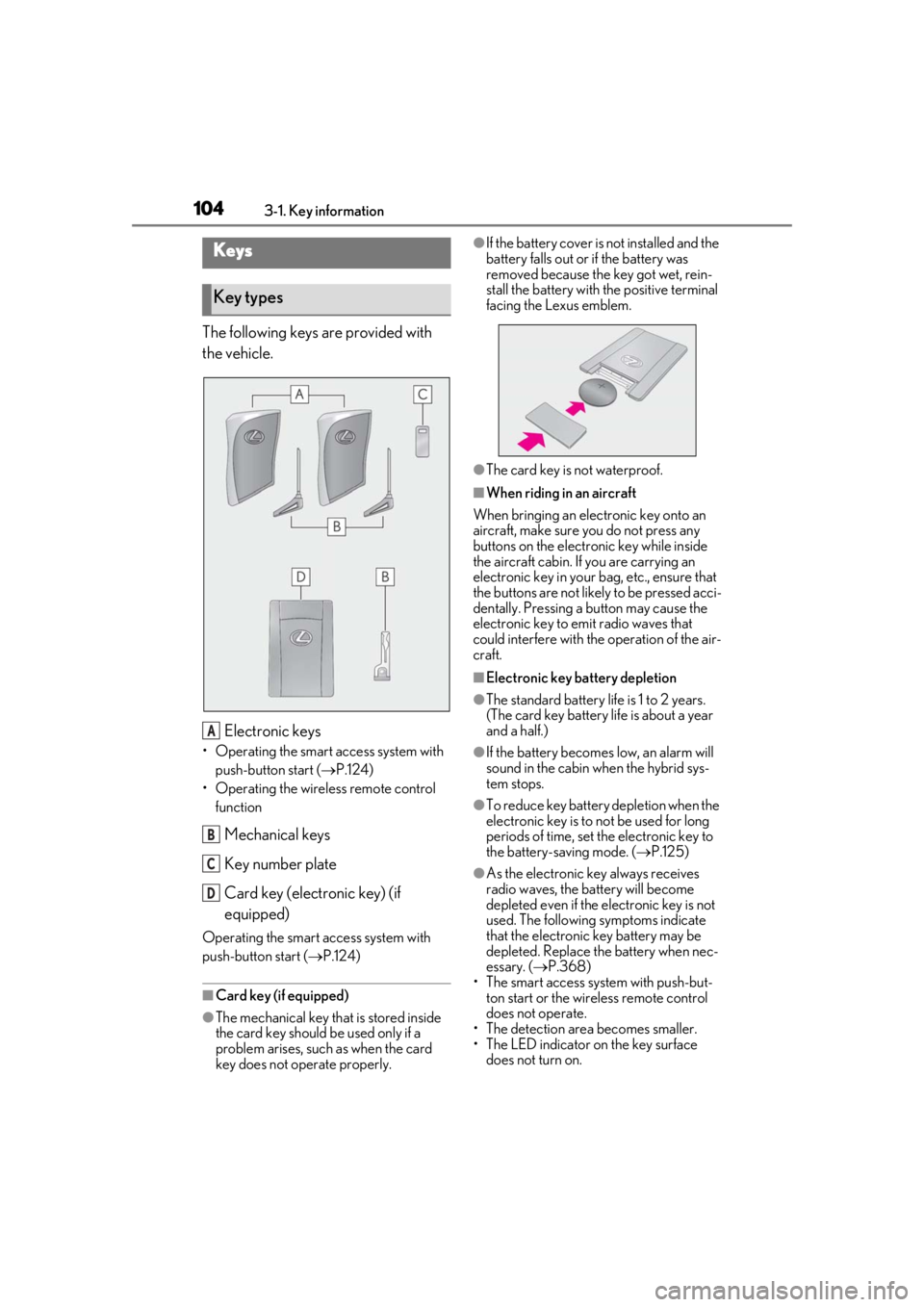
The following keys are provided with
the vehicle.
Electronic keys
• Operating the smart access system with push-button start ( P.124)
• Operating the wireless remote control function
Mechanical keys
Key number plate
Card key (electronic key) (if
equipped)
Operating the smart access system with
push-button start ( P.124)
■Card key (if equipped)
●The mechanical key that is stored inside
the card key should be used only if a
problem arises, such as when the card
key does not operate properly.
●If the battery cover is not installed and the
battery falls out or if the battery was
removed because the key got wet, rein-
stall the battery with the positive terminal
facing the Lexus emblem.
●The card key is not waterproof.
■When riding in an aircraft
When bringing an electronic key onto an
aircraft, make sure you do not press any
buttons on the electronic key while inside
the aircraft cabin. If you are carrying an
electronic key in your bag, etc., ensure that
the buttons are not likely to be pressed acci-
dentally. Pressing a button may cause the
electronic key to emit radio waves that
could interfere with the operation of the air-
craft.
■Electronic key battery depletion
●The standard battery life is 1 to 2 years.
(The card key battery life is about a year
and a half.)
●If the battery becomes low, an alarm will
sound in the cabin wh en the hybrid sys-
tem stops.
●To reduce key battery depletion when the
electronic key is to not be used for long
periods of time, set the electronic key to
the battery-saving mode. ( P.125)
●As the electronic key always receives
radio waves, the battery will become
depleted even if the electronic key is not
used. The following symptoms indicate
that the electronic key battery may be
depleted. Replace the battery when nec-
essary. ( P.368)
• The smart access system with push-but-
ton start or the wireless remote control
does not operate.
• The detection area becomes smaller.
• The LED indicator on the key surface
does not turn on.
Keys
Key types
A
B
C
D
Page 105 of 476

1053-1. Key information
3
Before driving
You can replace the battery by yourself
( P.368). However, as there is a danger
that the electronic key may be damaged, it
is recommended that replacement be car-
ried out by your Lexus dealer.
●To avoid serious deterioration, do not
leave the electronic key within 3 ft. (1 m)
of the following electr ical appliances that
produce a magnetic field:
• TVs
• Personal computers
• Cellular phones, cordless phones and battery chargers
• Recharging cellular phones or cordless phones
• Table lamps
• Induction cookers
■Replacing the battery
P.368
■Confirmation of the registered key
number
The number of keys already registered to
the vehicle can be confirmed. Ask your
Lexus dealer for details.
■If “A New Key has been Registered
Contact Your Dealer for Details” is
shown on the multi-information display
This message will be displayed each time
the driver’s door is opened when the doors
are unlocked from the outside for approxi-
mately 10 days after a new electronic key
has been registered. If this message is dis-
played but you have not had a new elec-
tronic key registered, ask your Lexus dealer
to check if an unknown electronic key
(other than those in your possession) has
been registered.
NOTICE
■To prevent key damage
●Do not drop the keys, subject them to
strong shocks or bend them.
●Do not expose the keys to high tem-
peratures for long periods of time.
●Do not get the keys wet or wash them
in an ultrasonic washer, etc.
●Do not attach metallic or magnetic
materials to the keys or place the keys
close to such materials.
●Do not disassemble the keys.
●Do not attach a sticker or anything else
to the surface of the electronic key.
●Do not place the keys near objects that
produce magnetic fields, such as TVs,
audio systems and induction cookers,
or medical electrical equipment, such
as low-frequency therapy equipment.
■Carrying the electronic key on your
person
Carry the electronic key 3.9 in. (10 cm)
or more away from electric appliances
that are turned on. Radio waves emitted
from electric applianc es within 3.9 in. (10
cm) of the electronic key may interfere
with the key, causing the key to not func-
tion properly.
■In case of a smart access system with
push-button start malfunction or
other key-related problems
P.403
■When an electronic key is lost
P.402
■Handling the card key
●If the battery or card key terminals get
wet, the battery may corrode and the
card key may stop working.
If the key is dropped into water, or if
drinking water, etc., is spilled on the
key, immediately remove the battery
cover and wipe the battery and termi-
nals. (To remove the battery cover,
lightly grasp and pull it.) If the battery is
corroded, have your Lexus dealer
replace the battery.
●Do not crush the battery cover or use
a screwdriver to remove the battery
cover.
Forcibly removing the battery cover
may bend or damage the key.
Page 106 of 476
1063-1. Key information
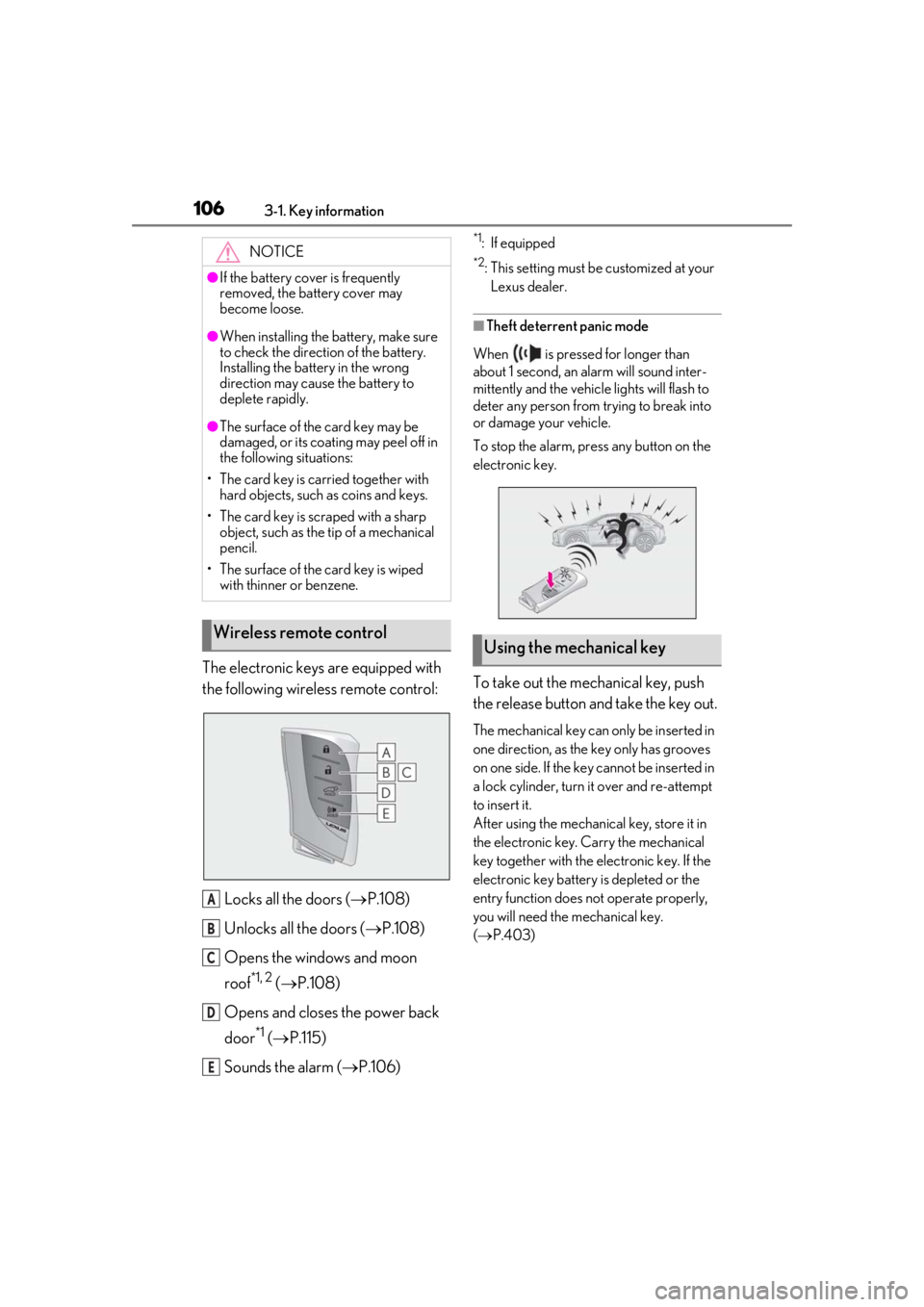
The electronic keys are equipped with
the following wireless remote control:Locks all the doors ( P.108)
Unlocks all the doors ( P.108)
Opens the windows and moon
roof
*1, 2 ( P.108)
Opens and closes the power back
door
*1 ( P.115)
Sounds the alarm ( P.106)
*1: If equipped
*2: This setting must be customized at your
Lexus dealer.
■Theft deterrent panic mode
When is pressed for longer than
about 1 second, an alarm will sound inter-
mittently and the vehicle lights will flash to
deter any person from trying to break into
or damage your vehicle.
To stop the alarm, press any button on the
electronic key.
To take out the mechanical key, push
the release button and take the key out.
The mechanical key can only be inserted in
one direction, as the key only has grooves
on one side. If the key cannot be inserted in
a lock cylinder, turn it over and re-attempt
to insert it.
After using the mechanical key, store it in
the electronic key. Carry the mechanical
key together with the electronic key. If the
electronic key battery is depleted or the
entry function does not operate properly,
you will need the mechanical key.
( P.403)
NOTICE
●If the battery cover is frequently
removed, the battery cover may
become loose.
●When installing the ba
ttery, make sure
to check the direction of the battery.
Installing the battery in the wrong
direction may cause the battery to
deplete rapidly.
●The surface of the card key may be
damaged, or its coating may peel off in
the following situations:
• The card key is carried together with hard objects, such as coins and keys.
• The card key is scraped with a sharp object, such as the tip of a mechanical
pencil.
• The surface of the card key is wiped with thinner or benzene.
Wireless remote control
A
B
C
D
E
Using the mechanical key
Page 110 of 476

1103-2. Opening, closing and locking the doors
■If the smart access system with push-
button start or the wireless remote con-
trol does not operate properly
●Use the mechanical key to lock and
unlock the doors. (P.403)
●Replace the key battery with a new one if
it is depleted. (P.368)
■If the 12-volt battery is discharged
The doors cannot be locked and unlocked
using the smart access system with push-
button start or wireless remote control.
Lock or unlock the doors using the
mechanical key. ( P.403)
■Customization
Settings (e.g. unlocking function using a
key) can be changed. (Customizable fea-
tures: P.437)
■Door lock switches (to
lock/unlock)
1
Locks all the doors
2
Unlocks all the doors
■Inside lock buttons (to lock)
Push down the inside lock button to
lock the door.
■Inside door handles (to unlock)
For the front doors
Pull the handle to unlock and open the
door.
When the door is unlo cked, the inside lock
button will pop up.
For the rear doors
Pull the handle to unlock the door. Pull
the handle a second time to open the
door.
WARNING
■To prevent an accident
Observe the following precautions while
driving the vehicle.
Failure to do so may result in a door
opening and an occupant falling out,
resulting in death or serious injury.
●Ensure that all doors are properly
closed and locked.
●Do not pull the inside handle of the
doors while driving.
Be especially careful for the front
doors, as the doors may be opened
even if the inside lock buttons are in
locked position.
●Set the rear door ch ild-protector locks
when children are seated in the rear
seats.
■When opening or closing a door
Check the surroundings of the vehicle
such as whether the vehicle is on an
incline, whether ther e is enough space
for a door to open and whether a strong
wind is blowing. When opening or clos-
ing the door, hold the door handle tightly
to prepare for any unpredictable move-
ment.
Unlocking and locking the doors
from the inside
Page 119 of 476

1193-2. Opening, closing and locking the doors
3
Before driving
■Preventing unintentional operation of
the Hands Free Power Back Door
When an electronic ke y is in the operation
range, the Hands Free Power Back Door
may operate unintentiona lly, so be careful in
the following situations.
●When a large amount of water is applied
to the rear bumper, such as when the
vehicle is being washed or in heavy rain
●When dirt is wiped off the rear bumper
●When a small animal or small object, such
as a ball, moves under the rear bumper
●When an object is moved from under the
rear bumper
●If someone is swinging their legs while sit-
ting on the rear bumper
●If the legs or another part of someone’s
body contacts the rear bumper while
passing by the vehicle
●When the vehicle is parked near an elec-
trical noise source which affects the sen-
sitivity of the Hands Free Power Back
Door, such as a pay parking spot, gas sta-
tion, electrically heated road, or fluores-
cent light
●When the vehicle is near a TV tower,
electric power plant, radio station, large
display, airport or other facility that gen-
erates strong radio waves or electrical
noise
●When the vehicle is parked in a place
where objects such as plants are near the
rear bumper
●If luggage, etc. is set near the rear
bumper
●If accessories or a vehicle cover is
installed/removed near the rear bumper
●When the vehicle is being towed
To prevent unintentional operation, turn the
Hands Free Power Back Door operation
setting off.
■When reconnecting the 12-volt battery
To enable the power back door to operate
properly, close the back door manually.
■Jam protection function
Sensors are installed in the right and left sides of the power back door. When the
door is automatically closing and the sen-
sors are pushed due to an object being
clamped, etc., the jam protection function
operates.
From that position the door automatically
moves a little in the opposite direction and
then the function stops.
■If the back door opener is inoperative
The back door can be unlocked from the
inside.
1 Remove the cover.
To protect the cover, place a rag between
the flathead screwdri ver and the cover as
shown in the illustration.
2 Move the lever.
■Customization
Some functions can be customized. (Cus-
tomizable features: P.438)
Page 120 of 476

1203-2. Opening, closing and locking the doors
WARNING
■Back door closer
●In the event that the back door is left
slightly open, the back door closer will
automatically close it to the fully closed
position. It takes several seconds
before the back door closer begins to
operate. Be careful not to catch fingers
or anything else in the back door, as
this may cause bone fractures or other
serious injuries.
●Be careful not to catch fingers or any-
thing else when using the back door
closer as it still operates when the
power back door system is canceled.
■Power back door
Observe the following precautions when
operating the power back door.
Failure to do so may cause death or seri-
ous injury.
●Check the safety of the surrounding
area to make sure there are no obsta-
cles or anything that could cause any
of your belongings to get caught.
●If anyone is in the vicinity, make sure
they are safe and let them know that
the back door is about to open or
close.
●If the power back door system is dis-
abled, while the back door is operating
automatically, the automatic operation
is stopped. The back door then has to
be operated manually. Take extra care
in this situation, as the back door may
open or close suddenly.
●If the operating conditions of the
power back door ( P.117) are no lon-
ger met, a buzzer may sound and the
back door may stop opening or clos-
ing. The back door then has to be
operated manually. Take extra care
when on an incline, as the back door
may open or close abruptly.
●On an incline, the back door may sud-
denly shut after it opens. Make sure
the back door is fully open and secure.
●In the following situations, the power
back door may detect an abnormality
and automatic operation may be
stopped. In this case, the back door
has to be operated manually. Take
extra care in this situation, as the back
door may open or close suddenly.
• When the back door contacts an obstacle
• When the 12-volt battery voltage sud- denly drops, such as when the power
switch is turned to ON or the hybrid
system is started during automatic
operation
●If a bicycle carrier or similar heavy
object is attached to the back door, the
power back door may not operate,
causing itself to malfunction, or the
back door may suddenly shut again
after being opened, causing some-
one’s hands, arms, head or neck to be
caught and injured. When installing an
accessory part to the back door, using
a genuine Lexus part is recommended.
■Jam protection function
Observe the following precautions.
Failure to do so may cause death or seri-
ous injury.
●Never use any part of your body to
intentionally activa te the jam protec-
tion function.
●The jam protection function may not
work if something gets caught just
before the back door fully closes. Be
careful not to get fingers caught or
anything else.
Page 125 of 476

1253-2. Opening, closing and locking the doors
3
Before driving■If “Key Detected in Vehicle” is shown on
the multi-information display
An attempt was made to lock the doors
using the smart access system with push-
button start while the electronic key was still
inside the vehicle. Retrieve the electronic
key from the vehicle and lock the doors
again.
■Battery-saving function
The battery-saving fu nction will be acti-
vated in order to prevent the electronic key
battery and the 12-volt battery from being
discharged while the vehicle is not in opera-
tion for a long time.
●In the following situations, the smart
access system with pu sh-button start may
take some time to unlock the doors.
• The electronic key has been left in an
area of approximately 6 ft. (2 m) of the
outside of the vehicle for 10 minutes or
longer.
• The smart access system with push-but- ton start has not been used for 5 days or
longer.
●If the smart access system with push-but-
ton start has not been used for 14 days or
longer, the doors cannot be unlocked at
any doors except the driver’s door. In this
case, take hold of the driver’s door han-
dle, or use the wireless remote control or
the mechanical key, to unlock the doors.
■Turning an electronic key to battery-
saving mode
●When battery-saving mode is set, battery
depletion is minimized by stopping the
electronic key from receiving radio
waves.
Press twice while pressing and
holding .
Confirm that the electronic key indicator
flashes 4 times. While the battery-saving
mode is set, the smart access system with
push-button start cannot be used. To cancel
the function, press any of the electronic key
buttons.
●Electronic keys that will not be used for
long periods of time can be set to the bat-
tery-saving mode in advance.
■Conditions affecting operation
The smart access system with push-button
start uses weak radio waves. In the following
situations, the communication between the
electronic key and the vehicle may be
affected, preventing the smart access sys-
tem with push-button start, wireless remote
control and immobilizer system from oper-
ating properly. (Ways of coping: P.403)
●When the electronic key battery is
depleted
●Near a TV tower, electric power plant,
gas station, radio stat ion, large display,
airport or other fac ility that generates
strong radio waves or electrical noise
●When carrying a portable radio, cellular
phone, cordless phone or other wireless
communication device
●When the electronic key is in contact
with, or is covered by the following metal-
lic objects
• Cards to which aluminum foil is attached
SituationCorrection proce-
dure
The power switch
was turned to ACC while the driver’s
door was open (The driver’s door was
opened when the
power switch was in ACC).
Turn the power
switch off and close the driver’s door.
The power switch
was turned off while
the driver’s door was open.
Close the driver’s door.