2019 LEXUS RX450H display
[x] Cancel search: displayPage 202 of 792

2023-5. Opening, closing the windows and moon roof
RX450h_RX450hL_U
■When the moon roof does not close normally
Perform the following procedure:
●If the moon roof closes but then re-opens slightly
Stop the vehicle.
Press and hold the “CLOSE” switch.
*1
The moon roof will close, reopen an d pause for approximately 10 seconds.*2 Then it
will close again, tilt up and pause for approx imately 1 second. Finally, it will tilt down,
open and close.
Check to make sure that the moon roof is completely closed and then release the
switch.
●If the moon roof tilts down but then tilts back up
Stop the vehicle.
Press and hold the “UP” switch
*1 until the moon roof moves into the tilt up position
and stops.
Release the “UP” switch once and then press and hold the “UP” switch again.
*1
The moon roof will pause fo r approximately 10 seconds in the tilt up position.*2
Then it will adjust slightly and pause for approximately 1 second. Finally, it will tilt
down, open and close.
Check to make sure that the moon roof is completely closed and then release the
switch.
*1: If the switch is released at the incorrect time, the pr ocedure will have to be per-
formed again from the beginning.
*2: If the switch is released after the above mentioned 10 second pause, automatic operation will be disabled. In that case, press and hold the “CLOSE” or “UP” switch,
and the moon roof will tilt up and pause for approximately 1 second. Then it will tilt
down, open and close. Check to make sure that the moon roof is completely closed
and then release the switch.
If the moon roof does not fully close even after performing the above procedure cor-
rectly, have the vehicle inspected by your Lexus dealer.
■Alarm
The alarm may be triggered if the alarm is se t and the moon roof is closed using the door
lock linked moon roof operation function. ( P. 87)
■Moon roof open warning buzzer
The buzzer sounds and a message is shown on the multi-information display in the instru-
ment cluster when the power switch is turned off and the driver’s door is opened with the
moon roof open.
■Customization
Some functions can be customized. ( P. 736)
1
2
3
1
2
3
4
Page 206 of 792

2063-5. Opening, closing the windows and moon roof
RX450h_RX450hL_U
■Closing both the panoramic moon roof and electronic sunshade
Slide the
switch forward.
The electronic sunshade will close to the half-open position and pause. The panoramic
moon roof will then fully close. Then the electronic sunshade will fully close.
■When the panoramic moon roof or electronic sunshade does not close normally
Perform the following procedure:
Stop the vehicle.
Turn the power switch to ON mode.
Slide and hold the switch or switch forward. Continue pressing the
switch for approximately 10 seconds afte r the panoramic moon roof or electronic
sunshade closes and reopens. The panora mic moon roof and electronic sunshade
will start to close.
*
Check that the panoramic moon roof and electronic sunshade are fully closed and
release the switch.
*: If the switch is released at the incorrect time, the pr ocedure will have to be per-
formed again from the beginning.
If the panoramic moon roof or electronic sunshade does not fully close even after per-
forming the above procedure correctly, have the vehicle inspected by your Lexus dealer.
■Alarm
A alarm may be triggered if the alarm is set and the panoramic moon roof is closed using
the door lock linked panoramic m oon roof operation function. (P. 87)
■Panoramic moon roof open warning buzzer
The buzzer sounds and a message is shown on the multi-information display in the instru-
ment cluster when the power switch is turned off and the driver’s door is opened with the
panoramic moon roof open.
■Customization
Some functions can be customized. ( P. 736)
1
2
3
4
Page 213 of 792
2134-1. Before driving
4
Driving
RX450h_RX450hL_U
With the brake pedal depressed, shift the shift lever to D. (P. 246)
Pull the parking brake switch and parking brake is set manually. ( P. 254)
Release the brake pedal and gently de press the accelerator pedal to acceler-
ate the vehicle.
Press the parking brake switch and pa rking brake is released manually.
( P. 254)
■When starting off on a uphill
The hill-start assist control will activate. ( P. 382)
■For fuel-efficient driving
Keep in mind that hybrid vehicles are simila r to conventional vehicles, and it is necessary
to refrain from activities su ch as sudden acceleration. ( P. 388)
■Driving in the rain
●Drive carefully when it is ra ining, because visibility will be reduced, the windows may
become fogged-up, and the road will be slippery.
●Drive carefully when it starts to rain, beca use the road surface will be especially slip-
pery.
●Refrain from high speeds when driving on an expressway in the rain, because there may
be a layer of water between the tires and th e road surface, preventing the steering and
brakes from operating properly.
■Restraining the hybrid system output (Brake Override System)
●When the accelerator and brake pedals are depressed at the same time, the hybrid sys-
tem output may be restrained.
●A warning message is displayed on the mult i-information display while the system is
operating. If a warning message is shown on the multi-in formation display, read the
message and follow the instructions.
■Restraining sudden start (Drive-Start Control)
●When the following unusual operation is pe rformed, the hybrid system output may be
restrained.
• When the shift lever is shifted from R to D, D to R, N to R, P to D, or P to R (D includes S) with the acce lerator pedal depressed, a warning message appears on
the multi-information display. If a warning message is shown on the multi-informa-
tion display, read the message and follo w the instructions.
• When the accelerator pedal is depressed t oo much while the vehicle is in reverse.
●While Drive-Start Control is being activated, your vehicle may have trouble escaping
from the mud or fresh snow. In such case, deactivate TRAC (P. 384) to cancel Drive-
Start Control so that the vehicle may beco me able to escape from the mud or fresh
snow.
Starting off on a uphill
1
2
3
4
Page 239 of 792
239
4
Driving
RX450h_RX450hL_U4-2. Driving procedures
Check that the parking brake is set.
Check that the shift lever is in P.
Firmly depress the brake pedal.
and a message will be
displayed on the multi-information display.
If it is not displayed, the hybrid system cannot be started.
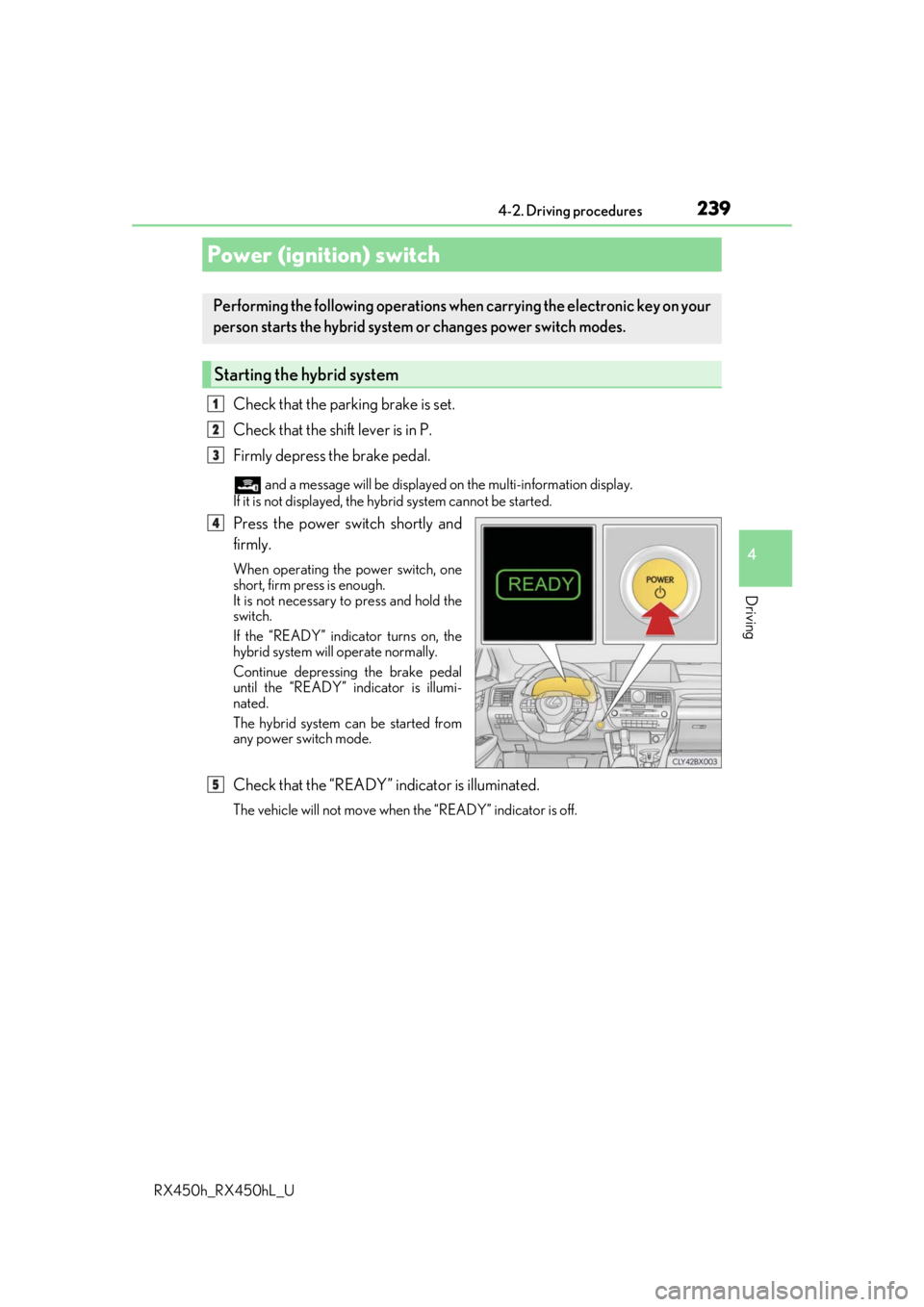
Press the power switch shortly and
firmly.
When operating the power switch, one
short, firm press is enough.
It is not necessary to press and hold the
switch.
If the “READY” indicator turns on, the
hybrid system will operate normally.
Continue depressing the brake pedal
until the “READY” indicator is illumi-
nated.
The hybrid system can be started from
any power switch mode.
Check that the “READY” indicator is illuminated.
The vehicle will not move when the “READY” indicator is off.
Power (ignition) switch
Performing the following operations wh en carrying the electronic key on your
person starts the hybrid system or changes power switch modes.
Starting the hybrid system
1
2
3
4
5
Page 240 of 792
2404-2. Driving procedures
RX450h_RX450hL_U
Stop the vehicle completely.
Set the parking brake ( P. 253), and shift the shift lever to P.
Press the power switch.
Release the brake pedal and check that the display on the meters is off.
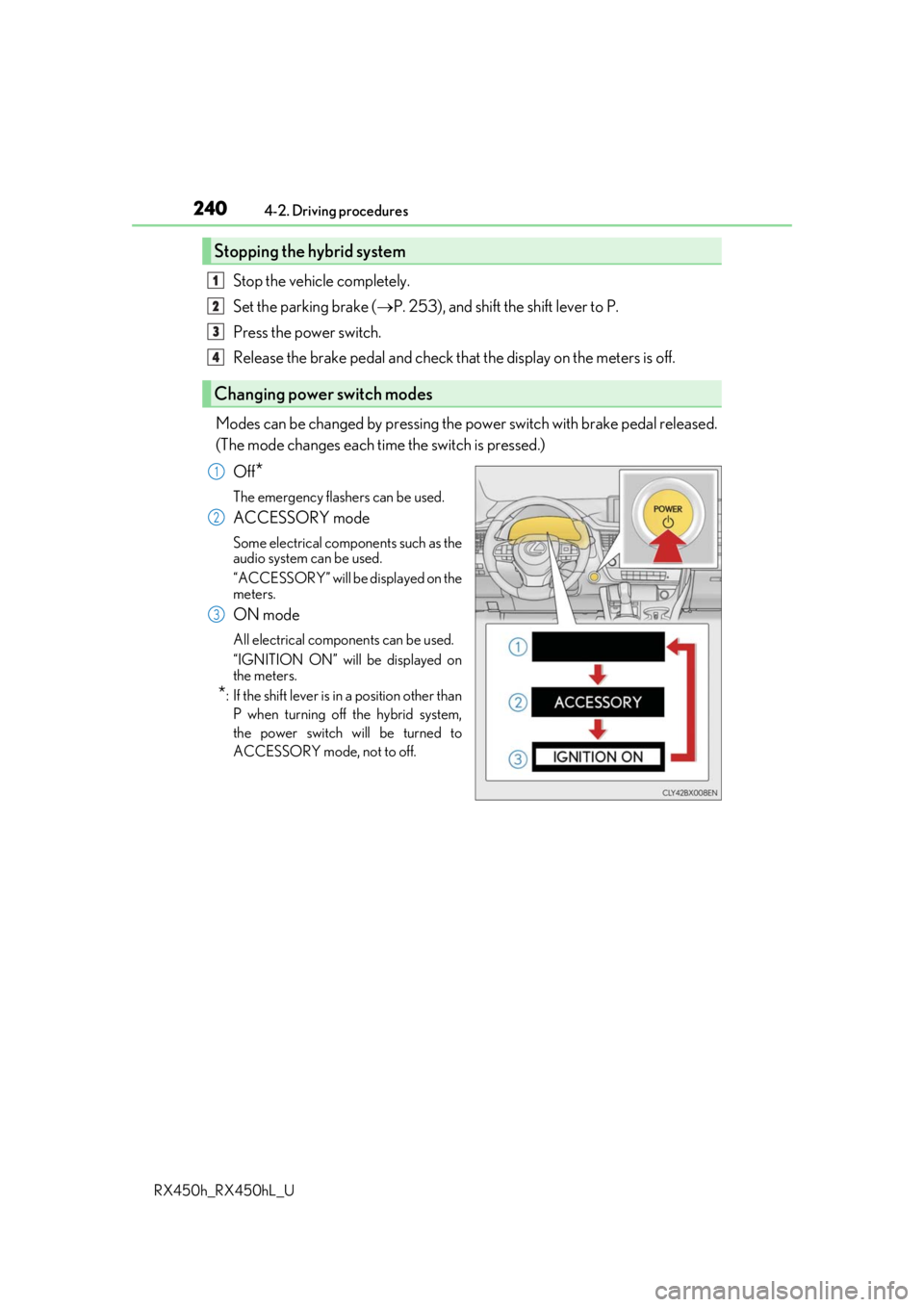
Modes can be changed by pressing the power switch with brake pedal released.
(The mode changes each time the switch is pressed.) Off
*
The emergency flashers can be used.
ACCESSORY mode
Some electrical components such as the
audio system can be used.
“ACCESSORY” will be displayed on the
meters.
ON mode
All electrical components can be used.
“IGNITION ON” will be displayed on
the meters.
*: If the shift le ver is in a position other than
P when turning off the hybrid system,
the power switch will be turned to
ACCESSORY mode, not to off.
Stopping the hybrid system
Changing power switch modes
1
2
3
4
1
2
3
Page 241 of 792

2414-2. Driving procedures
4
Driving
RX450h_RX450hL_U
If the hybrid system is stopped with the shift lever in a position other than P, the
power switch will not be turned off but instead be turned to ACCESSORY
mode. Perform the following proc edure to turn the switch off:
Check that the parking brake is set.
Shift the shift lever to P.
Check that “Turn Off Vehicle” is disp layed on the multi-information display
and then press the power switch once.
Check that “Turn Off Vehicle” on th e multi-information display is off.
■Auto power off function
If the vehicle is left in ACCESSORY mode for more than 20 minutes or ON mode (the
hybrid system is not operating) for more than an hour with the shift lever in P, the power
switch will automatically turn off. However, th is function cannot entirely prevent 12-volt
battery discharge. Do not leave the vehicle with the power switch in ACCESSORY or
ON mode for long periods of time when the hybrid system is not operating.
■Sounds and vibrations specific to a hybrid vehicle
P. 77
■Electronic key battery depletion
P. 134
■When the ambient temperature is low, su ch as during winter driving conditions
When starting the hybrid system, the flashing time of the “READY” indicator may be
long. Leave the vehicle as it is until the “REA DY” indicator is steady on, as steady means
the vehicle is able to move.
■Conditions affe cting operation
P. 160
■Note for the entry function
P. 161
■If the hybrid system does not start
●The immobilizer system may no t have been deactivated. (P. 83)
Contact your Lexus dealer.
●Check that the shift lever is se curely set in P. The hybrid system may not start if the shift
lever is displaced out of P. “To Start Vehicle, Put Shift Lever into P” will be displayed on
the multi-information display.
When stopping the hybrid system with the shift lever in a position other
than P
1
2
3
4
Page 242 of 792
2424-2. Driving procedures
RX450h_RX450hL_U
■Steering lock
After turning the power switch off and openin g and closing the doors, the steering wheel
will be locked due to the steering lock func tion. Operating the power switch again auto-
matically cancels the steering lock.
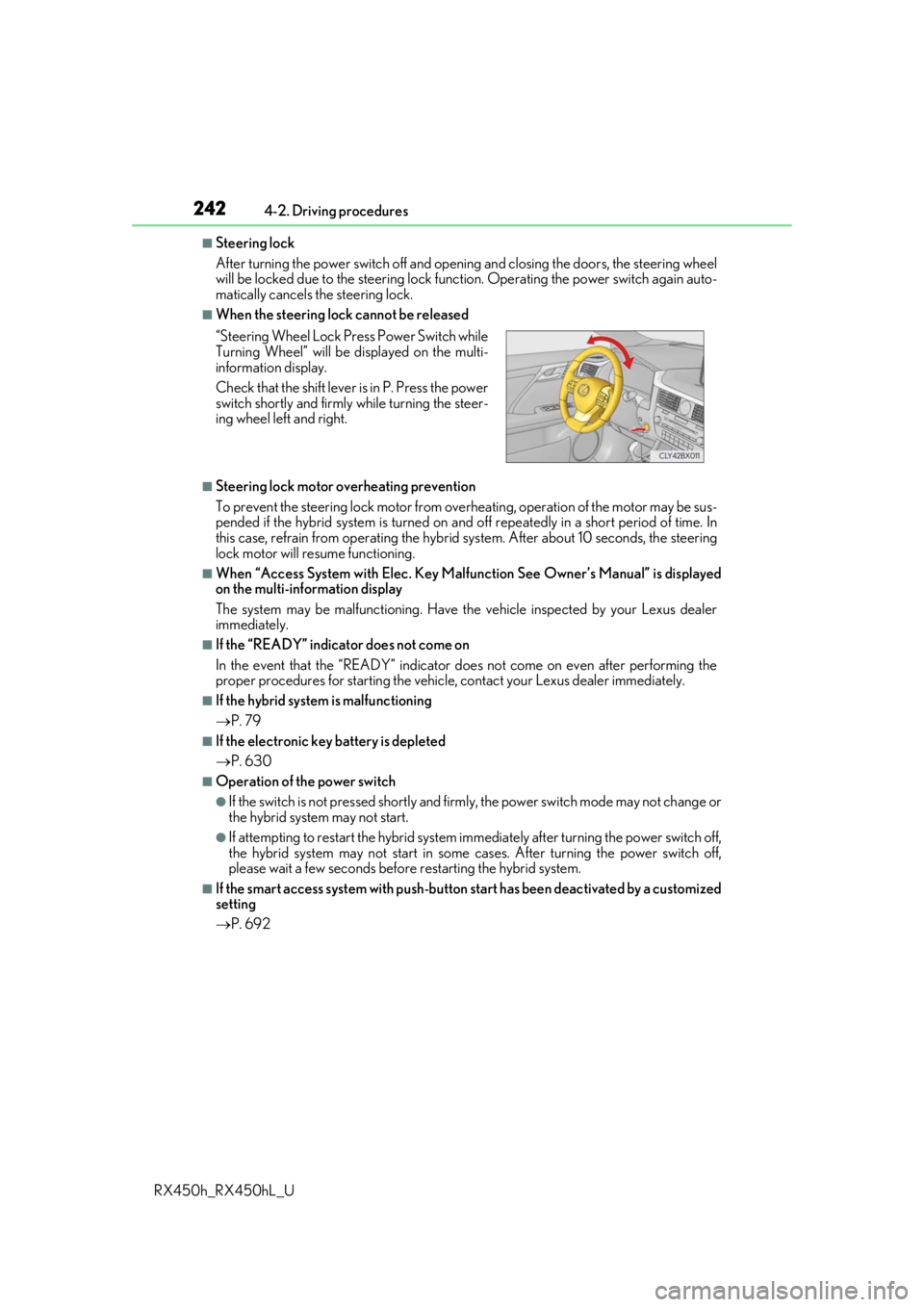
■When the steering lock cannot be released
■Steering lock motor overheating prevention
To prevent the steering lock motor from overheating, operation of the motor may be sus-
pended if the hybrid system is turned on an d off repeatedly in a short period of time. In
this case, refrain from operating the hybrid system. Afte r about 10 seconds, the steering
lock motor will resume functioning.
■When “Access System with Elec. Key Malf unction See Owner’s Manual” is displayed
on the multi-information display
The system may be malfunctio ning. Have the vehicle inspected by your Lexus dealer
immediately.
■If the “READY” indicator does not come on
In the event that the “READY” indicator does not come on even after performing the
proper procedures for starting the vehicl e, contact your Lexus dealer immediately.
■If the hybrid system is malfunctioning
P. 79
■If the electronic key battery is depleted
P. 630
■Operation of the power switch
●If the switch is not pressed shortly and firmly, the power switch mode may not change or
the hybrid system may not start.
●If attempting to restart the hybrid system immediately after turning the power switch off,
the hybrid system may not start in some cases. After turning the power switch off,
please wait a few seco nds before restarting the hybrid system.
■If the smart access system wi th push-button start has been deactivated by a customized
setting
P. 692
“Steering Wheel Lock Pr
ess Power Switch while
Turning Wheel” will be displayed on the multi-
information display.
Check that the shift lever is in P. Press the power
switch shortly and firmly while turning the steer-
ing wheel left and right.
Page 243 of 792

2434-2. Driving procedures
4
Driving
RX450h_RX450hL_U
WARNING
■When starting the hybrid system
Always start the hybrid system while sitting in the driver’s seat. Do not depress the
accelerator pedal while starting the hybrid system under any circumstances.
Doing so may cause an accident resu lting in death or serious injury.
■Caution while driving
If hybrid system failure occurs while the ve hicle is moving, do not lock or open the
doors until the vehicle reaches a safe and complete stop. Activation of the steering lock
in this circumstance may lead to an acci dent, resulting in death or serious injury.
■Stopping the hybrid system in an emergency
If you want to stop the hybrid system in an emergency while driving the vehicle, press
and hold the power switch for more than 2 se conds, or press it briefly 3 times or more
in succession. ( P. 653)
However, do not touch the power switch while driving except in an emergency. Turning
the hybrid system off while driving will not cause loss of steering or braking control,
however, power assist to the steering will be lost. This will make it more difficult to steer
smoothly, so you should pull over and stop the vehicle as soon as it is safe to do so.
NOTICE
■To prevent 12-volt battery discharge
●Do not leave the power switch in ACCESSORY or ON mode for long periods of
time without the hybrid system on.
●If “ACCESSORY” or “IGNITION ON” is displayed on the meters while the hybrid
system is not operating, the power switch is not off. Exit the vehicle after turning the
power switch off.
●Do not stop the hybrid system when the shift lever is in a position other than P. If the
hybrid system is stopped in another shift lever position , the power switch will not be
turned off but instead be turned to ACCESSORY mode. If the vehicle is left in
ACCESSORY mode, 12-volt ba ttery discharge may occur.
■When starting the hybrid system
If the hybrid system becomes difficult to star t, have your vehicle checked by your Lexus
dealer immediately.
■Symptoms indicating a malfun ction with the power switch
If the power switch seems to be operating somewhat differen tly than usual, such as the
switch sticking slightly, ther e may be a malfunction. Contact your Lexus dealer immedi-
ately.