Page 257 of 792
2574-2. Driving procedures
4
Driving
RX450h_RX450hL_U
■When the parking brake is set automatically while the system is holding the brakes
Perform any of the following operat ions to release the parking brake.
●Depress the accelerator pedal. (The parking brake will not be released automatically if
the seat belt is not fastened.)
●Operate the parking brake switch with the brake pedal depressed.
Make sure that the parking brake indicator light goes off. ( P. 253)
■When an inspection at your Lexus dealer is necessary
When the brake hold standby indicator (green) does not illuminate even when the brake
hold switch is pressed with the brake hold system operating conditions met, the system
may be malfunctioning. Ha ve the vehicle inspected at your Lexus dealer.
■If “Brake Hold Fault Depress Brake to Deacti vate Visit Your Dealer” is displayed on the
multi-information display
The system may be malfunctioning. Have the vehicle inspected by your Lexus dealer.
■Warning messages and buzzers
Warning messages and buzzers are used to indicate a system malfunction or to inform
the driver of the need for caution. If a warn ing message is shown on the multi-information
display, read the message and follow the instructions.
■If the brake hold operated indicator flashes
P. 660
WARNING
■When the vehicle is on a steep incline
When using the brake hold system on a steep incline exercise caution. The brake hold
function may not hold the vehicle in such a situation.
■When stopped on a slippery road
The system cannot stop the vehicle when the gripping ability of the tires has been
exceeded. Do not use the system when stopped on a slippery road.
NOTICE
■When parking the vehicle
The brake hold system is not designed for use when parking the vehicle for a long
period of time. Turning the power switch off while the system is holding the brakes may
release the brakes, which would cause the vehicle to move. When operating the power
switch, depress the brake pedal, shift the shift lever to P and set the parking brake.
Page 276 of 792
2764-4. Refueling
RX450h_RX450hL_U
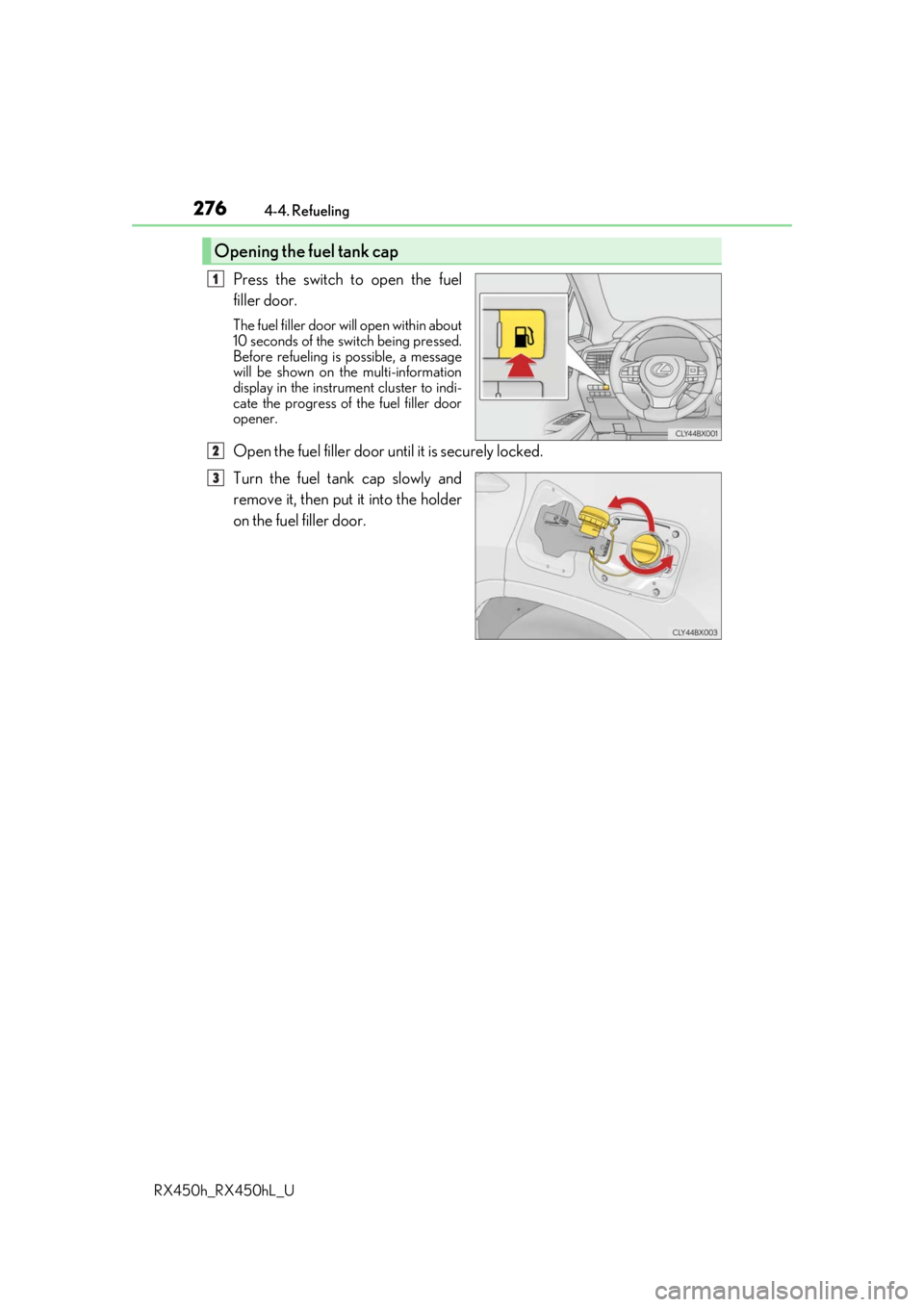
Press the switch to open the fuel
filler door.
The fuel filler door wi ll open within about
10 seconds of the sw itch being pressed.
Before refueling is possible, a message
will be shown on the multi-information
display in the instrument cluster to indi-
cate the progress of the fuel filler door
opener.
Open the fuel filler door until it is securely locked.
Turn the fuel tank cap slowly and
remove it, then put it into the holder
on the fuel filler door.
Opening the fuel tank cap
1
2
3
Page 287 of 792
2874-5. Using the driving support systems
4
Driving
RX450h_RX450hL_U
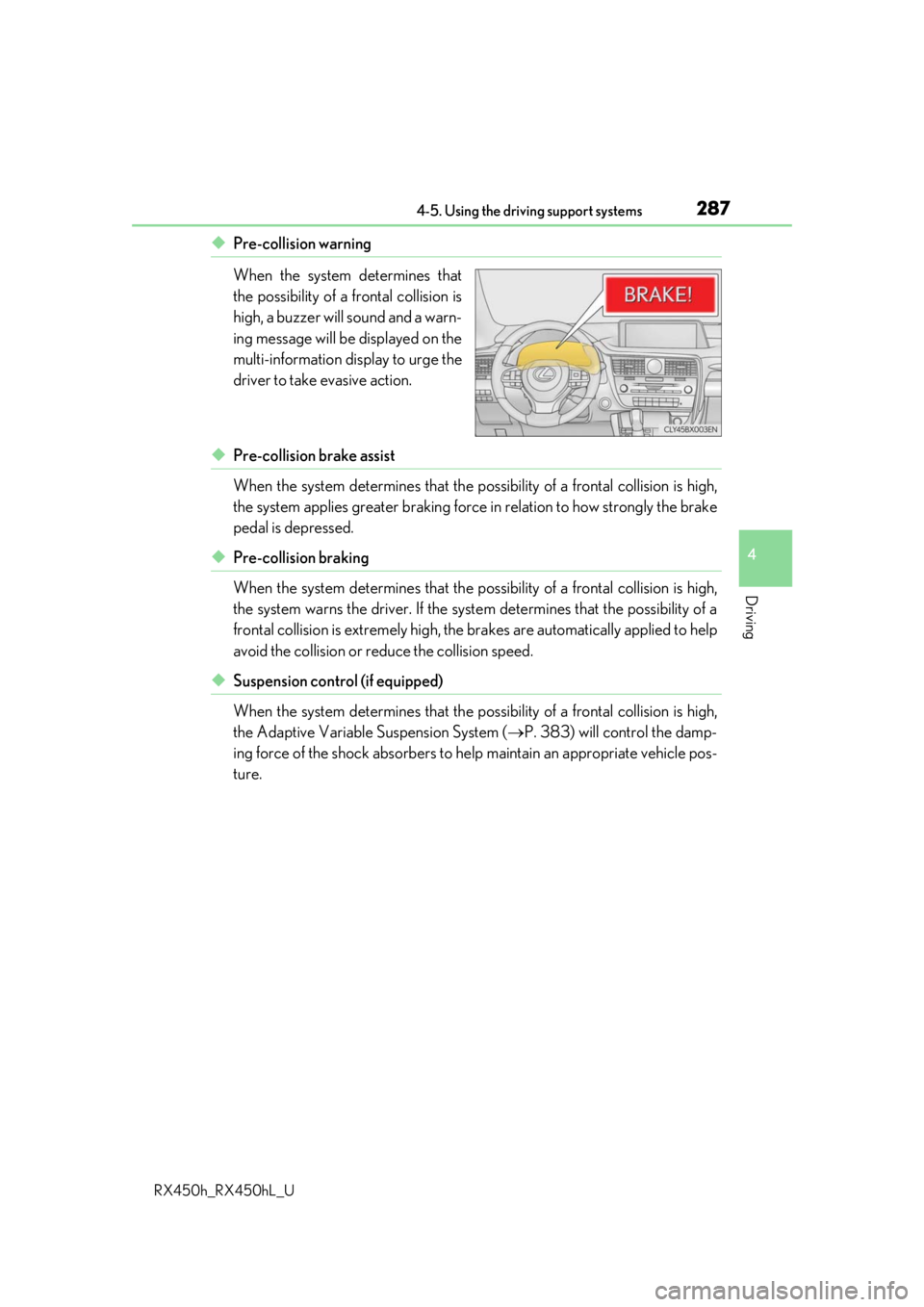
◆Pre-collision warning
When the system determines that
the possibility of a frontal collision is
high, a buzzer will sound and a warn-
ing message will be displayed on the
multi-information display to urge the
driver to take evasive action.
◆Pre-collision brake assist
When the system determines that the possibility of a frontal collision is high,
the system applies greater braking force in relation to how strongly the brake
pedal is depressed.
◆Pre-collision braking
When the system determines that the po ssibility of a frontal collision is high,
the system warns the driver. If the syst em determines that the possibility of a
frontal collision is extremely high, the br akes are automatically applied to help
avoid the collision or reduce the collision speed.
◆Suspension control (if equipped)
When the system determines that the po ssibility of a frontal collision is high,
the Adaptive Variable Suspension System ( P. 383) will control the damp-
ing force of the shock absorbers to help maintain an appropriate vehicle pos-
ture.
Page 290 of 792
2904-5. Using the driving support systems
RX450h_RX450hL_U
■Enabling/disabling the pre-collision system
The pre-collision system can be enabled/disabled on ( P. 108) of the
multi-information display.
The system is automatically enabled each time the power switch is turned to ON
mode.
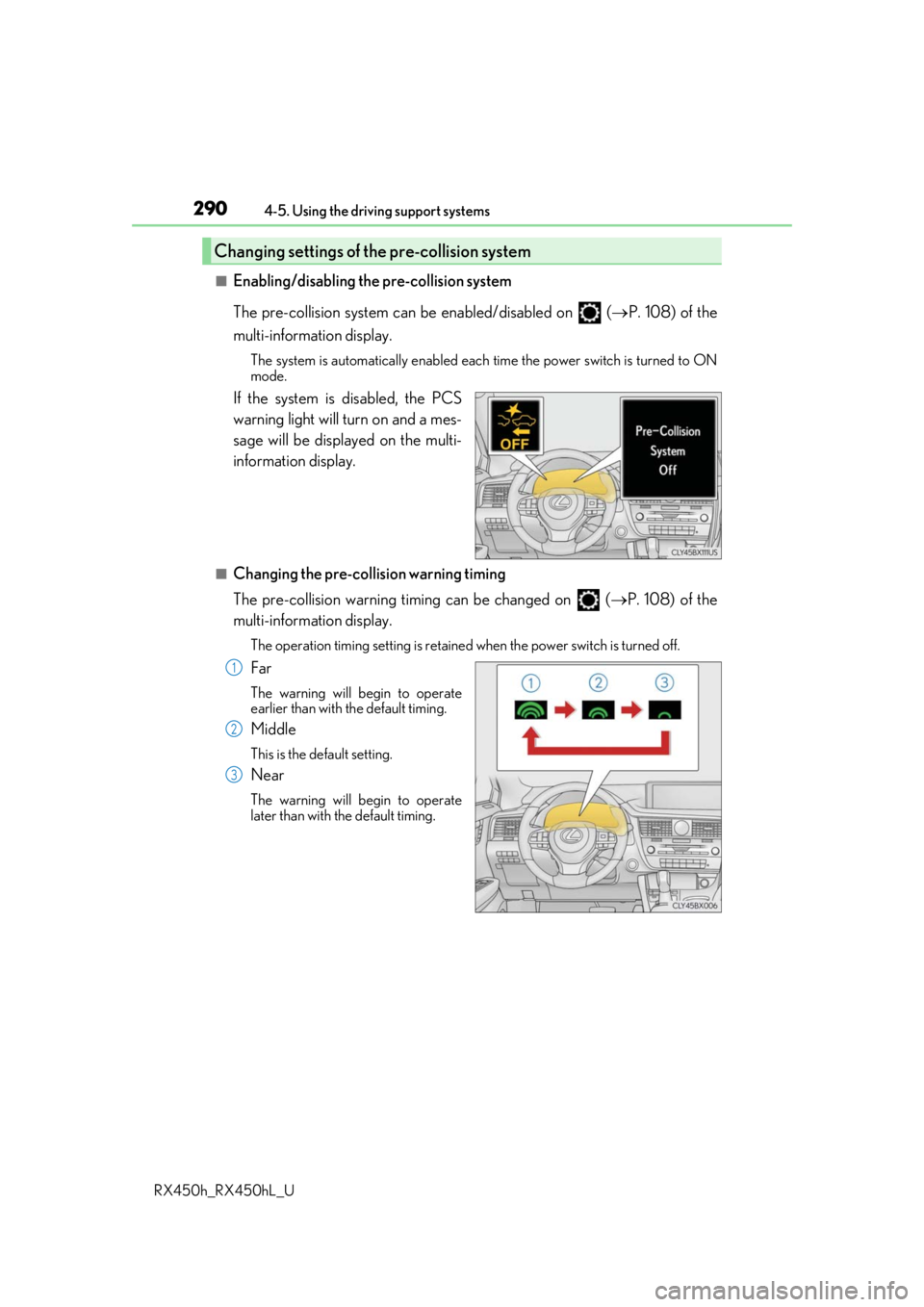
If the system is disabled, the PCS
warning light will turn on and a mes-
sage will be displayed on the multi-
information display.
■Changing the pre-collision warning timing
The pre-collision warning timi ng can be changed on (P. 108) of the
multi-information display.
The operation timing settin g is retained when the power switch is turned off.
Far
The warning will begin to operate
earlier than with the default timing.
Middle
This is the default setting.
Near
The warning will begin to operate
later than with the default timing.
Changing settings of the pre-collision system
1
2
3
Page 296 of 792

2964-5. Using the driving support systems
RX450h_RX450hL_U
■If the PCS warning light flas hes or illuminates and a warning message is displayed on
the multi-inform ation display
The pre-collision system may be temporarily unavailable or there may be a malfunction
in the system.
●In the following situations, the warning light will turn off, the message will disappear and
the system will become operational when normal operating conditions return:
• When the radar sensor or ca mera sensor or the area around either sensor is hot,
such as in the sun
• When the radar sensor or camera sensor or the area around either sensor is cold,
such as in an extremely cold environment
• When a front sensor is dirt y or covered with snow, etc.
• When the part of the windshield in front of the camera sensor is fogged up or cov-
ered with condensation or ice (Defogging the windshield: P. 516)
• If the camera sensor is obstructed, such as when the hood is open or a sticker is attached to the windshield near the camera sensor
●If the PCS warning light continues to flash or remains illuminated or the warning mes-
sage does not disappear even though the vehicle has returned to normal, the system
may be malfunctioning. Have the vehicle in spected by your Lexus dealer immediately.
■If VSC is disabled
●If VSC is disabled (P. 385), the pre-collision brake assist and pre-collision braking
functions are also disabled.
●The PCS warning light will turn on and “V SC Turned Off Pre-Collision Brake System
Unavailable” will be displayed on the multi-information display.
Page 298 of 792
2984-5. Using the driving support systems
RX450h_RX450hL_U
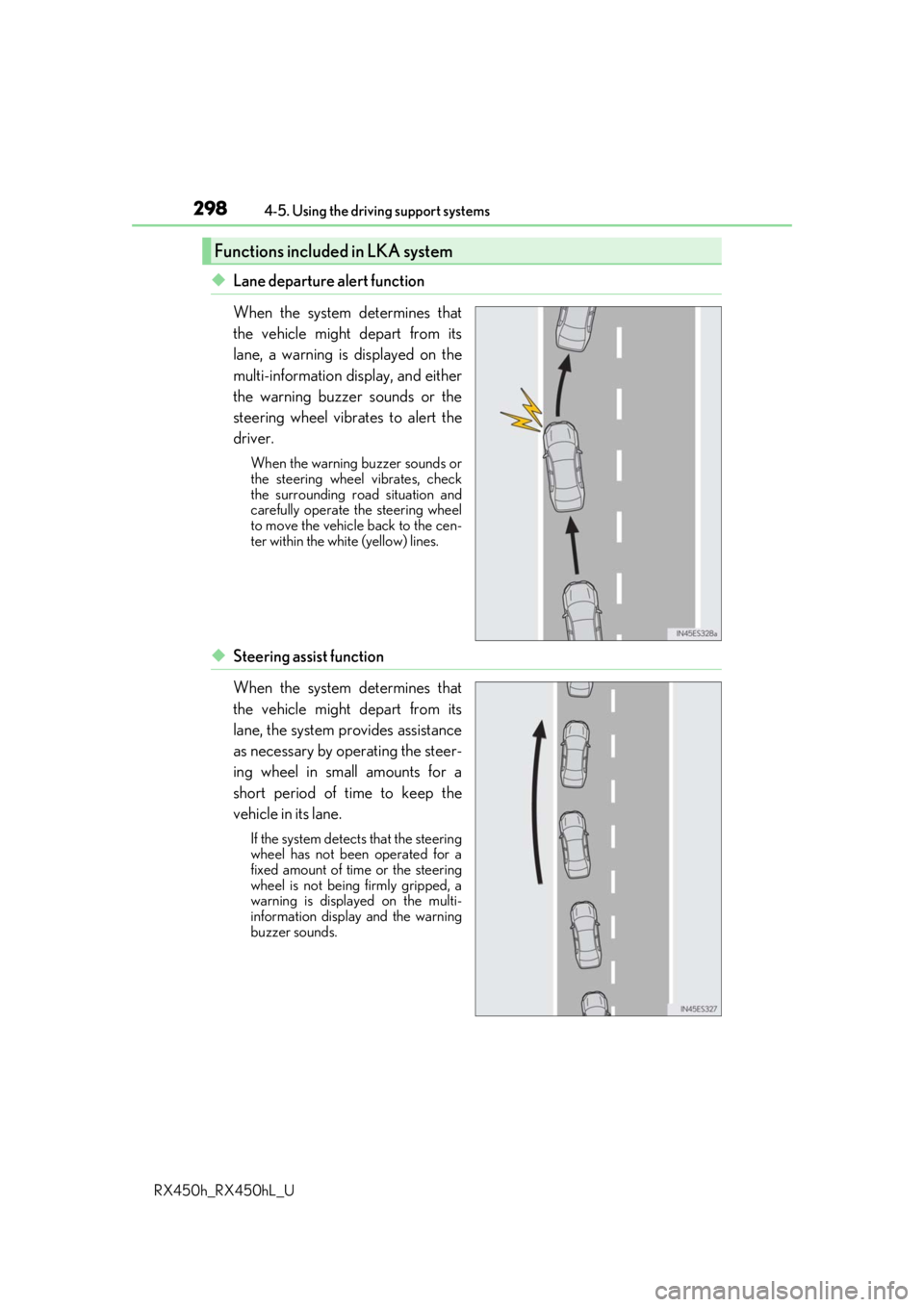
◆Lane departure alert function
When the system determines that
the vehicle might depart from its
lane, a warning is displayed on the
multi-information display, and either
the warning buzzer sounds or the
steering wheel vibrates to alert the
driver.
When the warning buzzer sounds or
the steering wheel vibrates, check
the surrounding road situation and
carefully operate the steering wheel
to move the vehicle back to the cen-
ter within the white (yellow) lines.
◆Steering assist function
When the system determines that
the vehicle might depart from its
lane, the system provides assistance
as necessary by operating the steer-
ing wheel in small amounts for a
short period of time to keep the
vehicle in its lane.
If the system detects that the steering
wheel has not been operated for a
fixed amount of time or the steering
wheel is not being firmly gripped, a
warning is displayed on the multi-
information display and the warning
buzzer sounds.
Functions included in LKA system
Page 299 of 792
2994-5. Using the driving support systems
4
Driving
RX450h_RX450hL_U
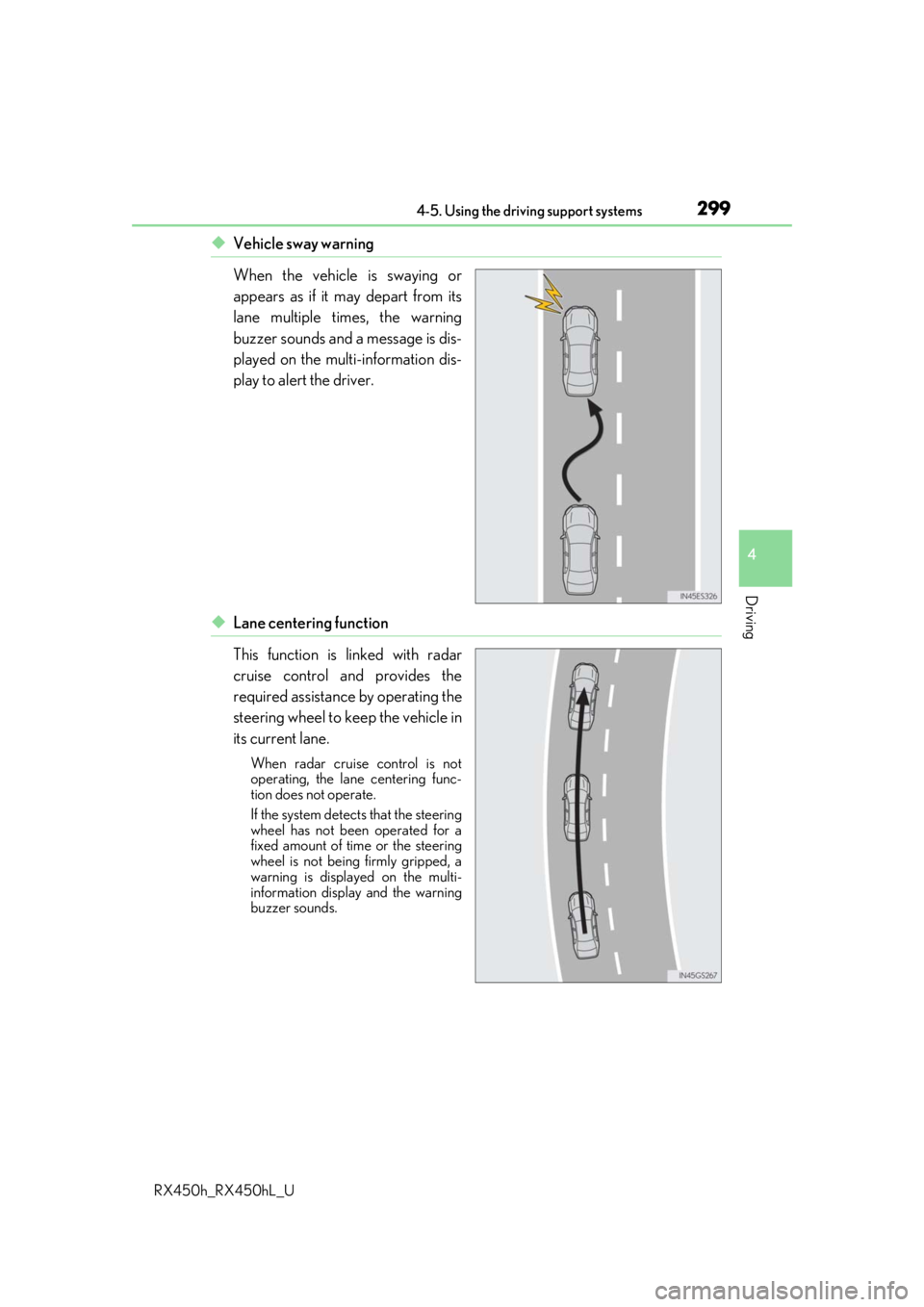
◆Vehicle sway warning
When the vehicle is swaying or
appears as if it may depart from its
lane multiple times, the warning
buzzer sounds and a message is dis-
played on the multi-information dis-
play to alert the driver.
◆Lane centering function
This function is linked with radar
cruise control and provides the
required assistance by operating the
steering wheel to keep the vehicle in
its current lane.
When radar cruise control is not
operating, the lane centering func-
tion does not operate.
If the system detects that the steering
wheel has not been operated for a
fixed amount of time or the steering
wheel is not being firmly gripped, a
warning is displayed on the multi-
information display and the warning
buzzer sounds.
Page 301 of 792
3014-5. Using the driving support systems
4
Driving
RX450h_RX450hL_U
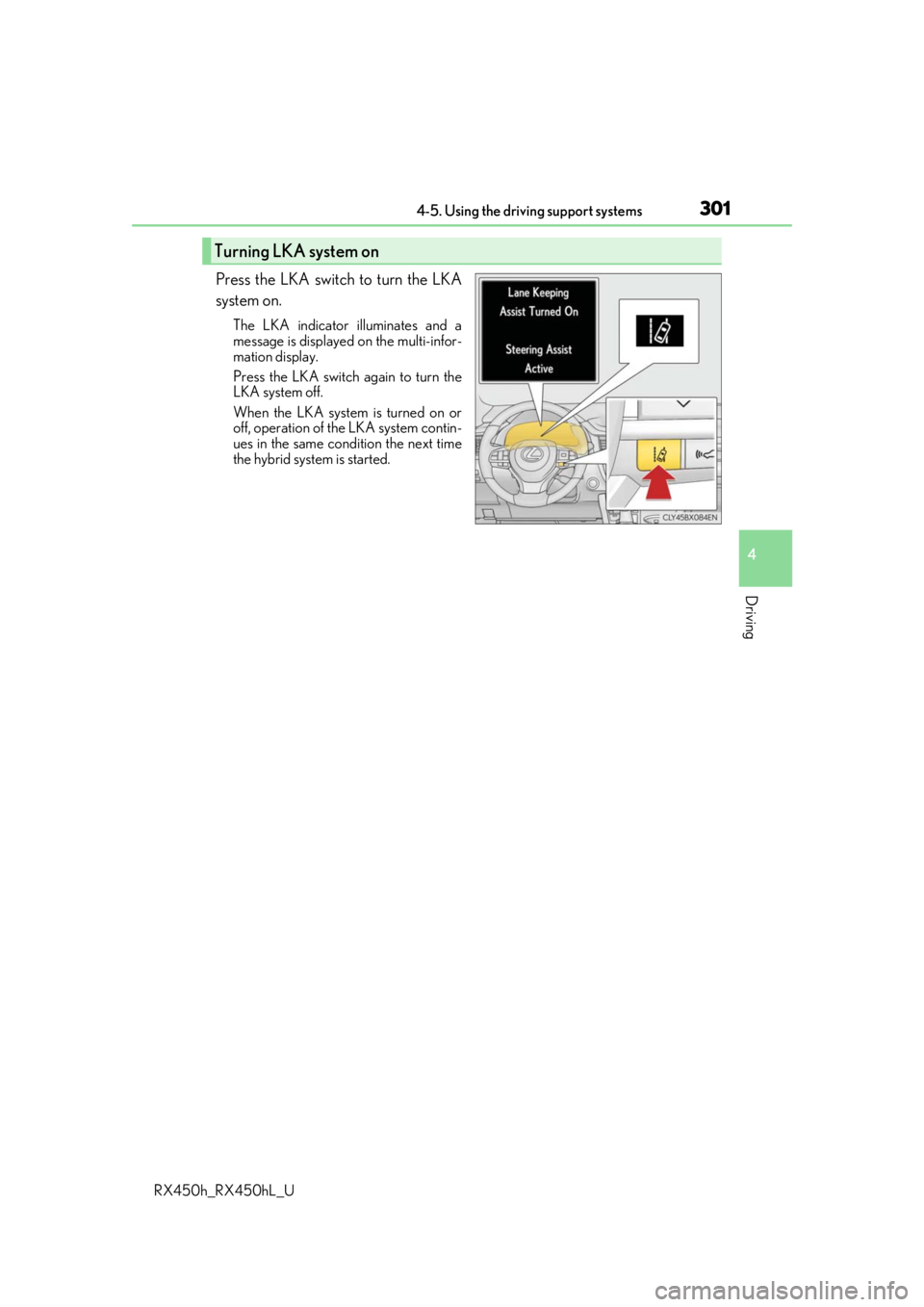
Press the LKA switch to turn the LKA
system on.
The LKA indicator illuminates and a
message is displayed on the multi-infor-
mation display.
Press the LKA switch again to turn the
LKA system off.
When the LKA system is turned on or
off, operation of the LKA system contin-
ues in the same condition the next time
the hybrid system is started.
Turning LKA system on