2019 LEXUS RX450H display
[x] Cancel search: displayPage 335 of 792

3354-5. Using the driving support systems
4
Driving
RX450h_RX450hL_U
■Distance display
Sensors that detect an obstacle will illuminate continuously or blink.
Sensor detection display, obstacle distance
Display*1
Insert displayApproximate distance to object
Lexus parking assist moni- tor
*4
Panoramic
view monitorFront and rear center sensorFront and rear corner sensor
(continuous)(blinking slowly)(blinking slowly) Front center sen-
sor:
3.3 ft. (100 cm)
to
2.0 ft. (60 cm)
Rear center sen-
sor:
4.9 ft. (150 cm)
to
2.0 ft. (60 cm)
(continuous)(blinking)(blinking)
2.0 ft. (60 cm) to
1.5 ft. (45 cm)
RX450hFront corner
sensor:
2.0 ft. (60 cm) to
1.5 ft. (45 cm)
Rear corner sen-
sor:
2.0 ft. (60 cm) to
1.5 ft. (45 cm)
RX450hLFront corner
sensor:
2.0 ft. (60 cm) to
1.5 ft. (45 cm)
2.1 ft. (66 cm) to
1.5 ft. (45 cm)
(continuous)(blinking
rapidly)(blinking rapidly) 1.5 ft. (45 cm) to
1.2 ft. (35 cm)
1.5 ft. (45 cm) to
1.2 ft. (35 cm)
Page 336 of 792

3364-5. Using the driving support systems
RX450h_RX450hL_U
*1: The images may differ from th ose shown in the illustrations. (P. 333)
*2: Multi-information display
*3: Audio system screen
*4: Lexus Display Audio or navigation system (8-inch display) screen
■Buzzer operation and distance to an object
A buzzer sounds when the sensors are operating.
●The buzzer sounds faster as the vehicle approaches an object.
When the vehicle comes within the following distance of the object, the
buzzer sounds continuously: Approximately 1.2 ft. (35 cm).
●When 2 or more objects are detected simultaneously, the buzzer system
responds to the nearest object. If on e or both come within the above dis-
tances, the beep will repeat a lo ng tone, followed by fast beeps.
(blinking*2 or
continuous
*3)
(continuous)(continuous) Less than
1.2 ft. (35 cm)
Less than
1.2 ft. (35 cm)
Display*1
Insert displayApproximate distance to object
Lexus parking
assist moni-
tor
*4
Panoramic
view monitorFront and rear center sensorFront and rear corner sensor
Page 338 of 792
3384-5. Using the driving support systems
RX450h_RX450hL_U
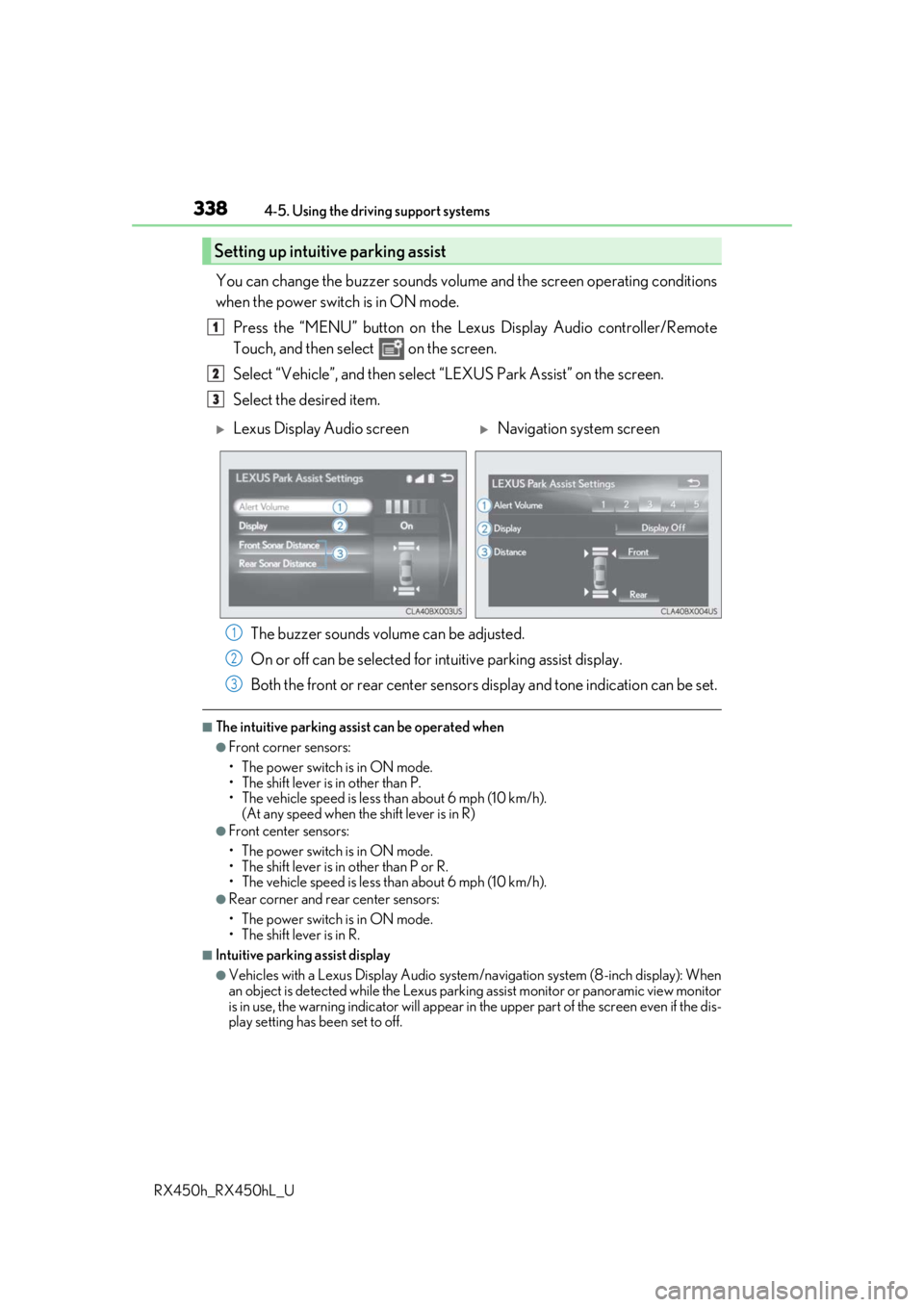
You can change the buzzer sounds volu me and the screen operating conditions
when the power switch is in ON mode.
Press the “MENU” button on the Le xus Display Audio controller/Remote
Touch, and then select on the screen.
Select “Vehicle”, and then select “LEXUS Park Assist” on the screen.
Select the desired item.
The buzzer sounds volume can be adjusted.
On or off can be selected for intuitive parking assist display.
Both the front or rear center sensors display and tone indication can be set.
■The intuitive parking assist can be operated when
●Front corner sensors:
• The power switch is in ON mode.
• The shift lever is in other than P.
• The vehicle speed is less than about 6 mph (10 km/h).
(At any speed when the shift lever is in R)
●Front center sensors:
• The power switch is in ON mode.
• The shift lever is in other than P or R.
• The vehicle speed is less than about 6 mph (10 km/h).
●Rear corner and rear center sensors:
• The power switch is in ON mode.
• The shift lever is in R.
■Intuitive parking assist display
●Vehicles with a Lexus Display Audio system/navigation system (8-inch display): When
an object is detected while the Lexus parking assist monito r or panoramic view monitor
is in use, the warning indicator will appear in the upper part of the screen even if the dis-
play setting has been set to off.
Setting up intuitive parking assist
1
2
3
Lexus Display Audio screenNavigation system screen
1
2
3
Page 339 of 792

3394-5. Using the driving support systems
4
Driving
RX450h_RX450hL_U
●Vehicles with a navigation system (12.3-inch display): If the intuitive parking assist dis-
play is set to on, detected objects will also be displayed on the panoramic view monitor.
For details, refer to “NAVIGATION SYSTEM OWNER’S MANUAL”.
■Sensor detectio n information
●The sensor’s detection areas are limited to the areas around the vehicle’s bumper.
●Certain vehicle conditions and the surrounding environment may affect the ability of a
sensor to correctly detect an object. Particular instances where this may occur are
listed below.
• There is dirt, snow or ice on the sensor . (Wiping the sensors will resolve this prob-
lem.)
• The sensor is frozen. (Thawing the area will resolve this problem.) In especially cold weather, if a sensor is frozen the screen may show an abnormal
display, or obstacles may not be detected.
• The sensor is covered in any way.
• The vehicle is leaning considerably to one side.
• When a sensor or the area around a sensor is extremely hot or cold.
• On an extremely bumpy road, on an incline, on gravel, or on grass.
• The vicinity of the vehicle is noisy due to vehicle horns, motorcycle engines, air
brakes of large vehicles, or other loud noises producing ultrasonic waves.
• There is another vehicle equipped with parking assist sensors in the vicinity.
• The sensor is coated with a sheet of spray or heavy rain.
• The bumper or sensor re ceives a strong impact.
• If the vehicle is significantly tilted.
• The vehicle is approaching a tall or curved curb.
• In harsh sunlight or intense cold weather.
• The area directly under the bumpers is not detected.
• If objects draw too close to the sensor.
• People may not be detected if they are wearing certain types of clothing.
In addition to the examples above, there ar e instances in which, because of their shape,
signs and other objects may be judged by a sensor to be closer than they are.
●The shape of the object may prevent a sensor from detecting it. Pay particular attention
to the following objects:
• Wires, fences, ropes, etc.
• Cotton, snow and other materi als that absorb sound waves
• Sharply-angled objects
• Low obstacles
• Tall obstacles with upper sections projecting outwards in the direction of your vehi-
cle
●The following situations may occur during use.
• Depending on the shape of the object and other factors, the detection distance may
shorten, or detection may be impossible.
• Objects may not be detected if they are too close to the sensor.
• There will be a short dela y between object detection and display. Even at slow
speeds, there is a possibility that the obje ct will come within the sensor’s detection
areas before the display is shown and the buzzer sounds.
• Thin posts or objects lower than the sens or may not be detected when approached,
even if they have been detected once.
• It might be difficult to hear beeps due to th e volume of audio system or air flow noise
of the air conditioning system.
Page 340 of 792

3404-5. Using the driving support systems
RX450h_RX450hL_U
■If “Clean Parking Assist Sensor” is di splayed on the multi-information display
A sensor may be dirty or covered with snow or ic e. In such cases, if it is removed from the
sensor, the system should return to normal.
Also, due to the sensor being frozen at low temperatures, a malfunction display may
appear or an object may not be detected. If the sensor thaws out, the system should
return to normal.
■If “Parking Assist Malfunction” is di splayed on the multi-information display
Depending on the malfunction of the sensor, the device may not be working normally.
Have the vehicle inspected by your Lexus dealer.
■Certification
For vehicles sold in Canada
This ISM device complies with Canadian ICES-001.
Cet appareil ISM est conforme a la norme NMB-001 du Canada.
■Customization
Some functions can be customized. ( P. 338, 736)
WARNING
■When using the intuitive parking assist
Observe the following precautions.
Failing to do so may result in the vehicle be ing unable to be driven safely and possibly
cause an accident.
●Do not use the sensor at speeds in excess of 6 mph (10 km/h).
●The sensors’ detection areas and reaction ti mes are limited. When moving forward or
reversing, check the areas surrounding the vehicle (especially the sides of the vehi-
cle) for safety, and drive slowly, using the brake to control the vehicle’s speed.
●Do not install accessories within the sensors’ detection areas.
●The vehicle is equipped with a fender pole or wireless antenna.
●The front or rear bumper or a se nsor receives a strong impact.
●A non-genuine Lexus suspension (lower ed suspension, etc.) is installed.
●Towing eyelets are installed.
●A backlit license plate is installed.
■When using intuitive parking assist
In the following situations, the system may not function correctly due to a sensor mal-
function, etc. Have the vehicle checked by your Lexus dealer.
●The intuitive parking assist operation disp lay flashes, and a buzzer sounds when no
obstacles are detected.
●If the area around a sensor co llides with something, or is subjected to strong impact.
●If the bumper collides with something.
●If the display shows continuously without beeping, except when the buzzer mute
switch has been turned on.
●If a display error occurs, first check the sensor.
If the error occurs even if there is no ice, sn ow or mud on the sensor, it is likely that the
sensor is malfunctioning.
Page 345 of 792

3454-5. Using the driving support systems
4
Driving
RX450h_RX450hL_U
Select on the multi-information
display.
Press or of the meter con-
trol switch and select “ICS”.
Press of the meter control
switch.
Select the “Yes” and push .
When the Intelligent Clearance Sonar is disabled, the ICS OFF indicator illu-
minates.
To re-enable the system when it was disabled, select on the multi-informa-
tion display, select “ICS” and then “On”. If disabled using this method, the sys-
tem will not be re-enabled by turning the power switch off and then to ON
mode.
Types of sensors
Except F SPORT modelsF SPORT models
Front corner sensors
Front center sensors
Rear corner sensors
Rear center sensors
Turning the Intelligent Cle arance Sonar system on/off
1
2
3
4
1
2
3
4
Page 346 of 792
3464-5. Using the driving support systems
RX450h_RX450hL_U
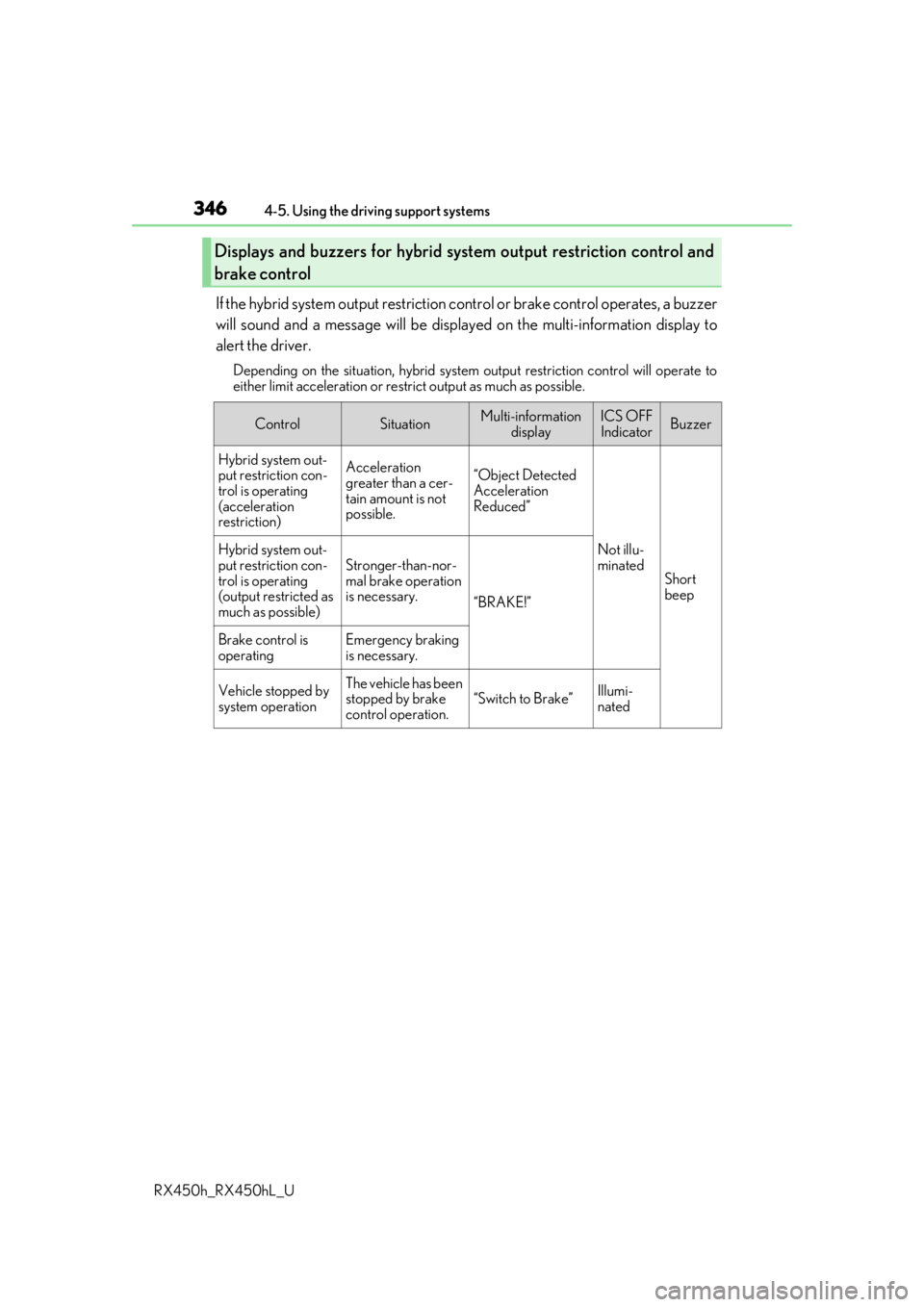
If the hybrid system output restriction control or brake control operates, a buzzer
will sound and a message will be displa yed on the multi-information display to
alert the driver.
Depending on the situation, hybrid system output restriction control will operate to
either limit acceleration or restrict output as much as possible.
Displays and buzzers for hybrid sys tem output restriction control and
brake control
ControlSituationMulti-information displayICS OFFIndicatorBuzzer
Hybrid system out-
put restriction con-
trol is operating
(acceleration
restriction)Acceleration
greater than a cer-
tain amount is not
possible.“Object Detected
Acceleration
Reduced”
Not illu-
minated
Short
beep
Hybrid system out-
put restriction con-
trol is operating
(output restricted as
much as possible)Stronger-than-nor-
mal brake operation
is necessary.
“BRAKE!”
Brake control is
operatingEmergency braking
is necessary.
Vehicle stopped by
system operationThe vehicle has been
stopped by brake
control operation.
“Switch to Brake”Illumi-
nated
Page 353 of 792

3534-5. Using the driving support systems
4
Driving
RX450h_RX450hL_U
■If a 12-volt battery terminal has been disconnected and reconnected
The system needs to be initialized.
To initialize the system, drive the vehicle stra ight ahead for 5 seconds or more at a speed
of approximately 22 mph (35 km/h) or more.
■If “ICS Unavailable” is displayed on the mu lti-information display and the ICS OFF indi-
cator is flashing
●A sensor may be covered with ice, snow, dirt, etc. Remove the ice, snow, dirt, etc., from
the sensor to return the system to normal.
Also, due to ice forming on a sensor at low temperatures, a warning message may be
displayed or the sensor may not be able to detect an object. Once the ice melts, the
system will return to normal.
●If this message continues to be displayed even after cleaning the sensor, or is displayed
even though the sensor is clean, have the vehicle inspected by your Lexus dealer.
●Initialization may not have been performed af ter a 12-volt battery terminal was discon-
nected and reconnected. Initialize the system. (P. 353)
■If “ICS Malfunction Visit Your Dealer” is di splayed on the multi-information display and
the ICS OFF indicator is flashing
The system may be malfunctioning. Have the vehicle inspected by your Lexus dealer.