Page 302 of 792
3024-5. Using the driving support systems
RX450h_RX450hL_U
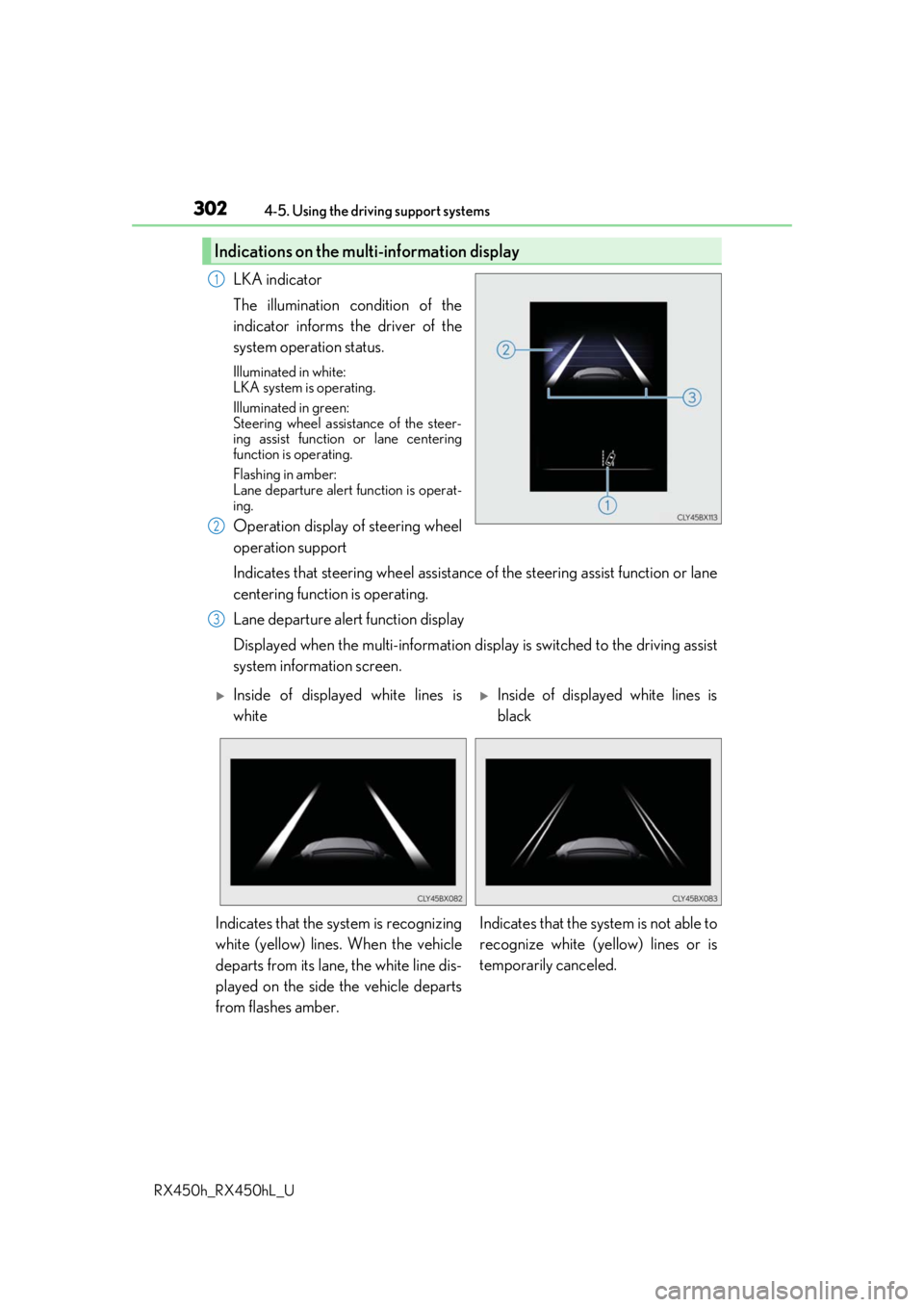
LKA indicator
The illumination condition of the
indicator informs the driver of the
system operation status.
Illuminated in white:
LKA system is operating.
Illuminated in green:
Steering wheel assistance of the steer-
ing assist function or lane centering
function is operating.
Flashing in amber:
Lane departure alert function is operat-
ing.
Operation display of steering wheel
operation support
Indicates that steering wheel assistance of the steering assist function or lane
centering function is operating.
Lane departure alert function display
Displayed when the multi-information disp lay is switched to the driving assist
system information screen.
Indications on the multi-information display
1
2
3
Inside of displayed white lines is
whiteInside of displayed white lines is
black
Indicates that the system is recognizing
white (yellow) lines. When the vehicle
departs from its lane, the white line dis-
played on the side the vehicle departs
from flashes amber. Indicates that the system is not able to
recognize white (ye
llow) lines or is
temporarily canceled.
Page 303 of 792
3034-5. Using the driving support systems
4
Driving
RX450h_RX450hL_U
■Operation conditions of each function
●Lane departure alert function
This function operates when all of the following conditions are met.
• LKA is turned on.
• Vehicle speed is approximatel y 32 mph (50 km/h) or more.
• System recognizes white (yellow) lines.
• Width of traffic lane is approx imately 9.8 ft. (3 m) or more.
• Turn signal lever is not operated.
• Vehicle is driven on a straight road or around a gentle curve with a radius of more
than approximately 492 ft. (150 m).
• No system malfunctions are detected. ( P. 660)
●Steering assist function
This function operates when all of the follo wing conditions are met in addition to the
operation conditions for the lane departure alert function.
• Setting for “Steering Assist” in of the multi-information display is set to “On”.
( P. 108)
• Vehicle is not accelerated or dece lerated by a fixed amount or more.
• Steering wheel is not operated with a steering force level suitable for changing
lanes.
• ABS, VSC, TRAC and PCS are not operating.
• TRAC or VSC is not turned off.
●Vehicle sway warning
This function operates when all of the following conditions are met.
• Setting for “Sway Warning” in of the multi-information display is set to “On”.
( P. 108)
• Vehicle speed is approximatel y 32 mph (50 km/h) or more.
• Width of traffic lane is approx imately 9.8 ft. (3 m) or more.
• No system malfunctions are detected. ( P. 660)
●Lane centering function
This function operates when all of the following conditions are met.
• LKA is turned on.
• Setting for “Lane Center” in of the mu lti-information display are set to “On”.
( P. 108)
• System recognizes white (yellow) lines.
• Dynamic radar cruise control with full-speed range is operating.
• Width of traffic lane is approximately 8.2 to 13.5 ft. (2.5 to 4.1 m).
• Turn signal lever is not operated.
• Vehicle is driven on a straight road or around a gentle curve with a radius of more
than approximately 656 ft. (200 m).
• No system malfunctions are detected. ( P. 660)
• Vehicle does not accele rate or decelerate by a fixed amount or more.
• Steering wheel is not operated with a steering force level suitable for changing lanes.
• ABS, VSC, TRAC and PCS are not operating.
• TRAC or VSC is not turned off.
• Steering assist function is not operating.
Page 304 of 792
3044-5. Using the driving support systems
RX450h_RX450hL_U
■Temporary cancellation of functions
When operation conditions are no longer met, a function may be temporarily canceled.
However, when the operation conditions are met again, operat ion of the function is auto-
matically restored. ( P. 303)
■Steering assist function/lane centering function
Depending on the vehicle speed, lane depart ure situation, road conditions, etc., the
operation of the functions may not be reco gnized or the functions may not operate.
■Lane departure alert function
The warning buzzer may be difficult to hear due to external noise, audio playback, etc.
Also, it may be difficult to f eel steering wheel vibrations due to the road conditions, etc.
■Hands off steering wheel alert
When the system determines that the driver has removed their hands from the steering
wheel while the steering assist function or lane centering function is operating, a warning
message is displayed on the multi-info rmation display and the buzzer sounds.
■White (yellow) lines are only on one side of road
The LKA system will not operate for the side on which white (yellow) lines could not be
recognized.
Page 305 of 792

3054-5. Using the driving support systems
4
Driving
RX450h_RX450hL_U
■Conditions in which functions may not operate properly
In the following situations, the camera sensor may not detect white (yellow) lines and var-
ious functions may not operate normally.
●There are shadows on the road that run parallel with, or cover, the white (yellow) lines.
●The vehicle is driven in an ar ea without white (yellow) lines, such as in front of a tollgate
or checkpoint, or at an intersection, etc.
●The white (yellow) lines are cracked, “Botts ’ dots”, “Raised pavement marker” or stones
are present.
●The white (yellow) lines cannot be seen or are difficult to see due to sand, etc.
●The vehicle is driven on a road surface that is wet due to rain, puddles, etc.
●The traffic lines are yellow (which may be more difficult to recognize than lines that are
white).
●The white (yellow) lines cross over a curb, etc.
●The vehicle is driven on a bright surface, such as concrete.
●The vehicle is driven on a surface that is bright due to reflected light, etc.
●The vehicle is driven in an area where the brightness changes suddenly, such as at the
entrances and exits of tunnels, etc.
●Light from the headlights of an oncoming vehicle, the sun, etc., enters the camera.
●The vehicle is driven where the road diverges, merges, etc.
●The vehicle is driven on a slope.
●The vehicle is driven on a road which tilts left or right, or a winding road.
●The vehicle is driven on an unpaved or rough road.
●The vehicle is driven around a sharp curve.
●The traffic lane is excessively narrow or wide.
●The vehicle is extremely tilted due to carry ing heavy luggage or having improper tire
pressure.
●The distance to the preceding vehicle is extremely short.
●The vehicle is moving up and down a large am ount due to road conditions during driv-
ing (poor roads or road seams).
●The headlight lenses are dirty and emit a faint amount of light at night, or the beam axis
has deviated.
●The vehicle is struck by a crosswind.
●The vehicle has just changed lane s or crossed an intersection.
●Snow tires, etc., are equipped.
■If the LKA indicator is illuminated in ambe r and a warning message is displayed on the
multi-information display
P. 660
■Customization
Some functions can be customized. ( P. 108)
Page 306 of 792
3064-5. Using the driving support systems
RX450h_RX450hL_U
In vehicle-to-vehicle distance control mode, the vehicle automatically a\
cceler-
ates, decelerates and stops to match the speed changes of the preceding vehicle
even if the accelerator pedal is not depr essed. In constant speed control mode,
the vehicle runs at a fixed speed.
Use the dynamic radar cruise control with full-speed range on freeways and
highways.
●Vehicle-to-vehicle distance control mode ( P. 309)
●Constant speed control mode ( P. 315)
Vehicle-to-vehicle distance switch
Display
Set speed
Indicators
Cruise control switch
Dynamic radar cruise control with full-speed range
Summary of functions
1
2
3
4
5
Page 310 of 792
3104-5. Using the driving support systems
RX450h_RX450hL_U
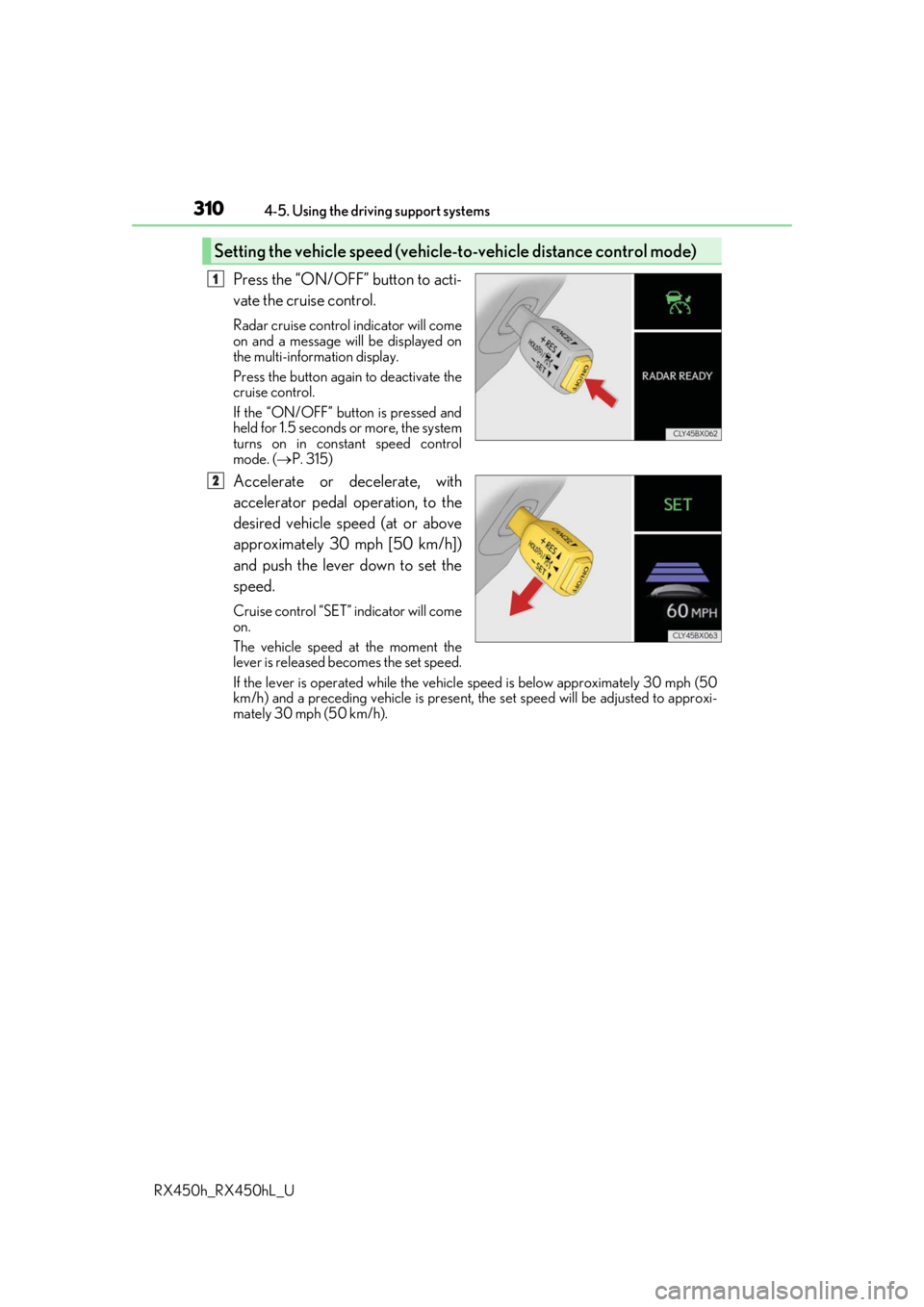
Press the “ON/OFF” button to acti-
vate the cruise control.
Radar cruise control indicator will come
on and a message will be displayed on
the multi-information display.
Press the button again to deactivate the
cruise control.
If the “ON/OFF” button is pressed and
held for 1.5 seconds or more, the system
turns on in constant speed control
mode. ( P. 315)
Accelerate or decelerate, with
accelerator pedal operation, to the
desired vehicle speed (at or above
approximately 30 mph [50 km/h])
and push the lever down to set the
speed.
Cruise control “SET” indicator will come
on.
The vehicle speed at the moment the
lever is released becomes the set speed.
If the lever is operated while the vehicl e speed is below approximately 30 mph (50
km/h) and a preceding vehicle is present, the set speed will be adjusted to approxi-
mately 30 mph (50 km/h).
Setting the vehicle speed (vehicle-to-vehicle distance control mode)
1
2
Page 312 of 792
3124-5. Using the driving support systems
RX450h_RX450hL_U
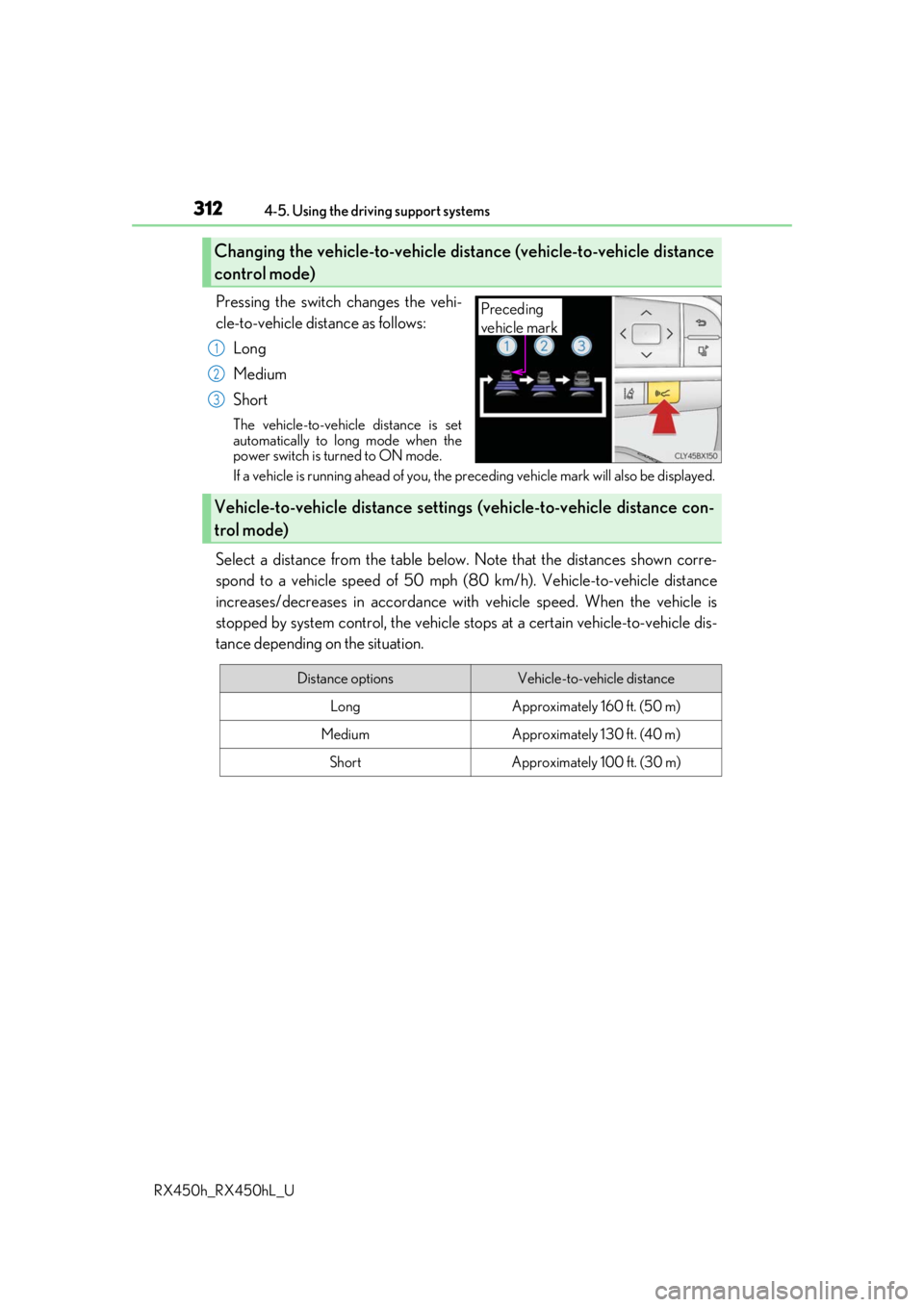
Pressing the switch changes the vehi-
cle-to-vehicle distance as follows: Long
Medium
Short
The vehicle-to-vehicle distance is set
automatically to long mode when the
power switch is turned to ON mode.
If a vehicle is running ahead of you, the pr eceding vehicle mark will also be displayed.
Select a distance from the table below. Note that the distances shown corre-
spond to a vehicle speed of 50 mph (8 0 km/h). Vehicle-to-vehicle distance
increases/decreases in accordance with vehicle speed. When the vehicle is
stopped by system control, the vehicle st ops at a certain vehicle-to-vehicle dis-
tance depending on the situation.
Changing the vehicle-to-vehicle distance (vehicle-to-vehicle distance
control mode)
Preceding
vehicle mark
1
2
3
Vehicle-to-vehicle distance settings (vehicle-to-vehicle distance con-
trol mode)
Distance optionsVehicle-to-vehicle distance
LongApproximately 160 ft. (50 m)
MediumApproximately 130 ft. (40 m)
ShortApproximately 100 ft. (30 m)
Page 314 of 792
3144-5. Using the driving support systems
RX450h_RX450hL_U
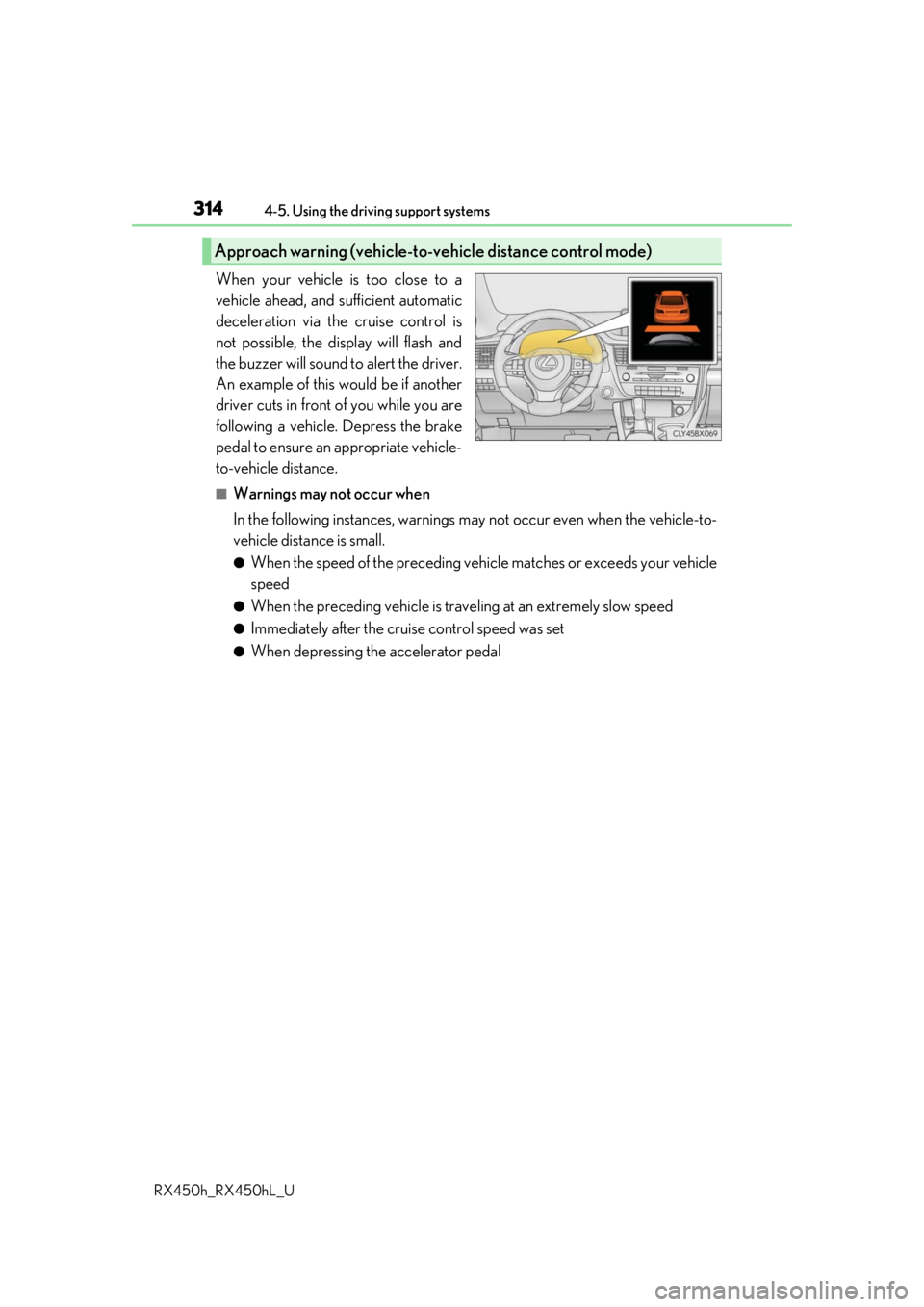
When your vehicle is too close to a
vehicle ahead, and sufficient automatic
deceleration via the cruise control is
not possible, the display will flash and
the buzzer will sound to alert the driver.
An example of this would be if another
driver cuts in front of you while you are
following a vehicle. Depress the brake
pedal to ensure an appropriate vehicle-
to-vehicle distance.
■Warnings may not occur when
In the following instances, warnings ma y not occur even when the vehicle-to-
vehicle distance is small.
●When the speed of the preceding vehicle matches or exceeds your vehicle
speed
●When the preceding vehicle is traveling at an extremely slow speed
●Immediately after the crui se control speed was set
●When depressing the accelerator pedal
Approach warning (vehicle-to-vehicle distance control mode)