Page 125 of 792
1252. Instrument cluster
2
Instrument cluster
RX450h_RX450hL_U
Lexus Display Audio screen
Press the “MENU” button on the Lexus
Display Audio controller, then select
“Info” on the “Menu” screen, and then
select “Fuel Consumption”.
If the “Energy Monitor” screen does not
appear, move the controller to the right
and select “Energy”.
Navigation system screen
Press the “MENU” button on the
Remote Touch, then select on the
“Menu” screen, and then select “Fuel
Consumption”.
If the “Trip Information” or “Past Record”
screen is displayed, select “Energy”.
Multi-information display
Press the “ ” or “” of the meter control switches and select , and then press
the “ ” or “ ” to select the energy monitor display.
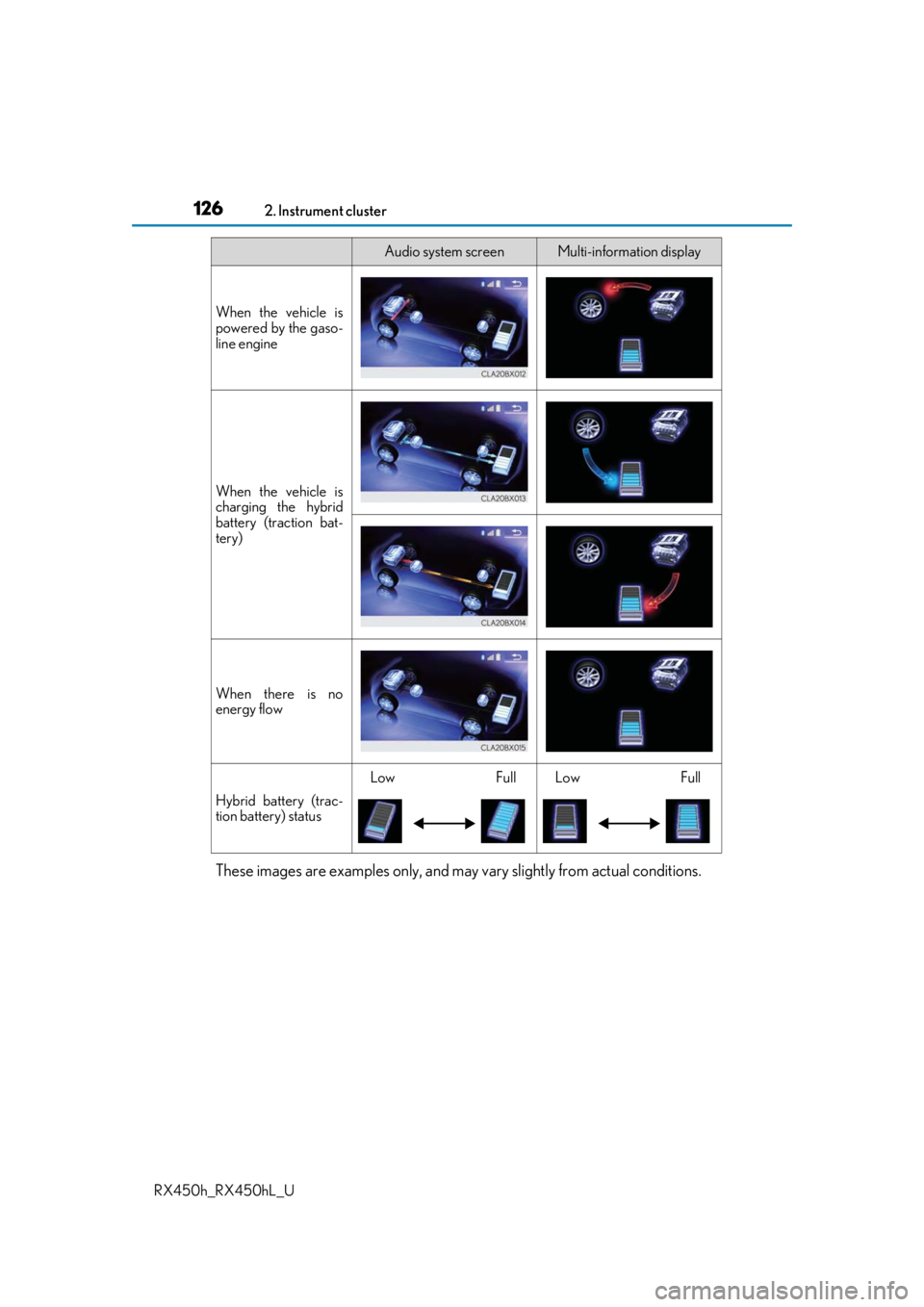
Energy monitor
Audio system screenMulti-information display
When the vehicle is
powered by the elec-
tric motor (traction
motor)
When the vehicle is
powered by both the
gasoline engine and
the electric motor
(traction motor)
Page 126 of 792
1262. Instrument cluster
RX450h_RX450hL_U
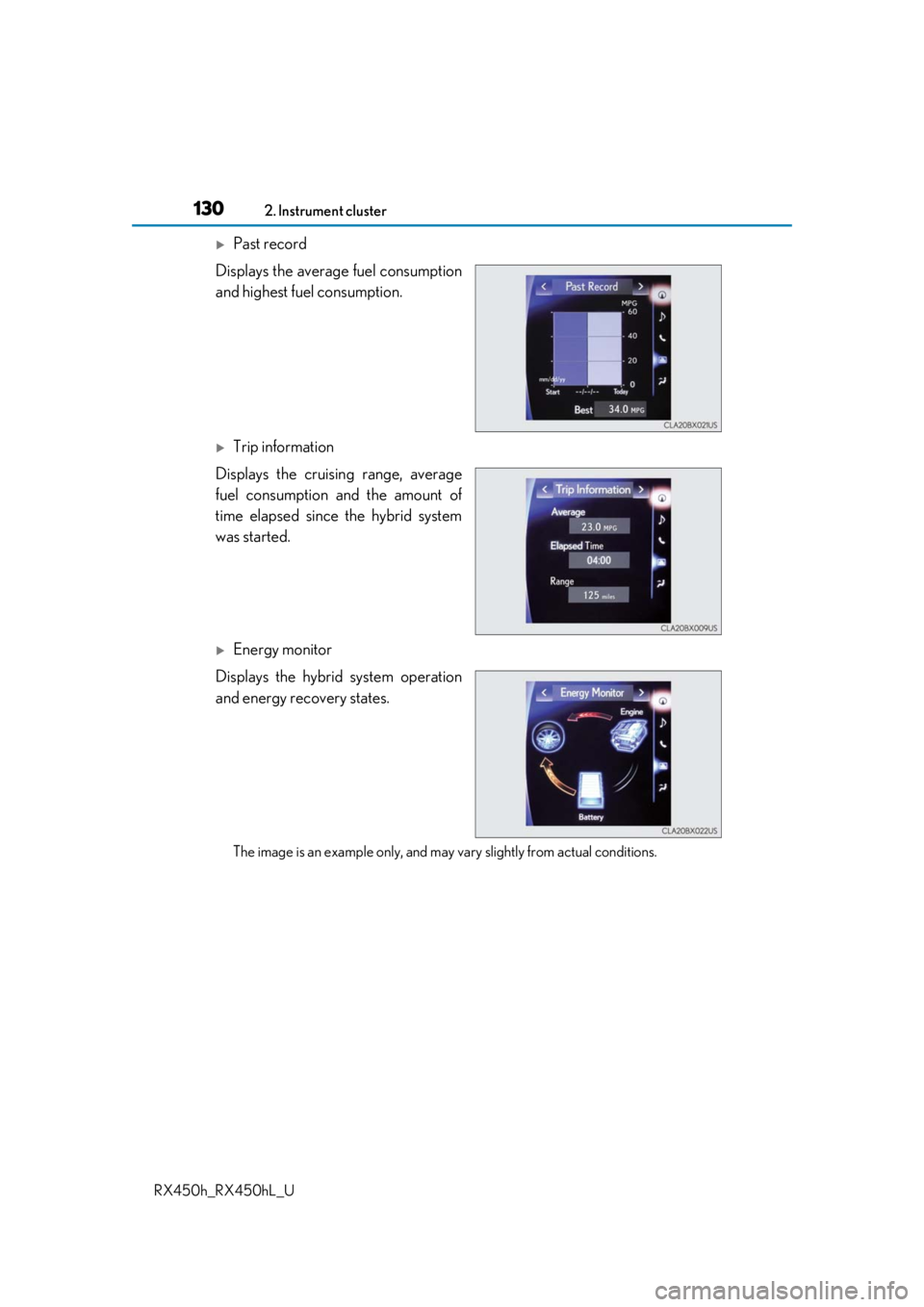
These images are examples only, and may vary slightly from actual conditions.
When the vehicle is
powered by the gaso-
line engine
When the vehicle is
charging the hybrid
battery (traction bat-
tery)
When there is no
energy flow
Hybrid battery (trac-
tion battery) status
LowFullLowFull
Audio system screenMulti-information display
Page 127 of 792

1272. Instrument cluster
2
Instrument cluster
RX450h_RX450hL_U
■Trip information
Lexus Display Audio screen
Press the “MENU” button on the Lexus Display Audio controller, then select
“Info” on the “Menu” screen, and then select “Fuel Consumption”.
If the “Trip Information” screen does no t appear, move the controller to the right
and select “Trip Information”.
Fuel consumption in the past 15
minutes
Current fuel consumption
Regenerated energy in the past
15 minutes
One symbol indicates 50 Wh.
Up to 5 symbols are shown.
Average vehicle speed since the hybrid system was started.
Elapsed time since the hybrid system was started.
Cruising range ( P. 129)
Navigation system screen
Press the “MENU” button on the Remo te Touch, then select on the
“Menu” screen, and then select “Fuel Consumption”.
If the “Energy Monitor” or “Past Record” screen is displayed, select “Trip Informa-
tion”.
Resetting the consumption data
Fuel consumption in the past 15
minutes
Current fuel consumption
Regenerated energy in the past
15 minutes
One symbol indicates 50 Wh.
Up to 5 symbols are shown.
Average vehicle speed since the hybrid system was started.
Elapsed time since the hybrid system was started.
Cruising range ( P. 129)
Fuel consumption
1
2
3
4
5
6
1
2
3
4
5
6
7
Page 128 of 792

1282. Instrument cluster
RX450h_RX450hL_U
Average fuel consumption for the past 15 minutes is divided by color into past
averages and averages atta ined since the power switch was last turned to ON
mode. Use the displayed average fuel consumption as a reference.
The image is an example only.
■Past record
Lexus Display Audio screen
Press the “MENU” button on the Lexus Display Audio controller, then select
“Info” on the “Menu” screen, and then select “Fuel Consumption”.
If the “Past Record” screen does not appear, move the controller to the right and
select “Past Record”.
Previous fuel consumption record
Current fuel consumption
Best recorded fuel consumption
Navigation system screen
Press the “MENU” button on the Remo te Touch, then select on the
“Menu” screen, and then select “Fuel Consumption”.
If the “Energy Monitor” or “Trip Informat ion” screen is displayed, select “Past
Record”.
Resetting the past record data
Best recorded fuel consumption
Average fuel consumption
Previous fuel consumption record
Updating the average fuel con-
sumption data
The average fuel consumption history is divided by color into past averages
and the average fuel consumption since the last updated. Use the displayed
average fuel consumption as a reference.
The image is an example only.
1
2
3
1
2
3
4
5
Page 129 of 792

1292. Instrument cluster
2
Instrument cluster
RX450h_RX450hL_U
■Updating the past record data
Vehicles with a Lexus Display Audio system
Update the average fuel consumption by moving the controller to the left and select
“Update” to measure the current fuel consumption again.
Vehicles with a navigation system
Update the average fuel consumption by selecting “Update” to measure the current
fuel consumption again.
■Resetting the data
Vehicles with a Lexus Display Audio system
The fuel consumption data can be deleted by moving the controller to the left and
select “Clear”.
Vehicles with a navigation system
The fuel consumption data can be deleted by selecting “Clear”.
■Cruising range
Displays the estimated maximum distance that can be driven with the quantity of fuel
remaining.
This distance is computed based on your average fuel consumption.
As a result, the actual distance that can be driven may differ from that displayed.
Vehicle information can be displayed on the side display ( P. 505), then select
“<” or “>” to select the desired screen.
Fuel consumption
Displays the average fuel consumption
and regenerated energy for the past 10
minutes in 1 minute intervals, as well as
the cruising range.
Using the side display (vehicles with 12.3-inch display)
Page 130 of 792
1302. Instrument cluster
RX450h_RX450hL_U
Past record
Displays the average fuel consumption
and highest fuel consumption.
Trip information
Displays the cruising range, average
fuel consumption and the amount of
time elapsed since the hybrid system
was started.
Energy monitor
Displays the hybrid system operation
and energy recovery states.
The image is an example only, and may va ry slightly from actual conditions.
Page 140 of 792
1403-2. Opening, closing and locking the doors
RX450h_RX450hL_U
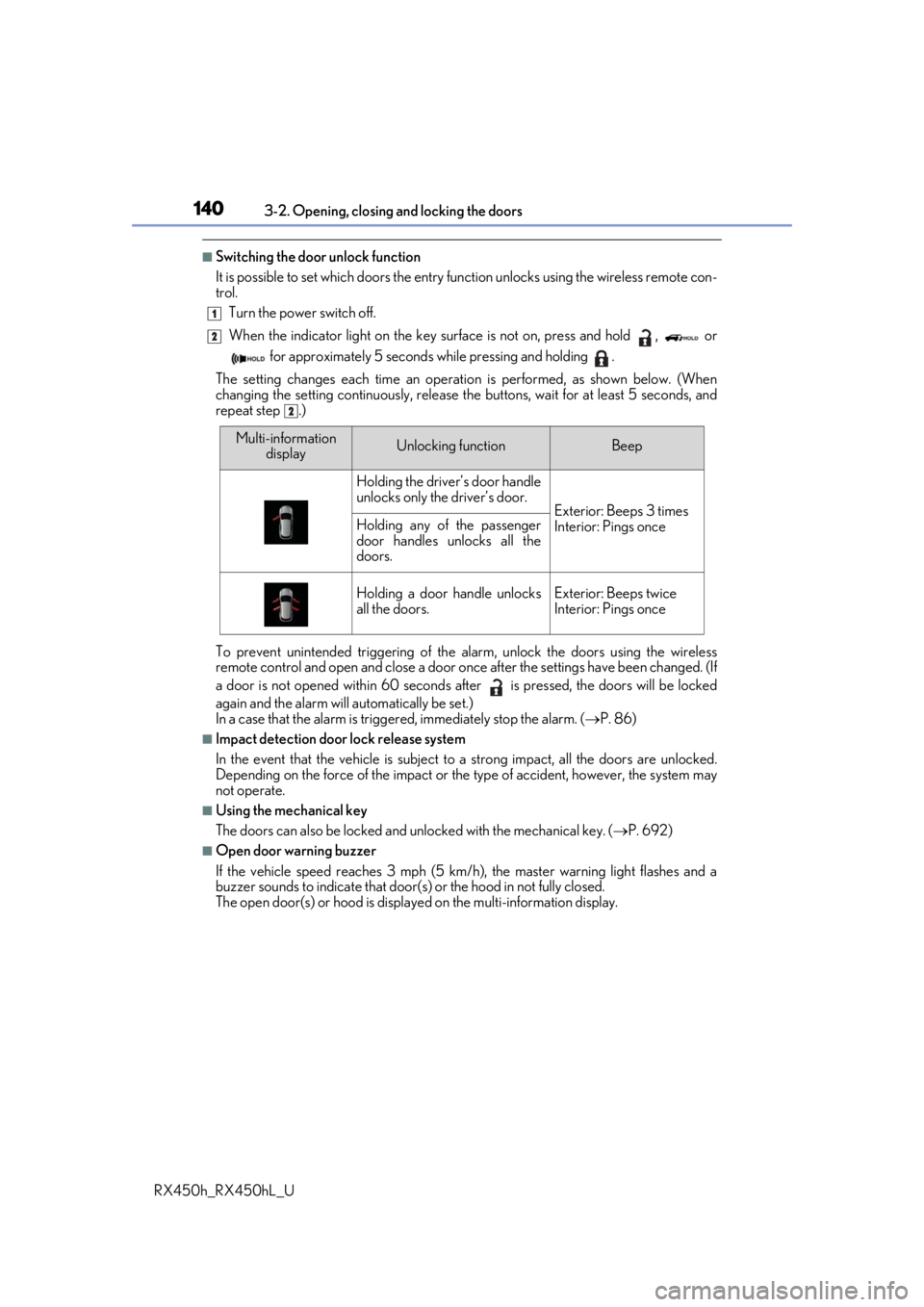
■Switching the door unlock function
It is possible to set which doors the entry function unlock s using the wireless remote con-
trol.
Turn the power switch off.
When the indicator light on the key su rface is not on, press and hold , or
for approximately 5 seconds while pressing and holding .
The setting changes each time an operation is performed, as shown below. (When
changing the setting continuously, release the buttons, wait for at least 5 seconds, and
repeat step .)
To prevent unintended triggering of the alarm, unlock the doors using the wireless
remote control and open and close a door once after the settings have been changed. (If
a door is not opened within 60 seconds af ter is pressed, the doors will be locked
again and the alarm will automatically be set.)
In a case that the alarm is triggered, immediately stop the alarm. ( P. 86)
■Impact detection door lock release system
In the event that the vehicle is subject to a strong impact, all the doors are unlocked.
Depending on the force of the impact or the type of accident, however, the system may
not operate.
■Using the mechanical key
The doors can also be locked and unlocked with the mechanical key. ( P. 692)
■Open door warning buzzer
If the vehicle speed reaches 3 mph (5 km/h), the master warning light flashes and a
buzzer sounds to indicate that door (s) or the hood in not fully closed.
The open door(s) or hood is displa yed on the multi-information display.
1
2
2
Multi-information
displayUnlocking functionBeep
Holding the driver’s door handle
unlocks only the driver’s door.
Exterior: Beeps 3 times
Interior: Pings onceHolding any of the passenger
door handles unlocks all the
doors.
Holding a door handle unlocks
all the doors.Exterior: Beeps twice
Interior: Pings once
Page 146 of 792
1463-2. Opening, closing and locking the doors
RX450h_RX450hL_U
The power back door settings can be ch anged on the multi-information display.
( P. 108)
The position at which the power back door will stop when opened automatically
can be changed.
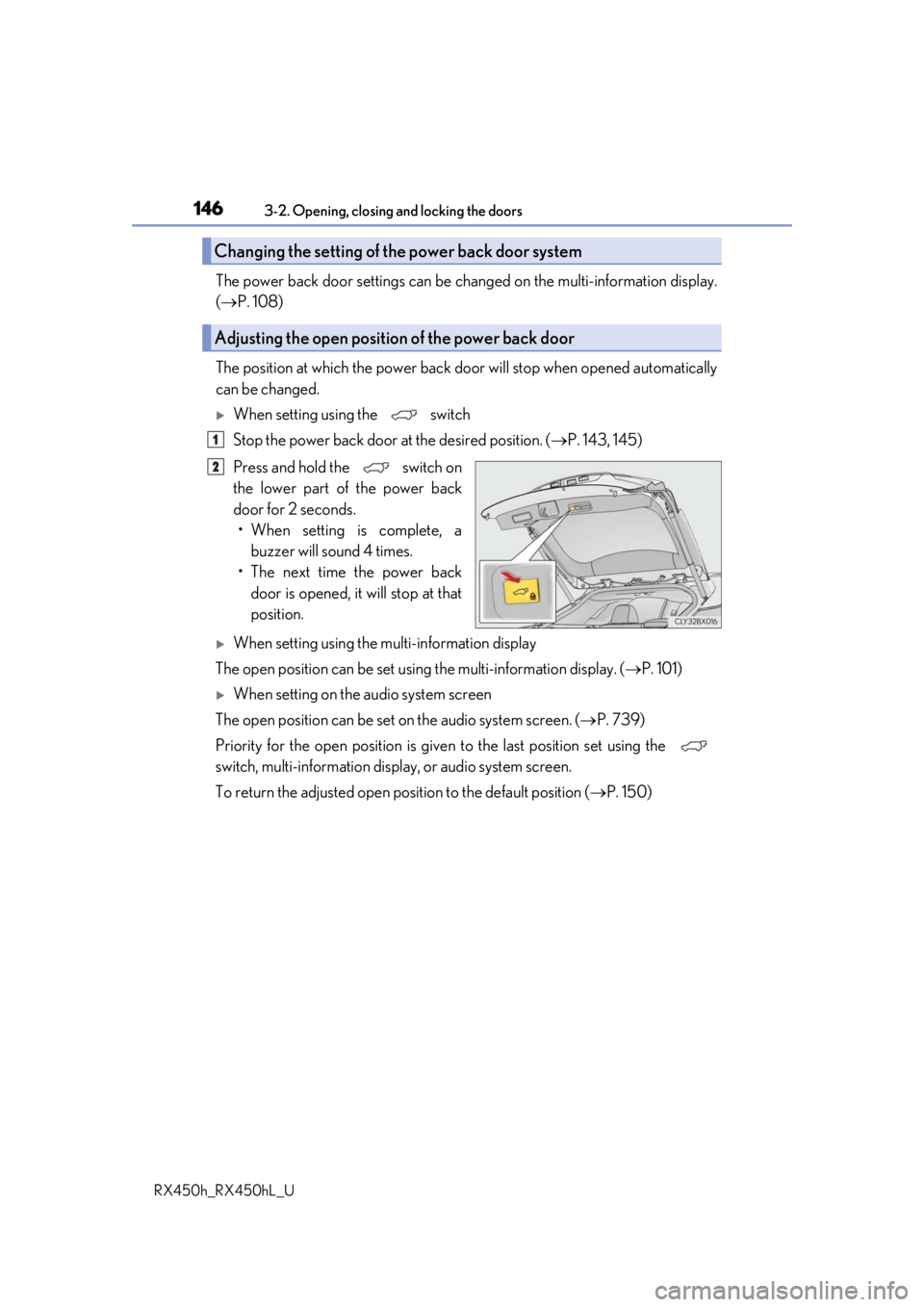
When setting using the switch
Stop the power back door at the desired position. ( P. 143, 145)
Press and hold the switch on
the lower part of the power back
door for 2 seconds. • When setting is complete, a buzzer will sound 4 times.
• The next time the power back door is opened, it will stop at that
position.
When setting using the multi-information display
The open position can be set usin g the multi-information display. (P. 101)
When setting on the audio system screen
The open position can be set on the audio system screen. ( P. 739)
Priority for the open position is give n to the last position set using the
switch, multi-information displa y, or audio system screen.
To return the adjusted open posi tion to the default position (P. 150)
Changing the setting of the power back door system
Adjusting the open position of the power back door
1
2