Page 313 of 777
312 4-5. Using the driving support systems
RX350/RX350L_U ●
Motorcycles travelin g in the same lane●
When water or snow thrown up by the surrounding vehicles hinders the detecting of
the sensor
■
Conditions under which the ve hicle-to-vehicle distance co ntrol mode may not function
correctly
In the case of the following conditions, o perate the brake pedal (or accelerator pedal,
depending on the situ ation) as necessary.
As the sensor may not be able to correctly detect vehicles ahead, the system may not
operate properly.
●
When the vehicle ahead of you decelerates suddenly ●
When your vehicle is pointing upwards
(caused by a heavy load in the luggage com-
partment, etc.) ●
Preceding vehicle has an extremely high
ground clearance
●
When the road curves or when the lanes are
narrow
●
When steering wheel operation or your posi-
tion in the lane is unstable
Page 316 of 777

3154-5. Using the driving support systems
4
Driving
RX350/RX350L_U Press “ ” or “ ” of the meter control switches, select .
Press “ ” or “ ” of the meter control switches, select “BSM”.
Press “ ” or “ ” of the meter control switch es, select “BSM” or “RCTA”.■
Outside rear view mirro r indicator visibility
In strong sunlight, the outside rear view mirror indicator may be difficult to see.■
Hearing the RCTA buzzer
The RCTA buzzer may be difficult to hear over loud noises, such as if the audio system
volume is high. ■
When there is a malfunction in the Blind Spot Monitor
If a system malfunction is detected due to any of the following, a warning message will be
displayed: ( P. 661)●
A sensor is malfunctioning ●
A sensor is dirty or covere d with snow or a sticker●
The outside temperature is extremely high or low ●
Sensor voltage is abnormal ●
A sensor is misaligned ■
Certification for the Blind Spot Monitor
For vehicles sold in the U.S.A.
For vehicles sold in CanadaTurning the BSM function/RCTA function on/off 1
2
3
Page 325 of 777

324 4-5. Using the driving support systems
RX350/RX350L_U ■
Conditions under which the RCTA fu nction will not detect a vehicle
The RCTA function is not designed to detect the following types of vehicles and/or
objects: ●
Vehicles approaching from directly behind ●
Vehicles backing up in a parkin g space next to your vehicle
●
Guardrails, walls, signs, parked vehi cles and similar stationary objects
*●
Small motorcycles, bicycles, pedestrians, etc.
*●
Vehicles moving away from your vehicle ●
Vehicles approaching from the parking spaces next to your vehicle
*
* : Depending on the conditions, detection of a vehicle and/or object may occur.■
Conditions under which the RCTA function may not function correctly ●
The RCTA function may not detect vehicles correctly in the following situations:
• When the sensor is misaligned due to a stro ng impact to the sensor or its surround-
ing area
• When mud, snow, ice, a sticke r, etc. is covering the sensor or surrounding area on
the rear bumper
• When driving on a road surf ace that is wet with standi ng water during bad weather,
such as heavy rain, snow, or fog
• When multiple vehicles are approaching wi th only a small gap between each vehicle
• When a vehicle is approaching at high speed
• When towing a trailer (vehicles with towing package) ●
Vehicles that the sensors cannot detect due to
obstructions
• When backing up on a slope with a sharp
change in grade
Page 336 of 777

3354-5. Using the driving support systems
4
Driving
RX350/RX350L_U WARNING ■
When using the intuitive parking assist
Observe the following precautions.
Failing to do so may result in the vehicle be ing unable to be driv en safely and possibly
cause an accident. ●
Do not use the sensor at speeds in excess of 6 mph (10 km/h). ●
The sensors’ detection areas and reaction ti mes are limited. When moving forward or
reversing, check the areas surrounding the vehicle (especially th e sides of the vehi-
cle) for safety, and drive slowly, using the brake to control the vehicle’s speed. ●
Do not install accessories within the sensors’ detection areas.●
The vehicle is equipped with a fender pole or wireless antenna. ●
The front or rear bumper or a se nsor receives a strong impact.●
A non-genuine Lexus suspension (lower ed suspension, etc.) is installed.●
Towing eyelets are installed. ●
A backlit license plate is installed. ■
When using intuitive parking assist
In the following situations, the system may not function correctly due to a sensor mal-
function, etc. Have the vehicle checked by your Lexus dealer. ●
The intuitive parking assist operation disp lay flashes, and a buzzer sounds when no
obstacles are detected. ●
If the area around a sensor co llides with something, or is subjected to strong impact.●
If the bumper collides with something. ●
If the display shows continuously withou t beeping, except when the buzzer mute
switch has been turned on. ●
If a display error occurs , first check the sensor.
If the error occurs even if there is no ice, sn ow or mud on the sensor, it is likely that the
sensor is malfunctioning. ■
Notes when washing the vehicle
Do not apply intensive bursts of water or steam to the sensor area.
Doing so may result in th e sensor malfunctioning.●
When using a high pressure washer to wa sh the vehicle, do not spray the sensors
directly, as doing so may cause a sensor to malfunction. ●
When using steam to clean the vehicle, do not direct steam too close to the sensors
as doing so may cause a sensor to malfunction.
Page 339 of 777
338 4-5. Using the driving support systems
RX350/RX350L_U If a rear radar sensor detects a vehicle ap proaching from the right or left at the
rear of the vehicle and the system determ ines that the possibility of a collision is
high, this function will perform brake control to reduce the likelihood of an
impact with the approaching vehicle. ■
Examples of system operation
This function will operate in situations such as the following if a vehicle is
detected in the traveling direction of the vehicle.
◆ When reversing, a vehicle is approaching and the brake pedal is not
depressed, or is depressed lateRear Cross Traffic Auto Brake function (if equipped)
Page 343 of 777
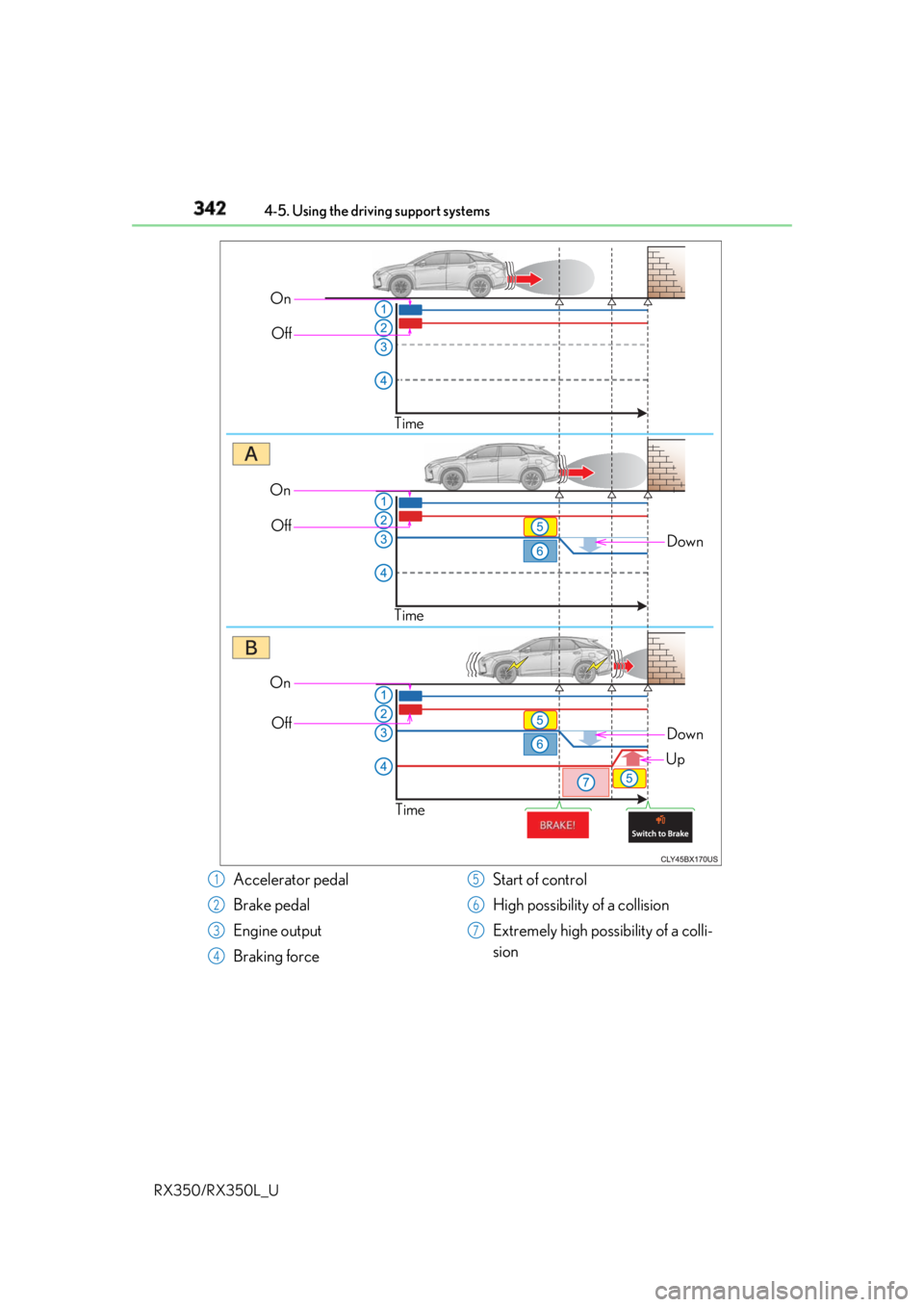
342 4-5. Using the driving support systems
RX350/RX350L_U On
Off
Time
DownOn
Off
Time
On
Off
Time Down
Up
Accelerator pedal
Brake pedal
Engine output
Braking force Start of control
High possibility of a collision
Extremely high possibility of a colli-
sion1
2
3
4 5
6
7
Page 350 of 777

3494-5. Using the driving support systems
4
Driving
RX350/RX350L_U NOTICE ■
To prevent the system from malfunctioning ●
If the area around a sensor is subjected to an impact, the system may not operate
properly due to the sensor being misaligned. Have the vehicle inspected by your
Lexus dealer. ●
When using a high pressure washer to wa sh the vehicle, do not spray the sensors
directly, as doing so may cause a sensor to malfunction. ●
When using steam to clean the vehicle, do not direct steam too close to the sensors
as doing so may cause a sensor to malfunction. ■
To prevent a radar sensor from malfunctioning ●
If the area around a radar sensor is subjected to an impact, the system may not oper-
ate properly due to a sensor malfunction. Have the vehicle inspected by your Lexus
dealer. ●
Observe the radar sensor handling precautions. ( P. 316)■
To prevent unnecessary operation of the Intelligent Clearance Sonar system
In the following situations, disable the Inte lligent Clearance Sonar system as the system
may operate even though there is no possibility of a collision.●
When inspecting the vehicle using a chassi s roller, chassis dynamo or free roller●
When loading the vehicle onto a boat, truck or other transport vessel ●
If the suspension has been modified or tires of a size other than specified are installed●
If the front of the vehicle is raised or lowered due to the carried load ●
If towing eyelets are installed
Page 352 of 777
3514-5. Using the driving support systems
4
Driving
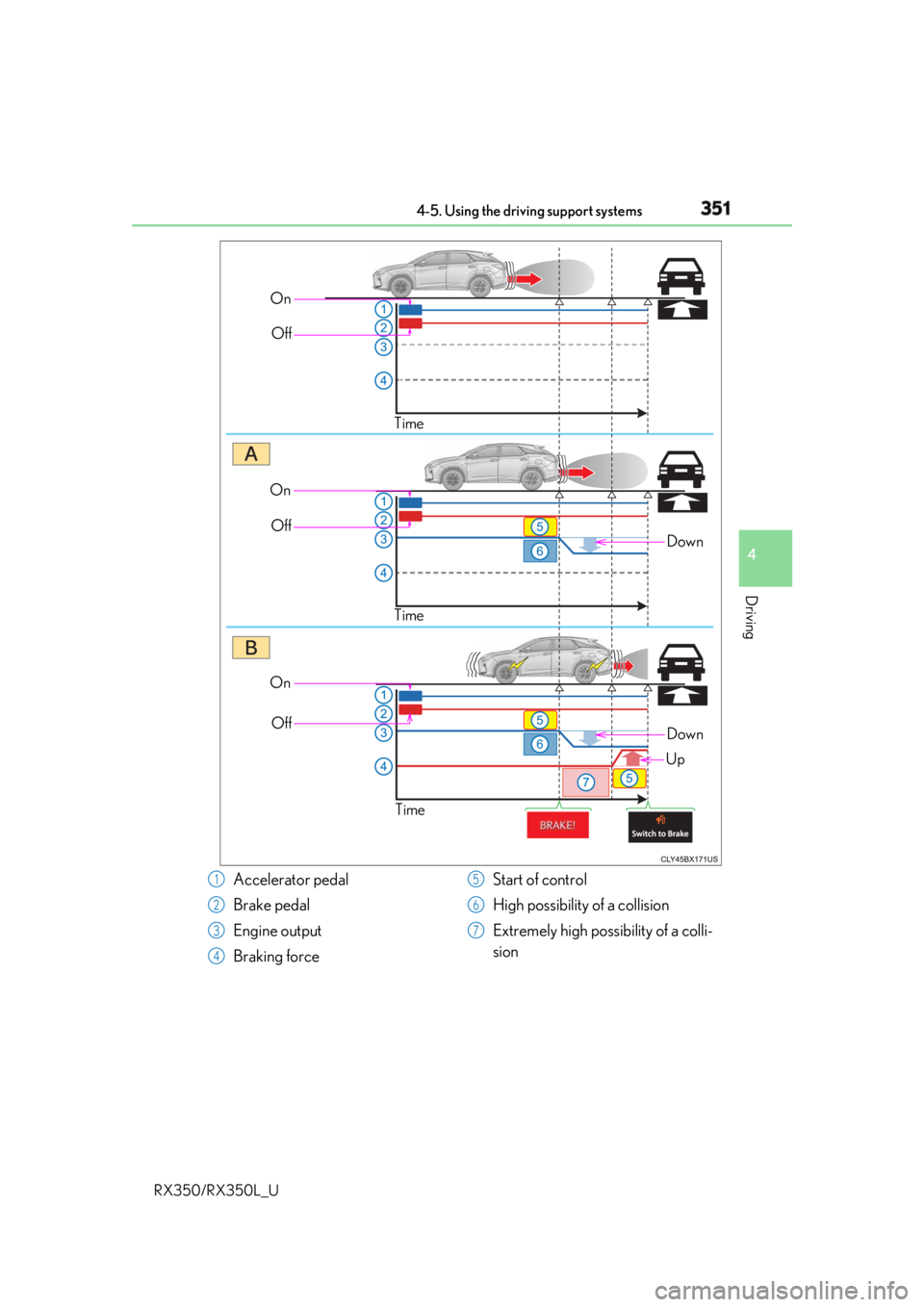
RX350/RX350L_U On
Off
Time
DownOn
Off
Time
On
Off
Time Down
Up
Accelerator pedal
Brake pedal
Engine output
Braking force Start of control
High possibility of a collision
Extremely high possibility of a colli-
sion1
2
3
4 5
6
7