2019 LEXUS RX350 high
[x] Cancel search: highPage 356 of 777

3554-5. Using the driving support systems
4
Driving
RX350/RX350L_U ■
Situations in which the Rear Cross Traffic Auto Brake function may not operate prop-
erly
In some situations such as the following , this function may not operate properly.●
Objects and vehicles which the radar sensors are not designed to detect
• Stationary objects
• Vehicles which are moving away from your vehicle
• Pedestrians, motorcycles, bicycles, etc.
*• Objects which are extremely close to a radar sensor
• Vehicles which are approaching from the right or left at the rear of the vehicle at a
traveling speed of less than approximately 5 mph (8 km/h)
• Vehicles which are approaching from the right or left at the rear of the vehicle at a
traveling speed of more than approximately 15 mph (24 km/h)
* : Depending on conditions, detection of a vehicle and/or object may occur.●
Situations in which the radar sensors may not be able to detect an object
• When a sensor or the area around a sensor is extremely hot or cold
• If the rear bumper is covere d with ice, snow, dirt, etc.
• If heavy rain or water strikes the vehicle
• When the detection area of a radar sensor is obstructed by an adjacent vehicle
• If the vehicle is significantly tilted
• If towing eyelets are installed
• If the suspension has been modified or tires of a size othe r than specified are
installed
• If the front of the vehicle is raised or lowered due to the carried load
• If a sticker or an electronic component, su ch as a backlit license plate (especially flu-
orescent type), fog lights, a fender pole or wireless antenna is installed near a radar
sensor
• If the orientation of a rada r sensor has been changed due to a collision or other
impact or removal and installation
• When multiple vehicles are approaching wi th only a small gap between each vehicle
• When a vehicle is approaching at high speed ●
Situations in which the radar sensor may not detect a vehicle
• When a vehicle approaches from the right
or left at the rear of the vehicle while you
are turning while backing up
• When turning while backing up
• When backing out of a shallow angle park-
ing spot
Page 365 of 777
364 4-5. Using the driving support systems
RX350/RX350L_U ■
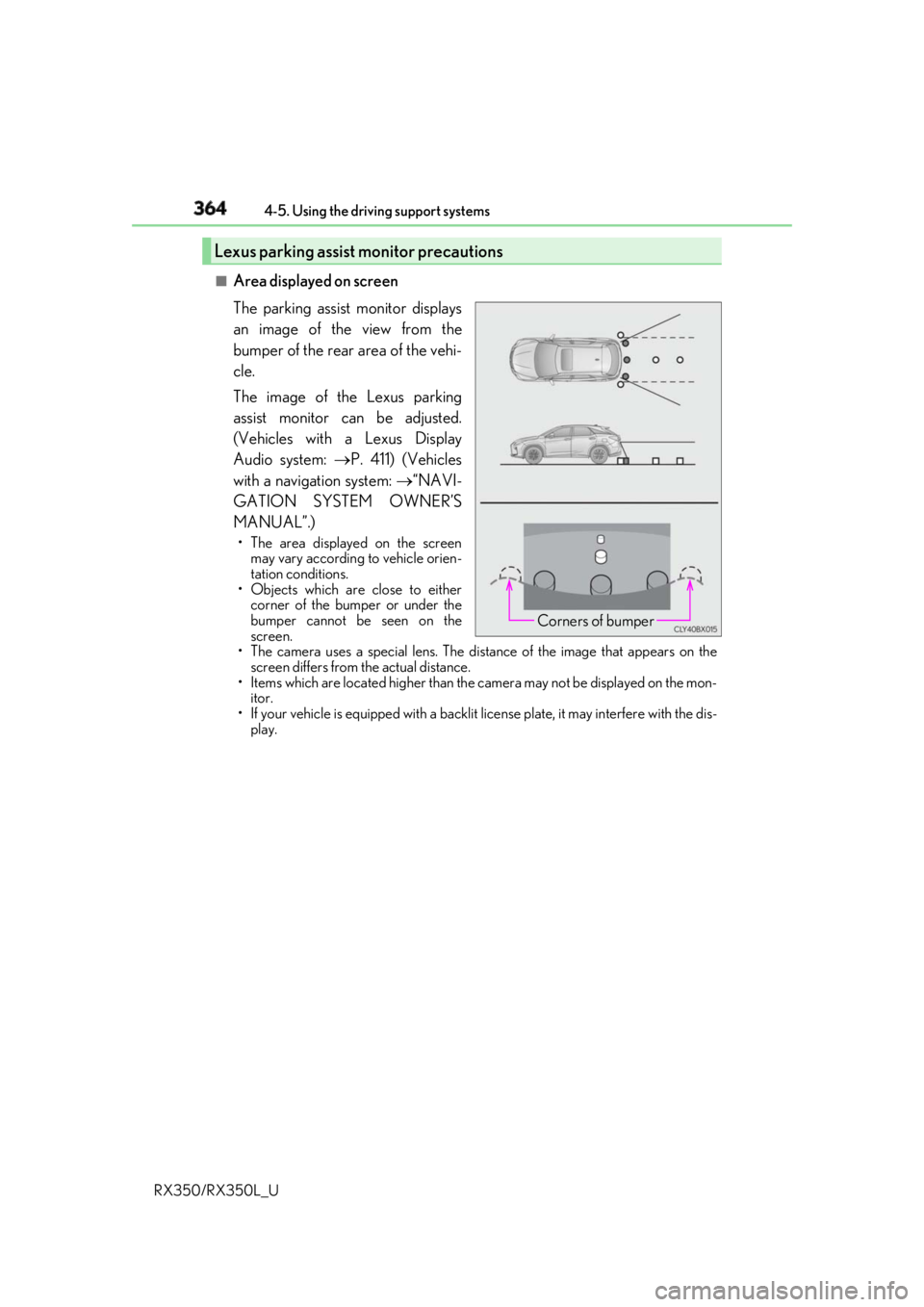
Area displayed on screen
The parking assist monitor displays
an image of the view from the
bumper of the rear area of the vehi-
cle.
The image of the Lexus parking
assist monitor can be adjusted.
(Vehicles with a Lexus Display
Audio system: P. 411) (Vehicles
with a navigation system: “NAVI-
GATION SYSTEM OWNER’S
MANUAL”.) • The area displayed on the screen
may vary according to vehicle orien-
tation conditions.
• Objects which are close to either
corner of the bumper or under the
bumper cannot be seen on the
screen.
• The camera uses a special lens. The dist ance of the image that appears on the
screen differs from the actual distance.
• Items which are located higher than the camera may not be displayed on the mon-
itor.
• If your vehicle is equipped with a backlit license plate, it may interfere with the dis-
play.Lexus parking assist monitor precautions
Corners of bumper
Page 370 of 777
3694-5. Using the driving support systems
4
Driving
RX350/RX350L_U ■
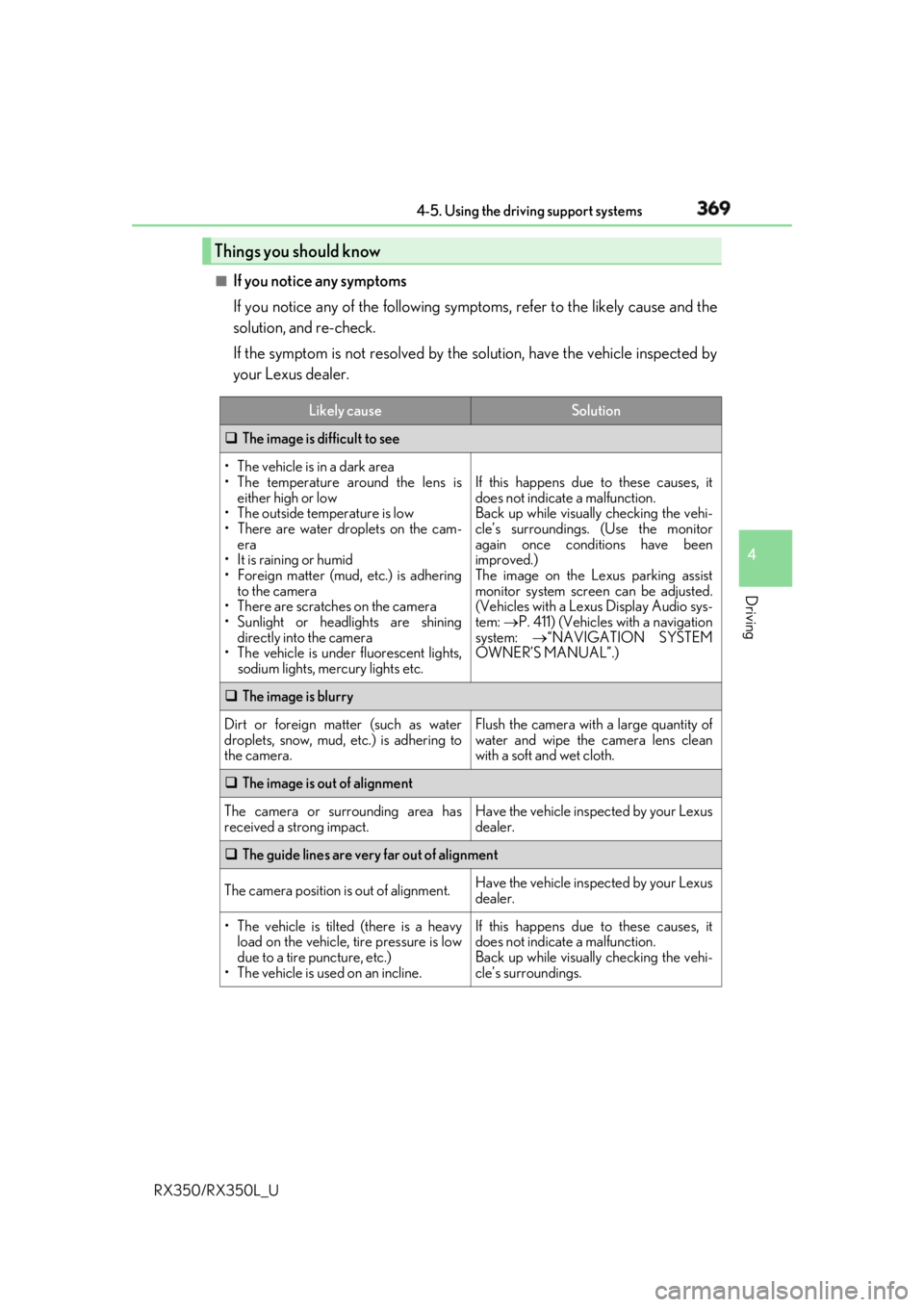
If you notice any symptoms
If you notice any of the following symp toms, refer to the likely cause and the
solution, and re-check.
If the symptom is not resolved by the solution, have the vehicle inspected by
your Lexus dealer.Things you should know Likely cause Solution
The image is difficult to see
• The vehicle is in a dark area
• The temperature around the lens is
either high or low
• The outside temperature is low
• There are water droplets on the cam-
era
• It is raining or humid
• Foreign matter (mud, etc.) is adhering
to the camera
• There are scratches on the camera
• Sunlight or headlights are shining
directly into the camera
•The vehicle is unde r fluorescent lights,
sodium lights, mercury lights etc. If this happens due to these causes, it
does not indicate a malfunction.
Back up while visually checking the vehi-
cle’s surroundings. (Use the monitor
again once conditions have been
improved.)
The image on the Lexus parking assist
monitor system screen can be adjusted.
(Vehicles with a Lexus Display Audio sys-
tem: P. 411) (Vehicles with a navigation
system: “NAVIGATION SYSTEM
OWNER’S MANUAL”.)
The image is blurry
Dirt or foreign matter (such as water
droplets, snow, mud, etc.) is adhering to
the camera. Flush the camera with a large quantity of
water and wipe the camera lens clean
with a soft and wet cloth.
The image is out of alignment
The camera or surrounding area has
received a strong impact. Have the vehicle inspected by your Lexus
dealer.
The guide lines are very far out of alignment
The camera position is out of alignment. Have the vehicle inspected by your Lexus
dealer.
• The vehicle is tilted (there is a heavy
load on the vehicle, tire pressure is low
due to a tire puncture, etc.)
• The vehicle is used on an incline. If this happens due to these causes, it
does not indicate a malfunction.
Back up while visually checking the vehi-
cle’s surroundings.
Page 380 of 777

3794-5. Using the driving support systems
4
Driving
RX350/RX350L_U ◆ Dynamic Torque Control AWD system (AWD models)
Automatically switches from front-wh eel drive to all-wheel drive (AWD)
according to the driving conditions, help ing to ensure reliable handling and
stability. Examples of conditions wher e the system will switch to AWD are
when cornering, going uphill, starting off or accele rating, and when the road
surface is slippery due to snow, rain, etc.
◆ Adaptive Variable Suspen sion System (if equipped)
Controls the damping force of the shock absorber of each wheel according to
the road and driving conditions, helpin g achieve a comfortable ride, excellent
driveability and a high level of stability.
If SPORT S+ mode is selected using the driving mode select switch, the
damping force will become more su itable for sporty driving. ( P. 374)
◆ VDIM (Vehicle Dynamics Integr ated Management) (if equipped)
Provides integrated control of the ABS, brake assist, TRAC, VSC, hill-start
assist control and EPS systems
Helps to maintain vehicle stability when swerving on slippery road surfaces by
controlling the brakes and engine output
Page 383 of 777

382 4-5. Using the driving support systems
RX350/RX350L_U ■
Automatic reactivation of TRAC, Tr ailer Sway Control and VSC systems
After turning the TRAC, Trailer Sway Contro l and VSC systems off, the systems will be
automatically re-enabled in the following situations: ●
When the engine swit ch is turned off●
If only the TRAC system is turned off, the TRAC will turn on when vehicle speed
increases
If both the TRAC and VSC systems are turned off, au tomatic re-enabling will not
occur when vehicle speed increases. ■
Reduced effectiveness of the EPS system
The effectiveness of the EPS system is reduced to prevent the system from overheating
when there is frequent steering input over an extended period of time. The steering
wheel may feel heavy as a result . Should this occur, refrain from excessive steering input
or stop the vehicle and turn the engine off. The EPS system should return to normal
within 10 minutes.
WARNING ■
The ABS does not operate effectively when ●
The limits of tire gripping performance have been exceeded (such as excessively
worn tires on a snow covered road). ●
The vehicle hydroplanes while driving at high speed on wet or slick roads.■
Stopping distance when the ABS is operating may exceed that of normal conditions
The ABS is not designed to shorten the vehi cle’s stopping distance . Always maintain a
safe distance from the vehicle in front of you, especially in the following situations: ●
When driving on dirt, grav el or snow-covered roads●
When driving with tire chains ●
When driving over bumps on the road ●
When driving over roads with potholes or uneven surfaces■
TRAC/VSC may not operate effectively when
Directional control an d power may not be achievable wh ile driving on slippery road
surfaces, even if the TRAC/VSC system is op erating. Drive the vehi cle carefully in con-
ditions where stability and power may be lost.
Page 389 of 777
388 4-6. Driving tips
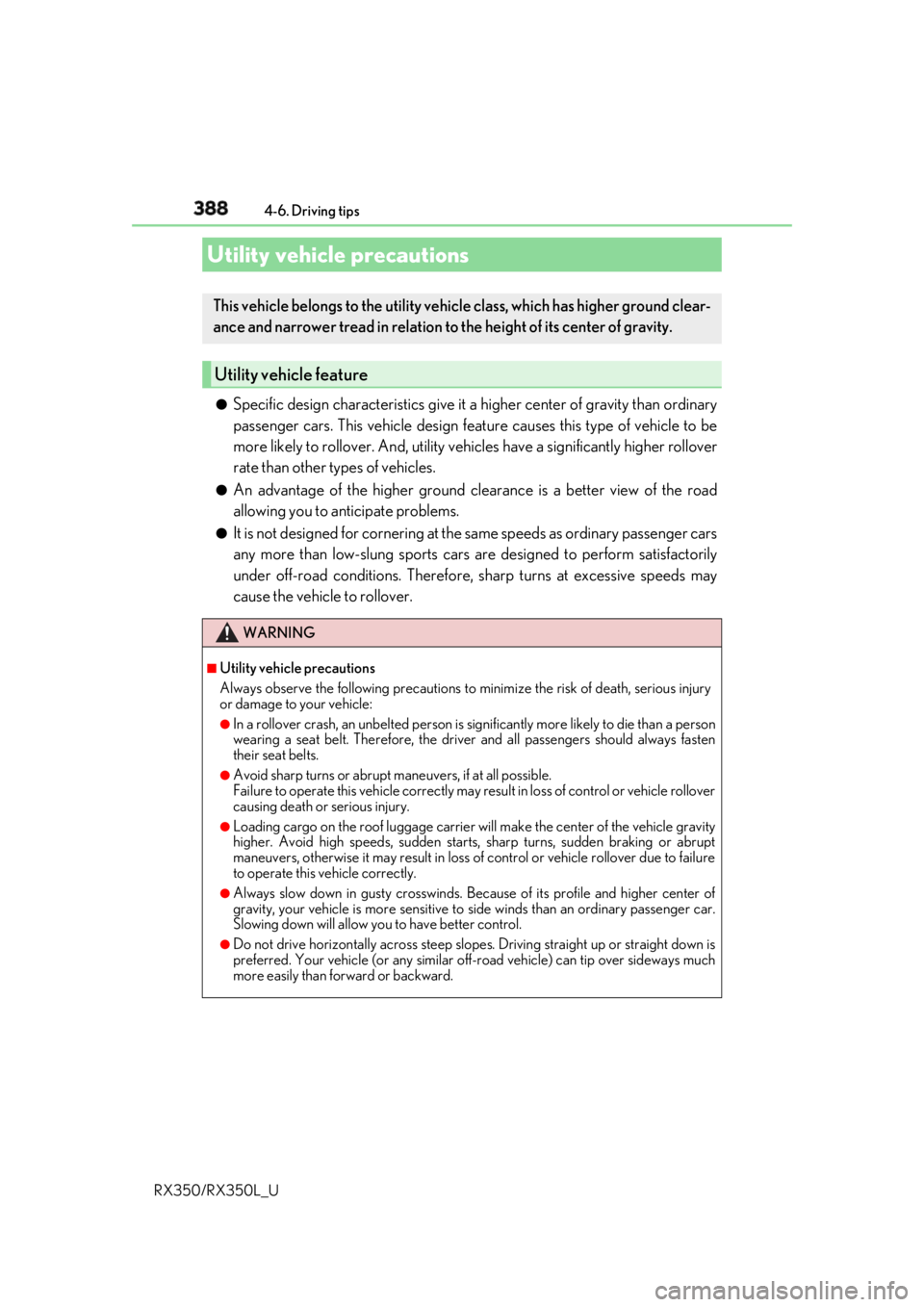
RX350/RX350L_U ●
Specific design characteristics give it a higher center of gravity than ordinary
passenger cars. This vehicle design feature causes this type of vehicle to be
more likely to rollover. And, utility vehi cles have a significantly higher rollover
rate than other types of vehicles. ●
An advantage of the higher ground cl earance is a better view of the road
allowing you to anticipate problems. ●
It is not designed for cornering at the same speeds as ordinary passenger cars
any more than low-slung sports cars are designed to perform satisfactorily
under off-road conditions. Therefore, sharp turns at excessive speeds may
cause the vehicle to rollover.Utility vehicle precautions This vehicle belongs to the utility vehicl e class, which has higher ground clear-
ance and narrower tread in relation to the height of its center of gravity.
Utility vehicle feature
WARNING ■
Utility vehicle precautions
Always observe the following precautions to minimize the risk of death, serious injury
or damage to your vehicle: ●
In a rollover crash, an unbelted person is si gnificantly more likely to die than a person
wearing a seat belt. Therefore, the driver and all passengers should always fasten
their seat belts. ●
Avoid sharp turns or abrupt maneuvers, if at all possible.
Failure to operate this vehicle correctly may result in loss of control or vehicle rollover
causing death or serious injury. ●
Loading cargo on the roof lu ggage carrier will make the ce nter of the vehicle gravity
higher. Avoid high speeds, sudden starts, sharp turns, sudden braking or abrupt
maneuvers, otherwise it may re sult in loss of control or vehicle rollover due to failure
to operate this vehicle correctly. ●
Always slow down in gusty crosswinds. Be cause of its profile and higher center of
gravity, your vehicle is more sensitive to side winds than an ordinary passenger car.
Slowing down will allow you to have better control. ●
Do not drive horizontally across steep slopes . Driving straight up or straight down is
preferred. Your vehicle (or any similar off- road vehicle) can tip over sideways much
more easily than forward or backward.
Page 403 of 777

402 5-1. Basic Operations
RX350/RX350L_U ■
Adjusting the volume
The volume of the Mobile Assist ant can be adjusted using the
“ PWR·VOL
” knob or
steering wheel volume switch es. The Mobile Assistant an d phone call volumes are syn-
chronized. ■
Microphone
It is not necessary to speak directly into the microphone when using the Mobile Assis-
tant. ●
Wait for the listening beeps before using the Mobile Assistant.●
The Mobile Assistant may not recognize commands in the following situations:
• When spoken too quickly.
• When spoken at a low or high volume.
• When the roof or windows are open.
• When passengers are talking while th e Mobile Assistan t is being used.
• When the air conditioning syst em’s fan speed is set high.
• When the air conditioning vents ar e turned toward the microphone.■
Mobile Assistant precautions ●
The available features and functions may vary based on the iOS version installed on the
connected device. ●
Some Siri features are limited in Eyes Free mode. If you attempt to use an unavailable
function, Siri will inform you that the function is not available. ●
If Siri is not enabled on the ce llular phone connected via Bluetooth
, an error message
will be displayed on the screen. ●
While a phone call is active, the Mobile Assistant cannot be used. ●
If using the navigation featur e of the cellular phone, ensure the active audio source is
Bluetooth
audio or iPod in order to hear turn by turn direction prompts.
Page 437 of 777
436 5-6. Using an external device
RX350/RX350L_U ■
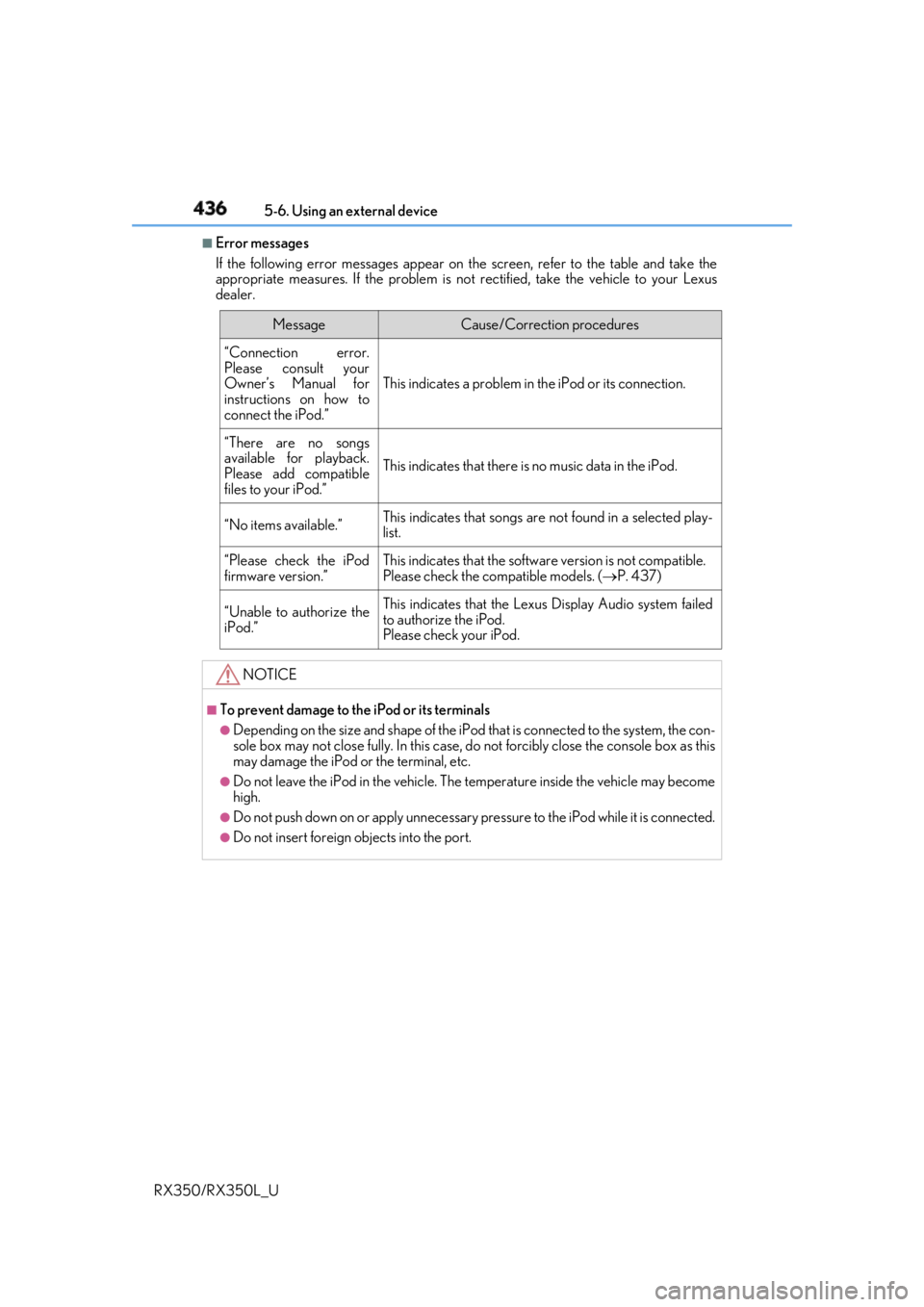
Error messages
If the following error messages appear on th e screen, refer to the table and take the
appropriate measures. If the pr oblem is not rectified, take the vehicle to your Lexus
dealer.
Message Cause/Correction procedures
“Connection error.
Please consult your
Owner’s Manual for
instructions on how to
connect the iPod.” This indicates a problem in the iPod or its connection.
“There are no songs
available for playback.
Please add compatible
files to your iPod.” This indicates that there is no music data in the iPod.
“No items available.” This indicates that songs are not found in a selected play-
list.
“Please check the iPod
firmware version.” This indicates that the softwa re version is not compatible.
Please check the co mpatible models. ( P. 437)
“Unable to authorize the
iPod.” This indicates that the Lexu s Display Audio system failed
to authorize the iPod.
Please check your iPod.
NOTICE ■
To prevent damage to th e iPod or its terminals●
Depending on the size and shape of the iPod that is connected to the system, the con-
sole box may not close fully. In this case, do not forcibly close the console box as this
may damage the iPod or the terminal, etc. ●
Do not leave the iPod in the vehicle. The temperature inside the vehicle may become
high. ●
Do not push down on or apply unnecessary pr essure to the iPod while it is connected.●
Do not insert foreign objects into the port.