Page 181 of 580
Features of your vehicle
88
4
Icy Road Warning Light
(if equipped)
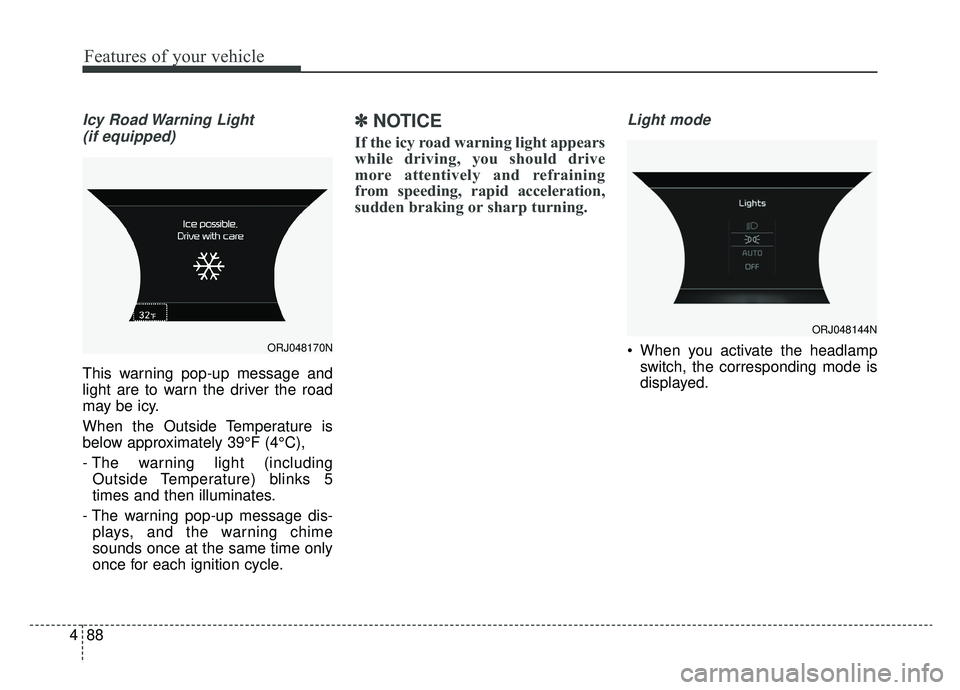
This warning pop-up message and
light are to warn the driver the road
may be icy.
When the Outside Temperature is
below approximately 39°F (4°C),
- The warning light (including Outside Temperature) blinks 5
times and then illuminates.
- The warning pop-up message dis- plays, and the warning chime
sounds once at the same time only
once for each ignition cycle.
✽ ✽ NOTICE
If the icy road warning light appears
while driving, you should drive
more attentively and refraining
from speeding, rapid acceleration,
sudden braking or sharp turning.
Light mode
When you activate the headlamp
switch, the corresponding mode is
displayed.ORJ048170N
ORJ048144N
Page 182 of 580
489
Features of your vehicle
Wiper mode
When the wiper switch is operated,the corresponding mode is dis-
played.
Check headlight LED
This warning message illuminates if
LED headlamp malfunctions.
Check headlight cooling fan
This warning message illuminates if
LED headlamp cooling fan malfunc-
tions.
Check shift lever
If there is a problem with the main
function of the shift lever, this warn-
ing is displayed.
Low Washer Fluid
This warning message illuminateson the service reminder mode if
the washer fluid level in the reser-
voir is nearly empty.
It means that you should refill the washer fluid.
Turn on FUSE SWITCH
This warning message illuminatesif the fuse switch under the steer-
ing wheel is OFF.
It means that you should turn the fuse switch on.
❈ For more details, refer to “Fuses” in
chapter 7.
ORJ048145L
Page 196 of 580
![KIA K900 2019 Owners Manual 4103
Features of your vehicle
AUTO HOLD IndicatorLight (if equipped)
This indicator light illuminates:
[White] When you activate the auto hold system by pressing the AUTO
HOLD button.
[Green] When y](/manual-img/2/55057/w960_55057-195.png "KIA K900 2019 Owners Manual 4103
Features of your vehicle
AUTO HOLD IndicatorLight (if equipped)
This indicator light illuminates:
[White] When you activate the auto hold system by pressing the AUTO
HOLD button.
[Green] When y")
4103
Features of your vehicle
AUTO HOLD IndicatorLight (if equipped)
This indicator light illuminates:
[White] When you activate the auto hold system by pressing the AUTO
HOLD button.
[Green] When you stop the vehicle completely by depressing the
brake pedal with the auto hold sys-
tem activated.
[Yellow] When there is a malfunc- tion with the auto hold system.
In this case, have the vehicle
inspected by an authorized K900
Kia dealer.
❈ For more details, refer to “Auto
Hold” in chapter 5.
LKA(Lane Keeping
Assist) indicator
The LKA indicator will illuminate
when you turn the lane keeping
assistant system on by pressing the
LKA button.
If there is a problem with the system,
the yellow LKA indicator will illumi-
nate.
❈ For more details, refer to “Lane
Keeping Assist” in chapter 5.
AUTO
HOLDWARNING - Distracted
driving
Driving while distracted can
result in a loss of vehicle con-
trol that may lead to an acci-
dent, severe personal injury,
and death. The driver's primary
responsibility is in the safe and
legal operation of a vehicle, and
use of any handheld devices,
other equipment, or vehicle sys-
tems which take the driver's
eyes, attention and focus away
from the safe operation of a
vehicle or which are not permis-
sible by law should never be
used during operation of the
vehicle.
Page 199 of 580
Features of your vehicle
106
4
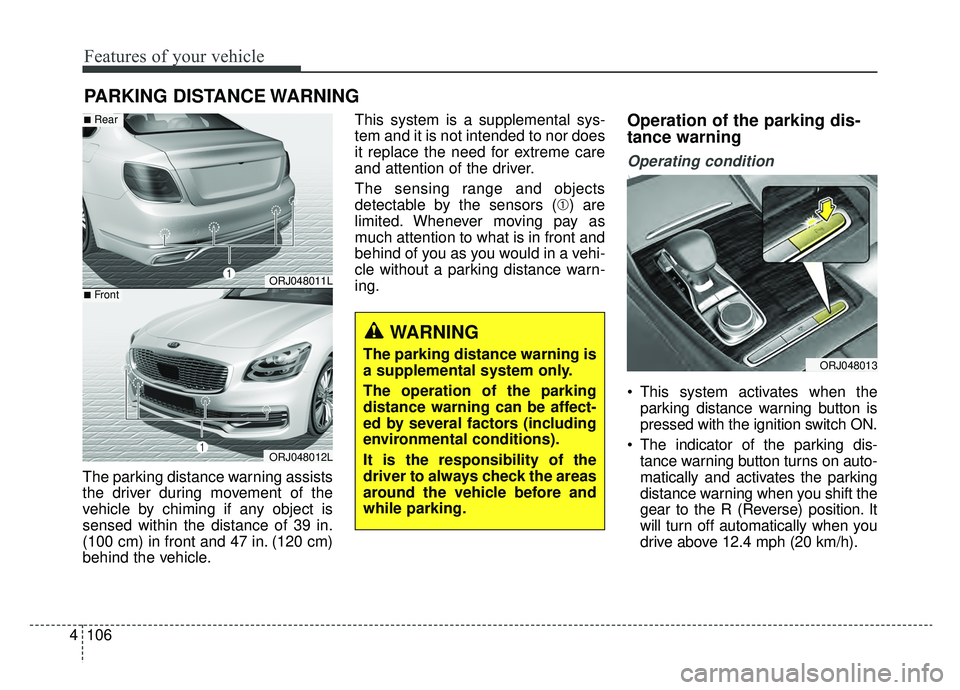
The parking distance warning assists
the driver during movement of the
vehicle by chiming if any object is
sensed within the distance of 39 in.
(100 cm) in front and 47 in. (120 cm)
behind the vehicle. This system is a supplemental sys-
tem and it is not intended to nor does
it replace the need for extreme care
and attention of the driver.
The sensing range and objects
detectable by the sensors (➀) are
limited. Whenever moving pay as
much attention to what is in front and
behind of you as you would in a vehi-
cle without a parking distance warn-
ing.
Operation of the parking dis-
tance warning
Operating condition
This system activates when the
parking distance warning button is
pressed with the ignition switch ON.
The indicator of the parking dis- tance warning button turns on auto-
matically and activates the parking
distance warning when you shift the
gear to the R (Reverse) position. It
will turn off automatically when you
drive above 12.4 mph (20 km/h).
PARKING DISTANCE WARNING
WARNING
The parking distance warning is
a supplemental system only.
The operation of the parking
distance warning can be affect-
ed by several factors (including
environmental conditions).
It is the responsibility of the
driver to always check the areas
around the vehicle before and
while parking.
ORJ048011L
ORJ048012L
■Rear
■Front
ORJ048013
Page 202 of 580

4109
Features of your vehicle
✽ ✽NOTICE
1. The warning may not sound
sequentially depending on the
speed and shapes of the objects
detected.
2. The parking distance warning system may malfunction if the
vehicle bumper height or sensor
installation has been modified.
Any non-factory installed equip-
ment or accessories may also
interfere with the sensor perform-
ance.
3. Sensor may not recognize objects less than 12 in. (30 cm) from the
sensor, or it may sense an incor-
rect distance. Use with caution.
4. When the sensor is frozen or stained with snow or water, the
sensor may be inoperative until
the stains are removed using a
soft cloth.
5. Do not push, scratch or strike the sensor with any hard objects that
could damage the surface of the
sensor. Sensor damage could
occur.
✽ ✽NOTICE
This system can only sense objects
within the range and location of the
sensors, it can not detect objects in
other areas where sensors are not
installed. Also, small or slim objects,
or objects located between sensors
may not be detected.
Always visually check in front and
behind the vehicle when driving.
Be sure to inform any drivers in the
vehicle that may be unfamiliar with
the system regarding the system's
capabilities and limitations.
Pay close attention when the vehicle
is driven close to objects on the
road, particularly pedestrians, and
especially children. Be aware that
some objects may not be detected
by the sensors, due to the objects
distance, size or material, all of
which can limit the effectiveness of
the sensor. Always perform a visual
inspection to make sure the vehicle
is clear of all obstructions before
moving the vehicle in any direction.
Page 204 of 580

4111
Features of your vehicle
The rear view monitor will activate
with the ignition switch ON, engine
ON and the shift lever in the R
(Reverse) position.This system is a supplemental sys-
tem that shows the area behind the
vehicle on the audio screen while
backing up. If the vehicle is equipped
with a navigation system, then the
system will display the image on the
navigation screen. Also, the system
displays the area behind the vehicle
when the vehicle is in Neutral or
Drive if the following conditions are
met:
- IGN Status : ON
- Gearshift Status : D or N
- Rear view camera switch (1) : ON
This system is a supplemental sys-
tem only. It is the responsibility of
the driver to always check the
inside/outside rearview mirrors and
the area behind the vehicle before
and while backing up.
Always keep the camera lens clean. If lens is covered with for-
eign matter, the camera may not
operate normally. ❈
If your vehicle is equipped with
AVN (Audio, Video and Navigation)
system, rearview display will show
behind the vehicle through the
AVN monitor while backing-up.
Refer to a separately supplied
manual for detailed information.
REAR VIEW MONITOR
ORJ048014
ORJ048015
WARNING
-
Backing & using monitor
Never rely solely on the rear view
monitor. You must always use
methods of viewing the area
behind you including looking
over both shoulders as well as
continuously checking all three
rear view mirrors. Due to the dif-
ficulty of ensuring that the area
behind you remains clear, always
back up slowly and stop immedi-
ately if you suspect that a per-
son, and especially a child, might
be behind you.
Page 205 of 580
Features of your vehicle
112
4
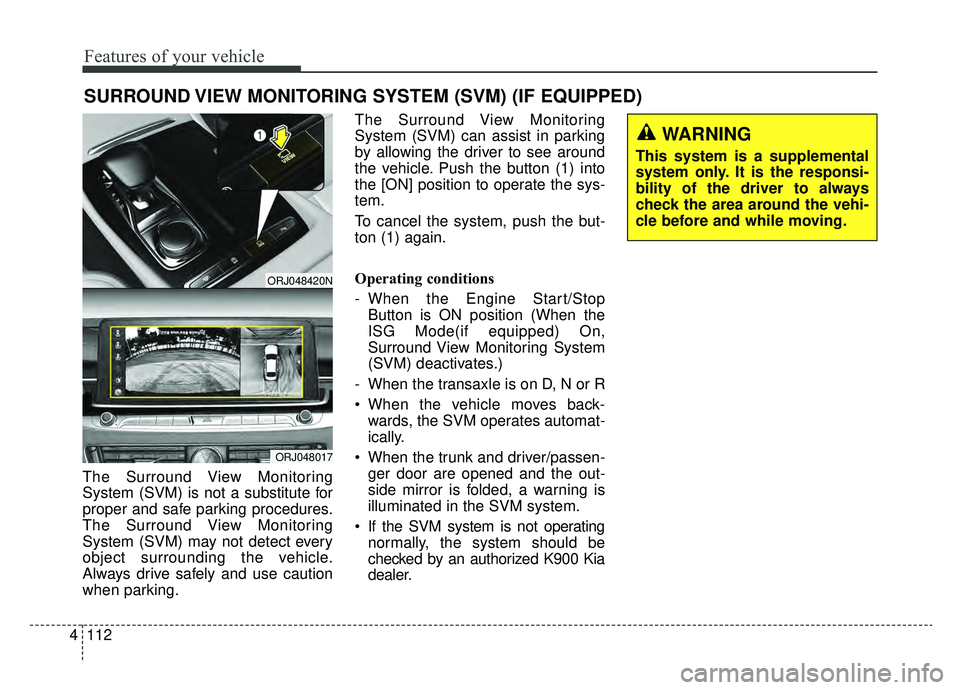
The Surround View Monitoring
System (SVM) is not a substitute for
proper and safe parking procedures.
The Surround View Monitoring
System (SVM) may not detect every
object surrounding the vehicle.
Always drive safely and use caution
when parking. The Surround View Monitoring
System (SVM) can assist in parking
by allowing the driver to see around
the vehicle. Push the button (1) into
the [ON] position to operate the sys-
tem.
To cancel the system, push the but-
ton (1) again.
Operating conditions
- When the Engine Start/Stop
Button is ON position (When the
ISG Mode(if equipped) On,
Surround View Monitoring System
(SVM) deactivates.)
- When the transaxle is on D, N or R
When the vehicle moves back- wards, the SVM operates automat-
ically.
When the trunk and driver/passen- ger door are opened and the out-
side mirror is folded, a warning is
illuminated in the SVM system.
If the SVM system is not operating normally, the system should be
checked by an authorized K900 Kia
dealer.
SURROUND VIEW MONITORING SYSTEM (SVM) (IF EQUIPPED)
ORJ048420N
ORJ048017
WARNING
This system is a supplemental
system only. It is the responsi-
bility of the driver to always
check the area around the vehi-
cle before and while moving.
Page 206 of 580
4113
Features of your vehicle
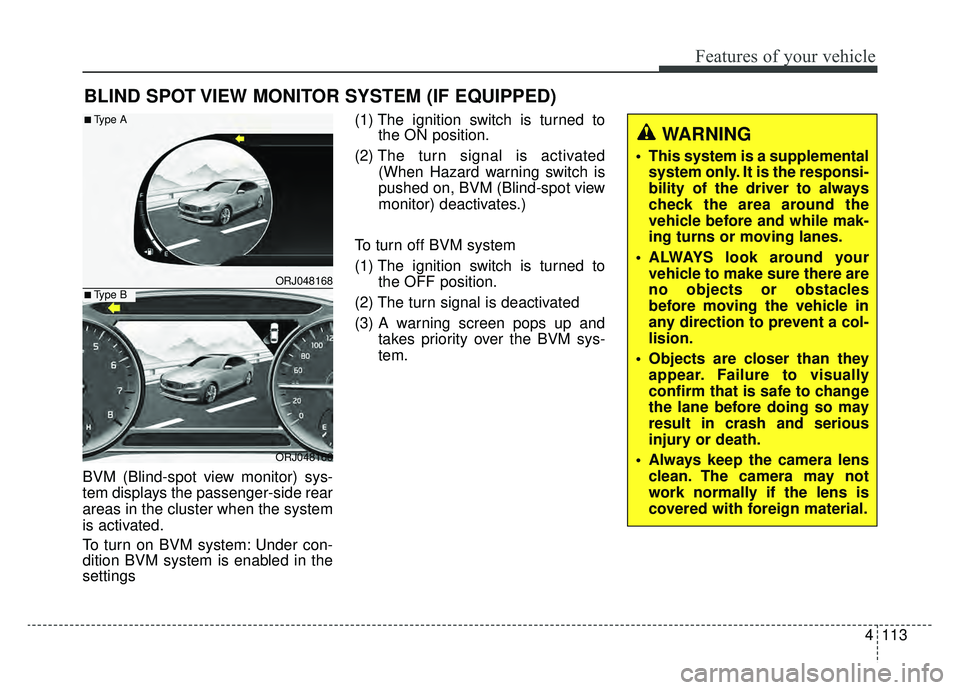
BVM (Blind-spot view monitor) sys-
tem displays the passenger-side rear
areas in the cluster when the system
is activated.
To turn on BVM system: Under con-
dition BVM system is enabled in the
settings(1) The ignition switch is turned to
the ON position.
(2) The turn signal is activated
(When Hazard warning switch is
pushed on, BVM (Blind-spot view
monitor) deactivates.)
To turn off BVM system
(1) The ignition switch is turned to the OFF position.
(2) The turn signal is deactivated
(3) A warning screen pops up and takes priority over the BVM sys-
tem.
BLIND SPOT VIEW MONITOR SYSTEM (IF EQUIPPED)
ORJ048168
ORJ048166
■Type A
■Type B
WARNING
This system is a supplementalsystem only. It is the responsi-
bility of the driver to always
check the area around the
vehicle before and while mak-
ing turns or moving lanes.
ALWAYS look around your vehicle to make sure there are
no objects or obstacles
before moving the vehicle in
any direction to prevent a col-
lision.
Objects are closer than they appear. Failure to visually
confirm that is safe to change
the lane before doing so may
result in crash and serious
injury or death.
Always keep the camera lens clean. The camera may not
work normally if the lens is
covered with foreign material.