2019 KIA K900 ESP
[x] Cancel search: ESPPage 207 of 580
Features of your vehicle
114
4
Battery saver function
The purpose of this feature is to
prevent the battery from being dis-
charged if the lights are left in the
ON position. The system automati-
cally shuts off the parking lights 30
seconds after the ignition key is
removed and the driver’s door is
opened and closed.
With this feature, the parking lights will turn off automatically if the driver
parks on the side of the road at night
and opens the driver’s side door.
If necessary, to keep the parking
lights on when the ignition key is
removed, perform the following:
1) Open the driver-side door.
2) Turn the parking lights OFF and ON again using the light switch
on the steering column.
Daytime running light
The Daytime Running Lights (DRL)
can make it easier for others to see the
front of your vehicle during the day.
DRL can be helpful in many different
driving conditions, and it is especially
helpful after dawn and before sunset.
The DRL system will turn the dedi-
cated lamp OFF when :
1.The headlight switch is on
- It includes that the headlight is onin the dark when the headlight
switch is in the auto light position.
2.The engine is off
3.Engaging the Parking Brake
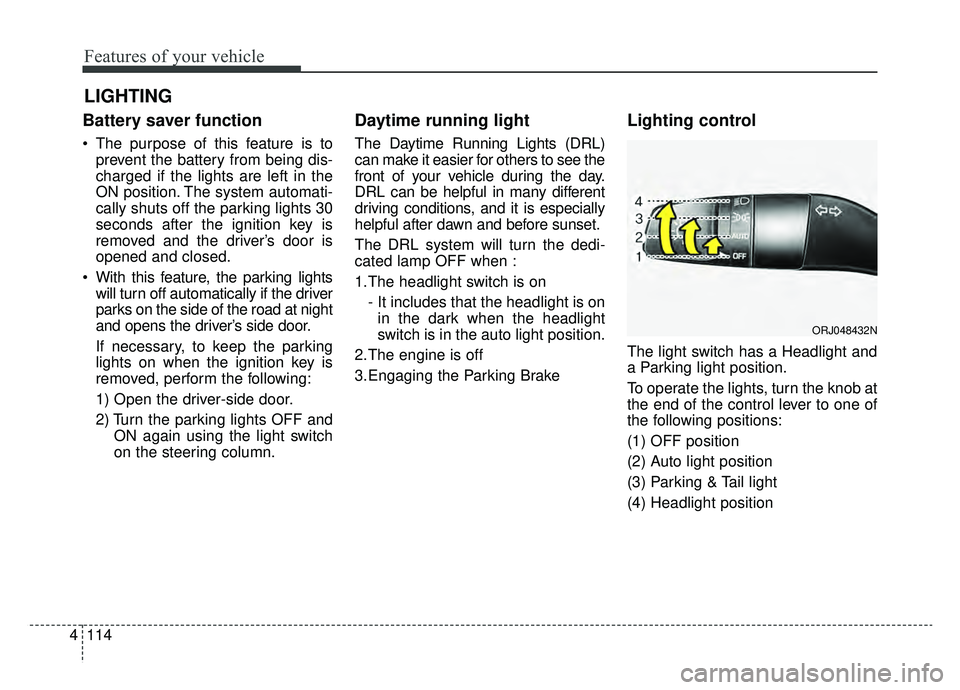
Lighting control
The light switch has a Headlight and
a Parking light position.
To operate the lights, turn the knob at
the end of the control lever to one of
the following positions:
(1) OFF position
(2) Auto light position
(3) Parking & Tail light
(4) Headlight position
LIGHTING
ORJ048432N
Page 213 of 580
Features of your vehicle
120
4
Turn signals and lane change
signals
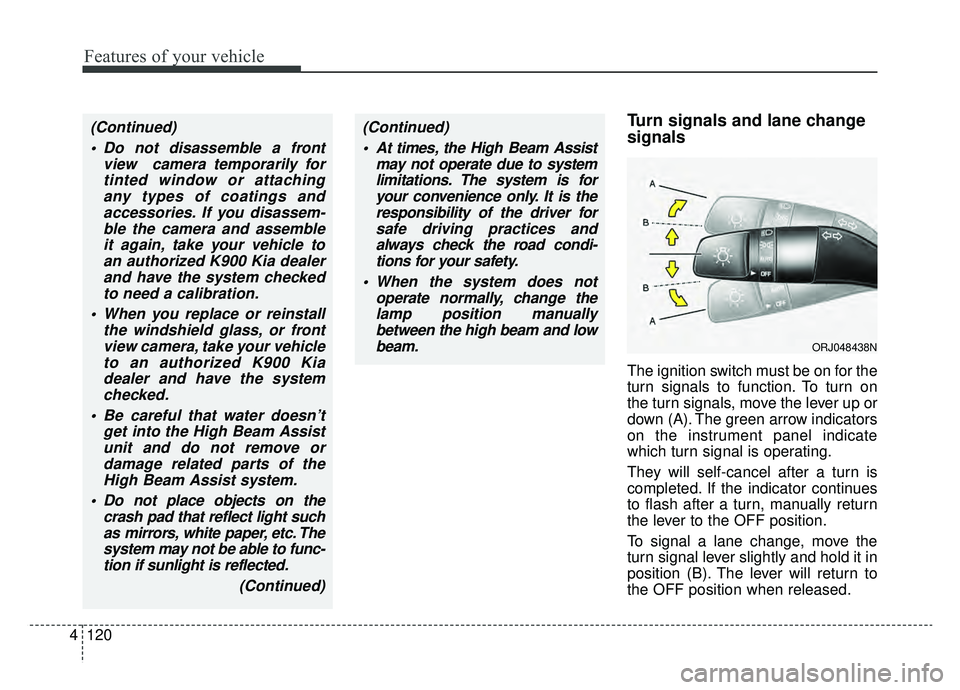
The ignition switch must be on for the
turn signals to function. To turn on
the turn signals, move the lever up or
down (A). The green arrow indicators
on the instrument panel indicate
which turn signal is operating.
They will self-cancel after a turn is
completed. If the indicator continues
to flash after a turn, manually return
the lever to the OFF position.
To signal a lane change, move the
turn signal lever slightly and hold it in
position (B). The lever will return to
the OFF position when released.
(Continued)
Do not disassemble a front view camera temporarily fortinted window or attachingany types of coatings andaccessories. If you disassem-ble the camera and assembleit again, take your vehicle toan authorized K900 Kia dealerand have the system checkedto need a calibration.
When you replace or reinstall the windshield glass, or frontview camera, take your vehicleto an authorized K900 Kiadealer and have the systemchecked.
Be careful that water doesn’t get into the High Beam Assistunit and do not remove ordamage related parts of theHigh Beam Assist system.
Do not place objects on the crash pad that reflect light suchas mirrors, white paper, etc. Thesystem may not be able to func-tion if sunlight is reflected.
(Continued)(Continued) At times, the High Beam Assist may not operate due to systemlimitations. The system is foryour convenience only. It is theresponsibility of the driver forsafe driving practices andalways check the road condi-tions for your safety.
When the system does not operate normally, change thelamp position manuallybetween the high beam and lowbeam.
ORJ048438N
Page 240 of 580
4147
Features of your vehicle
If the air conditioning and outside
(fresh) air position are not selected
automatically, adjust the correspon-
ding button manually. If the posi-
tion is selected, lower fan speed is
adjusted to a higher fan speed.To defrost outside windshield
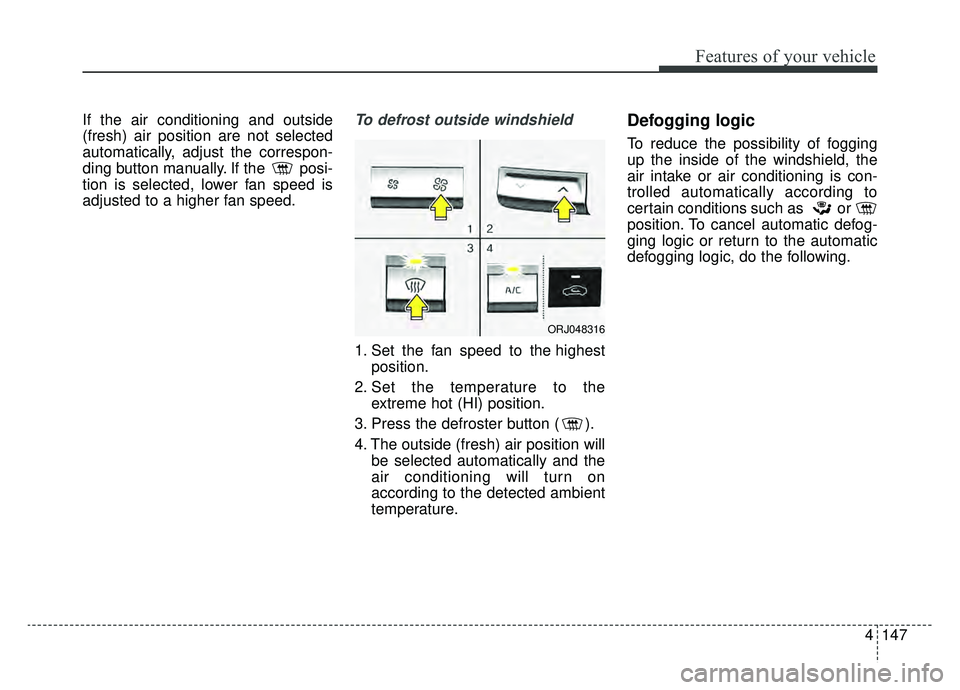
1. Set the fan speed to the highestposition.
2. Set the temperature to the extreme hot (HI) position.
3. Press the defroster button ( ).
4. The outside (fresh) air position will be selected automatically and the
air conditioning will turn on
according to the detected ambient
temperature.
Defogging logic
To reduce the possibility of fogging
up the inside of the windshield, the
air intake or air conditioning is con-
trolled automatically according to
certain conditions such as or
position. To cancel automatic defog-
ging logic or return to the automatic
defogging logic, do the following.
ORJ048316
Page 253 of 580
Features of your vehicle
160
4
If the wireless charging is not func-
tioning properly, the orange light will
blink and flash for ten seconds then
turn off. In such cases, remove the
smart phone from the pad and
replace it on the pad again, or double
check the charging status.
If you leave the smart phone on the
charging pad when the vehicle igni-
tion is in OFF, the vehicle will alert
you through warning messages and
sound (applicable for vehicles with
voice guidance function) after the
‘Good bye’ function on the instru-
ment cluster ends. However, it does
not alert for every smart phone. It is
not a malfunction of the system, but
the smart phone soft ware incompat-
ibility.
WARNING - Distracted
driving
Driving while distracted can
result in a loss of vehicle con-
trol that may lead to an acci-
dent, severe bodily injury, and
death. The driver’s primary
responsibility is in the safe and
legal operation of a vehicle, and
use of any handheld devices,
other equipment, or vehicle sys-
tems which take the driver’s
eyes, attention and focus away
from the safe operation of a
vehicle or which are not permis-
sible by law should never be
used during operation of the
vehicle.CAUTION - Liquid in
Wireless Smart Phone
Charger
To prevent liquid from damaging the wireless smart phone charg-ing system in your vehicle,securely close the tray coverwhen charging your phone.
WARNING - Metal in
Wireless Charging System
If any metallic object such as a
coin is placed between the wire-
less charging system and the
smart phone, the charging may
be disrupted. Also, the metallic
object may heat up and poten-
tially damage the charging sys-
tem. If there is any metallic
object between the smart phone
and the charging pad, immedi-
ately remove the smart phone.
Remove the metallic object
after it has cooled down.
Page 263 of 580
Features of your vehicle
170
4
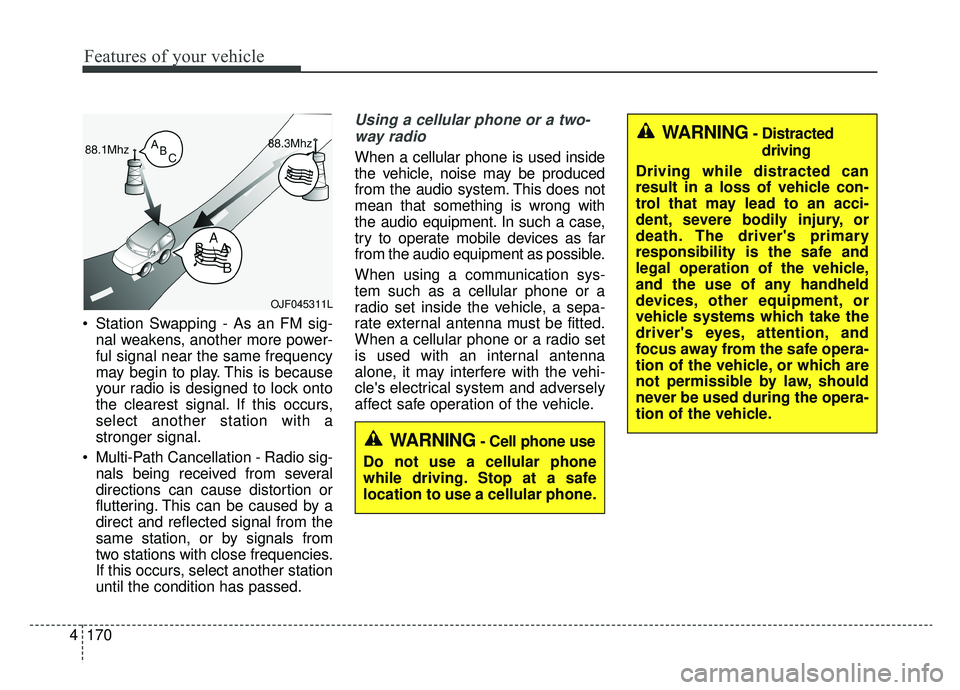
Station Swapping - As an FM sig-
nal weakens, another more power-
ful signal near the same frequency
may begin to play. This is because
your radio is designed to lock onto
the clearest signal. If this occurs,
select another station with a
stronger signal.
Multi-Path Cancellation - Radio sig- nals being received from several
directions can cause distortion or
fluttering. This can be caused by a
direct and reflected signal from the
same station, or by signals from
two stations with close frequencies.
If this occurs, select another station
until the condition has passed.
Using a cellular phone or a two-
way radio
When a cellular phone is used inside
the vehicle, noise may be produced
from the audio system. This does not
mean that something is wrong with
the audio equipment. In such a case,
try to operate mobile devices as far
from the audio equipment as possible.
When using a communication sys-
tem such as a cellular phone or a
radio set inside the vehicle, a sepa-
rate external antenna must be fitted.
When a cellular phone or a radio set
is used with an internal antenna
alone, it may interfere with the vehi-
cle's electrical system and adversely
affect safe operation of the vehicle.
OJF045311L
WARNING- Cell phone use
Do not use a cellular phone
while driving. Stop at a safe
location to use a cellular phone.
WARNING- Distracted driving
Driving while distracted can
result in a loss of vehicle con-
trol that may lead to an acci-
dent, severe bodily injury, or
death. The driver's primary
responsibility is the safe and
legal operation of the vehicle,
and the use of any handheld
devices, other equipment, or
vehicle systems which take the
driver's eyes, attention, and
focus away from the safe opera-
tion of the vehicle, or which are
not permissible by law, should
never be used during the opera-
tion of the vehicle.
Page 270 of 580
55
Driving your vehicle
Before entering vehicle
• Be sure that all windows, outsidemirror(s), and outside lights are
clean.
Check the condition of the tires.
Check under the vehicle for any sign of leaks.
Be sure there are no obstacles behind you if you intend to back up.
Necessary inspections
Fluid levels, such as engine oil,
engine coolant, brake fluid, and
washer fluid should be checked on a
regular basis, at the exact interval
depending on the fluid. Further
details are provided in chapter 7,
“Maintenance”.
Before starting
Close and lock all doors.
Position the seat so that all con-trols are easily reached.
Buckle your seat belt.
Adjust the inside and outside rearview mirrors.
Be sure that all lights work.
Check all gauges.
Check the operation of warning lights when the ignition switch is
turned to the ON position.
Release the parking brake and make sure the brake warning light
goes out.
For safe operation, be sure you are
familiar with your vehicle and its
equipment.
BEFORE DRIVING
WARNING - Distracted driving
Focus on the road while driving.
The driver's primary responsi-
bility is in the safe and legal
operation of the vehicle. Use of
any handled devices, other
equipment or vehicle systems
that distract the driver should
not be used during vehicle
operation.
Page 271 of 580
Driving your vehicle
65
WARNING- Check sur-roundings
Always check the surrounding
areas near your vehicle for peo-
ple, especially children, before
putting a vehicle into D (Drive)
or R (Reverse).
WARNING- Fire risk
When you intend to park or stop
the vehicle with the engine on,
be careful not to depress the
accelerator pedal for a long
period of time. It may overheat
the engine or exhaust system
and cause fire.WARNING- Loose objects
Securely store items in your
vehicle. When you make a sud-
den stop or turn the steering
wheel rapidly, loose objects
may drop on the floor and it
could interfere with the opera-
tion of the foot pedals, possibly
causing an accident.WARNING- Driving while intoxicated
Do not drive while intoxicated.
Drinking and driving is danger-
ous. Even a small amount of
alcohol will affect your reflexes,
perceptions and judgment.
Driving while under the influ-
ence of drugs is as dangerous
as or more dangerous than driv-
ing drunk.
WARNING- Proper footwear
Always wear appropriate shoes
when operating your vehicle.
Unsuitable shoes (high heels, ski
boots, sandals, etc.) may inter-
fere with your ability to use the
brake and accelerator pedals.
Page 277 of 580
Driving your vehicle
12
5
Transmission ranges
The indicator in the instrument clus-
ter displays the shift lever position
when the engine start/stop button is
in the ON position.
However, if the gear is in N (Neutral)
or P (Park), the position is displayed
on the instrument cluster when the
engine start/stop button is in the OFF
or ACC position.
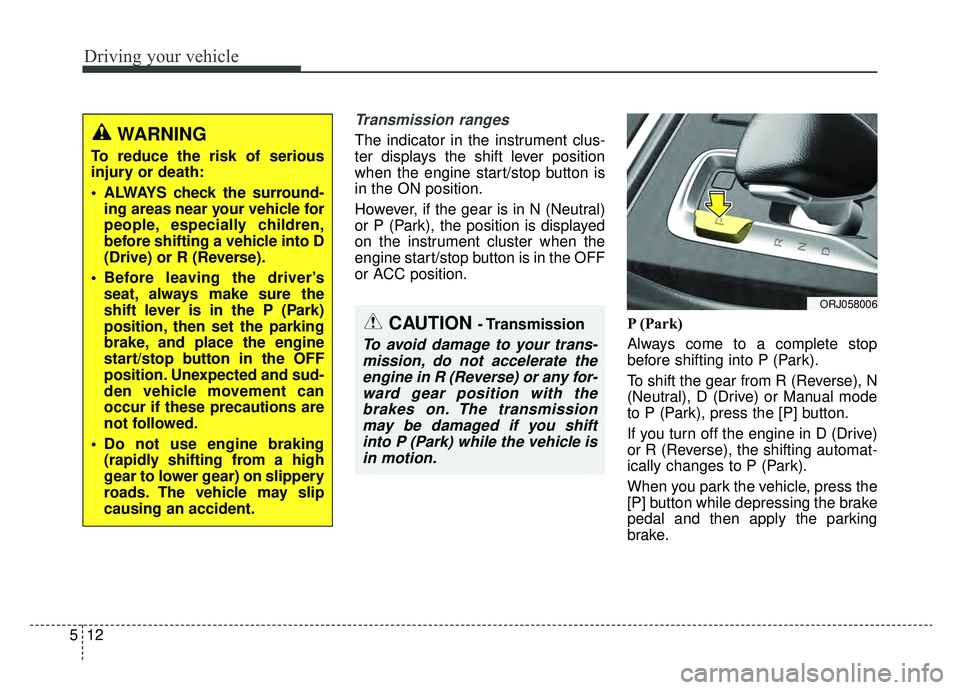
P (Park)
Always come to a complete stop
before shifting into P (Park).
To shift the gear from R (Reverse), N
(Neutral), D (Drive) or Manual mode
to P (Park), press the [P] button.
If you turn off the engine in D (Drive)
or R (Reverse), the shifting automat-
ically changes to P (Park).
When you park the vehicle, press the
[P] button while depressing the brake
pedal and then apply the parking
brake.WARNING
To reduce the risk of serious
injury or death:
ALWAYS check the surround-ing areas near your vehicle for
people, especially children,
before shifting a vehicle into D
(Drive) or R (Reverse).
Before leaving the driver’s seat, always make sure the
shift lever is in the P (Park)
position, then set the parking
brake, and place the engine
start/stop button in the OFF
position. Unexpected and sud-
den vehicle movement can
occur if these precautions are
not followed.
Do not use engine braking (rapidly shifting from a high
gear to lower gear) on slippery
roads. The vehicle may slip
causing an accident.
ORJ058006
CAUTION - Transmission
To avoid damage to your trans-mission, do not accelerate theengine in R (Reverse) or any for-ward gear position with thebrakes on. The transmissionmay be damaged if you shiftinto P (Park) while the vehicle isin motion.