Page 434 of 682

5-105
Driving your vehicle
Warning message and system
control
Blind-Spot Collision Warning
(BCW) system
First stage alert
If a vehicle is detected within the
boundary of the system, a warning
light will illuminate on the outside
rearview mirror and the head up dis-
play (if equipped).
Once the detected vehicle is no
longer within the blind spot area, the
warning will turn off according to the
driving conditions of the vehicle.
5
OTM058033
OTM058034
■Left side
■Left side
OTM058035
■Right side
■Right side
[A] : Warning sound
Second stage alert
A warning chime to alert the driver will activate when:
1. A vehicle has been detected in the blind spot area by the radar system
AND.
2. The turn signal is applied (same side as where the vehicle is being
detected).
When this alert is activated, the warning light on the outside rearview mir-
ror and the head up display (if equipped) will also blink. And a warning
chime will sound.
If you turn off the turn signal indicator, the second stage alert will be deac-
tivated.
Once the detected vehicle is no longer within the blind spot area, the warn-
ing will turn off according to the driving conditions of the vehicle.
Page 435 of 682

5-106
Detecting Sensor
Rear radar
The rear radars are the sensors
inside the rear bumper for detecting
the side/rear areas. Always keep the
rear bumper clean for proper opera-
tion of the system.
Driving your vehicle
•The warning light on the out-
side rearview mirror will illu-
minate whenever a vehicle is
detected at the rear side by
the system.
To avoid accidents, do not
focus only on the warning
light and neglect to see the
surrounding of the vehicle.
•Drive safely even though the
vehicle is equipped with a
Blind-Spot Collision Warning
System (BCW). Do not solely
rely on the system but check
your surrounding before
changing lanes or backing the
vehicle up.
•The system may not alert the
driver in some conditions so
always check your surround-
ings whilst driving.
WARNING
•The driver should always use
extreme caution whilst oper-
ating the vehicle, whether or
not the warning light on the
outside rearview mirror illumi-
nates or there is a warning
alarm.
•Playing the vehicle audio sys-
tem at high volume may offset
the Blind-Spot Collision
Warning System warning
sounds.
•The warning of the Blind-Spot
Collision Warning System
may not sound whilst other
system's warning sounds.
CAUTION
OTM058036
■Rear radar
Page 442 of 682

5-113
Driving your vehicle
System description
Rear Cross-Traffic Collision
Warning (RCCW) System
The Rear Cross-Traffic Collision
Warning (RCCW) System uses radar
sensors to monitor the approaching
cross traffic from the left and right
side of the vehicle when your vehicle
is in reverse.
The blind spot detection range varies
relative to the approaching vehicle
speed.
System setting and activation
System setting
• The driver can activate the sys-
tems by placing the ignition switch
to the ON position and by selecting
'User Settings →Driver assistance
→Blind-spot safety →Rear cross-
traffic safety'. The RCCW turns on
and get ready to be activated when
'Rear cross-traffic safety' is select-
ed.
• When the engine is turned off then
on again, the systems always get
ready to be activated.
• When the system is initially turned
on and when the engine is turned
off then on again, the warning light
will illuminate for 3 seconds on the
outside rearview mirror.
REAR CROSS-TRAFFIC COLLISION WARNING (RCCW) SYSTEM (IF EQUIPPED)
5
OTM058092
•Always be aware of road con-
ditions whilst driving and be
alert for unexpected situa-
tions even though the Rear
Cross-Traffic Collision
Warning System is operating.
•The Rear Cross-Traffic
Collision Warning System is
supplemental systems to
assist you. Do not entirely rely
on the systems. Always pay
attention, whilst driving, for
your safety.
•The Rear Cross-Traffic
Collision Warning System is
not substitutes for proper and
safe driving. Always drive
safely and use caution when
backing up the vehicle.
WARNING
Page 444 of 682
5-115
Driving your vehicle
If the vehicle detected by the sensors
approaches from the rear left/right
side of your vehicle, the warning
chime will sound, the warning light
on the outside rearview mirror will
blink and a message will appear on
the LCD display. If the rear view mon-
itor system is in activation, a mes-
sage will also appear on the audio or
AVN screen.
The warning will stop when:
- The vehicle moving at the rear
left/right side of your vehicle is not
in the detection range.
- The vehicle is right behind your
vehicle.
- The vehicle is not driving towards
your vehicle.
- The vehicle’s approaching speed is
decreased.
5
Warning message and system control
Rear Cross-Traffic Collision Warning (RCCW) System
OTM058096
■Left
OTM058098L
■Left
OTM058097
■Right
OTM058099L
■Right
Page 445 of 682

5-116
Driving your vehicle
•The warning of the Rear
Cross-Traffic Collision
Warning System may not
sound whilst other system's
warning sounds.
•When the operation condition
of the Rear Cross-Traffic
Collision Warning System is
satisfied the warning will
occur every time a vehicle
approaches the side/rear of
your stopped (0 km/h vehicle
speed) vehicle.
•The system's warning or
brake may not operate proper-
ly if the left/right of your vehi-
cle's rear bumper is blocked
by a vehicle or obstacle.
•The driver should always use
extreme caution whilst oper-
ating the vehicle, whether or
not the warning light on the
outside rearview mirror illumi-
nates or there is a warning
alarm.
•Playing the vehicle audio sys-
tem at high volume may offset
the system's warning sounds.
CAUTION
•Drive safely even though the
vehicle is equipped with a
Rear Cross-Traffic Collision
Warning System. Do not sole-
ly rely on the system but
check your surrounding when
backing the vehicle up.
•The driver is responsible for
accurate brake control.
•Always pay extreme caution
whilst driving. The Rear
Cross-Traffic Collision
Warning System may not
operate properly or unneces-
sarily operate in accordance
with your driving situations.
•The Rear Cross-Traffic
Collision Warning System is
not a substitute for safe driv-
ing practices, but a conven-
ience function only. It is the
responsibility of the driver to
always drive cautiously to
prevent unexpected and sud-
den situations from occur-
ring. Pay attention to the road
conditions at all times.
WARNING
Page 453 of 682
5-124
Driving your vehicle
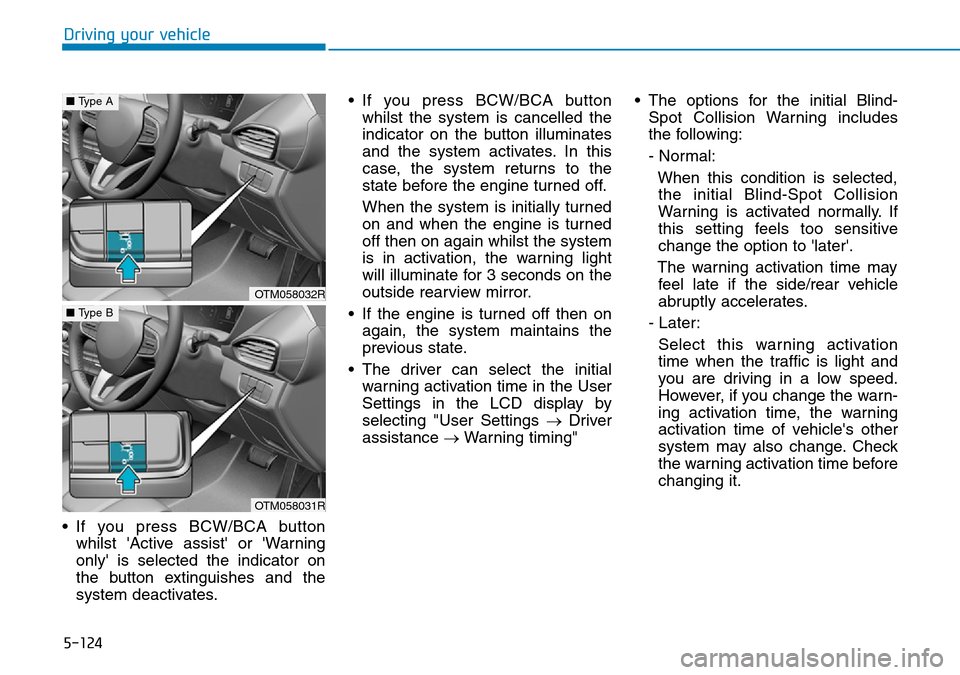
• If you press BCW/BCA button
whilst 'Active assist' or 'Warning
only' is selected the indicator on
the button extinguishes and the
system deactivates.• If you press BCW/BCA button
whilst the system is cancelled the
indicator on the button illuminates
and the system activates. In this
case, the system returns to the
state before the engine turned off.
When the system is initially turned
on and when the engine is turned
off then on again whilst the system
is in activation, the warning light
will illuminate for 3 seconds on the
outside rearview mirror.
• If the engine is turned off then on
again, the system maintains the
previous state.
• The driver can select the initial
warning activation time in the User
Settings in the LCD display by
selecting "User Settings → Driver
assistance →Warning timing"• The options for the initial Blind-
Spot Collision Warning includes
the following:
- Normal:
When this condition is selected,
the initial Blind-Spot Collision
Warning is activated normally. If
this setting feels too sensitive
change the option to 'later'.
The warning activation time may
feel late if the side/rear vehicle
abruptly accelerates.
- Later:
Select this warning activation
time when the traffic is light and
you are driving in a low speed.
However, if you change the warn-
ing activation time, the warning
activation time of vehicle's other
system may also change. Check
the warning activation time before
changing it.
OTM058032R
■Type A
OTM058031R
■Type B
Page 455 of 682
5-126
Driving your vehicle
Warning message and system
control
Blind-Spot Collision Warning
(BCW) system
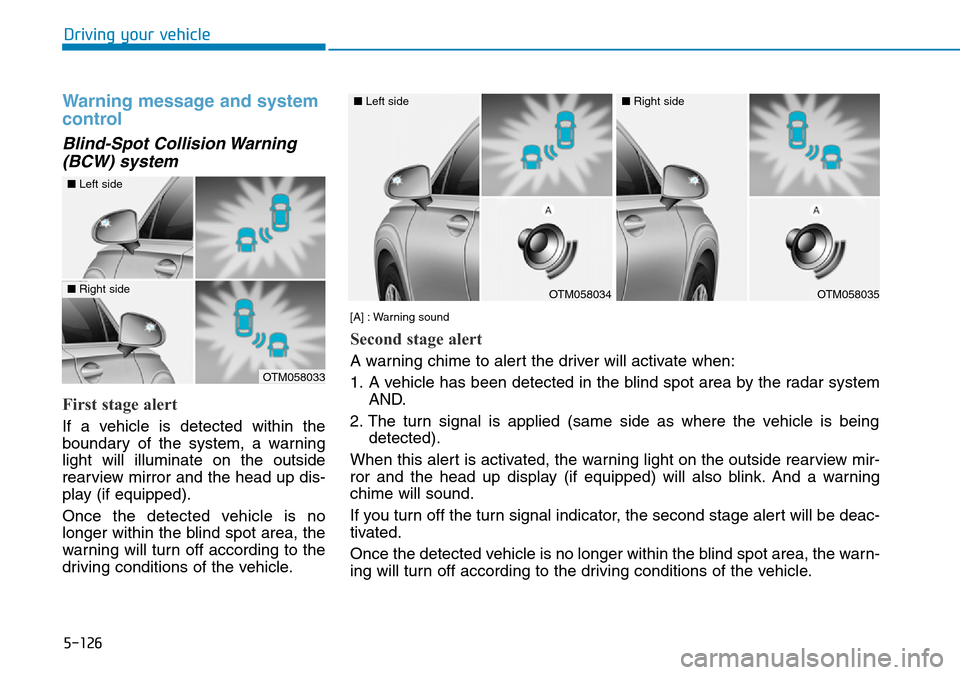
First stage alert
If a vehicle is detected within the
boundary of the system, a warning
light will illuminate on the outside
rearview mirror and the head up dis-
play (if equipped).
Once the detected vehicle is no
longer within the blind spot area, the
warning will turn off according to the
driving conditions of the vehicle.
OTM058033
OTM058034
■Left side
■Left side
OTM058035
■Right side
■Right side
[A] : Warning sound
Second stage alert
A warning chime to alert the driver will activate when:
1. A vehicle has been detected in the blind spot area by the radar system
AND.
2. The turn signal is applied (same side as where the vehicle is being
detected).
When this alert is activated, the warning light on the outside rearview mir-
ror and the head up display (if equipped) will also blink. And a warning
chime will sound.
If you turn off the turn signal indicator, the second stage alert will be deac-
tivated.
Once the detected vehicle is no longer within the blind spot area, the warn-
ing will turn off according to the driving conditions of the vehicle.
Page 456 of 682
5-127
Driving your vehicle
5
Blind-Spot Collision-Avoidance
Assist (BCA) system
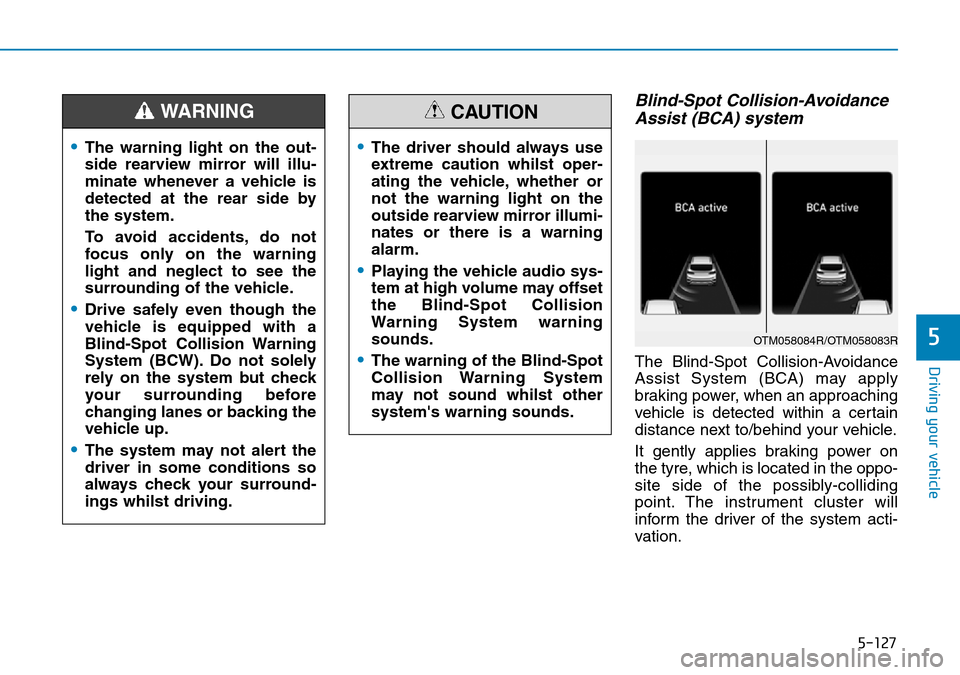
The Blind-Spot Collision-Avoidance
Assist System (BCA) may apply
braking power, when an approaching
vehicle is detected within a certain
distance next to/behind your vehicle.
It gently applies braking power on
the tyre, which is located in the oppo-
site side of the possibly-colliding
point. The instrument cluster will
inform the driver of the system acti-
vation.
•The warning light on the out-
side rearview mirror will illu-
minate whenever a vehicle is
detected at the rear side by
the system.
To avoid accidents, do not
focus only on the warning
light and neglect to see the
surrounding of the vehicle.
•Drive safely even though the
vehicle is equipped with a
Blind-Spot Collision Warning
System (BCW). Do not solely
rely on the system but check
your surrounding before
changing lanes or backing the
vehicle up.
•The system may not alert the
driver in some conditions so
always check your surround-
ings whilst driving.
WARNING
•The driver should always use
extreme caution whilst oper-
ating the vehicle, whether or
not the warning light on the
outside rearview mirror illumi-
nates or there is a warning
alarm.
•Playing the vehicle audio sys-
tem at high volume may offset
the Blind-Spot Collision
Warning System warning
sounds.
•The warning of the Blind-Spot
Collision Warning System
may not sound whilst other
system's warning sounds.
CAUTION
OTM058084R/OTM058083R
