2019 Hyundai Santa Fe mirror
[x] Cancel search: mirrorPage 115 of 682
3-24
Recalling memory position
1. Shit to P (Park) whilst the Engine
Start/Stop button is in the ON
position.
2. Press the desired memory button
(1 or 2). The system will beep
once, and then the driver's seat
position, outside rearview mirror
position, instrument panel illumi-
nation intensity and head-up dis-
play height/brightness will auto-
matically adjust to the stored posi-
tions.
3. "Driver 1 (or 2) settings applied"
will appear on the LCD display.
Information
• Whilst recalling the "1" memory
position, pressing the SET or 1 but-
ton temporarily stops the adjust-
ment of the recalled memory posi-
tion. Pressing the 2 button recalls
the "2" memory position.
• Whilst recalling the "2" memory
position, pressing the SET or 2 but-
ton temporarily stops the adjust-
ment of the recalled memory posi-
tion. Pressing the 1 button recalls
the "1" memory position.
• Whilst recalling the stored positions,
pressing one of the control buttons
for the driver's seat, outside
rearview mirror, steering wheel,
instrument panel illumination or
head-up display will cause the
movement of that component to stop
and move in the direction that the
control button is pressed.
Easy access function
The system will move the driver's seat
and steering wheel automatically as
follows:
• Exiting the vehicle:
The driver’s seat will move rear-
ward and the steering wheel will
move upward when the driver’s
door is opened and the Engine
Start/Stop button is in the OFF
positon with the gear in P (Park).
However, the driver’s seat may not
move rearward if there is not
enough space between the driver’s
seat and the rear seats.
Also, on a regular basis, the steer-
ing wheel will also move forward to
adjust its location by itself.
• Entering the vehicle:
The driver’s seat and steering
wheel will move back to its original
position when the Engine Start/Stop
button is in the OFF position and
the driver’s door is closed with the
smart key in possession or when
the Engine Start/Stop button is
changed to the ACC/ON/START
position from the OFF position.
i
Convenient features of your vehicle
Page 120 of 682
3-29
Convenient features of your vehicle
MIRRORS
3
Inside rearview mirror
Before you start driving, adjust the
rearview mirror to the centre on the
view through the rear window.When cleaning the mirror, use a
paper towel or similar material
dampened with glass cleaner. Do
not spray glass cleaner directly on
the mirror as that may cause the
liquid cleaner to enter the mirror
housing.
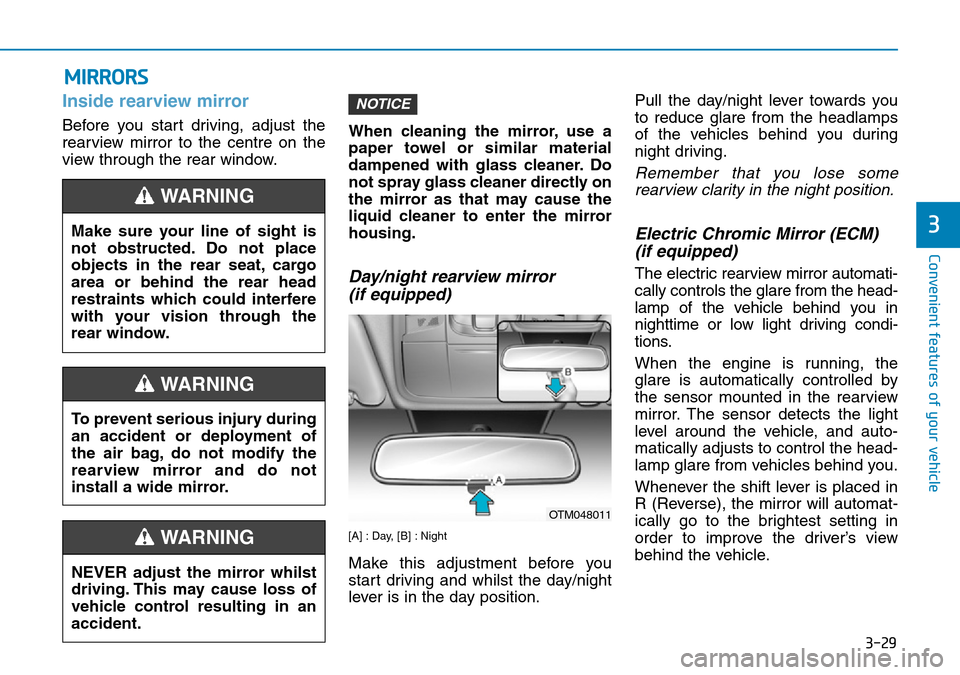
Day/night rearview mirror
(if equipped)
[A] : Day, [B] : Night
Make this adjustment before you
start driving and whilst the day/night
lever is in the day position.Pull the day/night lever towards you
to reduce glare from the headlamps
of the vehicles behind you during
night driving.
Remember that you lose some
rearview clarity in the night position.
Electric Chromic Mirror (ECM)
(if equipped)
The electric rearview mirror automati-
cally controls the glare from the head-
lamp of the vehicle behind you in
nighttime or low light driving condi-
tions.
When the engine is running, the
glare is automatically controlled by
the sensor mounted in the rearview
mirror. The sensor detects the light
level around the vehicle, and auto-
matically adjusts to control the head-
lamp glare from vehicles behind you.
Whenever the shift lever is placed in
R (Reverse), the mirror will automat-
ically go to the brightest setting in
order to improve the driver’s view
behind the vehicle.
NOTICE
NEVER adjust the mirror whilst
driving. This may cause loss of
vehicle control resulting in an
accident.
WARNING
Make sure your line of sight is
not obstructed. Do not place
objects in the rear seat, cargo
area or behind the rear head
restraints which could interfere
with your vision through the
rear window.
WARNING
To prevent serious injury during
an accident or deployment of
the air bag, do not modify the
rearview mirror and do not
install a wide mirror.
WARNING
OTM048011
Page 121 of 682
![Hyundai Santa Fe 2019 Owners Manual - RHD (UK, Australia) 3-30
Convenient features of your vehicle
[1] : Indicator, [2] : ON/OFF button, [3] : Sensor
To operate the electric rearview
mirror:
• Press the on/off button (1) to turn
the automatic dimming funct](/manual-img/35/16317/w960_16317-120.png "Hyundai Santa Fe 2019 Owners Manual - RHD (UK, Australia) 3-30
Convenient features of your vehicle
[1] : Indicator, [2] : ON/OFF button, [3] : Sensor
To operate the electric rearview
mirror:
• Press the on/off button (1) to turn
the automatic dimming funct")
3-30
Convenient features of your vehicle
[1] : Indicator, [2] : ON/OFF button, [3] : Sensor
To operate the electric rearview
mirror:
• Press the on/off button (1) to turn
the automatic dimming function on.
The mirror indicator light will illumi-
nate.
Press the on/off button to turn the
automatic dimming function off.
The mirror indicator light will turn
off.
• The mirror defaults to the ON posi-
tion whenever the ignition switch is
turned on.When cleaning the mirror, use a
paper towel or similar material
dampened with glass cleaner. Do
not spray glass cleaner directly on
the mirror as that may cause the
liquid cleaner to enter the mirror
housing.
Electric chromic mirror (ECM)
with compass
1. Rear light sensor
2. Status indicator LED
3. ECM ON/OFF button4. Compass button
5. Display window
Automatic dimming rear view mirror
controls automatically the glare of
headlights of the vehicle behind you
when it turned on by pressing the
ECM ON/OFF button. It is turned off
by pressing he ECM ON/OFF button
once more.
1. To operate Compass feature
Press and release the compass but-
ton, then the vehicle's directional
heading will be displayed. Pressing
and releasing the button again will
turn off the display.
Heading display
- E : East
- W : West
- S : South
- N : North
ex) NE : North East
NOTICE
OTM048428L
OTM048429L
Page 123 of 682
3-32
3. Press the button until the new zone
number appears in the display.
After you stop pressing the button
in, the display will show a compass
direction within a few seconds.
1. Do not install the ski rack,
antenna, etc. which are
attached to the vehicle by
means of a magnet. They affect
the operation of the compass.
2. If the compass deviates from
the correct indication soon
after repeated adjustment, we
recommend that you have the
compass checked at a
HYUNDAI authorised repairer.
3. The compass may not indicate
the correct compass point in
tunnels or whilst driving up or
down a steep hill.
(The compass returns to the
correct compass point when
the vehicle moves to an area
where the geomagnetism is sta-
bilized.)4. When cleaning the mirror, use a
paper towel or similar material
dampened with glass cleaner.
Do not spray glass cleaner
directly on the mirror as that
may cause the liquid cleaner to
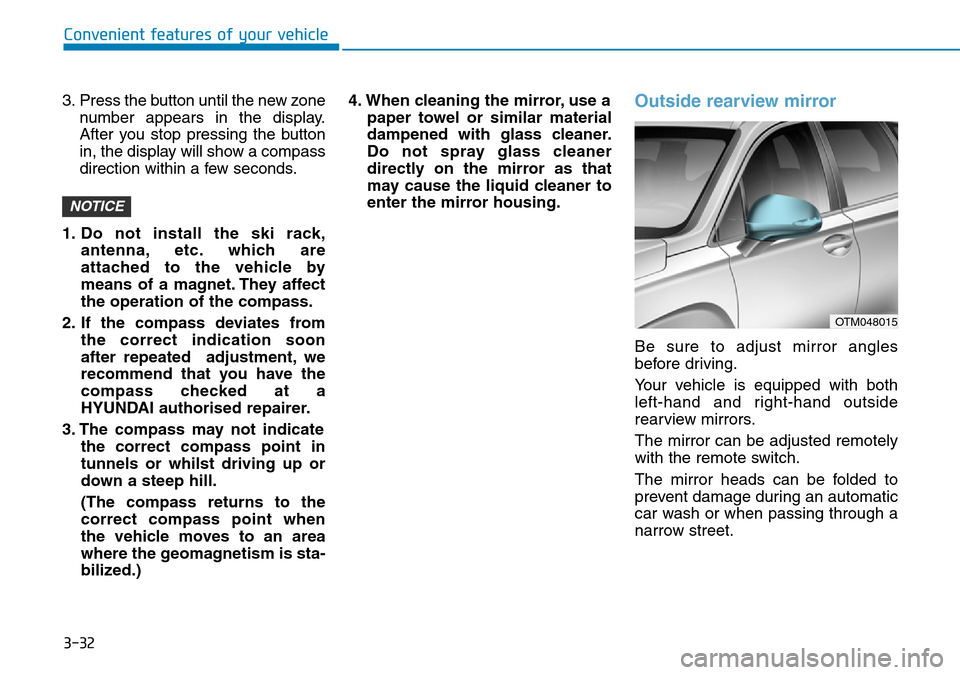
enter the mirror housing.Outside rearview mirror
Be sure to adjust mirror angles
before driving.
Your vehicle is equipped with both
left-hand and right-hand outside
rearview mirrors.
The mirror can be adjusted remotely
with the remote switch.
The mirror heads can be folded to
prevent damage during an automatic
car wash or when passing through a
narrow street.
NOTICE
Convenient features of your vehicle
OTM048015
Page 124 of 682
3-33
Convenient features of your vehicle
3
• Do not scrape ice off the mirror
face; this may damage the sur-
face of the glass.
• If the mirror is jammed with ice,
do not adjust the mirror by
force. Use an approved spray
de-icer (not radiator antifreeze)
spray, or a sponge or soft cloth
with very warm water, or move
the vehicle to a warm place and
allow the ice to melt.
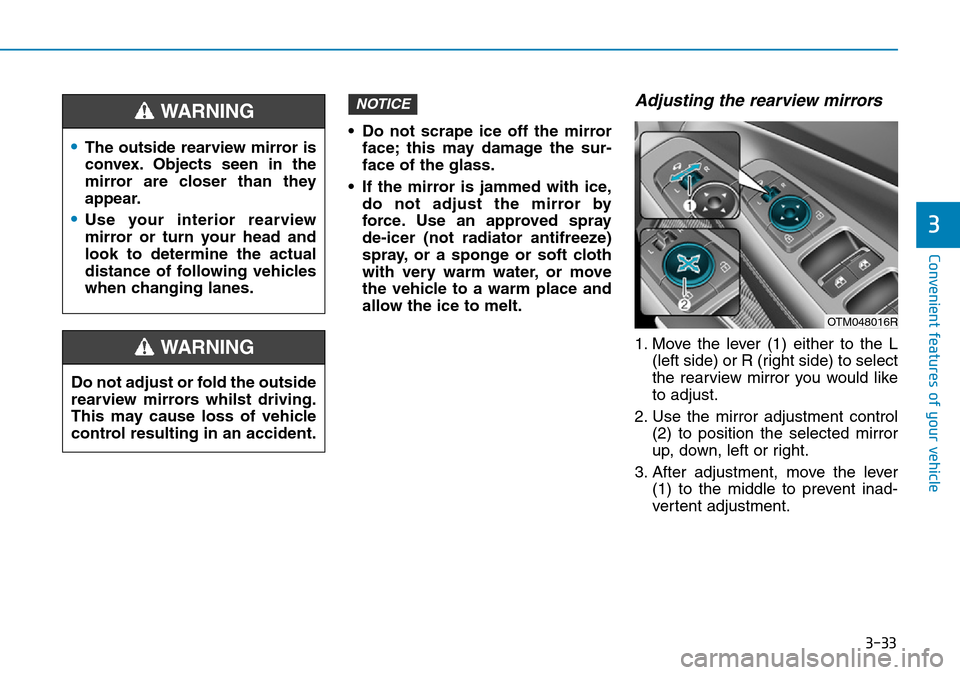
Adjusting the rearview mirrors
1. Move the lever (1) either to the L
(left side) or R (right side) to select
the rearview mirror you would like
to adjust.
2. Use the mirror adjustment control
(2) to position the selected mirror
up, down, left or right.
3. After adjustment, move the lever
(1) to the middle to prevent inad-
vertent adjustment.
NOTICE
•The outside rearview mirror is
convex. Objects seen in the
mirror are closer than they
appear.
•Use your interior rearview
mirror or turn your head and
look to determine the actual
distance of following vehicles
when changing lanes.
WARNING
Do not adjust or fold the outside
rearview mirrors whilst driving.
This may cause loss of vehicle
control resulting in an accident.
WARNING
OTM048016R
Page 125 of 682
3-34
Convenient features of your vehicle
• The mirrors stop moving when
they reach the maximum adjust-
ing angles, but the motor contin-
ues to operate whilst the switch
is pressed. Do not press the
switch longer than necessary,
the motor may be damaged.
• Do not attempt to adjust the out-
side rearview mirror by hand
otherwise the motor may be
damaged.
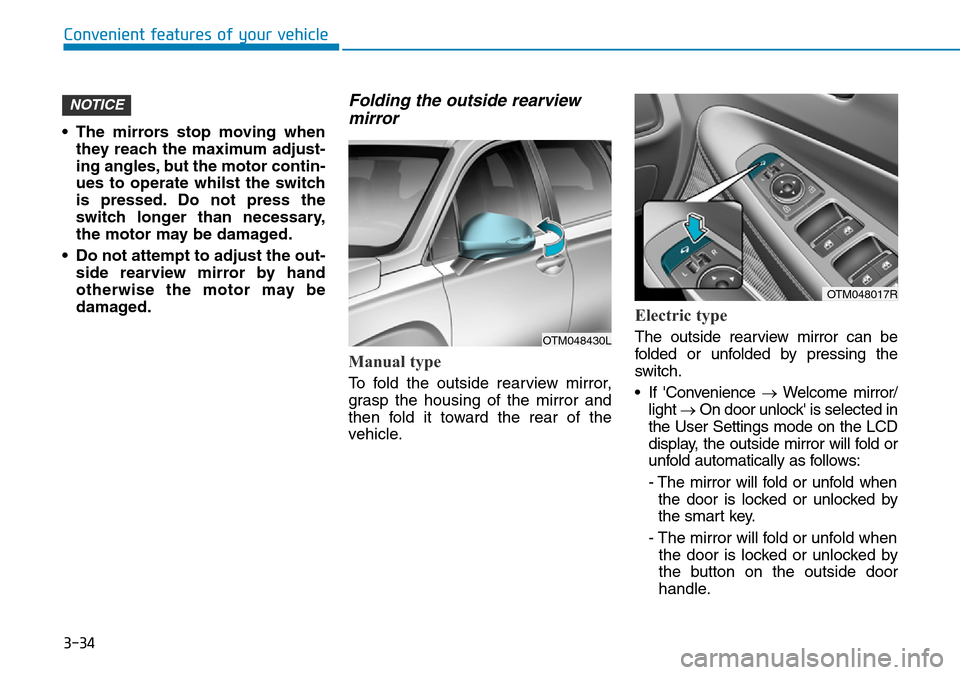
Folding the outside rearview
mirror
Manual type
To fold the outside rearview mirror,
grasp the housing of the mirror and
then fold it toward the rear of the
vehicle.
Electric type
The outside rearview mirror can be
folded or unfolded by pressing the
switch.
• If 'Convenience →Welcome mirror/
light →On door unlock' is selected in
the User Settings mode on the LCD
display, the outside mirror will fold or
unfold automatically as follows:
- The mirror will fold or unfold when
the door is locked or unlocked by
the smart key.
- The mirror will fold or unfold when
the door is locked or unlocked by
the button on the outside door
handle.
NOTICE
OTM048430L
OTM048017R
Page 126 of 682
3-35
Convenient features of your vehicle
• If 'Convenience →Welcome mirror/
light →On door unlock' and
'Convenience →Welcome mirror/
light →On driver approach' is
selected in the User Settings mode
on the LCD display, the outside mir-
ror will unfold automatically when
you approach the vehicle (all doors
closed and locked) with a smart key
in possession.
The electric type outside rearview
mirror operates even though the
ignition switch is in the OFF posi-
tion. However, to prevent unnec-
essary battery discharge, do not
adjust the mirrors longer than
necessary whilst the engine is not
running.
Do not fold the electric type out-
side rearview mirror by hand. It
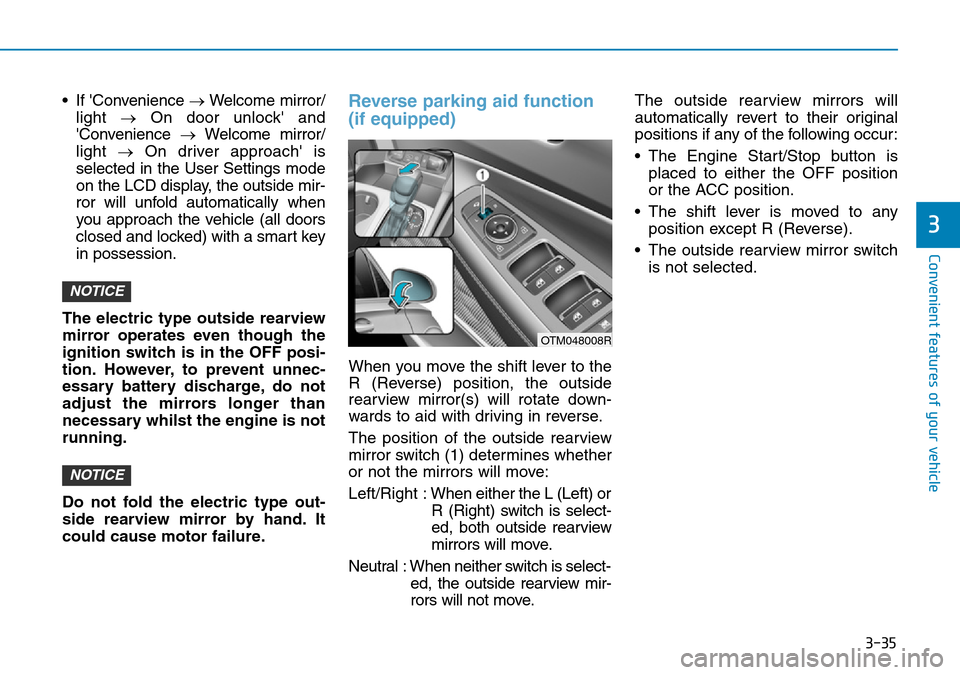
could cause motor failure.Reverse parking aid function
(if equipped)
When you move the shift lever to the
R (Reverse) position, the outside
rearview mirror(s) will rotate down-
wards to aid with driving in reverse.
The position of the outside rearview
mirror switch (1) determines whether
or not the mirrors will move:
Left/Right :When either the L (Left) or
R (Right) switch is select-
ed, both outside rearview
mirrors will move.
Neutral : When neither switch is select-
ed, the outside rearview mir-
rors will not move.The outside rearview mirrors will
automatically revert to their original
positions if any of the following occur:
• The Engine Start/Stop button is
placed to either the OFF position
or the ACC position.
• The shift lever is moved to any
position except R (Reverse).
• The outside rearview mirror switch
is not selected.
NOTICE
NOTICE
3
OTM048008R
Page 192 of 682
3-101
Convenient features of your vehicle
3
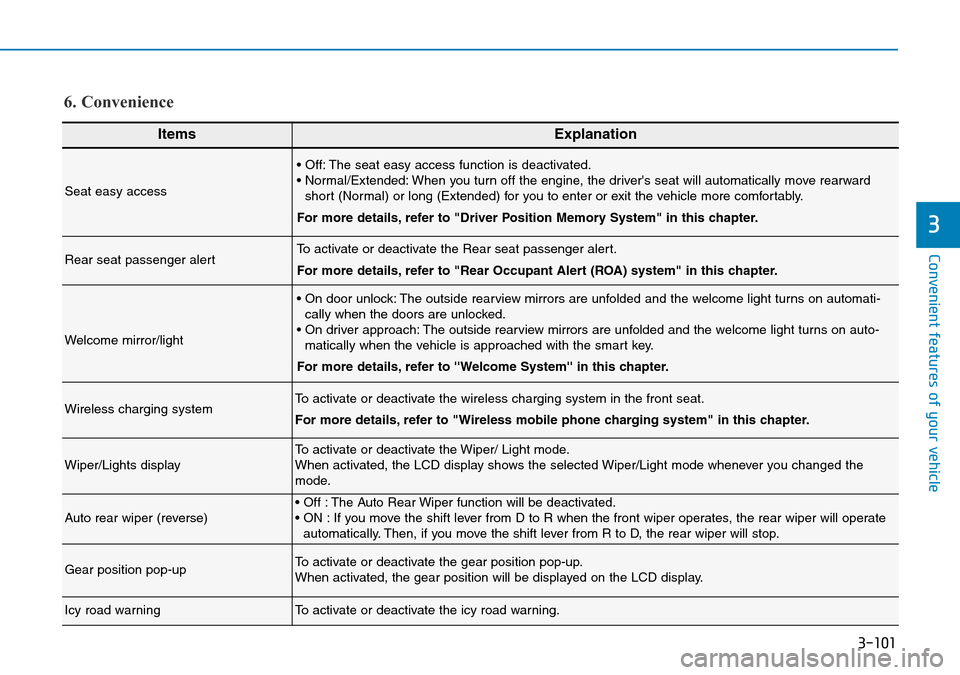
ItemsExplanation
Seat easy access
• Off: The seat easy access function is deactivated.
• Normal/Extended: When you turn off the engine, the driver's seat will automatically move rearward
short (Normal) or long (Extended) for you to enter or exit the vehicle more comfortably.
For more details, refer to "Driver Position Memory System" in this chapter.
Rear seat passenger alertTo activate or deactivate the Rear seat passenger alert.
For more details, refer to "Rear Occupant Alert (ROA) system" in this chapter.
Welcome mirror/light
• On door unlock: The outside rearview mirrors are unfolded and the welcome light turns on automati-
cally when the doors are unlocked.
• On driver approach: The outside rearview mirrors are unfolded and the welcome light turns on auto-
matically when the vehicle is approached with the smart key.
For more details, refer to ''Welcome System'' in this chapter.
Wireless charging systemTo activate or deactivate the wireless charging system in the front seat.
For more details, refer to "Wireless mobile phone charging system" in this chapter.
Wiper/Lights displayTo activate or deactivate the Wiper/ Light mode.
When activated, the LCD display shows the selected Wiper/Light mode whenever you changed the
mode.
Auto rear wiper (reverse)• Off : The Auto Rear Wiper function will be deactivated.
• ON : If you move the shift lever from D to R when the front wiper operates, the rear wiper will operate
automatically. Then, if you move the shift lever from R to D, the rear wiper will stop.
Gear position pop-upTo activate or deactivate the gear position pop-up.
When activated, the gear position will be displayed on the LCD display.
Icy road warningTo activate or deactivate the icy road warning.
6. Convenience