Page 110 of 620

outside temperature is below 32°F (0°C), unless the
wiper control on the multifunction lever is moved, the
vehicle speed becomes greater than 3 mph (5 km/h) or
the outside temperature rises above freezing.
• Neutral Wipe Inhibit — The Rain Sensing feature will
not operate when the ignition is ON, when the transmis-
sion gear selector is in the NEUTRAL position and the
vehicle speed is less than 3 mph (5 km/h), unless the
wiper control on the multifunction lever is moved, the
vehicle speed is greater than 3 mph (5 km/h) or the gear
selector is moved out of the NEUTRAL position.
• Remote Start Mode Inhibit — On vehicles equipped
with Remote Starting system, Rain Sensing wipers are
not operational when the vehicle is in the remote start
mode. Once the operator is in the vehicle and has placed
the ignition switch in the RUN position, rain sensing
wiper operation can resume, if it has been selected, and
no other inhibit conditions (mentioned previously) exist.
Rear Wiper And Washer
Rear Windshield Wiper Operation
Rotate the windshield wiper lever center ring upwards to
operate one of two modes for the rear window wiper:
• First detent — intermittent mode. •
Second detent — continuous mode.
Rear Windshield Washer Operation
Pushing the windshield wiper lever forward activates the
rear window washer. If the lever is pushed while on the
intermittent setting, the wipers will turn on and operate for
several wipe cycles after the lever is released, and then
resume the intermittent interval previously selected. If the
lever is pushed while the wipers are in the off position, the
wipers will operate several wipe cycles, then turn off.
CLIMATE CONTROLS
The Climate Control System allows you to regulate the
temperature, air flow, and direction of air circulating
throughout the vehicle. The controls are located on the
touchscreen (if equipped) and on the instrument panel below
the radio.
Automatic Climate Controls
The front controls are located on the touchscreen (if
equipped) and on the instrument panel below the radio. The
rear climate controls are located on the touchscreen and in
the rear headliner, on the passenger side of the vehicle.
NOTE: Heating and A/C are only available with the
vehicle running, unless the vehicle is plugged in.
108 GETTING TO KNOW YOUR VEHICLE
Page 115 of 620

IconDescription
Modes Control
Modes Control Knob
Faceplate: Push the button in the center of the knob to change the airflow distribution mode.
Touchscreen: Select Mode by pressing one of the Mode Buttons on the touchscreen.
The airflow distribution mode can be adjusted so air comes from the instrument panel outlets,
floor outlets, defrost outlets and demist outlets. The Mode settings are as follows:
Panel Mode
Panel Mode
Air comes from the outlets in the instrument panel. Each of these outlets can be individually
adjusted to direct the flow of air. The air vanes of the center outlets and outboard outlets can be
moved up and down or side to side to regulate airflow direction. There is a shut off wheel lo-
cated below the air vanes to shut off or adjust the amount of airflow from these outlets.
Bi-Level Mode
Bi-Level Mode
Air comes from the instrument panel outlets and floor outlets. A slight amount of air is directed
through the defrost and side window demister outlets.
NOTE:
Bi-Level mode is designed under comfort conditions to provide cooler air out of the panel out-
lets and warmer air from the floor outlets.
Floor Mode
Floor Mode
Air comes from the floor outlets. A slight amount of air is directed through the defrost and side
window demister outlets.
3
GETTING TO KNOW YOUR VEHICLE 113
Page 120 of 620

IconDescription
Blower Control
Blower Control is used to regulate the amount of air forced through the climate system. There
are seven blower speeds available. Adjusting the blower causes automatic mode to switch to
manual operation. The speeds can be selected using the buttons on the touchscreen.
Rear Passenger Climate Control OFF Button
Press and release this button to turn the Rear Climate Controls off.
Panel Mode
Panel Mode
Press this button on the touchscreen to change the air distribution mode to Panel Mode. In
Panel Mode, air comes from the outlets in the instrument panel. Each of these outlets can be
individually adjusted to direct the flow of air. The air vanes of the center outlets and outboard
outlets can be moved up and down or side to side to regulate airflow direction. There is a shut
off wheel located below the air vanes to shut off or adjust the amount of airflow from these out-
lets.
Bi-Level Mode
Bi-Level Mode
Press this button on the touchscreen to change the air distribution mode to Bi-Level Mode. In
Bi-Level Mode, air comes from the instrument panel outlets and floor outlets. A slight amount
of air is directed through the defrost and side window demister outlets.
NOTE: Bi-Level mode is designed under comfort conditions to provide cooler air out of the
panel outlets and warmer air from the floor outlets.
118 GETTING TO KNOW YOUR VEHICLE
Page 133 of 620
HOOD
Opening
WARNING!
Always cycle the ignition to OFF mode before opening
the hood. If the ignition is in ON mode and the
Propulsion System is active when the hood is opened,
the engine will automatically start, and persons not
clear of the vehicle could be injured by the engine’s
moving parts.
The hood release lever (to open the primary latch) and
safety latch (to open the secondary latch) must be released
to open the hood.
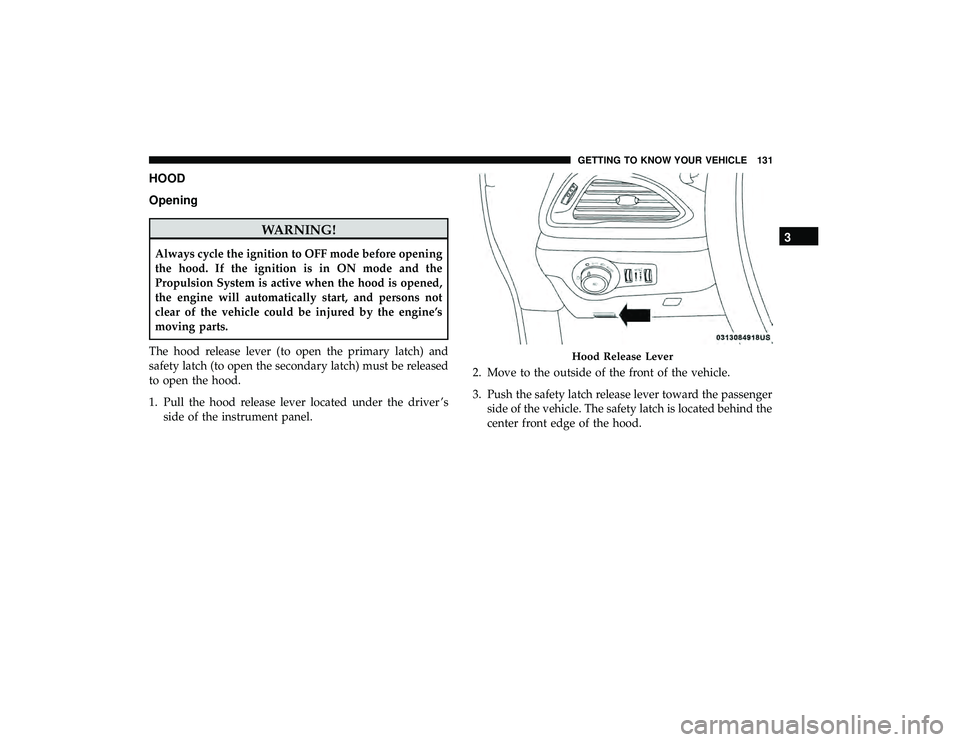
1. Pull the hood release lever located under the driver ’s side of the instrument panel. 2. Move to the outside of the front of the vehicle.
3. Push the safety latch release lever toward the passenger
side of the vehicle. The safety latch is located behind the
center front edge of the hood.
Hood Release Lever
3
GETTING TO KNOW YOUR VEHICLE 131
Page 147 of 620
General Information
The following regulatory statement applies to all Radio
Frequency (RF) devices equipped in this vehicle:
This device complies with Part 15 of the FCC Rules and
with Innovation, Science and Economic Development
Canada license-exempt RSS standard(s). Operation is sub-
ject to the following two conditions:
1. This device may not cause harmful interference, and
2. This device must accept any interference received, in-cluding interference that may cause undesired opera-
tion.
NOTE: Changes or modifications not expressly approved
by the party responsible for compliance could void the
user ’s authority to operate the equipment.
INTERNAL EQUIPMENT
Storage
Glove Compartment
The glove compartment is located on the passenger side of
the instrument panel.
To open the glove compartment, pull the release handle.
Release Handle
3
GETTING TO KNOW YOUR VEHICLE 145
Page 148 of 620
Front Door Storage
Both interior front door panels have multiple pockets for
storage.
WARNING!
If containers of hot liquid are placed in the bottle
holder, they can spill when the door is closed, burning
the occupants. Be careful when closing the doors to
avoid injury.
Instrument Panel Drawer
There is a storage drawer located in the lower center of the
instrument panel. It can be released by pushing the access
button above it. The drawer is actuator assisted once the
access button is pushed. Pull drawer outward to the fully
open position.
Front Door Storage
Drawer Access Button
146 GETTING TO KNOW YOUR VEHICLE
Page 152 of 620
The front power outlet is located at the bottom of the
instrument panel.In addition to the front power outlet, there is also a power
outlet located in the rear cargo area.
12 Volt Front Power OutletRear Power Outlet
150 GETTING TO KNOW YOUR VEHICLE
Page 155 of 620

WARNING!
To avoid serious injury or death:
•Do not insert any objects into the receptacles.
• Do not touch with wet hands.
• Close the lid when not in use.
• If this outlet is mishandled, it may cause an electric
shock and failure.
Cigar Lighter — If Equipped
NOTE: Cigar lighters can be purchased at an authorized
dealer through Mopar parts.
The cigar lighter is located at the bottom of the instrument
panel. Push lighter inward to heat.
After a few seconds, the lighter automatically returns to its
initial position and is ready to be used.
WARNING!
When the cigar lighter is in use it becomes very hot. To
avoid serious injury, handle the cigar lighter with care.
Always check that the cigar lighter has turned off.
CAUTION!
Do not connect devices with power higher than
180 Watts (15 Amps) to the socket. Do not damage the
socket by using unsuitable adaptors. If the 180 Watt
(15 Amp) power rating is exceeded the fuse protecting
the system will need to be replaced.
Smoker’s Package Kit — If Equipped
With the optional authorized dealer-installed Smoker’s
Package Kit, a removable ash receiver is inserted into one
of the two cupholders in the center floor console. To install
the ash receiver, align the receiver so the thumb grip on the
lid is facing rearward. Push the ash receiver into either of
the cup wells to secure. Pull upward on the ash receiver to
remove for cleaning and/or storage.
The left rear trim panel cupholder is designed to accom-
modate a second ash receiver, if desired.
3
GETTING TO KNOW YOUR VEHICLE 153