2019 AUDI TT ROADSTER ESP
[x] Cancel search: ESPPage 132 of 304
Audi connect
Wi-Fi settings
Applies to: vehicles with Wi-Fi hotspot
You can use the MMI as a Wi-Fi hotspot to con-
nect
up to eight Wi-Fi devices to the Internet.
Requirement: the ignition must be switched on.
> Select: [MENU] button > Telephone > right con-
trol button > Wi-Fi settings.
Depending on the country and the vehicle equip-
ment, the following functions may be available:
Wi-Fi
When this function is switched on, the MMI Wi-Fi
hotspot is active and visible to other devices (for
example, laptops and cell phones). You can con-
nect your Wi-Fi device to the MMI and use the In-
ternet connection if necessary. If you switch off
the Wi-Fi in the MMI, the Wi-Fi hotspot will be
deactivated. Therefore, any other devices access-
ing the Wi-Fi hotspot will no longer be connected
to the Wi-Fi.
Network key
The Wi-Fi connection between your vehicle and
your Wi-Fi device is encrypted. To establish a con-
nection, you must enter the following values
when setting up your wireless device. You can
change them if necessary.
— Access point (SSID): name of the Wi-Fi net-
work.
— Password: a random password was set at the
factory in the MMI. The password can be
changed. The encryption method requires a
password to be at least eight characters long.
Choose a secure password.
— Visible to others: your Wi-Fi network visibility
can be switched on or off.
Network search
A list of available Wi-Fi networks in your area is
displayed.
Connection to personal hotspot
The MMI Wi-Fi hotspot is activated. An MMI In-
ternet connection to a personal Wi-Fi hotspot
(such as a smartphone) can be established. For
additional information, see > page 126.
130
ZA WARNING
Always follow the information found in > A\
in General information on page 125.
(1) Note
Always follow the information found in © in
General information on page 125.
@ Tips
In vehicles without Audi connect Infotain-
ment, the use of the Wi-Fi hotspot is only
possible for the Wi-Fi audio player*. A data
connection to the Internet cannot be estab-
lished.
Data Privacy
Applies to: vehicles with Audi connect Infotainment
AUDI AG collects, uses, stores and shares your
personal information, such as contact data, vehi-
cle data, usage data, driving data and precise ge-
olocation, in order to provide you with the prod-
ucts and services you have purchased or request-
ed, and for a number of other purposes, for ex-
ample, to track quality issues, to performance
and safety, to meet our internal compliance or le-
gal requirements and to market to customers
and potential customers. For a more complete
list of the data we collect, how we use it and with
whom we share it, please visit your Audi nation-
al/sales region website at www.audi.com.
The collection, use and sharing may vary depend-
ing on your model and model year, your subscrip-
tion status, or the service offering. For example,
collection, use and sharing may vary between Au-
di connect services, if you have designated a key
user, or if you are driving a model equipped with
persistent data logging. Please review the com-
plete Privacy Statement to understand our data
handling practices with respect to a particular
service.
You can find additional information about our da-
ta privacy practices in your MMI.
> Select: [MENU] button > Audi connect > right
control button > About Audi connect.
Page 133 of 304
8S58012721BA
Audi connect
Information about our privacy practices in con-
junction with the mobile Audi connect applica-
tion can be found in the Application’s Privacy
Statement.
For additional information about the privacy
practices relating to Audi connect, myAudi, or
Troubleshooting
other websites, applications or online services as
well as your obligations with respect to using
these services, and for additional information re-
garding Audi connect terms and conditions,
please visit your Audi national/sales region web-
site at www.audi.com.
Applies to: vehicles with Audi connect Infotainment
The information that follows lists some trouble-
shooting options. They depend on the equip-
ment.
Problem Solution
Audi connect Infotainment serv-
ices: individual Audi connect Info-
tainment services are grayed out or
not available.
Some Audi connect Infotainment services must be activated or
configured through your personal myAudi account before using
them for the first time. You can find detailed information online
at www.audiusa.com/myaudi.
Wi-Fi hotspot: it is not possible to
connect through Wi-Fi.
Check if Wi-Fi is activated in the MMI & page 130.
Delete all existing Wi-Fi connections on your mobile device and
restart it.
Wi-Fi hotspot: the data connection
is interrupted.
Check if the function Connection to personal hotspot is activat-
ed > page 130. Turn the function off if you are not using a per-
sonal hotspot.
Personal Wi-Fi hotspot: the Net-
work search is not possible (grayed
out).
To start a network search for your personal Wi-Fi hotspot, the
Wi-Fi hotspot must be turned on > page 126.
131
Page 147 of 304
8S8012721BA
Navigation
You can also display the online traffic informa-
tion in the satellite map*») > page 143 or the
standard map > page 140, fig. 123
G) Tips
— Online traffic information is not available in
Canada.
— Always read the chapter > page 125, Audi
connect.
— Having the Online traffic data function
switched on provides the most accurate re-
ports of traffic situations as well as traffic
forecasting. Your vehicle transmits and
processes its anonymous, encrypted posi-
tion information at regular intervals to the
traffic data provider. If you do not want to
use this, you can switch off the online traf-
fic information function at any time.
— The online traffic information network is
currently not available in all countries, and
the coverage is not nationwide. For addi-
tional information, visit www.audiusa.com.
Traffic information (TMC)
Applies to: vehicles with navigation system
> Press the LNAV/MAP| button repeatedly until
the map is displayed.
> Select: left control button > Traffic messages.
TMC traffic messages are switched on at the fac-
tory.
Multiple traffic messages are summarized in the
overview under the corresponding street names
or highway names.
— Displaying all traffic messages for a street/
highway: select and confirm the |¢ symbol. A
list of all the traffic messages for the selected
street/highway is displayed.
— Opening the detailed view of a traffic mes-
sage: if you select an entry from the list, the
traffic information will be shown as a map pre-
view @) > page 144, fig. 126. Select and con-
2) AUDI AG provides access to services from third party pro-
viders. Permanent availability cannot be guaranteed, be-
cause that depends on the third party provider.
firm a traffic message to display the details for
that message.
— Displaying the selected traffic message on the
map: select the right control button > Show on
map.
— Displaying the next traffic message on the
map: press the control knob.
Traffic information display
Colored warning symbols: traffic incidents on
your route are shown in the upper section of the
list and are sorted according to distance.
Warning symbols with +: avoided traffic inci-
dents.
Grayed out warning symbols: traffic incidents
that are not on your route. They are sorted ac-
cording to road type (expressway, highway, other
road), country and name.
Shaded markings indicate the length of the area
with congestion.
G@) Tips
Critical traffic information, such as warnings
about wrong-way drivers, is automatically dis-
played. To hide the traffic information, press
the [BACK] button or the control knob.
— TMC traffic reports are not available in Can-
ada. For more information, please contact
Sirius Canada.
12{oh ea col th a)
Applies to: vehicles with navigation system
By receiving traffic information through TMC,
your MMI calculates a better route if available
and the possible time saved compared to the
current route. You can decide which route you
would like to use.
NAV/MAP > Press the
the
map is displayed.
button repeatedly until
Requirement: route guidance must be active.
145
>
Page 154 of 304
Media
Media
Introduction
There are various media drives and connections
available in the MMI. You can play, for example,
audio/video files from the Jukebox* or connect
your mobile device to the Audi music interface*
and operate it through the MMI.
Notes
Media and format restrictions: the MMI (includ-
ing the SD card reader and the USB storage de-
vice connection*) was tested with a variety of
products and media available in the market.
However, there may be cases where individual de-
vices or media and audio/video” files may not be
recognized, may play only with restrictions or
may not play at all.
Digital Rights Management: please note that
the audio/video files are subject to copyright pro-
tection.
The media drives do not play files that are pro-
tected by DRM and that are identified with the
symbol fi.
Data security: never store important data on SD
cards, the Jukebox*, CDs/DVDs or mobile devices.
Audi AG is not responsible for damaged or lost
files and media.
Loading times: the more files/folders/playlists
that are on a storage medium, the longer it will
take to load the audio/video* files. Audi recom-
mends using storage media that only contain au-
dio/video files*. To decrease the time it takes to
load audio/video files*, create subfolders (for ex-
ample, for the artist or album). The loading time
will also increase when importing files.
Additional information: when playing, audio
files are automatically displayed with any addi-
tional information that is stored (such as the ar-
tist, track and album cover). If this information is
not available on the storage medium, the MMI
will check the Gracenote metadata database.
152
However, in some cases, the additional informa-
tion may not be displayed.
Restricted functionality: reset the Media set-
tings to the factory default settings if functional-
ity is restricted > page 172.
If functionality is restricted, reset the Jukebox* to
the factory default settings > page 172.
For information about the properties of support-
ed media and file formats, see > page 166.
@) Note
Always follow the information found in >@ in
General information on page 125.
CD/DVD operation
CD/DVD and format restrictions: the functionali-
ty of individual storage media may be limited due
to the variety of blank CDs/DVDs available and
the various capacities. Audio CDs or video DVDs
with copy protection, CDs/DVDs that do not con-
form to the standard, and multisession CDs may
have limited playback or may not play at all. Audi
recommends finalizing the recording process
when creating multisession CDs. Multisession
DVDs are not supported.
Using CDs/DVDs, the CD drive or the DVD drive:
to ensure correct, high-quality playback and to
prevent damage to the drive or disc reading er-
rors, always store CDs/DVDs in a protective
sleeve and do not expose them to direct sunlight.
Do not use:
— Damaged, dirty or scratched CDs/DVDs
— Single CDs/DVDs with 3 in (8 cm) diameter
— CD/DVDs that are not round
— CDs/DVDs with labels
— Protective rings
— Cleaning CDs
Thermal protection switch: CD/DVD playback
may be temporarily unavailable if outside tem-
peratures
are extremely hot or cold. A thermal
protection switch is installed to protect the
CD/DVD and the laser.
Laser devices: laser devices are divided into safe-
ty classes 1 to 4 in accordance with DIN IEC 76 >
Page 160 of 304
Always follow the information found in >@ in
General information on page 125.
@ Tips
— Depending on the Internet connection and
network traffic, the connection may discon-
nected when online media sources are play-
ing.
— Online media and Internet radio usage de-
pends on the service availability of the third
party provider.
— Audi AG simply makes the access to online
media services possible through the MMI
and does not take any responsibility for the
contents of the online media services.
— Always read the chapter > page 125, Audi
connect.
— Depending on the mobile device being used,
there may be interruptions during media
playback and when using the myAudi app.
To prevent interruptions when using a mo-
bile device, do not lock the screen on your
mobile device and keep the myAudi app in
the foreground.
— Contact an authorized Audi dealer or au-
thorized Audi Service Facility for additional
information about online media.
158
Multimedia connections
USB adapter for Audi music interface or
USB charging port
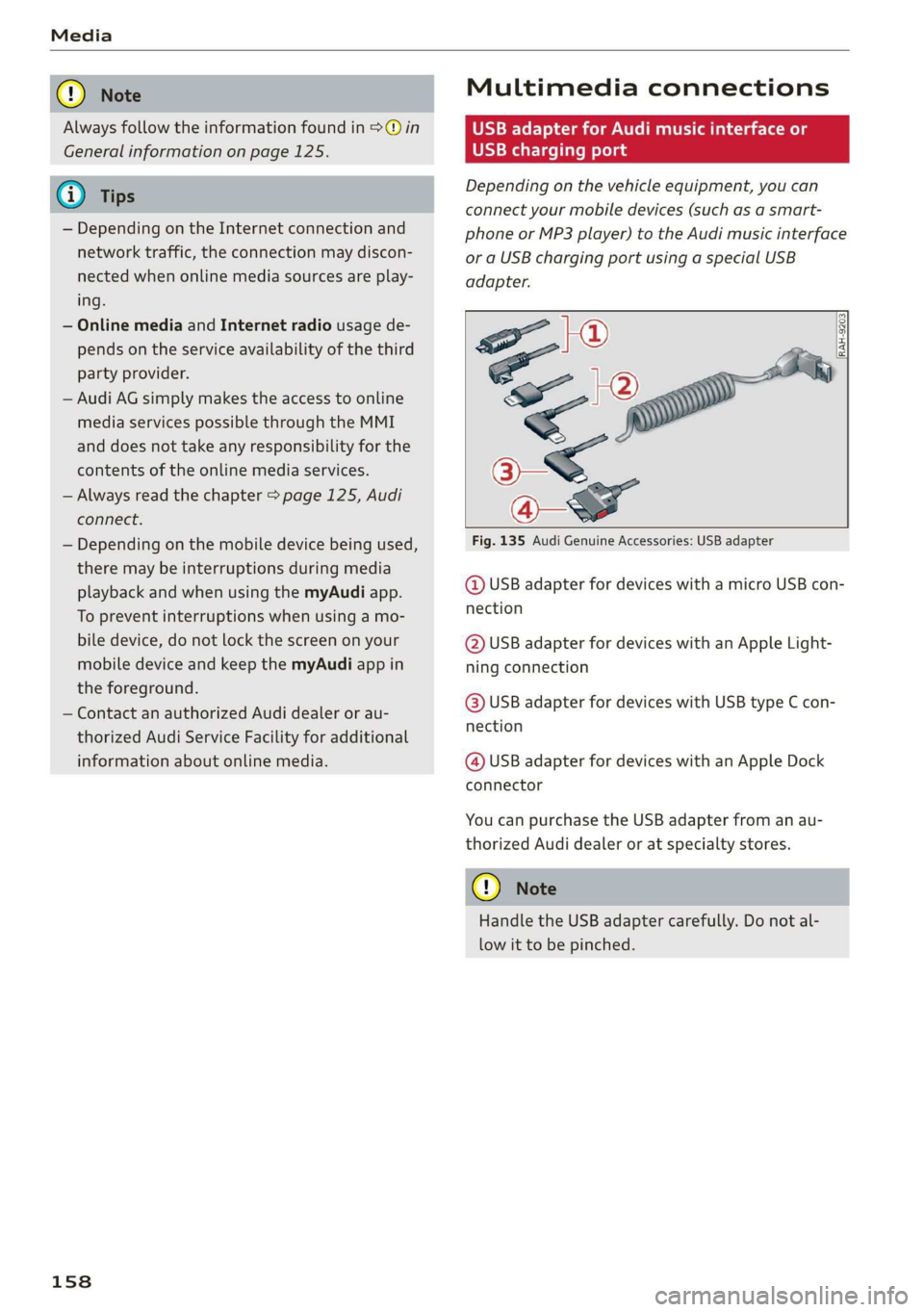
Depending on the vehicle equipment, you can
connect your mobile devices (such as a smart-
phone or MP3 player) to the Audi music interface
or a USB charging port using a special USB
adapter.
[RAH-9203]
Fig. 135 Audi Genuine Accessories: USB adapter
@ USB adapter for devices with a micro USB con-
nection
@ USB adapter for devices with an Apple Light-
ning connection
@ USB adapter for devices with USB type C con-
nection
@ USB adapter for devices with an Apple Dock
connector
You can purchase the USB adapter from an au-
thorized Audi dealer or at specialty stores.
C) Note
Handle the USB adapter carefully. Do not al-
low it to be pinched.
Page 161 of 304
8S58012721BA
Media
ONT ale)
Applies to: vehicles with Audi music interface
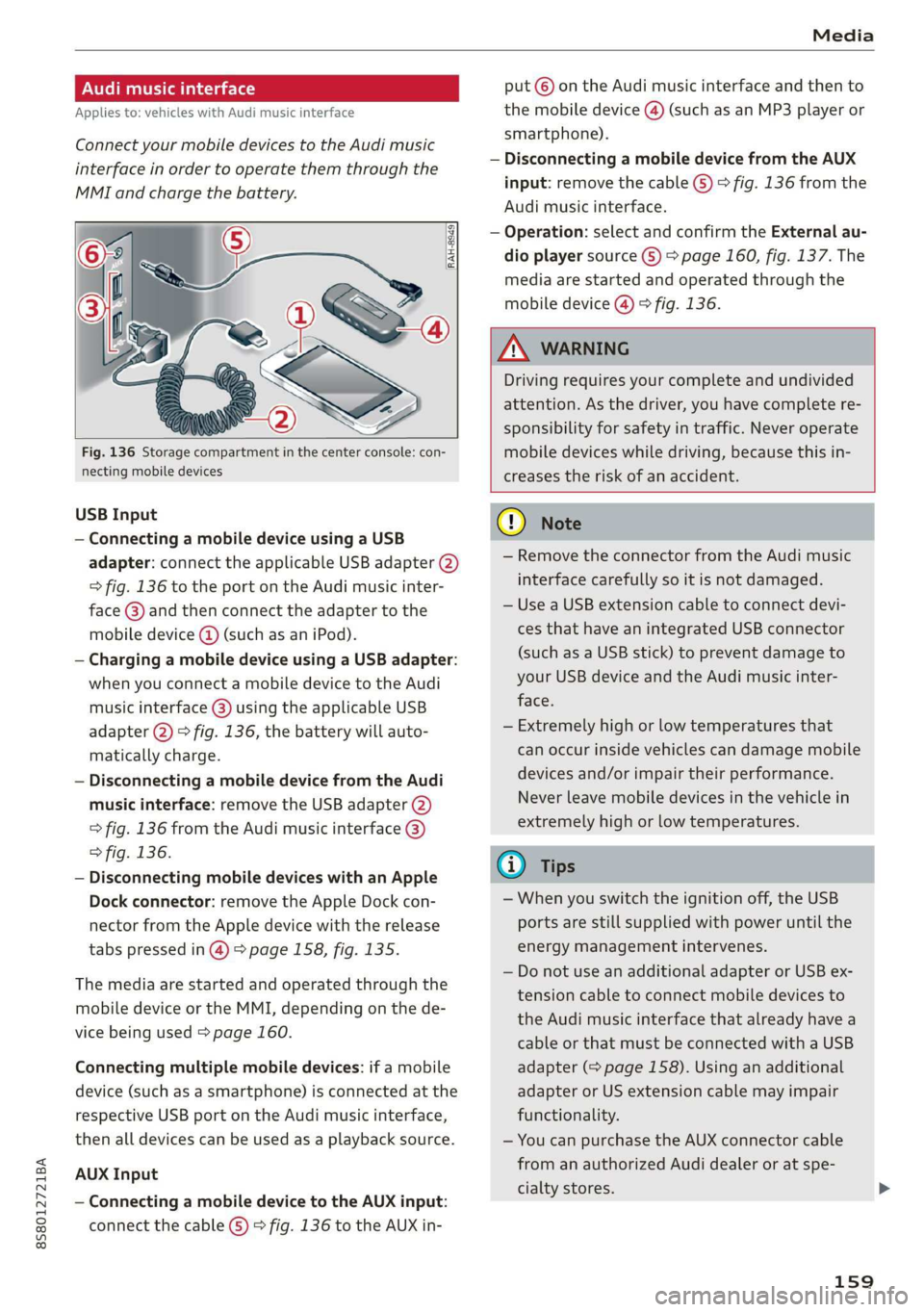
Connect your mobile devices to the Audi music
interface in order to operate them through the
MMI and charge the battery.
put © on the Audi music interface and then to
the mobile device @) (such as an MP3 player or
smartphone).
— Disconnecting a mobile device from the AUX
input: remove the cable G) > fig. 136 from the
Audi music interface.
— Operation: select and confirm the External au-
dio player source G) > page 160, fig. 137. The
media are started and operated through the
mobile device @) fig. 136.
Fig. 136 Storage compartment in the center console: con-
necting mobile devices
USB Input
— Connecting a mobile device using a USB
adapter: connect the applicable USB adapter (2)
=> fig. 136 to the port on the Audi music inter-
face @) and then connect the adapter to the
mobile device @ (such as an iPod).
— Charging a mobile device using a USB adapter:
when you connect a mobile device to the Audi
music interface @) using the applicable USB
adapter @) > fig. 136, the battery will auto-
matically charge.
— Disconnecting a mobile device from the Audi
music interface: remove the USB adapter (2)
> fig. 136 from the Audi music interface @)
> fig. 136.
— Disconnecting mobile devices with an Apple
Dock connector: remove the Apple Dock con-
nector from the Apple device with the release
tabs pressed in @) > page 158, fig. 135.
The media are started and operated through the
mobile device or the MMI, depending on the de-
vice being used > page 160.
Connecting multiple mobile devices: if a mobile
device (such as a smartphone) is connected at the
respective USB port on the Audi music interface,
then all devices can be used as a playback source.
AUX Input
— Connecting a mobile device to the AUX input:
connect the cable (G) > fig. 136 to the AUX in-
Z\ WARNING
Driving requires your complete and undivided
attention. As the driver, you have complete re-
sponsibility for safety in traffic. Never operate
mobile devices while driving, because this in-
creases the risk of an accident.
G) Note
— Remove the connector from the Audi music
interface carefully so it is not damaged.
— Use a USB extension cable to connect devi-
ces that have an integrated USB connector
(such as a USB stick) to prevent damage to
your USB device and the Audi music inter-
face.
— Extremely high or low temperatures that
can occur inside vehicles can damage mobile
devices and/or impair their performance.
Never leave mobile devices in the vehicle in
extremely high or low temperatures.
@ Tips
—When you switch the ignition off, the USB
ports are still supplied with power until the
energy management intervenes.
— Do not use an additional adapter or USB ex-
tension cable to connect mobile devices to
the Audi music interface that already have a
cable or that must be connected with a USB
adapter (> page 158). Using an additional
adapter or US extension cable may impair
functionality.
— You can purchase the AUX connector cable
from an authorized Audi dealer or at spe-
cialty stores.
159
Page 173 of 304
![AUDI TT ROADSTER 2019 Owners Manual 8S8012721BA
System settings
System settings
Setting the date and
time
You can set the clock time manually or using the
GPS.
> Select: [MENU] button > Settings > left control
button](/manual-img/6/57667/w960_57667-172.png "AUDI TT ROADSTER 2019 Owners Manual 8S8012721BA
System settings
System settings
Setting the date and
time
You can set the clock time manually or using the
GPS.
> Select: [MENU] button > Settings > left control
button")
8S8012721BA
System settings
System settings
Setting the date and
time
You can set the clock time manually or using the
GPS.
> Select: [MENU] button > Settings > left control
button > MMI settings > Date & time.
> Or: select: [MENU] button > Vehicle > left con-
trol button > Vehicle settings > Date & time.
Automatic setting
When this function is switched on ¥, the time
and date are automatically set.
Time
Requirement: the Automatic setting must be
switched off.
Press the control knob. You can set the Time
manually by turning and pressing the control
knob.
Date
Requirement: the Automatic setting must be
switched off.
Press the control knob. You can set the Date
manually by turning and pressing the control
knob.
Time zone
When selecting the appropriate time zone, a
sampling of countries in this zone will be listed.
Automatic time zone*
When this function is switched on @, the time
will automatically adjust to the corresponding
time zone.
Time format
If you select 24h, the clock will display, for exam-
ple, 13:00. If you select AM/PM, the clock will
display, for example, 1:00 PM.
D_ The Qi standard makes it possible to charge your mobile
device wirelessly.
Date format
If you select DD.MM.YYYY, the date display will
show, for example, 31.08.2017. If you select
MM/DD/YYVY, the date display will show, for ex-
ample, 08/31/2017. If you select YYYY-MM-DD,
the date display will show, for example,
2017-08-31.
MMI settings
> Select: [MENU] button > Settings > left control
button > MMI settings.
Language
You can change the display language as well as
the language for the voice guidance* and voice
recognition system*.
The number of languages available depends on
the market.
Measurement units
The following measurement units can be set de-
pending on availability: Speed, Distance, Tem-
perature, Fuel consumption, Volume, Pressure.
Mobile device reminder signal
Applies to: vehicles with Audi phone box
Requirement: your cell phone must be Qi-capa-
ble ) or connected to the Audi music interface @
with a USB adapter cable > page 113, fig. 110.
When the device reminder signal is switched on,
you will be notified that your mobile device is still
in the Audi phone box* when you leave the vehi-
cle. You can select between Spoken cue, Signal
tone
and Off.
Mobile device reminder signal volume: you can
adjust the reminder signal volume by turning the
control knob.
Switch off pop-up: when the function is switched
on [M, the messages in the Infotainment system
display regarding the charging status of your cell
phone in the Audi phone box* are hidden. The re-
minder not to forget your cell phone when leav-
ing the vehicle is likewise switched off.
171
Page 174 of 304
System settings
Tool tips
When this function is switched on M, your MMI
shows you tips for input. The frequency of how
often it displays decreases with time. You can
switch off the operating tips at any time.
Speech dialog system
Applies to: vehicles with voice recognition system
Command display: when this function is switch-
ed on, the MMI will show you the possible
commands for voice input in the respective
menu. You can switch the function off at any
time.
Short dialog: when this function is switched on
, a shorter form of the prompts is used. You
can switch the function off at any time.
Speech dialog system volume: you can adjust
the volume of the prompts by turning the control
knob.
Individual speech training (only when the vehi-
cle is stationary): you can adapt the voice recog-
nition system to your voice or pronunciation in or-
der to improve the system's ability to recognize
your speech. Individual speech training is com-
prised of 20 speech entries that consist of com-
mands and sequences of numbers. You can de-
lete the programmed voice training with the Re-
set individual speech training function.
Factory settings
The following functions can be reset to the facto-
ry default settings:
— Sound settings
— Radio
— Media settings
—Jukebox*
— Directory*
— Telephone*
— Bluetooth and Wi-Fi*
— Navigation settings*
— Navigation and online memory*
— Voice recognition system*
— Message settings*
— Apps*
— Tool tips
— Audi connect*
172
You can select the desired functions individually
or all at once with the option Select all entries.
Select and confirm Restore factory settings.
G) Tips
— Make sure that not only the settings were
deleted but also the stored data, if necessa-
ry.
— Please note that the voice recognition sys-
tem* is not available in Cabriolets that do
not have a factory-installed safety belt mi-
crophone.
Connection manager
Introduction
The connection manager provides an overview of
your connected devices and their network status.
> Select: [MENU] button > Settings > left control
button > MMI settings > Connection manager.
> Select and confirm a menu item.
If a mobile device was already connected and you
select and confirm the corresponding menu item,
the
device name and connection status are dis-
played under the menu item.
You can individually Connect (M) or Disconnect
(_) a paired device.
Requirement:
— The vehicle must be stationary and the ignition
must be switched on.
— The Bluetooth settings will open on your mo-
bile device during the connection setup.
— The Bluetooth function and visibility of the MMI
= page 174 and mobile device must be switch-
ed on.
— The mobile device to be connected must not be
connected to any other Bluetooth device.
Primary phone
Applies to: vehicles with telephone
— Connect new device: search for and connect a
cell phone.