2019 AUDI TT ROADSTER key
[x] Cancel search: keyPage 116 of 304
Telephone
@) Note
Applicable to Canada
In Canada, operation of a Zone Enhancer,
such as an Audi Phone Box, is subject to the
following requirements of the Innovation,
Science and Economic Development Canada
(ISED):
— This is a CONSUMER device.
— BEFORE USE, you MUST meet all require-
ments set out in CPC-2-1-05.
— You MUST operate this device with approved
antennas
and cables as specified by the
manufacturer. Antennas MUST NOT be in-
stalled within 20 cm of any person.
— You MUST cease operating this device im-
mediately if requested by ISED or a licensed
wireless service provider.
— WARNING: £911 location information may
not be provided or may be inaccurate for
calls served by using this device.
G) Tips
— The Audi phone box is not available in all
countries. For additional information, con-
tact an authorized Audi dealership.
— Placing the mobile device in a bag or protec-
tive sleeve inside the Audi phone box can in-
terfere with the connection to the external
antenna.
— Metal objects cannot be located in the Audi
phone box when using the exterior antenna*
and the Audi phone box charging function.
— The charging time and temperature will vary
depending on the mobile device being used.
— When the ignition is switched on, you can
charge your mobile device in the Audi phone
box.
—To reduce the risk of malfunctions, make
sure the mobile device is positioned correct-
ly in the Audi phone box.
— The maximum charging output is 5 watts.
— Strong transmission quality cannot be guar-
anteed if more than one mobile device is in
the box.
— Audi recommends using Audi Genuine Ac-
cessories. Audi has verified their reliability,
safety, and suitability.
114
— You can purchase a USB adapter from an au-
thorized Audi dealer or authorized Audi
Service Facility, or at specialty stores.
— If you place your remote control key togeth-
er with your mobile device in the Audi phone
box, it may cause your mobile device to stop
charging if wireless charging is active.
Using the telephone
Opening the telephone
Applies to: vehicles with telephone
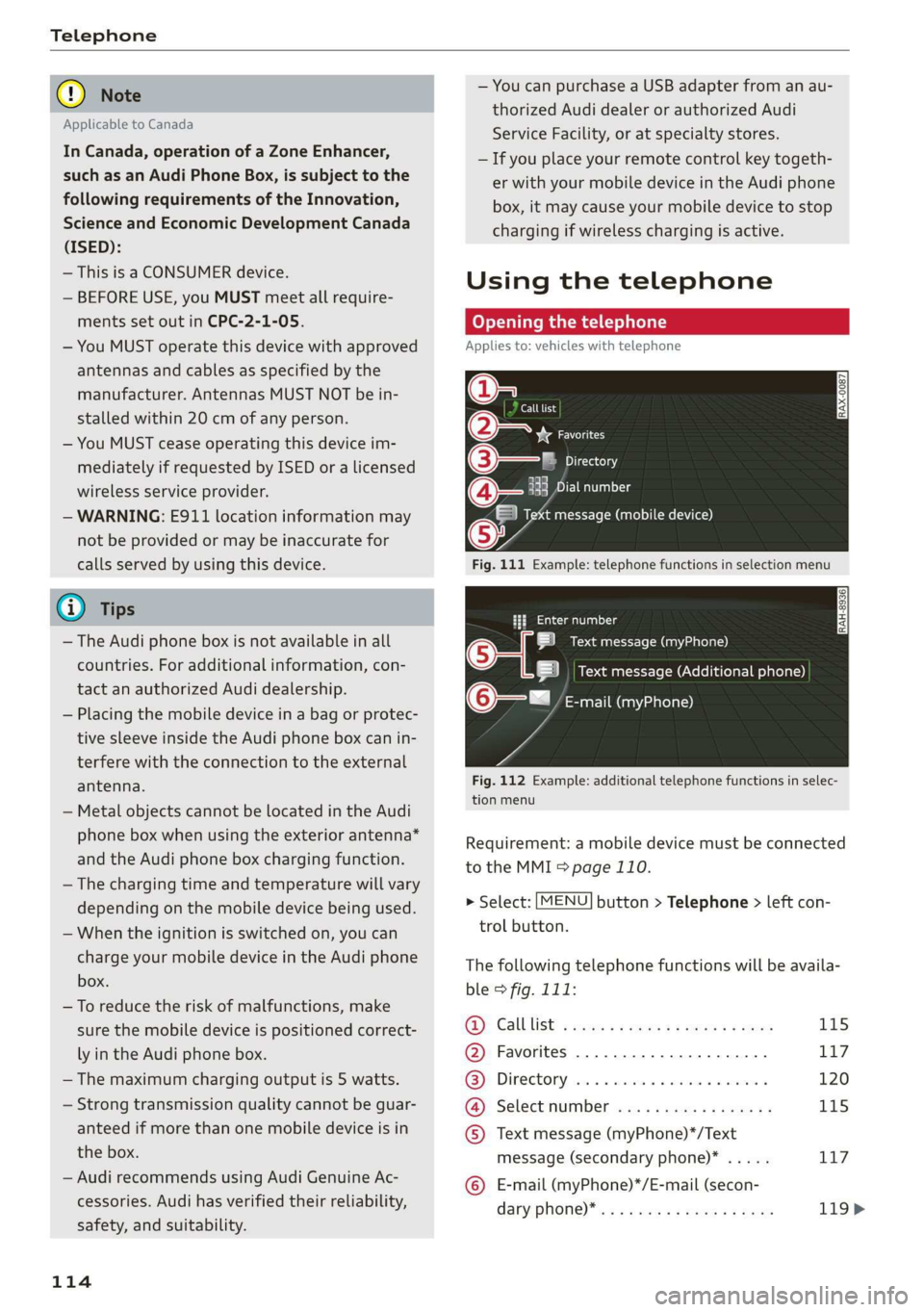
Call list
(2 Sa
©— Directory
(4)o 4) Es yor Llane
(=) Tekt message (mobile device)
Sy
Fig. 111 Example: telephone functions in selection menu
Hy ee al dg
5 Text message (myPhone)
|i] Text message (Additional phone)
@—= E-mail (myPhone)
Fig. 112 Example: additional telephone functions in selec-
tion menu
Requirement: a mobile device must be connected
to the MMI > page 110.
> Select: [MENU] button > Telephone > left con-
trol button.
The following telephone functions will be availa-
ble > fig. 111:
@): Calllist: : soy. sc cease 4: ews yo ewe 115
@ Favorites ................20.0, 117
@® Directory ....... 0. cece eee eee 120
@ Select number ...............0. 115
© Text message (myPhone)*/Text
message (secondary phone)* ..... 117
© E-mail (myPhone)*/E-mail (secon-
dary: phone) * ws « een ss wawn se eee 119>
Page 126 of 304
Telephone
Troubleshooting
Applies to: vehicles with telephone
Problem Solution
Pairing the cell phone to the MMI
failed.
Check if the requirements for connecting a mobile device are met
=> page 110.
Or: check if you accidentally declined the connection setup PIN on
your cell phone. If necessary, repeat the pairing process
=> page 110.
After pairing, not all contacts or
no contacts have been loaded into
the MMI.
Avoid using special characters in names.
Avoid using contact groups on your mobile device.
Certain telephone functions are
grayed out or not available.
The telephone functions depend on the mobile device service pro-
vider and the mobile device you are using. You can obtain more in-
formation from your cell phone service provider, in your cell phone
user guide or in the database for mobile devices at www.audiusa.
com/bluetooth.
Some telephone functions may
be switched off or not available,
even though the mobile device is
supported.
On corporate phones, some Bluetooth settings may not be com-
patible or the cell phone Bluetooth function may be deactivated.
You can obtain more information from your system administrator.
Applies to: vehicles with Audi
phone box Wireless cell phone
charging is not working or is inter-
rupted.
Applies to: vehicles with Audi phone box Check if your mobile de-
vice is Qi-capable.
Check if your cell phone is centered on the phone symbol in the
Audi phone box page 113 and make sure there are no other ob-
jects in the Audi phone box.
Do not place your remote control key in the Audi phone box with
your cell phone.
124
Page 132 of 304
Audi connect
Wi-Fi settings
Applies to: vehicles with Wi-Fi hotspot
You can use the MMI as a Wi-Fi hotspot to con-
nect
up to eight Wi-Fi devices to the Internet.
Requirement: the ignition must be switched on.
> Select: [MENU] button > Telephone > right con-
trol button > Wi-Fi settings.
Depending on the country and the vehicle equip-
ment, the following functions may be available:
Wi-Fi
When this function is switched on, the MMI Wi-Fi
hotspot is active and visible to other devices (for
example, laptops and cell phones). You can con-
nect your Wi-Fi device to the MMI and use the In-
ternet connection if necessary. If you switch off
the Wi-Fi in the MMI, the Wi-Fi hotspot will be
deactivated. Therefore, any other devices access-
ing the Wi-Fi hotspot will no longer be connected
to the Wi-Fi.
Network key
The Wi-Fi connection between your vehicle and
your Wi-Fi device is encrypted. To establish a con-
nection, you must enter the following values
when setting up your wireless device. You can
change them if necessary.
— Access point (SSID): name of the Wi-Fi net-
work.
— Password: a random password was set at the
factory in the MMI. The password can be
changed. The encryption method requires a
password to be at least eight characters long.
Choose a secure password.
— Visible to others: your Wi-Fi network visibility
can be switched on or off.
Network search
A list of available Wi-Fi networks in your area is
displayed.
Connection to personal hotspot
The MMI Wi-Fi hotspot is activated. An MMI In-
ternet connection to a personal Wi-Fi hotspot
(such as a smartphone) can be established. For
additional information, see > page 126.
130
ZA WARNING
Always follow the information found in > A\
in General information on page 125.
(1) Note
Always follow the information found in © in
General information on page 125.
@ Tips
In vehicles without Audi connect Infotain-
ment, the use of the Wi-Fi hotspot is only
possible for the Wi-Fi audio player*. A data
connection to the Internet cannot be estab-
lished.
Data Privacy
Applies to: vehicles with Audi connect Infotainment
AUDI AG collects, uses, stores and shares your
personal information, such as contact data, vehi-
cle data, usage data, driving data and precise ge-
olocation, in order to provide you with the prod-
ucts and services you have purchased or request-
ed, and for a number of other purposes, for ex-
ample, to track quality issues, to performance
and safety, to meet our internal compliance or le-
gal requirements and to market to customers
and potential customers. For a more complete
list of the data we collect, how we use it and with
whom we share it, please visit your Audi nation-
al/sales region website at www.audi.com.
The collection, use and sharing may vary depend-
ing on your model and model year, your subscrip-
tion status, or the service offering. For example,
collection, use and sharing may vary between Au-
di connect services, if you have designated a key
user, or if you are driving a model equipped with
persistent data logging. Please review the com-
plete Privacy Statement to understand our data
handling practices with respect to a particular
service.
You can find additional information about our da-
ta privacy practices in your MMI.
> Select: [MENU] button > Audi connect > right
control button > About Audi connect.
Page 187 of 304
8S8012721BA
Safety belts
— Never remove a safety belt while the vehicle
is moving. Doing so will increase your risk of
being injured or killed.
— Never wear belts twisted.
— Never wear belts over rigid or breakable ob-
jects in or on your clothing, such as eye
glasses, pens, keys, etc., as these may cause
injury.
— Never allow safety belts to become dam-
aged by being caught in door or seat hard-
ware.
— Do not wear the shoulder part of the belt
under your arm or otherwise out of position.
— Several layers of heavy clothing may inter-
fere with correct positioning of belts and re-
duce the overall effectiveness of the system.
— Always keep belt buckles free of anything
that may prevent the buckle from latching
securely.
— Never use comfort clips or devices that cre-
ate slack in the shoulder belt. However, spe-
cial clips may be required for the proper use
of some child restraint systems.
— Torn or frayed safety belts can tear and
damaged belt hardware can break in an acci-
dent. Inspect belts regularly. If webbing,
bindings, buckles, or retractors are dam-
aged, have belts replaced by an authorized
Audi dealer or qualified workshop.
— Safety belts that have been worn and loaded
in an accident must be replaced with the
correct replacement safety belt by an au-
thorized Audi dealer. Replacement may be
necessary even if damage cannot be clearly
seen. Anchorages that were loaded must al-
so be inspected.
— Never remove, modify, disassemble, or try
to repair the safety belts yourself.
— Always keep the belts clean. Dirty belts may
not work properly and can impair the func-
tion of the inertia reel > table Interior
cleaning on page 264.
Safety belts
Fastening safety belts
Safety first - everybody buckle up!
|
B4H-0462
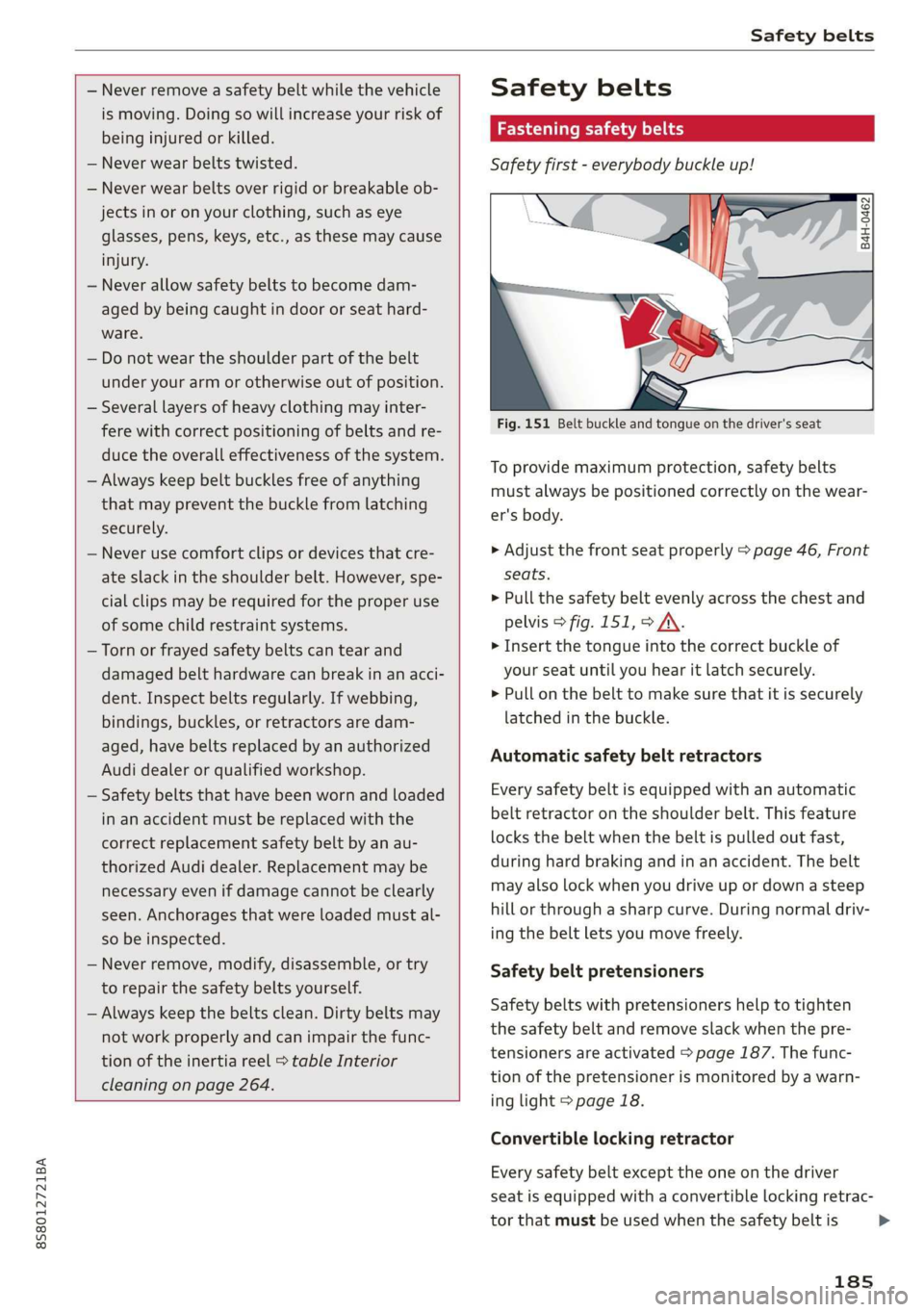
Fig. 151 Belt buckle and tongue on the driver's seat
To provide maximum protection, safety belts
must always be positioned correctly on the wear-
er's body.
> Adjust the front seat properly > page 46, Front
seats.
> Pull the safety belt evenly across the chest and
pelvis > fig. 151, > A\.
> Insert the tongue into the correct buckle of
your seat until you hear it latch securely.
> Pull on the belt to make sure that it is securely
latched in the buckle.
Automatic safety belt retractors
Every safety belt is equipped with an automatic
belt retractor on the shoulder belt. This feature
locks the belt when the belt is pulled out fast,
during hard braking and in an accident. The belt
may also lock when you drive up or down a steep
hill or through a sharp curve. During normal driv-
ing the belt lets you move freely.
Safety belt pretensioners
Safety belts with pretensioners help to tighten
the safety belt and remove slack when the pre-
tensioners are activated > page 187. The func-
tion of the pretensioner is monitored by a warn-
ing light > page 18.
Convertible locking retractor
Every safety belt except the one on the driver
seat is equipped with a convertible locking retrac-
tor that must be used when the safety belt is
185
>
Page 188 of 304
Safety belts
used to attach a child seat. Be sure to read the
important information about this feature
=> page 219.
ZA WARNING
Improperly positioned safety belts can cause
serious injury in an accident > page 186,
Safety belt position.
— Safety belts offer optimum protection only
when the seatback is upright and belts are
properly positioned on the body.
— Never attach the safety belt to the buckle
for another seat. Attaching the belt to the
wrong buckle will reduce safety belt effec-
tiveness and can cause serious personal in-
jury.
— A passenger who is not properly restrained
can be seriously injured by the safety belt it-
self when it moves from the stronger parts
of the body into critical areas like the abdo-
men.
— Always lock the convertible locking retractor
when you are securing a child seat in the ve-
hicle > page 220.
@) Tips
For information on safety belt pretensioners,
refer to > page 187.
Safety belt position
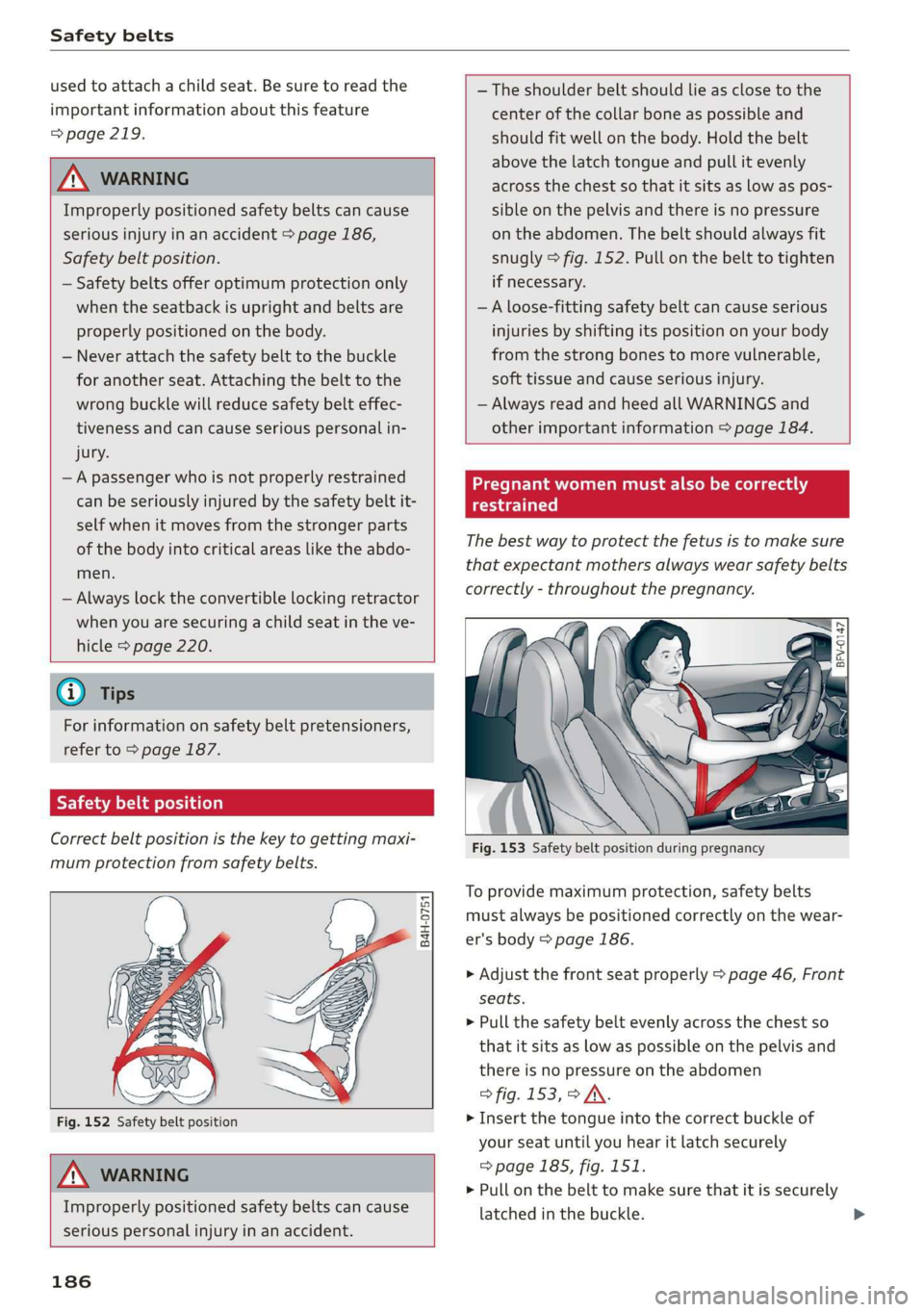
Correct belt position is the key to getting maxi-
mum protection from safety belts.
B4H-0751
Fig. 152 Safety belt position
Z\ WARNING
Improperly positioned safety belts can cause
serious personal injury in an accident.
186
— The shoulder belt should lie as close to the
center of the collar bone as possible and
should fit well on the body. Hold the belt
above the latch tongue and pull it evenly
across the chest so that it sits as low as pos-
sible on the pelvis and there is no pressure
on the abdomen. The belt should always fit
snugly > fig. 152. Pull on the belt to tighten
if necessary.
—A loose-fitting safety belt can cause serious
injuries by shifting its position on your body
from the strong bones to more vulnerable,
soft tissue and cause serious injury.
— Always read and heed all WARNINGS and
other important information > page 184.
Pregnant women must also be correctly
restrained
The best way to protect the fetus is to make sure
that expectant mothers always wear safety belts
correctly - throughout the pregnancy.
A ee
Fig. 153 Safety belt position during pregnancy
To provide maximum protection, safety belts
must always be positioned correctly on the wear-
er's body > page 186.
> Adjust the front seat properly > page 46, Front
seats.
> Pull the safety belt evenly across the chest so
that it sits as low as possible on the pelvis and
there is no pressure on the abdomen
> fig. 153, > JV.
> Insert the tongue into the correct buckle of
your seat until you hear it latch securely
=> page 185, fig. 151.
> Pull on the belt to make sure that it is securely
latched in the buckle.
Page 285 of 304
8S8012721BA
Accessories and technical changes
or write to:
Administrator NHTSA
1200 New Jersey Ave.,
S.E. West Building
Washington, DC
20590.
You can also obtain other infor-
mation about motor vehicle safe-
ty from http://www.safercar.gov.
Applicable to Canada
If you live in Canada and you be-
lieve that your vehicle has a de-
fect that could cause a crash, in-
jury or death, you should immedi-
ately inform Transport Canada,
Defect Investigations and Recalls.
You should also notify Audi Cana-
da.
Canadian customers who wish to
report a safety-related defect to
Transport Canada, Defect Investi-
gations and Recalls, may either
call Transport Canada toll-free at:
Tel.: 1-800-333-0510 or
Tel.: 1-819-994-3328 (Ottawa re-
gion and from other countries)
TTY for hearing impaired:
1-888-675-6863
or contact Transport Canada by
mail at:
Motor Vehicle Safety Investiga-
tions Laboratory
80 Noel Street
Gatineau, QC
J8Z OA1
For additional road safety infor-
mation, please visit the Road
Safety website at:
English:
http://www.tc.gc.ca/eng/
motorvehiclesafety/menu.htm
French:
http://www.tc.gc.ca/fra/
securiteautomobile/menu.htm
Declaration of
compliance for telecom-
munications equipment
and electronic systems
The manufacturer is not liable for radio malfunc-
tions that are caused by unauthorized changes to
the equipment.
Equipment
The following equipment complies with FCC sec-
tion 15 and RSS-Gen:
— Audi side assist*
— Remote control key
— Garage door opener (HomeLink)*
— Tire pressure monitoring system*
FCC Part 15.19
This device complies with part 15 of the FCC
Rules. Operation is subject to the following two
conditions: (1) This device may not cause harmful
interference, and (2) this device must accept any
interference received, including interference that
may cause undesired operation.
283
>
Page 290 of 304
Index
AUTO
Automatic climate control system........ 53
Automatic headlights...............0.. 38
Auto Lock (central locking) ............... 21
Automatic belt retractor..............-. 185
Automatic climate control system
refer to Climate control system (automatic) . 53
Automatic post-collision braking system.... 86
Automatic transmission................5- 61
DYING tPSiss s caus s 2 eee ss deme se ee ae 64
Emergency: Mode: « sieves «eens a emma se ow 67
Hill descent control................000. 65
Kicked OWiirews x 2 sews « & meee © eames « RoE 66
Malfumetionjans = cvs cw waseews a 6 wrawsos ot ancnnus & 63
Selector lever emergency release......... 68
Selector lever lO¢K ow « « sees = 2 capes y yee 63
Selector lever positions.............000- 62
Shifting manually.................000. 66
Steering wheel with shift paddles........ 66
LiptrOnies. « sass ss wows ¥ wane wo eae « + vam 66
Automatic wiper/washer system..........- 42
Automatic zoom (navigation)............ 142
AUX iNPUt sows s 5 epee so veme s pee es ees 159
Average fuel consumption................ 15
Average speed..... 0.2... cee ee eee eee 15
B
BACK button... 2.6.6... cece eee eee eee 92
Balance(SOUNG) wiesvise « crevice so sistas oxenize « 175
Band
refer to Frequency band............... 147
Bass (sound) .............00.00e eee eee 175
Battery. sors » x sows 2 « seme 9 « acomaee oo camsem 4 236
Charging.................0. cece eae 238
Winter operation. ..........0e eee e eee 237
Before rivitig, swiss = x zavex s » aw 2 x saree 4 oe 177
Better route (navigation)................ 145
Blower... 2... eee eee eee 53)
Bluetooth
Audio player « sean se cgay se eee e pawn vee 155
Connecting acell phone............... 110
SettingS
00... 0. cece eee eee ee eee 174
Boost... eee eee 15
Booster'seats:, « cscs + + wvosse a 0 wssnass oo micas + 217
Boost pressure indicator.............-00. 15
288
Brake fluid
Checking the brake fluid level........... 235
Brakes... 2... eee eee 88
Brak@assist:: « sais 2 < meas ss Raa 2 Bee aS 86
Brake assist systeM...........000--008. 86
Brake: booster’, «cscs» 0 scngee sx cncacn 0 « scuenen 88
Brake fluid
Electromechanical parking brake......... 59
Emergency braking function............. 60
Indicator lights. ...............0 eee eee 16
New brake pads............ ee eee eres 88
Break-in security feature..............0-. 27
Breaking in
New brake pads: «cca. ocean as wee es wee 88
Newtires.. 0.0.0... c cee eee eee 247
Browser
refer to Media center...............0.. 161
Bulb failure (indicator light).............. 19
Bulb replacement..............00 ee eee 279
Buttons
Control panel (MMI)...............---. 92
Cc
Cable (USB adapter/AUX connector cable).. 158
California Proposition 65 Warning........ 228
Battery specific.................-.00. 237
Calllist.. 0.0... eee eee eee Ls
Calloptions.......... 0.0.0 cece eee eee 122
Capacities
Fueltank.....................0.0000. 285
Washer fluid reservoir... ......... 00000 285
Cat K6Yisae + paca g = sete ss ome se dows § eRe 22
Car WaShi's = « wows = ¢ mews ¢ teens xo eg cs 262
Catalytic converter.................000. 227
CD drive (media drives) ................. 154
Cell phone
PlSYING IMUSIC ¢ saese « ¢ seme Fo ROR ¢ 5 eR: 155
also refer to Telephone................ 110
Cell phone compartment
refer to Audi phone box............... 113
Center armrest res: «5 wo vo wmnen ¥ wramen ev oe 47
Central: lockingiecs «= cece oo anaes o seatane vv vee 21
Auto Lock... 2.2... eee eee 21
Convenience key..........-.002- 000 eee 24
Convenience opening and closing......... 29
Mechanically unlocking and locking....... 26
Page 291 of 304
8S58012721BA
Remote control key............---0 eee 24
Setting... 2... cece eee 26
Central locking switch..............00-0. 25
Ceramic brakes......... 00020-00002 eae 88
Gertifications: = + ccs 2 waver « cece =o anesees 3 283
Changing light bulbs................... 279
Charging
refer to Power sourceS.........2--0000-- 48
Charging the battery (mobile devices). 113, 159
Child restraint
Danger of using child restraints in the front
Child restraints
Where can I get additional information
about child restraints and their use?..... 222
Child:safety:s + & scvis ss ows 2 2 reson oe vem vo 210
Important safety instructions for using child
SAfetySGats s wacas x x sees go eeeE so eR YY 213
Child safety seats... 0.00... cece eee eee 215
Booster Seats... + «isu ss ews ev paws soe 217
Convertible child seats.............0.0. 216
How do I properly install a child safety seat
in my vehicle? s = sees « ¢ sews so ees so es 213
Tinfantiseatsis i osseous a x cviaina a o canams ao xaos 215
Safety instructions.............-..00. 213
SOCUFING & exis x o ees xe eis xe dew ee oH 219
Cigarette lighter a: < s eens + 8 ees ose 5 oe 48
Classic view
Cleaning......... 02.
Cleaning/removing ice from windows...... 264
Cleaning Alcantara...............00000. 265
Cleaning artificial leather............... 265
Cleaning carbon components........ 264, 265
Cleaning controls ........0..scceeeeeees 265
Cleaning decorative parts andtrim........ 264
Cleaning displays «os i esas si eee ot ve ws 265
Cleaning exhaust tail pipes.............. 263
Cleaning plastic parts..............000. 265
Cleaning rims..............0 02.20 e ee eee 263
Cleaning seat covers.............000005 265
Cleaning taillights « ice <2 cece 6 a emacs xe oe 263
Cleaning textiles ove. ss sccan vs evn oe eves 265
Cleaning the Audi virtual cockpit.......... 265
Cleaning the instrument cluster.......... 265
Cleaning the wind deflector............. 264
Climate control system (automatic)........ 53
Drive select... 0... cece eee eee 78
Clock... eee eee eee eee L71
Closing
Convenience closing. ..........ese eres 29
HOG « 2 wey + y seus: 8 5 ees ¢ 9 eee es wR 229
Luggage compartment lid............... 27
Windows ..... 0.0.0.0 c cece eee eee eee 28
Cockpit (overview) ...... 6.0.0 c cece eee ee 6
GolommUMBer a. « siasnse sv cvavane ew ogsuwre + o oxesnse 285
GOMING HOME aici 2 6 sensi av eymree w H arwere a + anave 40
Commands (voice recognition system) ..... 104
Compartments: as ss ssw sv sews sv eaves y 6 eae 49
Compass inthe mirror...............0005 44
Complianicé:: = » eece x x sews 5 s wees 5 v eee os 283
Conference call...................20005 116
CONNECE. 2... eee eee 125
Data Privacy ews < ¢ ces se nes & ¢ pete 5 ¥ eee 130
Infotainmenticn 2 = ciao a 2 cxivaus « eoeseas 6 2 we 125
Infotainment services............00005 127
Connection manager................... 172
Connections
referto Media..............e eee 152, 160
Connection settings .................00. 172
Consumer information................55 280
Consumption (Fuel) . . srerice o ccasese wo yess « 6 ave 15
Contacts
Additional directory.......... 0.0 eevee 173
Importing/exporting.................. 122
Memiory:capacityisicca: asc ss sesese © evans 123
Searching.......... 02. see eee eee eee 121
SHOWiniG UStailS!: « aeas x 2 eames ¢ 5 seem Ee 121
Storing
as destination................. 138
Control BUTCONSio08 x s mews 2 x gow = qamey o 9 we 13
Control buttons (operating the MMI)....... 93
Control knob with joystick function......... 97
Convenience key...... 0.02.00 ee eee eee 22
Indicator light ; sacs se ceca ss pees ee reese 58
Unlocking and locking..............0005 24
Convenience opening and closing
Setting... 0.0... c eee 29
WIRKOWS% = zur: ¢ 2 were x x ces go ee sox 29
Convertible child safety seats............ 216
289