2019 AUDI TT ROADSTER phone
[x] Cancel search: phonePage 104 of 304
Multi Media Interface
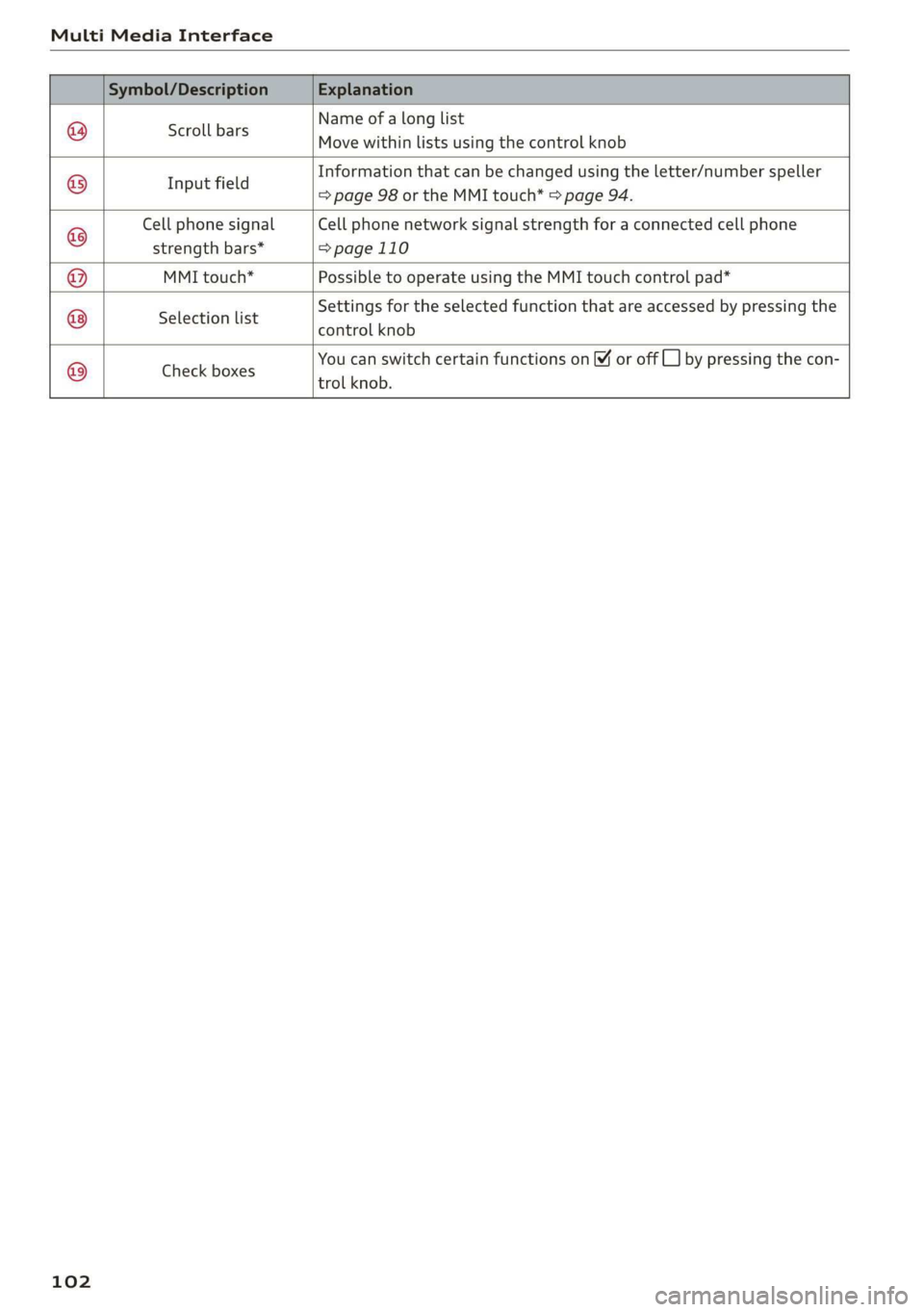
Name of a long list
Move within lists using the control knob
Scroll bars
Information that can be changed using the letter/number speller
I fi
apeerels => page 98 or the MMI touch* > page 94.
Cell phone signal Cell phone network signal strength for a connected cell phone
strength bars* =>page 110
MMI touch* Possible to operate using the MMI touch control pad*
Settings for the selected function that are accessed by pressing the
Selection list eSREROL KROL
You can switch certain functions on ¥ or off CL] by pressing the con-
trol knob.
©®|®
|O;/O|O)/
Check boxes
102
Page 105 of 304
8S58012721BA
Voice recognition system
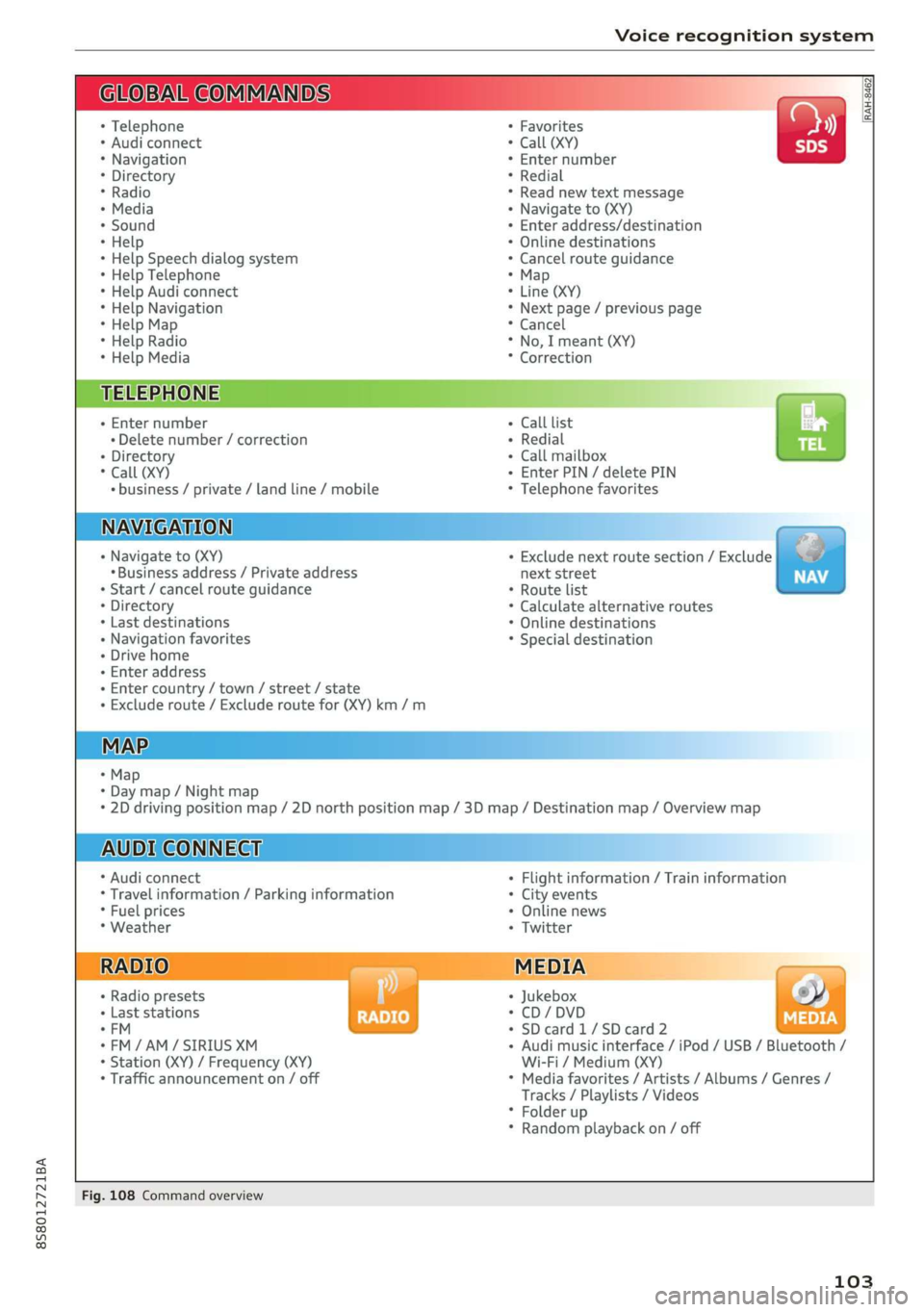
BAR COMMANDS
RAH-8462|
* Telephone + Favorites a)
+ Audi connect * Call (XY) SDS
* Navigation + Enter number
* Directory * Redial
* Radio * Read new text message
+ Media + Navigate to (XY)
* Sound + Enter address/destination
* Help + Online destinations
+ Help Speech dialog system * Cancel route guidance
* Help Telephone * Map
* Help Audi connect + Line (XY)
* Help Navigation * Next page / previous page
* Help Map * Cancel
* Help Radio * No, I meant (XY)
* Help Media * Correction
TELEPHONE: a
+ Enter number Call list a.
+ Delete number / correction Redial sie
+ Directory Call mailbox
* Call (XY) Enter PIN / delete PIN
* business / private / land line / mobile Telephone favorites
NAVIGATION i
+ Navigate to (XY) + Exclude next route section / Exclude
«Business address / Private address next street
+ Start / cancel route guidance * Route list
+ Directory * Calculate alternative routes
+ Last destinations * Online destinations
+ Navigation favorites * Special destination
+ Drive home
- Enter address
+ Enter country / town / street / state
+ Exclude route / Exclude route for (XY) km /m
MAP.
* Map
* Day map / Night map
* 2D driving position map / 2D north position map / 3D map / Destination map / Overview map
AUDI CONNECT
* Audi connect * Flight information / Train information
* Travel information / Parking information + City events
* Fuel prices * Online news
* Weather + Twitter
+ Radio presets « Jukebox rs}
+ Last stations * CD/DVD MEDIA
*FM + SDcard1/SDcard2
*FM/AM/ SIRIUS XM « Audi music interface / iPod / USB / Bluetooth /
+ Station (XY) / Frequency (XY) Wi-Fi / Medium (XY)
* Traffic announcement on / off * Media favorites / Artists / Albums / Genres /
Tracks / Playlists / Videos
* Folder up
* Random playback on / off
Fig. 108 Command overview
103
Page 106 of 304
Voice recognition system
Voice recognition system
Operating
Applies to: vehicles with voice recognition system
You can operate many Infotainment functions
conveniently by speaking.
Requirement: the ignition and the MMI must be
switched on. A system language supported by
the voice recognition system must be set. There
must be no phone calls in progress and the park-
ing aid must not be active.
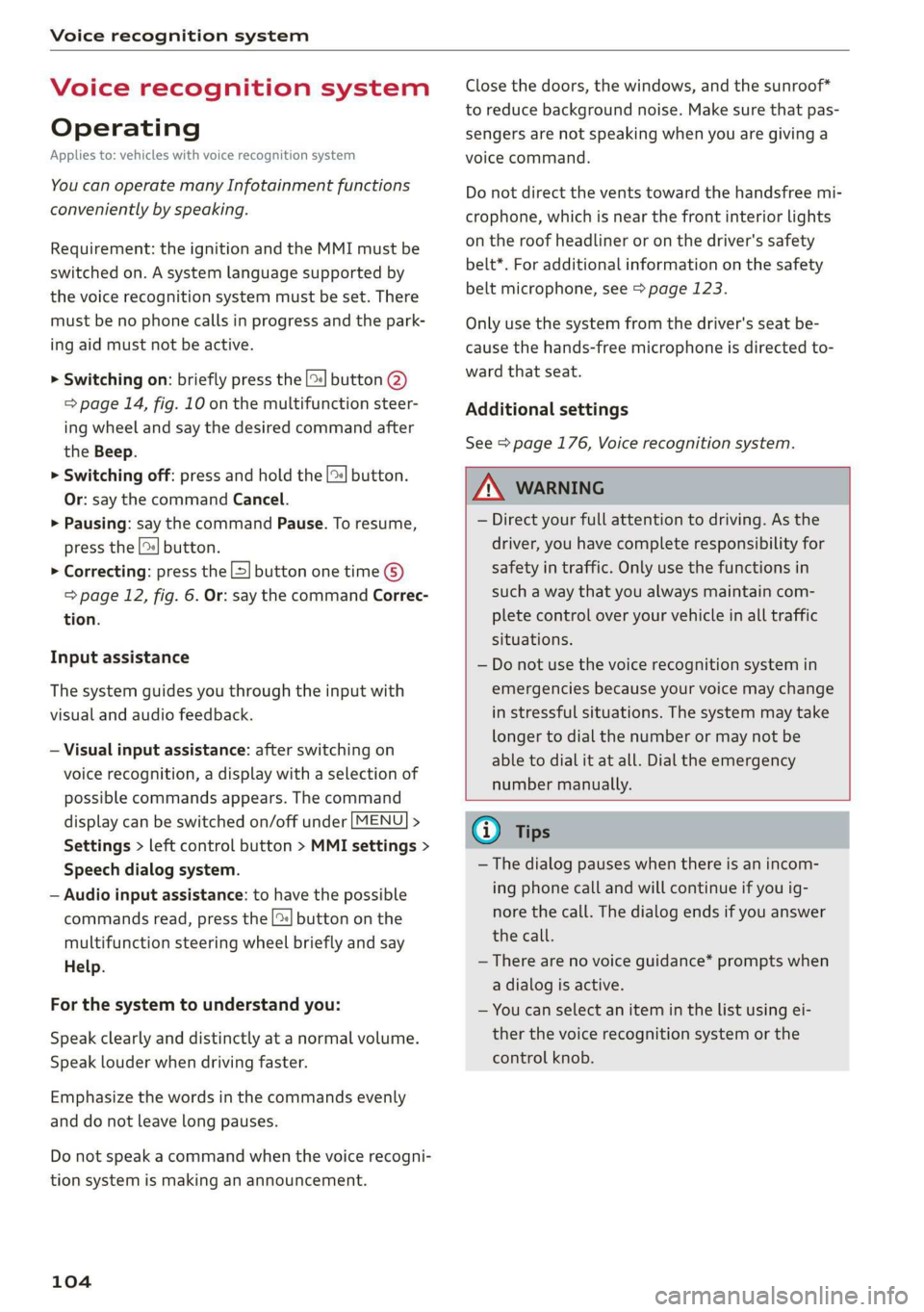
> Switching on: briefly press the [2] button @)
=> page 14, fig. 10 on the multifunction steer-
ing wheel and say the desired command after
the Beep.
> Switching off: press and hold the |™] button.
Or: say the command Cancel.
> Pausing: say the command Pause. To resume,
press the |] button.
> Correcting: press the [>] button one time ©
=> page 12, fig. 6. Or: say the command Correc-
tion.
Input assistance
The system guides you through the input with
visual and audio feedback.
— Visual input assistance: after switching on
voice recognition, a display with a selection of
possible commands appears. The command
display can be switched on/off under [MENU] >
Settings > left control button > MMI settings >
Speech dialog system.
— Audio input assistance: to have the possible
commands read, press the [2] button on the
multifunction steering wheel briefly and say
Help.
For the system to understand you:
Speak clearly and distinctly at a normal volume.
Speak louder when driving faster.
Emphasize the words in the commands evenly
and do not leave long pauses.
Do not speak a command when the voice recogni-
tion system is making an announcement.
104
Close the doors, the windows, and the sunroof*
to reduce background noise. Make sure that pas-
sengers are not speaking when you are giving a
voice command.
Do not direct the vents toward the handsfree mi-
crophone, which is near the front interior lights
on the roof headliner or on the driver's safety
belt*. For additional information on the safety
belt microphone, see > page 123.
Only
use the system from the driver's seat be-
cause the hands-free microphone is directed to-
ward that seat.
Additional settings
See > page 176, Voice recognition system.
ZA\ WARNING
— Direct your full attention to driving. As the
driver, you have complete responsibility for
safety in traffic. Only use the functions in
such a way that you always maintain com-
plete control over your vehicle in all traffic
situations.
— Do not use the voice recognition system in
emergencies because your voice may change
in stressful situations. The system may take
longer to dial the number or may not be
able to dial it at all. Dial the emergency
number manually.
G) Tips
—The dialog pauses when there is an incom-
ing phone call and will continue if you ig-
nore the call. The dialog ends if you answer
the call.
— There are no voice guidance* prompts when
a dialog is active.
— You can select an item in the list using ei-
ther the voice recognition system or the
control knob.
Page 107 of 304
8S58012721BA
Voice recognition system
Command overview Sequences of commands used to perform an ac-
ucn information tion are identified with a “>”, for example say:
: . . , Enter address > (then) Enter country/state.
Applies to: vehicles with voice recognition system
The majority shown are main commands. This
system also recognizes synonyms in certain cas-
es. For a business address, you can also say busi-
ness, work, office or at the office.
The following overviews describe the commands
that can be used to operate the MMI using the
voice recognition system.
Alternative commands are separated using a “/”,
for example say: Telephone / (or) Navigation /
(or) Radio.
Commands
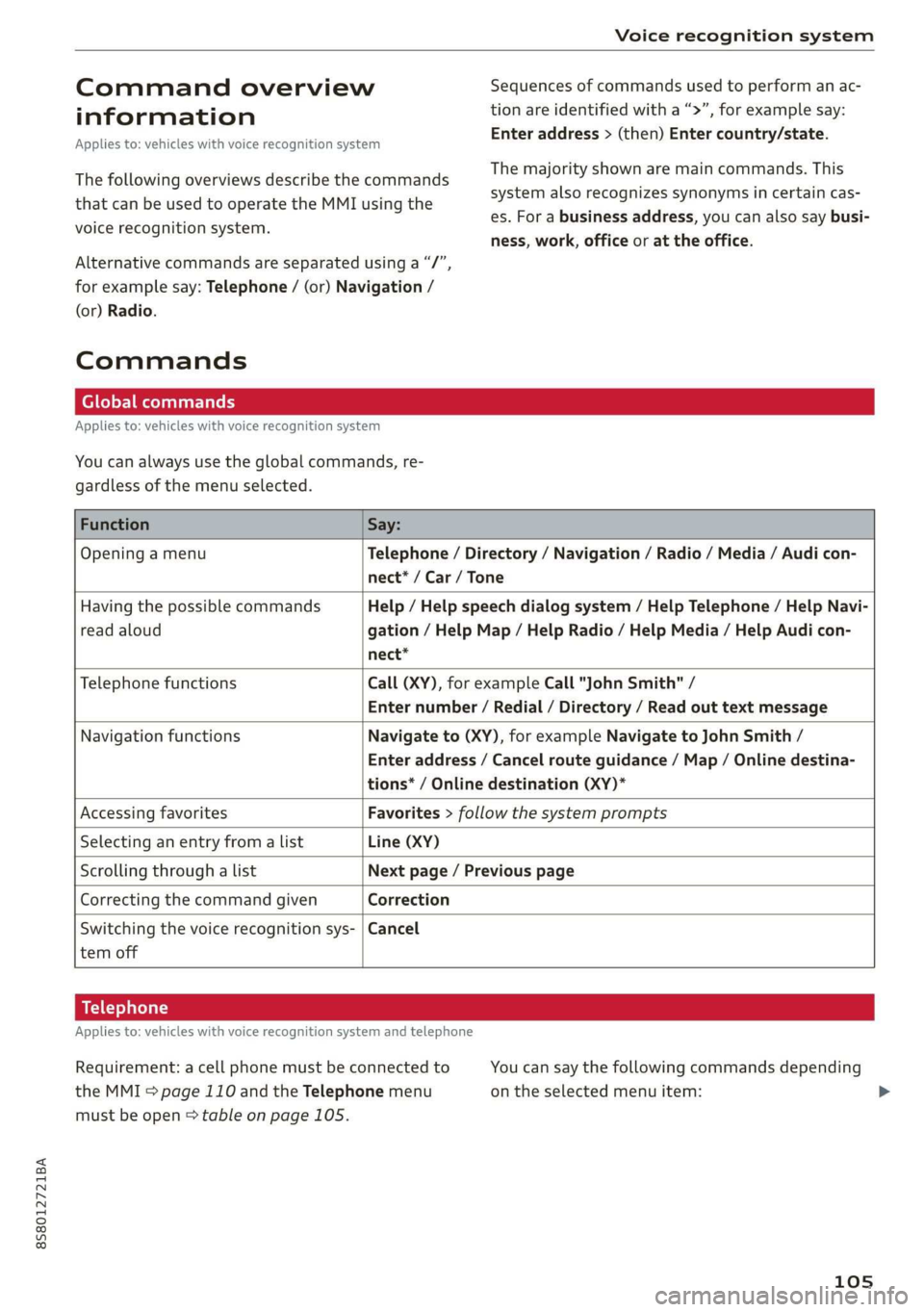
Global commands
Applies to: vehicles with voice recognition system
You can always use the global commands, re-
gardless of the menu selected.
Function Say:
Opening a menu Telephone / Directory / Navigation / Radio / Media / Audi con-
nect* / Car / Tone
Having the possible commands Help / Help speech dialog system / Help Telephone / Help Navi-
read aloud gation / Help Map / Help Radio / Help Media / Help Audi con-
nect*
Telephone functions Call (XY), for example Call "John Smith" /
Enter number / Redial / Directory / Read out text message
Navigation functions Navigate to (XY), for example Navigate to John Smith /
Enter address / Cancel route guidance / Map / Online destina-
tions* / Online destination (XY)*
Accessing favorites Favorites > follow the system prompts
Selecting an entry from a list Line (XY)
Scrolling through a list Next page / Previous page
Correcting the command given Correction
Switching the voice recognition sys- | Cancel
tem off
Telephone
Applies to: vehicles with voice recognition system and telephone
Requirement: a cell phone must be connected to You can say the following commands depending
the MMI > page 110 and the Telephone menu on the selected menu item: >
must be open > table on page 105.
105
Page 108 of 304
Voice recognition system
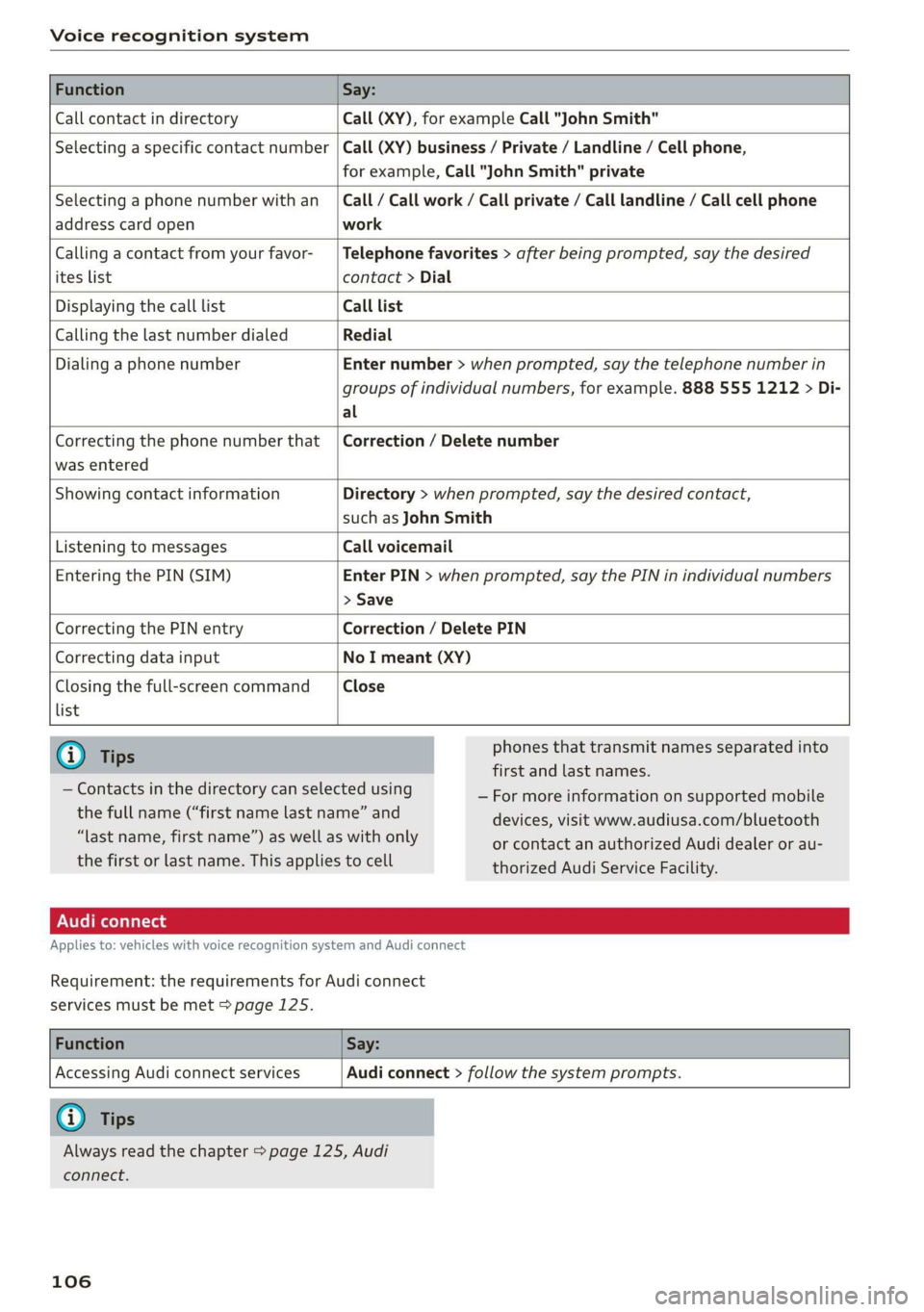
Function Say:
Call contact in directory Call (XY), for example Call "John Smith"
Selecting a specific contact number Call (XY) business / Private / Landline / Cell phone,
for example, Call "John Smith" private
Selecting a phone number with an
address card open
Call / Call work / Call private / Call landline / Call cell phone
work
Calling a contact from your favor-
ites list
Telephone favorites > after being prompted, say the desired
contact > Dial
Displaying the call list Call list
Calling the last number dialed Redial
Dialing a phone number Enter number > when prompted, say the telephone number in
groups of individual numbers, for example. 888 555 1212 > Di-
al
Correcting the phone number that
was entered
Correction / Delete number
Showing contact information Directory > when prompted, say the desired contact,
such as John Smith
Listening to messages Call voicemail
Entering the PIN (SIM) Enter PIN > when prompted, say the PIN in individual numbers
> Save
Correcting the PIN entry Correction / Delete PIN
Correcting data input No I meant (XY)
Closing the full-screen command
list
Close
G) Tips
— Contacts in the directory can selected using
the full name (“first name last name” and
“last name, first name”) as well as with only
the first or last name. This applies to cell
phones that transmit names separated into
first and last names.
— For more information on supported mobile
devices, visit www.audiusa.com/bluetooth
or contact an authorized Audi dealer or au-
thorized Audi Service Facility.
Applies to: vehicles with voice recognition system and Audi connect
Requirement: the requirements for Audi connect
services must be met > page 125.
Function Say:
Accessing Audi connect services
Audi connect > follow the system prompts.
@) Tips
Always read the chapter > page 125, Audi
connect.
106
Page 111 of 304
8S8012721BA
Voice recognition system
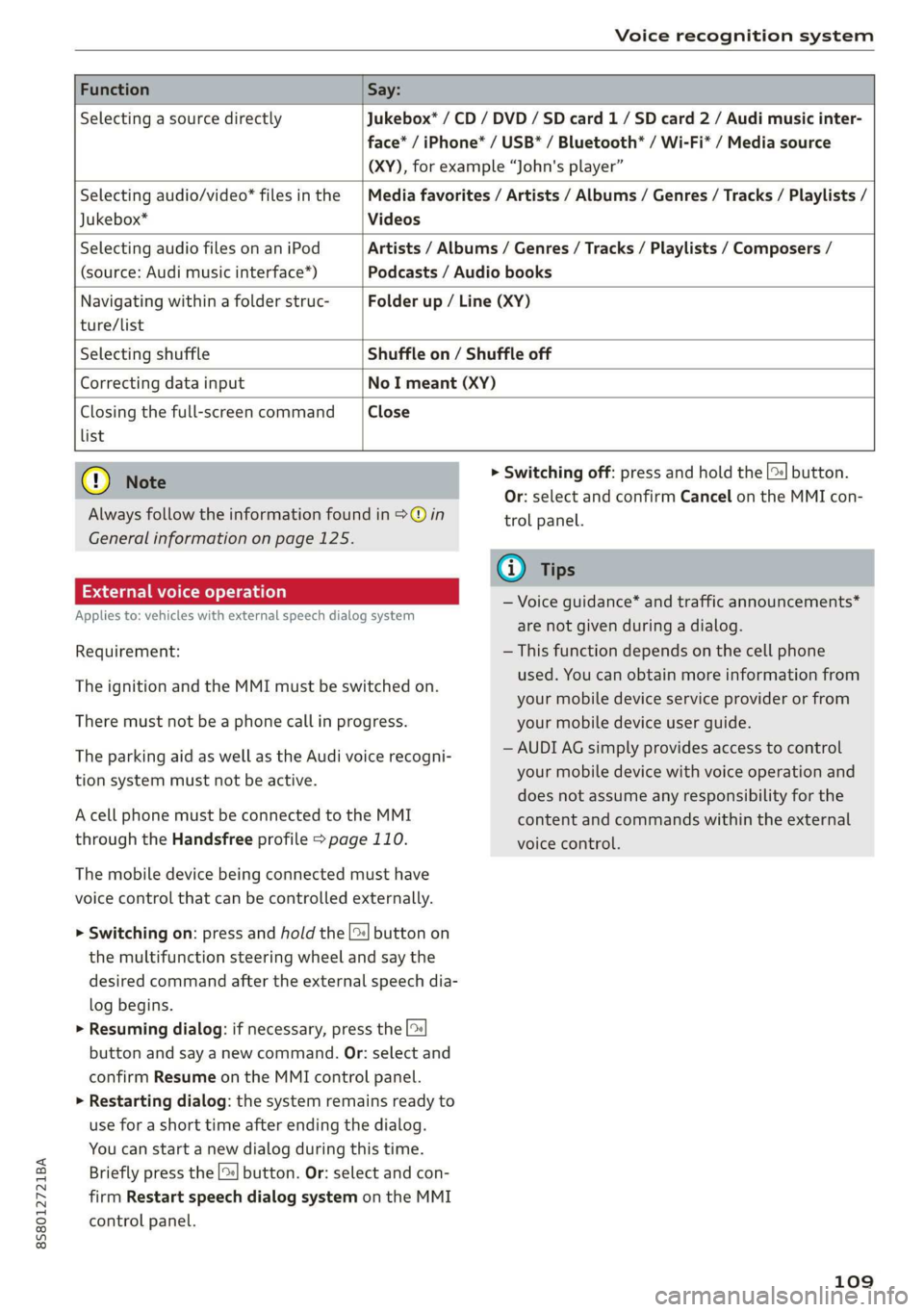
Function Say:
Selecting a source directly Jukebox* / CD / DVD / SD card 1/ SD card 2 / Audi music inter-
face* / iPhone* / USB* / Bluetooth* / Wi-Fi* / Media source
(XY), for example “John's player”
Selecting audio/video* files in the
Jukebox*
Media favorites / Artists / Albums / Genres / Tracks / Playlists /
Videos
Selecting audio files on an iPod
(source: Audi music interface*)
Artists / Albums / Genres / Tracks / Playlists / Composers /
Podcasts / Audio books
Navigating within a folder struc- Folder up / Line (XY)
ture/list
Selecting shuffle Shuffle on / Shuffle off
Correcting data input No I meant (XY)
Closing the full-screen command Close
list
@) Note
Always follow the information found in >@ in
General information on page 125.
External voice operation
Applies to: vehicles with external speech dialog system
Requirement:
The ignition and the MMI must be switched on.
There must not be a phone call in progress.
The parking aid as well as the Audi voice recogni-
tion system must not be active.
A cell phone must be connected to the MMI
through the Handsfree profile > page 110.
The mobile device being connected must have
voice control that can be controlled externally.
> Switching on: press and hold the [>| button on
the multifunction steering wheel and say the
desired command after the external speech dia-
log begins.
> Resuming dialog: if necessary, press the |%
button and say a new command. Or: select and
confirm Resume on the MMI control panel.
> Restarting dialog: the system remains ready to
use for a short time after ending the dialog.
You can start a new dialog during this time.
Briefly press the [2] button. Or: select and con-
firm
Restart speech dialog system on the MMI
control panel.
> Switching off: press and hold the |%] button.
Or: select and confirm Cancel on the MMI con-
trol panel.
G) Tips
— Voice guidance* and traffic announcements*
are not given during a dialog.
— This function depends on the cell phone
used. You can obtain more information from
your mobile device service provider or from
your mobile device user guide.
— AUDI AG simply provides access to control
your mobile device with voice operation and
does not assume any responsibility for the
content and commands within the external
voice control.
109
Page 112 of 304

Telephone
Telephone
Introduction
Applies to: vehicles with telephone
To make phone calls in your vehicle using the
MMI, connect your cell phone to the MMI via
Bluetooth.
Handsfree
After you have connected your mobile device to
the MMI via Bluetooth, you can use the handsfree
system and operate telephone functions through
your MMI. You can make calls using the antenna
on your mobile device.
Z\ WARNING
— Medical experts warn that mobile devices
can interfere with the function of pacemak-
ers. Always maintain a minimum distance of
about 8 inches (20 cm) between the cell
phone antenna and the pacemaker.
— Do not carry the mobile device in a pocket
directly over the pacemaker when the
phone is switched on.
— Switch the mobile device off immediately
if you suspect it may be interfering with
the pacemaker.
— Do not use the voice recognition system*
= page 104 in emergencies because your
voice may change in stressful situations. The
system may take longer to dial the number
or may not be able to dial it at all. Dial the
emergency number manually.
— Switch your mobile device off in areas where
there is a risk of an explosion. These loca-
tions are not always clearly marked. This
may include gas stations, fuel and chemical
storage facilities or transport vehicles, or lo-
cations where fuel vapors (such as propane
or gasoline vapor in vehicles or buildings),
chemicals or large quantities of dust parti-
cles (such as flour, sawdust or metal) may
be present in the air. This also applies to all
other locations where you would normally
turn your vehicle engine off.
— The demands of traffic require your full at-
tention. Always read the chapter > page 92,
Traffic safety information.
110
@) Note
Always follow the information found in >@ in
General information on page 125.
G) Tips
—To learn which Bluetooth connections and
which of the functions in your mobile device
are supported, check with your mobile de-
vice service provider or the database for mo-
bile devices at www.audiusa.com/
bluetooth.
— The Bluetooth connection range is limited
to inside the vehicle. It can also be affected
by local conditions and interference with
other devices.
Setup
Connecting a cell phone using Bluetooth
Applies to: vehicles with telephone
MyPhone
Does this PIN match the one on your
Bluetooth device? PIN: 967536
Fig. 109 Displaying the PIN for entering in the cell phone
Requirement
The vehicle must be stationary and the ignition
must be switched on.
The Bluetooth settings must be open on your
mobile device during the connection setup.
The Bluetooth function and visibility of the MMI
= page 174 and mobile device must be switched
on.
The mobile device to be connected must not be
actively connected to any other Bluetooth device.
The MMI must not be connected to a mobile de-
vice.
Connecting a mobile device
> Select: [MENU] button > Telephone > Connect
mobile device > Next. The available Bluetooth >
Page 113 of 304
8S8012721BA
Telephone
devices are shown in the Infotainment system
display. Or: search for the MMI in your cell
phone through the Bluetooth device search.
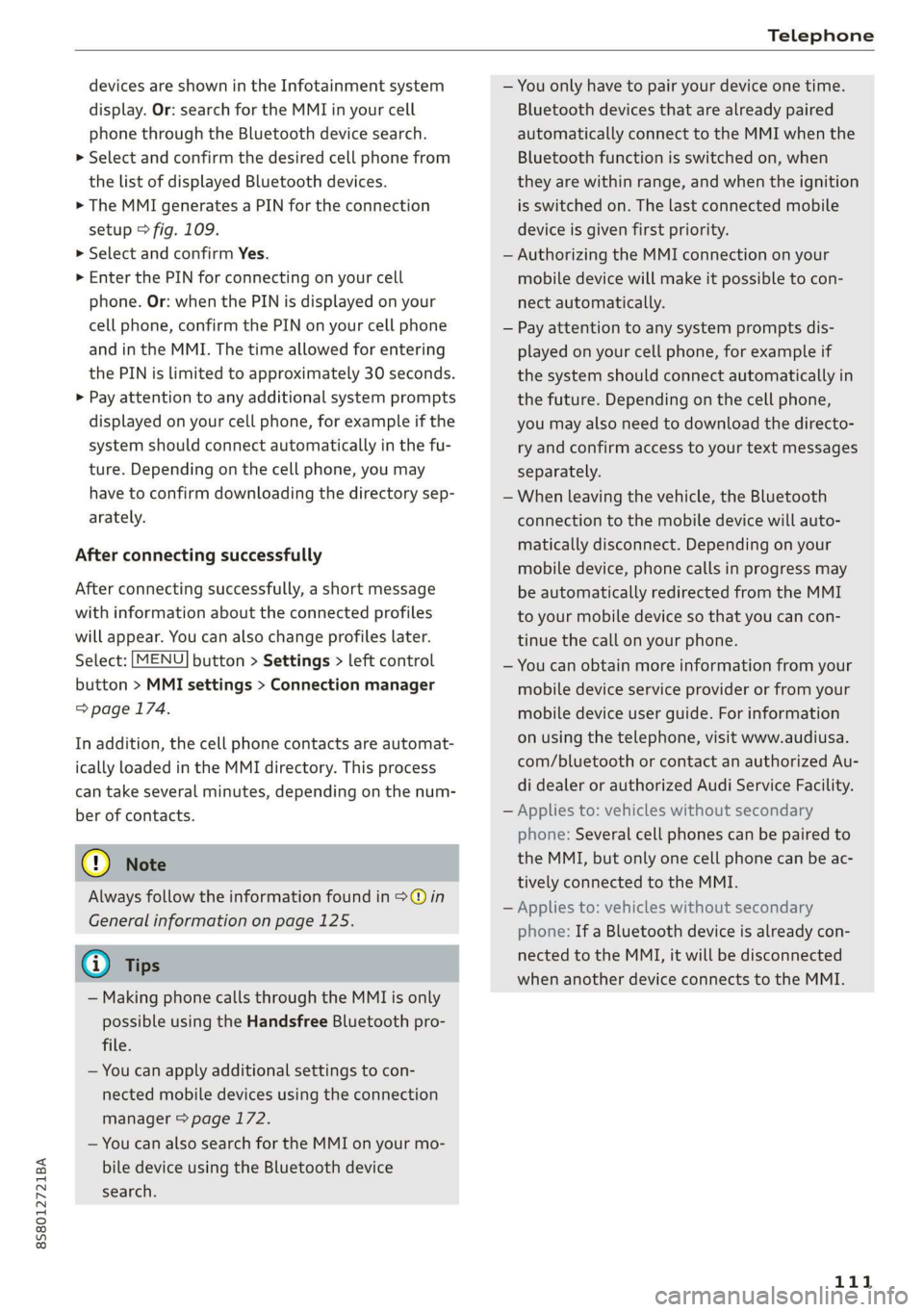
> Select and confirm the desired cell phone from
the list of displayed Bluetooth devices.
> The MMI generates a PIN for the connection
setup > fig. 109.
> Select and confirm Yes.
>» Enter the PIN for connecting on your cell
phone. Or: when the PIN is displayed on your
cell phone, confirm the PIN on your cell phone
and in the MMI. The time allowed for entering
the PIN is limited to approximately 30 seconds.
> Pay attention to any additional system prompts
displayed on your cell phone, for example if the
system should connect automatically in the fu-
ture. Depending on the cell phone, you may
have to confirm downloading the directory sep-
arately.
After connecting successfully
After connecting successfully, a short message
with information about the connected profiles
will appear. You can also change profiles later.
Select: [MENU] button > Settings > left control
button > MMI settings > Connection manager
=> page 174.
In addition, the cell phone contacts are automat-
ically loaded in the MMI directory. This process
can take several minutes, depending on the num-
ber of contacts.
@) Note
Always follow the information found in >@ in
General information on page 125.
@) Tips
— Making phone calls through the MMI is only
possible using the Handsfree Bluetooth pro-
file.
— You can apply additional settings to con-
nected mobile devices using the connection
manager = page 172.
— You can also search for the MMI on your mo-
bile device using the Bluetooth device
search.
— You only have to pair your device one time.
Bluetooth devices that are already paired
automatically connect to the MMI when the
Bluetooth function is switched on, when
they are within range, and when the ignition
is switched on. The last connected mobile
device is given first priority.
— Authorizing the MMI connection on your
mobile device will make it possible to con-
nect automatically.
— Pay attention to any system prompts dis-
played on your cell phone, for example if
the system should connect automatically in
the future. Depending on the cell phone,
you may also need to download the directo-
ry and confirm access to your text messages
separately.
— When leaving the vehicle, the Bluetooth
connection to the mobile device will auto-
matically disconnect. Depending on your
mobile device, phone calls in progress may
be automatically redirected from the MMI
to your mobile device so that you can con-
tinue the call on your phone.
— You can obtain more information from your
mobile device service provider or from your
mobile device user guide. For information
on using the telephone, visit www.audiusa.
com/bluetooth or contact an authorized Au-
di dealer or authorized Audi Service Facility.
— Applies to: vehicles without secondary
phone: Several cell phones can be paired to
the MMI, but only one cell phone can be ac-
tively connected to the MMI.
— Applies to: vehicles without secondary
phone: If a Bluetooth device is already con-
nected to the MMI, it will be disconnected
when another device connects to the MMI.
111