2018 TOYOTA TUNDRA warning
[x] Cancel search: warningPage 260 of 672
2604-5. Using the driving support systems
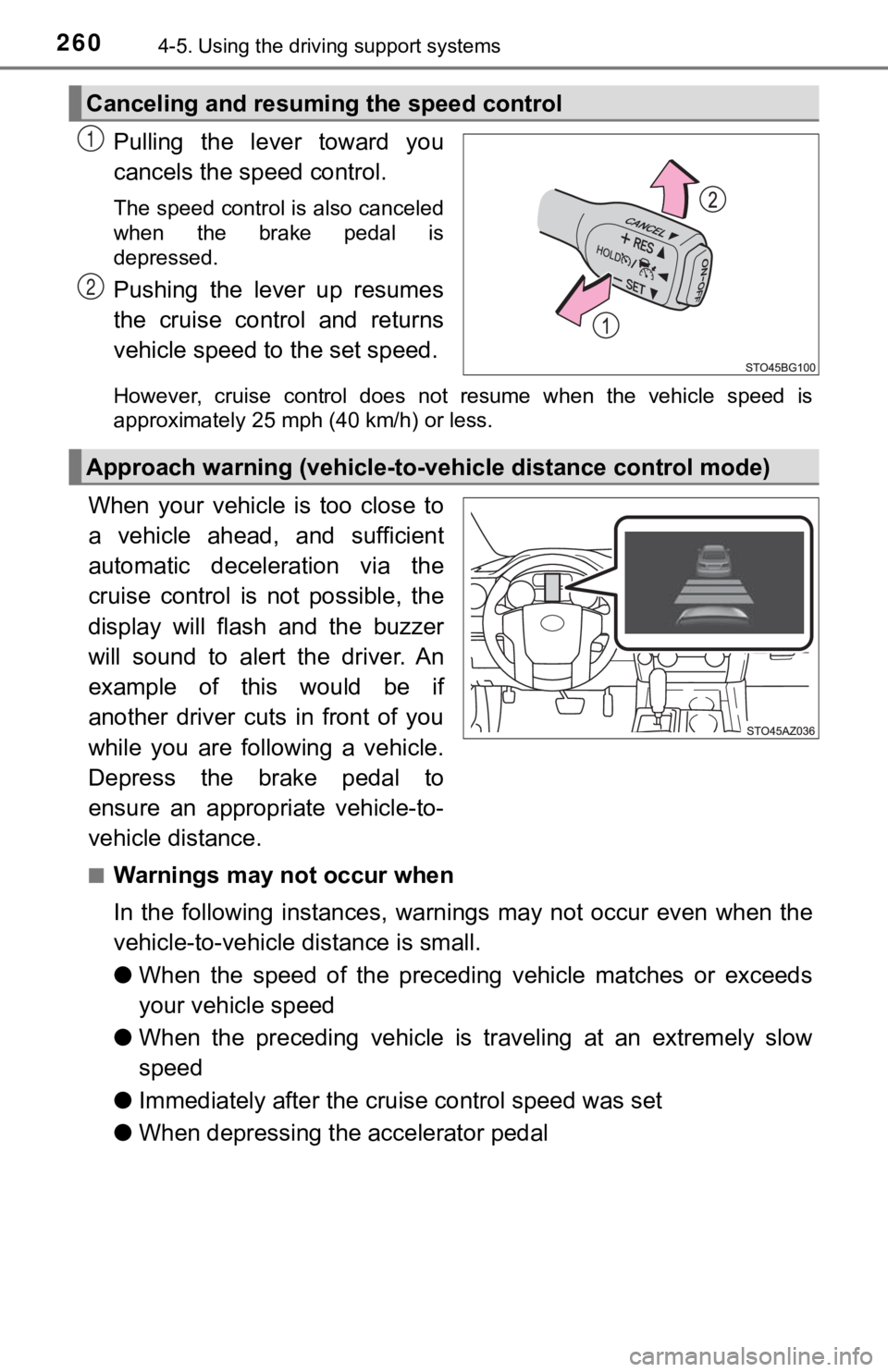
Pulling the lever toward you
cancels the speed control.
The speed control is also canceled
when the brake pedal is
depressed.
Pushing the lever up resumes
the cruise control and returns
vehicle speed to the set speed.
However, cruise control does not resume when the vehicle speed is
approximately 25 mph (40 km/h) or less.
When your vehicle is too close to
a vehicle ahead, and sufficient
automatic deceleration via the
cruise control is not possible, the
display will flash and the buzzer
will sound to alert the driver. An
example of this would be if
another driver cuts in front of you
while you are following a vehicle.
Depress the brake pedal to
ensure an appropriate vehicle-to-
vehicle distance.
■Warnings may not occur when
In the following instances, war nings may not occur even when th e
vehicle-to-vehicle distance is small.
● When the speed of the preceding vehicle matches or exceeds
your vehicle speed
● When the preceding vehicle is traveling at an extremely slow
speed
● Immediately after the cruise control speed was set
● When depressing the accelerator pedal
Canceling and resuming the speed control
1
2
Approach warning (vehicle-to-v ehicle distance control mode)
Page 263 of 672

2634-5. Using the driving support systems
4
Driving
■Automatic cancelation of c onstant speed control mode
Constant speed control mode is automatically canceled in the following situa-
tions:
● Actual vehicle speed is more than approximately 10 mph (16 km/h ) below
the set vehicle speed.
● Actual vehicle speed falls below approximately 25 mph (40 km/h) .
● VSC is activated.
● TRAC is activated for a period of time.
● When the VSC or TRAC system is turned off.
● Pre-collision braking is activated.
If constant speed control mode is automatically canceled for an y other rea-
son, there may be a malfunction in the system. Contact your Toyota dealer.
■ Brake system operation sound
If the brakes are applied automatically while the vehicle is in vehicle-to-vehi-
cle distance control mode, a brake system operation sound may b e heard
from the engine compartment. This does not indicate a malfuncti on.
■ Warning messages and buzzers for d ynamic radar cruise control
Warning messages and buzzers are used to indicate a system malfunction or
to inform the driver of the need for caution while driving. If a warning message
is shown on the multi-information display, read the message and follow the
instructions.
■ When the sensor may not be correctly detect ing the vehicle ahead
In the case of the following and depending on the conditions, o perate the
brake pedal when deceleration of the system is insufficient or operate the
accelerator pedal when acceleration is required.
As the sensor may not be able to correctly detect these types o f vehicles, the
approach warning ( P. 260) may not be activated.
● Vehicles that cut in suddenly
● Vehicles traveling at low speeds
● Vehicles that are not moving in the same lane
Page 269 of 672
2694-5. Using the driving support systems
4
Driving
WARNING
■To avoid operating the cruise control by mistake
Switch the cruise control off using the “ON-OFF” button when not in use.
■ Situations unsuitable for cruise control
Do not use cruise control in any of the following situations.
Doing so may result in loss of control and could cause an accid ent resulting
in death or serious injury.
● In heavy traffic
● On roads with sharp bends
● On winding roads
● On slippery roads, such as those covered with rain, ice or snow
● On steep hills
Vehicle speed may exceed the set speed when driving down a stee p hill.
● When your vehicle is towing a trailer or during emergency towin g
Page 273 of 672

2734-5. Using the driving support systems
4
Driving
■The intuitive parking assist can be operated when
●Front corner sensors:
• The engine switch is in the “ON” position.
• The shift lever is in R.
• The shift lever is not in P or R and vehicle speed is less than about 6 mph
(10 km/h).
● Rear corner and rear center sensors:
• The engine switch is in the “ON” position.
• The shift lever is in R.
■ If the display flashes and a message is displayed
P. 557, 558
■ Certification (Canada only)
This ISM device complies with Canadian ICES-001.
WARNING
■When using the intuitive parking assist
Observe the following precautions.
Failure to do so may result in the vehicle being unable to be driven safely
and possibly cause an accident.
● Do not use the sensor at speeds in excess of 6 mph (10 km/h).
● The sensors’ detection areas and reaction times are limited. When moving
forward or reversing, check the areas surrounding the vehicle ( especially
the sides of the vehicle) for safety, and drive slowly, using t he brake to
control the vehicle’s speed.
● Do not install accessories within the sensors’ detection areas.
Page 274 of 672

2744-5. Using the driving support systems
WARNING
■Sensor detection information
Pay particular attention to the following instances in where th is may occur.
Failing to do so way result in the vehicle being unable to be d riven or parked
safety and possibly cause an accident.
● The sensor’s detection areas are limited to the areas around the vehicle’s
front corner and rear bumpers.
● Certain vehicle conditions and the surrounding environment may affect the
ability of the sensor to correctly detect obstacles. Particular instances
where this may occur are listed below.
• There is dirt, snow or ice on the sensor. (Wiping the sensors will resolve
this problem.)
• The sensor is frozen. (Thawing the area will resolve this prob lem.)
• The sensor is covered in any way.
• The vehicle is leaning considerably to one side.
• On an extremely bumpy road, on an incline, on gravel, or on grass.
• The vicinity of the vehicle is noisy due to vehicle horns, mot orcycle
engines, air brakes of large vehicles, or other loud noises pro ducing
ultrasonic waves.
• There is another vehicle equipped with parking assist sensors in the
vicinity.
• The sensor is coated with a sheet of spray or heavy rain.
• The vehicle is equipped with a fender pole or radio antenna.
• The bumper or sensor receives a strong impact.
• The vehicle is approaching a tall or curved curb.
• In harsh sunlight or intense cold weather.
• The area directly under the bumpers is not detected.
• If obstacles draw too close to the sensor.
• A non-genuine Toyota suspension (lowered suspension, etc.) is installed.
• A backlit license plate, license plate holder, etc., are insta lled.
• People may not be detected if they are wearing certain types a nd color-
ing of clothing.
• People, animals, and moving objects may not be able to be detected.
In addition to the examples above, there are instances in which , because of
their shape, signs and other objects may be judged by the senso r to be
closer than they are.
Page 275 of 672

2754-5. Using the driving support systems
4
Driving
WARNING
●The shape of the obstacle may prevent the sensor from detecting it. Pay
particular attention to the following obstacles:
• Wires, fences, ropes, etc.
• Cotton, snow and other materials that absorb sound waves
• Sharply-angled objects
• Low obstacles
• Tall obstacles with upper sections projecting outwards in the direction of
your vehicle
● The following situations may occur during use.
• Depending on the shape of the obstacle and other factors, the detection
distance may shorten, or detection may be impossible.
• Obstacles may not be detected if they are too close to the sen sor.
• There will be a short delay between obstacle detection and dis play.
Even at slow speeds, there is a possibility that the obstacle w ill come
within the sensor’s detection areas before the display is shown and the
warning beep sounds.
• Thin posts or objects lower than the sensor may not be detecte d for col-
lision when approached, even if they have been detected once.
• It might be difficult to hear beeps due to the volume of audio system or
air flow noise of air conditioning system.
Page 284 of 672

2844-5. Using the driving support systems
WARNING
■When using the rear view monitor system
The rear view monitor system is a supplemental device intended to assist
the driver when backing up. When backing up, be sure to visually check all
around the vehicle both directly and using the mirrors before proceeding.
Observe the following precautions to avoid an accident that cou ld result in
death or serious injuries.
● Never depend on the rear view monitor system entirely when back ing up.
The image and the position of the guide lines displayed on the screen may
differ from the actual state.
Use caution, just as you would when backing up any vehicle.
● Be sure to back up slowly, depressing the brake pedal to contro l vehicle
speed.
● The instructions given are only guide lines.
When and how much to turn the steering wheel will vary according to traf-
fic conditions, road surface conditions, vehicle condition, etc . when park-
ing. It is necessary to be fully aware of this before using the rear view
monitor system.
● When parking, be sure to check that the parking space will acco mmodate
your vehicle before maneuvering into it.
● Do not use the rear view monitor system in the following cases:
• On icy or slick road surfaces, or in snow
• When using tire chains or emergency tires
• When the tailgate is not closed completely
• On roads that are not flat or straight, such as curves or slop es.
● In low temperatures, the screen may darken or the image may bec ome
faint. The image could distort when the vehicle is moving, or y ou may
become unable to see the image on the screen. Be sure to visual ly check
all around the vehicle both directly and using the mirrors befo re proceed-
ing.
● If the tire sizes are changed, the position of the fixed guide lines displayed
on the screen may change.
● The camera uses a special lens. The distances between objects a nd
pedestrians that appear in the image displayed on the screen will differ
from the actual distances. ( P. 280)
Page 288 of 672

2884-5. Using the driving support systems
Press “” or “” of meter control sw itches and select .
Press “ ” or “ ” of meter control switches and select “Vehicle
Settings”, and then press .
Press “ ” or “ ” of meter control switches and select “RCTA Vol-
ume”, and then press to sel ect the desired setting.
The buzzer volume cha nges with each press.
■The outside rear view mirror indicators visibility
When under strong sunlight, the outside rear view mirror indica tor may be dif-
ficult to see.
■ Rear Cross Traffic Alert buzzer hearing
Rear Cross Traffic Alert function may be difficult to hear over noises such as
high audio volume.
■ When there is a malfunction in the Blind Spot Monitor system
If a system malfunction is detected due to any of the following reasons, warn-
ing messages will be displayed: ( P. 557, 558)
● There is a malfunction with the sensors
● The sensors have become dirty
● The outside temperature is extremely high or low
● The sensor voltage has become abnormal
■ Certification for the Blind Spot Monitor system
For vehicles sold in the U.S.A.
FCC ID: OAYSRR3A
This device complies with part 15 of the FCC Rules. Operation is subject to
the following three conditions:
(1) This device may not cause harmful interference, and
(2) this device must accept any interference received, includin g interference
that may cause undesired operation.
FCC Warning
Changes or modifications not expressly approved by the party re sponsible for
compliance could void the user’s authority to operate the equip ment.
Changing the Rear Cross Traffic Alert warning buzzer volume
1
2
3