2018 SUBARU CROSSTREK headlight
[x] Cancel search: headlightPage 203 of 474
(208,1)
北米Model "A1320BE-C" EDITED: 2017/ 10/ 10
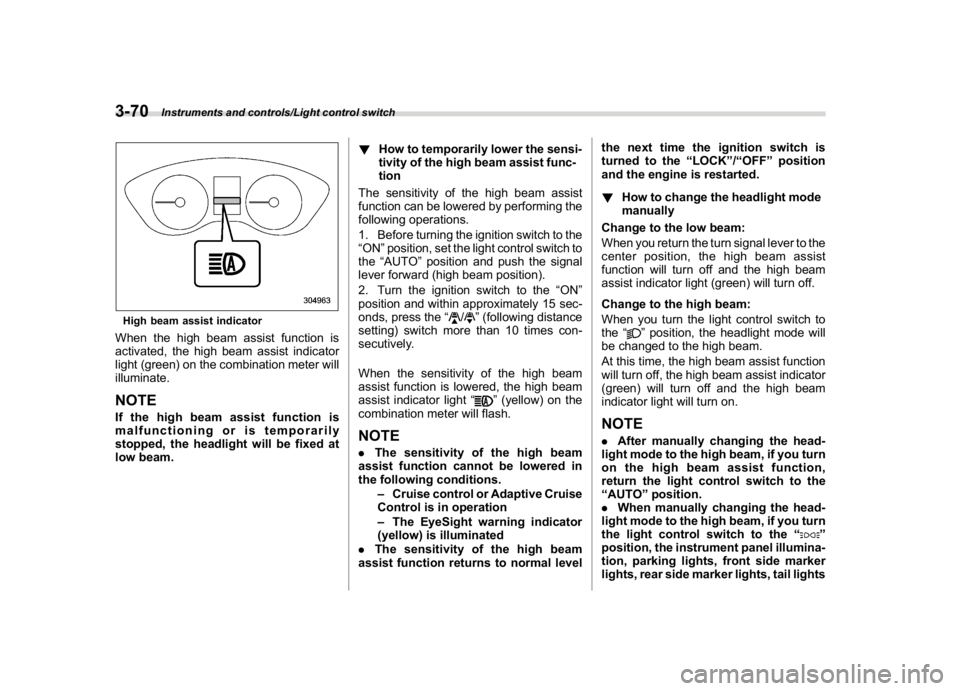
High beam assist indicatorWhen the high beam assist function is
activated, the high beam assist indicator
light (green) on the combination meter will
illuminate.NOTEIf the high beam assist function is
malfunctioning or is temporarily
stopped, the headlight will be fixed at
low beam.!How to temporarily lower the sensi-
tivity of the high beam assist func-
tion
The sensitivity of the high beam assist
function can be lowered by performing the
following operations.
1. Before turning the ignition switch to the
“ON”position, set the light control switch to
the“AUTO”position and push the signal
lever forward (high beam position).
2. Turn the ignition switch to the“ON”
position and within approximately 15 sec-
onds, press the“
/
”(following distance
setting) switch more than 10 times con-
secutively.
When the sensitivity of the high beam
assist function is lowered, the high beam
assist indicator light“
”(yellow) on the
combination meter will flash.
NOTE.The sensitivity of the high beam
assist function cannot be lowered in
the following conditions.
–Cruise control or Adaptive Cruise
Control is in operation
–The EyeSight warning indicator
(yellow) is illuminated
.The sensitivity of the high beam
assist function returns to normal levelthe next time the ignition switch is
turned to the“LOCK”/“OFF”position
and the engine is restarted.
!How to change the headlight mode
manually
Change to the low beam:
When you return the turn signal lever to the
center position, the high beam assist
function will turn off and the high beam
assist indicator light (green) will turn off.
Change to the high beam:
When you turn the light control switch to
the“
”position, the headlight mode will
be changed to the high beam.
At this time, the high beam assist function
will turn off, the high beam assist indicator
(green) will turn off and the high beam
indicator light will turn on.
NOTE.After manually changing the head-
light mode to the high beam, if you turn
on the high beam assist function,
return the light control switch to the
“AUTO”position.
.When manually changing the head-
light mode to the high beam, if you turn
the light control switch to the“
”
position, the instrument panel illumina-
tion, parking lights, front side marker
lights, rear side marker lights, tail lights
Instruments and controls/Light control switch
3-70
Page 204 of 474

(209,1)
北米Model "A1320BE-C" EDITED: 2017/ 10/ 10
and license plate lights will be on.
!Tips for the high beam assist sys-
tem
.The high beam assist function recog-
nizes the conditions surrounding the ve-
hicle based on the brightness of illumina-
tion ahead of your vehicle, etc. Therefore,
the headlight mode may switch in some
situations that do not match to the driver’s
sense.
.A bicycle or cargo cycle may not be
detected.
.Under the following situations, the
brightness of ambient illumination may
not be detected correctly and the high
beam assist function may not work prop-
erly. As a result, the glare of the high beam
maydisturbtheoncomingvehicleor
vehicle ahead. Also, the low beam mode
may continue although there are no
oncoming vehicles and vehicles ahead.
In the such cases, change the headlight
mode manually.
–In bad weather (fog, snow, sand
storm, heavy rain, etc.).
–When the windshield glass is dirty or
fogged.
–When the windshield is cracked or
damaged.
–Whenthestereocameraisde-
formed or the stereo camera lensesare dirty.
–If there are lights similar to the
headlights or the tail lights in the
surrounding area.
–When an oncoming vehicle or ve-
hicle ahead is driven without its head-
lights and tail lights on.
–If the headlights of an oncoming
vehicle or the tail lights of a vehicle
ahead are dirty or discolored, or if the
light beams are not aimed correctly.
–When a rapid change of brightness
continues while driving.
–When driving on a road with many
ups and downs or uneven surfaces.
–When driving on a road with many
curves.
–When there are some objects that
reflect light strongly, such as a road
sign or a mirror in vehicle ahead.
–When the rear part of the vehicle
ahead, such as a container, reflects
light strongly.
–When the headlights of your vehicle
are damaged or dirty.
–When your vehicle is tilted, such as
in case the vehicle has a flat tire or is
being towed.
–Immediately after the engine has
started.
.In the following conditions, the head-
light mode will not be automatically chan-ged from the high beam to the low beam.
–When your vehicle passes an on-
coming vehicle suddenly in a blind
curve.
–When another vehicle passes in
front of your vehicle.
–When an oncoming vehicle or ve-
hicle ahead comes in and out of view
because of continuous curves, median
strips, roadside trees, etc.
.If the stereo camera detects the light of
the front fog lights of an oncoming vehicle,
the headlight mode may change from the
high beam to the low beam automatically.
.The headlight mode may change from
the high beam to the low beam, or the low
beam mode may continue, when affected
by a street light, traffic signal, illumination
of an advertisement board, or a reflective
object such as a road sign and signboard.
.The timing of the change of headlight
mode may differ due to the following
factors.
–Color or brightness of the headlights
of an oncoming vehicle or the tail lights
of a vehicle ahead.
–The headlights of the oncoming
vehicle or the tail lights of the vehicle
ahead are covered with mud, snow,
etc.
–Movement and direction of an on-
coming vehicle or a vehicle ahead.
–CONTINUED–
Instruments and controls/Light control switch
3-71
3
Page 205 of 474
(210,1)
北米Model "A1320BE-C" EDITED: 2017/ 10/ 10
–When the headlights of an oncom-
ing vehicle or the tail lights of a vehicle
ahead illuminate on only one side.
–When the oncoming vehicle or
vehicle ahead is a motorcycle.
–Conditions of a road (slope, curve,
road surface, etc.).
–Number of passengers and weight
of loaded cargo.
–Limitation of the detection ability of
the stereo camera.
&Daytime running light system
WARNING
When the daytime running lights are
illuminated, the tail lights do not
illuminate. When it becomes dark
outside, turn the light switch to the
“
”position to illuminate the head-
lights and tail lights. This will im-
prove visibility and allow other dri-
vers to see your vehicle more easily.
The daytime running lights will automati-
cally illuminate when the following condi-
tions are fulfilled.
.The engine is running.
.The parking brake is fully released.
.The light control switch is in the“AUTO”
(if equipped),“
”or off position..For CVT models, the select lever is in a
position other than the“P”position.
NOTEWhen the light switch is in the“
”
position, the instrument panel illumina-
tion, front side marker lights, tail lights
and license plate lights are also illumi-
nated.
Steering Responsive Head-
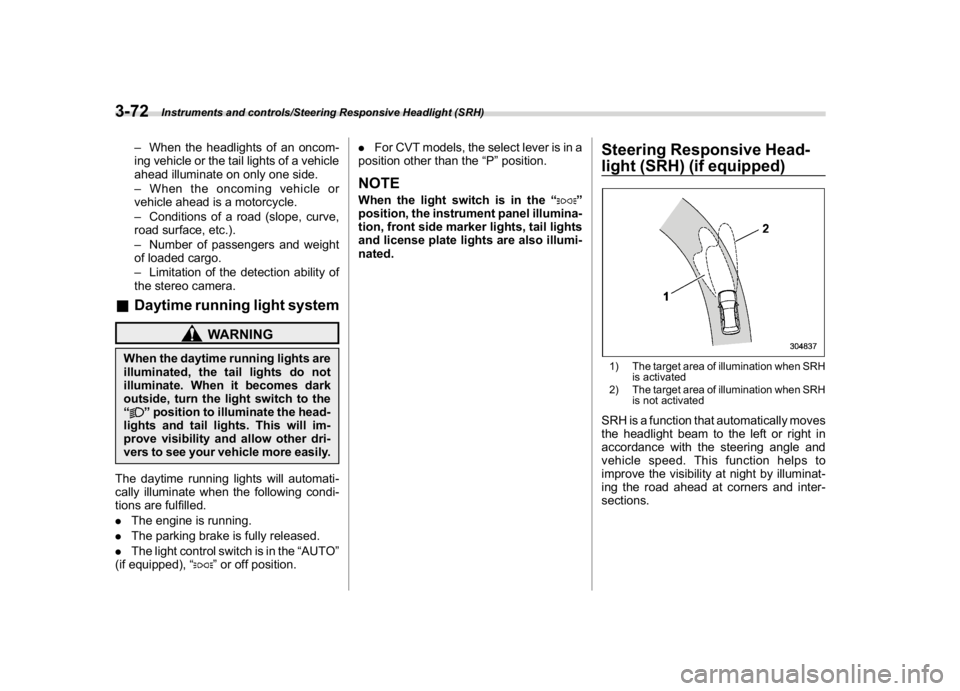
light (SRH) (if equipped)1) The target area of illumination when SRH
is activated
2) The target area of illumination when SRH
is not activatedSRH is a function that automatically moves
the headlight beam to the left or right in
accordance with the steering angle and
vehicle speed. This function helps to
improve the visibility at night by illuminat-
ing the road ahead at corners and inter-
sections.
Instruments and controls/Steering Responsive Headlight (SRH)
3-72
Page 206 of 474
(211,1)
北米Model "A1320BE-C" EDITED: 2017/ 10/ 10
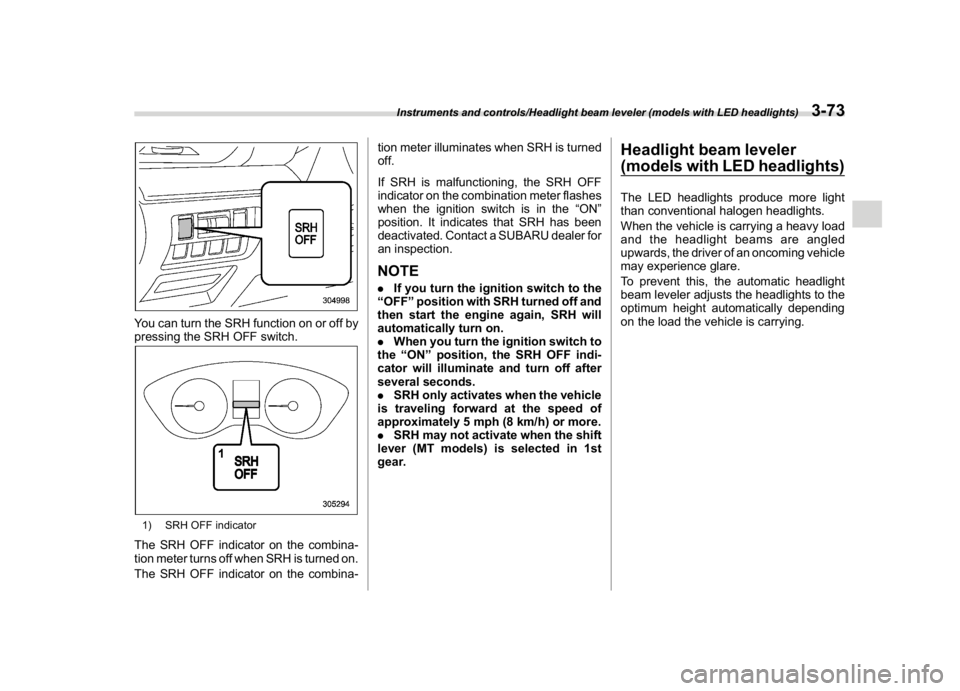
You can turn the SRH function on or off by
pressing the SRH OFF switch.1) SRH OFF indicatorThe SRH OFF indicator on the combina-
tion meter turns off when SRH is turned on.
The SRH OFF indicator on the combina-tion meter illuminates when SRH is turned
off.
If SRH is malfunctioning, the SRH OFF
indicator on the combination meter flashes
when the ignition switch is in the“ON”
position. It indicates that SRH has been
deactivated. Contact a SUBARU dealer for
an inspection.
NOTE.If you turn the ignition switch to the
“OFF”position with SRH turned off and
then start the engine again, SRH will
automatically turn on.
.When you turn the ignition switch to
the“ON”position, the SRH OFF indi-
cator will illuminate and turn off after
several seconds.
.SRH only activates when the vehicle
is traveling forward at the speed of
approximately 5 mph (8 km/h) or more.
.SRH may not activate when the shift
lever (MT models) is selected in 1st
gear.
Headlight beam leveler
(models with LED headlights)The LED headlights produce more light
than conventional halogen headlights.
When the vehicle is carrying a heavy load
and the headlight beams are angled
upwards, the driver of an oncoming vehicle
may experience glare.
To prevent this, the automatic headlight
beam leveler adjusts the headlights to the
optimum height automatically depending
on the load the vehicle is carrying.
Instruments and controls/Headlight beam leveler (models with LED headlights)
3-73
3
Page 207 of 474
(212,1)
北米Model "A1320BE-C" EDITED: 2017/ 10/ 10
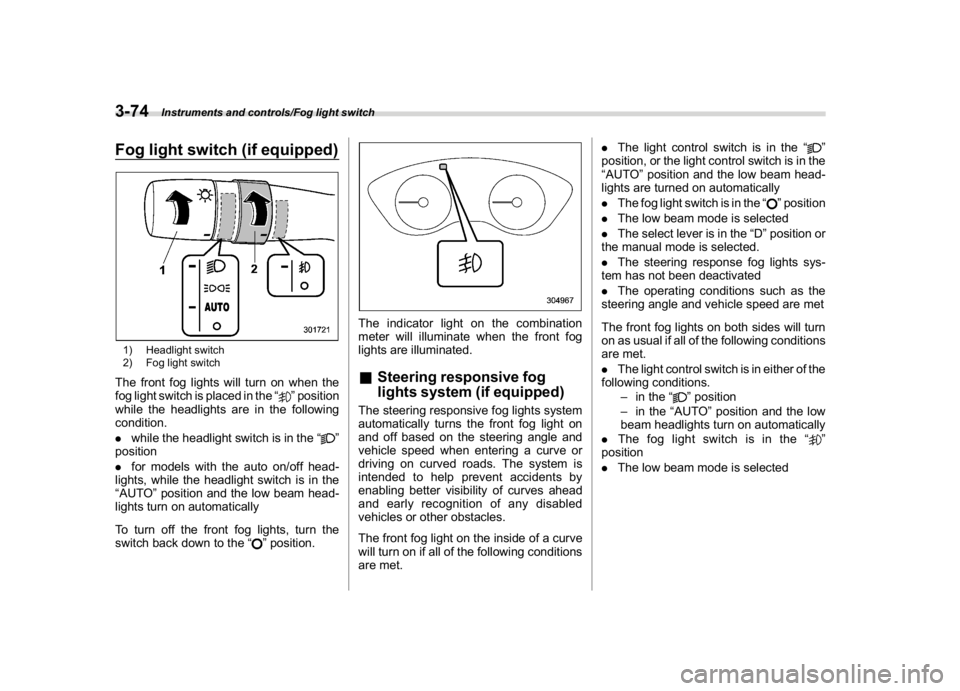
Fog light switch (if equipped)1) Headlight switch
2) Fog light switchThe front fog lights will turn on when the
fog light switch is placed in the“
”position
while the headlights are in the following
condition.
.while the headlight switch is in the“
”
position
.for models with the auto on/off head-
lights, while the headlight switch is in the
“AUTO”position and the low beam head-
lights turn on automatically
To turn off the front fog lights, turn the
switch back down to the“
”position.
The indicator light on the combination
meter will illuminate when the front fog
lights are illuminated.&Steering responsive fog
lights system (if equipped)The steering responsive fog lights system
automatically turns the front fog light on
and off based on the steering angle and
vehicle speed when entering a curve or
driving on curved roads. The system is
intended to help prevent accidents by
enabling better visibility of curves ahead
and early recognition of any disabled
vehicles or other obstacles.
The front fog light on the inside of a curve
will turn on if all of the following conditions
are met..The light control switch is in the“
”
position, or the light control switch is in the
“AUTO”position and the low beam head-
lights are turned on automatically
.The fog light switch is in the“
”position
.The low beam mode is selected
.The select lever is in the“D”position or
the manual mode is selected.
.The steering response fog lights sys-
tem has not been deactivated
.The operating conditions such as the
steering angle and vehicle speed are met
The front fog lights on both sides will turn
on as usual if all of the following conditions
are met.
.The light control switch is in either of the
following conditions.
–in the“
”position
–in the“AUTO”position and the low
beam headlights turn on automatically
.The fog light switch is in the“
”
position
.The low beam mode is selected
Instruments and controls/Fog light switch
3-74
Page 213 of 474
(218,1)
北米Model "A1320BE-C" EDITED: 2017/ 10/ 10
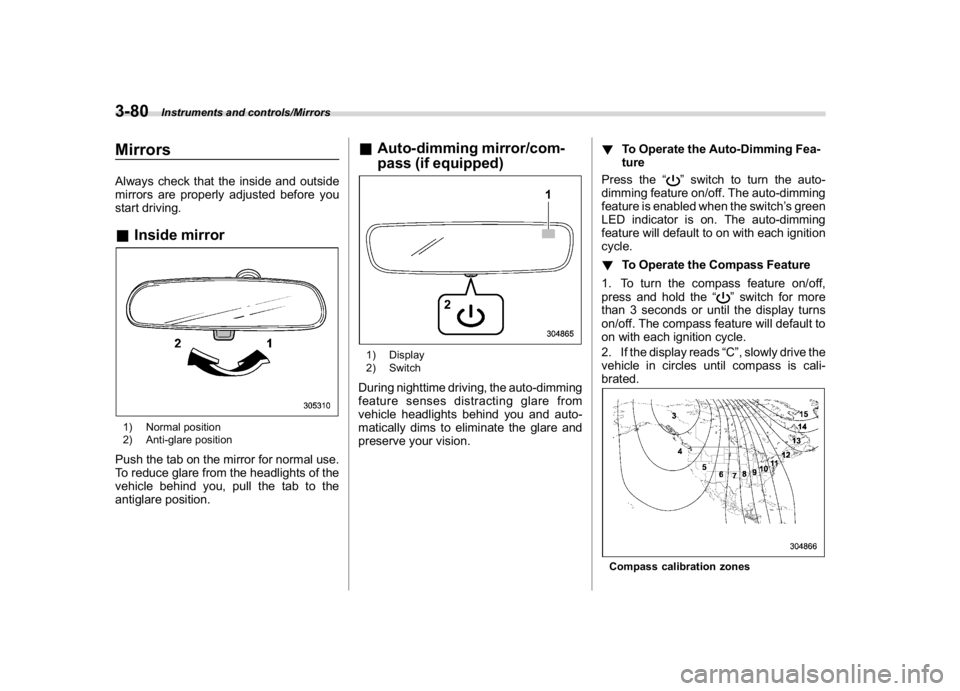
MirrorsAlways check that the inside and outside
mirrors are properly adjusted before you
start driving.&Inside mirror1) Normal position
2) Anti-glare positionPush the tab on the mirror for normal use.
To reduce glare from the headlights of the
vehicle behind you, pull the tab to the
antiglare position.
&Auto-dimming mirror/com-
pass (if equipped)1) Display
2) SwitchDuring nighttime driving, the auto-dimming
feature senses distracting glare from
vehicle headlights behind you and auto-
matically dims to eliminate the glare and
preserve your vision.!To Operate the Auto-Dimming Fea-
ture
Press the“
”switch to turn the auto-
dimming feature on/off. The auto-dimming
feature is enabled when the switch’s green
LED indicator is on. The auto-dimming
feature will default to on with each ignition
cycle.
!To Operate the Compass Feature
1. To turn the compass feature on/off,
press and hold the“
”switch for more
than 3 seconds or until the display turns
on/off. The compass feature will default to
on with each ignition cycle.
2. If the display reads“C”, slowly drive the
vehicle in circles until compass is cali-
brated.
Compass calibration zones
Instruments and controls/Mirrors
3-80
Page 214 of 474
(219,1)
北米Model "A1320BE-C" EDITED: 2017/ 10/ 10
3. To adjust for compass zone variance:
(1) Find your current location and
zone number on the map.
(2) Press and hold the“
”switch for
more than 6 seconds or until a zone
number appears in the display.
(3) Once the zone number appears in
the display, toggle the“”switch
again until your current location zone
number appears. After you stop press-
ing the switch, your new zone number
will be saved. Within a few seconds,
the display will show a compass direc-
tion.
4. If the vehicle’s magnetics have chan-
ged or if the compass appears inaccurate,
recalibrate the compass. Press and hold
the“
”switch for more than 9 seconds or
until a“C”appears in the display. Once a
“C”appears in the display, slowly drive the
vehicle in circles until compass is cali-
brated.
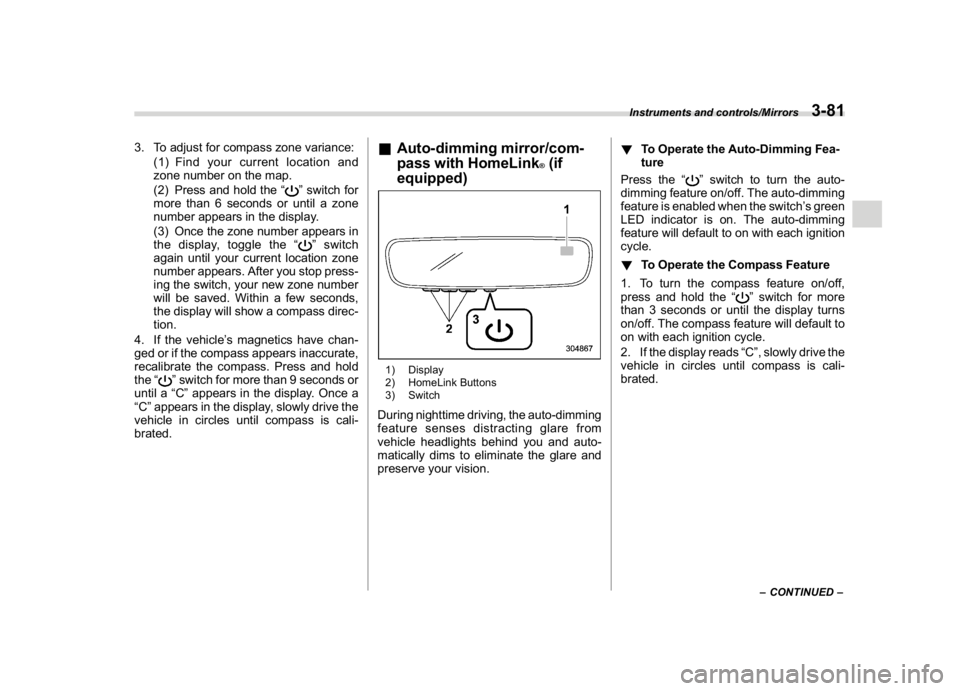
&Auto-dimming mirror/com-
pass with HomeLink
®(if
equipped)
1) Display
2) HomeLink Buttons
3) SwitchDuring nighttime driving, the auto-dimming
feature senses distracting glare from
vehicle headlights behind you and auto-
matically dims to eliminate the glare and
preserve your vision.!To Operate the Auto-Dimming Fea-
ture
Press the“
”switch to turn the auto-
dimming feature on/off. The auto-dimming
feature is enabled when the switch’s green
LED indicator is on. The auto-dimming
feature will default to on with each ignition
cycle.
!To Operate the Compass Feature
1. To turn the compass feature on/off,
press and hold the“
”switch for more
than 3 seconds or until the display turns
on/off. The compass feature will default to
on with each ignition cycle.
2. If the display reads“C”, slowly drive the
vehicle in circles until compass is cali-
brated.–CONTINUED–
Instruments and controls/Mirrors
3-81
3
Page 266 of 474
(275,1)
北米Model "A1320BE-C" EDITED: 2017/ 10/ 10
Starting and stopping the en-
gine (models without push-
button start system)
CAUTION
Do not operate the starter motor
continuously for more than 10 sec-
onds. If the engine fails to start after
operating the starter for 5 to 10
seconds, wait for 10 seconds or
more before trying again.NOTEIt may be difficult to start the engine
when the battery has been discon-
nected and reconnected (for mainte-
nance or other purposes). This diffi-
culty is caused by the electronically
controlled throttle’s self-diagnosis
function. To overcome it, keep the
ignition switch in the“ON”position
for approximately 10 seconds before
starting the engine.
&Starting engine!General precautions when starting
engine
WARNING
.Never start the engine from out-
side the vehicle (except when
using the remote engine start
system). It may result in an acci-
dent.
.Do not leave the engine running
in locations with poor ventilation,
such as a garage and indoors.
The exhaust gas may enter the
vehicle or indoors, and it may
result in carbon monoxide poi-
soning.
.Do not start the engine near dry
foliage, paper, or other flammable
substances. The exhaust pipe
and exhaust emissions can cre-
ate a fire hazard at high tempera-
tures.
CAUTION
.If the engine is stopped during
driving, the catalyst may over-
heat and burn..When starting the engine, be sure
to sit in the driver’s seat (except
when using the remote engine
start system).
NOTE.Avoid rapid racing and rapid accel-
eration immediately after the engine
has started.
.For a short time after the engine has
started, the engine speed is kept high.
When the warm-up is completed, the
engine speed lowers automatically.
.On rare occasions, it may be difficult
to start the engine depending on the
fuel and the usage condition (repeated
driving of a distance in which the
engine has not warmed up sufficiently).
In such a case, it is recommended that
you change to a different brand of fuel.
.On rare occasions, transient knock-
ing may be heard from the engine when
the accelerator is operated rapidly such
as a rapid start-up and a rapid accel-
eration. This is not a malfunction.
.The engine starts more easily when
the headlights, air conditioner and rear
window defogger are turned off.
.Do not shift the select lever (CVT
models) or shift lever (MT models)
while the starter is cranking.
–CONTINUED–
Starting and operating/Starting and stopping the engine (models without push-button start system)
7-9
7