2018 SUBARU CROSSTREK headlight
[x] Cancel search: headlightPage 163 of 474
(168,1)
北米Model "A1320BE-C" EDITED: 2017/ 10/ 10
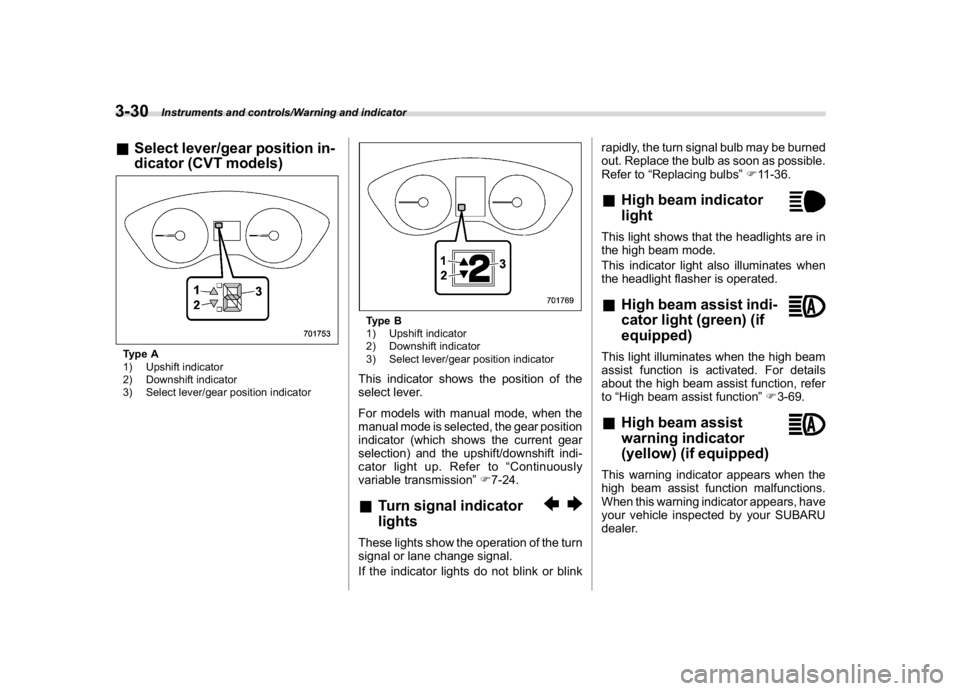
&Select lever/gear position in-
dicator (CVT models)Type A
1) Upshift indicator
2) Downshift indicator
3) Select lever/gear position indicator
Type B
1) Upshift indicator
2) Downshift indicator
3) Select lever/gear position indicatorThis indicator shows the position of the
select lever.
For models with manual mode, when the
manual mode is selected, the gear position
indicator (which shows the current gear
selection) and the upshift/downshift indi-
cator light up. Refer to“Continuously
variable transmission”F7-24.&Turn signal indicator
lightsThese lights show the operation of the turn
signal or lane change signal.
If the indicator lights do not blink or blinkrapidly, the turn signal bulb may be burned
out. Replace the bulb as soon as possible.
Refer to“Replacing bulbs”F11-36.
&High beam indicator
lightThis light shows that the headlights are in
the high beam mode.
This indicator light also illuminates when
the headlight flasher is operated.&High beam assist indi-
cator light (green) (if
equipped)This light illuminates when the high beam
assist function is activated. For details
about the high beam assist function, refer
to“High beam assist function”F3-69.&High beam assist
warning indicator
(yellow) (if equipped)This warning indicator appears when the
high beam assist function malfunctions.
When this warning indicator appears, have
your vehicle inspected by your SUBARU
dealer.
Instruments and controls/Warning and indicator
3-30
Page 164 of 474
(169,1)
北米Model "A1320BE-C" EDITED: 2017/ 10/ 10
&Cruise control indicator
light (if equipped)This light illuminates when the cruise
control main button is pressed to activate
the cruise control function. For details,
refer to“To set cruise control”F7-48.
If this light blinks, do not use the cruise
control. In addition, if it blinks frequently,
contact your SUBARU dealer for an
inspection.
CAUTION
If the CHECK ENGINE warning light/
malfunction indicator light illumi-
nates, the cruise control indicator
light flashes at the same time. At this
time, avoid driving at high speed and
have your vehicle inspected at a
SUBARU dealer as soon as possi-
ble.&Cruise control set indi-
cator light (if equipped)This light illuminates when vehicle speed
has been set to use the cruise control
function. Refer to“To set cruise control”
F7-48.
&Automatic headlight
beam leveler warning
light (models with LED
headlights)This light illuminates when the automatic
headlight beam leveler does not operate
normally.
If this light illuminates during driving, have
your vehicle inspected at your SUBARU
dealer.&LED headlight warning
light (models with LED
headlights)This light illuminates if the LED headlights
malfunction. Have your vehicle inspected
at a SUBARU dealer as soon as possible.&Steering Responsive
Headlight warning light/
Steering Responsive
Headlight OFF indicator
light (if equipped)This light illuminates when the Steering
Responsive Headlight OFF switch is
pressed to deactivate the Steering Re-
sponsive Headlight. Also, the light flashes
when a malfunction occurs in the Steering
Responsive Headlight. Refer to“SteeringResponsive Headlight (SRH)”F3-72.
&Front fog light indicator
light (if equipped)This indicator light illuminates while the
front fog lights are illuminated.&Headlight indicator
light (if equipped)This indicator light illuminates under the
following conditions.
.when the light switch is turned to the
“
”or“
”position
.when the light control switch is in the
“AUTO”position and the headlights illumi-
nate automatically
&Steering responsive fog
lights warning indicator/
Steering responsive fog
lights OFF indicator (if
equipped)NOTEFor details about the steering respon-
sive fog lights system, refer to“Steer-
ing responsive fog lights system”F3-
74.
–CONTINUED–
Instruments and controls/Warning and indicator
3-31
3
Page 168 of 474
(173,1)
北米Model "A1320BE-C" EDITED: 2017/ 10/ 10
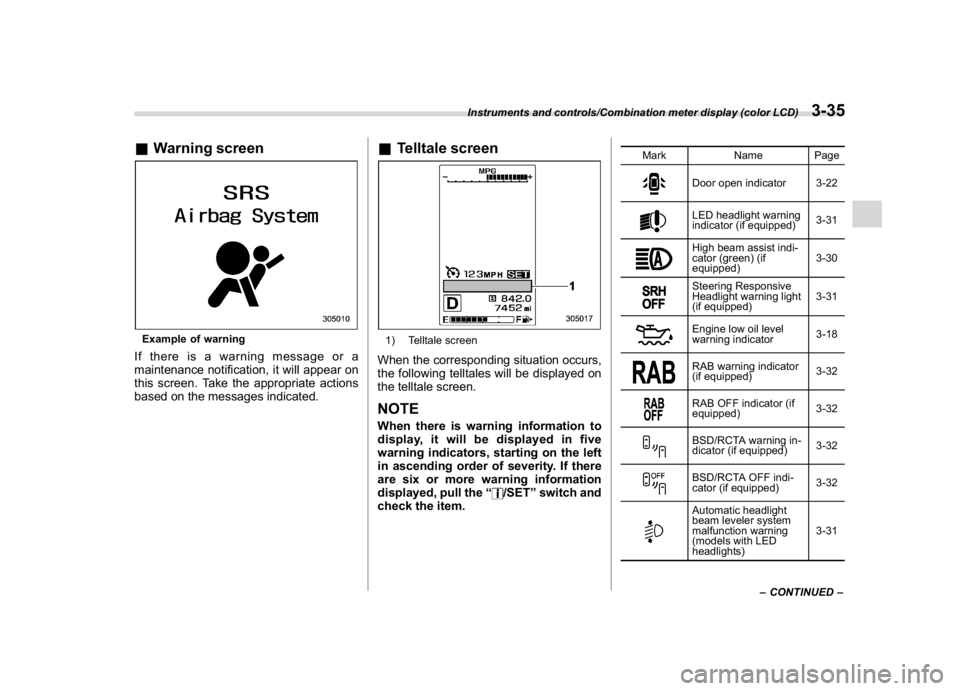
&Warning screenExample of warningIf there is a warning message or a
maintenance notification, it will appear on
this screen. Take the appropriate actions
based on the messages indicated.
&Telltale screen1) Telltale screenWhen the corresponding situation occurs,
the following telltales will be displayed on
the telltale screen.NOTEWhen there is warning information to
display, it will be displayed in five
warning indicators, starting on the left
in ascending order of severity. If there
are six or more warning information
displayed, pull the“
/SET”switch and
check the item.
Mark Name Page
Door open indicator 3-22LED headlight warning
indicator (if equipped)3-31High beam assist indi-
cator (green) (if
equipped)3-30Steering Responsive
Headlight warning light
(if equipped)3-31Engine low oil level
warning indicator3-18RAB warning indicator
(if equipped)3-32RAB OFF indicator (if
equipped)3-32BSD/RCTA warning in-
dicator (if equipped)3-32BSD/RCTA OFF indi-
cator (if equipped)3-32Automatic headlight
beam leveler system
malfunction warning
(models with LED
headlights)3-31
–CONTINUED–
Instruments and controls/Combination meter display (color LCD)
3-35
3
Page 175 of 474

(180,1)
北米Model "A1320BE-C" EDITED: 2017/ 10/ 10
doors to unlock simultaneously when
accessing from the cargo area.
!Defogger
Sets and customizes the operation of the
defogger.
!Interior Light
Sets and customizes the interior light off
delay timer.
!Auto Light Sensor (if equipped)
Sets and customizes the sensitivity of the
auto light sensor.
!Welcome Lighting (if equipped)
Sets the leaving time and approaching
time.
.Approaching time set
Sets the illumination time of the headlights
that illuminate when you approach the
vehicle.
.Leaving time set
Sets the time until the headlights turn off
when you have moved away from the
vehicle.
!One-touch lane changer
Sets the one-touch lane changer on/off.!Default Settings
Select“Ye s”to use the menu screen to
restore customized settings to the factory
default settings. Select“No”to return to the
previous screen without restoring to the
factory default settings.
Multi-function display (black
and white)NOTEFor models with multi-function display
(color LCD), refer to“Multi-function
display (color LCD)”F3-47.1) Outside temperature indicator
2) X-mode indicator (if equipped)
3) Driving information display
4) ClockWith the ignition switch in the“ACC”
position, the clock appears on the display.
With the ignition switch in the“ON”posi-
tion, the outside temperature indicator,
driving information display and clock all
appear on the display.
Instruments and controls/Multi-function display (black and white)
3-42
Page 186 of 474
(191,1)
北米Model "A1320BE-C" EDITED: 2017/ 10/ 10
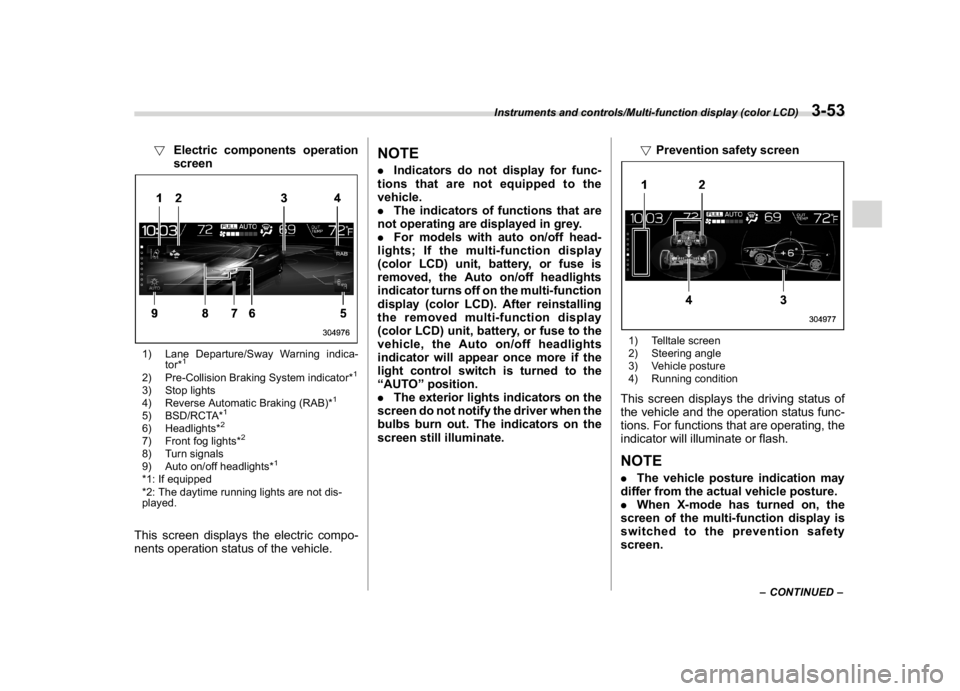
!Electric components operation
screen1) Lane Departure/Sway Warning indica-
tor*
1
2) Pre-Collision Braking System indicator*
1
3) Stop lights
4) Reverse Automatic Braking (RAB)*
1
5) BSD/RCTA*
1
6) Headlights*
2
7) Front fog lights*
2
8) Turn signals
9) Auto on/off headlights*
1
*1: If equipped
*2: The daytime running lights are not dis-
played.This screen displays the electric compo-
nents operation status of the vehicle.
NOTE.Indicators do not display for func-
tions that are not equipped to the
vehicle.
.The indicators of functions that are
not operating are displayed in grey.
.For models with auto on/off head-
lights; If the multi-function display
(color LCD) unit, battery, or fuse is
removed, the Auto on/off headlights
indicator turns off on the multi-function
display (color LCD). After reinstalling
the removed multi-function display
(color LCD) unit, battery, or fuse to the
vehicle, the Auto on/off headlights
indicator will appear once more if the
light control switch is turned to the
“AUTO”position.
.The exterior lights indicators on the
screen do not notify the driver when the
bulbs burn out. The indicators on the
screen still illuminate.!Prevention safety screen
1) Telltale screen
2) Steering angle
3) Vehicle posture
4) Running conditionThis screen displays the driving status of
the vehicle and the operation status func-
tions. For functions that are operating, the
indicator will illuminate or flash.NOTE.The vehicle posture indication may
differ from the actual vehicle posture.
.When X-mode has turned on, the
screen of the multi-function display is
switched to the prevention safety
screen.
–CONTINUED–
Instruments and controls/Multi-function display (color LCD)
3-53
3
Page 200 of 474
(205,1)
北米Model "A1320BE-C" EDITED: 2017/ 10/ 10
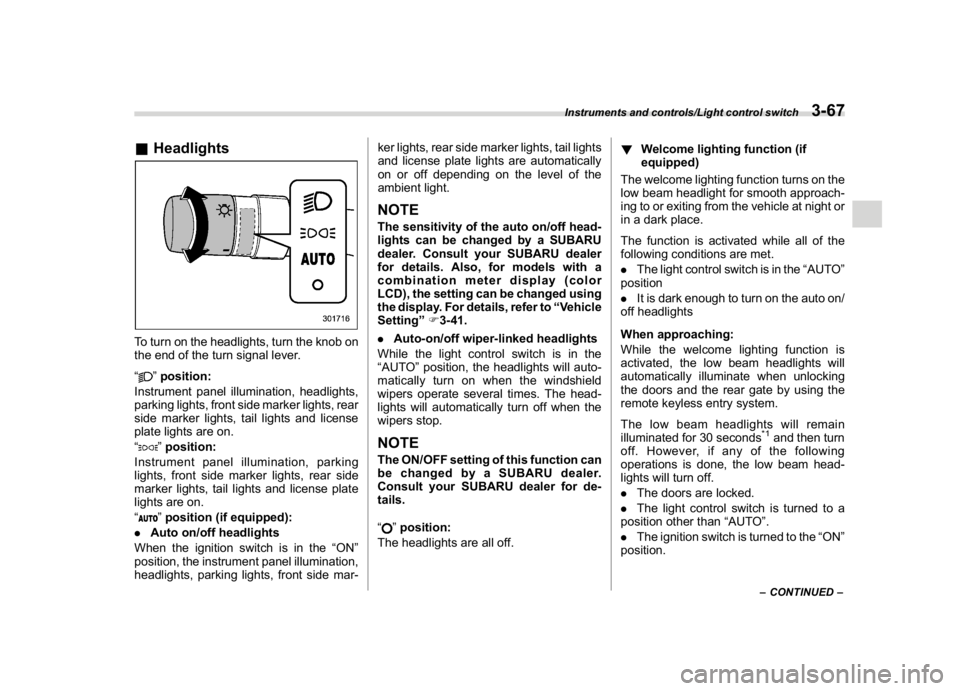
&HeadlightsTo turn on the headlights, turn the knob on
the end of the turn signal lever.
“
”position:
Instrument panel illumination, headlights,
parking lights, front side marker lights, rear
side marker lights, tail lights and license
plate lights are on.
“”position:
Instrument panel illumination, parking
lights, front side marker lights, rear side
marker lights, tail lights and license plate
lights are on.
“”position (if equipped):
.Auto on/off headlights
When the ignition switch is in the“ON”
position, the instrument panel illumination,
headlights, parking lights, front side mar-ker lights, rear side marker lights, tail lights
and license plate lights are automatically
on or off depending on the level of the
ambient light.
NOTEThe sensitivity of the auto on/off head-
lights can be changed by a SUBARU
dealer. Consult your SUBARU dealer
for details. Also, for models with a
combination meter display (color
LCD), the setting can be changed using
the display. For details, refer to“Vehicle
Setting”F3-41.
.Auto-on/off wiper-linked headlights
While the light control switch is in the
“AUTO”position, the headlights will auto-
matically turn on when the windshield
wipers operate several times. The head-
lights will automatically turn off when the
wipers stop.NOTEThe ON/OFF setting of this function can
be changed by a SUBARU dealer.
Consult your SUBARU dealer for de-
tails.
“
”position:
The headlights are all off.!Welcome lighting function (if
equipped)
The welcome lighting function turns on the
low beam headlight for smooth approach-
ing to or exiting from the vehicle at night or
in a dark place.
The function is activated while all of the
following conditions are met.
.The light control switch is in the“AUTO”
position
.It is dark enough to turn on the auto on/
off headlights
When approaching:
While the welcome lighting function is
activated, the low beam headlights will
automatically illuminate when unlocking
the doors and the rear gate by using the
remote keyless entry system.
The low beam headlights will remain
illuminated for 30 seconds
*1and then turn
off. However, if any of the following
operations is done, the low beam head-
lights will turn off.
.The doors are locked.
.The light control switch is turned to a
position other than“AUTO”.
.The ignition switch is turned to the“ON”
position.
–CONTINUED–
Instruments and controls/Light control switch
3-67
3
Page 201 of 474

(206,1)
北米Model "A1320BE-C" EDITED: 2017/ 10/ 10
When exiting:
While the welcome lighting function is
activated, the low beam headlights will
remain illuminated even when either of the
following operation is done.
.The push-button ignition switch is
turned to the“OFF”status (models with
“keyless access with push-button start
system”)
.The key is pulled out from the ignition
switch (models without“keyless access
with push-button start system”)
The low beam headlights will turn off under
any of the following conditions.
.3 minutes have passed since the low
beam headlights were illuminated by the
welcome lighting function.
.30 seconds have passed since the door
is opened and closed.
*1
.The light control switch is turned to a
position other than“AUTO”.
.The locking procedure is performed
twice. When performing the unlocking
procedure after performing the locking
procedure, perform the locking procedure
twice again.*1: The setting for the period of time in which the
low beam headlights remain on by the welcome
lighting function can be changed by a SUBARU
dealer. Contact your SUBARU dealer for de-tails.
!Sensor for the auto on/off head-
lights (if equipped)The sensor is on the instrument panel as
shown in the illustration.
CAUTION
If any object is placed on or near the
sensor, the sensor may not detect
the level of the ambient light cor-
rectly and the auto on/off headlights
may not operate properly.
&High/low beam change
(dimmer)1) High beam
2) Low beamWhen the headlights are on high beam, the
high beam indicator light“
”on the
combination meter is also on.
Instruments and controls/Light control switch
3-68
Page 202 of 474
(207,1)
北米Model "A1320BE-C" EDITED: 2017/ 10/ 10
&Headlight flasher
CAUTION
Do not hold the lever in the flashing
position for more than just a few
seconds.
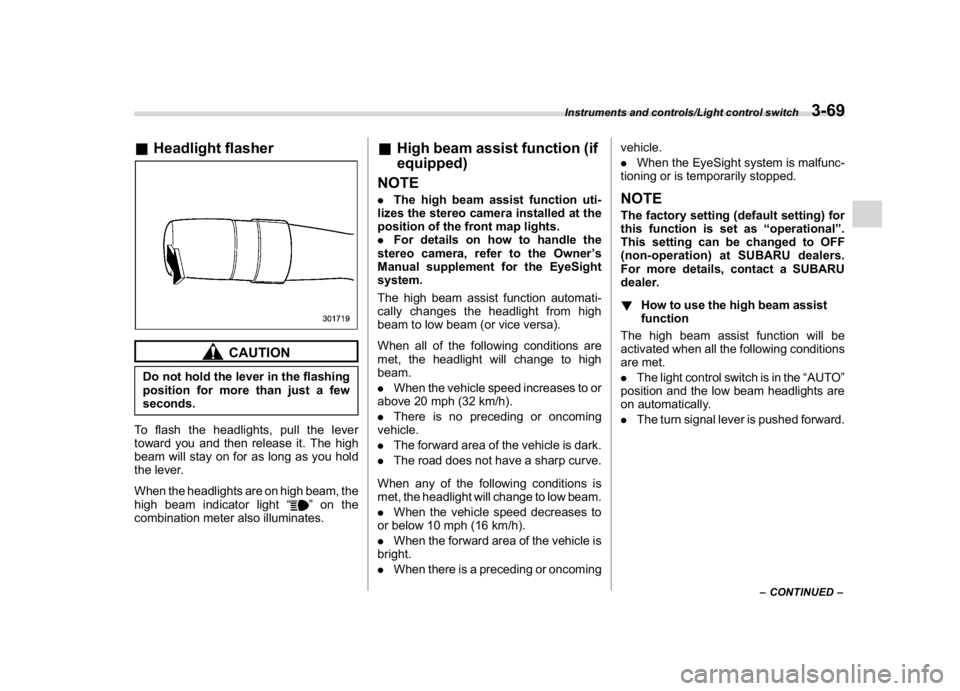
To flash the headlights, pull the lever
toward you and then release it. The high
beam will stay on for as long as you hold
the lever.
When the headlights are on high beam, the
high beam indicator light“
”on the
combination meter also illuminates.
&High beam assist function (if
equipped)
NOTE.The high beam assist function uti-
lizes the stereo camera installed at the
position of the front map lights.
.For details on how to handle the
stereo camera, refer to the Owner’s
Manual supplement for the EyeSight
system.
The high beam assist function automati-
cally changes the headlight from high
beam to low beam (or vice versa).
When all of the following conditions are
met, the headlight will change to high
beam.
.When the vehicle speed increases to or
above 20 mph (32 km/h).
.There is no preceding or oncoming
vehicle.
.The forward area of the vehicle is dark.
.The road does not have a sharp curve.
When any of the following conditions is
met, the headlight will change to low beam.
.When the vehicle speed decreases to
or below 10 mph (16 km/h).
.When the forward area of the vehicle is
bright.
.When there is a preceding or oncomingvehicle.
.When the EyeSight system is malfunc-
tioning or is temporarily stopped.
NOTEThe factory setting (default setting) for
this function is set as“operational”.
This setting can be changed to OFF
(non-operation) at SUBARU dealers.
For more details, contact a SUBARU
dealer.
!How to use the high beam assist
function
The high beam assist function will be
activated when all the following conditions
are met.
.The light control switch is in the“AUTO”
position and the low beam headlights are
on automatically.
.The turn signal lever is pushed forward.
–CONTINUED–
Instruments and controls/Light control switch
3-69
3