Page 196 of 474

(201,1)
北米Model "A1320BE-C" EDITED: 2017/ 10/ 10
ClockFor models with a SUBARU genuine
navigation and/or audio system, the clock
can be adjusted using either auto mode or
manual mode.
.Auto mode: automatic clock adjustment
.Manual mode: manual clock adjust-
ment&Setting the clock manually!Type A multi-function display (black
and white)
1. Turn the ignition switch to“ON”.2. Press the
button.
3. Select“Settings”.4. Select“Vehicle”.
5. Select“Clock adjustment”and then
select“Manual”.
6. Press the“+”button or the“”button
beside the clock.!Setting 12-hour or 24-hour dis-
play
The clock can be set to 12-hour or 24-hour
display. Perform the following procedure to
switch the display format.
1. Turn the ignition switch in the“LOCK”/
“OFF”position.
2. Press and hold the“”button located
near the clock display for approximately 5
seconds. The clock display will then start
to flash.
3. While the clock display is flashing,
press and hold the“+”button for approxi-
mately 2 seconds. The clock format will
then change.
4. The clock display will continue to flash
for approximately 3 seconds to indicate
that the clock display has been changed.
–CONTINUED–
Instruments and controls/Clock
3-63
3
Page 197 of 474
(202,1)
北米Model "A1320BE-C" EDITED: 2017/ 10/ 10
!Type B multi-function display (color
LCD)NOTEWhen the combination meter display
(color LCD) is displaying the menu
screen entering screen, the system will
not move to the selection screen even if
the“INFO”button is pressed and held.
Before adjusting the clock, be sure to
change the combination meter display
(color LCD) to a screen other than the
menu screen entering screen.
1. Turn the ignition switch to“ON”.
2. Press the
button.
3. Select“Settings”.
4. Select“Vehicle”.
5. Select“Clock adjustment”and then
select“Manual”.
1)“INFO”button
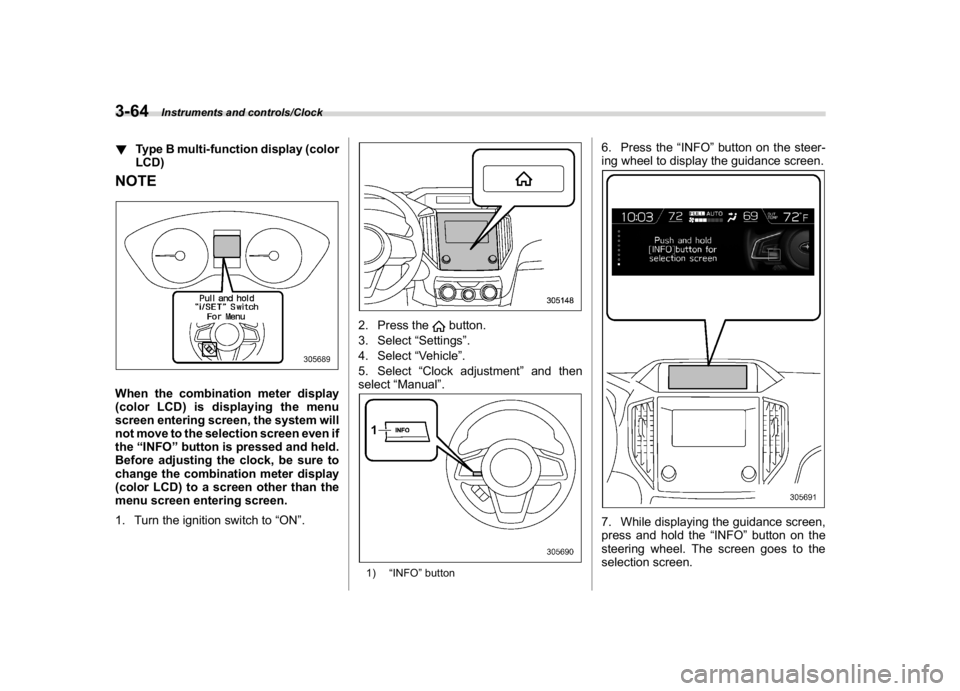
6. Press the“INFO”button on the steer-
ing wheel to display the guidance screen.7. While displaying the guidance screen,
press and hold the“INFO”button on the
steering wheel. The screen goes to the
selection screen.
Instruments and controls/Clock
3-64
Page 198 of 474
(203,1)
北米Model "A1320BE-C" EDITED: 2017/ 10/ 10
1)2)
/SET
3)
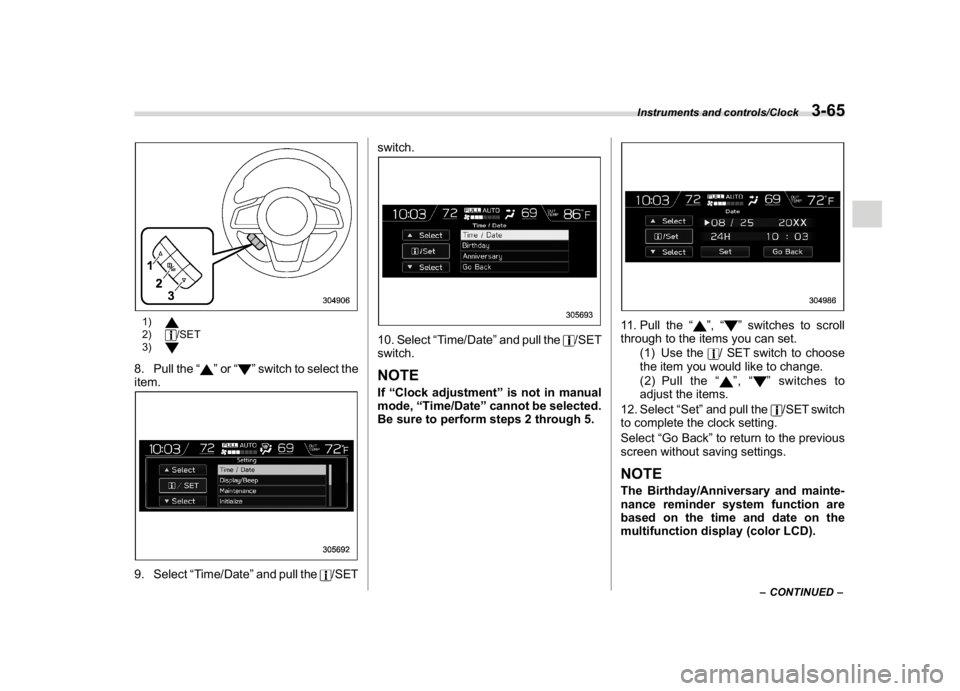
8. Pull the“
”or“
”switch to select the
item.
9. Select“Time/Date”and pull the
/SETswitch.
10. Select“Time/Date”and pull the
/SET
switch.
NOTEIf“Clock adjustment”is not in manual
mode,“Time/Date”cannot be selected.
Be sure to perform steps 2 through 5.
11. Pull the“
”,“
”switches to scroll
through to the items you can set.
(1) Use the
/ SET switch to choose
the item you would like to change.
(2) Pull the“
”,“
”switches to
adjust the items.
12. Select“Set”and pull the
/SET switch
to complete the clock setting.
Select“Go Back”to return to the previous
screen without saving settings.
NOTEThe Birthday/Anniversary and mainte-
nance reminder system function are
based on the time and date on the
multifunction display (color LCD).
–CONTINUED–
Instruments and controls/Clock
3-65
3
Page 199 of 474
(204,1)
北米Model "A1320BE-C" EDITED: 2017/ 10/ 10
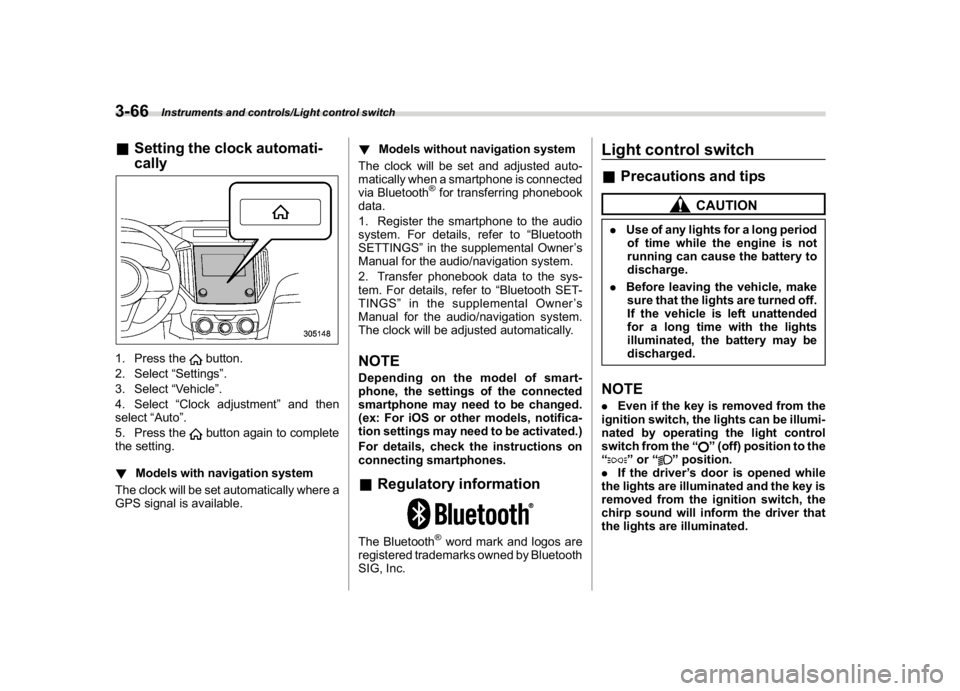
&Setting the clock automati-
cally1. Press the
button.
2. Select“Settings”.
3. Select“Vehicle”.
4. Select“Clock adjustment”and then
select“Auto”.
5. Press thebutton again to complete
the setting.
!Models with navigation system
The clock will be set automatically where a
GPS signal is available.!Models without navigation system
The clock will be set and adjusted auto-
matically when a smartphone is connected
via Bluetooth
®for transferring phonebook
data.
1. Register the smartphone to the audio
system. For details, refer to“Bluetooth
SETTINGS”in the supplemental Owner’s
Manual for the audio/navigation system.
2. Transfer phonebook data to the sys-
tem. For details, refer to“Bluetooth SET-
TINGS”in the supplemental Owner’s
Manual for the audio/navigation system.
The clock will be adjusted automatically.
NOTEDepending on the model of smart-
phone, the settings of the connected
smartphone may need to be changed.
(ex: For iOS or other models, notifica-
tion settings may need to be activated.)
For details, check the instructions on
connecting smartphones.&Regulatory informationThe Bluetooth
®word mark and logos are
registered trademarks owned by Bluetooth
SIG, Inc.
Light control switch&Precautions and tips
CAUTION
.Use of any lights for a long period
of time while the engine is not
running can cause the battery to
discharge.
.Before leaving the vehicle, make
sure that the lights are turned off.
If the vehicle is left unattended
for a long time with the lights
illuminated, the battery may be
discharged.NOTE.Even if the key is removed from the
ignition switch, the lights can be illumi-
nated by operating the light control
switch from the“
”(off) position to the
“
”or“
”position.
.If the driver’s door is opened while
the lights are illuminated and the key is
removed from the ignition switch, the
chirp sound will inform the driver that
the lights are illuminated.
Instruments and controls/Light control switch
3-66
Page 262 of 474
(271,1)
北米Model "A1320BE-C" EDITED: 2017/ 10/ 10
!Refueling
Only one person should be involved in
refueling. Do not allow others to approach
the area of the vehicle near the fuel filler
pipe while refueling is in progress.
Be sure to observe any other precautions
that are posted at the service station.
1. Stop the vehicle and turn the ignition
switch to the“LOCK”/“OFF”position and
turn off all the other electrical components.
2. To open the fuel filler lid, pull the lid
release lever up. The lever is on the floor at
the left of the driver’s seat.
WARNING
Before opening the fuel filler cap,
first touch the vehicle body or a
metal portion of the fuel pump or
similar object to discharge any sta-
tic electricity that may be present on
your body. If your body is carrying
an electrostatic charge, there is a
possibility that an electric spark
could ignite the fuel, which could
burn you. To avoid acquiring a new
static electric charge, do not get
back into the vehicle while refueling
is in progress.
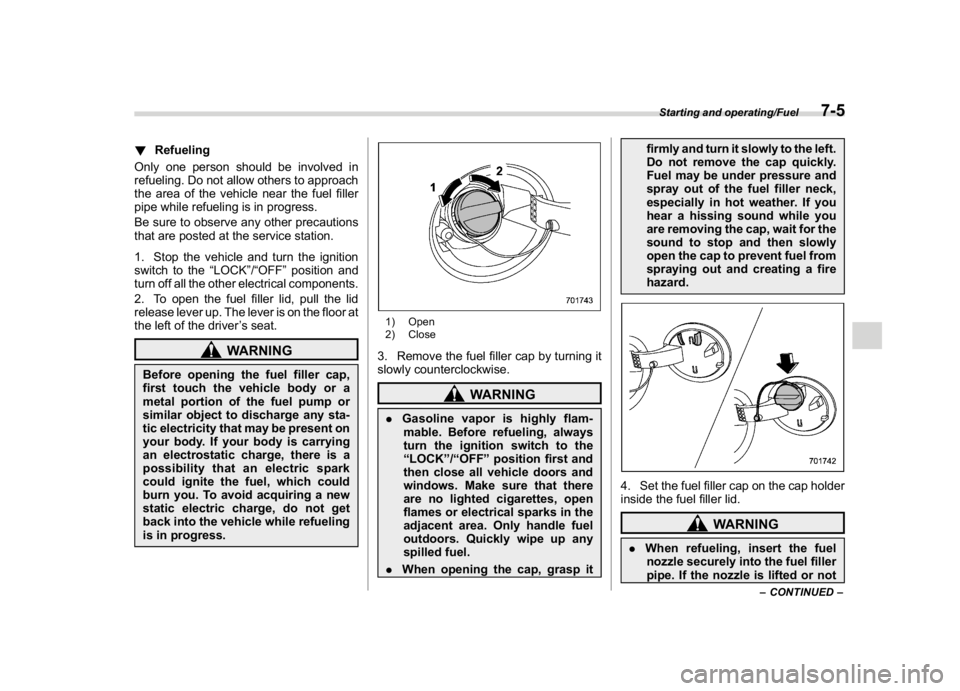
1) Open
2) Close3. Remove the fuel filler cap by turning it
slowly counterclockwise.
WARNING
.Gasoline vapor is highly flam-
mable. Before refueling, always
turn the ignition switch to the
“LOCK”/“OFF”position first and
then close all vehicle doors and
windows. Make sure that there
are no lighted cigarettes, open
flames or electrical sparks in the
adjacent area. Only handle fuel
outdoors. Quickly wipe up any
spilled fuel.
.When opening the cap, grasp itfirmly and turn it slowly to the left.
Do not remove the cap quickly.
Fuel may be under pressure and
spray out of the fuel filler neck,
especially in hot weather. If you
hear a hissing sound while you
are removing the cap, wait for the
sound to stop and then slowly
open the cap to prevent fuel from
spraying out and creating a fire
hazard.
4. Set the fuel filler cap on the cap holder
inside the fuel filler lid.
WARNING
.When refueling, insert the fuel
nozzle securely into the fuel filler
pipe. If the nozzle is lifted or not
–CONTINUED–
Starting and operating/Fuel
7-5
7
Page 418 of 474
(431,1)
北米Model "A1320BE-C" EDITED: 2017/ 10/ 10
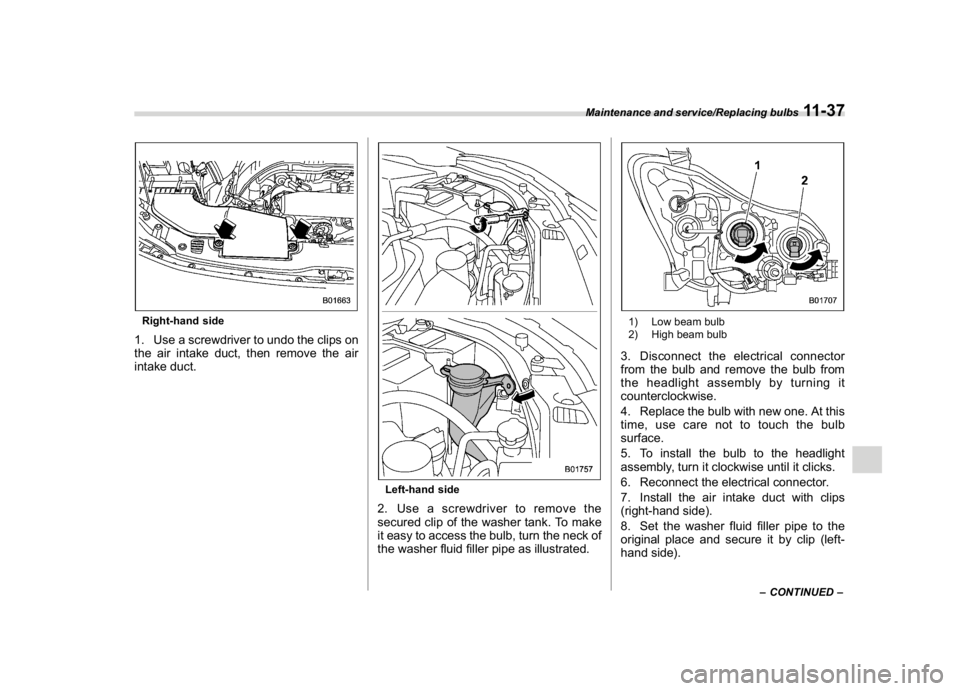
Right-hand side1. Use a screwdriver to undo the clips on
the air intake duct, then remove the air
intake duct.
Left-hand side2. Use a screwdriver to remove the
secured clip of the washer tank. To make
it easy to access the bulb, turn the neck of
the washer fluid filler pipe as illustrated.
1) Low beam bulb
2) High beam bulb3. Disconnect the electrical connector
from the bulb and remove the bulb from
the headlight assembly by turning it
counterclockwise.
4. Replace the bulb with new one. At this
time, use care not to touch the bulb
surface.
5. To install the bulb to the headlight
assembly, turn it clockwise until it clicks.
6. Reconnect the electrical connector.
7. Install the air intake duct with clips
(right-hand side).
8. Set the washer fluid filler pipe to the
original place and secure it by clip (left-
hand side).
–CONTINUED–
Maintenance and service/Replacing bulbs
11-37
11
Page 420 of 474
(433,1)
北米Model "A1320BE-C" EDITED: 2017/ 10/ 10
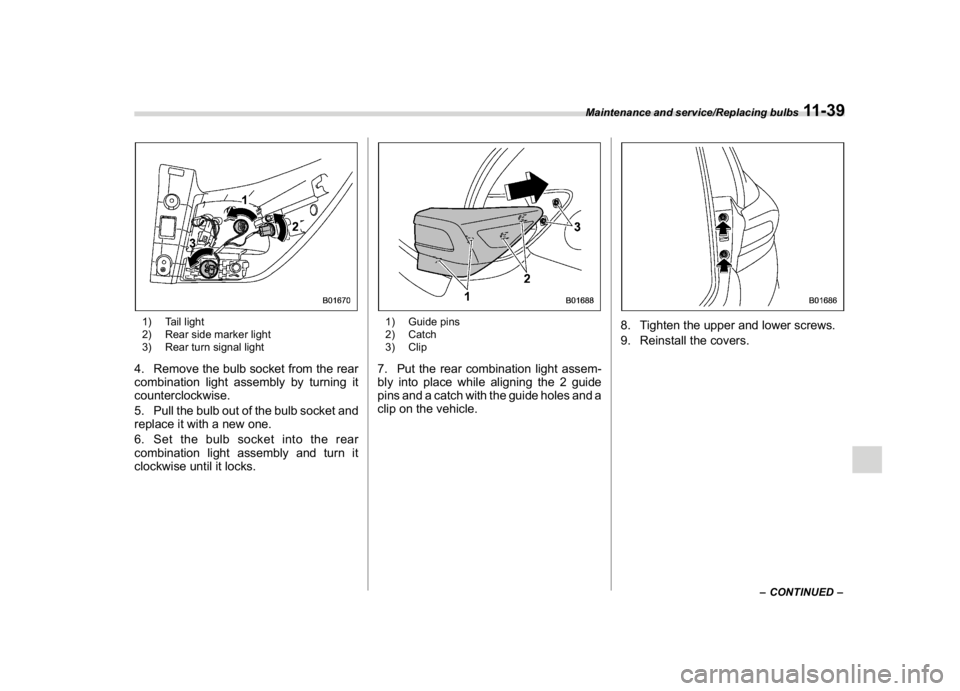
1) Tail light
2) Rear side marker light
3) Rear turn signal light4. Remove the bulb socket from the rear
combination light assembly by turning it
counterclockwise.
5. Pull the bulb out of the bulb socket and
replace it with a new one.
6. Set the bulb socket into the rear
combination light assembly and turn it
clockwise until it locks.
1) Guide pins
2) Catch
3) Clip7. Put the rear combination light assem-
bly into place while aligning the 2 guide
pins and a catch with the guide holes and a
clip on the vehicle.
8. Tighten the upper and lower screws.
9. Reinstall the covers.
–CONTINUED–
Maintenance and service/Replacing bulbs
11-39
11